Copyright © 2026 World Wide Web Consortium. W3C® liability, trademark and permissive document license rules apply.
推送 API 允许通过 推送服务 向 Web 应用发送 推送消息。应用服务器 可以在任何时间发送 推送消息,即使 Web 应用或 用户代理 处于非活动状态。推送服务 能确保消息可靠高效地传递给 用户代理。推送消息会发送到运行在 Web 应用源下的 Service Worker,Service Worker 可以使用消息中的信息更新本地状态或向用户显示通知。
本节描述了本文档在发布时的状态。当前 W3C 出版物列表及本技术报告的最新修订版可在 W3C 标准与草案索引中查阅。
作为工作草案发布不代表 W3C 及其成员的认可。
本文档为草稿,可能随时被更新、替换或废弃。除作为正在进行的工作外,不应引用本文件。
本文档由遵循 W3C 专利政策的工作组编制。 W3C维护着 与工作组交付物相关的专利公开的公开列表; 该页面还包括专利披露的说明。任何知晓包含 必要声明 的专利的个人,必须根据 《W3C 专利政策》第 6 节披露相关信息。
本文档受 2025 年 8 月 18 日 W3C 流程文件约束。
本节为非规范性内容。
推送 API 允许 Web 应用与 用户代理 异步通信。这使得 应用服务器 能够在信息变得可用时,及时向 用户代理 提供时效性信息,而无需等待用户打开 Web 应用。
特别地,即使 Web 应用当前未在浏览器窗口中活动,推送消息也会被投递到 Web 应用:这适用于用户关闭 Web 应用但仍希望在收到推送消息时能重新启动 Web 应用的场景。例如,推送消息可用于通知用户有来电的 WebRTC 呼叫。
当用户代理临时离线时,也可发送推送消息。对此,推送服务会为用户代理存储消息,直到用户代理可用。这支持 Web 应用在用户离线期间获知变化,并确保用户代理能及时获得相关信息。推送消息由推送服务存储,直到用户代理可达且消息可被投递。
推送 API 也确保在用户代理主动使用 Web 应用时可靠投递推送消息,例如用户正在使用 Web 应用或 Web 应用通过活动 worker、frame 或后台窗口与应用服务器进行通信时。这并非推送 API 的主要应用场景。Web 应用可选择使用推送 API 发送不频繁的消息,以避免与 应用服务器保持持续的通信。
推送消息更适合于用户代理与 Web 应用之间尚未建立活动通信通道的场合。发送推送消息相比直接通信方式(如 Fetch API 或 [WebSockets])消耗更多资源。推送消息通常比直接通信延迟更高,并且可能受限于使用条件。大多数推送服务会限制可发送推送消息的大小和数量。
Web 推送协议 [RFC8030] 描述了一种协议,使 用户代理 或 应用服务器 能够与 推送服务通信。可以使用其他协议替代本协议,但本规范假定采用该协议;其他协议应提供兼容语义。
Content-Encoding
HTTP 头,如
[RFC9110] 第 8.4 节所述,
用于指示应用于
推送消息
负载的内容编码类型。
应用服务器一词指 Web 应用的服务端组件。
推送消息是从应用服务器发送到 Web 应用的数据。
推送消息会投递到与消息所提交的推送订阅相关联的活动 worker。如果 Service Worker 当前未运行,则会启动 worker 以进行消息投递。
声明式推送消息是一个推送消息,其数据为用户代理能够理解的 JSON 文档。用户代理会机会性地解析每个收到的 推送消息,以判断其是否为声明式推送消息,解析过程使用 声明式推送消息解析器。
声明式推送消息允许创建和显示通知,无需 Service Worker 的参与。当然,如果 应用服务器需要,Service Worker 仍可以参与。在这种情况下,推送消息的声明式属性可作为备用,例如 Service Worker 因存储压力被驱逐时。同时,这种方式为通知数据的传递提供了更面向对象的方案。
{
"web_push": 8030,
"notification": {
"title": "Ada emailed ‘London’",
"lang": "en-US",
"dir": "ltr",
"body": "Did you hear about the tube strikes?",
"navigate": "https://email.example/message/12"
}
}
声明式推送消息包含以下成员:
web_push(必填)
一个整数,值必须为 8030。用于将声明式推送消息 与其它 JSON 文档区分开。
notification(必填)
一个 JSON 对象,包含如下成员,均类似于 Notifications API 的特性,但类型有时更严格。除 title 外,所有成员均来自 NotificationOptions
字典,并需保持同步。 [NOTIFICATIONS]
title(必填)
字符串。
dir
"auto"、"ltr" 或 "rtl"。
lang
表示语言标签的字符串。
body
字符串。
navigate(必填)
表示 URL 的字符串。
tag
字符串。
image
表示 URL 的字符串。
icon
表示 URL 的字符串。
badge
表示 URL 的字符串。
vibrate
32 位无符号整数数组。
timestamp
renotify
布尔值。
silent
布尔值。
requireInteraction
布尔值。
该字段未命名为 require_interaction,以与 NotificationOptions
字典保持一致。
data
任意 JSON 值。
actions
JSON 对象数组,包含如下成员,均来自 NotificationAction
字典,并需保持同步。
action(必填)
字符串。
title(必填)
字符串。
navigate(必填)
表示 URL 的字符串。
icon
表示 URL 的字符串。
mutable
布尔值。当为 true 时,会向(如有)Service Worker 分发包含该Notification
对象的 push 事件,该对象由
声明式推送消息描述。
声明式推送消息解析器结果是一个元组,包含 notification(一个 notification)和 mutable(一个布尔值)。
声明式推送消息解析器给定一个字节序列
bytes、origin
origin、URL
baseURL,以及
EpochTimeStamp
fallbackTimestamp,执行如下步骤。它们返回失败或声明式推送消息解析器结果。
令 message 为 解析 JSON 字节为 Infra 值的结果,参数为 bytes。若抛出异常,则返回失败。
若 message 不是有序映射,则返回失败。
若 message["web_push"] 不存在或不是 8030,则返回失败。
若 message["notification"] 不存在,则返回失败。
令 notificationInput = message["notification"]。
若 notificationInput 不是有序映射,则返回失败。
若 notificationInput["title"] 不存在或不是字符串,则返回失败。
若 notificationInput["navigate"] 不存在或不是字符串,则返回失败。
令 notificationTitle = notificationInput["title"]。
令 notificationOptions 为 NotificationOptions
字典。
若 notificationInput["dir"]存在且值为"auto"、"ltr"或"rtl",则设置
notificationOptions["dir"]
为 notificationInput["dir"]。
若 notificationInput["lang"]存在且为字符串,则设置
notificationOptions["lang"]
为
notificationInput["lang"]。
若 notificationInput["body"]存在且为字符串,则设置
notificationOptions["body"]
为
notificationInput["body"]。
设置 notificationOptions["navigate"]
为
notificationInput["navigate"],并转换。
若 notificationInput["tag"]存在且为字符串,则设置
notificationOptions["tag"]
为
notificationInput["tag"]。
若 notificationInput["image"]存在且为字符串,则设置
notificationOptions["image"]
为
notificationInput["image"],并转换。
若 notificationInput["icon"]存在且为字符串,则设置
notificationOptions["icon"]
为
notificationInput["icon"],并转换。
若 notificationInput["badge"]存在且为字符串,则设置
notificationOptions["badge"]
为
notificationInput["badge"],并转换。
若 notificationInput["vibrate"]存在且为列表,且每个项
都是32
位无符号整数,则设置
notificationOptions["vibrate"]
为
notificationInput["vibrate"]。
若 notificationInput["timestamp"]存在且为64 位无符号整数,则设置
notificationOptions["timestamp"]
为
notificationInput["timestamp"]。
若 notificationInput["renotify"]存在且为布尔值,则
设置 notificationOptions["renotify"]
为
notificationInput["renotify"]。
若 notificationInput["silent"]存在且为布尔值,则
设置 notificationOptions["silent"]
为
notificationInput["silent"]。
若 notificationInput["requireInteraction"]存在且为布尔值,则设置
notificationOptions["requireInteraction"]
为
notificationInput["requireInteraction"]。
若 notificationInput["data"]存在,则设置
notificationOptions["data"]
为运行 将
Infra 值转换为 JSON 兼容的 JavaScript 值的结果,参数为
notificationInput["data"]。
若 notificationInput["actions"]存在且为列表:
令 notificationActions = « »。
对每个
actionInput 属于
notificationInput["actions"]:
令 actionNavigate =
actionInput["navigate"],
转换。
令 notificationAction 为 NotificationAction
字典
«[ "action"
→ actionInput["action"],
"title"
→ actionInput["title"],
"navigate"
→ actionNavigate ]»。
若 actionInput["icon"]存在且为字符串,则
设置 notificationAction["icon"]
为
actionInput["icon"],并转换。
追加 notificationAction到 notificationActions。
设置 notificationOptions["actions"]
为
notificationActions。
令 notification 为运行 创建通知,参数为 notificationTitle、notificationOptions、origin、 baseURL 和 fallbackTimestamp 的结果。若抛出异常,则返回失败。
若 notification 的导航 URL为 null,则返回失败。
令 mutable = false。
若 message["mutable"]存在且
message["mutable"] 为布尔值,则设置 mutable 为
message["mutable"]。
返回 (notification, mutable)。
推送订阅是为 Web 应用在 用户代理与 推送服务之间建立的消息传递上下文。
推送订阅有一个关联的 scope(作用域),它是一个 URL。
当推送订阅的 scope的 path为 list,长度为 1,且 scope的 path[0]为空字符串时,认为其具有 窗口可访问作用域。
推送订阅有一个关联的 推送端点。 它必须是由 推送服务公开的绝对 URL, 应用服务器可向其发送 推送消息。 推送端点 必须唯一标识该 推送订阅。
推送订阅 可以有一个关联的 订阅过期时间。 设置时,它必须是自 1970 年 1 月 1 日 00:00:00 UTC 起的毫秒数,到该时间点订阅将被 停用。 用户代理 应当在订阅过期前尝试 刷新推送订阅。
一个推送订阅具有一个关联的P-256 ECDH 密钥对和一个 身份验证秘密,符合 [RFC8291]。
如果用户代理出于任何原因必须更改某个推送订阅的密钥 且该推送订阅的关联的服务工作线程注册 非 null, 则它必须刷新该推送 订阅。
要创建推送订阅,给定一个PushSubscriptionOptionsInit
optionsDictionary:
PushSubscription。
PushSubscriptionOptions
对象,并使用
optionsDictionary中对应的成员和值初始化其属性。
options属性设置为options。
applicationServerKey
属性。重新抛出任何异常。
endpoint属性设置为该
推送
订阅的推送端点。
expirationTime。
一个推送订阅的关联的服务工作线程注册是 服务工作线程 注册,其作用域 URL 等于该推送订阅的作用域(如果存在); 否则为 null。
一个推送订阅的关联的 服务工作线程注册只能为 null 当它具有一个窗口可访问作用域时。
反之,一个服务工作线程 注册的关联的推送 订阅是这样的推送订阅,其作用域 等于该服务工作线程 注册的作用域 URL(如果存在);否则 为 null。
用户代理或推送服务可以选择在任何时候刷新一个推送 订阅,其关联的服务工作线程 注册非 null,例如因为它已达到一定 时限。
发生这种情况时,用户代理 必须运行以下步骤,以创建推送
订阅,所给定的 PushSubscriptionOptions 是
为
创建当前推送订阅而提供的,并将新的推送订阅的
作用域设置为原订阅的作用域。
新的推送订阅 必须具有一个
与
原订阅不同的密钥对。
成功后,用户代理随后必须触发
"pushsubscriptionchange"
事件,并将与该服务工作线程
注册关联的推送
订阅作为registration,将一个表示
初始推送订阅的PushSubscription实例作为oldSubscription,并将一个
PushSubscription
表示新的推送订阅的实例作为
newSubscription。
为了留出时间将更改传播到应用服务器,用户 代理可以在刷新后的一小段时间内继续接受旧推送订阅的 消息。一旦已为刷新的推送 订阅接收到消息,任何旧的推送订阅必须被停用。
如果用户代理无法刷新推送订阅,则其应该
定期重试刷新。当推送订阅无法再
被
使用时,例如因为其已过期,用户代理 必须
触发
"pushsubscriptionchange" 事件,并将与服务工作线程
注册
相关联的推送订阅作为registration,将一个PushSubscription
实例作为oldSubscription,该实例表示正在停用的推送订阅,并将
oldSubscription
以及将null作为newSubscription。
当一个推送订阅被停用时, 用户代理和推送服务都必须删除其详细信息的任何已存储副本 。后续用于此推送消息的推送 订阅不得被 传递。
术语推送服务是指一种允许应用 服务器向 Web 应用程序发送推送消息的系统。推送服务为其所服务的 推送端点或端点提供服务,用于其所服务的推送 订阅。
用户代理连接到用于 创建推送 订阅的推送服务。用户代理可以限制可供选择的推送服务 。这样做的原因包括与性能相关的考虑,例如服务 可用性(包括服务是否被特定国家/地区的防火墙、 工作场所的网络等阻止)、可靠性、对电池续航时间的影响,以及 将元数据引导至或避开特定推送服务的协议。
Push API 是一个被 强大功能识别的功能, 其名称为 "push"。
为了与Permissions规范集成,
本规范定义了
PushPermissionDescriptor
权限描述符类型。
WebIDLdictionary PushPermissionDescriptor : PermissionDescriptor {
boolean userVisibleOnly = false;
};
userVisibleOnly
具有与
userVisibleOnly
相同的语义。
{name: "push", userVisibleOnly: false}
强于
{name: "push", userVisibleOnly: true}。
推送消息的内容会被加密 [RFC8291]。但是,推送 服务仍会接触到由应用 服务器通过推送订阅发送给用户代理的消息元数据。 这包括消息的 时间、频率和大小。除了更换推送服务之外,而用户代理 可能不允许这样做,唯一已知的缓解措施是通过填充来增加表面上的消息 大小。
无法保证推送消息是由与 Web 应用程序具有相同源的应用服务器 发送的。应用服务器能够自行 决定与第三方共享使用推送订阅所必需的详细信息 。
以下要求旨在尽可能保护用户的隐私和安全,并且 在满足该目标的前提下,保护 应用服务器与用户之间通信的完整性。
Push API 可能必须唤醒与服务工作线程 注册关联的服务工作线程,以运行开发者提供的事件处理程序。这可能导致 资源使用,例如网络流量,用户代理应该将其 归因于创建推送订阅的 Web 应用程序。
用户
代理在获取
权限或确定权限状态时可以考虑PushSubscriptionOptions。
当权限被撤销时,用户代理可以为使用该权限创建的订阅触发
"pushsubscriptionchange" 事件,并将与服务工作线程
注册关联的推送订阅作为
registration,将表示该PushSubscription实例
所表示的推送订阅
作为oldSubscription,并将null作为newSubscription。用户
代理必须
并行停用受影响的订阅。
推送端点不得暴露可供 推送服务以外的参与方推导出有关用户的信息,例如用户的设备、身份或位置。有关 确切要求,请参阅 [RFC8030] 中的隐私注意事项。
已停用的推送订阅的推送端点不得被 重用于新的推送订阅。这可防止创建用户无法移除的持久 标识符。这也可防止重复使用一个 推送订阅的详细信息,向另一个推送消息发送至另一个 推送订阅。
本节为非规范性内容。
这一整体框架允许应用服务器响应应用服务器上的事件而激活Service Worker。有关 这些 事件的信息可以包含在推送消息中,从而允许 Web 应用 对这些事件作出适当响应,并且可能无需发起网络 请求。
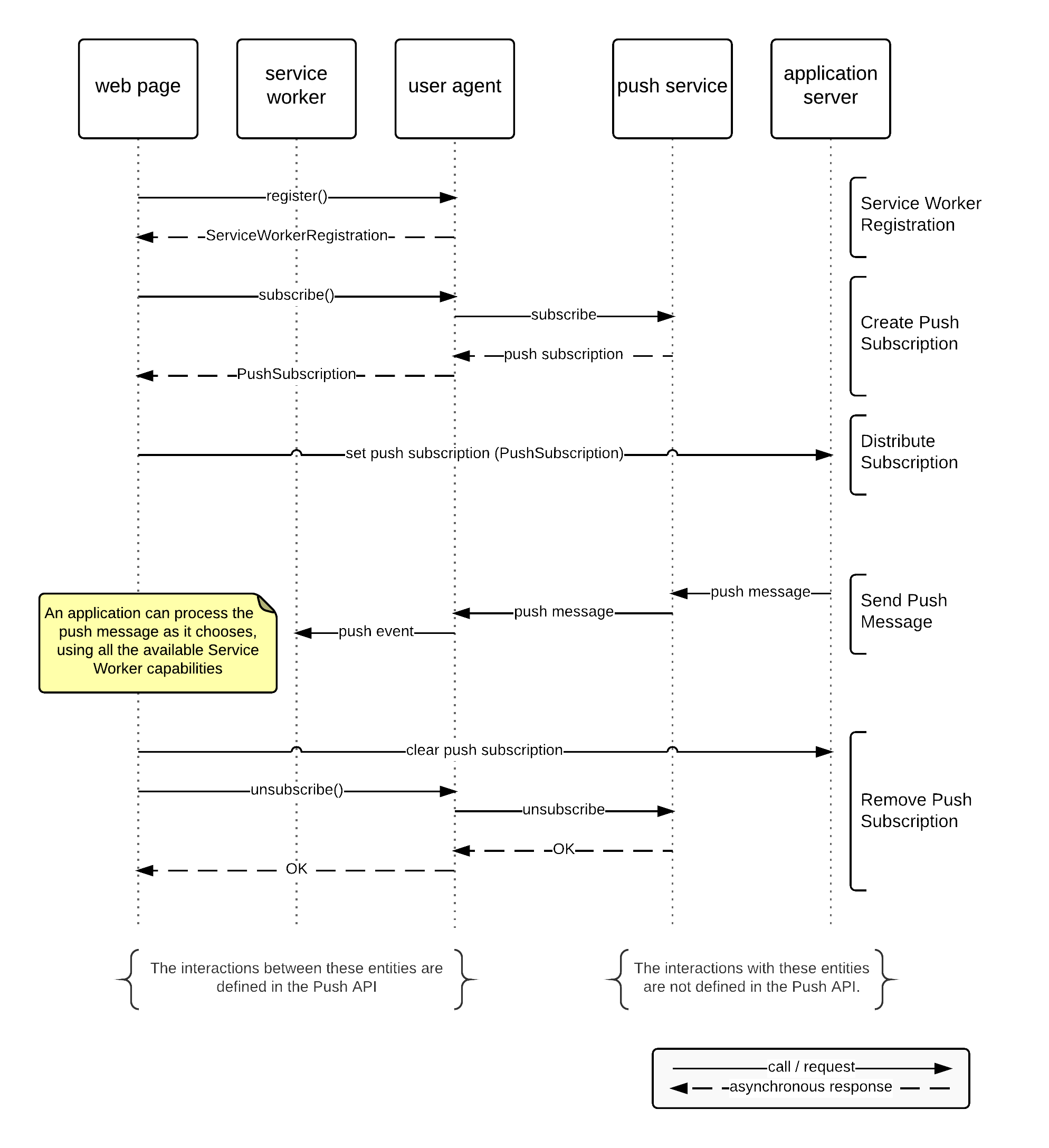
下列代码及流程图展示了推送 API 的一个假设使用场景。
本节为非规范性内容。
// https://example.com/serviceworker.js
this.onpush = event => {
console.log(event.data);
// 此处可以将数据写入 IndexedDB、发送到任何已打开窗口、显示通知等。
}
// https://example.com/webapp.js
// 在一个 async 函数内部...
try {
const serviceWorkerRegistration = await navigator.serviceWorker.register(
"serviceworker.js"
);
const pushSubscription = await serviceWorkerRegistration.pushManager.subscribe();
// 应用服务器所需的推送订阅详情现在已可用,可通过 XMLHttpRequest 等方式发送给服务器。
console.log(pushSubscription.endpoint);
console.log(pushSubscription.getKey("p256dh"));
console.log(pushSubscription.getKey("auth"));
} catch (err) {
// 在生产环境中,可能还需要将错误信息反馈给应用服务器。
console.log(error);
}
本节为非规范性内容。
PushSubscription 中包含的字段就是
应用服务器发送推送消息所需的全部信息。与 Push
API 兼容的推送服务提供符合Web
推送协议的推送端点。这些参数和属性包括:
PushSubscription的一个 URL,它允许
应用服务器请求将推送消息传递给 Web
应用程序。
getKey() 方法用于 PushSubscription,以
检索用于加密和认证推送消息的密钥材料。
每次
调用该函数都会返回一个新的 ArrayBuffer,其中
包含相应密钥的值;
如果所标识的密钥不存在,则为 null。传入值
"p256dh" 会检索与 椭圆曲线
Diffie-Hellman(ECDH)公钥,
该公钥与推送订阅相关联。传入
auth 值会返回一个认证秘密,应用服务器使用该秘密来
认证其消息。这些密钥由应用
服务器用于
加密和认证发送给推送订阅的消息,如
[RFC8291] 中
所述。
本规范通过 PushManagerAttribute 混入,
扩展了 Window 和
ServiceWorkerRegistration
对象。
[HTML]
[SERVICE-WORKERS]
WebIDL[SecureContext]
interface mixin PushManagerAttribute {
readonly attribute PushManager pushManager;
};
Window includes PushManagerAttribute;
ServiceWorkerRegistration includes PushManagerAttribute;
Window 和
ServiceWorkerRegistration
对象都拥有一个关联的 PushManager 对象。
pushManager
getter 步骤为返回 this 关联的
PushManager 对象。
在 Window 对象上,
PushManager 的
service worker registration 为 null。
在 ServiceWorkerRegistration
对象上,
PushManager 的
service worker registration
即为该
service worker
registration
所代表的
ServiceWorkerRegistration
对象。
PushManager 接口定义了访问
推送服务的操作。
WebIDL[Exposed=(Window,Worker), SecureContext]
interface PushManager {
[SameObject] static readonly attribute FrozenArray<DOMString> supportedContentEncodings;
Promise<PushSubscription> subscribe(optional PushSubscriptionOptionsInit options = {});
Promise<PushSubscription?> getSubscription();
Promise<PermissionState> permissionState(optional PushSubscriptionOptionsInit options = {});
};
PushManager 具有一个关联的 service
worker 注册,其值为 null 或一个
service worker 注册。
supportedContentEncodings 属性公开了一系列可用于加密
推送消息
负载的内容编码。内容编码通过请求
推送服务发送
推送消息时的
Content-Encoding 头字段指示。
用户代理
必须支持 [RFC8291] 中定义的 aes128gcm 内容编码,
并且可以为了兼容性原因支持旧版本草案中定义的内容编码。
subscribe() 方法的步骤如下:
/" 和
global 的关联的
Document 的URL。
https",
则
将一个全局
任务排入队列,在网络
任务源上使用 global 来拒绝
promise,并带有一个 "NotAllowedError" DOMException,然后
终止这些步骤。
userVisibleOnly"]
为 false 且用户
代理要求其为 true,则将一个全局
任务排入队列,在网络
任务源上使用 global 来拒绝 promise,并带有一个 "NotAllowedError"
DOMException,然后
终止这些步骤。
applicationServerKey"]
为 null 且
推送服务要求其非 null,则将一个全局
任务排入队列,在
网络
任务源上使用 global 来拒绝 promise,并带有一个
"NotSupportedError" DOMException,然后
终止这些步骤。
applicationServerKey"]
非 null:
applicationServerKey"]
是字符串,则
将其值设置为一个ArrayBuffer,
其中包含通过
使用
base64url 编码 [RFC7515] 解码 options["applicationServerKey"]
所得到的八位字节序列。
InvalidCharacterError"
DOMException
,然后终止这些步骤。
applicationServerKey"]
描述
P-256 曲线上的一个有效点。如果其值无效,则将
一个全局任务排入队列
到网络
任务源上,使用 global 来拒绝 promise,并带有一个
"InvalidAccessError"
DOMException
,然后终止这些步骤。
InvalidStateError"
DOMException
,然后终止
这些步骤。
denied",
则将
一个全局任务排入队列,在
用户
交互任务源上使用 global 来拒绝 promise,并带有一个
"NotAllowedError"
DOMException
,然后终止这些步骤。
AbortError"
DOMException
,然后终止这些步骤。
options 属性进行比较。
BufferSource
值的内容按相等性进行比较,而不是按
引用进行比较。
InvalidStateError"
DOMException
,然后终止这些步骤。
PushSubscription。
getSubscription() 方法的步骤如下:
/" 和 global 的
关联的
Document 的URL。
DOMException,
其名称为 "AbortError",然后
终止这些步骤。
PushSubscription兑现
promise。
permissionState() 方法的步骤如下:
令 promise 为一个新的 promise。
并行执行:
返回 promise。
使用推送服务的权限可以是持久的,即如果存在有效权限,则无需为后续订阅重新确认。
如果需要申请权限,应通过调用
subscribe() 方法完成。
WebIDL[Exposed=(Window,Worker), SecureContext]
interface PushSubscriptionOptions {
readonly attribute boolean userVisibleOnly;
[SameObject] readonly attribute ArrayBuffer? applicationServerKey;
};
userVisibleOnly 属性在获取时返回初始化值。
applicationServerKey 属性在获取时返回初始化值。
如果存在,applicationServerKey
的值
必须 包含一个
位于 P-256 椭圆曲线上的点 [DSS],采用
[ANSI-X9-62]
附录 A 所述的非压缩格式编码(即 65 个八位字节,以 0x04 开头)。如果以 DOMString 提供,
该值 必须 使用 base64url 编码 [RFC7515]。
当 applicationServerKey
不存在且 推送服务 出于运行需要要求提供该值时,
用户代理 可以 拒绝该订阅请求。
applicationServerKey
必须 与用于消息加密的值 [RFC8291] 不同。
WebIDLdictionary PushSubscriptionOptionsInit {
boolean userVisibleOnly = false;
(BufferSource or DOMString)? applicationServerKey = null;
};
userVisibleOnly 成员,
当设置为 true 时,表示推送
订阅将仅用于其效果对用户可见的推送消息
,例如通过显示 Web 通知。[NOTIFICATIONS]
PushSubscriptionOptionsInit
表示与
推送订阅关联的附加选项。用户代理可以在
向用户请求显式权限时考虑这些选项
。当某个选项被考虑时,
用户
代理应该对传入的推送消息强制执行该选项。
这些选项是可选的,并且用户代理可以选择仅支持其中的一个 子集。用户代理不得暴露其 不支持的选项。
一旦设置,推送订阅的选项便不能更改。可以通过 推送
订阅的unsubscribe取消已有订阅,以创建具有新选项的
推送订阅。
applicationServerKey 成员由用户
代理在
与推送服务建立推送订阅时使用。该
applicationServerKey
选项包含一个椭圆曲线公钥
,用于应用服务器。这是应用服务器
按照 [RFC8292] 中的定义,向此推送消息发送推送
订阅时用于对自身进行身份验证的密钥;
推送服务将拒绝任何
推送消息,除非使用对应的私钥来
生成
身份验证令牌。
一个PushSubscription 对象表示一个推送订阅。
WebIDL[Exposed=(Window,Worker), SecureContext]
interface PushSubscription {
readonly attribute USVString endpoint;
readonly attribute EpochTimeStamp? expirationTime;
[SameObject] readonly attribute PushSubscriptionOptions options;
ArrayBuffer? getKey(PushEncryptionKeyName name);
Promise<boolean> unsubscribe();
PushSubscriptionJSON toJSON();
};
dictionary PushSubscriptionKeys {
USVString p256dh;
USVString auth;
};
dictionary PushSubscriptionJSON {
USVString endpoint;
EpochTimeStamp? expirationTime = null;
PushSubscriptionKeys keys;
};
当获取
endpoint 属性时,用户代理必须返回与
推送
端点关联的推送订阅。用户
代理
必须使用不包含依赖输入的分支的序列化方法
(即,
恒定时间的方法)。
当获取 expirationTime 属性时,用户
代理必须返回
与订阅到期时间关联的推送订阅(如果
存在),否则返回 null。
当获取options 属性时,用户代理必须返回一个
PushSubscriptionOptions 对象,表示
与推送
订阅关联的选项。
getKey(name)
方法的步骤如下:
ArrayBuffer 对象。
p256dh":
unsubscribe() 方法被调用时必须运行
以下步骤:
false 兑现
promise
并终止这些步骤。
true 兑现 promise。
toJSON() 方法被调用时必须运行
以下步骤:
PushSubscriptionJSON 字典。
endpoint 属性的结果,该属性属于
this。
expirationTime 属性的结果,该属性属于this。
PushSubscriptionKeys 字典。
getKey("p256dh")
返回值的
不带填充的 URL 安全 base64 编码 [RFC4648],并作为USVString。
getKey("auth")
返回值的
不带填充的 URL 安全 base64 编码 [RFC4648],并作为USVString。
PushSubscriptionJSON 字典表示
PushSubscription 的JSON 类型。在 ECMAScript 中,可以
通过
JSON.stringify()
函数将其转换为 JSON 字符串。
keys 记录包含每个受支持的
PushEncryptionKeyName
条目的值的 URL 安全 base64 编码
表示形式 [RFC4648]。
请注意,PushSubscription 的选项不会
被序列化。
用于推送消息加密的加密密钥通过getKey() 方法或
PushSubscription 的序列化器提供给 Web 应用程序。每个密钥都使用来自
PushEncryptionKeyName
枚举的值来命名。
WebIDLenum PushEncryptionKeyName {
"p256dh",
"auth"
};
p256dh 用于获取 [RFC8291] 描述的 P-256 ECDH Diffie-Hellman 公钥。
auth 用于获取 [RFC8291] 中描述的认证密钥。
WebIDL[Exposed=ServiceWorker, SecureContext]
interface PushMessageData {
ArrayBuffer arrayBuffer();
Blob blob();
Uint8Array bytes();
any json();
USVString text();
};
PushMessageData 对象有一个关联的 bytes(一个 字节序列),在创建时设置。
arrayBuffer() 方法的步骤是返回一个 ArrayBuffer,其内容即 this 的 bytes。创建 ArrayBuffer 时抛出的异常会被重新抛出。
blob() 方法的步骤是返回一个新的 Blob 对象,其内容为 this 的 bytes。
bytes() 方法的步骤是返回一个新的 Uint8Array,其底层 ArrayBuffer 的内容为 this 的 bytes。创建 ArrayBuffer 时抛出的异常会被重新抛出。
json() 方法的步骤是返回运行 解析 JSON 字节为 JavaScript
值,参数为 this 的 bytes。
text() 方法的步骤是对 this 的 bytes 运行 UTF-8 解码。
从 object 提取字节序列,步骤如下:
BufferSource
USVString
Service Worker 规范定义了 ServiceWorkerGlobalScope
接口
[SERVICE-WORKERS],本规范对其进行了扩展。
WebIDL[Exposed=ServiceWorker, SecureContext]
partial interface ServiceWorkerGlobalScope {
attribute EventHandler onpush;
attribute EventHandler onpushsubscriptionchange;
};
onpush 属性是一个 事件处理器 IDL
属性,
其对应的 事件类型 为
"push"。"push" 事件表示
推送消息已被投递到 推送订阅。
onpushsubscriptionchange 属性是一个 事件处理器 IDL
属性,
对应的 事件类型为
"pushsubscriptionchange"。
WebIDL[Exposed=ServiceWorker, SecureContext]
interface PushEvent : ExtendableEvent {
constructor(DOMString type, optional PushEventInit eventInitDict = {});
readonly attribute PushMessageData? data;
readonly attribute Notification? notification;
};
dictionary PushEventInit : ExtendableEventInit {
PushMessageDataInit? data = null;
Notification? notification = null;
};
typedef (BufferSource or USVString) PushMessageDataInit;
当 PushEvent
接口或继承自 PushEvent 接口的某个接口的constructor被调用时,通常的事件
构造
步骤会扩展为包括以下步骤:
data 成员不存在,则将事件的 data 属性设为
null,结束步骤。
data" 成员 提取字节序列的结果。
data 属性设为新的 PushMessageData 实例,其 bytes 为 b。
data
属性必须返回初始化时的值。
notification 属性必须返回初始化时的值。
当用户代理从 推送服务 收到推送消息时, 必须执行以下步骤。
令 registration 为 subscription 的 关联 Service Worker 注册。
令 bytes 为 null。
如果推送消息包含负载:
如果 bytes 非 null:
令 baseURL 为 subscription 的 scope。
令 origin 为 baseURL 的 origin。
令 fallbackTimestamp 为 当前粗粒度墙上时间。
令 declarativeResult 为运行 声明式推送消息解析器, 参数为 bytes、origin、baseURL 和 fallbackTimestamp 的结果。
如果 declarativeResult 非失败:
令 notification 为 declarativeResult 的 notification。
设置 notification 的 Service Worker 注册 为 registration。
令 notificationShown 为 false。
如果 declarativeResult 的 mutable 为 true 且 registration 非 null:
令 result 为
触发 push 事件的结果,
参数为 registration、null 和一个表示 notification 的新的
Notification
对象。
如果 result 非失败,则将 notificationShown 设为 result 的 notification shown。
如果 notificationShown 为 false,则运行通知 显示步骤 ,给定 notification 和 null。
如果 registration 为 null,则中止后续步骤。
令 data 为一个新的
PushMessageData 对象,
其 bytes
为 bytes(如果 bytes 非 null),否则为 null。
令 result 为 触发 push 事件的结果, 参数为 registration、data 和 null。
如果 result 为失败,且同一个 推送消息 已多次投递给 Service Worker 注册且均未成功, 则确认 推送消息。
push 事件结果是一个元组,包含一个notification shown(一个 布尔值)。
触发 push
事件,参数为 Service Worker 注册
registration、
PushMessageData 对象或 null data,
以及 notification 或 null
notification,步骤如下。返回失败或 push 事件结果。
令 notificationResult 为 null。
设置 registration 的 showNotification() 是否已成功调用 为 false。
使用 PushEvent,在 registration 上
触发功能事件,事件名为
"push",并设置如下属性:
data
notification
然后与 dispatchedEvent 并行执行:
等待 dispatchedEvent 的所有 延长生命周期 promise 都 resolve。
若未全部成功 resolve,则设置 notificationResult 为失败。
否则,设置 notificationResult 为 registration 的 showNotification() 是否已成功调用。
等待 notificationResult 非 null。
如果 notificationResult 为失败,则返回失败。
返回 (notificationResult)。
要确认推送消息,给定一个推送消息 pushMessage,意味着按照 [RFC8030] 确认已收到 pushMessage 。
确认该推送消息会使推送服务停止 传递 该消息,并向应用服务器报告成功。这可以防止 同一 个推送消息被推送服务无限期重试。
确认还意味着应用服务器可能会错误地 收到一份 表明推送消息已成功传递的传递回执。因此, 在确认之前应该允许多次拒绝;建议至少允许 三次 尝试。
pushsubscriptionchange 事件表示 推送订阅发生了更改, 该更改是在应用程序控制之外触发的,例如因为它已被 刷新、撤销或丢失。
要触发 "pushsubscriptionchange" 事件,给定一个服务工作线程
注册 registration、newSubscription 和
oldSubscription,用户
代理必须触发一个功能事件
,名称为 "pushsubscriptionchange",并使用
PushSubscriptionChangeEvent 在
registration 上设置以下属性:
newSubscription
oldSubscription
将新的推送订阅的详细信息发送到你的应用 服务器时,请考虑使用更可靠的同步机制,例如 [WEB-BACKGROUND-SYNC]。用户可能处于不可靠的网络环境中,这可能导致 fetch 失败。
WebIDL[Exposed=ServiceWorker, SecureContext]
interface PushSubscriptionChangeEvent : ExtendableEvent {
constructor(DOMString type, optional PushSubscriptionChangeEventInit eventInitDict = {});
readonly attribute PushSubscription? newSubscription;
readonly attribute PushSubscription? oldSubscription;
};
newSubscription 属性,获取时,返回初始化时的值。
oldSubscription 属性,获取时,返回初始化时的值。
WebIDLdictionary PushSubscriptionChangeEventInit : ExtendableEventInit {
PushSubscription newSubscription = null;
PushSubscription oldSubscription = null;
};
newSubscription 成员详细说明了推送订阅,该订阅在每次调用pushsubscriptionchange 事件时有效。
当无法建立新的
null 将作为值返回,例如没有新的推送订阅能够被
建立,例如因为
Web 应用程序已失去显式权限。
oldSubscription 成员详细说明了推送订阅,该订阅不
应再使用。当用户代理无法
提供
完整的详细信息集时,例如由于数据库部分损坏,该值将为 null。
推送 API 本身不提供任何方式来展示从 推送服务接收到的数据。相反,推送 API 依赖其他 API——主要是 通知 API 标准——来向最终用户展示收到的信息。因此,推送 API 本身没有可访问性要求。不过,[NOTIFICATIONS] 等规范对如何以无障碍方式展示通知提供了指导。
此外,呈现一个无障碍界面可能需要传递比推送消息所能承载的更多信息。推送消息更适合携带少量内容或标识符。如需传递较大的资源,则需要从服务器获取。
除了标记为非规范性的章节外,本规范中的所有编写指南、图示、示例和注释均为非规范性内容。规范中的其他内容均为规范性要求。
本文档中的关键词 MAY、MUST、MUST NOT、SHOULD 和 SHOULD NOT 应按照 BCP 14 [RFC2119] [RFC8174] 的说明进行解释,仅当它们以全大写形式出现时,才具有上述含义。
本规范定义了一套一致性标准,适用于单一产品:实现其中接口的 用户代理。
WebIDLdictionary PushPermissionDescriptor : PermissionDescriptor {
boolean userVisibleOnly = false;
};
[SecureContext]
interface mixin PushManagerAttribute {
readonly attribute PushManager pushManager;
};
Window includes PushManagerAttribute;
ServiceWorkerRegistration includes PushManagerAttribute;
[Exposed=(Window,Worker), SecureContext]
interface PushManager {
[SameObject] static readonly attribute FrozenArray<DOMString> supportedContentEncodings;
Promise<PushSubscription> subscribe(optional PushSubscriptionOptionsInit options = {});
Promise<PushSubscription?> getSubscription();
Promise<PermissionState> permissionState(optional PushSubscriptionOptionsInit options = {});
};
[Exposed=(Window,Worker), SecureContext]
interface PushSubscriptionOptions {
readonly attribute boolean userVisibleOnly;
[SameObject] readonly attribute ArrayBuffer? applicationServerKey;
};
dictionary PushSubscriptionOptionsInit {
boolean userVisibleOnly = false;
(BufferSource or DOMString)? applicationServerKey = null;
};
[Exposed=(Window,Worker), SecureContext]
interface PushSubscription {
readonly attribute USVString endpoint;
readonly attribute EpochTimeStamp? expirationTime;
[SameObject] readonly attribute PushSubscriptionOptions options;
ArrayBuffer? getKey(PushEncryptionKeyName name);
Promise<boolean> unsubscribe();
PushSubscriptionJSON toJSON();
};
dictionary PushSubscriptionKeys {
USVString p256dh;
USVString auth;
};
dictionary PushSubscriptionJSON {
USVString endpoint;
EpochTimeStamp? expirationTime = null;
PushSubscriptionKeys keys;
};
enum PushEncryptionKeyName {
"p256dh",
"auth"
};
[Exposed=ServiceWorker, SecureContext]
interface PushMessageData {
ArrayBuffer arrayBuffer();
Blob blob();
Uint8Array bytes();
any json();
USVString text();
};
[Exposed=ServiceWorker, SecureContext]
partial interface ServiceWorkerGlobalScope {
attribute EventHandler onpush;
attribute EventHandler onpushsubscriptionchange;
};
[Exposed=ServiceWorker, SecureContext]
interface PushEvent : ExtendableEvent {
constructor(DOMString type, optional PushEventInit eventInitDict = {});
readonly attribute PushMessageData? data;
readonly attribute Notification? notification;
};
dictionary PushEventInit : ExtendableEventInit {
PushMessageDataInit? data = null;
Notification? notification = null;
};
typedef (BufferSource or USVString) PushMessageDataInit;
[Exposed=ServiceWorker, SecureContext]
interface PushSubscriptionChangeEvent : ExtendableEvent {
constructor(DOMString type, optional PushSubscriptionChangeEventInit eventInitDict = {});
readonly attribute PushSubscription? newSubscription;
readonly attribute PushSubscription? oldSubscription;
};
dictionary PushSubscriptionChangeEventInit : ExtendableEventInit {
PushSubscription newSubscription = null;
PushSubscription oldSubscription = null;
};
编辑们感谢 Mozilla 和 Telefónica Digital 团队实现 Firefox OS 推送消息解决方案,同时感谢下列在本文件中提供重要技术意见的人员:Antonio Amaya、Miguel García Arribas、Ben Bangert、Kit Cambridge、José Manuel Cantera、JR Conlin、Albert Crespell、Matt Gaunt、Phil Jenvey、Guillermo López、Nikhil Marathe、John Mellor、Pınar Özlen、Fernando R. Sela、Shijun Sun 和 Doug Turner。
Referenced in:
Referenced in:
Referenced in:
Referenced in:
Referenced in:
Referenced in:
Referenced in:
Referenced in:
Referenced in:
Referenced in:
Referenced in:
Referenced in:
Referenced in:
Referenced in:
Referenced in:
Referenced in:
Referenced in:
Referenced in:
Referenced in:
Referenced in:
Referenced in:
Referenced in:
Referenced in:
Referenced in:
Referenced in:
Referenced in:
Referenced in:
Referenced in:
Referenced in:
Referenced in:
Referenced in:
Referenced in:
Referenced in:
Referenced in:
Referenced in:
Referenced in:
Referenced in: