Copyright © 1998-2025 World Wide Web Consortium. W3C® liability, trademark and permissive document license rules apply.
本规范定义了数学标记语言,或称 MathML。MathML 是一种用于描述数学符号并捕捉其结构和内容的标记语言。MathML 的目标是使数学能够像 [HTML] 对文本所做的那样,在万维网上被提供、接收和处理。
本 MathML 标记语言规范主要面向将使用该语言开发或实现渲染器或编辑器的人群,或将使用 MathML 作为输入或输出协议进行通信的软件。它并非用户指南,而是参考文档。
MathML 可用于编码数学符号和数学内容。大约三十八个 MathML 标签描述抽象的表示结构,而约一百七十个标签则提供了以明确方式指定表达式意图含义的方法。后续章节讨论了 MathML 内容元素与呈现元素如何交互,MathML 渲染器应如何实现以及应如何与浏览器交互。最后,本文件讨论了用于数学的特殊字符、它们在 MathML 中的处理、它们在 Unicode 中的存在以及它们与字体的关系。
尽管 MathML 可被人阅读,但作者通常会使用公式编辑器、转换程序和其他专用软件工具来生成 MathML。已有若干版本的此类 MathML 工具,包含开源软件和商业产品,且还有更多工具在开发中。
MathML 最初被指定为一种 XML 应用,本规范中的大多数示例假定该语法。其他语法也是可能的,最值得注意的是 [HTML] 指定了在 HTML 中使用 MathML 的语法。除非另有注明,本规范中的示例亦为有效的 HTML 语法。
本节说明了本文件在发布时的状态。可以在 W3C 标准与草案索引 中查阅当前 W3C 出版物列表及本技术报告的最新修订。
关于 MathML 的公开讨论以及通过 W3C 支持 Web 上数学的问题,可在 Math 工作组的公开邮件列表(列表存档)上进行。要订阅,请发送电子邮件至 www-math-request@w3.org,邮件主题中写入
subscribe。或者,可在本规范的 GitHub 仓库 报告问题。
关于文档演进的更完整讨论可见于 I. 变更。
某些章节是折叠的,可以展开以显示更多细节。可使用下列按钮展开所有此类章节。
本文件由 Math 工作组 作为工作草案根据 建议案(Recommendation track) 发布。
作为工作草案发布并不意味着得到 W3C 及其成员的认可。
这是一个草案文件,可能随时更新、替换或被其他文档废止。不应将本文件作为除草稿外的引用。
本文件由在 W3C 专利政策 下运作的一个小组制作。 W3C 维护一份 与小组交付物相关的任何专利披露的公开列表;该页面还包含披露专利的说明。任何个人如果实际知道某项专利且认为该专利包含 必要权利要求(Essential Claim(s)),必须依据 W3C 专利政策第6节 披露相关信息。
本文件受 2025年8月18日 W3C 进程文档 管辖。
本节为非规范性内容。
数学及其记法在若干世纪,甚至千年间逐步演化。对于有经验的读者,数学符号能迅速且紧凑地传达大量信息。尽管符号与记法的排列与布局与被表示的数学的语义结构和含义有着深刻的对应关系,但记法与语义并不相同。语义符号和结构在细微处与记法有所区分。
因此,需要一种标记语言,既能表示传统的数学呈现记法,又能表示其语义内容。传统呈现对有视力的读者有用,但该标记语言还必须支持无障碍功能。语义形式必须支持各种计算用途。两种形式都应适用于从初等教育到研究的所有教育层次。
MathML 是一种用于描述数学的标记语言。 它在独立使用或嵌入其他 XML 时采用 XML 语法, 在 HTML 文档中使用时采用 HTML 语法。 从概念上讲,MathML 由两类主要的标记组成: 呈现标记用于显示数学表达式; 内容标记用于传达数学含义。 这两类标记,以及其他外部表示,可以使用并行标记结合在一起。
本规范的组织如下: 2. MathML 基础 讨论呈现与内容标记共有的基础知识; 3. 呈现标记 与 4. 内容标记 分别覆盖呈现和内容标记; 5. 注释 MathML: intent 讨论如何对标记进行注释,尤其是为无障碍目的; 6. 注释 MathML: semantics 讨论如何对标记进行注释,以便将呈现、内容和其他格式结合; 7. 与宿主环境的交互 涉及 MathML 与应用程序的交互; 最后,有关特殊符号以及字符、实体与字体相关问题的讨论在 8. 字符、实体与字体 中给出。
MathML 的规范由两层开发。 MathML Core([MathML-Core]) 覆盖(大部分)呈现标记, 重点是浏览器中显示数学的精确细节。 MathML Full,即本规范,通过在 4. 内容标记 中定义内容 MathML,主要扩展了 MathML Core。 它还定义了对呈现 MathML 的扩展,包括额外的属性、元素或属性语法的增强。 这些扩展为与遗留 MathML 的兼容性而定义, 也用于涵盖 3.1.7 表达式的换行、3.6 基础数学 以及 MathML Core 第一级中未包含但可能被纳入未来版本的其他方面。
本规范同时涵盖 MathML Core 及其扩展; 共同特性用 标示, 而扩展用 标示。
目标是使 MathML Full 成为 MathML Core 的真超集。 此外,任何有效的 Core 标记也应被视为有效的 Full 标记。 同样,若一个基本符合 MathML Core 的实现同时实现了 MathML Full 的部分或全部扩展, 它仍应被视为符合 MathML Core 的实现。
除了这两个规范之外,Math 工作组还编写了非规范性文档 Notes on MathML, 其中包含额外的示例和信息,以帮助理解使用 MathML 的最佳实践。
MathML 的基本“语法”使用 XML 语法定义,但也有可能使用其他能编码标注树(labeled trees)的语法。值得注意的是,HTML 解析器也可以与 MathML 一起使用。在此基础上,我们叠加一层“文法”,即允许的元素规则、它们出现的顺序、它们如何相互包含,以及属性值的附加语法规则。这些规则由本规范定义,并由在 A. 解析 MathML 中的 RelaxNG 模式 [RELAXNG-SCHEMA] 形式化。还提供了以其他格式导出的模式,如 DTD(文档类型定义)和 XML Schema [XMLSchemas]。
MathML 的字符集由所用语法允许的任何 Unicode 字符组成 [Unicode]。(例如参见 [XML] 或 [HTML]。)数学用 Unicode 字符的使用在 8. 字符、实体与字体 中讨论。
下面各节讨论 MathML 文法的一般方面,并描述用于属性值的语法。
XML 命名空间 [Namespaces] 是由 URI 标识的一组名称。MathML 命名空间的 URI 为:
http://www.w3.org/1998/Math/MathML
在使用 MathML 的 XML 序列化时声明命名空间,可以使用 xmlns 属性,或带有 xmlns 前缀的属性。
<math xmlns="http://www.w3.org/1998/Math/MathML">
<mrow>...</mrow>
</math>
当使用带前缀的 xmlns 属性时,它声明了一个前缀,该前缀可用于显式地将其他元素和属性与特定命名空间关联。在使用 XML 语法将
MathML 嵌入 HTML 时,可以使用:
<body xmlns:m="http://www.w3.org/1998/Math/MathML">
...
<m:math><m:mrow>...</m:mrow></m:math>
...
</body>
HTML 不以相同方式支持命名空间扩展性。HTML 解析器内置了对 HTML、SVG 和 MathML 命名空间的识别。xmlns
属性只是被视为普通属性。因此,在使用 MathML 的 HTML 序列化时,不应使用带前缀的元素名。可以在 math 元素上使用 xmlns=http://www.w3.org/1998/Math/MathML;但 HTML 解析器会忽略它。
如果 MathML 表达式可能出现在既可能被 XML 解析器也可能被 HTML 解析器解析的上下文中,为确保最大兼容性,应当使用以下形式:
<math xmlns="http://www.w3.org/1998/Math/MathML">
...
</math>
有些呈现元素在概念上只接受单个参数,但为了方便被设计为接受任意数量的子元素;然后我们推断一个包含这些子元素的 mrow,该 mrow 作为所述元素的参数;见 3.1.3.1 推断的 <mrow>s。
在 MathML 规范中对每个元素给出的元素语法详细讨论中,规定了所需参数的数量及其顺序,以及对内容的其它约束。关于呈现元素的这一信息也在 3.1.3 必需参数 中以表格形式列出。
Web 平台对 [MathML-Core] 的实现应遵循该文档中规定的详细布局规则。
本文档只推荐(即不要求)对呈现 MathML 的具体渲染方式;这样做是为了允许依赖介质的渲染以及不使用基于 CSS 的 Web 平台的实现。
MathML 元素接受具有特定值的属性,这些值进一步细化元素的含义或效果。属性名在本文档中以 等宽字体
显示。各属性的含义及其允许的值在各元素的规范中描述。本节中解释的语法记号用于指定允许的值。
为描述 MathML 特定的属性值语法,本文档中对大多数属性使用下列约定和记法。
| 记法 | 匹配内容 |
|---|---|
| boolean | 如 [MathML-Core] 所定义,字符串与 true 或
false 做 ASCII 不区分大小写的匹配。
|
| unsigned-integer | 如 [MathML-Core] 所定义的 integer,其首字符既不是
U+002D 连字符 (-) 也不是 U+002B 加号 (+)。 |
| positive-integer | 不全由 "0"(U+0030)组成的 unsigned-integer,表示正整数 |
| integer | 一个可选的 "-"(U+002D),后跟一个 unsigned-integer,表示一个整数 |
| number | 一个可选的前缀 "-"(U+002D),后跟一个 unsigned-number,表示终止小数数(有理数的一种) |
| unsigned-number | 值按 [CSS-VALUES-3] 中定义的 number,其首字符既不是
U+002D 连字符 (-) 也不是 U+002B 加号 (+),表示非负的终止小数(有理数的一种) |
| character | 单个非空白字符 |
| string | 任意的、非空且有限的由 character 组成的字符串 |
| length | 长度,如下所述,见 2.1.5.2 长度值属性 |
| namedspace | 命名的 length(命名空间),参见 2.1.5.2 长度值属性 的说明 |
| color | 颜色,使用 [CSS-Color-3] 指定的语法 |
| id | 文档中唯一的标识符;必须满足 XML 推荐规范 [XML] 的 NAME 语法 |
| idref | 引用文档中另一个元素的标识符;必须满足 XML 推荐规范 [XML] 的 NAME 语法 |
| URI | 统一资源标识符 [RFC3986]。注意,模式中将该属性值类型为 anyURI,允许任意 XML 字符序列。需要将此字符串作为 URI 使用的系统,必须对 URI 中不允许的字符先用其 UTF-8 编码的字节按 %HH 形式进行编码,其中 HH 为字节的十六进制值。这确保该属性值可解释为 IRI,或更一般地为 LEIRI;参见 [IRI]。 |
| italicized word | 如文本中对各属性的说明;见 2.1.5.3 属性的默认值 |
| "literal" | 带引号的符号,字面出现在属性值中(例如 "+" 或 '+') |
上述“类型”,除 string 外,可以使用下列运算符组合成复合模式。整个属性值在标记文档中必须被单引号(')或双引号(")包围。注意本规范中经常使用双引号来标记文字表达;表格第 5 行中的 "-" 是一个示例。
在下表中,形式 f 表示表中所述类型的一个实例。组合运算符按优先级从高到低显示:
| 记法 | 匹配内容 |
|---|---|
| 与 相同 | |
| 的可选实例 | |
| 零个或多个 的实例,之间以空白字符分隔 | |
| 一个或多个 的实例,之间以空白字符分隔 | |
| 每种形式 的一实例,按顺序,不带分隔空白 | |
| 每种形式 的一实例,按顺序,元素之间以空白字符分隔(但不使用逗号) | |
| 指定形式中任意一种 |
我们在此选择的记法风格类似于用于 MathML 基本模式的 RelaxNG 的句法记号,见 A. 解析 MathML。
由于某些应用对空白规范化不一致,为了最大互操作性,建议仅使用单个空白字符来分隔值的各部分。此外,应避免属性值中的前导和尾随空白。
为与 HTML 兼容,使用枚举字符串值定义的属性在比较时应采用 ASCII 不区分大小写 的比较方式。
对于大多数数值属性,仅表达值的一个子集是有意义的;除非另有规定,超出该子集的值并非错误,而是由渲染器按舍入规则向最接近允许子集的值折算。允许值的集合可能依赖于渲染器,MathML 并不对此进行规定。
如果属性值语法描述中声明某数值类型允许负号 ('-'),例如 number 或 integer,当提供了负号但该负值在语义上不合理时,这并不是语法错误。相反,应按照前一段所述由处理应用进行处理。显式的加号
('+') 除非在语法中明确列出(作为引号包围的 '+' 或 "+"),否则不允许作为数值的一部分,其存在可能改变属性值的含义(详见允许它的各属性的文档)。
大多数呈现元素具有接受表示长度的属性,用于设置大小、间距或类似属性。[MathML-Core] 仅接受在 [CSS-VALUES-3] 中定义的 <length-percentage>
语法。MathML Full 扩展了长度语法,还接受一种称为 namedspace 的值,该值为对下列之一的 ASCII 不区分大小写匹配:
| 正向空白 | 负向空白 | 值 |
|---|---|---|
veryverythinmathspace
|
negativeveryverythinmathspace |
±1/18 em |
verythinmathspace
|
negativeverythinmathspace |
±2/18 em |
thinmathspace |
negativethinmathspace
|
±3/18 em |
mediummathspace |
negativemediummathspace |
±4/18 em |
thickmathspace |
negativethickmathspace |
±5/18 em |
verythickmathspace
|
negativeverythickmathspace |
±6/18 em |
veryverythickmathspace |
negativeveryverythickmathspace |
±7/18 em |
在 MathML 3 中,mpadded 上的属性允许三种 伪单位:height、depth 和
width(取代通常 CSS 单位之一),表示内容的原始尺寸。它还允许一种已弃用的用法,即以无单位的数字表示长度,该数字被解释为参考值的倍数。这些形式在
MathML 4 中被视为无效。
关于相对单位还需澄清两点。首先,某些元素(例如 3.4
脚本与极限模式 或 mfrac)在其某些参数中会隐式切换到较小的字体大小。类似地,mstyle 可用于显式更改当前字体大小。在这些情况下,em 或 ex
在这些上下文内的有效值将不同于外部。第二点是,用于属性值的 em 或 ex
的有效值可能会受到当前字体大小更改的影响。因此,影响当前字体大小的属性,例如 mathsize 和 scriptlevel,必须在评估其它长度值属性之前处理。
MathML 属性的默认值通常在文中各具体元素的详细描述中给出。表格中以普通文本显示的默认值为字面值,但斜体表示的是如何计算默认值的说明。
被描述为 inherited 的默认值取自渲染环境,如 3.3.4 样式更改 <mstyle>
中所述,或在某些单独描述的情况下取自周围元素的其他属性值,或取自这些值的某些部分。使用的值总是可以被显式指定的值(如果已知);它绝不会依赖于同一元素的内容或属性,仅依赖于其环境。(其使用含义可能会依赖于那些属性或内容。)
被描述为 automatic 的默认值应由 MathML 渲染器以能产生高质量渲染的方式计算;通常 MathML 规范不会规定如何计算。所计算的值总是可以被显式指定的值(如果已知),但通常取决于元素内容及其渲染时的上下文。
表格中出现的其它斜体默认值说明在各属性的单独说明中给出。
XML 起始标记中属性值所需的单引号或双引号在各元素的属性值语法表中未显示,但在文本示例中属性值周围有引号,以便所示代码片段正确。
注意,一般而言,MathML 中没有机制模拟不指定被描述为 inherited 或 automatic 的属性的效果。显式给出单词
inherited
或 automatic
不会起作用,并且通常不被允许。此外,mstyle 元素(见
3.3.4 样式更改 <mstyle>)甚至可用于更改其子元素的呈现属性的默认值。
还应注意,这些默认值描述的是在未提供属性时 MathML 应用的行为;它们并不表示 XML 解析器会填充的值,如某些基于 DTD 的规范有时所要求的那样。
通常,可以将若干 MathML 渲染属性视作文档的整体属性,或者至少是大文档某些部分的属性。例如 mathsize(数学字体大小:见
3.2.2
标记元素通用的数学样式属性),或在对积分或求和等运算符设置上下标的行为(例如 movablelimits 或 displaystyle),或在跨行断开公式时的行为(例如 linebreakstyle);有关此类属性,请参阅 3.2 标记元素 中的若干元素。这些可以被视为从某个包含作用域继承而来。前面我们提到将
MathML 属性的默认值设置为 inherited 或 automatic;第三类全局默认值来源是 MathML 运算符词典。默认示例见 B. 运算符词典。这在 3.2.5.6.1
运算符词典 中也有讨论,示例见 3.2.5.2.1
基于词典的属性。
在 MathML 中,与在 XML 中一样,“空白”指简单空格、制表符、换行或回车,即十六进制 Unicode 代码为 U+0020、U+0009、U+000A 或 U+000D 的字符;参见 [XML] 第 2.3 节 关于空白的讨论。
MathML 忽略出现在 token 元素外的空白。那里不允许非空白字符。出现在 token 元素内容内的空白(<cs>
除外)按如下方式规范化:删除内容开始和结尾处的所有空白,并将元素内容内部的空白规范化折叠,即将每个由 1 个或多个空白字符组成的序列替换为一个空格字符(U+0020,有时称为空白字符)。
例如,<mo> ( </mo> 等价于 <mo>(</mo>,并且
<mtext>
Theorem
1:
</mtext>
等价于 <mtext>Theorem 1:</mtext> 或
<mtext>Theorem 1:</mtext>。
希望在 token 内容的开始或结尾处,或以非单一空格序列的方式编码空白字符且不被忽略的作者,必须使用不间断空格 U+00A0(或 nbsp)或其它不会被修剪的非标记字符。例如,将上面的 mtext 用法与下文比较:
<mtext>
 <!--nbsp-->Theorem  <!--nbsp-->1:
</mtext>
当渲染第一个示例时,在 Theorem
之前没有任何字符,在 Theorem
与 1:
之间有一个 Unicode 空格字符,在 1:
之后没有任何字符。在第二个示例中,在 Theorem
之前应渲染一个空格字符;在 1:
之前应渲染两个空格(一个 Unicode 空格和一个 Unicode
不间断空格);在 1:
之后没有任何字符。
注意 xml:space 属性的值在此情形中并不相关,因为 XML 处理器会将 token 中的空白传递给 MathML 处理器;是
MathML 处理的要求规定了空白被修剪和折叠。
对于出现在 mi, mn, mo, ms, mtext,
ci, cn, cs,
csymbol 和 annotation 的内容之外的空白,应使用 mspace 元素,而不是仅包含空白实体的 mtext 元素。
MathML 指定了单一的顶层或根 math 元素,用以封装文档中的每个 MathML 标记实例。所有其他 MathML 内容必须包含在 math 元素内;换言之,每个有效的 MathML 表达式都被外层的 <math>
标签包裹。math 元素必须始终是 MathML 表达式中的最外层元素;一个 math
元素包含另一个是错误。这些考量在子表达式在应用间传递(例如剪切粘贴操作)时同样适用;见 7.3 传输 MathML。
math 元素可以包含任意数量的子元素。默认情况下它们的渲染行为如同被包含在一个 mrow
元素中。
math 元素接受 呈现元素通用的呈现属性 中指定的任何常见呈现属性,以及在 2.1.6 所有 MathML 元素共有的属性
中指定的常见属性。特别是,它接受用于设置整体方向性的 dir 属性;通常在 math 元素上指定方向性最为有用(参见 3.1.5 方向性 的进一步讨论)。注意 dir 属性在 math 元素上默认值为 ltr(但在所有接受 dir 的其它元素上为 继承);这为向后兼容 MathML 2.0(其没有方向性概念)提供支持。此外,它像 mstyle 和其它呈现元素那样接受 mathbackground
属性以设置边界框的背景颜色,而不是为属性指定默认值(见 3.1.9
呈现元素共有的属性)。
除了那些属性外,math 元素还接受:
| 名称 | 值 | 默认 |
|---|---|---|
| display | "block" | "inline" | inline |
指定所包含的 MathML 表达式应作为单独的垂直块(以显示样式)或以内联方式与相邻文本对齐渲染。
当 display=block
时,displaystyle 初始化为 true;当 display=inline 时,displaystyle
初始化为 false;在两种情况下 scriptlevel 均初始化为 0(参见 3.1.6 displaystyle 与 scriptlevel)。此外,当
math 元素嵌入在较大文档中时,块级 math 元素应被视作块元素(通常作为一个新的垂直块),而内联 math
元素应被视作内联(通常完全等同于普通文本中的一个词序列)。特别的是,这适用于间距和换行:例如,不应在内联数学与任何紧随其后的标点之间插入空格或换行。当缺少 display
属性时,渲染代理可根据上下文自由初始化。
比较为 ASCII 不区分大小写,所有匹配的字符串都被允许作为值。 |
||
| maxwidth | length | 可用宽度 |
| 指定用于换行的最大宽度。默认值为周围环境中可用的最大宽度。如果无法确定该值,渲染器应假定渲染宽度为无限。 | ||
| overflow | "linebreak" | "scroll" | "elide" | "truncate" | "scale" | linebreak |
|
指定当表达式过长而无法适应允许宽度时的首选处理方式。见下文讨论。
比较为 ASCII 不区分大小写,所有匹配的字符串都被允许作为值。 |
||
| altimg | URI | 无 |
| 提供一个 URI,指向一个图像,作为不支持嵌入 MathML 的用户代理的备用显示。 | ||
| altimg-width | length | altimg 的宽度 |
指定显示 altimg 时的宽度,并在必要时缩放图像;参见 altimg-height。
|
||
| altimg-height | length | altimg 的高度 |
指定显示 altimg 时的高度,并在必要时缩放图像;若仅给出 altimg-width 和 altimg-height
中的一个,则缩放应保持图像的纵横比;若两者都未给出,则图像应按其自然尺寸显示。
|
||
| altimg-valign | length | "top" | "middle" | "bottom" | 0ex |
指定图像相对于相邻内联内容的垂直对齐。正值的 altimg-valign
会将图像底部抬高到当前基线之上,负值则将其下移。关键字 "top" 将图像顶部与相邻内联内容的顶部对齐;"center" 将图像中线与相邻内容的中线对齐;"bottom"
将图像底部与相邻内容的底部对齐(不一定是基线)。当 display=inline 时该属性才有效。默认情况下,图像底部与基线对齐。
比较为 ASCII 不区分大小写,所有匹配的字符串都被允许作为值。 |
||
| alttext | string | 无 |
| 提供一个文本替代,用作不支持嵌入 MathML 或图像的用户代理的备用内容。 | ||
| cdgroup | URI | 无 |
指定一个 CD 组文件,作为用于定位本 math 元素中 csymbol、annotation 和 annotation-xml 元素的 OpenMath 内容词典的 CD 基址目录;见 4.2.3 内容符号
<csymbol>。当未显式指定 cdgroup 属性时,嵌入该 math
元素的文档格式可能提供确定 CD 基址的方法。否则,系统必须确定一个 CD 基址;在没有具体信息时,假定
http://www.openmath.org/cd 为所有 csymbol、annotation 和 annotation-xml 元素的
CD 基址。这是 OpenMath 协会维护的标准 CD 集合的 CD 基址。
|
||
在无法或尺寸协商失败的情况下(例如表达式过长以致无法适应允许宽度),提供 overflow 属性以建议渲染器采用的处理方法。允许的值如下:
| 值 | 含义 |
|---|---|
| "linebreak" | 表达式将在多行间断开。有关更多讨论,见 3.1.7 表达式的换行。 |
| "scroll" | 窗口提供对数学表达式完整显示的视口。必要时在窗口中添加水平或垂直滚动条,以允许将视口移动到不同位置。 |
| "elide" | 通过移除足够的内容以使剩余部分适应窗口来缩略显示。例如,一个大多项式可能只显示首末项并在它们之间显示 + ... +。高级渲染器可能提供对被省略区域放大查看的功能。 |
| "truncate" | 通过在右侧和下边界简单截断显示来缩略显示。建议向查看者提供某种截断指示。 |
| "scale" | 选择用于显示数学表达式的字体,使完整表达式适应窗口。注意这仅在表达式过大时发生。在窗口大于所需时,表达式按其正常大小在更大窗口内显示。 |
本章规定了 MathML 的 呈现
元素,可用于描述数学记法的布局结构。
大部分呈现标记包含在 [MathML-Core] 中。应参考该规范以获取在 Web 浏览器中显示属于核心的元素和属性的精确细节。在浏览器之外,MathML 的呈现元素仅建议(即不强制)特定的渲染方式,以便允许依赖媒介的渲染和个人风格偏好。非基于浏览器的渲染器可以使用其自己的布局规则,只要渲染结果是可理解的。
用于呈现元素的名称暗示其视觉布局。然而,随着新概念的发展,数学记法在历史上经常被重新使用。因此,像 mfrac 这样的元素实际上可能并非分数,应该使用
intent 属性来为听觉渲染提供信息。
本章描述了 MathML 的所有呈现元素和属性,并给出可能有助于澄清用法的示例。
呈现元素旨在以类似于标题、章节和段落捕捉文本文档更高层句法结构的方式,表达数学记法的句法结构。因此,一行标识符和运算符通常会由多个嵌套的 mrow 元素表示,而不是单个 mrow。例如, 通常表示为:
<mrow>
<mi> x </mi>
<mo> + </mo>
<mrow>
<mi> a </mi>
<mo> / </mo>
<mi> b </mi>
</mrow>
</mrow>
类似地,上标应当附加到构成其底座的整个表达式,而不是仅附加到紧前的字符。该结构允许在未知渲染环境细节(例如显示宽度)时实现更高质量的数学渲染,也大大简化了对所表示数学结构的自动解释。
某些字符用于命名在传统记法中与其他符号呈现相同或呈现为不可见的标识符或运算符。例如,字符 U+2146、U+2147 和 U+2148 分别表示微分 d、指数 e 和虚数单位 i,在语义上与作为普通变量使用的相同字母是不同的。同样,字符 U+2061、U+2062、U+2063 和 U+2064 分别表示函数应用、不可见乘法、不可见逗号和不可见加号。它们通常呈现为不可见,但表示可能影响视觉间距和换行的重要信息,并且可能具有不同的语音渲染。因此,作者应在适用时使用这些字符(或相应的实体)。
MathML 实体的完整列表在 [Entities] 中描述。
呈现元素分为两类。标记(Token)元素 表示个别符号、名称、数字、标签等。布局模板(Layout schemata) 由各部分构建表达式,并且只能包含元素作为内容。这些又细分为 通用布局、脚本与极限、表格数学 和 基础数学 模式。还有一些仅与某些布局模板配合使用的空元素。
数学表达式中的所有单个 符号
应由 MathML 标记元素表示(例如 <mn>24</mn>)。主要的 MathML
标记元素类型是标识符(mi,例如变量或函数名)、数字(mn)和运算符(mo,包括括符如括号,以及分隔符如逗号)。还有用于表示文本或具有美学而非数学意义的空白的标记元素,以及为与计算机代数系统兼容而表示
字符串字面量
的其它元素。
布局模板指定将子表达式构建为更大表达式(例如分数和带脚本的表达式)的方式。布局模板对其子元素的数量和/或位置赋予特殊含义。布局模板的子元素也称为该元素的 参数。因此,布局模板的内容正好是一系列零个或多个作为其参数的元素。
本文所述的许多元素要求特定数量的参数(总是 1、2 或 3)。在下面给出的元素语法详细描述中,通过在各个位置给出参数名称隐式指示所需参数的数量。一些元素对参数的数量或类型有附加要求,这些在各自元素的说明中给出。例如,有些元素接受零个或多个参数序列——也就是说,它们可以没有任何参数出现。
注意,用于编码渲染空间的 MathML 元素确实计入其所在元素的参数。有关此类类空白元素的正确使用,请参见 3.2.7 空白 <mspace/>。
下表中列为需要 1* 参数的元素(msqrt、mstyle、merror、mpadded、mphantom、menclose、mtd、mscarry 和 math)
在概念上接受单个参数,但实际接受任意数量的子元素。如果子元素数量为 0 或多于 1,则它们将其内容视为由所有子元素构成的单个 推断的 mrow,并将该 mrow 视为参数。
例如,
<msqrt>
<mo> - </mo>
<mn> 1 </mn>
</msqrt>
被视为等同于
<msqrt>
<mrow>
<mo> - </mo>
<mn> 1 </mn>
</mrow>
</msqrt>
此特性允许 MathML 数据不包含(且其作者可以省略)许多本来需要的 mrow 元素。
为便于查阅,下面列出每个元素的参数计数要求以及在按位置区分时各参数的角色。参数计数为 1* 表示如上所述的推断 mrow。尽管
math 元素不是呈现元素,但为完整性其也在下表列出。
| 元素 | 所需参数计数 | 参数角色(当按位置不同) |
mrow |
0 或更多 | |
mfrac |
2 | numerator denominator |
msqrt |
1* | |
mroot |
2 | base index |
mstyle |
1* | |
merror |
1* | |
mpadded
|
1* | |
mphantom
|
1* | |
mfenced
|
0 或更多 | |
menclose
|
1* | |
msub |
2 | base subscript |
msup |
2 | base superscript |
msubsup
|
3 | base subscript superscript |
munder |
2 | base underscript |
mover |
2 | base overscript |
munderover |
3 | base underscript overscript |
mmultiscripts |
1 或更多 | base
(subscript superscript)*
[<mprescripts/>
(presubscript presuperscript)*] |
mtable |
0 或更多行 | 0 或更多 mtr 元素 |
mtr |
0 或更多 | 0 或更多 mtd 元素 |
mtd |
1* | |
mstack |
0 或更多 | |
mlongdiv
|
3 或更多 | divisor result dividend (msrow | msgroup | mscarries | msline)* |
msgroup
|
0 或更多 | |
msrow |
0 或更多 | |
mscarries
|
0 或更多 | |
mscarry
|
1* | |
maction
|
1 或更多 | 取决于 actiontype 属性 |
math |
1* |
某些 MathML 呈现元素在特定上下文中表现出特殊行为。这类特殊行为在下面的元素详细描述中讨论。但为方便起见,这里列出一些最重要的特殊行为类别。
某些元素被视为类空白元素;这些在 3.2.7 空白
<mspace/> 中定义。该定义影响对 mo 元素的某些建议渲染规则(见 3.2.5 运算符、定界符、分隔符或重音 <mo>)。
某些元素,例如 msup,能够修饰作为其第一个参数的运算符。这些元素列在 3.2.5 运算符、定界符、分隔符或重音 <mo> 中,该部分精确定义了何谓 被修饰的运算符
并解释了这如何影响对可伸缩运算符的建议渲染规则。
在大多数读者熟悉的记法中,整体布局和文本符号都从左到右(LTR)排列。如在引言中所述,在希伯来语或摩洛哥、波斯等地区书写的数学,其整体布局保持不变,但嵌入的符号(通常为希伯来语或阿拉伯语)是从右到左(RTL)书写。此外,在大多数阿拉伯语使用地区,记法完全按 RTL 排列;因此上标仍然是上提的,但它跟随底座位于左侧而非右侧。
因此,MathML 3.0 识别两个不同的方向性:token 元素内文本和符号的方向性,以及由布局模板表示的整体方向性。下面将讨论这两方面。
这里可能需要补充关于纵向语言(以及它们当前缺乏支持)的讨论
公式的整体方向性,基本上是布局模板的方向,由包含该公式的 math 元素上的 dir 属性指定(参见 2.2 顶层 <math> 元素)。默认值为
ltr。当使用 dir=rtl 时,布局只是常规欧洲布局的镜像。也就是说,上下移动保持不变,但布局的推进方向由右向左。
例如,在 RTL 布局中,下标和上标出现在底座的左侧;根号的符号出现在右侧,根号横线延伸覆盖底座向左。依赖于方向性的元素的布局细节在该元素的讨论中给出。在这些讨论中,使用术语 leading 和 trailing 来指定对象的一侧,当使用哪一侧取决于方向性时使用该术语;即在 LTR 中 leading 表示左侧,在 RTL 中表示右侧。术语 left 和 right 在其他情况下可安全地按字面含义理解。
整体方向性通常在 math 上设置,但也可以通过在单个子表达式上使用 dir 属性来切换,例如在 mrow 或 mstyle 元素上。当未指定时,所有元素继承其容器的方向性。
dir 的比较为 ASCII 不区分大小写,允许所有匹配字符串作为值。
文本方向性在可包含文本的 MathML 标记元素(mtext、mo、mi、mn 和 ms)中起作用,并由该文本的 Unicode 属性决定。仅包含 LTR 或 RTL 字符的标记元素按该方向直接显示。当涉及混合方向(例如
RTL 阿拉伯语与 LTR 数字)时,应应用 Unicode 双向算法 [Bidi]。该算法规定了具有相同方向的字符运行如何处理以及这些运行如何(重新)排序。基础或初始方向由上面描述的整体方向性(见
3.1.5.1
数学公式的整体方向性)给出,并影响弱方向字符的处理以及运行的嵌套。(因此 dir
属性被允许用于标记元素以在罕见情况下指定可能需要的初始方向性。)任何出现在标记元素内的 mglyph 或 malignmark 元素在效果上是 中性 的,不影响排序。
重要的是注意,双向算法独立地应用于每个标记元素的内容;每个标记元素是一个独立的字符运行。
还应尊重 Unicode 和各种字体的其它特性,例如“镜像”和“字形成形”。某些 Unicode 字符在 RTL 上下文中被标记为镜像显示;即字符绘制为其镜像或被替换为相应字符。例如,开括号 ‘(’ 在 RTL 中将显示为 ‘)’。相反,斜杠(/ U+002F)并未被标记为镜像。因此,希望在内联除法中将斜杠反转的阿拉伯作者应显式使用反斜杠(\ U+005C)或替代字符如镜像除号(U+2215)。
此外,像阿拉伯书法这样的字体会将字符序列连接在一起,改变它们的外观。由于这可能对可读性和美观性产生显著影响,应该在可能的情况下应用此类字形成形。字形成形(如方向性)对每个标记元素的内容单独生效。
注意,对于用希伯来字符表示的超限基数,应在 MathML 中使用代码点 U+2135-U+2138(ALEF SYMBOL、BET SYMBOL、GIMEL SYMBOL、DALET SYMBOL),而不是字母外观相似的代码点。这些代码点具有强烈的从左到右方向性。
所谓“displayed”
公式,指独占一行的公式,通常比内联公式使用更多的垂直空间,而内联公式应融入相邻文本而不侵入相邻行。例如,在显示样式的求和中,上下极限放在求和符号的上方和下方,而在内联时极限则出现在下标和上标位置。出于类似原因,下标与上标、嵌套分数和其它结构通常比公式主体显示得更小。MathML
隐式地为每个呈现节点关联了 displaystyle 和 scriptlevel,反映当前上下文是否适用更宽松的垂直布局以及当前脚本的层级。
这些值由 math 元素根据 display 属性初始化。它们会被各类 脚本与极限模板
元素以及通常会为其一些或全部参数将 displaystyle 设置为 false 并递增 scriptlevel 的元素(如 mfrac 与 mroot)自动调整。(详见每个元素的具体规则说明。)也可以通过允许出现在所有呈现元素上的 displaystyle 与 scriptlevel 属性显式设置它们,见 3.1.9
呈现元素共有的属性。如果显式设置,则该设置适用于当前元素,并将作为子元素的默认值,除非通过进一步规则应用更改。注意,如果 scriptlevel 使用了 + 或 - 符号,则有效的 scriptlevel 应相应地增加或减少该值。如果 scriptlevel
使用无符号整数,则有效的 scriptlevel 设为该值。在其它情况下,该值继承自节点的父节点。
displaystyle 影响用于布局公式的垂直空间量:当为 true 时,使用显示公式的更宽松布局;为 false
时,使用内联公式的更紧凑布局。这主要影响 mo 元素的
largeop 和 movablelimits
属性的解释。然而,更复杂的渲染器可以自由地使用该属性以更紧凑或更宽松地渲染。
scriptlevel 的主要作用是控制字体大小。通常,scriptlevel
越高,字体越小。(非视觉渲染器可对其媒介采取类似的响应。)每当 scriptlevel
更改,无论是自动还是显式,更改量的幂次用于将当前字体大小乘以 scriptsizemultiplier 的值。然而,由于 scriptlevel 的变化而导致的字体大小变化不应将大小降低到低于 scriptminsize,以防脚本变得无法辨认。默认的 scriptsizemultiplier 约为 1/2 的平方根,而 scriptminsize 的默认值为 8 点;这些值可在任何呈现元素上更改;详见 MathML Core Attributes">。注意 scriptlevel 属性允许获得任意 scriptlevel
值,包括导致字体增大的负值。
由于 scriptlevel 导致的字体大小变化应视为从节点“外部”施加。这意味着 scriptlevel 的影响在 mfrac 的标记子元素上的显式
mathsize(参见 3.2.2 标记元素通用的数学样式属性)之前应用。因此,mathsize
实际上覆盖了 scriptlevel 的影响。然而,该对 scriptlevel 的更改改变了当前字体大小,这会影响 em
长度的含义(见 2.1.5.2 长度值属性),因此在这类情况下
scriptlevel 仍可能有影响。另请注意,由于 mathsize 不受
scriptminsize 的约束,因此通过直接更改字体大小可能导致脚本小于 scriptminsize。
注意,无论是通过 CSS 还是通过 mathsize 属性直接更改当前字体大小,都不会影响 scriptlevel 的值。
TeX 的 \displaystyle、\textstyle、\scriptstyle 和 \scriptscriptstyle 分别对应于 displaystyle 与 scriptlevel 的组合:true 与 0、false 与 0、false 与 1、以及 false 与 2。因此,math 的 display=block 对应于 \displaystyle,而
display=inline 对应于 \textstyle。
MathML 支持对表达式的自动和手动(强制)换行,以将过长的表达式拆分为多行。所有此类换行发生在 mrow(包括推断的 mrow;见 3.1.3.1 推断的 <mrow>s)或 mfenced 内。换行通常发生在 mo
元素处,并且为向后兼容也可以在 mspace 处发生。
渲染器也可以选择在其它点放置自动换行,例如相邻的 mi 元素之间,甚至在一个非常长的标记元素(如 mn)内部。MathML 不提供指定此类换行的手段,但如果渲染器选择在此类点换行,应按照在该点生效的 缩进属性 缩进下一行。
当包含的 math 元素具有 overflow=linebreak
且显示引擎确定没有足够空间显示整个公式时,便发生自动换行。因此渲染器必须知道可用宽度。像字体属性一样,可从包含 MathML 元素的环境继承该宽度。如果无法确定宽度,则应假定为无限。在
mtable 内,每列具有某个宽度。该宽度可以作为属性指定或由内容决定。应将该宽度用作换行的行宽,并根据需要对表格中的各条目进行换行。
强制换行通过在 mo 或 mspace 元素上使用 linebreak=newline
来指定。自动和手动换行可以在同一公式中同时出现。
对 mfrac、msqrt、mroot、menclose
及各种脚本元素的子表达式进行自动换行并非强制。渲染器可以选择忽略这些元素内的强制换行。
在 mo(以及可能的 mspace)元素上设置的属性控制换行和随后的行的缩进。可控制的换行方面包括:
位置 — 属性决定在特定运算符或空白处换行的可取性,尤其是指定在该处是否要求或禁止换行。这些只能设置在 mo 和 mspace 元素上。(见 3.2.5.2.2
换行属性。)
运算符显示/位置 — 当发生换行时,决定运算符是否出现在行尾、下一行行首或在两处都出现;以及在换行后应添加多少垂直空白。这些属性可以在 mo 元素上设置,或从 mstyle 或 math 元素继承。(见 3.2.5.2.2
换行属性。)
缩进 — 决定换行后行的缩进,包括使下一行与上一行的某点对齐的缩进。这些属性可以在 mo
元素上设置,或从 mstyle 或 math 元素继承。(见
3.2.5.2.3
缩进属性。)
当 math 元素出现在内联上下文中时,它可以遵守文档文本渲染引擎所采用的段落流程规则。此类规则超出本规范范围。或者,它可以使用 math 元素的 overflow 属性值。(见 2.2.1
属性。)
下面的示例演示了强制换行和强制对齐:
<mrow>
<mrow>
<mi>f</mi><mo>⁡<!--ApplyFunction--></mo><mo>(</mo><mi>x</mi><mo>)</mo>
</mrow>
<mo id='eq1-equals'>=</mo>
<mrow>
<msup>
<mrow><mo>(</mo><mrow><mi>x</mi><mo>+</mo><mn>1</mn></mrow><mo>)</mo></mrow>
<mn>4</mn>
</msup>
<mo linebreak='newline' linebreakstyle='before'
indentalign='id' indenttarget='eq1-equals'>=</mo>
<mrow>
<msup><mi>x</mi><mn>4</mn></msup>
<mo id='eq1-plus'>+</mo>
<mrow>
<mn>4</mn><mo>⁢<!--InvisibleTimes--></mo><msup><mi>x</mi><mn>3</mn></msup>
</mrow>
<mo>+</mo>
<mrow>
<mn>6</mn><mo>⁢<!--InvisibleTimes--></mo><msup><mi>x</mi><mn>2</mn></msup>
</mrow>
<mo linebreak='newline' linebreakstyle='before'
indentalignlast='id' indenttarget='eq1-plus'>+</mo>
<mrow>
<mn>4</mn><mo>⁢<!--InvisibleTimes--></mo><mi>x</mi>
</mrow>
<mo>+</mo>
<mn>1</mn>
</mrow>
</mrow>
</mrow>
此示例显示为
注意,由于 indentalignlast 的默认值为 indentalign,在上例中可以使用 indentalign 替代 indentalignlast。此外,指定 linebreakstyle='before'
并非必需,因为这是默认值。
mi |
标识符 |
mn |
数字 |
mo |
运算符、定界符或分隔符 |
mtext |
文本 |
mspace |
空白 |
ms |
字符串字面量 |
另外,mglyph
元素可在标记元素内用于将非标准符号表示为图像。
mrow
and
a
|
水平分组任意数量的子表达式 |
mfrac |
由两个子表达式构成分数 |
msqrt |
构成平方根(不带指标的根式) |
mroot |
构成带指定指标的根式 |
mstyle |
样式更改 |
merror |
包裹预处理器的语法错误信息 |
mpadded
|
调整内容周围的空白 |
mphantom
|
使内容不可见但保留其尺寸 |
mfenced
|
用一对定界符环绕内容 |
menclose
|
用可拉伸的符号(如长除号)包围内容 |
msub |
将下标附加到底座 |
msup |
将上标附加到底座 |
msubsup
|
将下标-上标对附加到底座 |
munder |
将下标(下方脚本)附加到底座 |
mover |
将上方脚本附加到底座 |
munderover |
将下方-上方脚本对附加到底座 |
mmultiscripts |
将前置脚本和张量指标附加到底座 |
mtable |
表格或矩阵 |
mtr |
表格或矩阵中的一行 |
mtd |
表格或矩阵中的一个单元 |
maligngroup
and
malignmark
|
对齐标记 |
mstack |
对齐字符的列 |
mlongdiv
|
类似于 msgroup,但增加了除数和结果 |
msgroup
|
mstack 中被相似移位的一组行 |
msrow |
mstack 中的一行 |
mscarries
|
mstack 中其内容表示进位或借位的行 |
mscarry
|
mscarries 中的一个单元 |
msline |
mstack 内的水平线 |
maction
|
将动作绑定到子表达式 |
除了在 2.1.6 所有 MathML 元素共有的属性
中列出的属性外,所有 MathML 呈现元素还接受以下类别的属性。在 MathML 3 中,这些属性被限制仅能在 mstyle
元素上设置,但为更好地与移除了对 mstyle 特殊处理的 [MathML-Core]
对齐,它们现在允许出现在任何呈现元素上。
呈现元素还接受 [MathML-Core] 指定的 全局属性。
这些属性包括主要针对视觉媒介的属性。它们不应影响显示表达式的预期语义。前两个用于突出或引起注意,例如红色的 "x" 并不被认为在语义上不同于黑色的 "x",这与具有不同 mathvariant 值的变量(见 3.2.2 标记元素通用的数学样式属性)形成对比。其余两个覆盖表达式布局的一些默认规则。有关更多信息,请参见 3.1.6 displaystyle 与
Scriptlevel。
| 名称 | 值 | 默认 |
| mathcolor | color | 继承 |
指定绘制该元素组件时使用的前景色,例如标记元素的内容或任何线条、根号或其它装饰。将其用于布局元素时,也为子元素建立默认的 mathcolor。
|
||
| mathbackground | color | "transparent" | transparent |
| 指定用于填充元素及其子元素边界框的背景色。默认值 "transparent" 允许当前渲染上下文中使用的背景色透显。 | ||
| scriptlevel | ( "+" | "-" )? unsigned-integer | 继承 |
改变对子元素生效的 displaystyle。见 3.1.6
displaystyle 与 Scriptlevel。
|
||
| displaystyle | "true" | "false" | 继承 |
改变对子元素生效的 displaystyle。见 3.1.6
displaystyle 与 Scriptlevel。
比较为 ASCII 不区分大小写,允许所有匹配的字符串作为值。 |
||
这些属性也可以设置在任何 MathML 呈现元素上。
| 名称 | 值 | 默认 |
| scriptsizemultiplier | number | 0.71 |
指定因 scriptlevel 变化而调整字体大小时使用的乘数。参见 3.1.6
displaystyle 与 scriptlevel。
|
||
| scriptminsize | length | 8pt |
指定由于 scriptlevel 变化所允许的最小字体大小。注意这不会限制因 mathsize 变化导致的字体大小。参见 3.1.6
displaystyle 与 scriptlevel。
|
||
| infixlinebreakstyle | "before" | "after" | "duplicate" | before |
|
指定内中缀运算符的默认换行风格;参见 3.2.5.2.2
换行属性。 比较为 ASCII 不区分大小写,所有匹配的字符串均允许作为值。 |
||
| decimalcharacter | character | . |
指定在使用“decimalpoint”值指定对齐方式时,在
mstack
内用于确定对齐点的字符。默认值“.”是许多国家中用于分隔浮点数的整数部分与小数部分的小数点分隔符。(见 3.6
基础数学 及 3.5.4 对齐标记
<maligngroup/>, <malignmark/>)。
|
||
如果 scriptlevel
被某元素增量更改且该元素还设置某些其它属性,则更改的整体效果可能取决于处理顺序。在这类情况下,下列属性应按以下顺序处理,无论它们在 XML 格式起始标签属性列表中的顺序如何:scriptsizemultiplier、scriptminsize、scriptlevel、mathsize。
由于 MathML 表达式通常嵌入于如 HTML 等文本数据格式中,MathML 渲染器应继承 MathML 出现时环境中使用的前景色。但请注意,MathML(与 [MathML-Core] 相比)并未规定如何从渲染环境继承样式信息的机制。更多细节见 3.2.2 标记元素通用的数学样式属性。
请注意,建议的 MathML 可视渲染规则并未定义 mathbackground
属性影响的区域范围,唯一例外为当内容无负尺寸、其绘制区域不因其周围负间距而与其它绘制区域重叠时,应位于该内容所有绘制之下且不位于其它表达式绘制之下。由于负间距导致的绘制区域重叠对 mathbackground 属性影响区域范围的作用不在这些规则定义之内。
呈现标记中的标记元素大体上用于表示携带意义的数学记法的最小单位。标记元素大致类比于文本中的单词。然而,由于数学记法的精确和符号本质,标记元素的各种类别和属性在 MathML 标记中占有重要地位。相比之下,在文本数据中,个别单词很少需要被专门标注或样式化。
标记元素代表
标识符(mi)、
数字(mn)、
运算符(mo)、
文本(mtext)、
字符串(ms)和
空白(mspace)。
mglyph 元素
可以嵌套在标记元素
内部用于用图片表示非标准符号。
在详细讨论各个元素之前,接下来的两个小节讨论了
标记元素的允许内容和它们共同的属性。
MathML 标记中的字符数据只允许作为标记元素内容的一部分出现。元素之间的空白被忽略。除了空的 mspace 元素外,标记元素可以包含任意序列的零个或多个 Unicode 字符,或
mglyph 或
malignmark 元素。
mglyph 元素用于通过图片表示非标准字符或符号;
malignmark 元素用于表格结构中作为对齐点,其它情况下是不可见的(见 3.5.4 对齐标记
<maligngroup/>, <malignmark/>)。
字符 可以直接以 Unicode 字符数据表示,也可以通过数字或字符实体引用间接表示。 Unicode 包含了许多外观相似的字符。 有关在何种情况下使用哪些字符的讨论,参见 [MathML-Notes]。
标记元素(mspace 除外)应该按其内容进行渲染(例如在可视情况下,作为标准字体的紧密排列横排字符,或内容中的 mglyph 图片的组合)。mspace
元素按其属性确定的宽度渲染为空白。渲染算法还应考虑下文所述的数学样式属性,并按特定标记元素类型的规则或属性修改周围间距。内容的方向特征也必须得到尊重(见 3.1.5.2
标记元素中的双向布局)。
mglyph 在 [MathML-Core] 中不受支持。
在 Web 平台环境下,推荐使用 HTML img 元素。当 MathML 嵌入到 (X)HTML
时允许在标记元素中使用。
对于已存在的使用 mglyph 的 MathML,可在 Web 文档中用 Javascript polyfill 通过 img
实现 mglyph。
mglyph 元素为用图片显示非标准符号提供了一种机制。
可在标记元素 mi、mn、mo、mtext 或 ms 的内容内使用,当现有 Unicode 字符不足时。
Unicode 定义了大量用于数学的字符, 并且,在大多数情况下,这些字符的字形在多种字体中广泛可用。虽然这些字符应能满足几乎所有用户的需求,但 MathML 认识到数学不是静态的,在方便时会增加新字符和符号。被充分接受的字符最终有可能被 Unicode 联盟或其它标准组织采纳,但通常过程很漫长。
注意字形的 src 属性唯一标识 mglyph;
两个具有相同 src 属性值的 mglyph
应被必须判断字符/字形是否相同的应用视为相同。
mglyph 元素接受 3.1.9 呈现元素共有的属性 中列出的属性,但 mathcolor 无效。若指定的图片有透明度,mathbackground 背景色应该可透显。
mglyph 还接受如下附加属性。
| 名称 | 值 | 默认 |
| src | URI | 必须 |
| 指定图像资源的位置;如果有的话,可以相对于 MathML 源的 base-URI。 | ||
| width | length | 来自图片 |
指定字形所需的宽度;参见 height。
|
||
| height | length | 来自图片 |
指定字形所需的高度。
如果只给出 width 或 height 中之一,图片应按比例缩放保持纵横比;
如果两者都未给出,则按图片原始尺寸显示。
|
||
| valign | length | 0ex |
| 指定图片与当前基线的对齐点。正值将图片底部上移至当前基线上方,负值则下移。0(默认)表示图片基线在图片底部。 | ||
| alt | string | 必须 |
| 提供字形的替代名称。如果找不到指定图片或无法显示,渲染器可以在警告信息或未知字形记法中用该名称。该名称也可由音频渲染器或符号处理系统使用,应尽量具有描述性。 | ||
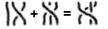
以下示例展示研究者如何结合一组图片用 mglyph 构造与辫群记号配合使用。
<mrow>
<mi><mglyph src="my-braid-23" alt="2 3 braid"/></mi>
<mo>+</mo>
<mi><mglyph src="my-braid-132" alt="1 3 2 braid"/></mi>
<mo>=</mo>
<mi><mglyph src="my-braid-13" alt="1 3 braid"/></mi>
</mrow>
渲染效果可能为:
除了为所有呈现元素定义的属性
(3.1.9 呈现元素共有的属性)外,MathML
还包括两个数学样式属性,以及一个有效于所有呈现标记元素的方向属性,
同时 math 和 mstyle
元素也有效;
dir 对 mrow
元素同样有效。
这些属性包括:
| 名称 | 值 | 默认 |
| mathvariant | "normal" | "bold" | "italic" | "bold-italic" | "double-struck" | "bold-fraktur" | "script" | "bold-script" | "fraktur" | "sans-serif" | "bold-sans-serif" | "sans-serif-italic" | "sans-serif-bold-italic" | "monospace" | "initial" | "tailed" | "looped" | "stretched" | normal(除 <mi> 外) |
|
指定该标记的逻辑类别。注意该类别不仅仅是样式,通常表达语义意图;参见下文讨论。
比较为 ASCII 不区分大小写, 所有匹配字符串允许作为值。 |
||
| mathsize | "small" | "normal" | "big" | length | 继承 |
指定标记内容的显示尺寸。
small 和 big
分别代表小于或大于当前字体大小,但确切比例未指明;
normal 允许用于完整性考虑,但因等价于
100% 或 1em,无实际影响。
比较为 ASCII 不区分大小写, 所有匹配字符串允许作为值。 |
||
| dir | "ltr" | "rtl" | 继承 |
指定标记内文本的初始方向:
ltr(左到右)或 rtl(右到左)。
该属性仅在涉及弱或中性字符的罕见情况下需要;
详见 3.1.5.1
数学公式的整体方向性。
对 mspace 无影响。
比较为 ASCII 不区分大小写, 所有匹配字符串允许作为值。 |
||
mathvariant
属性定义了标记元素的逻辑类别。每个类别表示一组在排版上相关的符号标记。每个标记在特定数学表达式中有具体含义,因此需要可视区分,并防止无意的全局样式更改导致含义改变。每个标记由 mathvariant 属性值与标记元素中的字符数据组合唯一标识。
当 MathML 在有 CSS 的环境下渲染时,数学样式属性可以视为 CSS 样式规则的预定义选择器。
参见 7.5 在 MathML 中使用 CSS,了解
MathML 与 CSS 的相互作用。
参见 [MathMLforCSS] 获取用 CSS 渲染 MathML 的说明和示例样式表。当 CSS
不可用时,则依赖渲染应用内部样式机制对不同逻辑类别进行可视区分。大多数 MathML 渲染器可能还会依赖额外的内部样式处理算法。尤其是,mathvariant 属性不遵循 CSS 继承模型;所有标记的默认值为 normal(不倾斜),但 mi 且内容为单字符时除外。详见 3.2.3 标识符 <mi>。
渲染器 在将数学样式属性映射为具体渲染属性时拥有完全自由。但实际中,数学样式属性的名称和取值表明明显的排版特征,渲染器应尽量尊重这些自然解释。例如,将 mathvariant 为 sans-serif 的标记用
Helvetica 或 Arial 显示是合理的,而用 Times Roman 字体则会产生误导,应避免。
原则上,任意 mathvariant 值均可配合任意字符数据定义特定符号标记。但实际中,只有某些字符数据与 mathvariant 值的组合会被渲染器区分。例如,“fraktur α”或“粗斜体汉字”并没有明确渲染方式,而 mathvariant 的 "initial"、"tailed"、"looped"、"stretched" 只适用于阿拉伯字符。
某些字符数据与 mathvariant 的组合等价于直接编码数学字母数字符号的指定 Unicode 码位。这些码位参见
阿拉伯数学字母符号块 U+1EE00 至 U+1EEFF,
数学字母数字符号块 U+1D400 至 U+1D7FF,
以及 字母类字符 范围 U+2100 至 U+214F(代表 SMP
内的“空洞”),见 8.2
数学字母数字符号。详见 UTR #25 第 2.2 节。
这些字符的 Unicode 标准描述为它们提供了一个未加样式的对等字符,除了字体变化(即 mathvariant)以外应当等价。用未加样式字符配合对应 mathvariant 的 token 元素,等价于单独使用数学字母数字符号字符的 token 元素。注意,周围的 mathvariant 或样式声明不应更改数学字母数字符号字符的外观。
渲染器应支持可对应于 Unicode 字符的字符数据与 mathvariant 组合,并且这些组合可用现有字体区分。对于不能对应
Unicode 码位的组合,渲染器可以选择支持或忽略;作者需知对无对应代码点的数学新符号支持情况在不同渲染器间差异很大。
由于 MathML 表达式通常嵌入如 HTML 等文本数据格式,周围文本和 MathML 必须共享诸如字体大小等渲染属性,以保证风格兼容。因此,大多数影响文本渲染的属性值按上表 默认
列所示从渲染环境继承。(当文本和 MathML 由不同软件渲染时,例如浏览器与插件,还应让渲染环境向 MathML 渲染器额外提供基线位置等信息,MathML 属性并未规定这些信息。)但 MathML
并不规定从渲染环境继承样式信息的机制。
如果当前字体请求的 mathsize 不可用,渲染器应设法以最清晰、最高质量的方式近似。许多 MathML
元素会自动更改某些子元素的字体大小;详见 3.1.6
displaystyle 与 scriptlevel 的讨论。
可按 7.4 将 MathML
与其他格式结合 所述将 MathML 与其他格式结合使用。
推荐的方式是通过扩展 MathML 模式,使额外元素可作为 mtext 或其他叶子元素的子元素嵌入
MathML,以适应表达式中的不同需求(见 3.2.3 标识符
<mi>、3.2.4 数字 <mn>、3.2.5 运算符、定界符、分隔符或重音 <mo>)。
方向、字体大小和其他字体属性应继承自包含元素字符本应有的设置(见 3.2.2 标记元素通用的数学样式属性)。
下面是一个在 HTML 场景下把 SVG 嵌入 mtext 的例子:
<mtable>
<mtr>
<mtd>
<mtext><input type="text" placeholder="what shape is this?"/></mtext>
</mtd>
</mtr>
<mtr>
<mtd>
<mtext>
<svg xmlns="http://www.w3.org/2000/svg" width="4cm" height="4cm" viewBox="0 0 400 400">
<rect x="1" y="1" width="398" height="398" style="fill:none; stroke:blue"/>
<path d="M 100 100 L 300 100 L 200 300 z" style="fill:red; stroke:blue; stroke-width:3"/>
</svg>
</mtext>
</mtd>
</mtr>
</mtable>
<mi>mi 元素表示一个符号名称或应被渲染为标识符的任意文本。标识符可以包括变量、函数名和符号常量。典型的图形渲染器会将 mi 元素按其内容渲染(见 3.2.1
标记元素内容字符,<mglyph/>),其周围无额外间距(与相邻元素相关的间距除外)。
并非所有 数学标识符
都通过 mi 元素表示——如下标或加上撇号的变量分别应当用 msub 或 msup
表示。反之,作为项
角色的任意文本(如求和数列中的省略号)应该用 mi 元素表示。
应当强调,mi 是一个表现性元素。因此只指明其内容应当以标识符形式呈现。在大多数情况下,mi
的内容实际上代表数学标识符(如变量或函数名)。但是,如上一段所述,应以标识符形式渲染的记法与真正代表数学标识符的记法之间,并不总能一一对应。若元素的语义保证是标识符,参见 4. 内容标记 中 ci 的说明。
mi 元素接受列表于 3.2.2 标记元素通用的数学样式属性 中的属性,但有一项默认值不同:
| 名称 | 值 | 默认 |
| mathvariant | "normal" | "bold" | "italic" | "bold-italic" | "double-struck" | "bold-fraktur" | "script" | "bold-script" | "fraktur" | "sans-serif" | "bold-sans-serif" | "sans-serif-italic" | "sans-serif-bold-italic" | "monospace" | "initial" | "tailed" | "looped" | "stretched" | (依赖内容,见下文) |
指定该标记的逻辑类别。
默认值为 normal(不斜体),除非内容为单字符,此时应为 italic。
比较为 ASCII 不区分大小写,允许所有匹配字符串。 |
||
请注意,为了判断 Math
字母数字符号字符的等价性(参见 8.2
数学字母数字符号),应首先解算 mathvariant 属性,包括上述特殊默认规则。
<mi>x</mi>
<mi>D</mi>
<mi>sin</mi>
<mi mathvariant='script'>L</mi>
<mi></mi>
允许内容为空的 mi 元素;<mi></mi> 可被 公式编辑器
用于表示 MathML 表达式中按常规数学语法需要但尚未填充的 项
位置。
标识符包括函数名如 sin
。表达式如 sin x
应使用字符 U+2061
(实体 af 或 ApplyFunction),如下所示;
也见关于不可见运算符的讨论 3.2.5
运算符、定界符、分隔符或重音
<mo>。
<mrow>
<mi> sin </mi>
<mo> ⁡<!--ApplyFunction--> </mo>
<mi> x </mi>
</mrow>
应作为 项
处理的杂项文本也可以用 mi 元素,如下:
<mrow>
<mn> 1 </mn>
<mo> + </mo>
<mi> … </mi>
<mo> + </mo>
<mi> n </mi>
</mrow>
在上述例外情况下使用 mi 时,显式设置 mathvariant
属性可能比某些渲染器的默认行为效果更佳。
符号常量的名称应以 mi 元素表示:
<mi> π </mi>
<mi> ⅈ </mi>
<mi> ⅇ </mi>
<mn>mn
元素表示一个数字字面量
或应以数字字面量形式渲染的其他数据。一般来说,数字字面量是一个数字序列,可能包含小数点,表示无符号整数或实数。
典型的图形渲染器会把 mn 元素渲染为其内容(见 3.2.1
标记元素内容字符,<mglyph/>),周围没有额外间距(除了来自相邻元素如
mo 的间距)。
mn 元素通常用非斜体字体渲染。
数字
这一数学概念可以非常微妙且复杂,取决于具体语境。因此,并非所有数学意义上的数字都应使用 mn
表示;下方给出的示例中,复数、以分数表示的数字比例以及数字常量名称等,应使用不同方式表示。
反过来,由于 mn 是表现性元素,在某些情况下可以将任意文本放入 mn
内容中,只要其渲染效果是数字字面量,哪怕根据某种数字字符序列的编码标准,该内容未必能被明确地解释为数字。不过,通常应将 mn
元素保留给真正要表达某种数值内容的情形。若需要其语义保证为某种类型的数学数,请参见 4.
内容标记 中 cn 的说明。
mn 元素可接受3.2.2 标记元素通用的数学样式属性中列出的属性。
<mn> 2 </mn>
<mn> 0.123 </mn>
<mn> 1,000,000 </mn>
<mn> 2.1e10 </mn>
<mn> 0xFFEF </mn>
<mn> MCMLXIX </mn>
<mn> twenty-one </mn>
许多数学意义上的数字应通过 mn 以外的呈现元素表示;这包括复数、负数、以分数形式表示的数字比例以及数字常量的名称。
<mrow>
<mn> 2 </mn>
<mo> + </mo>
<mrow>
<mn> 3 </mn>
<mo> ⁢<!--InvisibleTimes--> </mo>
<mi> ⅈ </mi>
</mrow>
</mrow>
<mfrac> <mn> 1 </mn> <mn> 2 </mn> </mfrac>
<mrow><mo>-</mo><mn>2</mn></mrow>
<mi> π </mi>
<mi> ⅇ </mi>
<mo>
mo 元素表示一个运算符或任何应按运算符方式渲染的项。通常,数学运算符的记法惯例相当复杂,因此 MathML 为指定 mo 元素的渲染行为提供了较为复杂的机制。因此,在 MathML
中“应按运算符渲染”的项的范围包括许多在普通意义上并非数学运算符的记法。除了通常的前缀、中缀或后缀形式的普通运算符外,还包括诸如大括号、圆括号和“绝对值”竖线等定界符;诸如逗号和分号之类的分隔符;以及诸如符号上方或上方波浪线之类的数学重音。本章中我们将使用“运算符”一词来指代上述广义的运算符。
典型的图形渲染器把所有 mo 元素显示为其内容(见 3.2.1
标记元素内容字符,<mglyph/>),并根据其属性在元素周围加上额外间距,下面会进一步说明。对于无法访问完整
MathML 字符集字体的渲染器,在某些情况下可能选择不精确地以内容中的字符渲染 mo
元素。例如,<mo> ≤ </mo> 可能会被终端渲染为 <=。然而,总的原则是渲染器应尽量按文本字面渲染
mo 元素的内容。即 <mo> ≤ </mo> 与
<mo> <= </mo> 应产生不同的渲染。前者应呈现为单一的“小于等于”字符,而后者应呈现为两个字符的序列
<=。
mo 元素的一个关键特性是其默认属性值在很多情况下是从下述的“运算符词典”按具体情形设置的。特别地,stretch、symmetric 和 accent 的默认值通常可以在运算符词典中找到,因此无需在每个 mo
元素上显式指定。
注意某些数学运算符并非仅由 mo 元素表示,而是由带有(例如)周围上标的 mo
元素“修饰”而成;下面将进一步描述这一点。相反,作为呈现元素,mo 元素可以包含任意文本,即使这些文本没有标准的运算符解释;例如,见
3.2.6 文本 <mtext> 中的“混合文本与数学”讨论。另请参见 4. 内容标记,其中定义了保证具有特定数学运算符语义的
MathML 内容元素。
另请注意,如在 3.1.7 表达式的换行
中讨论的,换行通常发生在运算符处(取决于本地惯例可在运算符之前或之后换行)。因此,mo
接受用于编码在特定运算符处换行可取性的属性,以及在该运算符处发生换行时描述运算符处理与缩进的属性。
mo 元素接受 3.2.2
标记元素通用的数学样式属性 中列出的属性以及此处列出的附加属性。由于运算符的显示在数学中至关重要,mo
元素接受大量属性;这些将在接下来的三个小节中描述。
大多数属性的默认值来自包含的 mstyle 元素、math 元素、
来自包含文档,
或来自 3.2.5.6.1 运算符词典。
当某个列为“继承”的值未在 mo、mstyle、math 上显式给出,或在运算符词典中未找到时,应使用表中括号内显示的默认值,因为这些值通常对通用运算符是可接受的。
| 名称 | 值 | 默认 |
| form | "prefix" | "infix" | "postfix" | 由运算符在 mrow 中的位置设置
|
指定运算符在所包含表达式中的角色。该角色及运算符内容会影响在运算符词典中的查找,从而影响间距和其他默认属性;参见 3.2.5.6.2
form 属性的默认值。
比较为 ASCII 不区分大小写,允许所有匹配字符串作为值。 |
||
| lspace | length | 由词典设置(thickmathspace) |
| 指定出现在运算符之前的前置空白;见 3.2.5.6.4 运算符周围的间距。 (注意在 RTL 环境中“之前”指向右侧;见 3.1.5 方向性。) | ||
| rspace | length | 由词典设置(thickmathspace) |
| 指定出现在运算符之后的尾随空白;见 3.2.5.6.4 运算符周围的间距。 (注意在 RTL 环境中“之后”指向左侧;见 3.1.5 方向性。) | ||
| stretchy | boolean | 由词典设置(false) |
| 指定运算符是否应伸展以匹配相邻内容的大小;见 3.2.5.7 运算符、定界符与重音的伸展。 | ||
| symmetric | boolean | 由词典设置(false) |
| 指定当可伸展时运算符是否应围绕数学轴保持对称。注意此属性仅适用于垂直伸展的符号。见 3.2.5.7 运算符、定界符与重音的伸展。 | ||
| maxsize | length | 由词典设置(无限) |
| 指定运算符在可伸展时的最大尺寸;见 3.2.5.7 运算符、定界符与重音的伸展。若未给出,则最大尺寸为无限。 无单位或百分比值表示相对于参考尺寸(即未伸展字形的尺寸)的倍数。MathML 4 将 "infinity" 作为可能值弃用,因为它等同于不提供值。 | ||
| minsize | length | 由词典设置 (100%) |
| 指定运算符在可伸展时的最小尺寸;见 3.2.5.7 运算符、定界符与重音的伸展。 无单位或百分比值表示相对于参考尺寸(即未伸展字形的尺寸)的倍数。 | ||
| largeop | boolean | 由词典设置(false) |
指定该运算符是否被视为“大型”运算符,即当 displaystyle=true 时是否应比正常更大地绘制(类似于 TeX 的
\displaystyle)。大型运算符示例包括 U+222B 和 U+220F(实体 int 与 prod)。详见 3.1.6
Displaystyle 与 Scriptlevel 的进一步讨论。
|
||
| movablelimits | boolean | 由词典设置(false) |
指定附加在该运算符上的下标和上标在 displaystyle 为 false
时是否“移动”到更紧凑的下标和上标位置。典型在 movablelimits=true 的运算符示例包括 U+2211 和 U+220F(实体 sum, prod),以及
lim。详见 3.1.6
Displaystyle 与 Scriptlevel。
|
||
| accent | boolean | 由词典设置(false) |
指定当该运算符被用作下标或上标时是否应被视作重音(变音符);见 munder、mover 和 munderover。
注:为与 MathML Core 兼容,可在外层的 mover 与 munderover 上使用 accent=true
来替代此属性。
|
||
下面的属性影响何时会或不会发生换行,以及发生换行时换行的表现。
| 名称 | 值 | 默认 |
| linebreak | "auto" | "newline" | "nobreak" | "goodbreak" | "badbreak" | auto |
指定在该运算符处换行的可取性:默认 auto
表示渲染器应使用其默认换行算法来决定是否换行;newline
用于强制换行;在自动换行情况下,nobreak 禁止在该处换行;goodbreak 建议这是一个良好的换行位置;badbreak 建议这是一个较差的换行位置。
比较为 ASCII 不区分大小写,允许所有匹配字符串作为值。 |
||
| lineleading | length | 继承 (100%) |
| 指定换行后使用的垂直行距量。对于较高的行,在换行处使用更大的行距通常更清晰。渲染代理可以选择适当的默认值。 | ||
| linebreakstyle | "before" | "after" | "duplicate" | "infixlinebreakstyle" | 由词典设置 (before) |
指定当在该运算符处发生换行时运算符是出现在“之前”还是“之后”,或是否被复制。before 使运算符出现在新行的开头(但可能缩进);after 使其出现在换行前的行尾。duplicate 则在两处都放置运算符。infixlinebreakstyle 使用为中缀运算符指定的值;该值(before、after 或 duplicate 之一)可由应用指定或由 mstyle 绑定(before 对应最常见的换行风格)。
比较为 ASCII 不区分大小写,允许所有匹配字符串作为值。 |
||
| linebreakmultchar | string | 继承 (⁢) |
指定用于在换行处使 ⁢ 运算符可见的字符。例如,linebreakmultchar="·" 会将乘法在换行处显示为中点。
|
||
相邻的 mo 与 mspace 元素上的 linebreak 值相互之间不互动;在一个 mo 上设置
linebreak=nobreak
并不会本身禁止在前后(可能嵌套的)mo 或 mspace
元素上发生换行,也不会与相邻 mo 的 linebreakstyle 值交互。但在其它情况下,它确实阻止在该 mo 元素两侧发生换行。
下列属性影响组成公式的行的缩进。主要这些属性控制换行后新行的位置,无论是自动还是手动换行。然而,indentalignfirst 与 indentshiftfirst 也控制在没有任何换行的单行公式的位置。当这些属性出现在 mo 或 mspace 上时,它们在该元素处发生换行时生效。当它们出现在
mstyle 或 math
上时,它们决定了在该上下文内发生换行时使用的默认样式。注意,除非需要对手动换行进行大量标记,否则这些属性多数在绑定到 mstyle 或 math 上时最为有用。
注意,由于渲染上下文(例如可用宽度和当前字体)并不总是由 MathML 作者可知,如果这些属性的值导致剩余宽度过小而无法有意义地显示表达式,或导致剩余宽度超过可用换行宽度,渲染器可以忽略这些属性值。
| 名称 | 值 | 默认 |
| indentalign | "left" | "center" | "right" | "auto" | "id" | 继承 (auto) |
指定当在 mrow 内发生换行时各行的位置;下面将讨论属性值的含义。
比较为 ASCII 不区分大小写,允许所有匹配字符串作为值。 |
||
| indentshift | length | 继承 (0) |
指定相对于 indentalign 决定的位置的额外缩进偏移。当值为百分比时,该值相对于
MathML 渲染器可用的水平空间(即用于换行的当前目标宽度)来解释。注意:MathML 3 中允许无单位数字并将其视为百分比,MathML 4
中该无单位数字已被弃用。
|
||
| indenttarget | idref | 继承(无) |
指定另一个元素的 id,该元素的水平位置决定当 indentalign=id
时缩进行的位置。注意,被引用的元素可能位于当前 math
元素之外,以允许表达式间的对齐,或可能位于不可见内容(如 mphantom)内;但它必须在被引用之前出现。这可能导致某渲染器无法获得该
id,或处于不允许对齐的位置。在这种情况下,indentalign 应回退为 auto。
|
||
| indentalignfirst | "left" | "center" | "right" | "auto" | "id" | "indentalign" | 继承 (indentalign) |
指定公式第一行使用的缩进样式;值 indentalign(默认)意味着按通用行的缩进方式缩进。
比较为 ASCII 不区分大小写,允许所有匹配字符串作为值。 |
||
| indentshiftfirst | length | "indentshift" | 继承 (indentshift) |
指定公式第一行使用的偏移;值 indentshift(默认)表示使用通用行所用的偏移。该值为 ASCII
不区分大小写。
百分比值与无单位数字按 indentshift 的描述进行解释。
|
||
| indentalignlast | "left" | "center" | "right" | "auto" | "id" | "indentalign" | 继承 (indentalign) |
指定在给定 mrow 内发生换行时最后一行使用的缩进样式;值 indentalign(默认)表示按通用行的缩进方式缩进。当恰好有两行时,应优先使用该属性的值来设置第二行的缩进,而不是
indentalign。
比较为 ASCII 不区分大小写,允许所有匹配字符串作为值。 |
||
| indentshiftlast | length | "indentshift" | 继承 (indentshift) |
指定在给定 mrow 内发生换行时最后一行使用的偏移;值 indentshift(默认)表示使用通用行的偏移。该值为 ASCII
不区分大小写。
当恰好有两行时,应优先使用该属性的值来设置第二行的偏移,而不是 indentshift。
百分比值与无单位数字按 indentshift 的描述进行解释。
|
||
indentalign 的合法值为:
| 值 | 含义 |
| left | 将下一行的左侧与行换行宽度的左侧对齐 |
| center | 将下一行的中心与行换行宽度的中心对齐 |
| right | 将下一行的右侧与行换行宽度的右侧对齐 |
| auto | (默认)使用渲染器的默认缩进样式;这可能是固定量,也可能随元素在 mrow 嵌套中的深度变化或采用其它类似方法。 |
| id | 将下一行的左侧与由 idref
指定的元素(由 indenttarget 给出)的左侧对齐;如果不存在这样的元素,则将 indentalign 的值视为 auto
|
<mo>+</mo>
<mo><</mo>
<mo>≤</mo>
<mo><=</mo>
<mo>++</mo>
<mo>∑</mo>
<mo>.NOT.</mo>
<mo>and</mo>
<mo>⁢<!--InvisibleTimes--></mo>
注意这些示例中的 mo 元素并不需要显式的 stretchy 或
symmetric 属性,因为这些可以像下文所述那样通过运算符词典找到。其中一些示例也可以使用在 3.3.8 定界对内的表达式 <mfenced> 中描述的
mfenced 元素来编码。
(a+b)
<mrow>
<mo> ( </mo>
<mrow>
<mi> a </mi>
<mo> + </mo>
<mi> b </mi>
</mrow>
<mo> ) </mo>
</mrow>
[0,1)
<mrow>
<mo> [ </mo>
<mrow>
<mn> 0 </mn>
<mo> , </mo>
<mn> 1 </mn>
</mrow>
<mo> ) </mo>
</mrow>
f(x,y)
<mrow>
<mi> f </mi>
<mo> ⁡<!--ApplyFunction--> </mo>
<mrow>
<mo> ( </mo>
<mrow>
<mi> x </mi>
<mo> , </mo>
<mi> y </mi>
</mrow>
<mo> ) </mo>
</mrow>
</mrow>
在传统数学记法中某些“不可见”的运算符应当使用特定字符(或实体引用)在 mo
元素内表示,而不是简单地什么都不写。用于这些“不可见运算符”的字符为:
| 字符 | 实体名称 | 简称 |
| U+2061 | ApplyFunction |
af |
| U+2062 | InvisibleTimes |
it |
| U+2063 | InvisibleComma |
ic |
| U+2064 |
上表中例子的 MathML 表示如下:
<mrow>
<mi> f </mi>
<mo> ⁡<!--ApplyFunction--> </mo>
<mrow>
<mo> ( </mo>
<mi> x </mi>
<mo> ) </mo>
</mrow>
</mrow>
<mrow>
<mi> sin </mi>
<mo> ⁡<!--ApplyFunction--> </mo>
<mi> x </mi>
</mrow>
<mrow>
<mi> x </mi>
<mo> ⁢<!--InvisibleTimes--> </mo>
<mi> y </mi>
</mrow>
<msub>
<mi> m </mi>
<mrow>
<mn> 1 </mn>
<mo> ⁣<!--InvisibleComma--> </mo>
<mn> 2 </mn>
</mrow>
</msub>
<mrow>
<mn> 2 </mn>
<mo> ⁤ </mo>
<mfrac>
<mn> 3 </mn>
<mn> 4 </mn>
</mfrac>
</mrow>
mo 元素的典型视觉渲染行为比其它 MathML 标记元素更复杂,因此对其渲染规则在本小节中单独描述。
注意,与 MathML 中所有渲染规则一样,这些规则为建议而非强制。下面的描述旨在尽可能清晰地说明各种渲染属性的预期效果。浏览器实现上关于运算符的详细布局规则见 MathML Core。
许多数学符号(例如积分号、加号或圆括号)具有固定且可预期的传统用法。通常这种用法体现为具有特定内容和特定 form 属性的
mo 元素的某些默认属性值。由于这些默认值随符号而异,MathML 预期渲染器会包含一个针对 mo 元素默认属性的“运算符词典”(见 B. 运算符词典),词典按每个 mo 元素的内容与 form 属性建立索引。如果某个 mo 元素未在词典中列出,应使用
mo 属性表中括号内给出的默认值,因为这些值一般对通用运算符是可接受的。
一些运算符是“重载”的,意味着它们可以以多种形式(前缀、中缀或后缀)出现,并且每种形式可能具有不同的渲染属性。例如“+”既可以是前缀也可以是中缀运算符。通常,视觉渲染器会在中缀运算符的两侧加入空白,而只在前缀运算符前面加入空白。form 属性允许指定使用哪种形式,以防依据词典存在多种形式且默认规则不合适时需要明确指定。
form
属性通常不必显式指定,因为可以从上下文中推断其值。如果未指定,且词典中对于给定内容存在多种可能形式,渲染器应按下列规则选择使用哪种形式(对于下文所述的被修饰的运算符有例外,稍后描述):
如果运算符是一个包含多个参数的 mrow 中的第一个参数(在确定长度和第一个参数时忽略所有类空白参数(见 3.2.7 空白
<mspace/>)),则使用前缀形式;
如果它是一个包含多个参数的 mrow 中的最后一个参数(忽略所有类空白参数),则使用后缀形式;
如果它是一个隐式或显式 mrow 中的唯一元素,并且它位于某些列在 3.4 脚本与极限模板
列表中的元素的脚本位置,则使用后缀形式;
在所有其它情况,包括运算符不属于任何 mrow 时,使用中缀形式。
注意上述讨论中的 mrow 可能是推断的;见 3.1.3.1 推断的 <mrow>s。
开括符应具有 form="prefix",闭括符应具有 form="postfix";分隔符通常为“中缀(infix)”,但也不总是如此,取决于其上下文。与普通运算符相同,这些值通常不需要显式指定。
如果词典中没有给定形式的运算符项,渲染器应使用词典中可用的某一形式,优先顺序为:中缀、后缀、前缀;如果对于给定 mo
元素内容没有任何形式可用,则渲染器应使用 mo 属性表中括号所示的默认值。
在为 mo 元素选择默认 form
属性值的上述规则中存在一条例外。被一个或多个嵌套的下标、上标、周围文本或空白或样式更改“修饰”的 mo
元素,其行为不同。应考察整个被修饰的运算符(下文会精确定义)在 mrow
中的位置来决定形式及其周围间距,而用于影响周围间距的属性则应取自位于核心处的 mo 元素(或该元素在词典中的条目)。
例如,表达式中 在
应当被视为整体上的中缀运算符,因为它位于 mrow 的中间,但其渲染属性应取自表示 的 mo 元素,或者在这些属性未显式指定时从词典中查找
<mo form="infix"> + </mo> 的入口。被修饰运算符(embellished operator)的精确定义如下:
一个 mo 元素;
或下列元素之一:msub、msup、msubsup、munder、mover、munderover、mmultiscripts、mfrac,或 semantics(见 6.5
<semantics>
元素),且其第一个参数存在并且是一个被修饰运算符;
或下列元素之一:mstyle、mphantom、或
mpadded,使得包含相同参数的 mrow
会是一个被修饰运算符;
或一个 maction 元素,其所选的子表达式存在且为被修饰运算符;
或一个 mrow,其参数由一个被修饰运算符和零个或多个类空白元素(顺序不限)组成。
注意该定义仅在没有其它插入的外层元素(不在上述列表中)时允许嵌套修饰。
上述选择运算符形式和定义被修饰运算符的规则被设计为在所有常见情形下作者无需显式指定 form 属性。
当运算符(或被修饰的运算符)出现在 mrow 中时,可直接用 lspace 与 rspace
属性指定添加在运算符周围的水平空间量。注意在 RTL 方向下应将 lspace 与 rspace
解释为前导与尾随空白。按照惯例,与其参数紧密结合的运算符其间距值较小,而与参数结合较弱的运算符间距值较大。这个惯例应在 MathML
渲染器所附带的运算符词典中遵循。
某些渲染器可能选择在上标或下标中对大多数运算符不使用间距,像 TeX 那样。
非图形渲染器应以其媒介对应的方式处理间距属性及此处描述的其它渲染属性。例如,更多的空白可能转化为音频渲染中的更长停顿。
四个属性控制运算符(可能被修饰)是否以及如何伸展以匹配其他元素的大小:stretchy、symmetric、maxsize 与 minsize。如果某个运算符的属性 stretchy=true,则其(即其内容中的每个字符)应遵循下面列出的伸展规则,受字体与字体渲染系统的约束。实际上,典型渲染器只能够伸展一小部分字符,且很可能只能够生成离散的一组字符尺寸。
MathML 未提供指定将某个字符或运算符向哪个方向(水平或垂直)伸展的机制;当 stretchy=true
时,若某字符在某个方向上可伸展且该方向对该字符是合理的,该字符应在该方向上伸展。渲染器应自行判断对该字符在何方向上伸展是合理的。如果可以伸展,典型渲染器大多数字符最多在一个方向上伸展,但有些渲染器可能能够对某些字符(如对角箭头)在两个方向上独立伸展。
minsize 与 maxsize
属性限制伸展量(任一方向)。这两个属性可作为伸展方向上的算子正常尺寸的乘数,或用单位表示为绝对尺寸。例如,若某字符有 maxsize=300%,则其最大可增长为正常(未伸展)尺寸的三倍。
symmetric 属性控制高度与深度在字符轴上下被强制相等(通过将高度与深度都设为两者最大值)。当需要在矩阵周围伸展括号但矩阵未在轴上对齐(例如乘以非方阵时常见)时,可能希望将
symmetric 设为 false,以避免括号对称伸展导致凸出矩阵一侧。symmetric 仅适用于垂直伸展的字符(否则忽略)。
如果一个可伸展的 mo 元素被修饰(如前文定义),那么其核心处的 mo
元素会被伸展到基于整个被修饰运算符上下文的尺寸,即伸展到如果不存在修饰物时该运算符应有的相同尺寸。例如,下面示例中的括号(通常会在运算符词典中被设置为可伸展)将被伸展到相同的尺寸,且与若它们未被下划或上划时的尺寸相同,并且将覆盖相同的垂直区间:
<mrow>
<munder>
<mo> ( </mo>
<mo> _ </mo>
</munder>
<mfrac>
<mi> a </mi>
<mi> b </mi>
</mfrac>
<mover>
<mo> ) </mo>
<mo> ‾ </mo>
</mover>
</mrow>
注意这意味着下面给出的伸展规则必须参考整个被修饰运算符的上下文,而非仅针对 mo 元素本身。
下面示例展示了一种设置括号最大尺寸的方法,以使其不增长,尽管其默认值为 stretchy=true。
<mrow>
<mo maxsize="100%">(</mo>
<mfrac>
<msup><mi>a</mi><mn>2</mn></msup>
<msup><mi>b</mi><mn>2</mn></msup>
</mfrac>
<mo maxsize="100%">)</mo>
</mrow>
上述应渲染为
而不是默认渲染
。
注意每个括号是独立定尺寸的;如果只有其中一个设置了 maxsize=100%,它们将呈现为不同的尺寸。
关于可伸展运算符的一般规则如下:
如果可伸展运算符是 mrow 元素的直接子表达式,或是某表格行中某个单元格(作为 mtd 元素)内唯一的直接子表达式,则它应伸展以覆盖该 mrow 元素或表格行中那些非伸展直接子表达式的高度与深度(轴以上与轴以下),除非伸展被 minsize 或 maxsize 限制。
对于被修饰的可伸展运算符,上述规则适用于其核心处的可伸展运算符。
上述规则也适用于 mrow 为推断的情形。
仅当 symmetric=true
且伸展发生在 mrow 或 mtr 中,且该
mtr 的 rowalign 值为 baseline 或 axis 时,对称伸展规则才适用。
下列算法指定了垂直伸展字符的高度与深度的计算:
设 maxheight 与 maxdepth 为同一 mrow 或 mtr
中非伸展兄弟元素的最大高度与最大深度。设 axis 为基线以上的数学轴高度。
注意即便在可伸展运算符上设置了 minsize 或 maxsize,这些值也不会用于对 mrow
的最大高度与深度的初始计算。
若 symmetric=true,则计算出的伸展运算符的高度与深度为:
height=max(maxheight-axis, maxdepth+axis) + axis
depth =max(maxheight-axis, maxdepth+axis) - axis
否则高度与深度为:
height= maxheight
depth = maxdepth
如果总尺寸 = height+depth 小于 minsize 或大于 maxsize,则按比例同时增加或减小 height 与 depth,使有效尺寸符合约束。
默认情况下,大多数垂直箭头以及大多数开合定界符在运算符词典中被定义为默认可伸展。
若可伸展运算符位于表格单元(即在 mtd
元素内),上述规则假定包含该运算符的表格行的每个单元格恰好覆盖一行。(等价地,假定该表格行中所有单元格的 rowspan
属性值为
1,包括包含运算符的单元格。)当事实并非如此时,运算符应仅垂直伸展以覆盖那些完全位于该运算符单元格所覆盖的行集内的表格单元格。延伸到运算符单元格未覆盖行的表格单元格应被忽略。有关
rowspan 属性的细节,请参见 3.5.3.2 属性。
如果可伸展运算符或被修饰的可伸展运算符是 munder、mover 或 munderover
元素的直接子表达式,或它是在某表格列中某单元格内作为该单元格唯一的直接子表达式(见 mtable),则它或其核心处的 mo
元素应伸展以覆盖给定元素中其它直接子表达式(或同列中其它单元格)的宽度,受上述约束限制。
对于被修饰的可伸展运算符,上述规则适用于其核心处的可伸展运算符。
默认情况下,大多数水平箭头与某些重音会水平伸展。
若可伸展运算符位于表格单元中(即在 mtd
内),上述规则假定包含可伸展运算符的表格列的每个单元格恰好覆盖一列。(等价地,假定该表格列中所有单元格的 columnspan 属性值为
1,包括包含运算符的单元格。)当事实并非如此时,运算符应仅水平伸展以覆盖那些完全位于该运算符单元格所覆盖的列集内的表格单元格。延伸到运算符单元格未覆盖列的表格单元格应被忽略。有关
rowspan 属性的细节,请参见 3.5.3.2
属性。
水平伸展规则包含 mtd 元素,以允许在使用 mtable
布局的交换图(commutative diagrams)中让箭头伸展。水平伸展规则包括脚本,以使如下示例等效:
<mrow>
<mi> x </mi>
<munder>
<mo> → </mo>
<mtext> maps to </mtext>
</munder>
<mi> y </mi>
</mrow>
如果某可伸展运算符不需要伸展(即它不在上述提及的位置,或没有其它表达式的尺寸需要与之匹配),则它具有由字体和当前 mathsize 决定的标准(未伸展)尺寸。
如果某可伸展运算符被要求伸展,但包含元素中的所有其它表达式(如上所述)也都是可伸展的,则所有可以伸展的元素应增长到包含对象中所有元素的未伸展正常尺寸的最大值,前提是它们能够增长到该尺寸。如果
minsize 或 maxsize
的值阻止了该行为,则应使用指定的(最小或最大)尺寸。
例如,在一个仅包含垂直可伸展运算符的 mrow
中,每个运算符应伸展到它们所有未伸展正常尺寸的最大值,前提是没有其它属性覆盖此行为。当然,字体或字体渲染的限制可能导致最终的伸展尺寸只能近似相同。
<mtext>mtext 元素用于表示应按原样渲染的任意文本。一般而言,mtext
元素用于表示注释性文本。
需要注意的是,具有明确定义记法角色的文本可能更适合使用 mi 或 mo 标记。
mtext 元素也可以包含
可渲染空白
,即旨在改变周围元素排布的不可见字符。在非图形媒介中,这些字符也应有类似效果,比如在音频渲染器中引入或减少时延、影响节奏等。但请参见 2.1.7
输入空白折叠。
mtext 元素可接受 3.2.2 标记元素通用的数学样式属性 中列出的属性。
另见关于 类空白元素
合法分组的警告,详见 3.2.7
空白 <mspace/>,以及相关元素用于微调
时的警告,参见
[MathML-Notes]。
<mrow>
<mtext> Theorem 1: </mtext>
<mtext>  <!--ThinSpace--> </mtext>
<mtext>  <!--ThickSpace--> <!--ThickSpace--> </mtext>
<mtext> /* a comment */ </mtext>
</mrow>
<mspace/>mspace
空元素表示任意大小的空白,由其属性设定。它也可用于向视觉渲染器建议换行位置。注意其属性的默认值被选为通常不会影响渲染,因此一般需要显式指定一个或多个属性值后才使用 mspace 元素。
请注意下面关于类空白元素
合法分组的警告,以及在 [MathML-Notes]
中关于用此类元素微调
的警告。另见其它可渲染为空白的元素,如 mtext、mphantom 和 maligngroup。
除下表列出的属性外,
mspace 元素还接受 3.2.2 标记元素通用的数学样式属性中描述的属性,但需注意 mathvariant 和 mathcolor 无效,而 mathsize 仅影响尺寸属性中的单位解释(详见 2.1.5.2 长度值属性)。
mspace 还接受 3.2.5.2.3 缩进属性中描述的属性。
| 名称 | 值 | 默认 |
| width | length | 0em |
| 指定空白所需的宽度。 | ||
| height | length | 0ex |
| 指定空白上(基线以上)所需的高度。 | ||
| depth | length | 0ex |
| 指定空白下(基线以下)所需的深度。 | ||
换行最初是在 MathML2 的 mspace 上指定,但在 MathML 3 增加了对 mo 换行和缩进的更强控制。MathML 4 中已不推荐在 mspace 上指定换行行为。
<mspace height="3ex" depth="2ex"/>
许多 MathML 呈现元素是 类空白
元素,即它们通常渲染为空白,不影响它们出现的表达式的数学意义。因此,这些元素在其它 MathML
表达式中通常会有些特殊的表现。例如,类空白元素在建议的 mo 渲染规则(见 3.2.5 运算符、定界符、分隔符或重音
<mo>)中会特殊处理。下列元素被定义为“类空白”:
一个 mtext 元素,其内容为空或全部为 Unicode 空白字符;
一个 mspace、maligngroup 或 malignmark 元素;
一个 mstyle、mphantom 或 mpadded 元素,其所有直接子表达式都是类空白;
一个 semantics 元素,其第一个参数存在且为类空白;
一个 maction 元素,其被选的子表达式存在且为类空白;
一个 mrow,其所有直接子表达式都是类空白。
注意,mphantom 并不一定自动定义为类空白,除非其内容为类空白。这是因为运算符间距会受到相邻元素是否为类空白的影响。由于
mphantom 元素主要用于表达式对齐,运算符与 mphantom
相邻时应像与 mphantom 的内容相邻一样对待,而不是与等尺寸空白区域相邻。
如果作者在现有 MathML 表达式中插入类空白或 mphantom
元素,需注意这些元素确实被计为参数,尤其是用于那些要求参数数量固定或不同参数位置有特殊解释的元素中。
因此,插入到此类 MathML 元素中的类空白元素应与相邻参数一起分组,可通过引入 mrow
实现。例如,若要实现上标底部右侧对齐,表达式
<msup>
<mi> x </mi>
<malignmark edge="right"/>
<mn> 2 </mn>
</msup>
是不合法的,因为 msup 必须有且只有 2 个参数;正确的表达式应该是:
<msup>
<mrow>
<mi> x </mi>
<malignmark edge="right"/>
</mrow>
<mn> 2 </mn>
</msup>
另见关于微调
的警告,参见 [MathML-Notes]。
<ms>ms 元素用于表示将在计算机代数系统或含有 编程语言
的其它系统中被解释的字符串字面量
。默认情况下,字符串字面量被双引号包围,周围不添加额外空白。如 3.2.6 文本 <mtext> 所述,普通文本嵌入数学表达式时应使用 mtext 标记,某些情况下可以用 mo 或 mi,但绝不应用 ms。
注意 ms 编码的字符串字面量由mglyph、malignmark等字符组成,而不是传统ASCII字符串
。例如,<ms>&</ms>
表示仅包含单个字符 & 的字符串字面量,而 <ms>&amp;</ms> 表示含有 5
个字符的字符串字面量,其中第一个是 &。
ms
元素内容应在渲染时对内容中的某些字符进行可见转义
,至少包括左右引号字符
,最好也包括空格以外的其它空白字符。目的是让用户能看到该表达式是字符串字面量,并能准确地看清其内容由哪些字符组成。例如,<ms>double quote is
"</ms> 可被渲染为 "double quote is \"" 。
和所有标记元素一样,ms 会按照 2.1.7 输入空白折叠 的规则修整并折叠内容中的空白,因此意在保留于内容中的空白应按该节说明进行编码。
ms 元素接受 3.2.2 标记元素通用的数学样式属性中列出的属性,此外还包括:
| 名称 | 值 | 默认 |
| lquote | string | U+0022(实体 quot) |
| 指定包围内容的起始引号(在 RTL 环境下不一定是“左引号”)。 | ||
| rquote | string | U+0022(实体 quot) |
| 指定包围内容的结束引号(在 RTL 环境下不一定是“右引号”)。 | ||
除了标记元素外,还有若干族的 MathML
呈现元素。一个元素族处理各种脚本
记法,例如下标与上标。另一个族与矩阵和表格有关。本节讨论的其余元素描述其它基本记法(如分数与根式),或处理一些通用功能,例如设置样式属性与错误处理。
mrow 或 a
元素用于将任意数量的子表达式分组,通常由一个或多个充当“运算符”的 mo
元素及其作用于一个或多个“运算对象”(operands)的其它表达式组成。
若干元素会自动将其参数视为包含在一个 mrow 元素中。参见关于推断 mrow
的讨论,见 3.1.3 必需参数。另见 mfenced(见 3.3.8 定界对内的表达式
<mfenced>),它实际上可以形成一个将其参数以逗号分隔的 mrow。
mrow 元素通常在视觉上呈现为一行水平排列的参数,在 LTR 方向的上下文中按参数出现的顺序从左到右,或在 RTL
方向的上下文中从右到左。
可使用 dir 属性为特定的 mrow
指定方向性,否则它从上下文继承方向性。对于听觉代理,参数将作为参数渲染的序列依次播放。对于 mo
元素的建议渲染规则中假定,运算符与其运算对象之间的所有水平间距应由 mo
元素(或更一般地,被修饰的运算符)的渲染来添加,而不是由包含它们的 mrow 的渲染来添加。
MathML 同时支持表达式的自动与手动换行(即将过长的表达式拆分为多行)。所有这些换行都发生在 mrow
中,无论它们是在文档中显式标记还是被推断的(见 3.1.3.1
推断的 <mrow>s),尽管换行的控制是通过其它元素上的属性实现的(见 3.1.7
表达式的换行)。
在 MathML 4 中 mrow 与
a 行为相同,但增加了 a 以兼容 MathML Core。MathML
Core 仅在 a 元素上支持 href 属性。
mrow 元素除接受 3.1.9
呈现元素共有的属性 中列出的属性外,还接受下表所列属性。
| Name | values | default |
| dir | "ltr" | "rtl" | 继承 |
指定用于布局该行子元素的整体方向性 ltr(从左到右)或
rtl(从右到左)。详见 3.1.5.1
数学公式的整体方向性 以获取更多讨论。
比较为 ASCII 不区分大小写,允许所有匹配字符串作为值。 |
||
文档作者应按数学解释中对子表达式的分组方式对其进行分组;也就是说,按照表达式的底层“语法树”进行分组。具体地,运算符及其数学参数应出现在同一 mrow 中;只有在语法上可以认为它们共同作用于交错的参数时,例如单一带括号项及其括号、关系运算符链,或由 +
与 - 分隔的项序列,才应在同一 mrow 中直接出现多个运算符。下面给出了精确规则。
正确分组有若干目的:它可改善显示(可能影响间距);允许更智能的换行与缩进;并简化呈现元素被计算代数系统或语音渲染器做语义解释的可能性。
尽管不正确的分组有时会导致次优渲染,并且常常使得除纯视觉渲染之外的解释变得困难或不可能,但在 MathML 语法中允许使用任何方式对表达式进行 mrow 分组;即渲染器不应假定作者会遵循正确分组的规则。
MathML 渲染器必须将恰好包含一个参数且无属性的 mrow 元素,在所有方面视为与该单个参数独立出现等价。若 mrow 元素上存在属性,则不强制要求等价性。此等价条件旨在简化生成 MathML
的软件(例如基于模板的编辑工具)的实现。它直接影响被修饰运算符和类空白元素的定义以及确定 mo 元素的 form 属性默认值的规则;详见 3.2.5 运算符、定界符、分隔符或重音
<mo> 与 3.2.7 空白 <mspace/>。另见关于 MathML 表达式等价性的讨论,见
D.1
MathML 一致性。
当从其它用于显示数学的格式(如 TeX)自动生成 MathML 时,常常希望有一条关于何时以及如何使用 mrow
嵌套子表达式的精确规则,因为这些格式并不总是指定子表达式如何嵌套。当需要精确分组规则时,应使用下列规则:
两个相邻的运算符(可能被修饰),可能被运算对象(即任何非运算符)分隔,只有在以下条件都成立时才应出现在同一 mrow
中:前导运算符具有中缀或前缀形式(可能被推断),随后运算符具有中缀或后缀形式,并且这两个运算符在运算符词典中的优先级相同(见 B.
运算符词典)。在其它所有情况下,应使用嵌套的 mrow。
在形成包含上述形式的两个连续运算符中仅一个的嵌套 mrow(在生成 MathML
期间)时,需要决定哪个运算符直接作用于这些运算对象(或者如果这些运算对象存在时会作用于它们)。理想情况下,这应从原始表达式中确定;例如,在从基于运算符优先级的格式转换时,应选择优先级更高的运算符。
注意上述规则仅影响从其它格式或书写符号生成 MathML 的推荐分组方式,而不影响任何 MathML 表达式的有效性。
(用于陈述上述规则的一些术语已在 3.2.5
运算符、定界符、分隔符或重音
<mo> 中定义。)
例如,2x+y-z 应写为:
<mrow>
<mrow>
<mn> 2 </mn>
<mo> ⁢<!--InvisibleTimes--> </mo>
<mi> x </mi>
</mrow>
<mo> + </mo>
<mi> y </mi>
<mo> - </mo>
<mi> z </mi>
</mrow>
对 (x, y) 的正确编码是一个不那么明显的嵌套 mrow 的例子:
<mrow>
<mo> ( </mo>
<mrow>
<mi> x </mi>
<mo> , </mo>
<mi> y </mi>
</mrow>
<mo> ) </mo>
</mrow>
在此情形中,括号内需要一个嵌套的 mrow,因为作为定界符与分隔符的括号与逗号并不共同作用于它们的参数。
与 MathML Core 兼容的超链接可以使用 <a> 元素而不是 <mrow> 指定:
<a href="https://openmath.org/cd/transc1.html#arccsch">
<mi>arccsch</mi>
<mrow>
<mo>(</mo>
<mi>z</mi>
<mo>)</mo>
</mrow>
</a>
<mfrac>mfrac 元素用于表示分数。它也可用于标注类似分数的对象,例如二项式系数与勒让德符号。mfrac 的语法为
<mfrac> numerator denominator </mfrac>
mfrac 元素在 numerator 与 denominator 内将 displaystyle 设为 false,或者如果它已经为
false,则将 scriptlevel 增加 1。(参见 3.1.6 Displaystyle 与 Scriptlevel。)
mfrac 元素除接受 3.1.9
呈现元素共有的属性 中列出的属性外,还接受下表列出的属性。若存在分数线,应使用 mathcolor
指定的颜色绘制分数线。
| Name | values | default |
| linethickness | length | "thin" | "medium" | "thick" | medium |
指定水平“分数线”或“横线”的粗细。默认值为 medium;thin 更薄但可见;thick 更粗。具体粗细由渲染代理决定。然而,如果可用 OpenType Math
字体,则渲染器应将 medium 设置为 MATH.MathConstants.fractionRuleThickness 的值(这是 MathML-Core
中的默认值)。
比较为 ASCII 不区分大小写,允许所有匹配字符串作为值。 注:MathML Core 仅允许 <length-percentage>
值。
|
||
| numalign | "left" | "center" | "right" | center |
|
指定分子在分数线上方的对齐方式。
比较为 ASCII 不区分大小写,允许所有匹配字符串作为值。 |
||
| denomalign | "left" | "center" | "right" | center |
|
指定分母在分数线下方的对齐方式。
比较为 ASCII 不区分大小写,允许所有匹配字符串作为值。 |
||
| bevelled | boolean | false |
| 指定分数是否应以斜式(bevelled)显示(分子略微上移、分母略微下移,二者由斜线分隔),而不是垂直“堆积”显示。下文有示例。 | ||
更粗的线(例如 linethickness="thick")可用于嵌套分数;设置为 "0" 将不绘制分数线,常用于二项式系数的表示。
在 RTL 方向上下文中,分子位于前导端(右侧),分母位于随后(左侧),对角线从右向左向上倾斜(参见 3.1.5.1
数学公式的整体方向性 以澄清)。尽管这种格式是一种既定惯例,但并非普遍遵循;当在 RTL 环境中希望使用正斜线时,应使用替代标记,例如将斜线作为 mo 放在 mrow 中。
下面是一个示例,使用了不同的 linethickness 值:
<mfrac linethickness="3px">
<mrow>
<mo> ( </mo>
<mfrac linethickness="0">
<mi> a </mi>
<mi> b </mi>
</mfrac>
<mo> ) </mo>
<mfrac>
<mi> a </mi>
<mi> b </mi>
</mfrac>
</mrow>
<mfrac>
<mi> c </mi>
<mi> d </mi>
</mfrac>
</mfrac>
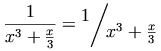
下例展示了斜式(bevelled)分数:
<mfrac>
<mn> 1 </mn>
<mrow>
<msup>
<mi> x </mi>
<mn> 3 </mn>
</msup>
<mo> + </mo>
<mfrac>
<mi> x </mi>
<mn> 3 </mn>
</mfrac>
</mrow>
</mfrac>
<mo> = </mo>
<mfrac bevelled="true">
<mn> 1 </mn>
<mrow>
<msup>
<mi> x </mi>
<mn> 3 </mn>
</msup>
<mo> + </mo>
<mfrac>
<mi> x </mi>
<mn> 3 </mn>
</mfrac>
</mrow>
</mfrac>
更通用的示例:
<mfrac>
<mrow>
<mn> 1 </mn>
<mo> + </mo>
<msqrt>
<mn> 5 </mn>
</msqrt>
</mrow>
<mn> 2 </mn>
</mfrac>
这些元素构造根式。msqrt 元素用于平方根,而 mroot
元素用于带指标的根式,例如立方根。这些元素的语法为:
<msqrt> base </msqrt>
<mroot> base index </mroot>
mroot 元素要求恰好 2 个参数。然而,msqrt
接受单一参数,该参数可能是由多个子元素构成的推断 mrow;见 3.1.3 必需参数。
mroot 元素在 index 内将 scriptlevel 增加 2,并将 displaystyle 设为
false,但在 base 内保持这两个属性不变。msqrt 元素在其参数内不改变这两个属性。(参见 3.1.6 Displaystyle 与 Scriptlevel。)
注意在 RTL 方向性中,根号从右侧开始,而对于 mroot,指标也位于右侧。
msqrt 与 mroot 元素接受 3.1.9 呈现元素共有的属性
中列出的属性。根号与上横线应使用 mathcolor 指定的颜色绘制。
平方根与立方根示例
<mrow>
<mrow>
<msqrt>
<mi>x</mi>
</msqrt>
<mroot>
<mi>x</mi>
<mn>3</mn>
</mroot>
<mrow>
<mo>=</mo>
<msup>
<mi>x</mi>
<mrow>
<mrow>
<mn>1</mn>
<mo>/</mo>
<mn>2</mn>
</mrow>
<mo>+</mo>
<mrow>
<mn>1</mn>
<mo>/</mo>
<mn>3</mn>
</mrow>
</mrow>
</msup>
</mrow>
<mstyle>mstyle 元素用于对其内容的渲染做样式更改。
作为一个呈现元素,它接受 3.1.9
呈现元素共有的属性 中描述的属性。
此外,它可以接受任何其它呈现元素所接受的属性,但不包括下文所述的某些属性。
mstyle 元素接受单个参数,该参数可能是由多个子元素构成的推断 mrow;见 3.1.3 必需参数。
大致而言,mstyle 元素的效果是改变其包含元素的某个属性的默认值。样式更改以若干方式工作,取决于属性默认值的指定方式。情况如下:
有些属性(例如 displaystyle 或 scriptlevel)在未显式设置时从周围上下文继承。在 mstyle
上指定此类属性会设置其子元素将继承的值。除非子元素覆盖该继承值,否则它会传递给子元素,然后继续传递。若子元素通过显式属性设置或自动方式(如对 scriptlevel 常见的那样)覆盖它,则新的(覆盖的)值会传给该元素的子孙,除非再次被覆盖。
其它属性(例如 linethickness 在 mfrac
上)具有通常不继承的默认值。也就是说,如果在 mfrac 元素上未设置 linethickness,它通常会使用默认值 medium,即便它被包含在一个设置了该属性的更大的 mfrac 元素中。对于这类属性,在 mstyle
上指定一个值会改变该属性在其作用域内的默认值。其净效果是,用 mstyle
设置该属性值会传播该更改到它所包含的所有元素(直接或间接),除非个别元素显式覆盖该值。与继承属性不同,被显式覆盖的元素的子孙不会因覆盖而影响该属性在其内部的默认值。注意:在
[MathML-Core] 中不支持通过 mstyle 设置这些属性。
另一组属性(例如 stretchy 与 form)是从运算符词典信息、在包含的 mrow
中的位置及其它类似数据计算得出。对于这些属性,外层 mstyle 指定的值会覆盖通常计算出的值。注意:在
[MathML-Core] 中不支持通过 mstyle 设置这些属性。
注意,从 mstyle
以任意方式继承的属性值仅当该后代元素没有由该后代元素自身给出该属性值时才影响该后代元素。对任何显式设置该属性的元素,显式指定的值覆盖继承值。唯一的例外是当该属性文档中说明为对该元素上下文或渲染环境所继承值进行增量更改时。
另请注意,上述关于 mstyle 设置的继承与非继承属性的区别仅在该属性在 mstyle 内容中的某些元素上被同时设置且这些元素的子孙也设置该属性时才重要。因此对于像 mathsize 这类只能设置在标记元素(或 mstyle
本身)上的属性,它从不会受此影响。
MathML 指定,当在 mstyle 元素上给出 height、depth 或 width 时,它们仅适用于 mspace 元素,而不作用于 mglyph、mpadded 或 mtable 的对应属性。类似地,当在 mstyle 上指定 rowalign 或 columnalign 时,它们仅适用于
mtable,而不适用于 mtr、mtd 与 maligngroup。当使用 mstyle 设置 lspace 属性时,它仅适用于 mo 元素,而不适用于 mpadded。为一致性,mpadded 的 voffset 属性不能在 mstyle 上设置。当使用 mstyle 设置 align 属性时,它仅适用于 munder、mover 与 munderover 元素,而不适用于 mtable 与 mstack 元素。mglyph 的 src 与 alt,以及 maction 的 actiontype,不能在 mstyle 上设置。
作为呈现元素,mstyle 可以直接接受 mathcolor 与
mathbackground 属性。因此,mathbackground 指定用于填充 mstyle
元素自身包围盒的颜色;它并不指定默认背景色。
在连分数中,嵌套的分数不应收缩,而应保持相同大小。可以通过为每个 mfrac 的子元素使用 mstyle 重置 displaystyle 与 scriptlevel 来实现,如下所示:
<mrow>
<mi>π</mi>
<mo>=</mo>
<mfrac>
<mstyle displaystyle="true" scriptlevel="0"> <mn>4</mn> </mstyle>
<mstyle displaystyle="true" scriptlevel="0">
<mn>1</mn>
<mo>+</mo>
<mfrac>
<mstyle displaystyle="true" scriptlevel="0">
<msup> <mn>1</mn> <mn>2</mn> </msup>
</mstyle>
<mstyle displaystyle="true" scriptlevel="0">
<mn>2</mn>
<mo>+</mo>
<mfrac>
<mstyle displaystyle="true" scriptlevel="0">
<msup> <mn>3</mn> <mn>2</mn> </msup>
</mstyle>
<mstyle displaystyle="true" scriptlevel="0">
<mn>2</mn>
<mo>+</mo>
<mfrac>
<mstyle displaystyle="true" scriptlevel="0">
<msup> <mn>5</mn> <mn>2</mn> </msup>
</mstyle>
<mstyle displaystyle="true" scriptlevel="0">
<mn>2</mn>
<mo>+</mo>
<mo>⋱</mo>
</mstyle>
</mfrac>
</mstyle>
</mfrac>
</mstyle>
</mfrac>
</mstyle>
</mfrac>
</mrow>
<merror>merror
元素将其内容作为一个错误信息
来显示。例如,可以通过将内容显示为红色、闪烁或改变背景色来实现。其内容可以是任意表达式或表达式序列。
merror 接受单个参数,该参数可能是由多个子元素构成的推断 mrow;见
3.1.3 必需参数。
此元素的意图是为从其它输入生成 MathML 的程序提供一种标准方式来报告其输入中的语法错误。鉴于预计会开发用于解析便于手工输入的语法并生成 MathML 的预处理器,重要的是它们能够在某一位置指示发生语法错误。见 D.2 错误处理。
建议的用法是:预处理器在遇到错误时,用包含错误描述的 merror
元素替换其输入中有问题的部分,同时尽可能正常处理周围的表达式。如此一来,错误信息将显示在原本有错误输入的位置,便于作者从渲染的输出中判断输入中哪一部分有误。
此处并未建议特定的错误消息格式,但像其它程序的错误信息一样,其格式应旨在尽可能清楚地向查看渲染错误信息的人说明输入哪里有误以及如何修复。如果有错误的输入包含格式正确的子段,预处理器可以正常预处理这些子段并将其包含在错误信息中(作为
merror 元素的内容),利用 merror 可以包含任意 MathML
表达式的能力,而不仅仅是文本。
merror 元素接受 3.1.9 呈现元素共有的属性 中列出的属性。
如果某个 MathML 语法检查预处理器接收到如下输入
<mfraction>
<mrow> <mn> 1 </mn> <mo> + </mo> <msqrt> <mn> 5 </mn> </msqrt> </mrow>
<mn> 2 </mn>
</mfraction>
其中包含非 MathML 元素 mfraction
(可能应为 MathML 元素 mfrac),预处理器可能生成如下错误信息:
<merror>
<mtext> Unrecognized element: mfraction; arguments were: </mtext>
<mrow> <mn> 1 </mn> <mo> + </mo> <msqrt> <mn> 5 </mn> </msqrt> </mrow>
<mtext> and </mtext>
<mn> 2 </mn>
</merror>
注意在此例中,预处理器的输入并非有效的 MathML,但其输出的错误信息是有效的 MathML。
<mpadded>
mpadded 元素以与其子内容相同的方式渲染该内容,但根据 mpadded
的属性修改子元素包围盒的尺寸及其内容的相对定位点。它不会对内容进行缩放(伸展或收缩)。该元素名反映了 mpadded
典型用法是向其内容周围添加填充或额外空白。然而,mpadded 也可用于更一般的尺寸与定位调整,有些组合(例如负填充)可能导致
mpadded 的内容与相邻内容发生重叠。有关若干潜在陷阱的警告见 [MathML-Notes]。
mpadded 元素接受单个参数,该参数可能是由多个子元素构成的推断 mrow;见 3.1.3 必需参数。
建议听觉渲染器基于表示水平空间的属性(width 与 lspace)来增加或缩短时间延迟。
mpadded 元素除接受 3.1.9 呈现元素共有的属性 中指定的属性外,还接受下表所列属性。
| Name | values | default |
| height | length | 同内容 |
设置或增量设置 mpadded 元素的高度。详见下文讨论。
|
||
| depth | length | 同内容 |
设置或增量设置 mpadded 元素的深度。详见下文讨论。
|
||
| width | length | 同内容 |
设置或增量设置 mpadded 元素的宽度。详见下文讨论。
|
||
| lspace | length | 0em |
| 设置子内容的水平位置。详见下文讨论。 | ||
| voffset | length | 0em |
| 设置子内容的垂直位置。详见下文讨论。 | ||
尽管 [MathML-Core] 支持上述属性,但它仅允许值为有效的 <length-percentage>。如在
length 所述,MathML 4 扩展该语法以允许 namedspace。
MathML 3 还允许额外的扩展:
<length-percentage>
语法实现,例如:height="calc(100%+10pt)"。height、depth 与
width。这些在 MathML 4 中不再支持,但主要用例可通过百分比值解决,例如
height="0.5height" 等价于 height="50%"。
这些属性指定 mpadded 元素的包围盒的尺寸相对于其子内容包围盒的尺寸,并指定子内容相对于 mpadded
元素自然定位的定位点的位置。由这些属性决定的排版布局参数在下一小节中描述。根据属性值的形式,维度可以被设置为新值,或相对于子内容的相应维度指定。值可以使用所谓的伪单位作为子内容正常渲染各维度的倍数或百分比给出,或者可以使用标准单位直接设置,参见
2.1.5.2 长度值属性。
对应的维度被设置为以下长度值。指定会产生负值的长度对这些属性具有与将属性设为零相同的效果。换言之,mpadded
元素的有效包围盒始终具有非负的维度。然而,lspace 与 voffset 这类相对定位属性允许负值。
mpadded
元素的内容定义了一个数学记法片段,例如字符、分数或表达式,该片段可被视为一个具有自然定位点并相对于其自然包围盒定位的单一排版元素。
mpadded 元素的包围盒尺寸定义为其内容包围盒的尺寸,除非被 mpadded 元素的 height、depth 与 width 属性修改。子内容的自然定位点位于与
mpadded 元素的自然定位点重合的位置,除非被 lspace 与
voffset 属性修改。因此,mpadded
的尺寸属性可以用来扩展或缩小其内容的表观包围盒,而位置属性可以用来相对于包围盒移动内容(从而也影响相邻元素)。注意 MathML
并未定义“墨迹”、“包围盒”与定位点之间的精确关系,这些是实现相关的。因此,mpadded 属性的绝对值在实现间可能不可移植。
height 属性指定 mpadded 元素包围盒基线以上的垂直范围。增大
height 会增加 mpadded
元素的基线与上方内容之间的空间,并在子内容渲染上方引入填充。减小 height
会减少基线与上方内容之间的空间,移除子内容上方的空间。减小 height 可能导致位于 mpadded 元素上方的内容与子内容渲染重叠,应尽量避免。
depth 属性指定 mpadded 元素包围盒基线以下的垂直范围。增大
depth 会增加基线与下方内容之间的空间,并在子内容渲染下方引入填充。减小 depth 会减少基线与下方内容之间的空间,并移除子内容下方的空间。减小 depth 可能导致位于 mpadded
元素下方的内容与子内容渲染重叠,应尽量避免。
width 属性指定 mpadded
元素的定位点与后续内容定位点之间的水平距离。增大 width 会增加该定位点与随后内容之间的空间,并在子内容渲染后引入填充。减小
width 会减少定位点与随后内容之间的空间,并移除子内容渲染后的空白。将 width 设为零会使随后内容位于 mpadded 元素的定位点处。减小
width 通常应避免,因为它可能导致随后内容的重印。
lspace 属性(“前导”空白;见 3.1.5.1 数学公式的整体方向性)指定子内容定位点相对于 mpadded 元素定位点的水平位置。默认情况下二者重合,因此 lspace
的绝对值与相对值具有相同效果。正值会增加前一内容与子内容之间的空间,并在子内容渲染前引入填充。负值会减少前一内容与子内容之间的空间,可能导致前一内容与子内容发生重印,应尽量避免。注意
lspace 不影响 mpadded 元素的 width,因此 lspace
也会影响子内容与随后内容之间的空间,可能导致与随后内容重印,除非相应调整 width。
voffset 属性指定子内容定位点相对于 mpadded
元素定位点的垂直位置。正值会将子内容渲染抬高到基线之上;负值会将子内容渲染降低到基线之下。在任一情况下,voffset
可能导致与邻近内容重印,应尽量避免。注意 voffset 不影响 mpadded 的 height 或 depth,因此 voffset
也会影响子内容与邻近内容之间的空间,除非相应调整 height 或 depth。
MathML 渲染器应确保,除了属性的影响之外,将某个 mpadded 元素替换为具有相同内容的 mrow 元素时,其内容与周围 MathML 元素之间的相对间距不会被修改,即便在 mpadded 元素内发生换行。MathML 并未定义 mpadded
的非默认属性值如何与换行算法相互作用。
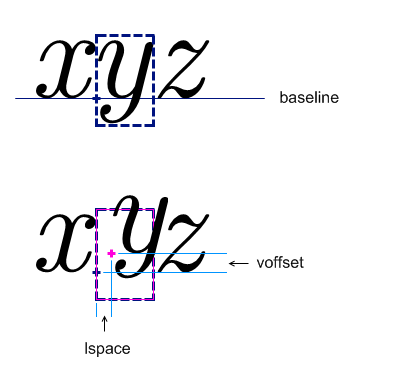
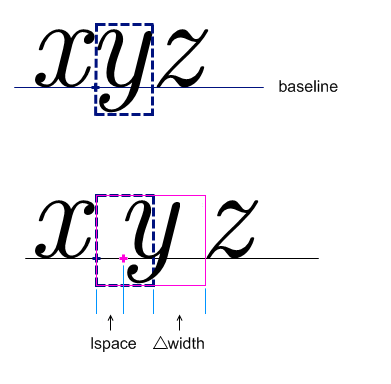
下面示例说明了尺寸与位置属性的效果。下图示例展示了如何使用 lspace 与 voffset 在不修改 mpadded
包围盒的情况下移动子内容的位置。
对应的 MathML 为:
<mrow>
<mi>x</mi>
<mpadded lspace="0.2em" voffset="0.3ex">
<mi>y</mi>
</mpadded>
<mi>z</mi>
</mrow>
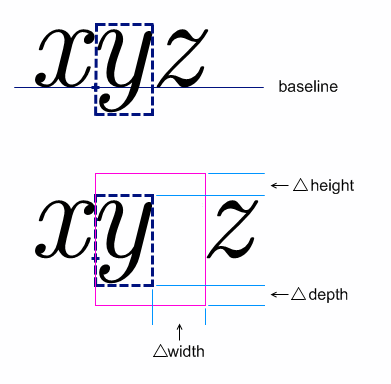
下图演示使用 width、height 与 depth 修改 mpadded
包围盒而不改变子内容相对位置的用法。
对应的 MathML 为:
<mrow>
<mi>x</mi>
<mpadded width="190%" height="calc(100% +0.3ex)" depth="calc(100% +0.3ex)">
<mi>y</mi>
</mpadded>
<mi>z</mi>
</mrow>
最后一张图示例说明 mpadded 的通用用法:同时修改包围盒与子内容的相对位置。
对应的 MathML 为:
<mrow>
<mi>x</mi>
<mpadded lspace="0.3em" width="calc(100% +0.6em)">
<mi>y</mi>
</mpadded>
<mi>z</mi>
</mrow>
<mphantom>mphantom 元素以不可见的方式渲染,但保留其内容若正常渲染时的相同尺寸与其它维度,包括基线位置。mphantom 可用于通过不可见复制子表达式来对表达式的部分进行对齐。
mphantom 元素接受单个参数,该参数可能是由多个子元素构成的推断 mrow;见 3.1.3 必需参数。
注意可以将 mphantom 与 mpadded 同时包裹在某个 MathML
表达式周围,例如 <mphantom><mpadded attribute-settings>
... </mpadded></mphantom>,以在改变尺寸的同时使其不可见。
MathML 渲染器应确保,当将某个 mphantom 元素替换为具有相同内容的 mrow 元素时,其内容与周围 MathML 元素之间的相对间距保持不变。即便在 mphantom 内发生换行时也应如此。
为上述原因,mphantom 并不 被自动视为类空白元素(见 3.2.7 空白 <mspace/>),除非其内容本身为类空白。这是因为运算符间距会受到相邻元素是否为类空白的影响。即便如此,关于类空白元素合法分组的警告可能也适用于
mphantom 的使用。
mphantom 元素接受 3.1.9 呈现元素共有的属性 中列出的属性(其中 mathcolor 无效)。
存在一种情形,之前关于渲染 mphantom 的规则可能不会产生期望效果。当 mphantom 包裹在某个 mrow 的参数子序列周围时,该子序列内的
mo 元素的 form 属性的默认确定可能改变(见 3.2.5 运算符、定界符、分隔符或重音 中关于
form 默认值的描述)。在这种情况下,可能需要为该 mo
显式添加 form 属性。下例说明了这一点。
在下例中,使用 mphantom 来确保分数的分子与分母对应部分对齐:
<mfrac>
<mrow>
<mi> x </mi>
<mo> + </mo>
<mi> y </mi>
<mo> + </mo>
<mi> z </mi>
</mrow>
<mrow>
<mi> x </mi>
<mphantom>
<mo form="infix"> + </mo>
<mi> y </mi>
</mphantom>
<mo> + </mo>
<mi> z </mi>
</mrow>
</mfrac>
这将渲染成类似下图的形式
而不是
在 mphantom 内的 mo 元素上显式设置 form="infix" 可以将其 form 属性设为在没有包裹的情况下本来应有的值。这是必要的,否则 +
将被解释为前缀运算符,可能导致略有不同的间距。
或者,可通过不显式设置属性而避免该问题:为每个参数将 <mo>+</mo> 与
<mi>y</mi> 分别用自己的 mphantom 元素包裹,如下所示:
<mfrac>
<mrow>
<mi> x </mi>
<mo> + </mo>
<mi> y </mi>
<mo> + </mo>
<mi> z </mi>
</mrow>
<mrow>
<mi> x </mi>
<mphantom>
<mo> + </mo>
</mphantom>
<mphantom>
<mi> y </mi>
</mphantom>
<mo> + </mo>
<mi> z </mi>
</mrow>
</mfrac>
mfenced 元素提供了一种便捷形式来表达常见的包含定界符(如花括号、方括号与圆括号)的构造,可在参数之间包含分隔符(例如逗号)。
例如 <mfenced> <mi>x</mi> </mfenced> 渲染为 (x)
,并等价于
<mrow> <mo> ( </mo> <mi>x</mi> <mo> ) </mo> </mrow>
且 <mfenced> <mi>x</mi> <mi>y</mi> </mfenced>
渲染为 (x, y)
,并等价于
<mrow>
<mo> ( </mo>
<mrow> <mi>x</mi> <mo>,</mo> <mi>y</mi> </mrow>
<mo> ) </mo>
</mrow>
个别的定界符或分隔符用 mo 元素表示,如 3.2.5 运算符、定界符、分隔符或重音 所述。因此,任何 mfenced 元素都完全等价于下文所述的展开形式。
支持此建议的渲染器必须以完全相同的方式渲染上述任一形式。注意虽然 mfenced 对作者或创作软件更为方便,但仅有使用展开形式的
mrow 在 [MathML-Core] 中被支持。
一般而言,mfenced 元素可以包含零个或多个参数,并将在一个 mrow
中用定界符包围它们;若有多个参数,它将在相邻参数之间插入分隔符,使用额外的嵌套 mrow 将参数与分隔符正确分组(见 3.3.1
水平分组子表达式
<mrow>,
<a>)。下面给出一般的展开形式。定界符与分隔符默认分别为圆括号与逗号,但可以如下表所示通过属性更改。
mfenced 元素除接受 3.1.9 呈现元素共有的属性 中指定的属性外,还接受下表所列属性。定界符与分隔符应使用 mathcolor 指定的颜色绘制。
| Name | values | default |
| open | string | ( |
指定开括符。由于其用作 mo 元素的内容,任何空白会按 2.1.7 输入空白折叠 的规则被修整与折叠。
|
||
| close | string | ) |
指定闭括符。由于其用作 mo 元素的内容,任何空白会按 2.1.7 输入空白折叠 的规则被修整与折叠。
|
||
| separators | string | , |
指定一系列零个或多个分隔字符,可选地由空白分隔。每对参数之间用相应的分隔符分隔(最后一个参数后不插入分隔符)。若分隔符数量过多,超出的被忽略;若不足,则重复使用最后一个分隔符。separators 中的任何空白都会被忽略。
|
||
一个带有所有属性显式指定的通用 mfenced 元素如下:
<mfenced open="opening-fence"
close="closing-fence"
separators="sep#1 sep#2 ... sep#(n-1)" >
arg#1
...
arg#n
</mfenced>
在 RTL 方向性上下文中,由于初始文本方向为 RTL,open 与 close 属性中的字符若存在镜像对应,则会以镜像形式渲染。特别是,默认值在 LTR 与 RTL 环境下都会正确渲染为带括号的序列。
以上一般的 mfenced 等价于下述展开形式:
<mrow>
<mo fence="true"> opening-fence </mo>
<mrow>
arg#1
<mo separator="true"> sep#1 </mo>
...
<mo separator="true"> sep#(n-1) </mo>
arg#n
</mrow>
<mo fence="true"> closing-fence </mo>
</mrow>
每个参数(除最后一个外)后跟一个分隔符。为了正确分组而添加了内部 mrow,如 3.3.1 水平分组子表达式 所述。
当只有一个参数时,上述形式没有分隔符;由于 <mrow> arg#1 </mrow> 等价于
arg#1,该情形也等同于:
<mrow>
<mo fence="true"> opening-fence </mo>
arg#1
<mo fence="true"> closing-fence </mo>
</mrow>
若分隔字符过多,则多余的被忽略。若提供了分隔符字符但不足以覆盖所有所需分隔位,则重复使用最后一个分隔符。因此,默认的 separators="," 等价于 separators=",,"、separators=",,,"
等。如果未提供任何分隔字符但需要分隔(例如 separators=" " 或 ""
且参数超过一个),则不插入任何分隔符元素——即,元素 <mo separator="true"> sep#i </mo>
完全省略。注意这与插入内容为空的 mo 元素不同。
最后,对于无参数的情形,即
<mfenced open="opening-fence"
close="closing-fence"
separators="anything" >
</mfenced>
其等价的展开形式被定义为只在一个 mrow 中包含括号:
<mrow>
<mo fence="true"> opening-fence </mo>
<mo fence="true"> closing-fence </mo>
</mrow>
注意并非所有“带定界的表达式”都能用 mfenced 编码。此类例外包括那些使用被修饰的分隔符或定界符或以 mstyle
包围的定界表达式、缺失或额外的分隔符或定界符、或具有多个内容字符的分隔符。在这些情形下,需要使用相应修改的展开形式来编码表达式。正如上文所述,即使不必要,直接使用展开形式也是允许的。特别地,作者不能保证
MathML 预处理器不会将 mfenced 替换为等价的展开形式。
注意上述等价的展开形式在 mo
元素上包含了识别它们为定界符或分隔符的属性。由于最常用的定界符与分隔符在运算符词典中已以这些属性存在,作者在直接使用展开形式时通常无需显式指定这些属性。此外,默认的 form 属性规则(见 3.2.5 运算符、定界符、分隔符或重音)使开闭定界符被有效赋予 form="prefix" 与 form="postfix",分隔符被赋予 form="infix"。
注意不要将 mfenced 与例如 +
作为分隔符一起使用,来缩写把 +
当作普通运算符的表达式,例如:
<mrow>
<mi>x</mi> <mo>+</mo> <mi>y</mi> <mo>+</mo> <mi>z</mi>
</mrow>
这是错误的,因为这些 + 将被视为分隔符,而非中缀运算符。也就是说,它将如同被标注为
<mo separator="true">+</mo> 一样渲染,可能因此不恰当地呈现。
<mfenced>
<mrow>
<mi> a </mi>
<mo> + </mo>
<mi> b </mi>
</mrow>
</mfenced>
注意上述 mrow 是必要的,以便 mfenced
只有一个参数。若省略该 mrow,将错误渲染为 (a, +, b)
。
<mfenced open="[">
<mn> 0 </mn>
<mn> 1 </mn>
</mfenced>
<mrow>
<mi> f </mi>
<mo> ⁡<!--ApplyFunction--> </mo>
<mfenced>
<mi> x </mi>
<mi> y </mi>
</mfenced>
</mrow>
menclose 元素将其内容渲染在由其 notation
属性指定的包围记法中。menclose 接受单个参数,该参数可能是由多个子元素构成的推断 mrow;见 3.1.3 必需参数。
menclose 元素接受下表列出的属性,除此之外还接受在 3.1.9 呈现元素共有的属性 中指定的属性。
记法应使用由 mathcolor 指定的颜色绘制。
notation 允许的取值是开放式的。
符合规范的渲染器可以忽略它们不支持的任何值,尽管鼓励渲染器尽可能实现下文列出的值。
| Name | values | default |
| notation | (actuarial | phasorangle | box | roundedbox | circle |
left | right
| top | bottom |
updiagonalstrike | downdiagonalstrike | verticalstrike | horizontalstrike | northeastarrow
| madruwb | text ) +
|
不绘制 |
指定一个以空格分隔的记法列表,用于包围子元素。下文给出每种记法的描述。
MathML 4 弃用 longdiv 与 radical 的使用。
这些记法分别重复了由 mlongdiv 与 msqrt
提供的功能;应改用那些元素。
默认值已更改:如果未给出 notation,
或者其为空字符串,则 menclose 不应绘制任何内容。
比较为 ASCII 不区分大小写, 允许所有匹配字符串作为值。 |
||
可以为 notation 指定任意数量的以空白分隔的值;所有被 MathML 渲染器理解的值都应被渲染。
每一种记法应当像其它记法不存在那样单独渲染;它们不应相互嵌套。例如,
notation="circle box" 应该在
menclose 的内容周围同时绘制圆与矩形;圆与矩形可以重叠。下文第一个示例展示了这一点。
在预定义的记法中,只有 phasorangle 会受方向性的影响(见 3.1.5.1 数学公式的整体方向性):
当 notation 指定为
actuarial 时,内容应被精算符号包围。使用值 top right 也可以获得类似结果。
值 box、
roundedbox 与 circle
应按其含义包围内容。盒子或圆与内容之间的距离由 MathML 未加以规定,由渲染器决定。实践中,水平方向两侧各约 0.4em、垂直方向约 0.5ex 的填充通常效果良好。
值 left、
right、top 与
bottom 应在内容的相应侧绘制线条。值 northeastarrow、
updiagonalstrike、
downdiagonalstrike、verticalstrike
与 horizontalstrike 应将相应的划线叠加在 menclose 的内容上,例如 updiagonalstrike
应从左下角到右上角划线,等等。
值 northeastarrow 是推荐实现的值,因为它可用于实现 TeX 的 \cancelto 命令。如果渲染器为
menclose 实现了其它箭头,建议为一致性与标准化,从下列完整名称集中选择箭头名称:
uparrow
rightarrow
downarrow
leftarrow
northwestarrow
southwestarrow
southeastarrow
northeastarrow
updownarrow
leftrightarrow
northwestsoutheastarrow
northeastsouthwestarrow
值 madruwb 应生成表示阿拉伯阶乘的包围记法(“madruwb” 是阿拉伯语 مضروب 的音译,表示阶乘)。
这在下面的第三个示例中有展示。
menclose 元素的基线是其子元素的基线(子元素可能是一个隐含的 mrow)。
一个使用多个记法的示例是
<menclose notation='circle box'>
<mi> x </mi><mo> + </mo><mi> y </mi>
</menclose>
使用 menclose 表示精算记法的示例是
<msub>
<mi>a</mi>
<mrow>
<menclose notation='actuarial'>
<mi>n</mi>
</menclose>
<mo>⁣<!--InvisibleComma--></mo>
<mi>i</mi>
</mrow>
</msub>
用于电路分析的 phasorangle 示例是:
<mi>C</mi>
<mrow>
<menclose notation='phasorangle'>
<mrow>
<mo>−</mo>
<mfrac>
<mi>π</mi>
<mn>2</mn>
</mfrac>
</mrow>
</menclose>
</mrow>
madruwb 的示例是:
<menclose notation="madruwb">
<mn>12</mn>
</menclose>
本节描述的元素将一个或多个脚本定位在一个基表达式的周围。将各种类型的脚本和修饰附加到符号上是数学记法中非常常见的做法。对于纯粹的视觉布局,一个通用元素就足以将脚本和修饰放置在给定基的任何传统脚本位置上。然而,为了更好地捕捉常见记法的抽象结构,MathML 提供了若干更专用的脚本元素。
除了下/上标元素之外,MathML
还有放置在基之上和基之下的上方脚本与下方脚本元素。这些元素可用于在大型运算符上放置极限,或在基上方或下方放置重音和线条。重音的渲染规则与上/下脚本不同,这一差异可以通过下文相应部分所述的 accent 与 accentunder 属性来控制。
脚本的渲染受 scriptlevel 和 displaystyle
属性影响,这些属性是每个 MathML 表达式渲染过程继承的环境的一部分,详见 3.1.6 Displaystyle and Scriptlevel。
MathML 还提供了用于附加张量指标的元素。张量指标不同于普通的下标与上标,因为它们必须在垂直列中对齐。同时,所有上标应当基线对齐,所有下标也应当基线对齐。张量指标也可以出现在前置脚的位置。注意普通脚本位于基之后(在 LTR 环境中在右侧,在 RTL 环境中在左侧);而前置脚位于基之前(在 LTR(RTL)环境中为左侧(右侧))。
因为呈现元素用于描述表达式的抽象记法结构,所以在所有“脚本”元素中(即第一个参数表达式)被脚本化的基表达式应当是被脚本化的整个表达式,而不仅仅是末尾字符。例如,下面的 应当写为:
<msup>
<mrow>
<mo> ( </mo>
<mrow>
<mi> x </mi>
<mo> + </mo>
<mi> y </mi>
</mrow>
<mo> ) </mo>
</mrow>
<mn> 2 </mn>
</msup>
<msub>msub 元素使用语法将下标附加到基上
<msub> base subscript </msub>
它在 subscript 内将 scriptlevel 增加 1,并将 displaystyle 设为 false,但在
base 内保持这两个属性不变。(参见 3.1.6 Displaystyle and Scriptlevel。)
msub 元素除接受 3.1.9 呈现元素共有的属性 中指定的属性外,还接受下表所列属性。
| Name | values | default |
| subscriptshift | length | 自动 |
| 指定将 subscript 的基线向下移动的最小量;默认由渲染代理使用其自身的定位规则。 | ||
<msup>msup 元素使用语法将上标附加到基上
<msup> base superscript </msup>
它在 superscript 内将 scriptlevel 增加 1,并将 displaystyle 设为 false,但在
base 内保持这两个属性不变。(参见 3.1.6
Displaystyle and Scriptlevel。)
msup 元素除接受 3.1.9 呈现元素共有的属性 中指定的属性外,还接受下表所列属性。
| Name | values | default |
| superscriptshift | length | 自动 |
| 指定将 superscript 的基线向上移动的最小量;默认由渲染代理使用其自身的定位规则。 | ||
<msubsup>msubsup 元素用于将下标和上标同时附加到基表达式。
<msubsup> base subscript superscript </msubsup>
它在 subscript 与 superscript 内将 scriptlevel 增加
1,并将 displaystyle 设为 false,但在
base 内保持这两个属性不变。(参见 3.1.6 Displaystyle and Scriptlevel。)
注意两者的位置:两脚本紧贴基定位,如下所示
与嵌套脚本错列定位的对比如下
;
后者可通过在 msup 内嵌套一个 msub 来实现。
msubsup 元素除接受 3.1.9 呈现元素共有的属性 中指定的属性外,还接受下表所列属性。
| Name | values | default |
| subscriptshift | length | 自动 |
| 指定将 subscript 的基线向下移动的最小量;默认由渲染代理使用其自身的定位规则。 | ||
| superscriptshift | length | 自动 |
| 指定将 superscript 的基线向上移动的最小量;默认由渲染代理使用其自身的定位规则。 | ||
msubsup
最常用于向标识符添加下/上标对,如上所示。然而,另一个重要用途是为某些大型运算符放置极限,这些运算符的极限传统上即使在 display style
下也显示在脚本位置。最常见的例子是积分。例如,
可表示为
<mrow>
<msubsup>
<mo> ∫ </mo>
<mn> 0 </mn>
<mn> 1 </mn>
</msubsup>
<mrow>
<msup>
<mi> ⅇ </mi>
<mi> x </mi>
</msup>
<mo> ⁢<!--InvisibleTimes--> </mo>
<mrow>
<mo> ⅆ </mo>
<mi> x </mi>
</mrow>
</mrow>
</mrow>
<munder>munder 元素使用语法将放在基下方的重音或极限附加到基上
<munder> base underscript </munder>
它在 underscript 内始终将 displaystyle 设为 false,但仅当 accentunder 为 false 时才将 scriptlevel 增加 1。在
base 内,它始终保持这两个属性不变。(参见 3.1.6 Displaystyle and Scriptlevel。)
如果 base 是具有 movablelimits=true 的运算符(或其修饰运算符的 mo 核心具有该属性),并且
displaystyle=false,那么
underscript 将以下标位置绘制。在这种情况下,忽略 accentunder 属性。这通常用于诸如
U+2211(实体 sum)之类符号的极限。
munder 元素除接受 3.1.9 呈现元素共有的属性 中指定的属性外,还接受下表所列属性。
| Name | values | default |
| accentunder | boolean | 自动 |
指定 underscript 是否作为“重音”绘制或作为极限绘制。重音以与基相同的大小绘制(不增加 scriptlevel),并且绘制得更接近基。
|
||
| align | "left" | "right" | "center" | center |
|
指定脚本在基下/基上是左对齐、居中还是右对齐。
如在 3.2.5.7.3 水平拉伸规则 中所述,被修饰运算符的 underscript
的核心应当拉伸以覆盖基,但对齐基于整个 underscript。
比较为 ASCII 不区分大小写, 允许所有匹配字符串作为值。 |
||
除非 underscript 是一个 mo 元素或一个被修饰的运算符,否则 accentunder 的默认值为 false。如果 underscript 是 mo 元素,则其 accent 属性的值用作 accentunder 的默认值。如果 underscript 是被修饰的运算符,则使用其核心 mo 元素的 accent
属性作为默认值。与所有属性一样,显式给定的值会覆盖默认值。
[MathML-Core] 不支持在 3.2.5
Operator, Fence, Separator or Accent
<mo> 上使用 accent 属性。为与 MathML Core 兼容,应在 munder
上设置 accentunder。
示例演示 accentunder 如何影响渲染:
<mrow>
<munder accentunder="true">
<mrow>
<mi> x </mi>
<mo> + </mo>
<mi> y </mi>
<mo> + </mo>
<mi> z </mi>
</mrow>
<mo> ⏟ </mo>
</munder>
<mtext> <!--nbsp-->versus <!--nbsp--></mtext>
<munder accentunder="false">
<mrow>
<mi> x </mi>
<mo> + </mo>
<mi> y </mi>
<mo> + </mo>
<mi> z </mi>
</mrow>
<mo> ⏟ </mo>
</munder>
</mrow>
<mover>mover 元素使用语法将放在基上方的重音或极限附加到基上
<mover> base overscript </mover>
它在 overscript 内始终将 displaystyle 设为 false,但仅当 accent 为 false 时才将 scriptlevel 增加 1。在
base 内,它始终保持这两个属性不变。(参见 3.1.6 Displaystyle and Scriptlevel。)
如果 base 是具有 movablelimits=true 的运算符(或其修饰运算符的 mo 核心具有该属性),并且
displaystyle=false,那么
overscript 将以上标位置绘制。在这种情况下,忽略 accent 属性。这通常用于诸如
U+2211(实体 sum)之类符号的极限。
mover 元素除接受 3.1.9 呈现元素共有的属性 中指定的属性外,还接受下表所列属性。
| Name | values | default |
| accent | boolean | 自动 |
指定 overscript 是否作为“重音”绘制或作为极限绘制。重音以与基相同的大小绘制(不增加 scriptlevel),并且绘制得更接近基。
|
||
| align | "left" | "right" | "center" | center |
|
指定脚本在基下/基上是左对齐、居中还是右对齐。
如在 3.2.5.7.3 水平拉伸规则 中所述,被修饰运算符的 overscript
的核心应当拉伸以覆盖基,但对齐基于整个 overscript。
比较为 ASCII 不区分大小写, 允许所有匹配字符串作为值。 |
||
重音与极限之间的差异在 示例 中有所展示。
accent 的默认值为 false,除非 overscript 是 mo 元素或被修饰的运算符(参见 3.2.5
Operator, Fence, Separator or Accent
<mo>)。如果 overscript 是
mo 元素,则其 accent 属性的值用作 mover 的 accent 的默认值。如果
overscript 是被修饰的运算符,则使用其核心 mo 元素的 accent 属性作为默认值。
[MathML-Core] 不支持在 3.2.5 Operator, Fence, Separator or Accent
<mo> 上使用 accent 属性。为与 MathML Core 兼容,应在 munder
上设置 accentunder。
两个示例演示 accent 如何影响渲染:
<mrow>
<mover accent="true">
<mi> x </mi>
<mo> ^ </mo>
</mover>
<mtext> <!--nbsp-->versus <!--nbsp--></mtext>
<mover accent="false">
<mi> x </mi>
<mo> ^ </mo>
</mover>
</mrow>
<mrow>
<mover accent="true">
<mrow>
<mi> x </mi>
<mo> + </mo>
<mi> y </mi>
<mo> + </mo>
<mi> z </mi>
</mrow>
<mo> ⏞ </mo>
</mover>
<mtext> <!--nbsp-->versus <!--nbsp--></mtext>
<mover accent="false">
<mrow>
<mi> x </mi>
<mo> + </mo>
<mi> y </mi>
<mo> + </mo>
<mi> z </mi>
</mrow>
<mo> ⏞ </mo>
</mover>
</mrow>
<munderover>
munderover 元素使用语法将同时放在基下方和基上方的重音或极限附加到基上
<munderover> base underscript overscript </munderover>
它在 underscript 与 overscript 内始终将 displaystyle 设为
false,但仅当相应的 accentunder 或
accent 为 false 时才将 scriptlevel 增加 1。在 base 内,它始终保持这两个属性不变。(参见 3.1.6 Displaystyle and
Scriptlevel。)
如果 base 是具有 movablelimits=true 的运算符(或其修饰运算符的 mo 核心具有该属性),并且
displaystyle=false,那么
underscript 与 overscript 分别以下标与上标位置绘制。在这种情况下,忽略 accentunder 与 accent 属性。这通常用于诸如
U+2211(实体 sum)之类符号的极限。
munderover 元素除接受 3.1.9 呈现元素共有的属性 中指定的属性外,还接受下表所列属性。
| Name | values | default |
| accent | boolean | 自动 |
指定 overscript 是否作为“重音”绘制或作为极限绘制。重音以与基相同的大小绘制(不增加 scriptlevel),并且绘制得更接近基。
|
||
| accentunder | boolean | 自动 |
指定 underscript 是否作为“重音”绘制或作为极限绘制。重音以与基相同的大小绘制(不增加 scriptlevel),并且绘制得更接近基。
|
||
| align | "left" | "right" | "center" | center |
|
指定脚本在基下/基上是左对齐、居中还是右对齐。
如在 3.2.5.7.3 水平拉伸规则 中所述,被修饰运算符的 underscript 与
overscript 的核心应当拉伸以覆盖基,但对齐基于整个 underscript 或 overscript。
比较为 ASCII 不区分大小写, 允许所有匹配字符串作为值。 |
||
munderover 元素用于替代单独的 munder 与 mover 元素,以便 underscript 与 overscript 相对于基在垂直方向上等距分布并且随基的倾斜而倾斜,如示例所示。
该示例展示了在 movablelimits=true
且处于 displaystyle(这时渲染与 msubsup
相同)时,将 munder 嵌套在 mover 内与使用 munderover 之间的区别。
<mstyle displaystyle="false">
<mover>
<munder>
<mo>∑</mo>
<mi>i</mi>
</munder>
<mi>n</mi>
</mover>
<mo>+</mo>
<munderover>
<mo>∑</mo>
<mi>i</mi>
<mi>n</mi>
</munderover>
</mstyle>
<mmultiscripts>,
<mprescripts/>
前置下标与张量记法由单个元素 mmultiscripts 表示,语法为:
<mmultiscripts>
base
(subscript superscript)*
[ <mprescripts/> (presubscript presuperscript)* ]
</mmultiscripts>
该元素允许表示任意数量的垂直对齐的下标/上标对,并附加到一个基表达式上。它同时支持后置脚与前置脚。缺失的脚本必须用表示空子项的有效空元素表示,例如 <mrow/>。(早期 MathML 版本曾使用 <none/>,但其等价于空的 <mrow/>。)所有上脚应当基线对齐,所有下脚也应当基线对齐。
前置脚是可选的,若存在则在后置脚之后给出。之所以这样排序,是因为与张量记法相比,前置脚较为少见。
参数序列由基(base)开始,随后是零个或多个垂直对齐的下标/上标对(以此顺序)代表所有后置脚。该列表可选地后跟一个空元素 mprescripts
及零个或多个垂直对齐的前置下标/前置上标对来代表所有前置脚。后置脚与前置脚的对列表在显示时按方向性上下文的顺序显示(即在 LTR
环境中为从左到右的顺序)。如果在某个位置不应呈现下标或上标,则应在该位置使用空元素 <mrow/>。对于每一对下标与上标,应当将该对内的元素在水平方向上向基对齐。也就是说,前置脚应当右对齐,而后置脚应当左对齐。
基、下标、上标、可选的分隔元素 mprescripts、前置下标与前置上标都是 mmultiscripts
的直接子表达式,即它们在表达树上处于同一层级。脚本参数是下标还是上标,或是前置下标还是前置上标,是由其出现在偶数还是奇数参数位置(忽略 mprescripts 本身)来决定的。第一个参数(基)视为位置 1。若未给出 mprescripts,参数总数必须为奇数;若给出,则为偶数。
空元素 mprescripts 仅允许作为 mmultiscripts
的直接子表达式。
与 msubsup 的属性相同。见 3.4.3.2
Attributes。
mmultiscripts 元素在其各个参数(除 base 外)内将 scriptlevel 增加 1,并将 displaystyle 设为
false,但在 base 内保持这两个属性不变。(参见 3.1.6 Displaystyle and
Scriptlevel。)
下面这个超几何函数的示例演示了前置与后置下标的用法:
<mrow>
<mmultiscripts>
<mi> F </mi>
<mn> 1 </mn>
<mrow/>
<mprescripts/>
<mn> 0 </mn>
<mrow/>
</mmultiscripts>
<mo> ⁡<!--ApplyFunction--> </mo>
<mrow>
<mo> ( </mo>
<mrow>
<mo> ; </mo>
<mi> a </mi>
<mo> ; </mo>
<mi> z </mi>
</mrow>
<mo> ) </mo>
</mrow>
</mrow>
下例展示了一个张量。在该示例中,k 与 l 是不同的指标。
<mmultiscripts>
<mi> R </mi>
<mi> i </mi>
<mrow/>
<mrow/>
<mi> j </mi>
<mi> k </mi>
<mrow/>
<mi> l </mi>
<mrow/>
</mmultiscripts>
下例演示了脚本向基对齐的行为:
<mmultiscripts>
<mi> X </mi>
<mn> 123 </mn>
<mn> 1 </mn>
<mprescripts/>
<mn> 123 </mn>
<mn> 1 </mn>
</mmultiscripts>
最后一个 mmultiscripts 的示例展示了如何以阿拉伯风格显示二项式系数:
<mstyle dir="rtl">
<mmultiscripts><mo>ل</mo>
<mn>12</mn><mrow/>
<mprescripts/>
<mrow/><mn>5</mn>
</mmultiscripts>
</mstyle>
矩阵、数组以及其它类表格的数学记法使用 mtable、
mtr 与
mtd 元素来标记。这些元素类似于 HTML 中的 table、tr 与 td 元素,
不同之处在于它们提供了用于交换图、块矩阵等所需的精细布局控制的专用属性。
虽然用于初等数学(例如加法与乘法)的二维布局在某种程度上类似于表格,但在重要方面存在差异。
出于布局与可访问性的原因,应使用在 3.6 初等数学 中讨论的
mstack 与 mlongdiv 元素来表示初等数学记法。
<mtable>
使用 mtable 元素来指定矩阵或表格。在 mtable
元素内部,只允许出现 mtr 元素。
具有比同一表中其它行更少列的表行(无论这些其它行是在其之前还是之后),实际上会在右侧(在 RTL 上下文中为左侧)用空的 mtd
元素填充,
以便每一行中的列数等于表中任何行的最大列数。注意,使用具有非默认 rowspan 或 columnspan 属性值的 mtd 元素可能会影响在后续 mtr 元素中为覆盖给定列数而应提供的 mtd 元素数量。
MathML 未指定表格布局算法。特别是,MathML 渲染器负责解决 width 属性与表宽度上的其它约束(例如为 columnwidth 属性指定的显式值以及表格单元内容的最小尺寸)之间的冲突。有关表格布局算法的讨论,请参见
层叠样式表,第 2 级。
mtable 元素除了接受在 3.1.9 呈现元素共有的属性 中列出的属性外,还接受下表所列的属性。
作为 mtable 的一部分绘制的任何线条应使用由 mathcolor
指定的颜色绘制。
| 名称 | 取值 | 默认 |
| align | ("top" | "bottom" | "center" | "baseline" | "axis"), rownumber? | axis |
指定表格相对于其环境的垂直对齐。
axis 意味着将表格的垂直中心对齐到环境的轴线。
(方程的轴线是排版者使用的一个对齐线。通常是减号所在的那一条线。)
center 与 baseline 都意味着将表格的中心对齐到环境的基线。
top 或 bottom
将表格的顶部或底部对齐到环境的基线。
如果 align 属性值以一个 rownumber 结尾,
指定的是该行(从顶部行起计数为 1)而不是整个表格按上述方式对齐,见下文例外说明。
如果 rownumber 为负数,则从底部计数行。
当 rownumber 超出范围或不是整数时,将被忽略。
如果指定了行号且对齐值为 baseline 或 axis,
则使用该行的基线或轴线进行对齐。注意,这仅在 rowalign
的值为 baseline 或 axis 时才良好定义;MathML 未规定当 rowalign 取其它值时如何进行 baseline 或 axis 对齐。
比较为 ASCII 不区分大小写, 允许所有匹配字符串作为值。 |
||
| rowalign | ("top" | "bottom" | "center" | "baseline" | "axis") + | baseline |
指定同一行内单元格相对于彼此的垂直对齐:
top 将行中每个条目的顶部对齐;
bottom 将单元格底部对齐;
center 将单元格居中;
baseline 将单元格的基线对齐;
axis 将各单元格的轴线对齐。
(关于多个值的说明见下文注释。)
比较为 ASCII 不区分大小写, 允许所有匹配字符串作为值。 |
||
| columnalign | ("left" | "center" | "right") + | center |
指定同一列内单元格相对于彼此的水平对齐:
left 将单元格左侧对齐;
center 将单元格居中;
right 将单元格右侧对齐。
(关于多个值的说明见下文注释。)
比较为 ASCII 不区分大小写, 允许所有匹配字符串作为值。 |
||
| alignmentscope | (boolean) + | true |
[该属性与对齐元素 maligngroup 与 malignmark 一并描述,见 3.5.4 对齐标记
<maligngroup/>, <malignmark/>。]
|
||
| columnwidth | ("auto" | length | "fit") + | auto |
指定列的宽度应如何确定:
auto 表示列应根据需要变宽;
显式长度表示该列应精确为该宽度,渲染器可通过换行或裁剪使该列内容适应;
fit 表示在从表宽中减去 auto 或固定宽度列后,余下的页面宽度在所有 fit 列之间平均分配。
如果留给 fit 列的空间不足以容纳其内容,渲染器可对这些列的内容进行换行或裁剪。
注意,当 columnwidth 指定为百分比时,该值是相对于表格的宽度,而不是相对于默认值(即
auto)的百分比。
也就是说,渲染器应尝试调整列宽,使其覆盖整个表格宽度的指定百分比。
(关于多个值的说明见下文注释。)
比较为 ASCII 不区分大小写, 允许所有匹配字符串作为值。 |
||
| width | "auto" | length | auto |
指定整个表格的期望宽度,供视觉用户代理使用。
当值为百分比时,该值相对于 MathML 渲染器可用的水平空间(即用于换行的当前目标宽度,参见 3.1.7 表达式的换行);这允许作者比如指定表格在显示区域中为全宽。
当值与 auto 字符串的 ASCII 不区分大小写匹配时,MathML
渲染器应根据其选择的布局算法从内容计算表格宽度。
注意:MathML 3 中允许无单位数字并将其类似处理为百分比值,但在 MathML 4 中不再推荐无单位数字。
|
||
| rowspacing | (length) + | 1.0ex |
| 指定在行之间添加多少空白。(关于多个值的说明见下文注释。) | ||
| columnspacing | (length) + | 0.8em |
| 指定在列之间应添加多少空白。 (关于多个值的说明见下文注释。) | ||
| rowlines | ("none" | "solid" | "dashed") + | none |
指定是否以及在何种样式下在各行之间添加线条:
none 表示不添加线条;
solid 表示实线;
dashed 表示虚线(虚线间隔由实现决定)。
(关于多个值的说明见下文注释。)
比较为 ASCII 不区分大小写, 允许所有匹配字符串作为值。 |
||
| columnlines | ("none" | "solid" | "dashed") + | none |
指定是否以及在何种样式下在各列之间添加线条:
none 表示不添加线条;
solid 表示实线;
dashed 表示虚线(虚线间隔由实现决定)。
(关于多个值的说明见下文注释。)
比较为 ASCII 不区分大小写, 允许所有匹配字符串作为值。 |
||
| frame | "none" | "solid" | "dashed" | none |
指定是否以及在何种样式下绘制表格的外框。
none 表示无外框;
solid 表示实线;
dashed 表示虚线(虚线间隔由实现决定)。
比较为 ASCII 不区分大小写, 允许所有匹配字符串作为值。 |
||
| framespacing | length, length | 0.4em 0.5ex |
指定当 frame 不为 none
时,表格与外框之间额外添加的间距。
第一个值指定左右的间距;
第二个值指定上下的间距。
|
||
| equalrows | boolean | false |
| 指定是否强制所有行具有相同的总高度。 | ||
| equalcolumns | boolean | false |
| 指定是否强制所有列具有相同的总宽度。 | ||
| displaystyle | boolean | false |
指定每个单元格内 displaystyle 的值(scriptlevel 不变);
参见 3.1.6
Displaystyle 与 Scriptlevel。
|
||
在上面对影响行(相应地列或行间/列间间隙)的属性说明中,记法 (...)+ 意味着可以为属性提供多个值,作为以空格分隔的列表(见 2.1.5
MathML 属性值)。
在此语境中,单一值表示用于所有行(或列或间隙)的值。
值列表按顺序应用于对应的行(或列或间隙),即从顶部行开始对于行,或根据方向性从第一列(左或右)开始对于列。
如果所需的行(或列或间隙)多于提供的值,则重复最后一个值以满足需要。
如果提供的值过多,则多余的被忽略。
注意,被线条占据的任何区域(frame、rowlines 与
columnlines)以及间距 framespacing、rowspacing 或 columnspacing 都不计入行或列的计算。
displaystyle 属性允许出现在 mtable
元素上以设置该属性的继承值。如果该属性不存在,mtable 元素将在表格元素内将 displaystyle 设为 false。(参见 3.1.6 Displaystyle 与
Scriptlevel。)
一个 3×3 单位矩阵可以表示如下:
<mrow>
<mo> ( </mo>
<mtable>
<mtr>
<mtd> <mn>1</mn> </mtd>
<mtd> <mn>0</mn> </mtd>
</mtr>
<mtr>
<mtd> <mn>0</mn> </mtd>
<mtd> <mn>1</mn> </mtd>
<mtd> <mn>0</mn> </mtd>
</mtr>
<mtr>
<mtd> <mn>0</mn> </mtd>
<mtd> <mn>1</mn> </mtd>
</mtr>
</mtable>
<mo> ) </mo>
</mrow>
注意括号必须显式表示;它们不是 mtable 元素渲染的一部分。这允许使用其它包围符(例如方括号)或不使用包围符。
<mtr>mtr 元素表示表格或矩阵中的一行。mtr 元素只允许作为 mtable 元素的直接子表达式,
并指定其内容应构成表格的一行。mtr 的每一个参数被放置在表格的不同列中,在 LTR 上下文中从最左列开始,在 RTL
上下文中从最右列开始。
如在 3.5.1 表格或矩阵
<mtable> 中所述,
当 mtr 元素比表中其它行短时,它们会被有效地用 mtd 元素填充。
mtr 元素除了接受在 3.1.9 呈现元素共有的属性 中列出的属性外,还接受下表所列的属性。
| 名称 | 取值 | 默认 |
| rowalign | "top" | "bottom" | "center" | "baseline" | "axis" | 继承 |
覆盖该行由包含的 mtable 上的 rowalign
属性指定的单元格垂直对齐方式。
比较为 ASCII 不区分大小写, 允许所有匹配字符串作为值。 |
||
| columnalign | ("left" | "center" | "right") + | 继承 |
覆盖该行由包含的 mtable 上的 columnalign
属性指定的单元格水平对齐方式。
比较为 ASCII 不区分大小写, 允许所有匹配字符串作为值。 |
||
MathML 的早期版本指定了用于编号方程的 mlabeledtr 元素。在 mlabeledtr 中,
第一项 mtd 表示方程编号,行中的其余元素表示被编号的方程。mtable
的 side 与 minlabelspacing
属性决定方程编号的位置。
该元素并未被广泛实现并且在当前版本中未指定,但在 遗留模式 中仍然有效。
在包含许多编号方程的较大文档中,自动编号变得很重要。虽然自动方程编号与自动解析方程编号引用超出 MathML 的范畴,但可以通过使用样式表或其它手段来解决这些问题。在 CSS
环境中,可以将一个空的 mtd 作为 mtr 的第一个子元素,并使用 CSS
计数器与生成内容来填充方程编号,例如使用如下 CSS:
body {counter-reset: eqnum;}
mtd.eqnum {counter-increment: eqnum;}
mtd.eqnum:before {content: "(" counter(eqnum) ")"}
<mtd>mtd 元素表示表格或矩阵中的一个项或单元格。mtd 元素仅允许作为
mtr 元素的直接子表达式。
mtd 元素接受单个参数,该参数可能是一个由多个子元素构成的推断 mrow;见
3.1.3 必需参数。
mtd 元素除了接受在 3.1.9 呈现元素共有的属性 中列出的属性外,还接受下表所列的属性。
| 名称 | 取值 | 默认 |
| rowspan | positive-integer | 1 |
指示该单元格应被视为占据指定数量的行。
在接下来的 rowspan-1 行中对应的 mtd 必须省略。
其解释与 HTML 表格中类似属性的解释一致。
|
||
| columnspan | positive-integer | 1 |
指示该单元格应被视为占据指定数量的列。
在随后的 rowspan-1 个 mtd 中必须省略相应单元格。
其解释与 HTML 表格中类似属性的解释一致。
|
||
| rowalign | "top" | "bottom" | "center" | "baseline" | "axis" | 继承 |
指定该单元格的垂直对齐方式,覆盖包含的 mrow 与 mtable 上指定的任何值。
参见 rowalign(在 mtable
上)。
比较为 ASCII 不区分大小写, 允许所有匹配字符串作为值。 |
||
| columnalign | "left" | "center" | "right" | 继承 |
指定该单元格的水平对齐方式,覆盖包含的 mrow 与 mtable 上指定的任何值。
参见 columnalign(在 mtable 上)。
比较为 ASCII 不区分大小写, 允许所有匹配字符串作为值。 |
||
malignmark 与 maligngroup 在
[MathML-Core] 中不受支持。
对于大多数用途,建议直接使用 mtable 列实现对齐。如下一节所述,这些元素可能在未来的 MathML
版本中进一步简化或移除。
对于现有使用 malignmark 的 MathML,提供了一个 Javascript 填充脚本(polyfill)。
除了一个重要的例外外,<maligngroup/> 与 <malignmark/> 的采用与实现都很少。
那个例外仅使用了对齐的基础功能。基于此,MathML 中的对齐被大大简化以符合当前用法并使未来的实现更简单。特别地,做出了以下简化:
<maligngroup/> 与 <malignmark/> 的属性。mtable、mtr 与
mlabeledtr 上的 groupalign 属性已被移除。
<malignmark/> 过去可以出现在任何位置(包括 token 元素内);现在仅允许出现在 <maligngroup/> 被允许的位置(见下文)。对齐标记是类空白元素(见 3.2.7 空白
<mspace/>),
可用于通过在指定的子表达式之间自动插入所需的水平空白量来垂直对齐 MathML 表达式列中的指定点。
下文讨论将使用一组联立方程的示例,要求对每一项的系数与变量进行竖直对齐,方法是在相应位置插入间距,如下所示:
| 8.44x | + | 55y | = | 0 |
| 3.1x | − | 0.7y | = | −1.1 |
如果上例中的表达式被排列在一列但未对齐,它们将显示为:
| 8.44x + 55.7y = 0 |
| 3.1x − 50.7y = −1.1 |
那些其部分需要对齐的表达式(上例中的每个方程)必须作为由 mtable 的一列中的表格元素(即作为 mtd 元素)提供。为避免混淆,以下部分中将使用“表格单元格”一词,而不是“表格元素”。
所有对齐元素之间的相互作用仅限于其所在的 mtable 列。即,每个由 mtable
指定的表格列作为一个“对齐作用域”,其中包含其内容产生的所有对齐效果。它也排除了该列自身的对齐元素与其可能包含的任何嵌套对齐作用域内的对齐元素之间的相互作用。
如果只有一个对齐点,也可选择使用 mo 元素上的换行与缩进属性来实现,如 3.1.7 表达式的换行 所述。
可以为 mtable 元素指定属性 alignmentscope=false,使其列不充当对齐作用域。本文节末对此有进一步讨论。否则,本节的讨论假定该属性的默认值为 true。
要对齐的表达式的每一部分应位于一个 maligngroup 中。
对齐点是紧随 maligngroup 元素之后的元素的左边缘(如果为 RTL 则为右边缘),除非 maligngroup 元素之间有 malignmark
元素。在这种情况下,跟随 malignmark 的元素的左边缘(RTL 则为右边缘)就是该组的对齐点。
如果 maligngroup 或 malignmark 出现在 mtable 外部,则其呈现宽度为零。
在上面的例子中,每个方程在每个系数、变量与左侧的运算符之前会有一个 maligngroup 元素,在 =
符号之前有一个,从而在右侧常数之前也有一个,因为这些部分应当被对齐。
一般来说,包含 n 个 maligngroup 元素的表格单元格包含 n 个对齐组,第 i 组由第 i 个 maligngroup 元素之后并在第 i+1
个之前的所有元素组成;表格单元格内容中不应有元素完全出现在其第一个 maligngroup 元素之前。
请注意,对齐组的划分并不必然与包含这些组的 MathML 表达式的嵌套结构一致——也就是说,允许一个对齐组由一个 mrow
的结尾、另一个的全部以及第三个的开始组成。例如在本节末给出的示例的 MathML 标记中可以看到这一点。
尽管对齐组不必与布局模板的嵌套表达式结构一致,但对于在表格单元格中允许 maligngroup 与 malignmark 元素的位置仍有约束。这些元素只能包含在下列类型的元素中(直接或间接),且这些元素本身也被包含在表格单元格内:
一个 mrow 元素,包括推断的 mrow(例如由具有多个子项的 mtd
元素形成的那种),但不包括通过 dir 属性改变方向的 mrow;
一个 mstyle 元素
,但不包括那些通过 dir 属性改变方向的;
一个 mphantom 元素;
一个 mfenced 元素;
一个 maction 元素,但仅检查其被选中的子表达式;
一个 semantics 元素。
这些限制旨在确保对齐可以无歧义地指定,同时避免诸如上方/下方脚本、根号与分数线等复杂情形。它们也确保了一个简单的算法就足以完成所需的对齐。
对于那些被划分为对齐组的表格单元格,它们的内容中的每个元素必须恰好属于一个对齐组,除了 上述列表中包含 maligngroup 元素的那些元素及这些 maligngroup
元素本身。这意味着在任何包含对齐组的表格单元格内,第一个完整的元素必须是一个 maligngroup
元素,尽管它之前可以有其它元素的起始标记。该要求消除了关于如何对齐第一个 maligngroup
元素之前的元素的潜在歧义,并且便于识别完全未被其列的对齐过程涉及的表格单元格。
并不要求同一列中被划分为对齐组的表格单元格各自包含相同数量的组。如果它们不相同,则对于那些组数少于同列其它单元格的单元格,会在右侧(RTL 情况下为左侧)有效地添加零宽的对齐组。
我们是否希望收紧此规则,使得所有行具有相同数量的 maligngroup 元素?
我们是否仍然希望允许如本节所述未包含 maligngroup 的行?
在某列中不包含对齐组的表达式应不含 maligngroup 元素。无对齐组的表达式仅使用适用于该整列的 columnalign
属性对齐。如果这样的表达式比包含对齐组的表格单元格所需的列宽更宽,则所有包含对齐组的单元格将作为该列内的一个整体被移动,移动方式由该列的 columnalign 属性决定。例如,可以在上述两条对齐方程之前插入另一表格行并包含用于标题的 mtext 元素,使用表格的默认 columnalign="center",得到:
| 带对齐变量的方程 | ||||||
| 8.44x | + | 55y | = | 0 | ||
| 3.1x | − | 0.7y | = | −1.1 | ||
或者,使用更短的标题,
| 一些方程 | ||||
| 8.44x | + | 55y | = | 0 |
| 3.1x | − | 0.7y | = | −1.1 |
在对齐组内(不包括完全包含在其内的其它对齐作用域)任意位置的 malignmark 元素会覆盖在 maligngroup 开始处的对齐。
malignmark 元素指示对齐点应位于随后元素的左边缘(RTL 情况下为右边缘)。
malignmark 元素可以出现在 token 内部吗?
当在对齐组内提供 malignmark 元素时,它应仅出现在允许用于 maligngroup 的元素内(见 3.5.4.3
指定对齐组)。
如果一个对齐组中存在多个 malignmark 元素,则除第一个之外的所有 malignmark 将被忽略。MathML
应用可能希望提供一种模式,在该模式下会对这种情形发出警告,但这并不是错误,且默认不应触发警告。其理由是在自动生成的数据中必须移除所有不必要的 malignmark 元素将很不方便。
上述规则足以解释在本节开头 本节 中给出的示例的 MathML 表示。
用 MathML 表示的一种方法是:
<mtable groupalign="{decimalpoint left left decimalpoint left left decimalpoint}">
<mtr>
<mtd>
<mrow>
<mrow>
<mrow>
<maligngroup/>
<mn> 8.44 </mn>
<mo> ⁢<!--InvisibleTimes--> </mo>
<maligngroup/>
<mi> x </mi>
</mrow>
<maligngroup/>
<mo> + </mo>
<mrow>
<maligngroup/>
<mn> 55 </mn>
<mo> ⁢<!--InvisibleTimes--> </mo>
<maligngroup/>
<mi> y </mi>
</mrow>
</mrow>
<maligngroup/>
<mo> = </mo>
<maligngroup/>
<mn> 0 </mn>
</mrow>
</mtd>
</mtr>
<mtr>
<mtd>
<mrow>
<mrow>
<mrow>
<maligngroup/>
<mn> 3.1 </mn>
<mo> ⁢<!--InvisibleTimes--> </mo>
<maligngroup/>
<mi> x </mi>
</mrow>
<maligngroup/>
<mo> - </mo>
<mrow>
<maligngroup/>
<mn> 0.7 </mn>
<mo> ⁢<!--InvisibleTimes--> </mo>
<maligngroup/>
<mi> y </mi>
</mrow>
</mrow>
<maligngroup/>
<mo> = </mo>
<maligngroup/>
<mrow>
<mo> - </mo>
<mn> 1.1 </mn>
</mrow>
</mrow>
</mtd>
</mtr>
</mtable>
这里给出一个 MathML 渲染器可以用来执行本节所述对齐的简单算法。由于对齐规范是确定性的(除字符左右边界的定义外),任何正确的 MathML 对齐算法都将与此算法具有相同的行为。每个
mtable 列(对齐作用域)可以独立处理;此处给出的算法适用于单个 mtable 列,并考虑到对齐元素与在 mtable 下描述的 columnalign 属性(见 3.5.1 表格或矩阵
<mtable>)。
在 RTL 上下文中,在算法中将左右边界互换。
该算法应由实现验证。
maligngroup 与 malignmark 元素使用零宽。最终呈现将与此相同,只是在对齐组和/或表格单元格上应用水平平移。
malignmark
指定,否则为左边缘)与右边缘的水平位置,从而可以确定该组在对齐点两侧的宽度。两侧宽度之和(即对齐点左侧与右侧的宽度之和)等于该对齐组的宽度。那些不包含对齐组的表格单元格的宽度在初始呈现时已被计算,并且可能因单元格而异,也可能与包含对齐组的单元格所使用的单一宽度不同。所有单元格宽度的最大值(包括两类单元格)给出整列的宽度。
列中每个单元格的位置由最内层包含的 mtable、mtr 或 mtd 元素中对 columnalign
属性的显式值所决定,如这些元素各自的章节所述。这可能意味着包含对齐组的单元格除了其内部对齐组已被平移外,还将作为整列的一部分在列内被移动,但由于每个此类单元格具有相同的宽度,它们将在列内被相同量地平移,从而保持对应对齐组在各单元格中的对齐点的竖直对齐。
小学低年级使用的数学记法,例如二维的加法、乘法和长除法,往往具有表格性质。 然而,所使用的具体记法在不同国家之间的差异远大于高等数学。 此外,初等数学经常呈现处于某些中间步骤的示例,MathML 必须能够表达这些中间或有意缺失的部分形式。实际上,这些构造既代表记忆辅助或过程指南,也代表“数学”。
用于初等数学中基本对齐的元素包括:
mstack对齐数字行与运算符
msgroup将具有相似对齐方式的行分组
msrow将数字和运算符分组为一行
msline在堆栈的行之间绘制线条
mscarries对后续行添加可选的借位/进位和/或删除线注释
mscarry单个数字的借位/进位和/或删除线
mlongdiv为长除法指定被除数与商,以及中间计算的堆栈
mstack 与 mlongdiv 是所有初等数学布局的父元素。
mstack、mlongdiv 与 msgroup 的任何子元素(除了 msrow、msgroup、mscarries 和 msline)都被视为隐含地被 msrow 包围
(关于行的更多细节见 3.6.4 初等数学中的行 <msrow>)。
由于这些堆叠结构的主要用途是将按数位对齐的数字行堆叠起来,
且数字总是以从左到右的格式显示,
因此 mstack 的列总是按从左到右的顺序处理;
当前生效的整体方向性(即 dir 属性)不会影响列或行中进位的显示顺序,
特别地,不会影响行内任何运算符的顺序(参见 3.1.5 方向性)。
本节先描述这些元素,然后给出它们的使用示例。 除了二维的加、减、乘与长除法之外,这些元素也可以用来表示若干用于循环小数的记法。
下面给出一个非常简单的二维加法示例:
<mstack>
<mn>424</mn>
<msrow> <mo>+</mo> <mn>33</mn> </msrow>
<msline/>
</mstack>
更多示例见 3.6.8 初等数学示例。
mstack 用于布局按每一位对齐的数字行。
这在许多初等数学记法中很常见,如二维加法、减法和乘法。
mstack 的子元素表示要依次堆叠在前一行之下的行或行组;行数可以任意。
msrow 表示一行;
msgroup 将一组行分组,以便它们可以作为整体调整水平对齐;
mscarries 表示要应用到后续行的一组进位;
msline 表示分隔行的线条。
任何其它元素都被视为隐含地被 msrow 包围。
每一行包含被放入列中的“数字”。
(更多细节见 3.6.4 初等数学中的行 <msrow>。)
stackalign 属性连同 msgroup、
mscarries 与 msrow 的 position 和 shift 属性决定一个字符属于哪一列。
列的宽度是该列中各“数字”宽度的最大值——进位不参与宽度计算;它们被视为宽度为零。
如果某个元素太宽而无法适应某列,则根据 charalign 属性决定它会溢出到相邻列(或多列)。
如果某列没有字符,则该列的宽度取当前语言中数字 0 的宽度(在许多字体中,所有数字宽度相同)。
布局 mstack 的方法如下:
确定一行中的“数字”。
根据 stackalign 的值,初始对齐该行中的所有数字。
基于控制该行的 position 属性(如果有),确定每行相对于该对齐的位置。
确定各列中数字的最大宽度,并根据 charalign 对较短或较宽的列项进行对齐。
基于行和列计算 mstack 元素的宽度和高度。 列的任何溢出 不 用于该计算。
由 align 属性确定 mstack 元素的基线。
mstack 元素除接受在 3.1.9 呈现元素共有的属性 中指定的属性外,还接受下表列出的属性。
| 名称 | 取值 | 默认 |
| align | ("top" | "bottom" | "center" | "baseline" | "axis"), rownumber? | baseline |
指定 mstack 相对于其环境的垂直对齐。
合法值及其含义与 mtable 的 align 属性相同。
比较为 ASCII 不区分大小写, 允许所有匹配字符串作为值。 |
||
| stackalign | "left" | "center" | "right" | "decimalpoint" | decimalpoint |
指定用于水平对齐行的列。
对于 left,行在左侧对齐;
对于 right,行在右侧对齐;
对于 center,使用中间列(若列数为偶数,则使用中间列的右侧)进行对齐。
对于具有非零 position 或受 shift 影响的行,
它们会被视为在适当一侧添加了相应数量的空列;见 3.6.3 将具有相似位置的行分组 <msgroup> 与 3.6.4 初等数学中的行 <msrow>)。
对于 decimalpoint,所用的列是每行中包含由 mstyle 的 decimalcharacter
属性指定的小数点字符(默认为 ".")的最左列。
如果行中没有小数点字符,则假定在该行第一个数字的右侧有一个隐含的小数点字符。
参见 decimalpoint 关于 decimalpoint 的讨论。比较为 ASCII 不区分大小写, 允许所有匹配字符串作为值。 |
||
| charalign | "left" | "center" | "right" | right |
指定列内数字的水平对齐方式。
如果内容大于列宽,则其会在与对齐相反的一侧溢出。
例如,对于 right,内容将在左侧溢出;对于 center,则在两侧溢出。
这部分溢出不参与列宽计算,也不参与 mstack 的总体宽度计算。
在这些情况下,作者应注意避免列溢出之间的碰撞。
比较为 ASCII 不区分大小写, 允许所有匹配字符串作为值。 |
||
| charspacing | length | "loose" | "medium" | "tight" | medium |
指定各列之间的间距大小。
如果进位未放在上方或特别宽,较大的间距可能有用。
关键字 loose、medium 与 tight
会根据列中进位或其它条目的宽度自动调整间距。
这三种值允许作者在无需自行计算具体数值的情况下,对布局外观有一定选择空间。
在所有情况下,列之间的间距是固定的,并不随列而异。
比较为 ASCII 不区分大小写, 允许所有匹配字符串作为值。 |
||
长除法的记法在世界各地差异很大,尽管其核心常常相似。
mlongdiv 与 mstack 类似,用于布局长除法。
mlongdiv 的前两个子元素依次是除数和除法结果(商)。
剩余的子元素被视为 mstack 的子元素。
用于显示长除法的线条与分隔的位置由 longdivstyle 属性控制。
结果或除数可以是一个初等数学元素,也可以是一个空的 <mrow/>(MathML 3 中使用的特定空元素 <none/> 在本规范中不使用)。
特别地,如果使用 msgroup,该组内的元素可能会也可能不会形成它们自己的 mstack,或者成为被除数的 mstack 的一部分,这取决于 longdivstyle 的取值。
例如,在美国的除法书写法中,商被视为被除数的 mstack 的一部分,但除数不是。
MathML 不规定何时结果和除数应形成它们自己的 mstack,也不规定当结果或除数使用 msline 或其它初等数学元素且它们不参与被除数的 mstack
布局时应如何处理。
在本节余下关于初等数学的部分中,凡是对 mstack 所述的内容,除非另有说明,亦适用于 mlongdiv。
mlongdiv 元素接受所有 mstack 元素接受的属性(包括在 3.1.9 呈现元素共有的属性
中指定的那些),以及下表所列的属性。
longdivstyle 允许的取值是开放式的。
符合规范的渲染器可以忽略它们不处理的任何值,尽管鼓励渲染器尽可能实现下文列出的值。
作为除法布局一部分绘制的任何线条应使用由 mathcolor 指定的颜色绘制。
| 名称 | 取值 | 默认 |
| longdivstyle | "lefttop" | "stackedrightright" | "mediumstackedrightright" | "shortstackedrightright" | "righttop" | "left/\right" | "left)(right" | ":right=right" | "stackedleftleft" | "stackedleftlinetop" | lefttop |
|
控制长除法布局的样式。名称作为助记符,粗略描述了除数和商相对于被除数的位置。
比较为 ASCII 不区分大小写, 允许所有匹配字符串作为值。 |
||
有关如何绘制这些记法的示例,见 3.6.8.3 长除法。上面列出的值用于世界各地的不同长除法记法:
lefttop在美国、英国及其它地方常用的一种记法
stackedrightright在法国及其它地方常用的一种记法
mediumrightright在俄罗斯及其它地方常用的一种记法
shortstackedrightright在巴西及其它地方常用的一种记法
righttop在中国、瑞典及其它地方常用的一种记法
left/\right在荷兰常用的一种记法
left)(right在印度常用的一种记法
:right=right在德国常用的一种记法
stackedleftleft在阿拉伯国家常用的一种记法
stackedleftlinetop在阿拉伯国家常用的一种记法
msgroup 用于在 mstack 与 mlongdiv 中将相对于堆栈对齐具有相似位置的行分组。
如果未显式给出,mstack 与 mlongdiv
中表示堆栈的子元素将被视为隐含地被 msgroup 元素包围。
msgroup 元素除接受在 3.1.9 呈现元素共有的属性 中指定的属性外,还接受下表所列的属性。
| 名称 | 取值 | 默认 |
| position | integer | 0 |
指定该组内行相对于包含它的 msgroup(根据其 position 与 shift
属性)所确定位置的水平位置。
结果位置值相对于包含的 mstack 或 mlongdiv 的 stackalign
所指定的列。
正值将每行向十位方向移动(类似乘以 10 的某次幂),实际上是在右侧填充空列;
负值将向个位方向移动,实际上是在左侧填充空列。
小数点被计作一列,在处理负值时应加以考虑。
|
||
| shift | integer | 0 |
| 指定该组内连续子项(行或组)的递增位置偏移。该值的解释与 position 相同,但它指定每个子项(除第一个外)相对于该组中前一个子项的位置。 | ||
msrow 表示 mstack 中的一行。
在大多数情况下它是由上下文隐含的,但在需要将多个元素放在同一行(例如在加法或减法中将运算符“+”或“-”与数字并列)时,显式使用它是有用的。
如果 mn 元素是 msrow
的子元素(无论是否隐含),则该数字会被拆分为其各个数字,并将这些数字放入连续的列中。
除 mstyle 外的任何其它元素都被视为占据下一个列的单个“数字”。
mstyle 则被视为其子元素直接成为 msrow
的子元素,但这些子元素的样式会受该 mstyle 的属性影响。
可以使用空元素 <mrow/> 来创建空列。
注意行主要被视为一个数字(数字始终从左到右显示),因此列的显示方向始终是从左到右;
在 token 元素(除 mn 外)内的文本双向显示仍然适用,
并且任何 msrow 的子元素内部的整体方向性亦适用(这些子元素最终被视为单个“数字”);参见 3.1.5 方向性。
msrow 元素除接受在 3.1.9 呈现元素共有的属性 中指定的属性外,还接受下表所列的属性。
| 名称 | 取值 | 默认 |
| position | integer | 0 |
指定该组内行相对于包含的 msgroup(根据其 position 与 shift
属性)所确定位置的水平位置。
结果位置值相对于包含的 mstack 或 mlongdiv 的 stackalign
所指定的列。
正值将每行向十位方向移动(类似乘以 10 的某次幂),实际上是在右侧填充空列;
负值将向个位方向移动,实际上是在左侧填充空列。
小数点被计作一列,在处理负值时应加以考虑。
|
||
mscarries 元素用于在初等数学中出现的各种注释,如进位、借位与删除线。
其子元素与 mstack 中 下一行 的元素相关联。
若 mscarries 是 mstack 或 mlongdiv 的最后一个元素,则为错误。mscarries
的每个子元素适用于下一行的同一列。
由于这些注释用于装饰被视为数字的内容,进位附着到列的顺序从左到右进行;
整体方向性不适用于进位的顺序,尽管它可能适用于每个进位的内容;参见 3.1.5
方向性。
mscarries 的每个子元素(除了 mscarry 或 空元素
<mrow/>)都被视为隐含地被 mscarry 包围;
当某个列不需要进位时使用空元素 <mrow/>。
早期 MathML 版本使用过 <none/>,但它等价于空的 <mrow/>。
mscarries 元素将 displaystyle 设为 false,并将 scriptlevel 增加
1,因此其子元素通常以较小的字体显示。(参见 3.1.6
Displaystyle 与 Scriptlevel。)
它还改变了 scriptsizemultiplier 的默认值。
其效果是,在 mscarries 内的默认 scriptsizemultiplier 应为 0.6,但继承的值仍会覆盖该默认值。
可以在 mscarries 上设置 scriptsizemultiplier,并且该值应像往常一样覆盖继承值。
如果两个进位行彼此相邻,
第一行进位会像第二(后随)行具有 location=n
那样注释第二行。
这意味着第二行即使不绘制,也会在显示时占用某些(本规范未定义的)空间。
mscarries 元素除接受在 3.1.9 呈现元素共有的属性 中指定的属性外,还接受下表所列的属性。
| 名称 | 取值 | 默认 |
| position | integer | 0 |
指定该组内行相对于包含的 msgroup(根据其 position 与 shift
属性)所确定位置的水平位置。
结果位置值相对于包含的 mstack 或 mlongdiv 的 stackalign
所指定的列。
该值的解释与 msgroup 或 msrow 的
position 相同,但它改变了每个进位与下方列的关联方式。
例如,position=1 会导致最右侧的进位与从右起第二个位列关联。
|
||
| location | "w" | "nw" | "n" | "ne" | "e" | "se" | "s" | "sw" | n |
|
指定进位或借位相对于其关联列下方字符的位置。
使用罗盘方向表示值;默认是将进位放置在字符的上方。
比较为 ASCII 不区分大小写, 允许所有匹配字符串作为值。 |
||
| crossout | ("none" | "updiagonalstrike" | "downdiagonalstrike" | "verticalstrike" | "horizontalstrike")* | none |
指定如何对位于每个进位下方的列内容应用“删除线”;
可以给出一个或多个值,并绘制所有给定的值。
如果与其它值同时给出 none,则忽略它。
关于不同值的示例见 3.6.8
初等数学示例。
删除线仅应用于具有相应 mscarry 的列。
删除线应使用由 mathcolor 指定的颜色绘制。
比较为 ASCII 不区分大小写, 允许所有匹配字符串作为值。 |
||
| scriptsizemultiplier | number | 继承 (0.6) |
指定用于改变字体大小的乘数因子。
有关此属性如何与 scriptsize 一起工作的描述,见 3.1.6
Displaystyle 与 Scriptlevel。
|
||
mscarry 用于 mscarries 内,表示单个列的进位。
进位被视为其宽度为零;它不参与其对应列宽度的计算;
因此,它可以超出列边界。
虽然通常是隐含的,但该元素可显式使用以覆盖包含它的 mscarries 的 location 与/或 crossout 属性。
在其内容为 <mrow/> 时也可能有用,以便不显示实际的进位,但仍允许由于包围的 mscarries 而在该列绘制 crossout。
mscarry 元素除接受在 3.1.9 呈现元素共有的属性 中指定的属性外,还接受下表所列的属性。
| 名称 | 取值 | 默认 |
| location | "w" | "nw" | "n" | "ne" | "e" | "se" | "s" | "sw" | 继承 |
|
指定进位或借位相对于下方对应列中字符的位置。
使用罗盘方向表示值。
比较为 ASCII 不区分大小写, 允许所有匹配字符串作为值。 |
||
| crossout | ("none" | "updiagonalstrike" | "downdiagonalstrike" | "verticalstrike" | "horizontalstrike")* | 继承 |
指定与进位关联的列内容如何被“划掉”;
可以给出一个或多个值,并绘制所有值。
如果与其它值同时给出 none,则基本上会被忽略。
删除线应使用由 mathcolor 指定的颜色绘制。
比较为 ASCII 不区分大小写, 允许所有匹配字符串作为值。 |
||
msline 在 mstack 元素内绘制一条水平线。
该线的位置、长度与厚度由属性指定。
如果指定了长度,则该线被定位并绘制为一个具有给定数字位数的数字。
msline 元素除接受在 3.1.9 呈现元素共有的属性 中指定的属性外,还接受下表所列的属性。
线条应使用由 mathcolor 指定的颜色绘制。
| 名称 | 取值 | 默认 |
| position | integer | 0 |
指定该组内行相对于包含的 msgroup(根据其 position 与 shift
属性)所确定位置的水平位置。
结果位置值相对于包含的 mstack 或 mlongdiv 的 stackalign
所指定的列。
正值向十位移动(类似乘以 10 的幂);负值向个位移动。
小数点被计作一列,在处理负值时应加以考虑。
注意由于默认线长度跨越整个 mstack,当 length 未被指定为非零时,position 不起作用。
|
||
| length | unsigned-integer | 0 |
指定线应跨越的列数。
值 '0'(默认)表示跨越该行的 所有 列(在这种情况下 position 与
stackalign 无效)。
|
||
| leftoverhang | length | 0 |
| 指定线在被跨越的最左列左侧应额外悬垂的长度。 | ||
| rightoverhang | length | 0 |
| 指定线在被跨越的最右列右侧应额外悬垂的长度。 | ||
| mslinethickness | length | "thin" | "medium" | "thick" | medium |
指定线的绘制厚度。
该线应具有 height=0 且 depth=mslinethickness,以便 msline
的顶端位于周围上下文的基线上(如果有的话)。
(有关 thickness 关键字 medium、thin 与 thick
的讨论,见 3.3.2 分数
<mfrac>。)
比较为 ASCII 不区分大小写, 允许所有匹配字符串作为值。 |
||
二维加法、减法与乘法通常涉及数字、进位/借位、线条以及运算符的符号。
下面是节开头展示的示例:
mn 元素内的每个数字各占一列,"+" 也占一列。
使用空元素 <mrow/> 来填充在 "4" 下面的列,使 "+" 显示在所有操作数的左侧。
注意在 msline 上未提供属性,因此它跨越所有列。
<mstack>
<mn>424</mn>
<msrow> <mo>+</mo> <mrow/> <mn>33</mn> </msrow>
<msline/>
</mstack>
下一个示例说明如何将运算符放在右侧。在荷兰和其他一些国家,将运算符放在右侧是标准做法。 注意尽管示例中共有四列,但由于默认对齐是隐含小数点(在数字右侧), 因此不需要为任何行填充或移动位置。
<mstack>
<mn>123</mn>
<msrow> <mn>456</mn> <mo>+</mo> </msrow>
<msline/>
<mn>579</mn>
</mstack>
下列两个示例说明 mscarries、mscarry
的用法,以及使用空元素 <mrow/> 来填充列。
这些示例还展示了两种不同的借位显示方式。
<mstack>
<mscarries crossout='updiagonalstrike'>
<mn>2</mn> <mn>12</mn> <mscarry crossout='none'> <mrow/> </mscarry>
</mscarries>
<mn>2,327</mn>
<msrow> <mo>-</mo> <mn> 1,156</mn> </msrow>
<msline/>
<mn>1,171</mn>
</mstack>
<mstack>
<mscarries location='nw'>
<mrow/>
<mscarry crossout='updiagonalstrike' location='n'> <mn>2</mn> </mscarry>
<mn>1</mn>
<mrow/>
</mscarries>
<mn>2,327</mn>
<msrow> <mo>-</mo> <mn> 1,156</mn> </msrow>
<msline/>
<mn>1,171</mn>
</mstack>
第二个示例的 MathML 使用了 mscarry,因为删除线应只在单列上发生:
下一个减法示例显示了一个带下划线的借位(示例来自 瑞典来源)。
有两点需要注意:
进位中使用了 menclose,并使用空元素 <mrow/>,
这样可以使用 mscarry 来为给定列创建删除线。
<mstack>
<mscarries>
<mscarry crossout='updiagonalstrike'><mrow/></mscarry>
<menclose notation='bottom'> <mn>10</mn> </menclose>
</mscarries>
<mn>52</mn>
<msrow> <mo>-</mo> <mn> 7</mn> </msrow>
<msline/>
<mn>45</mn>
</mstack>
下面是一个简单的乘法示例,说明了 msgroup 的使用以及 shift 属性的作用。第一个 msgroup
是隐含的,不改变布局。
第二个 msgroup 也可以省略,但最后两个子元素将需要 msrow。
这些 msrow 需要设置 position 或 shift 属性,
或者添加空的 <mrow/> 元素以在右侧填充数字。
<mstack>
<msgroup>
<mn>123</mn>
<msrow><mo>×</mo><mn>321</mn></msrow>
</msgroup>
<msline/>
<msgroup shift="1">
<mn>123</mn>
<mn>246</mn>
<mn>369</mn>
</msgroup>
<msline/>
</mstack>
下例是一个更复杂的乘法示例,包含多行进位。它还(有点牵强地)包含了作为数字分隔符的逗号(",")。该编码在 spacing 属性值中包含了这些分隔符,以及非 ASCII 值。
<mstack>
<mscarries><mn>1</mn><mn>1</mn><mrow/></mscarries>
<mn>1,234</mn>
<msrow><mo>×</mo><mn>4,321</mn></msrow>
<msline/>
<mscarries position='2'>
<mn>1</mn>
<mrow/>
<mn>1</mn>
<mn>1</mn>
<mn>1</mn>
<mrow/>
<mn>1</mn>
</mscarries>
<msgroup shift="1">
<mn>1,234</mn>
<mn>24,68</mn>
<mn>370,2</mn>
<msrow position="1"> <mn>4,936</mn> </msrow>
</msgroup>
<msline/>
<mn>5,332,114</mn>
</mstack>
用于长除法的记法在各国差异很大。大多数记法的共同特征是对齐中间结果并为要减去的操作数绘制线条。中间计算有时显示减号,有时不显示。绘制的线条长度视记法而异。 各记法之间最显著的差别是除数的位置不同,以及商、余数和中间项的位置也不同。
布局由 longdivstyle 属性控制。下面给出在 3.6.2.2 属性 中列出的取值的示例。
lefttop |
stackedrightright |
mediumstackedrightright |
shortstackedrightright |
righttop |
|
|
|
|
|
|
left/\right |
left)(right |
:right=right |
stackedleftleft |
stackedleftlinetop |
|
|
|
|
|
|
第一个示例的 MathML 如下所示。它说明了嵌套 msgroup 的使用以及在这些用法中如何计算 position。
<mlongdiv longdivstyle="lefttop">
<mn> 3 </mn>
<mn> 435.3</mn>
<mn> 1306</mn>
<msgroup position="2" shift="-1">
<msgroup>
<mn> 12</mn>
<msline length="2"/>
</msgroup>
<msgroup>
<mn> 10</mn>
<mn> 9</mn>
<msline length="2"/>
</msgroup>
<msgroup>
<mn> 16</mn>
<mn> 15</mn>
<msline length="2"/>
<mn> 1.0</mn> <!-- aligns on '.', not the right edge ('0') -->
</msgroup>
<msgroup position='-1'> <!-- extra shift to move to the right of the "." -->
<mn> 9</mn>
<msline length="3"/>
<mn> 1</mn>
</msgroup>
</msgroup>
</mlongdiv>
除了最后一个示例外,其它示例的编码相同,只是 longdivstyle 的值不同并且小数点使用 "," 代替 "."。
对于最后一个示例,除了 longdivstyle 不同之外,唯一的区别是使用了阿拉伯数字(而非拉丁数字),如下所示。
<mstyle decimalpoint="٫">
<mlongdiv longdivstyle="stackedleftlinetop">
<mn> ٣ </mn>
<mn> ٤٣٥٫٣</mn>
<mn> ١٣٠٦</mn>
<msgroup position="2" shift="-1">
<msgroup>
<mn> ١٢</mn>
<msline length="2"/>
</msgroup>
<msgroup>
<mn> ١٠</mn>
<mn> ٩</mn>
<msline length="2"/>
</msgroup>
<msgroup>
<mn> ١٦</mn>
<mn> ١٥</mn>
<msline length="2"/>
<mn> ١٫٠</mn>
</msgroup>
<msgroup position='-1'>
<mn> ٩</mn>
<msline length="3"/>
<mn> ١</mn>
</msgroup>
</msgroup>
</mlongdiv>
</mstyle>
对于像 1/3(0.3333...)这样具有无限重复数字的十进制数,有若干记法可表示。一种常见记法是在重复的数字上方加一条水平线(在葡萄牙使用下划线)。
另一种记法是在重复的数字上方画点。
这些在 MathML 中可用 mstack、msrow 与
msline 直接表示。
下列展示了这些记法:
<mstack stackalign="right">
<msline length="1"/>
<mn> 0.3333 </mn>
</mstack>
<mstack stackalign="right">
<msline length="6"/>
<mn> 0.142857 </mn>
</mstack>
<mstack stackalign="right">
<mn> 0.142857 </mn>
<msline length="6"/>
</mstack>
<mstack stackalign="right">
<msrow> <mo>.</mo> <mrow/><mrow/><mrow/><mrow/> <mo>.</mo> </msrow>
<mn> 0.142857 </mn>
</mstack>
元素 maction 提供了一种将动作绑定到表达式的机制。
该元素接受任意数量的子表达式作为参数,应该发生的动作类型由 actiontype 属性控制。
MathML 3 预定义了四种动作:toggle、statusline、statusline 和 input。
然而,由于实现任何动作的能力在很大程度上依赖于平台,MathML 4 不再预定义这些动作的具体行为。
此外,在 Web 环境中,将事件连接到 JavaScript 来执行动作通常是更强大的解决方案,尽管 maction
提供了一个便于附加此类事件的包装元素。
将链接指向其它元素(无论是在 math 元素内部的本地链接还是某个 URL)并非由 maction 处理。
相反,应按 7.4.4 Linking 中规定的方式直接在
MathML 元素上添加链接来处理。
maction 元素除了接受 3.1.9 呈现元素共有的属性 中指定的属性外,还接受下列属性。
默认情况下,不识别所指定 actiontype 的 MathML 应用程序,或者当 actiontype 属性不存在时,应按下文定义渲染被选中的子表达式。如果不存在被选中的子表达式,则为 MathML
错误;在这种情况下的适当渲染如 D.2 错误处理
所述。
| 名称 | 取值 | 默认 |
| actiontype | string | |
| 指定该元素应当发生什么。 允许的取值是开放式的。符合规范的渲染器可忽略其不处理的任何取值。 | ||
| selection | positive-integer | 1 |
指定用于显示的子元素编号。其值应在 1 与该元素的子元素数之间。
指定的子元素被称为 被选中的子表达式(selected sub-expression)。 如果指定的值超出范围,则为错误。当未指定 selection
属性时(包括那些对某些动作类型无意义的情况),其默认值为 1,因此被选中的子表达式将是第一个子表达式。
|
||
如果 MathML 应用响应用户命令将一个 MathML 子表达式复制到环境的“剪贴板”(参见 7.3 传输 MathML),
被复制内容中出现的任何 maction 元素应被赋予与复制时 MathML 渲染中其选择状态相对应的 selection 值。
当 MathML 应用接收到可能被两个或多个嵌套 maction 元素处理的鼠标事件时,每个动作类型应由最内层的 maction 元素响应该事件。
actiontype 的取值是开放式的。如果给定了另一个取值并且它需要额外的属性,则这些属性应以 "data-" 开头,或者在
XML 中可以放在不同的命名空间中。
在该示例中,非标准的 data 属性用于向支持它们的渲染器传递附加信息。
data-color 属性可能会改变表示中字符的颜色,而 data-background 属性可能会改变字符背后的背景颜色。
MathML 使用 semantics 元素来允许向呈现 MathML 元素指定语义注释;这些注释可以是 content MathML 或其他表示法。
因此,semantics 应被视为既属于呈现 MathML 又属于内容 MathML 的一部分。所有 MathML 处理器都应处理 semantics 元素,即使它们只处理这些子集中的一个。
在语义注释中,呈现 MathML 表达式通常是 semantics 元素的第一个子元素。
然而,它也可以放在 semantics 元素内的 annotation-xml 元素中。
如果它作为 annotation-xml 元素的一部分提供,则可以使用 encoding=application/mathml-presentation+xml 或 encoding=MathML-Presentation,
并且呈现 MathML 处理器应使用该值来处理呈现。
关于 semantics 与 annotation-xml 元素的更多细节,见 6. Annotating MathML: semantics。
内容标记的目的是对表达式的潜在数学含义进行显式编码,而不是对该表达式的任何特定记法进行编码。数学记法有时是模棱两可的、依赖上下文的,并且在不同的群体之间存在差异。在许多情况下,直接处理潜在的、形式化的数学对象更为可取。内容标记为此目的提供了一个严格的、可扩展的语义框架和一种标记语言。
通过显式编码潜在的数学结构,而不考虑其如何呈现,就可以在语义上处理数学对象的系统之间更精确地交换信息。重要的应用领域包括计算机代数系统、自动推理系统、工业和科学应用、多语言翻译系统、数学搜索、在线评估的自动评分以及交互式教科书。
本章介绍用于定义内容标记的基本概念概述,描述构成严格内容标记的核心元素集合,并定义支持常见数学习惯用法的完整元素集合。严格内容标记以语义上严格的方式对通用表达树进行编码,而完整的内容 MathML 元素集则与以前的内容标记版本保持向后兼容。完整内容标记与严格内容标记之间的对应关系在F. 严格内容 MathML 转换中定义,该节详细说明了将任意内容标记翻译为严格内容标记的算法。
内容 MathML 将数学对象表示为表达树。通常,表达树是通过将一个运算符应用于一系列子表达式来构造的。例如,和 x+y
可以构造为将加法运算符应用于两个参数 x 和 y,而表达式
cos(π)
则是将余弦函数应用于数值 π。
表达树的终端节点表示基本的数学对象,如数字、变量、算术运算等。树中的内部节点表示函数应用或其它构造,这些构造用于构建复合对象。
MathML 定义了相对较少的常用数学构造,选择这些构造是为了在广泛的应用中足够使用。此外,它还提供了一种机制以引用其定义集合之外的概念,从而也能表示这些概念。
所定义的内容元素集合旨在足以对通常从幼儿园到美国大学前两年使用的公式进行简单编码,也就是相当于欧洲的 A 级或学士预备课程水平。
内容元素集合的主要作用是对表达式的数学结构进行编码,独立于用于呈现它的记法。然而,呈现问题不能被完全忽视。渲染 Content MathML 公式的方法有很多种,从对 MathML 元素的原生实现,到声明性记法定义,再到 XSLT 样式表。由于 Content MathML 的渲染需求差异很大,MathML 并未提供具有规范约束力的渲染规范。相反,典型的渲染通过使用呈现标记给出的示例来建议实现方式。
内容 MathML 表达式的基本构件是数字、标识符和符号。这些构件通过函数应用和绑定运算符合并在一起。
在表达式 中,数字 表示具有固定值的数字。内容 MathML 使用cn 元素来表示数值量。标识符 是一个数学变量,即表示没有预定值的量的标识符。内容 MathML 使用ci 元素来表示变量标识符。
加号是一个表示固定、外部定义对象(即加法函数)的标识符。这样的标识符称为符号,以将其与变量区分开来。常见的初等函数和运算符在此意义上都是符号。内容 MathML 使用csymbol 元素来表示符号。
将数字、变量和符号组合的基本方式是函数应用。内容 MathML 区分函数本身(它可以是像正弦这样的符号、像 f
这样的变量,或其它表达式)以及将函数应用于其参数的结果。apply 元素在语法上将函数与其参数分组,并表示将函数应用于其参数所得到的表达式。
在一个表达式中,变量可以被描述为被绑定或自由变量。被绑定的变量在绑定表达式的作用域内具有特殊角色,并且可以在该作用域内一致地重命名而不改变表达式的含义。自由变量是在表达式内未被绑定的那些变量。内容
MathML 区分将函数应用于一个自由变量(例如 f(x))与在绑定作用域内绑定变量的操作。bind 元素用于划定被绑定变量的绑定作用域,并将绑定运算符与其被绑定变量分组,这些被绑定变量通过bvar 元素提供。
在严格内容标记中,执行变量绑定的唯一方式是使用 bind
元素。在非严格内容标记中,还提供了其它更接近常见习惯记法的标记元素,例如用于求和与积分的“下标式”记法。这些构造可能隐式绑定变量,例如积分变量或求和中的索引变量。MathML
使用术语限定元素来指代那些用于表示此类构造所需辅助数据的元素。
涉及限定符的表达式遵循少数几种习惯模式之一,每一种模式都适用于一类相似的绑定运算符。例如,求和与乘积属于同一类,因为它们使用相同模式的索引变量。内容 MathML 的运算符类别在4.3.4 运算符类别中有详细描述。
从 MathML 3 开始,严格内容 MathML 定义为内容 MathML 的一个最小子集,它足以使用统一结构表示数学表达式的含义。完整的内容 MathML 元素集保留了与 MathML 2 的向后兼容性,并在冗长性与形式性之间取得了务实的平衡。
内容 MathML 提供了大量预定义函数,这些函数以空元素编码(例如 sin、log
等),并提供了各种构造来形成复合对象(例如 set、interval
等)。相比之下,严格内容 MathML 使用单一元素(csymbol)表示所有已知函数,并通过一个属性指向其在可扩展内容词典中的定义,同时仅使用 apply 和 bind 元素来构建复合表达式。像 cn 和 ci 这样的标记元素被视为严格内容 MathML
的一部分,但其属性集更受限且内容仅限于文本。
内容 MathML 表达式的形式语义通过指定等价的严格内容 MathML 表达式给出,这些严格表达式在内容词典的术语下具有正式语义。每个非严格内容 MathML 结构与其严格内容 MathML 等价物之间的精确对应关系以重写规则的形式描述,这些规则作为F. 严格内容 MathML 转换中给出的转换算法的一部分。
F. 严格内容 MathML 转换 中描述的算法是完整的,因为它为每个内容 MathML 表达式给出了一个特定的严格内容 MathML 表达式含义。在某些情况下,它为一个在 MathML 2 中含义未充分指定的表达式给出特定的严格解释。该算法的目标是忠实于自然的数学直觉,然而在一些边界情形中,算法给出的具体解释可能与先前的预期不一致。
符合规范的 MathML 处理器不必实现该算法。这些转换规则的存在并不意味着系统必须以相同方式处理等价表达式。特别是,系统可能会为那些转换规则暗示数学上等价的表达式给出不同的呈现渲染。通常,内容 MathML 并不对它所编码的表达式的计算行为定义任何期望,包括但不限于任何特定表达式的等价性。
严格内容 MathML 的设计与 OpenMath 兼容,OpenMath 是用于表示形式化数学对象与语义的一个标准。严格内容 MathML 是 OpenMath 对象的 XML 编码形式(参见 [OpenMath])。下表给出严格内容 MathML 元素与其 OpenMath 对应项之间的对应关系。
| 严格内容 MathML | OpenMath |
cn |
OMI, OMF |
csymbol |
OMS |
ci |
OMV |
cs |
OMSTR |
apply |
OMA |
bind |
OMBIND |
bvar |
OMBVAR |
share |
OMR |
semantics
|
OMATTR |
annotation,
annotation-xml
|
OMATP, OMFOREIGN |
cerror |
OME |
cbytes |
OMB |
对数学表达式的含义进行形式化的任何方法都必须是可扩展的,也就是说,它必须提供定义新函数和符号以扩展论域的能力。内容 MathML 使用csymbol
元素来表示新符号,并使用内容词典来描述它们的数学语义。符号与其语义描述之间的关联是通过 csymbol
元素的属性来指向内容词典中该符号的定义来完成的。
内容 MathML 中运算符元素与内容词典中符号定义之间的对应关系见 E.3 内容 MathML 运算符。这些为预定义 MathML 运算符符号提供的定义参考由 OpenMath 协会与 W3C Math 工作组共同开发的内容词典。[OpenMath]。需要注意的是,这些信息是说明性的,而非规范性的。通常,预定义符号的精确数学语义并未由 MathML 推荐规范完全指定,关于符号语义的唯一规范性陈述是本章文本中存在的那些。OpenMath 内容词典所提供的语义定义旨在满足大多数应用的需要,并且通常与本推荐规范中类似构造所指定的语义兼容。然而,在需要高度精确语义的上下文中(例如计算机代数系统之间的通信、定理证明器等形式系统中),相关的实践社区有责任根据需要验证、扩展或替换 OpenMath 内容词典所提供的定义。
在本节中我们将介绍用于编码内容 MathML 表达结构的元素。这些元素是用于严格内容 MathML 编码的唯一元素。具体而言,我们有
完整的 Content MathML 允许在 4.3 针对特定结构的 Content MathML 中给出的更多元素,并允许在本节中展示的更丰富的内容模型。严格与非严格用法之间的差异将在下文讨论每个严格元素的各节中标出。
| Schema 片段(严格) | Schema 片段(完整) | |||
|---|---|---|---|---|
| 类 | Cn | Cn | ||
| 属性 | CommonAtt, type |
CommonAtt, DefEncAtt, type?, base? |
||
type 属性取值 |
integer |
real |
double |
hexdouble
|
integer |
real |
double |
hexdouble |
e-notation |
rational |
complex-cartesian |
complex-polar |
constant | text
|
默认是 real | |
base 属性取值 |
integer
|
默认是 10 | ||
| 内容 | text | (text | mglyph | sep | PresentationExpression)* |
||
cn 元素是用于表示数字的 Content MathML 元素。严格内容 MathML
支持整数、实数和双精度浮点数。在这些类型的数字中,cn 的内容是文本。此外,cn
支持有理数和复数,其中不同部分可通过使用 sep 元素来分隔。使用 sep
的构造可以在严格内容 MathML 中重写为使用 apply 的构造,如下所述。
type 属性指定 cn 元素中表示的数字种类。默认值是 real。每种类型都意味着内容应符合特定的形式,详见下文。
cn 文本内容的默认呈现与呈现元素 mn 的呈现相同;在使用属性或 sep 的情况下,有若干建议的变体,列于下方。
在严格内容 MathML 中,type 属性是必须的,并且只能取值为 integer、real、hexdouble 或 double:
整数由可选的符号后跟一个或多个十进制 数字
字符串表示。
实数采用基数记法表示。基数记法由可选符号(+
或 -
)后跟一串数字组成,数字可能通过小数点分隔为整数部分和小数部分。例如 0.3、1 和
-31.56。
此类型用于标记那些可用 IEEE 754 标准格式表示的双精度浮点数。这包括实数的一个子集、负零、正负无穷以及若干“非数”(NaN)值。将 cn 的文本内容解释为 IEEE double 的词法规则由 XML Schema Part 2
的相应节给出(见引用)。例如 -1E4、1267.43233E12、12.78e-2、12、-0、0 和 INF 都是合法的 double。
此类型用于将 IEEE 754 双精度浮点数的 64 位直接表示为 16 位十六进制数。因此该数字表示尾数、指数和符号,以最低有效字节顺序从低到高位排列。它由 16 个
0-9、A-F 的十六进制数字字符串组成。下面示例表示一个 NaN 值。注意某些 IEEE double(例如示例中的 NaN)不能用 double 类型的词法格式表示。
<cn type="hexdouble">7F800000</cn>
示例呈现
<mn>0x7F800000</mn>
base 属性用于指定如何解析内容。该属性值为以十进制给出的正整数,表示应以该 base 值解释 cn 的文本内容。base 属性应仅用于类型为 integer 或 real 的元素。在其它类型的
cn 元素上使用该属性已被弃用。base 的默认值是 10。
为支持实数的 e-记法、有理数、复数和选定重要常数,type 属性有额外取值。与 integer、real、double 和 hexdouble
一样,每种类型都要求内容具有特定形式。如果省略 type 属性,则默认为 real。
整数可以相对于非十进制的基表示:如果存在 base,则该属性(以十进制给出)指定数字编码所使用的基。例如 base='16' 表示十六进制编码。当 base
> 10 时,拉丁字母(A-Z, a-z)按字母顺序作为数字使用。用于作为数字的字母大小写不敏感。下面示例对十进制数字 32736 进行编码。
<cn base="16">7FE0</cn>
示例呈现
<msub><mn>7FE0</mn><mn>16</mn></msub>
当 base > 36 时,有些整数不能仅用数字和字母表示。例如,尽管下例
<cn base="1000">10F</cn>
可能表示以基 10 写作 1,000,015 的数,但以基 10 写作 1,000,037 的数在 base=1000 时无法仅用字母与数字表示。因此,当 base > 36 时,可能使用的额外字符支持是应用特定的。
实数也可以相对于非十进制基表示。如果存在 base 属性,则数字按该基解释(与 integer 的描述相同)。
使用该类型可以用科学记数法表示实数。此类数字有两部分(有效数字和指数),由 <sep/>
元素分隔。第一部分是实数,第二部分是表示基的幂的整数指数。
例如 <cn type="e-notation">12.3<sep/>5</cn> 表示 12.3 ×
10^5。此示例的默认呈现为 12.3e5。注意此类型主要用于与 MathML 2 的向后兼容,在多数情况下,如果数字在 IEEE double 的范围内,优先使用 double 类型。
有理数表示为用于分子与分母的两个整数。分子与分母用 <sep/> 分隔。
<cn type="rational">22<sep/>7</cn>
示例呈现
<mrow><mn>22</mn><mo>/</mo><mn>7</mn></mrow>
复数(直角坐标)由两个数字给出,分别指定实部和虚部。实部与虚部由 <sep/>
元素分隔,每部分均按上述实数格式表示。
<cn type="complex-cartesian"> 12.3 <sep/> 5 </cn>
示例呈现
<mrow>
<mn>12.3</mn><mo>+</mo><mn>5</mn><mo>⁢<!--InvisibleTimes--></mo><mi>i</mi>
</mrow>
复数(极坐标)由两个数字给出,分别指定幅值和角度。幅值与角度由 <sep/>
元素分隔,每部分均按上述实数格式表示。
<cn type="complex-polar"> 2 <sep/> 3.1415 </cn>
示例呈现
<mrow>
<mn>2</mn>
<mo>⁢<!--InvisibleTimes--></mo>
<msup>
<mi>e</mi>
<mrow><mi>i</mi><mo>⁢<!--InvisibleTimes--></mo><mn>3.1415</mn></mrow>
</msup>
</mrow>
<mrow>
<mi>Polar</mi>
<mo>⁡<!--ApplyFunction--></mo>
<mrow><mo>(</mo><mn>2</mn><mo>,</mo><mn>3.1415</mn><mo>)</mo></mrow>
</mrow>
如果 type 的值是 constant,
则内容应为某个知名常数的 Unicode 表示形式。下面列出了一些重要常数及其常用 Unicode 表示。
此 cn 类型主要用于与 MathML 1.0 的向后兼容。MathML 2.0 引入了许多空元素(例如 <pi/>)来表示常数,因此优先使用这些表示或使用严格的 csymbol 表示。
除了类型属性的附加取值外,cn 元素的内容还能包含(除了严格内容 MathML 允许的 sep 元素之外)mglyph 元素以引用当前 Unicode
中不可用的字符,或一个通用的呈现构造(见 3.1.8
呈现元素摘要),用于渲染(见 4.1.2 内容表达式)。
如果存在 base 属性,则它指定整数的数字编码所使用的基。将 base 与 rational 类型一起使用已被弃用。
| Schema 片段(严格) | Schema 片段(完整) | |
|---|---|---|
| 类 | Ci | Ci |
| 属性 | CommonAtt, type? |
CommonAtt, DefEncAtt,
type?
|
type 属性取值 |
integer|
rational|
real|
complex|
complex-polar|
complex-cartesian|
constant|
function|
vector|
list|
set|
matrix
|
string |
| 限定符 |
BvarQ,
DomainQ,
degree,
momentabout,
logbase
|
|
| 内容 | text | text | mglyph | PresentationExpression |
Content MathML 使用 ci 元素(记忆语 content
identifier
)来构造变量。内容标识符表示有属性但没有固定值的“数学变量”。例如,在表达式 x+y
中,x 和 y 是变量,变量 x 可表示为:
<ci>x</ci>
在 MathML 中,变量与具有固定外部定义的符号区分开,后者由 csymbol 元素表示。
在对空白进行规范化后,ci 元素的内容被解释为标识其名称的字符串。只有当两个变量的名称在同一作用域内完全相同才被视为相等(参见 4.2.6 绑定与被绑定变量 <bind> 与 <bvar> 中的讨论)。
ci 元素使用 type 属性来指定其表示的对象的基本类型。在严格内容
MathML 中,允许的取值集合为 integer、rational、real、complex、complex-polar、complex-cartesian、constant、function、vector、list、set 与 matrix。这些值对应于 mathmltypes
内容词典中的相应符号:在这种意义上,下面两个表达式被视为等价:
<ci type="integer">n</ci>
<semantics>
<ci>n</ci>
<annotation-xml cd="mathmltypes" name="type" encoding="MathML-Content">
<csymbol cd="mathmltypes">integer_type</csymbol>
</annotation-xml>
</semantics>
注意 complex 应当被视为 complex-cartesian 的别名,并被重写为相同的 mathmltypes 符号。对于 ci 来说,complex 可能是更自然的类型名称,因为直角与极坐标形式的区别实际上仅影响使用 cn 编码的字面量的解释。
ci 元素允许 type 属性使用任意字符串值,特别是可以使用
MathML 容器元素的名称或它们的类型值。
对于更高级的类型处理,使用 type 属性并不合适。高级类型需要自身具有显著结构(例如 vector(complex)),并且通常最好将它们构造为数学对象,然后通过使用 semantics 元素将其与 MathML 表达式关联。更多示例见参考文献。
如果 ci 元素的内容由呈现 MathML 标记构成,则使用该呈现。若无此类标记,则文本内容按 mi 元素的内容来呈现。如果应用支持双向文本渲染,则按 Unicode 双向渲染规则进行。
type 属性可以被解释为提供渲染信息。例如在
<ci type="vector">V</ci>
渲染器可以将向量显示为粗体 V。
| Schema 片段(严格) | Schema 片段(完整) | |
|---|---|---|
| 类 | Csymbol | Csymbol |
| 属性 | CommonAtt, cd |
CommonAtt, DefEncAtt,
type?, cd?
|
| 内容 | SymbolName |
text | mglyph | PresentationExpression |
| 限定符 | BvarQ, DomainQ, degree, momentabout,
logbase
|
csymbol 用于引用具有外部定义的特定数学概念。在表达式 x+y
中,加号是一个符号,因为它有一个特定的外部定义,即加法函数。MathML 将此类标识符称为
符号。初等函数和常见数学运算符均为符号。注意这里的“符号”一词是抽象意义上的,与屏幕或纸上具体的呈现无关。
csymbol 通过属性引用其定义来标识其所代表的具体数学概念。概念上,外部定义的引用仅仅是一个
URI,即唯一标识定义的标签。但为便于在用户代理之间进行通信,外部定义必须是可共享的。
因此,已经组织了若干长期项目来开发系统化的、公共的数学定义仓库。其中最著名的是 OpenMath 社区维护的内容词典(Content Dictionaries, CDs),它是广泛、开放且活跃的。在 MathML 3 中,OpenMath CD 是引用外部定义的首选来源。特别地,预定义 MathML 运算符和函数的定义使用 OpenMath CDs 给出。
MathML 3 提供了两种引用外部定义或内容词典的机制。第一种是使用 cd 属性,遵循 OpenMath 为引用 CD
所建立的约定。这是严格内容 MathML 中要求使用的形式。第二种是使用 definitionURL 属性,这对 MathML 2
向后兼容,并可用于引用 CD 或任何可以用 URI 标识的定义来源。在下一节中对此有所描述。
引用 OpenMath CD 时,首选的方法是使用 cd 属性。抽象地说,OpenMath
符号定义由三元组标识:符号名、CD 名称 与 CD 基址(用于消歧同名 CD 的 URI)。要将此三元组与 csymbol 关联,csymbol 的内容指明符号名,CD 名称用于
cd 属性。CD 基址由包含该 csymbol 的 math 元素的嵌入文档通过相应机制确定,或由系统默认值,或由可选在外层 math 元素上指定的 cdgroup 属性决定;参见 2.2.1
Attributes。在没有具体信息的情况下,默认假定 http://www.openmath.org/cd 为所有 csymbol、annotation 和 annotation-xml 的 CD 基址。这是 OpenMath 社区维护的标准 CDs 集合的基址。
cdgroup 指定指向 OpenMath CD Group 文件的 URL。有关 CD Group 文件格式的详细描述,参见
OpenMath 规范中的相应章节。概念上,CD group 文件是由 CD 名称与相应 CD 基址配对组成的列表。当 csymbol
使用 cd 属性引用 CD 名称时,会在 CD Group 文件中查找该名称,并使用其关联的 CD 基址作为该 csymbol 的基址。如果指定了 CD Group 文件,但被引用的 CD 名称未出现在组文件中,或检索组文件出错,则引用该 CD
名称的 csymbol 被视为未定义。不过如何处理该错误未作规定,由用户代理负责。
尽管对外部定义的引用是 URI,但强烈建议 CD 文件在将 URI 解释为 URL 后可被检索。特别地,可以通过检查指定的内容词典获取关于符号的其它属性,包括符号定义、示例和其它形式属性。注意 OpenMath 内容词典有多种编码方式,用户代理在检索 CD 时需正确判断其编码。
除了上述形式外,csymbol 元素可以包含 mglyph 元素以引用当前
Unicode 中不可用的字符,或包含一个通用的呈现构造(见 3.1.8
呈现元素摘要),用于渲染(见 4.1.2 内容表达式)。在这种情况下,当写入严格内容 MathML 时,csymbol 应被视为 ci 元素,并按 Rewrite: ci presentation mathml
重写。
外部定义(在 OpenMath CD 或其它地方)也可以直接通过 definitionURL 属性为 csymbol 指定。当用于引用 OpenMath 符号定义时,抽象三元组(符号名、CD 名称、CD 基址)映射为完全限定的
URI,如下:
URI = cdbase + '/' + cd-name + '#' + symbol-name
例如:
(plus, arith1, http://www.openmath.org/cd)
被映射为
http://www.openmath.org/cd/arith1#plus
生成的 URI 被作为 definitionURL 属性的值。
这种引用形式对于与 MathML2 的向后兼容以及在基于 URI 的框架(例如语义网中的 RDF 或 OMDoc)中使用 Content MathML 很有用。另一个好处是 CD
中的符号名不必与 csymbol 元素的内容对应。不过通常此方法会使 MathML 实例变得更长。并且在 CD 正在开发的情况下,使用
CD Group 文件可以在不修改标记的情况下改变 CD 的位置。第三个缺点是与 cd 属性不同,definitionURL 不限于引用 OpenMath
内容词典中的符号定义。因此在一般情况下,用户代理无法在没有关于上下文与实践社区的额外信息时自动确定 definitionURL
值的正确解释。
在同一个 MathML 实例中可以同时使用 cd 与 definitionURL 机制。然而,当在一个 csymbol
上同时指定了 cd 与 definitionURL 时,cd 属性优先。
如果 csymbol 元素的内容使用了呈现标签进行标注,则使用该呈现。若无此类标注,则文本内容按 mi 元素的内容来呈现。特别地,如果应用支持双向文本渲染,则按 Unicode 双向渲染规则进行。
| Schema 片段(严格) | Schema 片段(完整) | |
|---|---|---|
| 类 | Cs | Cs |
| 属性 | CommonAtt |
CommonAtt, DefEncAtt
|
| 内容 | text | text |
cs 元素编码可在 Content MathML 表达式中使用的 字符串字面量
。
cs 的内容是文本;即便在非严格标记中也不允许呈现 MathML 构造。具体而言,cs
不得包含 mglyph 元素,并且其内容不进行空白规范化。
Content MathML
<set>
<cs>A</cs><cs>B</cs><cs> </cs>
</set>
示例呈现
<mrow>
<mo>{</mo>
<ms>A</ms>
<mo>,</mo>
<ms>B</ms>
<mo>,</mo>
<ms>  </ms>
<mo>}</mo>
</mrow>
| Schema 片段(严格) | Schema 片段(完整) | |
|---|---|---|
| 类 | Apply | Apply |
| 属性 | CommonAtt |
CommonAtt, DefEncAtt
|
| 内容 | ContExp+ |
ContExp+
|
(ContExp,
BvarQ,
Qualifier?,
ContExp*)
|
构建复合对象在数学中最基本的方式就是将函数或运算符应用于若干参数。
在 MathML 中,apply
元素用于构建表示将函数或运算符应用于其参数的表达树。生成的树对应于一个完整的数学表达式。粗略地说,这意味着一个可以用括号包围而不改变其含义的数学片段。
例如,(x + y) 可以编码为
<apply><csymbol cd="arith1">plus</csymbol><ci>x</ci><ci>y</ci></apply>
apply 的起始与结束标签精确地指定了任何运算符或函数的作用域。最典型的使用方式是简单且递归的。其符号化的内容模型可描述为:
<apply> op [ a b ...] </apply>
其中操作数 a、b、... 本身是 MathML 表达树,而 op 是表示运算符或函数的 MathML 表达树。注意 apply
构造可以任意嵌套。
apply 的操作数个数理论上可以为任意。例如,(x + y
+ z) 可编码为
<apply><csymbol cd="arith1">plus</csymbol>
<ci>x</ci>
<ci>y</ci>
<ci>z</ci>
</apply>
注意 MathML 也允许没有操作数的应用,例如表示函数 random() 或 current-date()。
涉及混合运算的数学表达式会导致嵌套的 apply 出现。例如,a x + b 可编码为
<apply><csymbol cd="arith1">plus</csymbol>
<apply><csymbol cd="arith1">times</csymbol>
<ci>a</ci>
<ci>x</ci>
</apply>
<ci>b</ci>
</apply>
无需引入括号或使用运算优先级来正确解析表达式。apply 标签为在其它构造中重用表达式提供了恰当的分组。被 apply
包含的任何表达式都是良定的、一致的对象,其解释不依赖于周围上下文。这与呈现标记形成鲜明对比,在呈现标记中相同的表达在不同上下文中可能含义迥异。例如,视觉上呈现为 (F+G)(x)
的表达可能表示乘积,也可能表示函数 F+G 对 x 的应用。这可通过不同的 apply 构造分别明确表示,因而语义上不含糊。
前述示例还说明在 apply 构造中,函数和参数既可以是简单标识符,也可以是更复杂的表达式。
apply 在概念上是必要的,以区分函数或运算符本身与其使用实例。将函数应用于 0
个或多个参数所构成的表达总是函数的值域中的元素。正确用法依赖于被应用的运算符。例如,plus 运算符可有零个或多个参数,而 minus 运算符则需一或两个参数才能构成合法形式。
严格内容 MathML 的应用被呈现为数学函数的应用。如果 <mi>F</mi> 表示 <ci>f</ci> 的呈现,且 <mi>Ai</mi> 表示 <ci>ai</ci> 的呈现,那么一个简单应用的示例呈现如下:
Content MathML
<apply><ci>f</ci>
<ci>a1</ci>
<ci>a2</ci>
<ci>...</ci>
<ci>an</ci>
</apply>
示例呈现
<mrow>
<mi>F</mi>
<mo>⁡<!--ApplyFunction--></mo>
<mrow>
<mo fence="true">(</mo>
<mi>A1</mi>
<mo separator="true">,</mo>
<mi>...</mi>
<mo separator="true">,</mo>
<mi>A2</mi>
<mo separator="true">,</mo>
<mi>An</mi>
<mo fence="true">)</mo>
</mrow>
</mrow>
非严格 MathML 的应用也可能带有限定符。在缺乏针对某些常见运算符的更具体呈现规则时,应按下面基于 sum 的典型呈现进行渲染。设
<mi>Op</mi> 为 <ci>op</ci> 的呈现,<mi>X</mi> 为 <ci>x</ci> 的呈现,则:
Content MathML
<apply><ci>op</ci>
<bvar><ci>x</ci></bvar>
<domainofapplication><ci>d</ci></domainofapplication>
<ci>expression-in-x</ci>
</apply>
示例呈现
<mrow>
<munder>
<mi>Op</mi>
<mrow><mi>X</mi><mo>∈</mo><mi>D</mi></mrow>
</munder>
<mo>⁡<!--ApplyFunction--></mo>
<mrow>
<mo fence="true">(</mo>
<mi>Expression-in-X</mi>
<mo fence="true">)</mo>
</mrow>
</mrow>
许多复杂数学表达通过使用被绑定变量构造出来,被绑定变量是逻辑与形式语言中的重要概念。变量通过量化子在表达的作用域内变为被绑定变量。非正式地,它们可被视为积分、求和、乘积及逻辑量词“对所有”和“存在”的表达中的“哑变量”。被绑定变量的特征是可在其作用域内一致地重命名(重命名为在表达中尚未出现的名称),而不改变表达的含义。
| Schema 片段(严格) | Schema 片段(完整) | |
|---|---|---|
| 类 | Bind | Bind |
| 属性 | CommonAtt |
CommonAtt, DefEncAtt |
| 内容 |
ContExp,
BvarQ*,
ContExp
|
ContExp,
BvarQ*,
Qualifier*,
ContExp+
|
绑定表达表示为使用 bind 元素的 MathML 表达树。其第一个子元素是表示绑定算子的 MathML
表达式,例如积分算子。随后是一个非空的 bvar 元素列表,表示被绑定变量,最后一个子元素是一个通用 Content MathML
表达,称为绑定的 主体。
| Schema 片段(严格) | Schema 片段(完整) | |
|---|---|---|
| 类 | BVar | BVar |
| 属性 | CommonAtt |
CommonAtt, DefEncAtt |
| 内容 | ci | semantics-ci
|
(ci | semantics-ci), degree? |
degree?, (ci |
semantics-ci)
|
bvar 元素用于表示绑定表达式(例如求和、乘积、量词或用户定义函数)中的被绑定变量。
bvar 元素的内容是一个 带注释的变量,即要么是由 ci
表示的内容标识符,要么是其第一子元素为带注释变量的 semantics 元素。第二类带注释变量的 名称
是其第一个子元素的名称。被绑定变量的 名称 即为 bvar 元素中带注释变量的名称。
通过比较名称来识别被绑定变量。也可以通过在 bvar 中的 ci 元素上放置
id 并在其它实例上使用 xref
引用它,从而显式地标识变量。如下为该方法的示例:
<bind><csymbol cd="quant1">forall</csymbol>
<bvar><ci id="var-x">x</ci></bvar>
<apply><csymbol cd="relation1">lt</csymbol>
<ci xref="var-x">x</ci>
<cn>1</cn>
</apply>
</bind>
当涉及嵌套的被绑定变量构造时,这种基于 id 的方法尤为有用。
有时需要将额外信息与被绑定变量关联,如详细数学类型、替代的呈现或编码或适用域。这类关联可通过将 ci 元素(即便在 bvar 内)替换为包含该 ci 与额外信息的 semantics 元素来完成。识别被绑定变量仍基于实际的 ci 元素,而非
semantics 元素或其中的其它内容。上述基于 id
的方法仍可使用。
下面的示例对表达 ∀x . x+y=y+x 进行编码。
<bind><csymbol cd="quant1">forall</csymbol>
<bvar><ci>x</ci></bvar>
<apply><csymbol cd="relation1">eq</csymbol>
<apply><csymbol cd="arith1">plus</csymbol><ci>x</ci><ci>y</ci></apply>
<apply><csymbol cd="arith1">plus</csymbol><ci>y</ci><ci>x</ci></apply>
</apply>
</bind>
在非严格内容标记中,bvar 元素用于若干习惯性构造,这些在 4.3.3 限定符 与 4.3 针对特定结构的 Content MathML 中有描述。
被绑定变量的一个定义性属性是它们可以在其父 bind 元素的作用域内被一致地重命名。此操作有时称为
α-转换,它保持表达的语义不变。
一个被绑定变量 x 可以被重命名为 y,只要 y 不在绑定体或该被绑定变量的任何注释中、或在之后被绑定的变量中作为自由变量出现。
如果将被绑定变量 x 重命名,则其在 bvar 元素注释中的所有自由出现、任何后续的 bvar 子元素以及 bind 的主体表达中的出现都应被重命名。
在上一节的示例中,注意将 x 重命名为 z 会产生等价表达 ∀z . z+y=y+z,而将 x 重命名为 y 则不允许,因为 y 在绑定体中是自由的,会被捕获,产生与原表达不等价的结果。
若 <ci>b</ci> 与 <ci>s</ci> 是分别呈现为 <mi>B</mi> 与 <mi>S</mi> 的 Content MathML 表达式,那么绑定元素的示例呈现如下:
Content MathML
<bind><ci>b</ci>
<bvar><ci>x1</ci></bvar>
<bvar><ci>...</ci></bvar>
<bvar><ci>xn</ci></bvar>
<ci>s</ci>
</bind>
示例呈现
<mrow>
<mi>B</mi>
<mrow>
<mi>x1</mi>
<mo separator="true">,</mo>
<mi>...</mi>
<mo separator="true">,</mo>
<mi>xn</mi>
</mrow>
<mo separator="true">.</mo>
<mi>S</mi>
</mrow>
内容元素可以通过 semantics 元素附加额外信息进行注释。MathML 使用 semantics 元素来包裹被注释元素以及用于表示注释本身的 annotation-xml 与 annotation 元素。semantics、annotation 与 annotation-xml 的使用在 6. Annotating MathML: semantics 中有详细描述。
semantics 元素被视为既属于呈现 MathML 又属于内容 MathML。MathML 认为当且仅当其第一个子元素是(严格)内容
MathML 时,一个 semantics 元素是(严格)内容 MathML。
| 模式片段(严格) | 模式片段(完整) | |
|---|---|---|
| 类 | Error | Error |
| 属性 | CommonAtt |
CommonAtt, DefEncAtt
|
| 内容 |
csymbol, ContExp*
|
csymbol, ContExp*
|
一个内容错误表达由一个 csymbol 开始,后面跟着零个或多个 MathML 表达序列。首个表达式必须是一个表示错误类型的 csymbol。如果存在,后续子元素指示错误发生的上下文。
cerror
元素本身没有直接的数学含义。错误是对表达树执行某些操作的结果,因此仅在进行某种通信时才真正有意义。错误可以出现在其它对象内部,也可以嵌套在其它错误中。
例如,为了对“除以零”错误进行编码,可以使用一个假设的 aritherror 内容词典,其中包含一个 DivisionByZero
符号,如下表达所示:
<cerror>
<csymbol cd="aritherror">DivisionByZero</csymbol>
<apply><csymbol cd="arith1">divide</csymbol><ci>x</ci><cn>0</cn></apply>
</cerror>
注意:错误标记通常应仅包围最小的有错误的子表达。因此一个 cerror 常常是一个较大表达的子表达,例如:
<apply><csymbol cd="relation1">eq</csymbol>
<cerror>
<csymbol cd="aritherror">DivisionByZero</csymbol>
<apply><csymbol cd="arith1">divide</csymbol><ci>x</ci><cn>0</cn></apply>
</cerror>
<cn>0</cn>
</apply>
cerror 元素的默认呈现是一个 merror
表达,其第一个子元素为错误符号的呈现,后续子元素为 cerror 的其余子元素的默认呈现。特别地,如果 cerror 的某个剩余子元素本身就是呈现 MathML 表达,则在对应的 merror
中将按字面使用该呈现。
<cerror>
<csymbol cd="aritherror">DivisionByZero</csymbol>
<apply><csymbol cd="arith1">divide</csymbol><ci>x</ci><cn>0</cn></apply>
</cerror>
示例呈现
<merror>
<mtext>DivisionByZero: </mtext>
<mfrac><mi>x</mi><mn>0</mn></mfrac>
</merror>
注意:当错误发生的上下文非常荒谬以致其默认呈现无用时,应用可以提供该错误上下文的替代表示。例如:
<cerror>
<csymbol cd="error">Illegal bound variable</csymbol>
<cs> <bvar><plus/></bvar> </cs>
</cerror>
| 模式片段(严格) | 模式片段(完整) | |
|---|---|---|
| 类 | Cbytes | Cbytes |
| 属性 | CommonAtt |
CommonAtt, DefEncAtt
|
| 内容 | base64 |
base64 |
cbytes 的内容以 Base64 编码的字符序列表示字节流,即匹配 XML Schema 所定义的 base64Binary
数据类型。所有空白均被忽略。
cbytes 元素主要用于与 OpenMath 的兼容性,但也可用于(如在 OpenMath 中)封装系统输出中难以在 MathML
中编码的内容,例如与系统内部状态相关的二进制数据或图像数据。
对 cbytes 的呈现通常不需要展示其内容,建议的呈现为一个空的 mrow。通常
cbytes 在 annotation-xml 中使用,或本身带有呈现 MathML
注释,因此该默认呈现很少被使用。
在上一节中描述的严格内容 MathML 元素足以编码逻辑断言和表达结构,而且它们的编码方式紧密模拟构成数学基础的标准数学逻辑结构。因此,严格标记可用于表示所有数学内容,并且对于为所有内容 MathML 表达提供一致的数学语义是理想的。
同时,许多数学记法习惯并不容易直接用严格内容标记来表示。例如,求和、积分、集合、分段函数和许多其它常见构造的标准记法,若用严格标记要严格编码,通常需要引入 lambda 函数等非常规技术手段。因此,为了使内容 MathML 更易使用,提供了一系列附加元素以更直接地编码这些习惯性构造。本节讨论用于编码这些习惯性构造的一般方法及其到严格内容的等价转换。具体构造在 4.3 用于特定结构的内容 MathML 中有详细讨论。
内容标记所处理的大多数习惯性构造可归入大约十几个类别。其中一些类别(例如具有自身语法的 容器元素)有其专门语法。类似地,少数非严格构造涉及具有特殊语法的单个元素,例如 partialdiff。这些特殊元素在 4.3 用于特定结构的内容 MathML 中逐个讨论。然而,大多数构造由一类类的运算符元素组成,它们都共享对 限定符 的特定用法。这些运算符类别在 4.3.4 运算符类别 中有描述。
在所有情况下,非严格表达都可以仅使用严格标记重写。在大多数情况下,该转换是完全可算法化的,并且可以自动化。针对非严格构造类别的重写规则将在本节后面介绍;针对涉及单一运算符的特殊构造的重写规则见 4.3 用于特定结构的内容 MathML。将任意内容 MathML 重写为严格内容标记的完整算法在本章末尾的 F. 严格内容 MathML 转换 中总结。
许多数学结构由若干子部分或参数构成。例如,集合是包含若干元素的数学对象,因此为集合编写的标记通常包含其各个组成元素的标记。集合的标记可以通过枚举元素来显式定义元素集合,也可以通过使用限定符的规则来隐式定义。在任一情况中,元素的标记都包含在集合的标记内,这种表示风格在
MathML 中称为容器标记。相比之下,严格标记将集合的一个实例表示为将一个构造子符号或函数应用于参数的结果。在这种标记风格中,集合构造的标记与集合元素的标记位于一个外层的
apply 元素内作为兄弟节点。
MathML 为下列数学构造提供容器标记:集合、列表、区间、向量、矩阵(由两个元素表示)、分段函数(三个元素表示)和 lambda 函数。除了 lambda 函数以外,每个这些在严格标记中都有对应的构造子符号,lambda 函数在严格标记中对应绑定符号。
从容器标记获得等价严格内容标记的重写规则取决于所涉运算符的运算符类别。有关特定容器元素的详细信息,请查阅该元素在 E. 内容 MathML 运算符 中的语法表与讨论,然后应用在 F. 严格内容 MathML 转换 中为该运算符类别描述的重写规则。
对应于构造子的容器元素的参数可以作为一系列子元素显式给出,也可以通过使用限定符的规则隐式给出。例外者是 interval、piecewise、piece 和 otherwise 元素。这些元素的参数必须显式指明。
下面是一个参数显式指定的容器标记示例:
<set><ci>a</ci><ci>b</ci><ci>c</ci></set>
该表示等价于下列严格内容 MathML 表达:
<apply><csymbol cd="set1">set</csymbol><ci>a</ci><ci>b</ci><ci>c</ci></apply>
另一个容器标记示例,其中参数列表作为带有被绑定变量的表达间接给出。下面为偶整数集合的容器标记:
<set>
<bvar><ci>x</ci></bvar>
<domainofapplication><integers/></domainofapplication>
<apply><times/><cn>2</cn><ci>x</ci></apply>
</set>
这可以在严格内容 MathML 中写为:
<apply><csymbol cd="set1">map</csymbol>
<bind><csymbol cd="fns1">lambda</csymbol>
<bvar><ci>x</ci></bvar>
<apply><csymbol cd="arith1">times</csymbol>
<cn>2</cn>
<ci>x</ci>
</apply>
</bind>
<csymbol cd="setname1">Z</csymbol>
</apply>
lambda 元素是一个容器元素,对应于 fns1 内容词典中的 lambda 符号。然而,与前一节的容器元素不同,前者纯粹通过参数构造数学对象,而 lambda 元素还执行变量绑定。因此,lambda
的子元素具有不同的语义角色。特别地,lambda 元素必须至少包含一个 bvar 子元素,后面可选跟若干 限定符元素,然后跟一个内容 MathML 元素。lambda
容器与其它构造子容器的这一基本差别也体现在它们对应的 OpenMath 符号上:构造子符号的 OpenMath 角色为“application”,而 lambda 符号的角色为“bind”。
下面的示例展示了 lambda 容器元素的用法及其在严格内容 MathML 中等价的 bind 用法
<lambda><bvar><ci>x</ci></bvar><ci>x</ci></lambda>
<bind><csymbol cd="fns1">lambda</csymbol>
<bvar><ci>x</ci></bvar><ci>x</ci>
</bind>
MathML 允许在非严格构造中使用 apply 元素来执行变量绑定,而不是使用 bind 元素。这一用法保持与 MathML 2 的向后兼容性,也简化了若干涉及带限定符的被绑定变量构造的编码,如下文 所述。
允许在两种情形下使用 apply 来绑定变量。第一种情形是当被应用的运算符本身就是绑定运算符时,此时 apply 元素仅作为 bind 元素的替代。逻辑量词 <forall/>、<exists/> 以及容器元素
lambda 是这类情况的主要例子。
第二种情形是当被应用的运算符允许使用带限定符的被绑定变量时。最常见的例子是求和和积分。在大多数这些情况中,变量绑定在符号记法中在某种程度上是隐式的,而等价的严格表示需要引入辅助构造(例如 lambda 表达式)以达到形式上的正确性。
由于使用带限定符的被绑定变量的表达具有习惯性,并不总是涉及真正的变量绑定,因此不能期望用 apply
所“绑定”的变量进行系统性重命名(α-转换)在所有情形下保持意义不变。一个例子是 diff 元素,其中 bvar 项在技术上可能根本不是绑定的。
下面示例说明了在绑定运算符情况下使用 apply。在这些情况下,对应的严格等价形式只是将 apply 元素替换为 bind 元素:
<apply><forall/>
<bvar><ci>x</ci></bvar>
<apply><geq/><ci>x</ci><ci>x</ci></apply>
</apply>
等价的严格表达为:
<bind><csymbol cd="logic1">forall</csymbol>
<bvar><ci>x</ci></bvar>
<apply><csymbol cd="relation1">geq</csymbol><ci>x</ci><ci>x</ci></apply>
</bind>
在此示例中,求和运算符本身并不是绑定运算符,但在标准记法中带限定符的被绑定变量是隐含的,这在非严格标记中得以体现。在等价的严格表示中,需要将求和项转换为一个 lambda 表达式,并将限定符重新表达为一个参数表达:
<apply><sum/>
<bvar><ci>i</ci></bvar>
<lowlimit><cn>0</cn></lowlimit>
<uplimit><cn>100</cn></uplimit>
<apply><power/><ci>x</ci><ci>i</ci></apply>
</apply>
等价的严格表达为:
<apply><csymbol cd="arith1">sum</csymbol>
<apply><csymbol cd="interval1">integer_interval</csymbol>
<cn>0</cn>
<cn>100</cn>
</apply>
<bind><csymbol cd="fns1">lambda</csymbol>
<bvar><ci>i</ci></bvar>
<apply><csymbol cd="arith1">power</csymbol>
<ci>x</ci>
<ci>i</ci>
</apply>
</bind>
</apply>
许多常见的数学构造包含运算符以及一些附加数据。这些附加数据要么在传统记法中是隐含的(例如被绑定变量),要么被视为运算符的一部分(例如定积分的上下限)。MathML 3 使用限定符元素来表示此类附加数据。
限定符元素总是与运算符或容器元素一起使用。它们的含义是习惯性的,取决于使用它们的上下文。与运算符一起使用时,限定符总是在运算符之后、任何存在的参数之前出现。在所有情况下,如果存在多个限定符,它们出现的顺序为
bvar, lowlimit, uplimit, interval, condition, domainofapplication, degree, momentabout, logbase。
限定符元素的确切功能取决于它们所修饰的运算符或容器。大多数用例属于几个类别中的一种,这些类别在下文讨论,特定运算符与限定符的使用说明见 4.3 用于特定结构的内容 MathML。
| 类 | qualifier |
|---|---|
| 属性 | CommonAtt |
| 内容 | ContExp |
(关于 interval 的语法见 4.3.10.3 区间 <interval>。)
domainofapplication、interval、uplimit、lowlimit 与 condition
的主要用途是限制被绑定变量的取值范围。最通用的限定符是 domainofapplication,用于指定一个集合(可能具有额外结构,如序或度量),运算将在该集合上进行。interval 限定符以及成对出现的 lowlimit 与 uplimit 也用于将被绑定变量限制到某个集合,在该集合为区间的特殊情形下使用。注意当且仅当 interval 紧跟在 bvar 之后时,它才被解释为限定符。condition 限定符与 domainofapplication
一样通用,可用于限制被绑定变量到任意集合。但不同于其它限定符,condition 通过指定被绑定变量的布尔值函数来限制变量,因此
condition 限定符总是包含被绑定变量的出现,因而要求前面存在 bvar,而其它限定符则不要求。其它限定符甚至可以在没有被绑定变量时使用,例如指示函数被限制到子域。
在大多数情况下,任何能够表示所需域的限定符都可以互换使用。最通用的限定符是 domainofapplication,因此它具有优先地位。除非因习惯性原因需要使用其它限定符(例如积分的上下限),否则首选使用
domainofapplication。在 MathML 3 中,其它形式被视为 domainofapplication 的简写,因为它们都可以被重写为等价的 domainofapplication
构造。提供这些其它限定符是因为它们对应常见记法,并更容易映射到熟悉的呈现中。因此,在这些限定符自然出现的场景下,它们可能比 domainofapplication 更方便、更直接。
为说明这些想法,考虑下列关于定积分的不同表示法示例。设 表示从 0 到 1 的区间,且 。则可以用 domainofapplication 来表示在集合 上对函数 的积分:
<apply><int/>
<domainofapplication>
<ci type="set">C</ci>
</domainofapplication>
<ci type="function">f</ci>
</apply>
注意此编码中没有明确地标识被绑定变量,被积函数是一个函数。或者,也可以对被绑定变量显式给出并使用 interval 限定符:
<apply><int/>
<bvar><ci>x</ci></bvar>
<interval><cn>0</cn><cn>1</cn></interval>
<apply><power/><ci>x</ci><cn>2</cn></apply>
</apply>
也可以使用成对的 lowlimit 与 uplimit,这也许是该积分最“标准”的表示:
<apply><int/>
<bvar><ci>x</ci></bvar>
<lowlimit><cn>0</cn></lowlimit>
<uplimit><cn>1</cn></uplimit>
<apply><power/><ci>x</ci><cn>2</cn></apply>
</apply>
最后,下面是使用 condition 对被绑定变量施加条件的同一积分表示:
<apply><int/>
<bvar><ci>x</ci></bvar>
<condition>
<apply><and/>
<apply><leq/><cn>0</cn><ci>x</ci></apply>
<apply><leq/><ci>x</ci><cn>1</cn></apply>
</apply>
</condition>
<apply><power/><ci>x</ci><cn>2</cn></apply>
</apply>
注意在 condition 项中使用了显式被绑定变量。还要注意,当使用被绑定变量时,被积项是关于该被绑定变量的表达,而不是一个函数。
结合 condition 与 domainofapplication
的一般技术非常强大。例如,要将前例扩展到多变量域,可以使用额外的被绑定变量并使用对应于笛卡尔积的域:
<apply><int/>
<bvar><ci>x</ci></bvar>
<bvar><ci>y</ci></bvar>
<domainofapplication>
<set>
<bvar><ci>t</ci></bvar>
<bvar><ci>u</ci></bvar>
<condition>
<apply><and/>
<apply><leq/><cn>0</cn><ci>t</ci></apply>
<apply><leq/><ci>t</ci><cn>1</cn></apply>
<apply><leq/><cn>0</cn><ci>u</ci></apply>
<apply><leq/><ci>u</ci><cn>1</cn></apply>
</apply>
</condition>
<list><ci>t</ci><ci>u</ci></list>
</set>
</domainofapplication>
<apply><times/>
<apply><power/><ci>x</ci><cn>2</cn></apply>
<apply><power/><ci>y</ci><cn>3</cn></apply>
</apply>
</apply>
注意内外被绑定变量的顺序是重要的。
| 类 | qualifier |
|---|---|
| 属性 | CommonAtt |
| 内容 | ContExp |
degree 元素是一个限定符,用于指定运算的“次数”或“阶”。MathML 在三类情形中使用 degree 元素:指定根的次数、矩的矩(moment)的次数,以及各种导数的阶数。MathML
没有为每一族引入专门元素,而是提供了一个通用构造 degree。
注意 degree
限定符并不是用来像前述限定符那样限制被绑定变量。事实上,对于根与矩的情形,根本不存在被绑定变量(显式或隐式)。在求导的情形中,degree 元素与一个 bvar
一起使用,但即便在这些情形中,该变量也可能并非真正被绑定。
关于 degree 在 root 与 moment
运算符中的用法,见下文对这些运算符的讨论。关于求导中 degree 的使用更为复杂。通常,degree 指明相对于某变量求导的阶数。degree
元素允许作为标识求导变量的 bvar 元素的第二子元素。下面示例为使用 degree 限定符表示的二阶导数:
<apply><diff/>
<bvar>
<ci>x</ci>
<degree><cn>2</cn></degree>
</bvar>
<apply><power/><ci>x</ci><cn>4</cn></apply>
</apply>
限定符 momentabout 与 logbase 是专用元素,分别用于 moment 与 log 运算符。关于它们的用法见下文对这些运算符的描述。
下面各节详细描述的内容 MathML 元素大体上可以划分为若干类别。每个元素的类别在 E.3 内容 MathML 运算符 中的运算符语法表里列出。类别指示了该元素的一般数学用途,并且还决定了模式对其的使用。引入各元素的各节中提供指向该元素运算符语法和模式类的链接。
运算符类别还决定了映射到严格内容 MathML 的适用重写规则。这些重写规则在 F. 严格内容 MathML 转换 中详述。它们包括适用于特定运算符类别的用例、针对单个元素的特殊情况重写规则,以及供几乎所有运算符类别使用的通用重写规则 F.8 重写运算符。
下列各节介绍代表一组核心数学运算、函数与常量的元素。大多数是空元素,覆盖直到微积分水平的标准数学课程内容。其余元素为集合、区间、向量等的容器元素。为简便起见,本节中定义的所有元素有时称为运算符元素。
许多 MathML 运算符可与任意数量的参数一起使用。这些类别中元素对应的 OpenMath 符号也接受任意数量的参数。
在所有此类情况中,参数可以作为 apply 或 bind
元素的子元素显式给出,或者通过使用限定符元素隐式指定列表。
plus 与 times 元素表示加法与乘法运算符。参数通常在外层的
apply 元素中显式指定。作为一个可与任意个参数一起使用的交换运算符,它们可以使用限定符来指定参数,但这并不推荐;在这种情形下应使用
sum 或 product 运算符来表示此类表达。
内容 MathML
<apply><plus/><ci>x</ci><ci>y</ci><ci>z</ci></apply>
示例呈现
<mrow><mi>x</mi><mo>+</mo><mi>y</mi><mo>+</mo><mi>z</mi></mrow>
gcd 与 lcm 元素表示返回参数的最大公约数或最小公倍数的
N-元运算符。参数可以在外层 apply 元素中显式指定,或者通过限定符指定。
这些默认呈现以英语语言区域为特定:其它语言区域可能有不同的默认呈现。
内容 MathML
<apply><gcd/><ci>a</ci><ci>b</ci><ci>c</ci></apply>
示例呈现
<mrow>
<mi>gcd</mi>
<mo>⁡<!--ApplyFunction--></mo>
<mrow><mo>(</mo><mi>a</mi><mo>,</mo><mi>b</mi><mo>,</mo><mi>c</mi><mo>)</mo></mrow>
</mrow>
sum 元素表示
N-元加法运算符。求和项通常通过限定符按规则指定。虽然它可以与显式参数列表一起使用,但强烈不建议这样做;在这类情形应改用 plus
运算符。
sum 运算符既可与显式被绑定变量一起使用,也可不使用。当使用被绑定变量时,sum 元素后跟一个或多个 bvar
元素给出索引变量,随后是给出索引变量域的限定符。外层 apply
中的最后一个子元素则是关于这些被绑定变量的表达式,求和项通过在索引变量域的每一点处计算该表达式得到。根据域的结构,求和域通常通过使用 uplimit 与 lowlimit 来指定上限与下限。
当没有显式给出被绑定变量时,外层 apply 的最后一个子元素必须是一个函数,求和项通过在限定符指定的域的每一点处计算该函数得到。
内容 MathML
<apply><sum/>
<bvar><ci>x</ci></bvar>
<lowlimit><ci>a</ci></lowlimit>
<uplimit><ci>b</ci></uplimit>
<apply><ci>f</ci><ci>x</ci></apply>
</apply>
<apply><sum/>
<bvar><ci>x</ci></bvar>
<condition>
<apply><in/><ci>x</ci><ci type="set">B</ci></apply>
</condition>
<apply><ci type="function">f</ci><ci>x</ci></apply>
</apply>
<apply><sum/>
<domainofapplication>
<ci type="set">B</ci>
</domainofapplication>
<ci type="function">f</ci>
</apply>
示例呈现
<mrow>
<munderover>
<mo>∑</mo>
<mrow><mi>x</mi><mo>=</mo><mi>a</mi></mrow>
<mi>b</mi>
</munderover>
<mrow><mi>f</mi><mo>⁡<!--ApplyFunction--></mo><mrow><mo>(</mo><mi>x</mi><mo>)</mo></mrow></mrow>
</mrow>
<mrow>
<munder>
<mo>∑</mo>
<mrow><mi>x</mi><mo>∈</mo><mi>B</mi></mrow>
</munder>
<mrow><mi>f</mi><mo>⁡<!--ApplyFunction--></mo><mrow><mo>(</mo><mi>x</mi><mo>)</mo></mrow></mrow>
</mrow>
<mrow><munder><mo>∑</mo><mi>B</mi></munder><mi>f</mi></mrow>
product 元素表示
N-元乘法运算符。乘积项通常通过限定符按规则指定。虽然它可以与显式参数列表一起使用,但强烈不建议这样做;在这种情形下应改用 times
运算符。
product 运算符既可与显式被绑定变量一起使用,也可不使用。当使用被绑定变量时,product 元素后跟一个或多个 bvar
元素给出索引变量,随后是给出索引变量域的限定符。外层 apply
中的最后一个子元素则是关于这些被绑定变量的表达式,乘积项通过在域的每一点处计算该表达式得到。根据域的结构,域通常使用 uplimit
与 lowlimit 限定符给出。
当没有显式给出被绑定变量时,外层 apply 的最后一个子元素必须是一个函数,乘积项通过在限定符指定的域的每一点处计算该函数得到。
内容 MathML
<apply><product/>
<bvar><ci>x</ci></bvar>
<lowlimit><ci>a</ci></lowlimit>
<uplimit><ci>b</ci></uplimit>
<apply><ci type="function">f</ci>
<ci>x</ci>
</apply>
</apply>
<apply><product/>
<bvar><ci>x</ci></bvar>
<condition>
<apply><in/>
<ci>x</ci>
<ci type="set">B</ci>
</apply>
</condition>
<apply><ci>f</ci><ci>x</ci></apply>
</apply>
示例呈现
<mrow>
<munderover>
<mo>∏</mo>
<mrow><mi>x</mi><mo>=</mo><mi>a</mi></mrow>
<mi>b</mi>
</munderover>
<mrow><mi>f</mi><mo>⁡<!--ApplyFunction--></mo><mrow><mo>(</mo><mi>x</mi><mo>)</mo></mrow></mrow>
</mrow>
<mrow>
<munder>
<mo>∏</mo>
<mrow><mi>x</mi><mo>∈</mo><mi>B</mi></mrow>
</munder>
<mrow><mi>f</mi><mo>⁡<!--ApplyFunction--></mo><mrow><mo>(</mo><mi>x</mi><mo>)</mo></mrow></mrow>
</mrow>
compose 元素表示函数复合运算。注意 MathML 对构成复合的各函数的定义域和值域不作任何假设;结果复合的定义域可能为空。
compose 元素是一个交换的
N-元运算符。因此,可以通过使用限定符将其提升为在由(可能是无限)集合索引的参数集合上定义的诱导运算,如 4.3.5.4 N-元函数复合:<compose/> 所述。
内容 MathML
<apply><compose/><ci>f</ci><ci>g</ci><ci>h</ci></apply>
<apply><eq/>
<apply>
<apply><compose/><ci>f</ci><ci>g</ci></apply>
<ci>x</ci>
</apply>
<apply><ci>f</ci><apply><ci>g</ci><ci>x</ci></apply></apply>
</apply>
示例呈现
<mrow>
<mi>f</mi><mo>∘</mo><mi>g</mi><mo>∘</mo><mi>h</mi>
</mrow>
<mrow>
<mrow>
<mrow><mo>(</mo><mi>f</mi><mo>∘</mo><mi>g</mi><mo>)</mo></mrow>
<mo>⁡<!--ApplyFunction--></mo>
<mrow><mo>(</mo><mi>x</mi><mo>)</mo></mrow>
</mrow>
<mo>=</mo>
<mrow>
<mi>f</mi>
<mo>⁡<!--ApplyFunction--></mo>
<mrow>
<mo>(</mo>
<mrow>
<mi>g</mi>
<mo>⁡<!--ApplyFunction--></mo>
<mrow><mo>(</mo><mi>x</mi><mo>)</mo></mrow>
</mrow>
<mo>)</mo>
</mrow>
</mrow>
</mrow>
这些元素表示以布尔参数为输入并返回布尔值的 N-元函数。参数可以在外层 apply 元素中显式指定,或通过限定符元素指定。
and 当且仅当所有参数都为真时为真,否则为假。
or 当任一参数为真时为真,否则为假。
xor 表示逻辑“异或”函数。当真参数个数为奇数时为真,否则为假。
内容 MathML
<apply><and/><ci>a</ci><ci>b</ci></apply>
<apply><and/>
<bvar><ci>i</ci></bvar>
<lowlimit><cn>0</cn></lowlimit>
<uplimit><ci>n</ci></uplimit>
<apply><gt/><apply><selector/><ci>a</ci><ci>i</ci></apply><cn>0</cn></apply>
</apply>
严格内容 MathML
<apply><csymbol cd="logic1">and</csymbol><ci>a</ci><ci>b</ci></apply>
<apply><csymbol cd="fns2">apply_to_list</csymbol>
<csymbol cd="logic1">and</csymbol>
<apply><csymbol cd="list1">map</csymbol>
<bind><csymbol cd="fns1">lambda</csymbol>
<bvar><ci>i</ci></bvar>
<apply><csymbol cd="relation1">gt</csymbol>
<apply><csymbol cd="linalg1">vector_selector</csymbol>
<ci>i</ci>
<ci>a</ci>
</apply>
<cn>0</cn>
</apply>
</bind>
<apply><csymbol cd="interval1">integer_interval</csymbol>
<cn type="integer">0</cn>
<ci>n</ci>
</apply>
</apply>
</apply>
示例呈现
<mrow><mi>a</mi><mo>∧</mo><mi>b</mi></mrow>
<mrow>
<munderover>
<mo>⋀</mo>
<mrow><mi>i</mi><mo>=</mo><mn>0</mn></mrow>
<mi>n</mi>
</munderover>
<mrow>
<mo>(</mo>
<msub><mi>a</mi><mi>i</mi></msub>
<mo>></mo>
<mn>0</mn>
<mo>)</mo>
</mrow>
</mrow>
selector
元素是向量、矩阵和列表索引的运算符。它接受一个或多个参数。第一个参数标识要从中选择的向量、矩阵或列表,第二个及以后(如果有)参数指示所进行的选择类型。
当 selector
与单个参数一起使用时,应将其解释为给出所示列表、向量或矩阵的所有元素序列。矩阵中元素序列的排序理解为先按列再按行;因此所得列表为按条目给出的矩阵行。即对于矩阵 ,其中索引分别表示行与列,顺序为 a_{1,1}, a_{1,2}, …, a_{2,1}, a_{2,2}, … 等。
当给出两个参数且第一个为向量或列表时,第二个参数指定列表或向量中条目的索引。如果第一个参数是矩阵,则第二个参数指定矩阵行的索引。
当给出三个参数时,对于列表或向量最后一个参数被忽略;对于矩阵,第二和第三参数指定所选元素的行和列索引。
内容 MathML
<apply><selector/><ci type="vector">V</ci><cn>1</cn></apply>
<apply><eq/>
<apply><selector/>
<matrix>
<matrixrow><cn>1</cn><cn>2</cn></matrixrow>
<matrixrow><cn>3</cn><cn>4</cn></matrixrow>
</matrix>
<cn>1</cn>
</apply>
<matrix>
<matrixrow><cn>1</cn><cn>2</cn></matrixrow>
</matrix>
</apply>
示例呈现
<msub><mi>V</mi><mn>1</mn></msub>
<mrow>
<msub>
<mrow>
<mo>(</mo>
<mtable>
<mtr><mtd><mn>1</mn></mtd><mtd><mn>2</mn></mtd></mtr>
<mtr><mtd><mn>3</mn></mtd><mtd><mn>4</mn></mtd></mtr>
</mtable>
<mo>)</mo>
</mrow>
<mn>1</mn>
</msub>
<mo>=</mo>
<mrow>
<mo>(</mo>
<mtable><mtr><mtd><mn>1</mn></mtd><mtd><mn>2</mn></mtd></mtr></mtable>
<mo>)</mo>
</mrow>
</mrow>
union 元素用于表示集合的 N-元并集。它接受集合作为参数,并表示包含任一参数中出现的所有元素的集合。
intersect 元素用于表示集合的 N-元交集。它接受集合作为参数,并表示包含所有参数中都出现的元素的集合。
cartesianproduct 元素用于表示笛卡尔积运算。
参数可以在外层 apply 元素中显式指定,或如在 4.3.5 N-元运算符 中所述通过限定符元素指定。
内容 MathML
<apply><union/><ci>A</ci><ci>B</ci></apply>
<apply><intersect/><ci>A</ci><ci>B</ci><ci>C</ci></apply>
<apply><cartesianproduct/><ci>A</ci><ci>B</ci></apply>
示例呈现
<mrow><mi>A</mi><mo>∪</mo><mi>B</mi></mrow>
<mrow><mi>A</mi><mo>∩</mo><mi>B</mi><mo>∩</mo><mi>C</mi></mrow>
<mrow><mi>A</mi><mo>×</mo><mi>B</mi></mrow>
内容 MathML
<apply><union/>
<bvar><ci type="set">S</ci></bvar>
<domainofapplication>
<ci type="list">L</ci>
</domainofapplication>
<ci type="set"> S</ci>
</apply>
<apply><intersect/>
<bvar><ci type="set">S</ci></bvar>
<domainofapplication>
<ci type="list">L</ci>
</domainofapplication>
<ci type="set"> S</ci>
</apply>
示例呈现
<mrow><munder><mo>⋃</mo><mi>L</mi></munder><mi>S</mi></mrow>
<mrow><munder><mo>⋂</mo><mi>L</mi></munder><mi>S</mi></mrow>
向量是表示 n 维向量空间元素的有序 n 元组值。
为与矩阵和矩阵乘法交互,向量被视为等价于由单列组成的矩阵,而向量的转置则视为由单行组成的矩阵。
vector 的分量可以作为子元素显式给出,或如在 4.3.1.1 用于构造子符号的容器标记 中所述通过规则指定。
内容 MathML
<vector>
<apply><plus/><ci>x</ci><ci>y</ci></apply>
<cn>3</cn>
<cn>7</cn>
</vector>
示例呈现
<mrow>
<mo>(</mo>
<mtable>
<mtr><mtd><mrow><mi>x</mi><mo>+</mo><mi>y</mi></mrow></mtd></mtr>
<mtr><mtd><mn>3</mn></mtd></mtr>
<mtr><mtd><mn>7</mn></mtd></mtr>
</mtable>
<mo>)</mo>
</mrow>
<mrow>
<mo>(</mo>
<mrow><mi>x</mi><mo>+</mo><mi>y</mi></mrow>
<mo>,</mo>
<mn>3</mn>
<mo>,</mo>
<mn>7</mn>
<mo>)</mo>
</mrow>
矩阵被视为由矩阵行构成,每一矩阵行都可以看作一种特殊类型的向量。
注意 matrix 与 matrixrow 元素的行为与呈现元素 mtable 与 mtr 有实质不同。
matrix 元素是一个构造子元素,因此条目可以作为子元素显式给出,或如在 4.3.1.1
用于构造子符号的容器标记 中所述通过规则指定。在后一种情况下,条目通过提供一个函数和一个二维的应用域来指定。矩阵的条目对应于在域的各点处评估该函数所得的值。
矩阵行在矩阵上下文之外并不直接单独呈现。
内容 MathML
<matrix>
<bvar><ci type="integer">i</ci></bvar>
<bvar><ci type="integer">j</ci></bvar>
<condition>
<apply><and/>
<apply><in/>
<ci>i</ci>
<interval><ci>1</ci><ci>5</ci></interval>
</apply>
<apply><in/>
<ci>j</ci>
<interval><ci>5</ci><ci>9</ci></interval>
</apply>
</apply>
</condition>
<apply><power/><ci>i</ci><ci>j</ci></apply>
</matrix>
示例呈现
<mrow>
<mo>[</mo>
<msub><mi>m</mi><mrow><mi>i</mi><mo>,</mo><mi>j</mi></mrow></msub>
<mo>|</mo>
<mrow>
<msub><mi>m</mi><mrow><mi>i</mi><mo>,</mo><mi>j</mi></mrow></msub>
<mo>=</mo>
<msup><mi>i</mi><mi>j</mi></msup>
</mrow>
<mo>;</mo>
<mrow>
<mrow>
<mi>i</mi>
<mo>∈</mo>
<mrow><mo>[</mo><mi>1</mi><mo>,</mo><mi>5</mi><mo>]</mo></mrow>
</mrow>
<mo>∧</mo>
<mrow>
<mi>j</mi>
<mo>∈</mo>
<mrow><mo>[</mo><mi>5</mi><mo>,</mo><mi>9</mi><mo>]</mo></mrow>
</mrow>
</mrow>
<mo>]</mo>
</mrow>
set 元素表示从其参数构造数学集合的 N 元函数。set 元素接受属性
type,其值可以是 set 或 multiset。要构造的集合的成员可以作为构造子(constructor)的子元素显式给出,或者如在 4.3.1.1
用于构造子符号的容器标记 中所述通过规则指定。集合元素没有隐含的顺序。
list 元素表示从其参数构造列表的 N 元函数。列表与集合的不同之处在于元素具有显式的顺序。list 元素接受属性 order,其值可以是 numeric(数值)或 lexicographic(字典序)。列表条目和顺序可以显式给出,也可以如在 4.3.1.1
用于构造子符号的容器标记 中所述通过规则指定。
内容 MathML
<set>
<ci>a</ci><ci>b</ci><ci>c</ci>
</set>
<list>
<ci>a</ci><ci>b</ci><ci>c</ci>
</list>
示例呈现
<mrow>
<mo>{</mo><mi>a</mi><mo>,</mo><mi>b</mi><mo>,</mo><mi>c</mi><mo>}</mo>
</mrow>
<mrow>
<mo>(</mo><mi>a</mi><mo>,</mo><mi>b</mi><mo>,</mo><mi>c</mi><mo>)</mo>
</mrow>
通常,可通过提供一个函数和一个适用域来构造集合和列表。元素对应于在域的各点处评估该函数所得到的值。当此方法用于列表时,列表元素的顺序可能不明确,因此可以通过 order 属性指定所需的排序类型。支持两种排序:字典序(lexicographic)和数值排序(numeric)。
内容 MathML
<set>
<bvar><ci>x</ci></bvar>
<condition>
<apply><lt/><ci>x</ci><cn>5<lt;/cn></apply>
</condition>
<ci>x</ci>
</set>
<list order="numeric">
<bvar><ci>x</ci></bvar>
<condition>
<apply><lt/><ci>x</ci><cn>5</cn></apply>
</condition>
</list>
<set>
<bvar><ci type="set">S</ci></bvar>
<condition>
<apply><in/><ci>S</ci><ci type="list">T</ci></apply>
</condition>
<ci>S</ci>
</set>
<set>
<bvar><ci> x </ci></bvar>
<condition>
<apply><and/>
<apply><lt/><ci>x</ci><cn>5</cn></apply>
<apply><in/><ci>x</ci><naturalnumbers/></apply>
</apply>
</condition>
<ci>x</ci>
</set>
示例呈现
<mrow>
<mo>{</mo>
<mi>x</mi>
<mo>|</mo>
<mrow><mi>x</mi><mo><</mo><mn>5</mn></mrow>
<mo>}</mo>
</mrow>
<mrow>
<mo>(</mo>
<mi>x</mi>
<mo>|</mo>
<mrow><mi>x</mi><mo><</mo><mn>5</mn></mrow>
<mo>)</mo>
</mrow>
<mrow>
<mo>{</mo>
<mi>S</mi>
<mo>|</mo>
<mrow><mi>S</mi><mo>∈</mo><mi>T</mi></mrow>
<mo>}</mo>
</mrow>
<mrow>
<mo>{</mo>
<mi>x</mi>
<mo>|</mo>
<mrow>
<mrow>
<mo>(</mo><mi>x</mi><mo><</mo><mn>5</mn><mo>)</mo>
</mrow>
<mo>∧</mo>
<mrow>
<mi>x</mi><mo>∈</mo><mi mathvariant="double-struck">N</mi>
</mrow>
</mrow>
<mo>}</mo>
</mrow>
MathML 允许将可传递的关系用于多个参数,以自然地表示诸如 a < b < c < d 之类的关系链。然而,与算术运算符不同,用于严格内容 MathML 的底层符号被归类为二元,因此不能像前一节那样使用 apply_to_list,而是使用一个类似的函数 predicate_on_list,其语义实质上是将该谓词按两个一对地应用于域元素并取其合取(conjunction)。
元素
eq,
gt,
lt,
geq,
leq
分别表示
“等于”、“大于”、“小于”、“大于或等于”和
“小于或等于”关系,这些关系根据第一个参数与第二个参数的比较关系返回真或假。
内容 MathML
<apply><eq/>
<ci>x</ci>
<cn type="rational">2<sep/>4</cn>
<cn type="rational">1<sep/>2</cn>
</apply>
<apply><gt/><ci>x</ci><ci>y</ci></apply>
<apply><lt/><ci>y</ci><ci>x</ci></apply>
<apply><geq/><cn>4</cn><cn>3</cn><cn>3</cn></apply>
<apply><leq/><cn>3</cn><cn>3</cn><cn>4</cn></apply>
示例呈现
<mrow>
<mi>x</mi>
<mo>=</mo>
<mrow><mn>2</mn><mo>/</mo><mn>4</mn></mrow>
<mo>=</mo>
<mrow><mn>1</mn><mo>/</mo><mn>2</mn></mrow>
</mrow>
<mrow><mi>x</mi><mo>></mo><mi>y</mi></mrow>
<mrow><mi>y</mi><mo><</mo><mi>x</mi></mrow>
<mrow><mn>4</mn><mo>≥</mo><mn>3</mn><mo>≥</mo><mn>3</mn></mrow>
<mrow><mn>3</mn><mo>≤</mo><mn>3</mn><mo>≤</mo><mn>4</mn></mrow>
MathML 允许将可传递的关系用于多个参数,以自然地表示诸如 a < b < c < d 之类的关系链。然而,与算术运算符不同,用于严格内容 MathML 的底层符号被归类为二元,因此不能像前一节那样使用 apply_to_list,而是使用一个类似的函数 predicate_on_list,其语义实质上是将该谓词按两个一对地应用于域元素并取其合取(conjunction)。
subset 和 prsubset
元素分别表示子集和真子集关系。它们用于表示第一个参数是第二个参数的子集或真子集。如上所述,它们也可以用作 N 元运算符,表示每个参数是其前一个参数的子集或真子集。
内容 MathML
<apply><subset/>
<ci type="set">A</ci>
<ci type="set">B</ci>
</apply>
<apply><prsubset/>
<ci type="set">A</ci>
<ci type="set">B</ci>
<ci type="set">C</ci>
</apply>
示例呈现
<mrow><mi>A</mi><mo>⊆</mo><mi>B</mi></mrow>
<mrow><mi>A</mi><mo>⊂</mo><mi>B</mi><mo>⊂</mo><mi>C</mi></mrow>
MathML 元素 max、min 以及某些统计元素(如 mean)可以按上述类别作为 N
元函数使用,但在只提供单个参数的情况下有特殊解释。如果只提供单个参数,则函数应用于该参数所表示的元素集合。
这些元素在严格内容 MathML 中使用的底层符号为“Unary”,因此如果 MathML 用于 0 个或多于 1 个参数时,函数将按下述规则应用于由显式提供的参数构造的集合。
min 元素表示最小值函数,返回其所应用参数中的最小值。其参数可以在包含的 apply 元素中显式指定,或如在 4.3.5.12 N-元/一元算术运算:
<min/>,
<max/>
中所述通过限定符元素指定。注意,当应用于无限参数集时,可能不存在最小元素。
max 元素表示最大值函数,返回其所应用参数中的最大值。其参数可以在包含的 apply 元素中显式指定,或如在 4.3.5.12
N-元/一元算术运算:
<min/>,
<max/>
中所述通过限定符元素指定。注意,当应用于无限参数集时,可能不存在最大元素。
内容 MathML
<apply><min/><ci>a</ci><ci>b</ci></apply>
<apply><max/><cn>2</cn><cn>3</cn><cn>5</cn></apply>
<apply><min/>
<bvar><ci>x</ci></bvar>
<condition>
<apply><notin/><ci>x</ci><ci type="set">B</ci></apply>
</condition>
<apply><power/><ci>x</ci><cn>2</cn></apply>
</apply>
<apply><max/>
<bvar><ci>y</ci></bvar>
<condition>
<apply><in/>
<ci>y</ci>
<interval><cn>0</cn><cn>1</cn></interval>
</apply>
</condition>
<apply><power/><ci>y</ci><cn>3</cn></apply>
</apply>
示例呈现
<mrow>
<mi>min</mi>
<mrow><mo>{</mo><mi>a</mi><mo>,</mo><mi>b</mi><mo>}</mo></mrow>
</mrow>
<mrow>
<mi>max</mi>
<mrow>
<mo>{</mo><mn>2</mn><mo>,</mo><mn>3</mn><mo>,</mo><mn>5</mn><mo>}</mo>
</mrow>
</mrow>
<mrow>
<mi>min</mi>
<mrow><mo>{</mo><msup><mi>x</mi><mn>2</mn></msup><mo>|</mo>
<mrow><mi>x</mi><mo>∉</mo><mi>B</mi></mrow>
<mo>}</mo>
</mrow>
</mrow>
<mrow>
<mi>max</mi>
<mrow>
<mo>{</mo><mi>y</mi><mo>|</mo>
<mrow>
<msup><mi>y</mi><mn>3</mn></msup>
<mo>∈</mo>
<mrow><mo>[</mo><mn>0</mn><mo>,</mo><mn>1</mn><mo>]</mo></mrow>
</mrow>
<mo>}</mo>
</mrow>
</mrow>
某些统计类的 MathML 元素(例如 mean)可以作为 N
元函数使用,但在只提供单个参数时有特殊解释。如果只提供单个参数,则函数应用于该参数所表示的元素集合。
这些元素在严格内容 MathML 中使用的底层符号为“Unary”,因此如果 MathML 用于 0 个或多于 1 个参数时,函数将按下述规则应用于由显式提供的参数构造的集合。
mean 元素表示返回数据集或随机变量算术平均值(均值)的函数。
median 元素表示返回其参数中位数的运算符。中位数是将样本值的下半部分与上半部分分隔开的数值。
mode 元素用于表示参数的众数。众数是出现频率最高的值。
sdev 元素用于表示数据集或随机变量的标准差函数。标准差是表示离散程度的统计量,等于方差的平方根。
variance 元素表示数据集或随机变量的方差。方差是一种离散程度的统计量,通常计算可能取值与其均值偏差的平方的平均值。
内容 MathML
<apply><mean/>
<cn>3</cn><cn>4</cn><cn>3</cn><cn>7</cn><cn>4</cn>
</apply>
<apply><mean/><ci>X</ci></apply>
<apply><sdev/>
<cn>3</cn><cn>4</cn><cn>2</cn><cn>2</cn>
</apply>
<apply><sdev/>
<ci type="discrete_random_variable">X</ci>
</apply>
<apply><variance/>
<cn>3</cn><cn>4</cn><cn>2</cn><cn>2</cn>
</apply>
<apply><variance/>
<ci type="discrete_random_variable">X</ci>
</apply>
示例呈现
<mrow>
<mo>⟨</mo>
<mn>3</mn><mo>,</mo><mn>4</mn><mo>,</mo><mn>3</mn>
<mo>,</mo><mn>7</mn><mo>,</mo><mn>4</mn>
<mo>⟩</mo>
</mrow>
<mrow>
<mo>⟨</mo><mi>X</mi><mo>⟩</mo>
</mrow>
<mtext> or </mtext>
<mover><mi>X</mi><mo>¯</mo></mover>
<mrow>
<mo>σ</mo>
<mo>⁡<!--ApplyFunction--></mo>
<mrow>
<mo>(</mo>
<mn>3</mn><mo>,</mo><mn>4</mn><mo>,</mo><mn>2</mn><mo>,</mo><mn>2</mn>
<mo>)</mo>
</mrow>
</mrow>
<mrow>
<mo>σ</mo>
<mo>⁡<!--ApplyFunction--></mo><mrow><mo>(</mo><mi>X</mi><mo>)</mo></mrow>
</mrow>
<mrow>
<msup>
<mo>σ</mo>
<mn>2</mn>
</msup>
<mo>⁡<!--ApplyFunction--></mo>
<mrow>
<mo>(</mo>
<mn>3</mn><mo>,</mo><mn>4</mn><mo>,</mo><mn>2</mn><mo>,</mo><mn>2</mn>
<mo>)</mo>
</mrow>
</mrow>
<mrow>
<msup><mo>σ</mo><mn>2</mn></msup>
<mo>⁡<!--ApplyFunction--></mo>
<mrow><mo>(</mo><mi>X</mi><mo>)</mo></mrow>
</mrow>
二元运算符接受两个参数,并通过 重写: element 简单地映射到 OpenMath 符号,而无需任何特殊的重写规则。二元构造器 interval 类似,但使用构造器语法,其中参数是该元素的子节点,所使用的符号取决于类型元素,如在 4.3.10.3 区间 <interval> 中所述。
quotient 元素表示整数除法运算符。当该运算符作用于整数参数 a 和 b 时,结果是“a 除以 b 的商”。也就是说,整数 a 和 b 的商是满足 a = b *
q + r 的整数 q,其中 |r|
小于 |b| 且 a * r 为正。在常用语境中,q 称为商,r 称为余数。
divide 元素表示数域中的除法运算符。
minus 元素可以用作一元算术运算符(例如表示 −x),也可以用作二元算术运算符(例如表示 x − y)。更多示例见 4.3.7.2 一元算术运算:
<factorial/>,
<abs/>,
<conjugate/>,
<arg/>,
<real/>,
<imaginary/>,
<floor/>,
<ceiling/>,
<exp/>,
<minus/>,
<root/>。
power 元素表示指数运算符。第一个参数被提升到第二个参数的幂。
rem 元素表示模运算符,返回将第一个参数除以第二个参数所得的余数。也就是说,当作用于整数参数 a
和 b 时,它返回唯一的整数 r,使得 a = b * q + r,其中 |r| 小于
|b| 且 a * r 为正。
root 元素用于抽取根。要取的根的种类由一个 degree
元素指定,该元素应作为包含
root 元素的 apply 元素的第二个子元素给出。因此,平方根对应于 degree 包含值 2
的情况,立方根对应于 3,依此类推。如果没有提供 degree,则使用默认值 2。
内容 MathML
<apply><quotient/><ci>a</ci><ci>b</ci></apply>
<apply><divide/>
<ci>a</ci>
<ci>b</ci>
</apply>
<apply><minus/><ci>x</ci><ci>y</ci></apply>
<apply><power/><ci>x</ci><cn>3</cn></apply>
<apply><rem/><ci> a </ci><ci> b </ci></apply>
<apply><root/>
<degree><ci type="integer">n</ci></degree>
<ci>a</ci>
</apply>
示例显示
<mrow><mo>⌊</mo><mi>a</mi><mo>/</mo><mi>b</mi><mo>⌋</mo></mrow>
<mrow><mi>a</mi><mo>/</mo><mi>b</mi></mrow>
<mrow><mi>x</mi><mo>−</mo><mi>y</mi></mrow>
<msup><mi>x</mi><mn>3</mn></msup>
<mrow><mi>a</mi><mo>mod</mo><mi>b</mi></mrow>
<mroot><mi>a</mi><mi>n</mi></mroot>
implies 元素表示逻辑蕴含函数,该函数接受两个布尔表达式作为参数。当第一个参数为真且第二个参数为假时其值为假,否则其值为真。
equivalent 元素表示断言两个布尔表达式在逻辑上等价的关系,也就是对任意输入两者具有相同布尔值的关系。
内容 MathML
<apply><implies/><ci>A</ci><ci>B</ci></apply>
<apply><equivalent/>
<ci>a</ci>
<apply><not/><apply><not/><ci>a</ci></apply></apply>
</apply>
示例显示
<mrow><mi>A</mi><mo>⇒</mo><mi>B</mi></mrow>
<mrow>
<mi>a</mi>
<mo>≡</mo>
<mrow><mo>¬</mo><mrow><mo>¬</mo><mi>a</mi></mrow></mrow>
</mrow>
neq 元素表示二元不等关系,即“非等于”关系,当两个参数不相等时返回真。
approx 元素表示断言其参数近似相等的关系。
factorof 元素用于表示第一个参数“是第二个参数的因子”的数学关系。当且仅当 b mod
a = 0 时,该关系为真。
内容 MathML
<apply><neq/><cn>3</cn><cn>4</cn></apply>
<apply><approx/>
<pi/>
<cn type="rational">22<sep/>7</cn>
</apply>
<apply><factorof/><ci>a</ci><ci>b</ci></apply>
示例显示
<mrow><mn>3</mn><mo>≠</mo><mn>4</mn></mrow>
<mrow>
<mi>π</mi>
<mo>≃</mo>
<mrow><mn>22</mn><mo>/</mo><mn>7</mn></mrow>
</mrow>
<mrow><mi>a</mi><mo>|</mo><mi>b</mi></mrow>
tendsto 元素用于表示一个量趋向于指定值的关系。虽然这主要用于数学极限的陈述中,但它自身作为一个构造存在,以便可以表达诸如 “当
x 趋近于 y 时” 之类的数学陈述,并为构造更一般形式的极限提供构件。
tendsto 元素采用属性 type
来设置极限值被接近的方向。该属性可以取任意值,但常见值包括 above 和 below。
内容 MathML
<apply><tendsto type="above"/>
<apply><power/><ci>x</ci><cn>2</cn></apply>
<apply><power/><ci>a</ci><cn>2</cn></apply>
</apply>
<apply><tendsto/>
<vector><ci>x</ci><ci>y</ci></vector>
<vector>
<apply><ci type="function">f</ci><ci>x</ci><ci>y</ci></apply>
<apply><ci type="function">g</ci><ci>x</ci><ci>y</ci></apply>
</vector>
</apply>
示例显示
<mrow>
<msup><mi>x</mi><mn>2</mn></msup>
<mo>→</mo>
<msup><msup><mi>a</mi><mn>2</mn></msup><mo>+</mo></msup>
</mrow>
<mrow><mo>(</mo><mtable>
<mtr><mtd><mi>x</mi></mtd></mtr>
<mtr><mtd><mi>y</mi></mtd></mtr>
</mtable><mo>)</mo></mrow>
<mo>→</mo>
<mrow><mo>(</mo><mtable>
<mtr><mtd>
<mi>f</mi><mo>⁡<!--ApplyFunction--></mo><mrow><mo>(</mo><mi>x</mi><mo>,</mo><mi>y</mi><mo>)</mo></mrow>
</mtd></mtr>
<mtr><mtd>
<mi>g</mi><mo>⁡<!--ApplyFunction--></mo><mrow><mo>(</mo><mi>x</mi><mo>,</mo><mi>y</mi><mo>)</mo></mrow>
</mtd></mtr>
</mtable><mo>)</mo></mrow>
vectorproduct 元素表示向量积。它接受两个三维向量参数,结果为一个三维向量。
scalarproduct 元素表示标量积函数。它接受两个向量参数并返回一个标量值。
outerproduct 元素表示外积函数。它接受两个向量参数并返回一个矩阵作为值。
内容 MathML
<apply><eq/>
<apply><vectorproduct/>
<ci type="vector"> A </ci>
<ci type="vector"> B </ci>
</apply>
<apply><times/>
<ci>a</ci>
<ci>b</ci>
<apply><sin/><ci>θ</ci></apply>
<ci type="vector"> N </ci>
</apply>
</apply>
<apply><eq/>
<apply><scalarproduct/>
<ci type="vector">A</ci>
<ci type="vector">B</ci>
</apply>
<apply><times/>
<ci>a</ci>
<ci>b</ci>
<apply><cos/><ci>θ</ci></apply>
</apply>
</apply>
<apply><outerproduct/>
<ci type="vector">A</ci>
<ci type="vector">B</ci>
</apply>
示例显示
<mrow>
<mrow><mi>A</mi><mo>×</mo><mi>B</mi></mrow>
<mo>=</mo>
<mrow>
<mi>a</mi>
<mo>⁢<!--InvisibleTimes--></mo>
<mi>b</mi>
<mo>⁢<!--InvisibleTimes--></mo>
<mrow><mi>sin</mi><mo>⁡<!--ApplyFunction--></mo><mi>θ</mi></mrow>
<mo>⁢<!--InvisibleTimes--></mo>
<mi>N</mi>
</mrow>
</mrow>
<mrow>
<mrow><mi>A</mi><mo>.</mo><mi>B</mi></mrow>
<mo>=</mo>
<mrow>
<mi>a</mi>
<mo>⁢<!--InvisibleTimes--></mo>
<mi>b</mi>
<mo>⁢<!--InvisibleTimes--></mo>
<mrow><mi>cos</mi><mo>⁡<!--ApplyFunction--></mo><mi>θ</mi></mrow>
</mrow>
</mrow>
<mrow><mi>A</mi><mo>⊗</mo><mi>B</mi></mrow>
in 元素表示集合包含关系。它有两个参数:一个元素和一个集合。用于表示该元素属于给定集合。
notin 表示取反的集合包含关系。它有两个参数:一个元素和一个集合。用于表示该元素不属于给定集合。
notsubset 元素表示取反的子集关系。用于表示第一个参数不是第二个参数的子集。
notprsubset 元素表示取反的真子集关系。用于表示第一个参数不是第二个参数的真子集。
setdiff 元素表示集合差运算。它接受两个集合作为参数,表示包含所有出现在第一集合但不出现在第二集合中的元素的集合。
内容 MathML
<apply><in/><ci>a</ci><ci type="set">A</ci></apply>
<apply><notin/><ci>a</ci><ci type="set">A</ci></apply>
<apply><notsubset/>
<ci type="set">A</ci>
<ci type="set">B</ci>
</apply>
<apply><notprsubset/>
<ci type="set">A</ci>
<ci type="set">B</ci>
</apply>
<apply><setdiff/>
<ci type="set">A</ci>
<ci type="set">B</ci>
</apply>
示例显示
<mrow><mi>a</mi><mo>∈</mo><mi>A</mi></mrow>
<mrow><mi>a</mi><mo>∉</mo><mi>A</mi></mrow>
<mrow><mi>A</mi><mo>⊈</mo><mi>B</mi></mrow>
<mrow><mi>A</mi><mo>⊄</mo><mi>B</mi></mrow>
<mrow><mi>A</mi><mo>∖</mo><mi>B</mi></mrow>
一元运算符接受单个参数,并通过 重写: element 映射到 OpenMath 符号,而无需任何特殊的重写规则。
not 元素表示逻辑非函数,它接受一个布尔参数并返回相反的布尔值。
内容 MathML
<apply><not/><ci>a</ci></apply>
示例显示
<mrow><mo>¬</mo><mi>a</mi></mrow>
<factorial/>,
<abs/>,
<conjugate/>,
<arg/>,
<real/>,
<imaginary/>,
<floor/>,
<ceiling/>,
<exp/>,
<minus/>,
<root/>
factorial 元素表示非负整数上的一元阶乘运算。整数 n 的阶乘由 n! = n×(n-1)×⋯×1 给出。
abs 元素表示绝对值函数。参数应为数值。当参数为复数时,绝对值通常称为模。
conjugate 元素表示在复数域上定义的函数,它返回参数的复共轭。
arg 元素表示一元函数,返回复数的幅角,即从该复数到零的直线与实轴所成的角(逆时针测量)。
real 元素表示用于构造表示复数实部的表达式的一元算子,即在 x + iy 中的 x 分量。
imaginary 元素表示用于构造表示复数虚部的表达式的一元算子,即在 x + iy 中的 y 分量。
floor 元素表示向下取整(向负无穷方向)到最接近整数的操作。该函数接受一个实数作为参数并返回一个整数。
ceiling 元素表示向上取整(向正无穷方向)到最接近整数的操作。该函数接受一个实数作为参数并返回一个整数。
exp 元素表示与 ln 的反函数相关的指数函数。它接受一个参数。
minus 元素可以用作一元算术运算符(例如表示 −x),也可以用作二元算术运算符(例如表示 x
− y)。更多示例见 4.3.6.1 二元算术运算:
<quotient/>,
<divide/>,
<minus/>,
<power/>,
<rem/>,
<root/>。
MathML 中的 root 元素被视为带有可选 degree
限定的一元元素,然而它表示取 n 次根的二元操作,并在
4.3.6.1 二元算术运算:
<quotient/>,
<divide/>,
<minus/>,
<power/>,
<rem/>,
<root/> 中有所描述。
内容 MathML
<apply><factorial/><ci>n</ci></apply>
<apply><abs/><ci>x</ci></apply>
<apply><conjugate/>
<apply><plus/>
<ci>x</ci>
<apply><times/><cn>ⅈ</cn><ci>y</ci></apply>
</apply>
</apply>
<apply><arg/>
<apply><plus/>
<ci> x </ci>
<apply><times/><imaginaryi/><ci>y</ci></apply>
</apply>
</apply>
<apply><real/>
<apply><plus/>
<ci>x</ci>
<apply><times/><imaginaryi/><ci>y</ci></apply>
</apply>
</apply>
<apply><imaginary/>
<apply><plus/>
<ci>x</ci>
<apply><times/><imaginaryi/><ci>y</ci></apply>
</apply>
</apply>
<apply><floor/><ci>a</ci></apply>
<apply><ceiling/><ci>a</ci></apply>
<apply><exp/><ci>x</ci></apply>
<apply><minus/><cn>3</cn></apply>
示例显示
<mrow><mi>n</mi><mo intent="factorial">!</mo></mrow>
<mrow intent="absolute-value($x)"><mo>|</mo><mi arg="x">x</mi><mo>|</mo></mrow>
<mover intent="complex-conjugate($z)">
<mrow arg="z">
<mi>x</mi>
<mo>+</mo>
<mrow><mn>ⅈ</mn><mo>⁢<!--InvisibleTimes--></mo><mi>y</mi></mrow>
</mrow>
<mo>¯</mo>
</mover>
<mrow>
<mi intent="complex-arg">arg</mi>
<mo>⁡<!--ApplyFunction--></mo>
<mrow>
<mo>(</mo>
<mrow>
<mi>x</mi>
<mo>+</mo>
<mrow><mi>i</mi><mo>⁢<!--InvisibleTimes--></mo><mi>y</mi></mrow>
</mrow>
<mo>)</mo>
</mrow>
</mrow>
<mrow>
<mo intent="real-part">ℛ</mo>
<mo>⁡<!--ApplyFunction--></mo>
<mrow>
<mo>(</mo>
<mrow>
<mi>x</mi>
<mo>+</mo>
<mrow><mi>i</mi><mo>⁢<!--InvisibleTimes--></mo><mi>y</mi></mrow>
</mrow>
<mo>)</mo>
</mrow>
</mrow>
<mrow>
<mo intent="imaginary-part">ℑ</mo>
<mo>⁡<!--ApplyFunction--></mo>
<mrow>
<mo>(</mo>
<mrow>
<mi>x</mi>
<mo>+</mo>
<mrow><mi>i</mi><mo>⁢<!--InvisibleTimes--></mo><mi>y</mi></mrow>
</mrow>
<mo>)</mo>
</mrow>
</mrow>
<mrow intent="floor($x)"><mo>⌊</mo><mi arg="x">a</mi><mo>⌋</mo></mrow>
<mrow intent="ceiling($x)"><mo>⌈</mo><mi arg="x">a</mi><mo>⌉</mo></mrow>
<msup><mi>e</mi><mi>x</mi></msup>
<mrow><mo>−</mo><mn>3</mn></mrow>
determinant 元素用于一元函数,返回其参数的行列式,参数应为方阵。
transpose 元素表示一个一元函数,表示给定矩阵或向量的转置。
内容 MathML
<apply><determinant/>
<ci type="matrix">A</ci>
</apply>
<apply><transpose/>
<ci type="matrix">A</ci>
</apply>
示例显示
<mrow><mi>det</mi><mo>⁡<!--ApplyFunction--></mo><mi>A</mi></mrow>
<msup><mi>A</mi><mi>T</mi></msup>
inverse 元素用于应用于函数以构造该函数的泛式反函数表达式。
ident 元素表示恒等函数。注意 MathML 并未对所表示的恒等函数的定义域和值域做出假定,这取决于其使用的上下文。
domain 元素表示其所应用函数的定义域。定义域是函数定义的值的集合。
codomain 表示函数的陪域或目标域。注意陪域不一定等于函数的像,它只是必须包含像的集合。
image 元素表示其所应用函数的像。函数的像是函数所取的值的集合。像中的每一点都是函数作用于定义域中某点产生的。
ln 元素表示自然对数函数。
这些元素可以应用于参数,也可以单独出现,在这种情况下它们表示作用于其他函数的抽象算子。
内容 MathML
<apply><inverse/><ci>f</ci></apply>
<apply>
<apply><inverse/><ci type="matrix">A</ci></apply>
<ci>a</ci>
</apply>
<apply><eq/>
<apply><compose/>
<ci type="function">f</ci>
<apply><inverse/>
<ci type="function">f</ci>
</apply>
</apply>
<ident/>
</apply>
<apply><eq/>
<apply><domain/><ci>f</ci></apply>
<reals/>
</apply>
<apply><eq/>
<apply><codomain/><ci>f</ci></apply>
<rationals/>
</apply>
<apply><eq/>
<apply><image/><sin/></apply>
<interval><cn>-1</cn><cn> 1</cn></interval>
</apply>
<apply><ln/><ci>a</ci></apply>
示例显示
<msup><mi>f</mi><mrow><mo>(</mo><mn>-1</mn><mo>)</mo></mrow></msup>
<mrow>
<msup><mi>A</mi><mrow><mo>(</mo><mn>-1</mn><mo>)</mo></mrow></msup>
<mo>⁡<!--ApplyFunction--></mo>
<mrow><mo>(</mo><mi>a</mi><mo>)</mo></mrow>
</mrow>
<mrow>
<mrow>
<mi>f</mi>
<mo>∘</mo>
<msup><mi>f</mi><mrow><mo>(</mo><mn>-1</mn><mo>)</mo></mrow></msup>
</mrow>
<mo>=</mo>
<mi>id</mi>
</mrow>
<mrow>
<mrow>
<mi>domain</mi>
<mo>⁡<!--ApplyFunction--></mo>
<mrow><mo>(</mo><mi>f</mi><mo>)</mo></mrow>
</mrow>
<mo>=</mo>
<mi mathvariant="double-struck">R</mi>
</mrow>
<mrow>
<mrow>
<mi>codomain</mi>
<mo>⁡<!--ApplyFunction--></mo>
<mrow><mo>(</mo><mi>f</mi><mo>)</mo></mrow>
</mrow>
<mo>=</mo>
<mi mathvariant="double-struck">Q</mi>
</mrow>
<mrow>
<mrow>
<mi>image</mi>
<mo>⁡<!--ApplyFunction--></mo>
<mrow><mo>(</mo><mi>sin</mi><mo>)</mo></mrow>
</mrow>
<mo>=</mo>
<mrow><mo>[</mo><mn>-1</mn><mo>,</mo><mn>1</mn><mo>]</mo></mrow>
</mrow>
<mrow><mi>ln</mi><mo>⁡<!--ApplyFunction--></mo><mi>a</mi></mrow>
card 元素表示基数函数,它接受一个集合参数并返回其基数,即集合中元素的数量。集合的基数为非负整数或无穷基数。
内容 MathML
<apply><eq/>
<apply><card/><ci>A</ci></apply>
<cn>5</cn>
</apply>
示例显示
<mrow>
<mrow intent="cardinality($x)"><mo>|</mo><mi arg="x">A</mi><mo>|</mo></mrow>
<mo>=</mo>
<mn>5</mn>
</mrow>
<sin/>,
<cos/>,
<tan/>,
<sec/>,
<csc/>,
<cot/>,
<sinh/>,
<cosh/>,
<tanh/>,
<sech/>,
<csch/>,
<coth/>,
<arcsin/>,
<arccos/>,
<arctan/>,
<arccosh/>,
<arccot/>,
<arccoth/>,
<arccsc/>,
<arccsch/>,
<arcsec/>,
<arcsech/>,
<arcsinh/>,
<arctanh/>
这些运算符元素表示标准的三角函数和双曲函数及其反函数。由于它们的标准解释广为人知,因此作为一组讨论。
反函数的定义存在差异,因此为了最大互操作性,评估此类表达式的应用程序应遵循 [DLMF] 第4章:初等函数 中的定义。
内容 MathML
<apply><sin/><ci>x</ci></apply>
<apply><sin/>
<apply><plus/>
<apply><cos/><ci>x</ci></apply>
<apply><power/><ci>x</ci><cn>3</cn></apply>
</apply>
</apply>
<apply><arcsin/><ci>x</ci></apply>
<apply><sinh/><ci>x</ci></apply>
<apply><arcsinh/><ci>x</ci></apply>
示例显示
<mrow><mi>sin</mi><mo>⁡<!--ApplyFunction--></mo><mi>x</mi></mrow>
<mrow>
<mi>sin</mi>
<mo>⁡<!--ApplyFunction--></mo>
<mrow>
<mo>(</mo>
<mrow><mi>cos</mi><mo>⁡<!--ApplyFunction--></mo><mi>x</mi></mrow>
<mo>+</mo>
<msup><mi>x</mi><mn>3</mn></msup>
<mo>)</mo>
</mrow>
</mrow>
<mrow>
<mi>arcsin</mi>
<mo>⁡<!--ApplyFunction--></mo>
<mi>x</mi>
</mrow>
<mtext> or </mtext>
<mrow>
<msup><mi>sin</mi><mrow><mo>-</mo><mn>1</mn></mrow></msup>
<mo>⁡<!--ApplyFunction--></mo>
<mi>x</mi>
</mrow>
<mrow><mi>sinh</mi><mo>⁡<!--ApplyFunction--></mo><mi>x</mi></mrow>
<mrow>
<mi>arcsinh</mi>
<mo>⁡<!--ApplyFunction--></mo>
<mi>x</mi>
</mrow>
<mtext> or </mtext>
<mrow>
<msup><mi>sinh</mi><mrow><mo>-</mo><mn>1</mn></mrow></msup>
<mo>⁡<!--ApplyFunction--></mo>
<mi>x</mi>
</mrow>
divergence 元素是向量微积分中的散度算子,常称为
div。它表示散度函数,接受一个参数,该参数应为标量值函数的向量(用于表示向量值函数),并返回表示该参数散度的标量值函数。
grad 元素是向量微积分中的梯度算子,常称为 grad。它用于表示梯度函数,接受一个标量值函数作为参数并返回一个函数向量。
curl 元素用于表示向量微积分中的旋度函数。它接受一个参数,该参数应为标量值函数的向量(用于表示向量值函数),并返回一个函数向量。
laplacian
元素表示向量微积分中的拉普拉斯算子。拉普拉斯算子接受一个参数,该参数是表示向量值函数的标量值函数向量,并返回一个函数向量。
内容 MathML
<apply><divergence/><ci>a</ci></apply>
<apply><divergence/>
<ci type="vector">E</ci>
</apply>
<apply><grad/><ci type="function">f</ci></apply>
<apply><curl/><ci>a</ci></apply>
<apply><laplacian/><ci type="vector">E</ci></apply>
示例显示
<mrow>
<mi>div</mi><mo>⁡<!--ApplyFunction--></mo><mrow><mo>(</mo><mi>a</mi><mo>)</mo></mrow>
</mrow>
<mrow>
<mi>div</mi><mo>⁡<!--ApplyFunction--></mo><mrow><mo>(</mo><mi>E</mi><mo>)</mo></mrow>
</mrow>
<mtext> or </mtext>
<mrow><mo>∇</mo><mo>⋅</mo><mi>E</mi></mrow>
<mrow>
<mi>grad</mi><mo>⁡<!--ApplyFunction--></mo><mrow><mo>(</mo><mi>f</mi><mo>)</mo></mrow>
</mrow>
<mtext> or </mtext>
<mrow>
<mo>∇</mo><mo>⁡<!--ApplyFunction--></mo>
<mrow><mo>(</mo><mi>f</mi><mo>)</mo></mrow>
</mrow>
<mrow>
<mi>curl</mi><mo>⁡<!--ApplyFunction--></mo><mrow><mo>(</mo><mi>a</mi><mo>)</mo></mrow>
</mrow>
<mtext> or </mtext>
<mrow><mo>∇</mo><mo>×</mo><mi>a</mi></mrow>
<mrow>
<msup><mo>∇</mo><mn>2</mn></msup>
<mo>⁡<!--ApplyFunction--></mo>
<mrow><mo>(</mo><mi>E</mi><mo>)</mo></mrow>
</mrow>
定义坐标的函数可以隐式地作为以坐标名为变量的表达式来定义,在这种情况下必须提供坐标名作为绑定变量。
内容 MathML
<apply><divergence/>
<bvar><ci>x</ci></bvar>
<bvar><ci>y</ci></bvar>
<bvar><ci>z</ci></bvar>
<vector>
<apply><plus/><ci>x</ci><ci>y</ci></apply>
<apply><plus/><ci>x</ci><ci>z</ci></apply>
<apply><plus/><ci>z</ci><ci>y</ci></apply>
</vector>
</apply>
<apply><grad/>
<bvar><ci>x</ci></bvar>
<bvar><ci>y</ci></bvar>
<bvar><ci>z</ci></bvar>
<apply><times/><ci>x</ci><ci>y</ci><ci>z</ci></apply>
</apply>
<apply><laplacian/>
<bvar><ci>x</ci></bvar>
<bvar><ci>y</ci></bvar>
<bvar><ci>z</ci></bvar>
<apply><ci>f</ci><ci>x</ci><ci>y</ci></apply>
</apply>
示例显示
<mrow>
<mi>div</mi>
<mo>⁡<!--ApplyFunction--></mo>
<mo>(</mo>
<mtable>
<mtr><mtd>
<mi>x</mi>
<mo>↦</mo>
<mrow><mi>x</mi><mo>+</mo><mi>y</mi></mrow>
</mtd></mtr>
<mtr><mtd>
<mi>y</mi>
<mo>↦</mo>
<mrow><mi>x</mi><mo>+</mo><mi>z</mi></mrow>
</mtd></mtr>
<mtr><mtd>
<mi>z</mi>
<mo>↦</mo>
<mrow><mi>z</mi><mo>+</mo><mi>y</mi></mrow>
</mtd></mtr>
</mtable>
<mo>)</mo>
</mrow>
<mrow>
<mi>grad</mi>
<mo>⁡<!--ApplyFunction--></mo>
<mrow>
<mo>(</mo>
<mrow><mo>(</mo><mi>x</mi><mo>,</mo><mi>y</mi><mo>,</mo><mi>z</mi><mo>)</mo></mrow>
<mo>↦</mo>
<mrow>
<mi>x</mi>
<mo>⁢<!--InvisibleTimes--></mo>
<mi>y</mi>
<mo>⁢<!--InvisibleTimes--></mo>
<mi>z</mi>
</mrow>
<mo>)</mo>
</mrow>
</mrow>
<mrow>
<msup><mo>∇</mo><mn>2</mn></msup>
<mo>⁡<!--ApplyFunction--></mo>
<mrow>
<mo>(</mo>
<mrow><mo>(</mo><mi>x</mi><mo>,</mo><mi>y</mi><mo>,</mo><mi>z</mi><mo>)</mo></mrow>
<mo>↦</mo>
<mrow>
<mi>f</mi>
<mo>⁡<!--ApplyFunction--></mo>
<mrow><mo>(</mo><mi>x</mi><mo>,</mo><mi>y</mi><mo>)</mo></mrow>
</mrow>
<mo>)</mo>
</mrow>
</mrow>
moment 元素用于表示数据集或随机变量的第 i 阶矩。moment 函数接受 degree 和
momentabout 限定。如果存在,degree
模式表示矩的阶数。否则,矩被假定为一阶。当与
moment 一起使用时,degree
模式预计包含单个子元素。如果存在,momentabout 模式表示矩被取的参照点。否则,矩被假定为关于零的矩。
内容 MathML
<apply><moment/>
<degree><cn>3</cn></degree>
<momentabout><mean/></momentabout>
<cn>6</cn><cn>4</cn><cn>2</cn><cn>2</cn><cn>5</cn>
</apply>
<apply><moment/>
<degree><cn>3</cn></degree>
<momentabout><ci>p</ci></momentabout>
<ci>X</ci>
</apply>
示例显示
<msub>
<mrow>
<mo>⟨</mo>
<msup>
<mrow>
<mo>(</mo>
<mn>6</mn><mo>,</mo>
<mn>4</mn><mo>,</mo>
<mn>2</mn><mo>,</mo>
<mn>5</mn>
<mo>)</mo>
</mrow>
<mn>3</mn>
</msup>
<mo>⟩</mo>
</mrow>
<mi>mean</mi>
</msub>
<msub>
<mrow>
<mo>⟨</mo>
<msup><mi>X</mi><mn>3</mn></msup>
<mo>⟩</mo>
</mrow>
<mi>p</mi>
</msub>
log 元素表示相对于给定底的对数函数。当存在 logbase
限定时指定底。否则,底被假定为 10。
内容 MathML
<apply><log/>
<logbase><cn>3</cn></logbase>
<ci>x</ci>
</apply>
<apply><log/><ci>x</ci></apply>
示例显示
<mrow><msub><mi>log</mi><mn>3</mn></msub><mo>⁡<!--ApplyFunction--></mo><mi>x</mi></mrow>
<mrow><mi>log</mi><mo>⁡<!--ApplyFunction--></mo><mi>x</mi></mrow>
The int element is the operator element for a definite or indefinite
integral
over a function or a definite integral over an expression with a bound variable.
内容 MathML
<apply><eq/>
<apply><int/><sin/></apply>
<cos/>
</apply>
<apply><int/>
<interval><ci>a</ci><ci>b</ci></interval>
<cos/>
</apply>
示例呈现
<mrow><mrow><mi>∫</mi><mi>sin</mi></mrow><mo>=</mo><mi>cos</mi></mrow>
<mrow>
<msubsup><mi>∫</mi><mi>a</mi><mi>b</mi></msubsup><mi>cos</mi>
</mrow>
The int element can also be used with bound variables serving as the
integration variables.
定积分通过提供限定元素来指定积分域。一个 lowlimit/uplimit
对可能是定积分的最标准
表示。
内容 MathML
<apply><int/>
<bvar><ci>x</ci></bvar>
<lowlimit><cn>0</cn></lowlimit>
<uplimit><cn>1</cn></uplimit>
<apply><power/><ci>x</ci><cn>2</cn></apply>
</apply>
示例呈现
<mrow>
<msubsup><mi>∫</mi><mn>0</mn><mn>1</mn></msubsup>
<msup><mi>x</mi><mn>2</mn></msup>
<mi>d</mi>
<mi>x</mi>
</mrow>
The diff element is the differentiation operator element for
functions or
expressions of a single variable. It may be applied directly to an actual function
thereby denoting a function which is the derivative of the original function, or it
can be
applied to an expression involving a single variable.
内容 MathML
<apply><diff/><ci>f</ci></apply>
<apply><eq/>
<apply><diff/>
<bvar><ci>x</ci></bvar>
<apply><sin/><ci>x</ci></apply>
</apply>
<apply><cos/><ci>x</ci></apply>
</apply>
示例呈现
<msup><mi>f</mi><mo>′</mo></msup>
<mrow>
<mfrac>
<mrow>
<mi>d</mi><mrow><mi>sin</mi><mo>⁡<!--ApplyFunction--></mo><mi>x</mi></mrow>
</mrow>
<mrow>
<mi>d</mi><mi>x</mi>
</mrow>
</mfrac>
<mo>=</mo>
<mrow><mi>cos</mi><mo>⁡<!--ApplyFunction--></mo><mi>x</mi></mrow>
</mrow>
The bvar element may also contain a degree element, which specifies
the order of the derivative to be taken.
内容 MathML
<apply><diff/>
<bvar><ci>x</ci><degree><cn>2</cn></degree></bvar>
<apply><power/><ci>x</ci><cn>4</cn></apply>
</apply>
示例呈现
<mfrac>
<mrow>
<msup><mi>d</mi><mn>2</mn></msup>
<msup><mi>x</mi><mn>4</mn></msup>
</mrow>
<mrow><mi>d</mi><msup><mi>x</mi><mn>2</mn></msup></mrow>
</mfrac>
The partialdiff element is the partial differentiation operator
element for
functions or expressions in several variables.
For the case of partial differentiation of a function, the
containing partialdiff takes two arguments: firstly a list of
indices indicating by position which function arguments are involved in
constructing the partial derivatives, and secondly the actual function
to be partially differentiated. The indices may be repeated.
内容 MathML
<apply><partialdiff/>
<list><cn>1</cn><cn>1</cn><cn>3</cn></list>
<ci type="function">f</ci>
</apply>
<apply><partialdiff/>
<list><cn>1</cn><cn>1</cn><cn>3</cn></list>
<lambda>
<bvar><ci>x</ci></bvar>
<bvar><ci>y</ci></bvar>
<bvar><ci>z</ci></bvar>
<apply><ci>f</ci><ci>x</ci><ci>y</ci><ci>z</ci></apply>
</lambda>
</apply>
示例呈现
<mrow>
<msub>
<mi>D</mi>
<mrow><mn>1</mn><mo>,</mo><mn>1</mn><mo>,</mo><mn>3</mn></mrow>
</msub>
<mi>f</mi>
</mrow>
<mfrac>
<mrow>
<msup><mo>∂</mo><mn>3</mn></msup>
<mrow>
<mi>f</mi>
<mo>⁡<!--ApplyFunction--></mo>
<mrow><mo>(</mo><mi>x</mi><mo>,</mo><mi>y</mi><mo>,</mo><mi>z</mi><mo>)</mo></mrow>
</mrow>
</mrow>
<mrow>
<mrow><mo>∂</mo><msup><mi>x</mi><mn>2</mn></msup></mrow>
<mrow><mo>∂</mo><mi>z</mi></mrow>
</mrow>
</mfrac>
对于代数表达式,作为被绑定变量的变量由 bvar 元素给出,这些元素是包含的 apply 元素的子元素。bvar 元素也可以包含 degree 元素,用于指定在该变量上所求偏导的阶数。
当必须指定总的微分阶数时,可在顶层(即不与任何 bvar 关联)将一个 degree 元素作为包含的 apply 元素的子元素来指示。
内容 MathML
<apply><partialdiff/>
<bvar><ci>x</ci></bvar>
<bvar><ci>y</ci></bvar>
<apply><ci type="function">f</ci><ci>x</ci><ci>y</ci></apply>
</apply>
<apply><partialdiff/>
<bvar><ci>x</ci><degree><ci>m</ci></degree></bvar>
<bvar><ci>y</ci><degree><ci>n</ci></degree></bvar>
<degree><ci>k</ci></degree>
<apply><ci type="function">f</ci>
<ci>x</ci>
<ci>y</ci>
</apply>
</apply>
示例呈现
<mfrac>
<mrow>
<msup><mo>∂</mo><mn>2</mn></msup>
<mrow>
<mi>f</mi>
<mo>⁡<!--ApplyFunction--></mo>
<mrow><mo>(</mo><mi>x</mi><mo>,</mo><mi>y</mi><mo>)</mo></mrow>
</mrow>
</mrow>
<mrow>
<mrow><mo>∂</mo><mi>x</mi></mrow>
<mrow><mo>∂</mo><mi>y</mi></mrow>
</mrow>
</mfrac>
<mfrac>
<mrow>
<msup><mo>∂</mo><mi>k</mi></msup>
<mrow>
<mi>f</mi>
<mo>⁡<!--ApplyFunction--></mo>
<mrow><mo>(</mo><mi>x</mi><mo>,</mo><mi>y</mi><mo>)</mo></mrow>
</mrow>
</mrow>
<mrow>
<mrow><mo>∂</mo><msup><mi>x</mi><mi>m</mi></msup>
</mrow>
<mrow><mo>∂</mo><msup><mi>y</mi><mi>n</mi></msup></mrow>
</mrow>
</mfrac>
常量符号与数学常数相关,例如 e 和 true,也与集合名称相关,例如实数和整数。在严格内容 MathML 中,它们会被简单地重写为 算术常量 和 集合论常量 的语法表中列出的相应符号。
<exponentiale/>,
<imaginaryi/>,
<notanumber/>,
<true/>,
<false/>,
<pi/>,
<eulergamma/>,
<infinity/>
The elements
<exponentiale/>,
<imaginaryi/>,
<notanumber/>,
<true/>,
<false/>,
<pi/>,
<eulergamma/>,
<infinity/>
分别表示:
自然对数的底,约为 2.718;
-1 的平方根,常写作 i;
非数(NaN),即不良定义的浮点计算结果(参见 [IEEE754]);
布尔值 true;
布尔值 false;
圆周率 π,约为 3.142,即圆的周长与直径的比值;
欧拉常数 γ,约为 0.5772;
无穷大 (∞)。
Content MathML
<apply><eq/><apply><ln/><exponentiale/></apply><cn>1</cn></apply>
<apply><eq/><apply><power/><imaginaryi/><cn>2</cn></apply><cn>-1</cn></apply>
<apply><eq/><apply><divide/><cn>0</cn><cn>0</cn></apply><notanumber/></apply>
<apply><eq/><apply><or/><true/><ci type="boolean">P</ci></apply><true/></apply>
<apply><eq/><apply><and/><false/><ci type="boolean">P</ci></apply><false/></apply>
<apply><approx/><pi/><cn type="rational">22<sep/>7</cn></apply>
<apply><approx/><eulergamma/><cn>0.5772156649</cn></apply>
<infinity/>
示例呈现
<mrow>
<mrow><mi>ln</mi><mo>⁡<!--ApplyFunction--></mo><mi>e</mi></mrow>
<mo>=</mo>
<mn>1</mn>
</mrow>
<mrow><msup><mi>i</mi><mn>2</mn></msup><mo>=</mo><mn>-1</mn></mrow>
<mrow>
<mrow><mn>0</mn><mo>/</mo><mn>0</mn></mrow>
<mo>=</mo>
<mi>NaN</mi>
</mrow>
<mrow>
<mrow><mi>true</mi><mo>∨</mo><mi>P</mi></mrow>
<mo>=</mo>
<mi>true</mi>
</mrow>
<mrow>
<mrow><mi>false</mi><mo>∧</mo><mi>P</mi></mrow>
<mo>=</mo>
<mi>false</mi>
</mrow>
<mrow>
<mi>π</mi>
<mo>≃</mo>
<mrow><mn>22</mn><mo>/</mo><mn>7</mn></mrow>
</mrow>
<mrow>
<mi>γ</mi><mo>≃</mo><mn>0.5772156649</mn>
</mrow>
<mi>∞</mi>
<integers/>,
<reals/>,
<rationals/>,
<naturalnumbers/>,
<complexes/>,
<primes/>,
<emptyset/>
这些元素表示标准的数集:整数、实数、有理数、包含零的自然数、复数、素数,以及空集。
Content MathML
<apply><in/><cn type="integer">42</cn><integers/></apply>
<apply><in/><cn type="real">44.997</cn><reals/></apply>
<apply><in/><cn type="rational">22<sep/>7</cn><rationals/></apply>
<apply><in/><cn type="integer">1729</cn><naturalnumbers/></apply>
<apply><in/><cn type="complex-cartesian">17<sep/>29</cn><complexes/></apply>
<apply><in/><cn type="integer">17</cn><primes/></apply>
<apply><neq/><integers/><emptyset/></apply>
示例呈现
<mrow>
<mn>42</mn><mo>∈</mo><mi mathvariant="double-struck">Z</mi>
</mrow>
<mrow>
<mn>44.997</mn><mo>∈</mo><mi mathvariant="double-struck">R</mi>
</mrow>
<mrow>
<mrow><mn>22</mn><mo>/</mo><mn>7</mn></mrow>
<mo>∈</mo>
<mi mathvariant="double-struck">Q</mi>
</mrow>
<mrow>
<mn>1729</mn><mo>∈</mo><mi mathvariant="double-struck">N</mi>
</mrow>
<mrow>
<mrow>
<mn>17</mn><mo>+</mo><mn>29</mn><mo>⁢<!--InvisibleTimes--></mo><mi>i</mi>
</mrow>
<mo>∈</mo>
<mi mathvariant="double-struck">C</mi>
</mrow>
<mrow>
<mn>17</mn><mo>∈</mo><mi mathvariant="double-struck">P</mi>
</mrow>
<mrow>
<mi mathvariant="double-struck">Z</mi><mo>≠</mo><mi>∅</mi>
</mrow>
forall 和 <exists/>
元素表示全称(对于所有
)和存在(存在
)
量词,它们带有一个或多个约束变量,以及
一个用于指定被量化断言的参数。
此外,可以使用 condition 或其他限定符来限定
约束变量的定义域。
内容 MathML
<bind><forall/>
<bvar><ci>x</ci></bvar>
<apply><eq/>
<apply><minus/><ci>x</ci><ci>x</ci></apply>
<cn>0</cn>
</apply>
</bind>
展示示例
<mrow>
<mo>∀</mo>
<mi>x</mi>
<mo>.</mo>
<mrow>
<mo>(</mo>
<mrow>
<mrow><mi>x</mi><mo>−</mo><mi>x</mi></mrow>
<mo>=</mo>
<mn>0</mn>
</mrow>
<mo>)</mo>
</mrow>
</mrow>
内容 MathML
<bind><exists/>
<bvar><ci>x</ci></bvar>
<apply><eq/>
<apply><ci>f</ci><ci>x</ci></apply>
<cn>0</cn>
</apply>
</bind>
展示示例
<mrow>
<mo>∃</mo>
<mi>x</mi>
<mo>.</mo>
<mrow>
<mo>(</mo>
<mrow>
<mrow>
<mi>f</mi>
<mo>⁡<!--ApplyFunction--></mo>
<mrow><mo>(</mo><mi>x</mi><mo>)</mo></mrow>
</mrow>
<mo>=</mo>
<mn>0</mn>
</mrow>
<mo>)</mo>
</mrow>
</mrow>
内容 MathML
<apply><exists/>
<bvar><ci>x</ci></bvar>
<domainofapplication>
<integers/>
</domainofapplication>
<apply><eq/>
<apply><ci>f</ci><ci>x</ci></apply>
<cn>0</cn>
</apply>
</apply>
严格 MathML 等价形式:
<bind><csymbol cd="quant1">exists</csymbol>
<bvar><ci>x</ci></bvar>
<apply><csymbol cd="logic1">and</csymbol>
<apply><csymbol cd="set1">in</csymbol>
<ci>x</ci>
<csymbol cd="setname1">Z</csymbol>
</apply>
<apply><csymbol cd="relation1">eq</csymbol>
<apply><ci>f</ci><ci>x</ci></apply>
<cn>0</cn>
</apply>
</apply>
</bind>
展示示例
<mrow>
<mo>∃</mo>
<mi>x</mi>
<mo>.</mo>
<mrow>
<mo>(</mo>
<mrow>
<mi>x</mi><mo>∈</mo><mi mathvariant="double-struck">Z</mi>
</mrow>
<mo>∧</mo>
<mrow>
<mrow>
<mi>f</mi>
<mo>⁡<!--ApplyFunction--></mo>
<mrow><mo>(</mo><mi>x</mi><mo>)</mo></mrow>
</mrow>
<mo>=</mo>
<mn>0</mn>
</mrow>
<mo>)</mo>
</mrow>
</mrow>
lambda 元素用于根据表达式、约束变量和限定符构造用户自定义函数。
在含有n(可能为0)个约束变量的lambda结构中,
前 n 个子元素是 bvar 元素,用于标识在最后一个子元素中
作为实际参数值占位符的变量。约束变量可以通过可选的
domainofapplication 限定符或其
简写记法来限定。
lambda 结构的含义是一个 n 元函数,其返回值为最后一个子元素中的表达式,
其中约束变量被各自的参数所替代。
domainofapplication 子元素限制了所构造函数的参数的可能值。例如,
下例中的 lambda 结构表示一个整数域的函数。
<lambda>
<bvar><ci> x </ci></bvar>
<domainofapplication><integers/></domainofapplication>
<apply><sin/><ci> x </ci></apply>
</lambda>
如果 lambda 结构没有包含约束变量,则该 lambda
结构是冗余的,可以移除,
除非它还包含 domainofapplication 结构。在这种情况下,如果 lambda 结构的
最后一个子元素本身是一个函数,则 domainofapplication 限定了其已有的函数参数,如下例所示,
这是上述函数的另一种变体表示。
<lambda>
<domainofapplication><integers/></domainofapplication>
<sin/>
</lambda>
否则,如果 lambda 结构的最后一个子元素不是函数,例如是数字,则
lambda 结构不是一个函数,而只是该数字,并且会忽略
任何 domainofapplication。
内容 MathML
<lambda>
<bvar><ci>x</ci></bvar>
<apply><sin/>
<apply><plus/><ci>x</ci><cn>1</cn></apply>
</apply>
</lambda>
展示示例
<mrow>
<mi>λ</mi>
<mi>x</mi>
<mo>.</mo>
<mrow>
<mo>(</mo>
<mrow>
<mi>sin</mi>
<mo>⁡<!--ApplyFunction--></mo>
<mrow><mo>(</mo><mi>x</mi><mo>+</mo><mn>1</mn><mo>)</mo></mrow>
</mrow>
<mo>)</mo>
</mrow>
</mrow>
<mtext> 或 </mtext>
<mrow>
<mi>x</mi>
<mo>↦</mo>
<mrow>
<mi>sin</mi>
<mo>⁡<!--ApplyFunction--></mo>
<mrow><mo>(</mo><mi>x</mi><mo>+</mo><mn>1</mn><mo>)</mo></mrow>
</mrow>
</mrow>
interval 元素是用于表示实数轴上简单数学区间的容器元素。
它带有一个可选的 closure 属性,该属性可取 open、closed、open-closed 或
closed-open,默认值为 closed。
如
4.3.3.1
限定作用域
<domainofapplication>、
<interval>、
<condition>、
<lowlimit>
和 <uplimit>中所述,
interval
如果紧跟在bvar之后,则被解释为限定符。
内容 MathML
<interval closure="open"><ci>x</ci><cn>1</cn></interval>
<interval closure="closed"><cn>0</cn><cn>1</cn></interval>
<interval closure="open-closed"><cn>0</cn><cn>1</cn></interval>
<interval closure="closed-open"><cn>0</cn><cn>1</cn></interval>
展示示例
<mrow><mo>(</mo><mi>x</mi><mo>,</mo><mn>1</mn><mo>)</mo></mrow>
<mrow><mo>[</mo><mn>0</mn><mo>,</mo><mn>1</mn><mo>]</mo></mrow>
<mrow><mo>(</mo><mn>0</mn><mo>,</mo><mn>1</mn><mo>]</mo></mrow>
<mrow><mo>[</mo><mn>0</mn><mo>,</mo><mn>1</mn><mo>)</mo></mrow>
limit 元素表示对数列取极限的运算。极限点可以通过指定 lowlimit
和
bvar,或通过对一个或多个约束变量指定 condition 来表达。
趋近极限值的方向在 Strict Content MathML 中作为参数 limit 给出,用于此目的的方向符号有 both_sides、above 和 below。它们与 type 属性的值 all、above、below 相对应,tendsto
元素上。如果没有 type 属性,则对应符号为 null。
内容 MathML
<apply><limit/>
<bvar><ci>x</ci></bvar>
<lowlimit><cn>0</cn></lowlimit>
<apply><sin/><ci>x</ci></apply>
</apply>
<apply><limit/>
<bvar><ci>x</ci></bvar>
<condition>
<apply><tendsto/><ci>x</ci><cn>0</cn></apply>
</condition>
<apply><sin/><ci>x</ci></apply>
</apply>
<apply><limit/>
<bvar><ci>x</ci></bvar>
<condition>
<apply><tendsto type="above"/><ci>x</ci><ci>a</ci></apply>
</condition>
<apply><sin/><ci>x</ci></apply>
</apply>
展示示例
<mrow>
<munder>
<mi>lim</mi>
<mrow><mi>x</mi><mo>→</mo><mn>0</mn></mrow>
</munder>
<mrow><mi>sin</mi><mo>⁡<!--ApplyFunction--></mo><mi>x</mi></mrow>
</mrow>
<mrow>
<munder>
<mi>lim</mi>
<mrow><mi>x</mi><mo>→</mo><mn>0</mn></mrow>
</munder>
<mrow><mi>sin</mi><mo>⁡<!--ApplyFunction--></mo><mi>x</mi></mrow>
</mrow>
<mrow>
<munder>
<mi>lim</mi>
<mrow><mi>x</mi><mo>→</mo><msup><mi>a</mi><mo>+</mo></msup></mrow>
</munder>
<mrow><mi>sin</mi><mo>⁡<!--ApplyFunction--></mo><mi>x</mi></mrow>
</mrow>
piecewise,piece 以及 otherwise 元素用于表示形如 H(x) = 0 如果 x 小于 0, H(x) = 1
其他情况
的分段函数定义。
该声明使用 piecewise 元素构建。其中包含零个或多个 piece
元素,并且可选地包含一个 otherwise 元素。每个
piece 元素恰好包含两个子元素。第一个子元素定义当关联的第二个子元素条件成立时
piecewise 表达式所取的值。如果没有 piece
元素且没有 otherwise 元素,退化情况视为整个定义域都未定义。
otherwise 元素允许指定 piecewise
函数在所有条件(piece 元素的第二个子元素)都不成立时取的值,即为默认值。
需要注意的是,piecewise 内各 piece 子元素的排列顺序不代表
执行顺序
。
作者有责任确保函数定义域由各 piece 元素的第二个子元素划分出的子集不相交,或在有重叠时各自第一个子元素取值一致。
若非如此,表达式的意义为未定义。
内容 MathML
<piecewise>
<piece>
<apply><minus/><ci>x</ci></apply>
<apply><lt/><ci>x</ci><cn>0</cn></apply>
</piece>
<piece>
<cn>0</cn>
<apply><eq/><ci>x</ci><cn>0</cn></apply>
</piece>
<piece>
<ci>x</ci>
<apply><gt/><ci>x</ci><cn>0</cn></apply>
</piece>
</piecewise>
展示示例
<mrow>
<mo>{</mo>
<mtable>
<mtr>
<mtd><mrow><mo>−</mo><mi>x</mi></mrow></mtd>
<mtd columnalign="left"><mtext>  如果  </mtext></mtd>
<mtd><mrow><mi>x</mi><mo><</mo><mn>0</mn></mrow></mtd>
</mtr>
<mtr>
<mtd><mn>0</mn></mtd>
<mtd columnalign="left"><mtext>  如果  </mtext></mtd>
<mtd><mrow><mi>x</mi><mo>=</mo><mn>0</mn></mrow></mtd>
</mtr>
<mtr>
<mtd><mi>x</mi></mtd>
<mtd columnalign="left"><mtext>  如果  </mtext></mtd>
<mtd><mrow><mi>x</mi><mo>></mo><mn>0</mn></mrow></mtd>
</mtr>
</mtable>
</mrow>
MathML 已被辅助技术(AT)广泛采用。
然而,数学符号可能存在歧义,这在某些情况下会导致 AT 猜测应如何朗读。
MathML 4 为作者提供了表达意图的轻量级方法:intent 属性。
该属性类似于 aria-label 属性,
但有一些重要区别。
在可访问性方面,主要区别在于 intent
不会影响盲文生成。
大多数语言都有单独的数学盲文编码,因此用于语音的词汇不应影响盲文生成。
有些语言,如英语,甚至存在多种数学盲文编码,作者无法得知读者需要哪一种编码。
因此,即使作者知道元素的(数学)盲文,也无法通过使用建议的 aria-braillelabel
属性覆盖 aria-label,因为他们并不知道应使用哪种编码。
如 2.1.6 所有 MathML 元素共享的属性中所述,
MathML 元素允许使用 intent 和 arg 属性,
可以指定术语的意图
。该
标注并不用于提供完整的数学定义,
主要是为了帮助 AT 生成音频和/或盲文呈现,见 C. MathML
无障碍性。
不过,它同样可用于指导 Content MathML 或计算系统的转换。
intent 属性采用一种
简单的函数式语法来表示预期朗读内容。
下文有正式的语法定义,但一个典型示例是
intent="power($base,$exponent)",用于如下场景:
<msup intent="power($base,$exp)">
<mi arg="base">x</mi>
<mi arg="exp">n</mi>
</msup>
intent 的值 power($base,$exp) 清楚地表明,
作者希望表达的是幂运算而不是其他上标的含义之一。
由于幂运算是 AT 支持的概念,因此它可以根据上下文、参数或其他细节选择不同的朗读方式。
例如,上述表达式可能朗读为“x 的 n 次幂”,
但如果参数为“2”,则可能朗读为“x 的平方”。
intent 属性的取值应符合下述语法规则。
intent := self-property-list | expression
self-property-list := property+ S
expression := S ( term property* ) S
term := concept-or-literal | number | reference | application
concept-or-literal := NCName
number := '-'? \d+ ( '.' \d+ )?
reference := '$' NCName
application := expression '(' arguments? S ')'
arguments := expression ( ',' expression )*
property := S ':' NCName
S := [ \t\n\r]*
其中 NCName
的定义见 [xml-names],digit 是
0–9 之间的字符。
各组成部分说明如下:
NCName 产生式,
即无命名空间的元素名。
concept-or-literal 可解释为 concept 或 literal。
concept 对应某些数学或 应用相关的函数或概念。 对于许多概念,朗读该概念时使用的词汇与引用该概念时的名称非常接近。
literal 指以
(U+00F5)开头的名称。
这些名称不会包含在 Intent Concept
Dictionary 中。
朗读 literal 时,将名称中的任何
_-、_、. 替换为空格,
然后朗读结果短语。
2.5 自身即为其含义。
$name 指代具有 arg="name"
属性的子元素。
与 id 属性不同,
arg 不必在文档中唯一。搜索匹配元素时,
仅应考虑子元素,并在遇到已设置 intent 或
arg 属性的元素时提前停止,
不深入到这些元素中。
正确使用 reference,而非插入等效 literal,
可以在导航数学结构时发挥 intent 的作用。
:infix,也可以间接影响朗读风格,
如 :unit 或 :chemistry
任何系统支持的属性列表是开放的,但应包括如下所述的核心属性。
每个支持 intent 的 AT 系统至少隐式包含一份它可识别的概念列表。
概念名称的匹配和使用细节见 5.4 意图概念和属性的使用。
这样的 AT 应当识别下述 核心列表中的概念;
它可以同时包含下述 开放列表里的概念及其自定义概念。
意图概念词典
是一种将 概念名称抽象映射到该概念的语音、文本或盲文的机制。
它类似于 MathML 渲染器使用的 B.
操作符词典,为渲染器提供默认值集。
property 也和操作符词典中的 form 用法类似,
因为匹配会用到位置属性(prefix、infix等)。
意图 概念名称维护在两个列表中,均在 w3c/mathml-docs GitHub 仓库。 虽然这些概念词典以 HTML 表格发布(基于 yaml 数据), 系统不强制要求具体映射机制。 除了固定列表和哈希表,也可用 XPath 匹配、正则表达式、 经过训练的生成式 AI 或其他适当方式。 唯一的要求是应接受核心概念词典中的情况, 并为这些情况生成可接受的语音提示。
divide、
power和
greater-than等常见概念。由 Math 工作组根据不同 AT 实现经验 并按照 [Concept-Lists] 制定。
NCName 的字符串都可用。
未来版本的“核心”概念列表可能会根据实际使用情况, 合并“开放”列表中的名称。
MathML 可用的 Unicode 字符有数千种。 为帮助实现者,仓库中还提供了非规范性的 语音模板列表, 为很多字符建议了语音读法。
意图 属性作为 intent 属性
可能生成的语音或盲文的修饰器。
多数属性只在特定语境下有定义效果,如用于
函数应用
或应用于 <mtable>。
在其他语境下使用这些属性并不会造成错误,
默认会被忽略,也可有系统特定效果。
类似于 概念列表,工作组维护了一份 属性列表,包含 建议实现的 属性值。
下面说明影响语音生成的主要属性类别。
:prefix,
:infix, :postfix,
:function, :silent
在 应用函数时,
这些属性请求隐藏函数名称朗读或影响词序。
注意,:prefix、:infix 和 :postfix 属性
指的是名称与参数在朗读时词序的变化,
不一定与数理符号的书写顺序一致。
union 在列表中有 "$1 union $2" 和 "union of $1 and $2" 读法。
用 union :prefix ($a,$b) 表示偏好后者风格。
f :prefix ($x) : f x
f :infix ($x,y) : x f y
f :postix ($x) : x f
f :function ($x, $y): f of x and y
f :silent ($x,$y) : x y
f:function($x, $y) 也可朗读为
f of x comma y。若未使用这些属性,则默认采用
function 风格,除非 literal 本身为静音(如 _),则默认
:silent。参见 5.7 关于 literal 和
property 的警示中的例子。
:literal, :common, :legacy这些属性控制整体语音风格, 每种情况可详见 单独文档。
:literal 要求 AT 不做语义推断,
只采用逐字解释,包括叶子内容(如 |
朗读为 vertical bar
)。
:common 要求采用指定的启发式方法,允许推断常见符号的意图。
:legacy 要求采用系统特定行为。
:matrix,
:system-of-equations, :lines, :continued-row,
:equation-label
这些属性可用于 mtable 或引用 mtable、mtr、
mtd 的
引用元素。
用于影响对齐部分的朗读方式。
具体话术由系统决定。
:matrix
适用于矩阵风格,通常会报读列号。:system-of-equations
适合用于显示的方程(或不等式),列号通常不报读。每一行为一个“方程”,如某行
continued-row 属性表示该行为延续上一行的方程。
:equation-label 可用于 mtd 标记包含方程标签的单元格。:pause-short, :pause-medium,
:pause-long, :pause-xlong
:use-argnamearg 的元素时,AT 在用户跳转至该子元素时会朗读 arg
属性值(可能已翻译)。
当特定节点对应的 intent 属性包含概念组件时,AT 的 意图概念词典应被参考。
概念名称应被规范化
(将
(U+00F5) 和 _
(U+002E) 替换为 .
(U+002D)),
并使用 ASCII 不区分大小写
比较。如果在 -intent 中显式给出了参数,则参数个数即为元数,
位置由显式属性确定,或者可从概念词典默认。如果没有,则假定元数为0。
当规范化名称、位置属性和元数都与 AT 的概念词典中的条目匹配时,
概念被认为是 已支持概念(由AT支持)。
这并不排除实现其他概念,以及多元数、多位置或别名的概念,
只要能正确映射。
匹配项中的语音提示可用于生成
特定的音频、替换文本或盲文渲染,也可帮助明确参数顺序。
但由于常见符号的朗读方式很多,AT 并不强制使用提示内容。例如,
标记为 <mfrac> 的分数 AT 可以朗读为 three quarters
或 three over x
,
而将内联分数标记为 <mo>/</mo> 时可能朗读为 three divided by x
。
具体选择可能依赖内容和承载元素及 intent="divide($num,$denom)"。
除了位置属性外,其他属性也可以影响渲染方式。
否则,如果概念名、位置和元数不匹配,则认为是
未支持概念(AT不支持),
会与 literal一样处理;
即,名称规范化后按原文朗读,每个 -、_ 和 . 变为词间空格。
即使是未支持概念,只要有位置属性和参数,
参数朗读也应尽量与指定的位置属性保持一致。
请注意,今后的 AT 更新可能会在其 意图概念词典中增删概念。 因此支持的概念可能随更新而变化。
如果 intent 既不包含显式也不能推断的概念,
AT 通常应按逐字或结构方式朗读 MathML,
类似于 :literal 属性的效果。
但任何已给定的 属性应尽可能被遵循,
用于指示数学对象类型,
而不需要给出具体的 概念名。
这种技术对大型结构(如表格)尤为有效,
因为它允许推断子元素,而无需像 appliation 那样在 intent 中显式引用。
例如,<mtable intent=":array">... 可以朗读为数组,
而 <mtable intent=":system-of-equations">... 则以方程组风格朗读。
AT 系统可以提供底层表结构的导航功能,就像对未标注表格一样。
一般而言,AT 会向语音添加词语或声音,以增强朗读清晰度。例如,
对无法看到分数的人,AT 可能会说 fraction x over three end fraction
,
使听者准确了解分数内容。对能看内容的人,这些额外词语可能令其分心。
AT 应始终生成最适合服务群体的语音。
意图表达式对语音或盲文的具体影响依赖于系统, 但系统应尽量遵循本节所述的解释方式。
若在 自身属性列表
或 term
中出现多个属性,则应自左向右依次处理。一般所有属性都可能产生效果,但多数情况下,同组属性设置同一个内部参数,互斥,最终以最后一个为准。
例如,f:prefix:suffix 等价于
f:suffix,两属性都改定位 参数。类似地
:literal:common 等价于 :common,因为它们都设置缺省解释参数。
相反,f:pause-medium:prefix 与 f:prefix:pause-medium 效果相同,
两个属性均生效。
在解释包含 引用的意图表达式时,引用可被指向元素的有效intent替代。即, 若被引用元素带有 intent 属性且为 intent 表达式,可直接以其表达式替代原引用,且任何跟在引用后的属性会置于合并表达式末尾,优先于被引用元素的属性。 若被引用元素没有 intent 属性,或 intent 是 自身属性列表,则该元素的有效 intent 以及属性列表,将作为引用的替换内容。 没有显式 intent 表达式的元素的有效 intent 由系统决定,但应兼容当前缺省推断规则(通常为 common 或 literal)。可为推断出的 intent 表达式,也可为该元素将被朗读的 literal。
属于 自身属性列表(即以冒号:开头的 intent值)的属性称为
自身属性。这些属性的效果仅限于所在元素及其子元素,但具体效果由属性定义决定。例如:
<mrow
intent=":pause-medium"><mi>x</mi>...</mrow>
表示在此 mrow 处理前应有语音停顿(而非作用于所有子元素前)。
<mrow
intent=":literal"><mi>x</mi>...</mrow>
设置与默认意图推断规则相关的参数为 literal。这将导致该 mrow及其所有子元素都以
literal 规则推断意图,除非它们指定了 intent 或用其它 自身属性(如 :common)覆盖该值。
本节提供上述解释方式下的意图表达式展开示例。
<mrow intent="$xf:prefix">
<mrow arg="xf" intent="$f:function($x)">
<mi arg="x">x</mi><mo arg="f" intent="factorial:suffix">!</mo>
</mrow>
</mrow>
展开所有引用如:
<mrow intent="factorial:suffix:function:prefix(_x)">
<mrow arg="xf" intent="factorial:suffix:function(_x)">
<mi arg="x">x</mi><mo arg="f" intent="factorial:suffix">!</mo>
</mrow>
</mrow>
</mrow>
整表达式将以首个 mrow 的 intent 朗读,等价于 factorial:prefix(_x),即朗读为 factorial x
。
<mrow intent=":common">
<msup><mi>x</mi><mn>2</mn></msup>
<mo>+</mo>
<mrow intent=":literal">
<msup><mi>x</mi><mn>2</mn></msup>
</mrow>
<mo>+</mo>
<msup><mi>x</mi><mn>2</mn></msup>
</mrow>
</mrow>
首个 mrow 将作用域内的默认解释设为 common,因此第一个 msup 无 intent,解释为 power,朗读为 x 的平方。
第二个 mrow 将默认设为 literal,因此第二个 msup 无 intent 时朗读为 x 上标 2。
最后一个 msup 再次处于 common 作用域,朗读为 x 的平方。
注意 :common 和 :literal 属性作为没有 intent 元素的默认解释规则, 是属性描述的一部分,不需要专门分类。这也说明了它们互斥,因为同属于内部默认参数 just as fixity 属性 :prefix 和 :suffix 互斥一样,任何 term 只允许一个生效。
<mtable intent=":system-of-equations">
<mtr>
<mtd>
<mo>(</mo>
<mtable intent=":matrix"><mtr><mtd><mn>1</mn></mtd><mtd><mn>2</mn></mtd></mtr></mtable>
<mo>)</mo>
</mtd>
<mtd>
<mo>+</mo>
</mtd>
<mtd>
<mo>(</mo>
<mtable intent=":matrix"><mtr><mtd><mn>2</mn></mtd><mtd><mn>3</mn></mtd></mtr></mtable>
<mo>)</mo>
</mtd>
<mtd>
<mo>=</mo>
</mtd>
<mtd>
<mo>(</mo>
<mtable intent=":matrix"><mtr><mtd><mn>3</mn></mtd><mtd><mn>5</mn></mtd></mtr></mtable>
<mo>)</mo>
</mtd>
</mtr>
</mtable>
首个 mtable 按方程组朗读(这里只包含一条无标签方程,可能为:一条方程:...), :system-of-equations 属性仅影响当前 mtable,嵌套的 mtable 不受外层方程组属性影响,而用 :matrix 属性朗读, 综合朗读为:
1 行
the 1 行 2 列矩阵 1 2
加号
the 1 行 2 列矩阵 2 3
等于
the 1 行 2 列矩阵 3 5
<mrow intent="$op:infix($x,$y)">
<mi arg="x">x</mi>
<msup arg="op" intent="converse:postfix(L)">
<mi>R</mi>
<mi>T</mi>
</msup>
<mi arg="y">y</mi>
</mrow>
等价于:
<mrow intent="converse:postfix(L):infix(_x,_y)">
<mi arg="x">x</mi>
<msup arg="op" intent="converse:postfix(L)">
<mi>R</mi>
<mi>T</mi>
</msup>
<mi arg="y">y</mi>
</mrow>
即朗读为 x L converse y(:infix 作用于 L converse)。 等价于移除首个 intent 后顺序朗读所有子元素。
<mrow>
<mrow>
<mi>a</mi><mi>b</mi>
</mrow>
<mrow intent=":pause-long">
<mi>c</mi><mi>d</mi>
</mrow>
</mrow>
朗读顺序为 a b 停顿 c d
注意 :pause-long 仅作用一次,不影响其下级子元素。
<mrow intent="wibble($a,$b,$c)">
<msup arg="a" intent=":common"><mi>x</mi><mn>2</mn></msup>
<mo>+</mo>
<msup arg="b" intent=":literal"><mi>x</mi><mn>2</mn></msup>
<mo>+</mo>
<msup arg="c"><mi>x</mi><mn>2</mn></msup>
</mrow>
被引用元素无 intent 或只含自身属性,因此每例实际 intent 由系统规则产生,但第一项受“common”规则,第二项受“literal”规则,第三项为“legacy”(假定 legacy 朗读与 common一样),于是:
<mrow intent="wibble(_x_squared,x_superscript_2,_x_squared)">
<msup arg="a" intent=":common"><mi>x</mi><mn>2</mn></msup>
<mo>+</mo>
<msup arg="b" intent=":literal"><mi>x</mi><mn>2</mn></msup>
<mo>+</mo>
<msup arg="c"><mi>x</mi><mn>2</mn></msup>
</mrow>
朗读为:
wibble of x 的平方,x 上标 2,x 的平方
<mrow intent=":unit">
<mi>W</mi>
<mo>/</mo>
<msup>
<mi>m</mi>
<mn>2</mn>
</msup>
</mrow>
:unit 属性将 mrow 作用域的默认解释定为“单位风格”,具体词语取决于系统,典型情况
<mi>W</mi> 会被读作 “瓦特”
<mo>/</mo>为“每”,所以朗读为
瓦特每平方米
意图处理器可以通过任何适当的方式报告意图表达式中的错误,包括将错误信息作为生成文本返回,或者以实现支持的任意形式抛出异常(错误)。然而在 Web 平台环境下,通常不适宜向无法修正源码的读者报告错误,因此意图处理器应提供如下面所述的错误恢复模式。
intent
属性不符合语法 5.1 intent
属性的语法,
则处理器应视为该属性不存在。
通常这将导致从 MathML 元素和其后代自动生成合适的备用文本。注意,仅忽略出错的属性,MathML 表达式中的其他 intent 属性仍应被使用。reference(如 $x)未能对应到某个子元素的 arg 属性值
x,处理器应将该引用视为被 literal _dollar_x 替换。
literal 和 property 机制
扩展了数学概念的覆盖范围,超越了预定义词典,并允许表达语音偏好。
例如,当 $x 和 $y 分别引用
<mi arg="x">x</mi> 和 <mi
arg="y">y</mi> 时:
list :silent ($x,$y) 的朗读结果为 x y
semi-factorial :postfix($x) 的朗读结果为 x semi factorial
这些机制也允许几乎完全控制生成的语音。 比如,比较下列表达:
free-algebra ($r, $x)free algebra of r and x
free-algebra-construct:silent (_free, $r, _algebra, _on, $x)free r algebra on x
_(free, _($r,algebra), on, $x)free r algebra; on x
但由于 literal 不在词典中, 表达式的含义会变得更加晦涩,因此滥用这些机制会限制 AT 对用户需求的适应能力,同时限制翻译和特定语言的语音输出。 因此,后两个例子并不推荐。
反之,当确实需要不对应于具体概念的特定语音,
推荐使用带前缀
的 literal 名称,
而非 未支持概念。
这样可以避免与词典未来更新发生冲突。
所以最后一个例子尤其不建议。_
intent 的主要用途是区分同样语法对应不同含义的情形,
这种情况典型地需要不同的朗读。
上标 msup 可能代表幂、转置、求导或装饰符号。可区分如下面例子,展示有 intent
与无 intent 可能的朗读:
<msup intent="power($base,$exp)">
<mi arg="base">x</mi>
<mi arg="exp">n</mi>
</msup>
x 的 n 次幂
x 上标 n 结束上标
若无 intent,可默认 msup 永为幂运算,因此上例第二种朗读也可能是 x 的 n 次幂
。这种情况下,下面的例子实际会被错误地朗读为
提升到...幂
。
<msup intent="$op($a)">
<mi arg="a">A</mi>
<mi arg="op" intent="transpose">T</mi>
</msup>
A 的转置
A 上标 T 结束上标
如果有属性,上述朗读则可能不同。
<msup intent="$op :postfix ($a)">
<mi arg="a">A</mi>
<mi arg="op" intent="transpose">T</mi>
</msup>
A 的转置
<msup intent="derivative($a)">
<mi arg="a">f</mi>
<mi>′</mi>
</msup>
f 的导数
f 上标 prime 结束上标
<msup intent="x-prime">
<mi>x</mi>
<mo>′</mo>
</msup>
x prime
x 上标 prime 结束上标
可组合注释自定义无障碍描述,如作者设定的变量名、运算符名,也可通过下划线函数进行标注。
上述符号也可表示自定义名 "x-new",可用 literal intent="_x-new" 或通过两个参数组合表达:
<msup intent="_($base,$script)">
<mi arg="base">x</mi>
<mo arg="script" intent="_new">′</mo>
</msup>
x new
x 上标 prime 结束上标
使用下划线函数也有助于片段局部化,例如西里尔语(保加利亚语):
<msup intent="_($base,$script)">
<mi arg="base" intent="_хикс">x</mi>
<mo arg="script" intent="_прим">′</mo>
</msup>
хикс прим
x 上标 prime 结束上标
或者可以将各片段留给 AT 朗读,但仍可指定它们组成:
<msup intent="_($base,$script)">
<mi arg="base">x</mi>
<mo arg="script">′</mo>
</msup>
x prime
x 上标 prime 结束上标
上划线可表示复共轭或均值(平均值),对应不同朗读方式,有 intent 和无 intent:
<mover intent="conjugate($v)">
<mi arg="v">z</mi>
<mo>¯</mo>
</mover>
<mtext> <!--nbsp-->不是 <!--nbsp--></mtext>
<mover intent="mean($var)">
<mi arg="var">X</mi>
<mo>¯</mo>
</mover>
z 的共轭不是 X 的均值
z 上划线不是 X 上划线
意图机制可以通过 未支持概念名进行扩展。 例如,假定贝尔数不在任何词典中,下例:
<msub intent="bell-number($index)">
<mi>B</mi>
<mn arg="index">2</mn>
</msub>
朗读仍能如预期:
贝尔数 2
MathML 的 CSS 定制通常不会向 AT 提供,且在无障碍朗读中会被忽略。 当作者希望强调某些风格或定制构造(如自定义名称),使用 intent 属性是合适的。 例如,表达式分色往往有助于教学材料:
<mn>1</mn><mo>+</mo>
<mrow style="padding:0.1em;background-color:lightyellow;"
intent="highlighted-step($step)">
<mfrac arg="step"><mn>6</mn><mn>2</mn></mfrac>
</mrow>
<mi>x</mi>
<mo>=</mo>
<mn>1</mn><mo>+</mo>
<mn style="padding:0.1em;background-color:lightgreen;"
intent="highlighted-result(3)">3</mn>
<mi>x</mi>
一加六分之二重点步骤结束 x,等于一加重点结果三结束结果 x
<mtable> 元素有多种用途,可表示矩阵、方程组、推导步骤等。除此之外,也可以用于强制换行和对齐,尤其是对于不支持
3.1.7 表达式换行的系统,或用于从(La)TeX 转换时类似用途。
凡是某种表格构造有 相关属性, 通常只用属性让 AT 推断如何朗读和导航表达式更佳。通过这种形式,作者可以对朗读给予提示,再例如生成对齐方程列表而非矩阵的朗读。
当核心属性不足以表达表格布局时,可结合意图概念名,以及(如有需要)开放属性列表中的属性,传递所需的朗读与导航方案。因表格可能较为复杂,应测试 AT 以确保用户实际听到表达与作者预期一致。
矩阵
<mrow intent='$m'>
<mo>(</mo>
<mtable arg='m' intent=':matrix'>
<mtr>
<mtd><mn>1</mn></mtd>
<mtd><mn>0</mn></mtd>
</mtr>
<mtr>
<mtd><mn>0</mn></mtd>
<mtd><mn>1</mn></mtd>
</mtr>
</mtable>
<mo>)</mo>
</mrow>
二阶矩阵;
第1列;1;
第2列;0;
第1列;0;
第2列;1;
结束矩阵
对齐方程
<mtable intent=':equations'>
<mtr>
<mtd columnalign="right">
<mn>2</mn>
<mo>⁢<!--InvisibleTimes--></mo>
<mi>x</mi>
</mtd>
<mtd columnalign="center">
<mo>=</mo>
</mtd>
<mtd columnalign="left">
<mn>1</mn>
</mtd>
</mtr>
<mtr>
<mtd columnalign="right">
<mi>y</mi>
</mtd>
<mtd columnalign="center">
<mo>></mo>
</mtd>
<mtd columnalign="left">
<mi>x</mi>
<mo>-</mo>
<mn>3</mn>
</mtd>
</mtr>
</mtable>
共两条方程,
第1条方程:2 x 等于 1;
第2条方程:y 大于 x 减 3;
对齐方程,含换行表达式
<mtable intent=':equations'>
<mtr>
<mtd columnalign="right">
<mi>a</mi>
</mtd>
<mtd columnalign="center">
<mo>=</mo>
</mtd>
<mtd columnalign="left">
<mi>b</mi>
<mo>+</mo>
<mi>c</mi>
<mo>-</mo>
<mi>d</mi>
</mtd>
</mtr>
<mtr intent=':continued-row'>
<mtd columnalign="right"></mtd>
<mtd columnalign="center"></mtd>
<mtd columnalign="left">
<mo form="infix">+</mo>
<mi>e</mi>
<mo>-</mo>
<mi>f</mi>
</mtd>
</mtr>
</mtable>
一条方程:a 等于 b 加 c 减 d;+ e - f;
除了上面描述的 intent 属性外,
MathML 还提供了更通用的标注框架。一个 MathML 表达式可以用 一系列由指示标注类型的符号(称为 标注键)和
相关数据(称为 标注值)组成的配对序列进行修饰。
semantics、annotation 和
annotation-xml 元素一起用于在 MathML 中表示标注。
semantics 元素用于容纳表达式及其标注。
annotation 元素用于文本标注,
annotation-xml 元素用于结构化标注。
semantics 元素的第一个子元素是被标注的表达式,
后面跟随零个或多个 annotation 和/或
annotation-xml 元素。
semantics 元素同时被视为表现元素和内容元素,
可在任意语境下使用。所有 MathML 处理器都应处理
semantics 元素,即使只处理其中一个子集,或
[MathML-Core]。
标注键用于指定表达式与标注之间的关系。可以有许多不同类型关系。 例如,备选表现、语义说明或澄清、类型信息、显示提示和特定处理器的私有数据等。 标注键是处理器判断是否处理某个标注的主要依据。
表达式与标注的逻辑关系会显著影响表达式的正确处理。 例如,一种特殊的标注形式称为 语义赋值,不能被忽略否则会改变被标注表达式的含义, 至少在某些处理环境下如此。相反,备选表现不会改变表达式的含义,但可能影响其显示方式, 通常用于提供渲染提示。还有一些标注携带私有数据或元数据,只在特定环境下有用, 不影响表达式意义或显示。
标注键可以在 内容字典中定义符号,
并通过 cd 和 name 属性在
annotation 和 annotation-xml 元素上指定。
另外,也可以通过 definitionURL 属性引用标注键,以替代
cd 和 name 属性。
MathML 为最常见的标注类型提供了两个预定义标注键: alternate-representation 和 contentequiv,定义于 mathmlkeys 内容字典中。 alternate-representation 标注键表示标注值为某表达式在其他标记语言中的备选表现, contentequiv 标注键表示 标注值是被标注表达式的语义等价替代。
若在 annotation 或
annotation-xml 元素上未显式指定标注键,
则默认使用 alternate-representation。
一般而言,标注键只描述表达式与标注之间的逻辑关系。标注的数据格式通过
encoding 属性指示。在 MathML 2 中,
encoding 属性是处理器判断是否能理解标注的主要信息。
为兼容旧版,处理器应检查标注键和 encoding 属性。
特别地,MathML 2 指定了预定义编码值
MathML, MathML-Content, 以及
MathML-Presentation。
MathML 编码用于说明 annotation-xml 元素中包含 MathML 表达式。
其他编码值的用途详见后续章节。
备选表现标注主要用于提供表达式的显示方案,或提供其在其他标记语言中的等价表示。 一般来说,备选表现标注不会改变被标注表达式的含义,但可能改变其显示方式。
一个特别重要的情景是:用表现型 MathML 表达式指定内容型 MathML 表达式的优先显示方式。
此情景可通过将标注的 encoding 属性值设为
application/mathml-presentation+xml 实现。
为兼容 MathML 2.0,该情景也可用等效的
MathML-Presentation 作为 encoding 属性值。
注意,当 semantics 元素中存在表现型 MathML 标注时,可以用其作为
semantics 元素的默认显示,而不是第一个子元素的默认显示。
下例中,semantics 元素将内容型 MathML 表达式的多种备选表现绑定在一起。
表现型 MathML 标注可作为默认渲染;其它标注则为其他标记语言的表现。
由于未明确指定标注键,默认标注键
alternate-representation
适用于每个标注。
<semantics>
<apply>
<plus/>
<apply><sin/><ci>x</ci></apply>
<cn>5</cn>
</apply>
<annotation-xml encoding="MathML-Presentation">
<mrow>
<mrow>
<mi>sin</mi>
<mo>⁡<!--ApplyFunction--></mo>
<mrow><mo>(</mo><mi>x</mi><mo>)</mo></mrow>
</mrow>
<mo>+</mo>
<mn>5</mn>
</mrow>
</annotation-xml>
<annotation encoding="application/x-maple">sin(x) + 5</annotation>
<annotation encoding="application/vnd.wolfram.mathematica">Sin[x] + 5</annotation>
<annotation encoding="application/x-tex">\sin x + 5</annotation>
<annotation-xml encoding="application/openmath+xml">
<OMA xmlns="http://www.openmath.org/OpenMath">
<OMA>
<OMS cd="arith1" name="plus"/>
<OMA><OMS cd="transc1" name="sin"/><OMV name="x"/></OMA>
<OMI>5</OMI>
</OMA>
</OMA>
</annotation-xml>
</semantics>
需要注意的是,这个示例利用了只有在 MathML 的 XML 语法下才能获得的命名空间可扩展性。如果该示例被包含在
HTML 文档中
则会被视为无效,OpenMath 元素会被解析为 MathML 命名空间下的元素。详情见 6.7.3 HTML 文档中 annotation-xml
的用法。
语义等价标注为表达式提供了额外的计算信息。带有 contentequiv 键的标注不可被忽略, 忽略会导致表达式行为可能变化。
一个重要情景是:用内容型 MathML 标注,消除表现型 MathML 表达式的歧义。
可通过将标注的 encoding 属性值设为
application/mathml-content+xml 实现。
在 MathML 2 中,此类标注用等效的
MathML-Content 作为 encoding 属性值表示,
推荐处理器兼容该用法。
contentequiv 标注键
应用于明确断言该标注为表达式提供了权威的内容型 等价标记。
下例中,对歧义的表现型 MathML 表达式,用 MathML-Content 标注做出含义澄清。
<semantics>
<mrow>
<mrow>
<mi>a</mi>
<mrow>
<mo>(</mo>
<mrow><mi>x</mi><mo>+</mo><mn>5</mn></mrow>
<mo>)</mo>
</mrow>
</mrow>
</mrow>
<annotation-xml cd="mathmlkeys" name="contentequiv" encoding="MathML-Content">
<apply>
<ci>a</ci>
<apply><plus/><ci>x</ci><cn>5</cn></apply>
</apply>
</annotation-xml>
</semantics>
通常情况下,每个标注元素都包含有字符数据内容(对于 annotation)或 XML 标记数据(对于
annotation-xml),这些数据表示标注值。
semantics 元素中的标注类型没有限制。例如,标注可以提供 TeX 编码,供计算机代数系统的线性输入格式、
渲染图像,或详细的数学类型信息等。
在某些情况下,semantics 元素的备选子元素并非被标注表达式行为的重要部分,
但对专用处理器可能有用。为更高效地提供多种标注格式,
semantics 元素可以包含空的 annotation 和 annotation-xml
元素,通过 encoding 和 src 属性
指定与标注关联的外部标注值位置。此类标注称为标注引用。
<semantics>
<mfrac><mi>a</mi><mrow><mi>a</mi><mo>+</mo><mi>b</mi></mrow></mfrac>
<annotation encoding="image/png" src="333/formula56.png"/>
<annotation encoding="application/x-maple" src="333/formula56.ms"/>
</semantics>
当处理代理预期导出的标记使用者可能无法获取所引用的外部实体时, 应请求并获取外部实体内容,并用展开形式替换标注。
标注引用在确定标注键(用以指定被标注对象与标注值关系)时, 遵循与其他标注相同的规则。
semantics 元素是用于将标注与 MathML 表达式关联的容器元素。
其首个子元素为被标注的表达式。任何 MathML 表达式都可作为
semantics 元素的第一个子元素。后续 annotation
和
annotation-xml 子元素则容纳标注内容。
以 XML 表示的标注放在 annotation-xml 元素内;以字符数据表示的标注放在
annotation 元素内。
如上所述,semantics 元素既是表现元素,也是内容元素,
因其可根据内容作为两者之一。因此,所有 MathML 处理器都应处理 semantics 元素,
即使只处理表现标记或只处理内容标记。
semantics 元素的默认显示为其第一个子元素的默认显示。
渲染器可以利用标注中的信息自定义被标注元素的显示方式。
<semantics>
<mrow>
<mrow>
<mi>sin</mi>
<mo>⁡<!--ApplyFunction--></mo>
<mrow><mo>(</mo><mi>x</mi><mo>)</mo></mrow>
</mrow>
<mo>+</mo>
<mn>5</mn>
</mrow>
<annotation-xml cd="mathmlkeys" name="contentequiv" encoding="MathML-Content">
<apply>
<plus/>
<apply><sin/><ci>x</ci></apply>
<cn>5</cn>
</apply>
</annotation-xml>
<annotation encoding="application/x-tex">\sin x + 5</annotation>
</semantics>
annotation 元素是用于语义标注的容器元素,其内容为非 XML 格式的解析字符数据。
annotation 元素应包含标注所需的字符数据,不允许包含 XML 标记元素。
如果标注内容包含 XML 保留字符 &, <,必须通过实体引用或
(在 XML 语法中)CDATA 区段进行编码。
| 名称 | 取值 | 默认值 |
| definitionURL | URI | 无 |
| 标注键符号的位置 | ||
| encoding | string | 无 |
| 标注中语义信息的编码方式 | ||
| cd | string | mathmlkeys |
| 包含标注键符号的内容字典 | ||
| name | string | alternate-representation |
| 标注键符号的名称 | ||
| src | URI | 无 |
| 外部语义信息的位置 | ||
cd 和 name 属性共同指定标注键符号,
用于标识被标注元素与标注的关系,详见
6.5 <semantics> 元素。definitionURL
属性提供了单一属性引用标注键符号的替代方式。如果这些属性都未指定,
则标注键符号为
alternate-representation
,来源于 mathmlkeys 内容字典。
encoding 属性说明标注内容类型。其值可以为标注内容数据格式的媒体类型;
若数据格式无对应媒体类型,实现者可选择自描述字符串标识内容类型。
src 属性可用于将外部实体作为 MathML 表达式的标注进行关联。
<annotation encoding="image/png" src="333/formula56.png"/>
annotation 元素是一种语义映射元素,仅可作为 semantics 的子元素。
虽然该元素没有默认显示,但渲染器可以利用标注中的信息自定义被标注元素的显示方式。
annotation-xml 元素是用于结构化标记表示的语义标注的容器元素。
annotation-xml 元素应包含标注所需的标记元素、属性和字符数据。
| 名称 | 取值 | 默认值 |
| definitionURL | URI | 无 |
| 标注键符号的位置 | ||
| encoding | string | 无 |
| 标注中语义信息的编码方式 | ||
| cd | string | mathmlkeys |
| 包含标注键符号的内容字典 | ||
| name | string | alternate-representation |
| 标注键符号的名称 | ||
| src | URI | 无 |
| 外部语义信息的位置 | ||
cd 和 name 属性共同指定标注键符号,
用于标识被标注元素与标注的关系,详见
6.5 <semantics> 元素。definitionURL
属性提供了单一属性引用标注键符号的替代方式。如果这些属性都未指定,
则标注键符号为
alternate-representation
,来源于 mathmlkeys 内容字典。
encoding 属性说明标注内容类型。其值可以为标注内容数据格式的媒体类型;
若数据格式无对应媒体类型,实现者可选择自描述字符串标识内容类型。
如上所述及 7.2.4 MathML
编码名称,MathML 预定义了
MathML, MathML-Presentation, MathML-Content
三种编码值。最后,src 属性可用于将外部 XML 实体作为标注,与 MathML 表达式关联。
<annotation-xml cd="mathmlkeys" name="contentequiv" encoding="MathML-Content">
<apply>
<plus/>
<apply><sin/><ci>x</ci></apply>
<cn>5</cn>
</apply>
</annotation-xml>
<annotation-xml encoding="application/openmath+xml">
<OMA xmlns="http://www.openmath.org/OpenMath">
<OMS cd="arith1" name="plus"/>
<OMA><OMS cd="transc1" name="sin"/><OMV name="x"/></OMA>
<OMI>5</OMI>
</OMA>
</annotation-xml>
当 MathML 作为 XML 解析且标注值采用除 MathML 外的 XML 方言时, 标注的 XML 标记应通过命名空间属性和/或标注值上的命名空间前缀指定。例如:
<annotation-xml encoding="application/xhtml+xml">
<html xmlns="http://www.w3.org/1999/xhtml">
<head><title>E</title></head>
<body>
<p>自然对数的底数,约为 2.71828。</p>
</body>
</html>
</annotation-xml>
annotation-xml 元素是一种语义映射元素,仅可作为 semantics
元素的子元素。
虽然该元素没有默认显示,但渲染器可以利用标注中的信息自定义被标注元素的显示方式。
需要注意,上述示例使用的命名空间扩展性,若 MathML 未当作 XML 文档处理时可能不可用。尤其是 HTML 解析器
会把 xmlns 属性当作普通属性,因此 OpenMath 示例会被 HTML 校验器判为无效。
OpenMath 元素仍作为 annotation-xml 子元素解析,但会被归为
MathML 命名空间。上述示例在本规范的 HTML 版本不会被渲染,以保证文档为有效 HTML5 文档。
HTML 解析器对 annotation-xml 的处理由 [HTML] 规范确定,并在 7.4.3 MathML 与 HTML
混合中摘要说明,但主要不同于 XML 解析器之处包括:
1) HTML 解析器不特殊对待 xmlns 属性,也不特殊对待带冒号的元素名 :;
2) 有内建机制决定用三种“已知”命名空间(HTML、SVG 或 MathML)。
如果 annotation-xml 的 encoding
属性为(忽略大小写) text/html 或 annotation/xhtml+xml,内容按 HTML 解析,初始放入 HTML 命名空间。
否则按外部内容解析,方式更接近 XML(如 HTML 中的 MathML),使 /> 表示空元素。
内容归入 MathML 命名空间。
若该外部内容标注中出现 HTML 元素,HTML 解析器将结束数学表达式,关闭所有打开元素直到 math 元素关闭,然后按正常
HTML处理。
后续 MathML 元素不再处于数学上下文或 MathML 命名空间,渲染会异常。
这些差异意味着如下示例无论用 XML 还是 HTML 解析器都有效:
<math>
<semantics>
<mi>a</mi>
<annotation-xml encoding="text/html">
<span>xxx</span>
</annotation-xml>
</semantics>
<mo>+</mo>
<mi>b</mi>
</math>
但若省略 encoding 属性,仅在 XML 解析下有效:
<math>
<semantics>
<mi>a</mi>
<annotation-xml>
<span>xxx</span>
</annotation-xml>
</semantics>
<mo>+</mo>
<mi>b</mi>
</math>
若上述代码用 HTML 解析器处理,则结果等价于如下无效输入,
即 span 元素导致所有 MathML 元素提前关闭。
span 后续的 MathML 元素已不在 <math>
内,被当作未知 HTML 元素,显示异常。
<math xmlns="http://www.w3.org/1998/Math/MathML">
<semantics>
<mi>a</mi>
<annotation-xml>
</annotation-xml>
</semantics>
</math>
<span xmlns="http://www.w3.org/1999/xhtml">xxx</span>
<mo xmlns="http://www.w3.org/1999/xhtml">+</mo>
<mi xmlns="http://www.w3.org/1999/xhtml">b</mi>
注意此处 HTML span 元素导致所有打开的 MathML 元素被提前关闭,
从而后续 MathML 元素会按未知 HTML 元素处理,不再是 math 的子孙。
详见 7.4.3 MathML 与 HTML 混合
关于 HTML 中 MathML 解析的说明。
在 annotation-xml 中使用 MathML、SVG 或 HTML 以外的命名空间都被视为 HTML 语法下的无效用法。
应避免使用冒号和命名空间前缀的元素名,因为 HTML 解析器会生成本地名带冒号(如 om:OMA)的节点,这类节点无法被命名空间感知型 XML 解析器创建。
如果在 HTML 解析环境,不建议使用这些外部标注。建议用现有词汇表达。
如 4. 内容标记 将 OpenMath 忠实转码为严格 Content
MathML;
RDF 标注可用 RDFa 通过 text/html 标注或 N3 格式用 annotation,
而不是在 annotation-xml 元素里使用 RDF/XML。
表现标记编码表达式的符号结构, 内容标记编码表达式的函数结构。在某些场景下, MathML 的具体应用需把表现标记和内容标记结合。下节具体说明在内容标记中嵌入表现标记,以及表现标记中嵌入内容标记时的约束。
只要结果表达式仍遵循明确的函数应用结构,内容标记可嵌入表现标记。 具体来说,表现标记只可通过三种方式出现于内容标记中:
嵌入 ci 和 cn 标记元素内
嵌入 csymbol 元素内
嵌入 semantics 元素内
在内容标记中出现其它方式的表现标记均为 MathML 错误。对上述三种情况解释如下:
标记元素 ci 和 cn 允许包含任意 MathML 字符(定义见
8. 字符、实体和字体)
以及/或表现元素。在 ci 或 cn 元素中,连续的 MathML
字符块视为隐式包裹在 mi 或 mn 元素中,并以隐式 mrow 元素呈现。
与 ci 和 cn 标记元素同样的渲染规则适用于 csymbol 元素。
semantics 元素的主要用途之一就是为内容标记中的任意 MathML
表达式提供语义化整合机制。任何有效的表现表达式都可作为 semantics 元素的第一个子元素嵌入内容表达式,具体语义由该
semantics 元素下的一个或多个标注元素指示。
只要结果表达式是明确可渲染的,表现标记可嵌入内容标记。也就是说,原则上应能为组合表达式中的每个内容标记片段生成表现标记片段。 将内容标记片段替换为对应的表现标记,需能保证得到规范的表现表达式。渲染引擎可按表现表达式处理,原始表达式中的内容标记部分无需参与处理。
通常,这意味着每个被嵌入的内容表达式必须是规范的内容表达式,并且在离开任何包含的内容标记元素环境下依然能被独立使用。因此,下列内容元素不能直接作为表现元素的子元素出现:
annotation, annotation-xml,
bvar, condition, degree,
logbase, lowlimit, uplimit.
另外,内容标记不允许嵌入表现标记的标记元素内。
某些应用需同时利用表现信息和内容信息。并行标记是将同一数学表达式的两个或更多标记树组合的方法。
并行标记由 semantics 元素实现。某表达式的并行标记可以独立出现,也可以作为更大的内容或表现树的一部分。
多数情况下,目标是为整体数学表达式同时提供表现标记和内容标记。
一个 semantics 元素用于配对两个标记树,其中一个子元素为表现标记,另一个为内容标记。
下例编码布尔算术表达式 如下。
<semantics>
<mrow>
<mrow><mo>(</mo><mi>a</mi> <mo>+</mo> <mi>b</mi><mo>)</mo></mrow>
<mo>⁢<!--InvisibleTimes--></mo>
<mrow><mo>(</mo><mi>c</mi> <mo>+</mo> <mi>d</mi><mo>)</mo></mrow>
</mrow>
<annotation-xml encoding="MathML-Content">
<apply><and/>
<apply><xor/><ci>a</ci> <ci>b</ci></apply>
<apply><xor/><ci>c</ci> <ci>d</ci></apply>
</apply>
</annotation-xml>
</semantics>
注意,上述标记以表现标记作为首个子元素,内容标记作为 annotation-xml 的一部分。如果以内容标记作为首个子元素,表现标记作为
annotation-xml 元素的一部分,也可达到等价效果。
为支持处理大型对象子表达式的应用,MathML 支持在 semantics 元素的多个分支间建立交叉引用以标识对应的子结构。交叉引用的建立采用
id
和 xref 属性,均在 semantics 元素内使用。
在 semantics 元素内使用 id 和 xref 属性建议作为最佳实践,这样接收端可以在各分支中任意选择表达式子结构。id
和 xref 属性可以用于任意类型的 MathML 元素。
下例展示了布尔算术表达式 的交叉引用并行标注。
<semantics>
<mrow id="E">
<mrow id="E.1">
<mo id="E.1.1">(</mo>
<mi id="E.1.2">a</mi>
<mo id="E.1.3">+</mo>
<mi id="E.1.4">b</mi>
<mo id="E.1.5">)</mo>
</mrow>
<mo id="E.2">⁢<!--InvisibleTimes--></mo>
<mrow id="E.3">
<mo id="E.3.1">(</mo>
<mi id="E.3.2">c</mi>
<mo id="E.3.3">+</mo>
<mi id="E.3.4">d</mi>
<mo id="E.3.5">)</mo>
</mrow>
</mrow>
<annotation-xml encoding="MathML-Content">
<apply xref="E">
<and xref="E.2"/>
<apply xref="E.1">
<xor xref="E.1.3"/><ci xref="E.1.2">a</ci><ci xref="E.1.4">b</ci>
</apply>
<apply xref="E.3">
<xor xref="E.3.3"/><ci xref="E.3.2">c</ci><ci xref="E.3.4">d</ci>
</apply>
</apply>
</annotation-xml>
</semantics>
在同一 semantics 元素中,出现的 id 属性与对应的 xref 属性建立了分支下子表达式的交叉引用。
在并行标记中,任何 xref 属性引用的 id 属性均应位于同一
分支 内。这一约束确保交叉引用不会无意形成环路。此约束不影响在另一分支使用 id 属性,但禁止跨分支引用同一 semantics 元素内其它分支的 id 属性。
semantics 元素的哪个分支包含目标 id 属性没有限制,由具体应用决定。
并行分支的节点一般不会一一对应。例如,表现树中可能包含内容树没有的元素(如括号)。因此,将 id
属性加在结构最细致的分支上较为实用,其它分支只需用 xref 属性指向这些 id 即可。
没有其他优先标准时,推荐将 semantics 元素第一个分支设置为 id
属性所在分支,这样增删标注时无需重分配这些属性。
总体上,利用 id 和 xref
属性可以在分支间实现完整子表达式对应,且文本增量有限。交叉引用并不代表只能对某分支做子表达式选择;同样可以在任意分支选定子树,进而获取其它分支的对应子树。
并行标记及交叉引用可用于任意 annotation-xml 内的语义标注,例如在表现型 MathML 渲染与 OpenMath
注释之间建立交叉引用。
如上,除 MathML、SVG、HTML 外,annotation-xml 内使用其它命名空间属 HTML
语法无效用法。
应避免用冒号和命名空间前缀的元素名,因为 HTML 解析器会生成本地名 om:OMA(例如),而命名空间感知型 XML 解析器无法创建这类节点。
为了发挥作用,MathML 必须能很好地与各种渲染器、处理器、转换器和编辑器协同工作。本章提出了一些与生成和渲染 MathML 相关的接口问题。由于 MathML 主要用于在 Web 文档中编码数学,也许最重要的接口问题与将 MathML 嵌入 [HTML]、 以及 [XHTML] 中有关,和在未来出现的任何新版 HTML 中的嵌入有关。
在将 MathML 嵌入其它 XML 文档时会出现两类接口问题。首先,MathML 标记必须被识别为有效的嵌入式 XML 内容,而不是错误。这个问题主要可被视为 XML 中命名空间管理的问题 [Namespaces]。
其次,用于生成和处理 MathML 的工具必须能够可靠地通信。MathML 工具包括编辑器、转换器、计算代数系统以及其他科学软件。然而,由于 MathML 表达式往往很长,并且在手动输入时易出错,因此必须特别强调确保 MathML 能够由用户友好的转换和创作工具轻松生成,并且这些工具以可靠、与平台无关且与厂商无关的方式协同工作。
本章适用于内容标记和表现标记,并描述了第 6. Annotating MathML:
semantics 中所述的 semantics、annotation 和
annotation-xml 元素的一种特定处理模型。
在支持命名空间的 XML 文档中 [XML],
[Namespaces],识别 MathML 标记的首选方法是通过在
MathML 命名空间中识别 math 元素,即使用 MathML 命名空间 URI
http://www.w3.org/1998/Math/MathML。
MathML 命名空间 URI 是在 [XHTML] 文档中嵌入 MathML 的推荐方法。但有些用户代理可能需要额外信息以便调用特定扩展来处理 MathML 标记。
希望嵌入 MathML 的标记语言规范可能要求一些特殊条件来识别 MathML 标记,这些条件应独立于本推荐项而存在。这些条件应与本推荐中表达的条件相似,并且 MathML 元素的本地名称应保持与本推荐中定义的一致。
HTML 不允许任意命名空间,但内建了对 MathML 命名空间的认识。HTML 解析器会将 math 元素及其子孙放入
http://www.w3.org/1998/Math/MathML 命名空间,并在应用中呈现为好像输入是带有前一节所述命名空间声明的 XHTML。详见 7.4.3
Mixing MathML and HTML,获知 HTML 解析器处理 MathML 的详细规则。
虽然 MathML 表达式的渲染通常发生在 Web 浏览器中,但其他 MathML 处理功能更自然地发生在其他应用中。特别常见的任务包括在方程编辑器或计算代数系统中打开 MathML 表达式。因此,指定用于标识 MathML 片段的编码名称非常重要。
在那些不识别 XML 命名空间的环境之外,[RFC2045], [RFC2046] 所定义的媒体类型应在可能时被使用,以确保能够调用 MathML 处理器。对于那些媒体类型不合适的环境(例如某些平台的剪贴板格式),应使用下一节中描述的编码名称。
MathML 包含两套不同的词汇:一套用于编码视觉表现,在 3. Presentation Markup 中定义;另一套用于编码计算结构,在 4. Content Markup 中定义。一些 MathML 应用可能只导入或导出这两类词汇中的一种,而其他应用则可能以不同方式生成和消耗两者,仍有些则在处理时不区分两者。下面的编码名称可用于在需要时区分内容 MathML 与表现 MathML 标记。
MathML-Presentation: 实例仅包含表现 MathML 标记。
媒体类型:application/mathml-presentation+xml
Windows 剪贴板类型:MathML Presentation
通用类型标识符:public.mathml.presentation
MathML-Content: 实例仅包含内容 MathML 标记。
媒体类型:application/mathml-content+xml
Windows 剪贴板类型:MathML Content
通用类型标识符:public.mathml.content
MathML(通用): 实例可能包含表现 MathML、内容 MathML,或两者的混合。
文件扩展名:.mml
媒体类型:application/mathml+xml
Windows 剪贴板类型:MathML
通用类型标识符:public.mathml
有关每种编码名称的更多细节,请参见 [MathML-Media-Types]。
MathML 2 为 annotation-xml 元素上的 encoding
属性指定了预定义的编码值 MathML、MathML-Content 和
MathML-Presentation。这些值可作为媒体类型的替代以兼容旧版。详见 6.2 Alternate representations 和
6.3 Content
equivalents。此外,MathML 1.0 曾建议媒体类型 text/mathml,该建议已被 [RFC7303] 所取代。
MathML 表达式经常在应用之间通过熟悉的复制粘贴或拖放范式交换,也常被存储在文件中或通过 HTTP 协议交换。本节提供在这些传输过程中处理 MathML 的推荐方法。
本节描述的 MathML 片段传输发生在两个应用的上下文之间,通过以多种“口味”(通常称为媒体类型、剪贴板格式或数据格式)提供 MathML 数据来实现。这些口味通常由产生应用按优先顺序排列,并由消费应用按优先顺序检查。复制粘贴范式允许应用将内容“放入”中央“剪贴板”,每种剪贴板格式对应一条数据流;消费应用通过选择读取其偏好的格式来协商。拖放范式允许应用通过声明可用格式来“提供”内容;潜在接收方基于可用格式列表接受或拒绝放下,并在放下操作中请求以某种指示的格式交付数据。HTTP GET 传输允许客户端提交可接受媒体类型列表;服务器然后以所示媒体类型之一返回数据。HTTP POST 传输允许客户端提交带有媒体类型标记的数据以供服务器应用接受。
当前桌面平台提供的复制粘贴和拖放传输使用相似的体系结构,但命名方案因平台而异。HTTP 传输均基于媒体类型。本节规定了应用应提供的传输类型、它们的命名方式,以及如何处理特殊的 semantics、annotation 和 annotation-xml 元素。
为总结这三种协商机制,下面将描述传输的“口味”,每种口味具有一个“名称”(字符串)和“内容”(二进制数据流),这些口味会被“提供”、“接受”或“导出”。
在 7.2.4 MathML 编码名称 中列出的名称是用于标识对应 MathML 编码的传输口味应使用的精确字符串。在允许的操作系统上,应用应注册对这些口味名称的支持(例如在 Windows 上调用 RegisterClipboardFormat,或在 Macintosh 平台上在应用描述符中声明对通用类型标识符的支持)。
在传输 MathML 时,应用必须确保数据传输的内容是一个符合规范的 MathML 文档类型的格式正确的 XML 实例。具体而言:
实例可以以 XML 声明开头,例如 <?xml version="1.0">
实例必须只包含一个根 math 元素。
实例必须在根 math 元素上声明 MathML 命名空间。
实例可以在 math 元素上使用 schemaLocation 属性来指示描述该 MathML 文档类型的 MathML 模式的位置。存在该属性并不要求
MathML 实例的消费者获取或使用该引用的模式。
实例应当使用数字字符引用(例如 α)而不是字符实体名称(例如 α),以提高互操作性。
若实例使用 UTF-8 以外的编码,则实例必须在 XML 声明中或通过 UTF-16 数据的字节顺序标记(BOM)指定字符编码。
进行 MathML 传输的应用应当遵循下列约定:
支持纯表现标记和/或纯内容标记的应用应当尽可能提供其可用的所有这些口味。
若应用仅导出一种 MathML 口味,且无法确定更具体的口味,则应当将其命名为 MathML。
若应用能够确定更具体的口味,应当同时提供通用和特定口味,但只有在知道接收方支持时才应实际交付特定口味。以 HTTP GET 传输为例,只有当客户端在 Accept 头中包含了具体传输类型时,才应返回内容和表现的具体传输类型。
若应用导出两种具体传输口味,应当导出内容和表现两种传输口味,以及通用口味;通用口味应当通过顶层 MathML semantics 元素组合其它两种口味(参见
6.9.1 Top-level
Parallel Markup)。
当应用导出其根元素的唯一子元素为 semantics 的 MathML 片段时,若可基于 encoding 属性值识别并命名传输口味,且标注键为(默认的)alternate-representation,则该应用应当在上述口味之后,为每个 annotation 或 annotation-xml 元素提供一个传输口味。每个标注的传输内容应包含以指定编码的字符数据(对于 annotation 元素),或一个格式正确的 XML 片段(对于 annotation-xml 元素),或通过请求 src 属性所给
URL 得到的数据(对于标注引用)。
作为最后的回退,应用可以导出纯文本口味(例如
text/plain、CF_UNICODETEXT、UnicodeText 或
NSStringPboardType)。当应用有多个表达式版本可用时,可自行决定导出哪一个作为文本。由于一些较旧的 MathML 处理器期望以纯文本传输的
MathML 实例以 math 元素开头,文本版本应当通常省略 XML
声明、DOCTYPE 声明以及位于 math 元素之前的其它 XML prolog 材料。Unicode 文本版本应当总是作为最后一个导出口味,遵循将最具体的口味放前面、最不具体的放最后的原则。
为确定 MathML 实例是纯内容标记还是纯表现标记,math、semantics、annotation 和 annotation-xml 元素应被视为同时属于表现和内容标记词汇。之所以这样处理 math 元素,是因为它是任何 MathML 传输中作为根元素所必需的。semantics 元素及其子标注元素组成了 MathML 中的任意标注机制,并不专属于表现或内容标记。因此,消费 MathML
的应用应当始终处理这四个元素,即使它只实现了两类词汇中的一种。
值得注意的是,上述建议允许产生 MathML 的代理为剪贴板提供二进制数据,例如作为图像或其他应用特定格式。唯一的方式是通过在标注的 src
属性中引用二进制数据,因为 XML 字符数据不允许传输任意字节流数据。
尽管上述建议旨在改进使用这些传输范式的 MathML 感知应用间的互操作性,但它们并不能保证互操作性。例如,MathML 数据中对外部资源(例如样式表等)的引用可能会引起互操作性问题,若数据的消费者无法定位这些资源(如在剪切粘贴 HTML 或其他数据类型时可能发生),则会出现问题。使用外部资源引用的应用应鼓励用户留意潜在问题并提供获取引用资源的替代方式。通常,无法解析或不理解引用的 MathML 数据消费者应忽略这些外部引用。
某电子学习应用有一个题库数据库,其中部分题目包含 MathML。这些 MathML 来自多个来源,且该电子学习应用仅将数据传递用于显示,但并不具备复杂的 MathML 分析能力。因此,该应用并不知道某个 MathML 实例是纯表现标记还是纯内容标记,也不清楚该实例是否对某一版本的 MathML 模式有效。因此它在剪贴板上放置如下数据格式:
| 口味名称 | 口味内容 |
MathML |
|
Unicode Text |
|
Windows 平台上的一个方程编辑器能够生成对 MathML 3 有效的纯表现标记。因此,它导出如下口味:
| 口味名称 | 口味内容 |
MathML Presentation |
|
Tiff |
(一个渲染示例) |
Unicode Text |
|
某基于模式的内容管理系统在 Mac OS X 平台上保存了一组数学表达的多种 MathML 表示,包括作者的混合标记、用于与符号计算引擎接口的纯内容标记,以及用于印刷出版的纯表现标记。由于系统使用模式,标记以命名空间前缀存储。因此系统可以传输如下数据:
| 口味名称 | 口味内容 |
public.mathml.presentation |
|
public.mathml.content |
|
public.mathml |
|
public.plain-text.tex |
|
public.plain-text |
|
另一个类似的内容管理系统是面向 Web 的,它提供数学表达式的 MathML 表示。该系统能够生成 MathML-Presentation、MathML-Content、TeX 以及 TIFF 格式的图片。在被浏览的网页中,它可以生成如下 MathML 片段:
<math xmlns="http://www.w3.org/1998/Math/MathML">
<semantics>
<mrow>...</mrow>
<annotation-xml encoding="MathML-Content">...</annotation-xml>
<annotation encoding="TeX">{1 \over x}</annotation>
<annotation encoding="image/tiff" src="formula3848.tiff"/>
</semantics>
</math>
在 Windows 平台上接收该片段并试图在拖放操作中导出的 Web 浏览器可以提供如下口味:
| 口味名称 | 口味内容 |
MathML Presentation |
|
MathML Content |
|
MathML |
|
TeX |
|
CF_TIFF |
(图片文件的内容,通过 formula3848.tiff 请求得到) |
CF_UNICODETEXT |
|
MathML 通常与其他标记语言结合使用。最典型的情况或许是将 MathML 用于文档级标记语言中,例如 HTML 或 DocBook。也常见在复合文档格式中同时包含其它对象级标记语言,例如 HTML5 中的 MathML 与 SVG。其他常见用例包括在 MathML 中混入其他标记。例如,作者工具可能在 MathML 标记中插入表示光标位置或其他状态信息的元素,以便作者可以在其被中断处继续编辑。
大多数文档标记语言都有某种内联方程(或图形、对象等)的概念,因此通常有自然方式将 MathML 实例纳入内容模型。然而在反方向上,在 MathML 内嵌入其它标记并不那么清晰,因为在许多 MathML
元素中,子元素的角色由位置定义。例如,apply 的第一个子元素必须是操作符,mfrac
的第二个子元素是分母。当外来标记出现在此类上下文中时,适当的行为便成问题。即便在特定上下文中可以定义这种行为,对通用 MathML 处理器而言也会带来实现挑战。
因此,默认的 MathML 模式不允许在 MathML 实例中包含外来标记元素。
在标准模式中,不允许来自其他命名空间的元素,但允许来自其他命名空间的属性。遇到未知的 XML 标记的 MathML 处理器应按下列方式行为:
来自非 MathML 命名空间的属性应被静默忽略。
来自非 MathML 命名空间的元素应被视为错误,除非处于 annotation-xml 元素中。如果该元素是表现元素的子元素,应按
3.3.5
Error Message <merror>
中所述方式处理。如果该元素是内容元素的子元素,应按 4.2.9
Error Markup <cerror>
中所述方式处理。
例如,若 mfrac 元素的第二个子元素是未知元素,则应使用指示错误的分母来渲染该分数。
在设计将 MathML 包含在更大文档类型中的复合文档格式时,设计者可能扩展 MathML 的内容模型以允许附加元素。例如,一个常见的扩展是扩展 MathML 模式,使得非 MathML 命名空间的元素可以出现在标记元素中,但不允许出现在其它元素中。遇到未知标记的 MathML 处理器应按下列方式行为:
无法识别的 XML 属性应被静默忽略。
在 MathML 标记元素中的无法识别元素应被静默忽略。
来自非 MathML 命名空间的元素应被视为错误,除非处于 annotation-xml 元素中。如果该元素是表现元素的子元素,应按
3.3.5
Error Message <merror>
中所述方式处理。如果该元素是内容元素的子元素,应按 4.2.9
Error Markup <cerror>
中所述方式处理。
通过使用本规范所述的 Relax NG 模式扩展模式很容易实现此类扩展,可能仅需包含 MathML 模式并覆盖 mtext 的内容模型:
default namespace m = "http://www.w3.org/1998/Math/MathML"
include "mathml4.rnc" {
mtext = element mtext {mtext.attributes, (token.content|anyElement)*}
}
此处给出的定义将允许任何不在 MathML 命名空间内的格式正确 XML 作为 mtext 的子元素。实际上这可能过于宽松。例如,一个
XHTML+MathML 模式可能只希望允许内联 XHTML 元素作为 mtext 的额外子元素。可以通过用宿主文档类型的合适产生式替换
anyElement 来实现这一点,详见 7.4.1
Mixing MathML and XHTML。
在首次设计复合文档类型时,应考虑在复合文档中混合标记词汇的问题。但一旦文档类型确定,特定软件工具一般不太可能进一步修改内容模型以满足它们的需要。然而,这些工具仍常常需要在 MathML 实例内存储附加信息。由于 MathML 通常由创作工具生成,一个非常常见且重要的情况是创作工具需要将其内部状态信息与 MathML 表达式一并存储,以便作者从先前状态继续编辑。例如,可能使用占位符指示表达式的不完整部分,或需要存储表达式中的插入点位置。
需要在 MathML 表达式内持久化私有数据的应用一般应尝试在不改变底层内容模型的前提下进行,即便在可行时也应如此。为支持该要求,无论特定复合文档格式的内容模型允许什么,MathML 允许通过下列策略存储私有数据:
在允许使用 XML 命名空间的格式中,对于少量数据,允许在所有 MathML 元素上使用来自其他命名空间的属性。
对于较大量的数据,应用可使用 semantics 元素,如 6. Annotating MathML: semantics 所述。
对于需要将特定动作与表现 MathML 子树关联(例如标记待作者填写的不完整表达式)的创作工具和其他应用,可使用 maction
元素,如 3.7.1 Bind Action to
Sub-Expression 所述。
为了将 MathML 完全集成到 XHTML 中,不仅应能将 MathML 嵌入 XHTML,还应能在 MathML 中嵌入 XHTML。W3C HTML5 验证器使用的模式扩展了
mtext,允许所有内联(措辞)HTML 元素(包括 svg)在 mtext 的内容中使用。见 3.2.2.1 Embedding HTML
in MathML 中的示例。如上所述,如果提取并孤立使用包含 XHTML 元素的 MathML 片段,这类片段将不是有效的 MathML。编辑工具可能提供移除 mtext 中 HTML 标记并用文本替代的支持。
在大多数情况下,XHTML 元素(标题、段落、列表等)在数学语境中要么不适用,要么 MathML 已经提供了在数学内容中专门定制的等效或更好的功能(表格、数学样式更改等)。
请查阅 W3C Math Working Group 主页,获取当前浏览器和其他 MathML 感知工具的兼容性和实现建议。
可能存在需要数学表达式标记的非 XML 词汇,在这种情况下参考本规范是合理的。HTML 是下一节讨论的一个重要示例,但也存在其他示例。可以使用类似 TeX 的语法,例如
\frac{a}{b},而不是显式使用 <mfrac> 和 <mi>。如果系统解析指定语法并生成可根据 MathML
模式 验证的树,则可视为 MathML 应用。但请注意,使用此类系统的文档并非有效的 MathML。此类语法的实现应在可能时提供将任何数学表达输出为此处定义的 XML 语法
MathML 的功能。这样的应用则为文档所述的 MathML 输出合规处理器,参见 D.1 MathML Conformance。
一个重要的非 XML 基础系统示例由 [HTML] 定义。考虑 HTML 中的 MathML 时,有两方面需要考虑。首先,如上在 XHTML
环境中所述,模式被扩展以允许在 mtext 中使用 HTML。其次,使用的是 HTML 解析器而非 XML 解析器。HTML 解析器对
MathML 的解析在 [HTML]
中具有规范性定义。那里对解析器实现者的描述是以解析器在逐字符解析输入时的状态转换来表述的。下面的非规范性描述旨在提供更高层次的说明和示例。
XML 解析是完全规则化的,任何 XML 文档都可以在不参考具体词汇的情况下解析。HTML 解析不同,它是针对 HTML 词汇的定制解析器,对每个元素有特定规则。与 XML 类似,HTML 解析器区分解析与验证;即使某些输入能够正确渲染,但也可能被归为一种解析错误,这类错误可能会被验证器报告(但渲染系统通常不报告)。
影响 MathML 使用的主要差异可总结为:
在大多数情况下多数属性值不需要加引号:例如 <mfenced open=( close=)> 可被正确解析。
许多情况下可省略结束标签。
HTML 不支持除了内置的 HTML、MathML 和 SVG 三个命名空间之外的命名空间,也不支持命名空间前缀。因此不能使用前缀形式如 <mml:math
xmlns:mml="http://www.w3.org/1998/Math/MathML">,尽管可以使用 <math
xmlns="http://www.w3.org/1998/Math/MathML">,但命名空间声明在实质上被忽略,输入被视为 <math>。无论哪种情况,math 元素及其子孙都会被放到 MathML 命名空间中。如在 6. Annotating MathML: semantics
所述,命名空间支持的缺失限制了在 HTML 中用其他词汇注释 MathML 的某些可能性。
与 XML 解析器不同,HTML 解析器被定义为接受任意输入字符串并产生定义良好的结果(即便可能被归类为不合规)。极端示例
<math></<><z =5> 将被验证器标为解析错误,但会返回一个树,对应一个包含注释
< 的 math 元素以及一个元素 z,其包含一个在 XML 中无法表示的属性,属性名为 =5
且值为 ""。
除非处于标记元素 <mtext>、<mo>、<mn>、<mi>、<ms> 内,或处于带有
encoding 属性值为 text/html 或
annotation/xhtml+xml 的 <annotation-xml> 中,否则 HTML 元素的出现会通过关闭所有打开的 MathML
元素来终止数学表达,从而使该 HTML 元素被解释为外部 HTML 上下文的一部分。随后出现的任何 MathML 元素将不再位于 <math> 内,因此会被解析为无效的 HTML 元素,无法作为 MathML 渲染。有关示例,见 6.7.3 Using annotation-xml in HTML documents。
为兼容现有 MathML 应用,作者和编辑系统应当使用格式正确的 XML 形式的 MathML 片段,即使这些片段嵌入在 HTML 文档中。如上所述,虽然接受 HTML 文档中 MathML 的应用必须接受使用这些 HTML 解析器特性的 MathML,但它们应提供将 MathML 导出为可移植 XML 语法的方式。
在 MathML 3 中,通过存在 href 属性来指定元素为链接。MathML 无对应 HTML/XHTML 锚元素 a 的元素。
MathML 允许在所有元素上使用 href
属性。然而,大多数用户代理无法实现嵌套链接或在无可见渲染的元素上设置链接;此类链接可能无效。
下表列出了通常没有可视渲染,因而不应作为链接元素使用的表现标记元素。
| 不应作为链接元素的 MathML 元素 | |
mprescripts |
none |
malignmark |
maligngroup |
对于支持链接机制的复合文档格式,应使用 id 属性指定指向 MathML 表达式的链接位置。id 属性允许在所有 MathML 元素上使用,其值在文档内必须唯一,使其成为此用途的理想选择。
注意 MathML 2 无直接支持链接;它在复合文档上下文中通过引用 W3C 推荐的 “XML
Linking Language” [XLink] 来定义链接,使用 xlink:href 属性。正如上文所述,MathML 3 添加了用于链接的 href 属性,因此不再需要 xlink:href。不过,由于 MathML
允许使用非 MathML 命名空间的属性,仍允许使用 xlink:href。建议新的复合文档格式使用 MathML 3 的 href 属性进行链接。当用户代理遇到同时包含 href 和 xlink:href 的 MathML 元素时,应以 href
属性为准。为支持向后兼容,实现 XML Linking 的用户代理在包含 MathML 2 的复合文档中应继续支持 xlink:href,同时也支持 href。
除引入新字形外,许多可能倾向于使用图像的情况实际上都是显示带标签的图示。例如,结图、维恩图、Dynkin 图、费曼图和交换图都属于此类。因而它们的内容更适合通过结构化图形与 MathML 标记的某种组合来编码。然而,截至本文撰写时,W3C 数学活动的范围还不足以定义一种能够编码“带标签图示”这一一般概念的标记语言。(关于当前 W3C 在数学方面的活动见 http://www.w3.org/Math;图形方面的活动见 http://www.w3.org/Graphics。)
嵌入额外图形内容的一种机制是通过 semantics 元素,如下例所示:
<semantics>
<apply>
<intersect/>
<ci>A</ci>
<ci>B</ci>
</apply>
<annotation-xml encoding="image/svg+xml">
<svg xmlns="http://www.w3.org/2000/svg" viewBox="0 0 290 180">
<clipPath id="a">
<circle cy="90" cx="100" r="60"/>
</clipPath>
<circle fill="#AAAAAA" cy="90" cx="190" r="60" style="clip-path:url(#a)"/>
<circle stroke="black" fill="none" cy="90" cx="100" r="60"/>
<circle stroke="black" fill="none" cy="90" cx="190" r="60"/>
</svg>
</annotation-xml>
<annotation-xml encoding="application/xhtml+xml">
<img xmlns="http://www.w3.org/1999/xhtml" src="intersect.png" alt="A intersect B"/>
</annotation-xml>
</semantics>
这里,annotation-xml 元素用于指示 MathML-Content
描述两集合交集的替代表示。第一个是以“可缩放矢量图形”(SVG)格式给出(见 [SVG]),第二个作为 XHTML
片段嵌入了 XHTML 的 img 元素。在这种情况下,MathML
处理器可以使用这些表示中的任意一种进行显示,或许会生成如下面图片所示的图形格式。
注意该示例的语义表示以 MathML-Content 标记作为 semantics 元素的第一个子元素给出。在这方面,它最类似于 XHTML 中
img 元素的 alt
属性,并且可能是非视觉呈现的最佳选择。
当 MathML 在支持 CSS 的环境中渲染时 [CSS21], 使用 CSS 样式表控制数学样式属性是可取的,但并不像最初看起来那样简单,因为数学布局模式的格式化与 CSS 可视化格式模型有很大不同,许多影响数学布局的样式参数没有直接的文本对应。即使在存在对应属性的情况下,这些属性的合理取值也可能不一致。由于这种差异,本地支持 MathML 的应用可能选择将适用于 MathML 布局模式的 CSS 属性限制为那些不影响布局的属性。
一般而言,CSS 与数学样式属性交互的模型如下。一个 CSS 样式表可能提供类似的样式规则:
math *.[mathsize="small"] {
font-size: 80%
}
该规则设置了所有具有 mathsize 属性并设置为 small 的 math
元素子元素的 CSS font-size 属性。MathML 渲染器随后会查询样式引擎以获取 CSS 环境,并将返回的值作为其布局算法的输入。MathML
并未指定样式信息如何从环境继承。不过,某些建议的渲染规则关于环境样式属性与 MathML 特定渲染规则之间的交互可见于 3.2.2 Mathematics style attributes common to token
elements,以及更广泛地贯穿于 3. Presentation
Markup。
然而需要强调的是,为 MathML 编写 CSS 样式表时需要谨慎。因为改变数学符号的排版属性可能会改变方程的含义,样式表应以一种使得文档范围内的排版样式更改不影响嵌入的 MathML 表达式为目标。
另一个应避免的陷阱是使用 CSS 提供对理解表达式必需的排版样式信息。依赖 CSS 才能表达含义的表达式将无法移植到非 CSS 环境(例如计算代数系统)。通过使用 MathML 3.0 的数学样式属性的逻辑值作为 CSS 规则的选择器,可以确保对表达式含义必需的样式信息直接编码在 MathML 中。
MathML 3.0 未规定用户代理应如何处理样式信息,因为存在许多非 CSS 的 MathML 环境,且不同的用户代理和渲染器对 CSS 信息的访问能力差异很大。
CSS 或类似的样式表可以指定选定 MathML 元素渲染属性的更改。由于渲染属性也可以由元素上的属性更改,或由渲染器自动更改,因此需要指定由不同来源请求的更改发生的顺序。该顺序由 [CSS21] 的级联顺序定义,同时考虑到非 CSS 表现提示的优先级。
TeX 有许多命令对应于 MathML 中的 mover/munder 重音。规范并未说明应使用哪些字符来表示这些重音。在某些情况下,可以使用 ASCII 字符作为替代,但也存在类似的非 ASCII
字符。许多此类字符在与 mover/munder 一起使用时应具有可拉伸性。
至少,规范应指明下列(或全部)应当用于(可伸缩的)重音(列出了一些选项),以便渲染器和 MathML 生成器在应使用哪些字符上达成一致:
\hat -- '^', U+0302, U+02C6\check -- 'v', U+0306, U+02D8\tilde -- '~', U+0303, U+223C, U+02DC\acute -- U+0027, U+00B4, U+02CA, U+0301, U+02B9, U+2032\grave -- U+0060, U+02BC, U+02CB, U+0300\dot -- '.', U+00B7, U+02D9, U+0307, and potentially others like
U+2E33\ddot -- '..', U+00A8, U+0308\breve -- U+02D8, U+0306\bar -- '_', '-', U+00AF, U+02C9, U+0304, U+0305, U+0332, U+FF3F
vec -- U+20D7, U+2192, U+27F6注意:根据与 MathPlayer 的经验,野外中确实遇到上述许多替代字符,因此 Core 指定这些字符(MathML 3 应该有此指定)很重要,否则人们不得不自己猜测使用哪个字符。
\overline -- 应与 \bar 相同 \underline -- 与 \bar 相同?本章讨论在 MathML 中使用的字符、关于其使用的建议,以及关于在通用多字节八位组编码字符集(UCS)ISO-10646 中对应码点的正确形式的警告,这些在 Unicode [Unicode] 中有规定。
在 Unicode 3.1 中增加了额外的数学字母数字符号。如在 3.2.2
标记元素共有的数学样式属性 中所述,MathML 提供了一种替代机制来指定数学字母数字字符。即在诸如 mi
的标记元素上使用 mathvariant 属性,以指示该标记元素中的字符数据选择的是数学字母数字符号。
在平面 1(Plane 1)中的数学字母数字符号的重要用途是用于通常以特殊数学字体印刷的标识符,例如 Fraktur、希腊体、黑体或花体。举例来说,数学 Fraktur 字母表从 U+1D504("A")到 U+1D537("z")。因此,使用 Fraktur 字符的变量标识符可以标记为:
<mi>𝔄<!--BLACK-LETTER CAPITAL A--></mi>
mathvariant 属性指定:
<mi mathvariant="fraktur">A</mi>
MathML 处理器必须将出现的数学字母数字字符视为与未加样式的字符加上相应 mathvariant 属性组合等同。
期望渲染器至少区分那些在 Unicode 中有等价码点的组合,并可以忽略那些没有分配 Unicode 码点或字体支持不足的组合。
有些字符尽管对印刷或替代呈现的质量很重要,但其自身并没有直接对应的字形标记。这里称它们为非标记字符。它们的作用在 3. 表现标记 和 4. 内容标记 中讨论。
在 MathML 中,页面组合控制(例如换行)是通过在 mo 和 mspace
元素上使用适当属性来实现的。
下面这些字符不是简单的空白字符。它们是 UCS 中特别重要的新补充,因为它们提供的文本线索可以提高印刷呈现的质量,允许正确的语音呈现,并允许从在视觉上歧义的文本中唯一地恢复数学语义。
| Unicode 码位 | Unicode 名称 | 说明 |
| U+2061 | FUNCTION APPLICATION | 在表现标注中表示函数应用的字符(参见 3.2.5
运算符、括号、分隔符或重音
<mo>) |
| U+2062 | INVISIBLE TIMES | 表示在没有明确记号时的乘法(参见 3.2.5
运算符、括号、分隔符或重音
<mo>) |
| U+2063 | INVISIBLE SEPARATOR | 用作分隔符,例如在下标中(参见 3.2.5
运算符、括号、分隔符或重音
<mo>) |
| U+2064 | INVISIBLE PLUS | 标记加法,尤其在诸如 1½ 之类的构造中(参见 3.2.5
运算符、括号、分隔符或重音
<mo>) |
一些在数学文本中相当常见并具有特殊意义的字符,经常与 UCS 中的其他相似字符混淆。在某些情况下,常用键盘字符已成为比更合适的数学字符更为普遍的替代。在其他情况下,字符在公式和文本中都有合法用途,但呈现和字体约定存在冲突。这里将所有这些字符称为异常字符。
典型的基于 Latin-1 的键盘包含若干在视觉上类似于重要数学字符的字符。因此,这些字符经常被有意或无意地替代为其更正确的数学对应字符。
最常见的普通文本字符并在数学中有特殊用途的是 U+002D [HYPHEN-MINUS]。正如其 Unicode
名称所示,它在散文语境中用作连字符,在公式中用作减号或负号。用于文本时,有一个专用的码位 U+2010 [HYPHEN],用于散文语境,应呈现为连字符或短破折号。用于数学时,有另一个码位
U+2212 [MINUS SIGN],用于数学公式,应呈现为较长的减号或负号。MathML 渲染器在公式上下文(如 mo)中应将
U+002D [HYPHEN-MINUS] 视为等同于 U+2212 [MINUS SIGN],在文本上下文(如 mtext)中应将其视为等同于 U+2010 [HYPHEN]。
在典型的欧洲键盘上,有一个键用于输入被视为撇号或单引号(直立或右单引号)。因此一个键在散文输入中可用于输入 U+0027 [APOSTROPHE] 和 U+2019 [RIGHT SINGLE QUOTATION MARK]。在数学语境中它也常被用于表示 prime,应为 U+2032 [PRIME]。Unicode 认识到该符号的多重含义,并指出它也可表示分钟或英尺单位。在未结构化的普通印刷文本中,这些字符并列放置。U+0027 [APOSTROPHE] 和 U+2019 [RIGHT SINGLE QUOTATION MARK] 的字形通常较小并相对于文本中线提高。完整的 Unicode 字体中对 U+2032 [PRIME] 也有相应处理。
在适当的公式上下文中,鼓励 MathML 渲染器将 U+0027 [APOSTROPHE] 视为 U+2032 [PRIME]。
最后说明,撇号在西里尔字母 U+044C [CYRILLIC SMALL LETTER SOFT SIGN] 的音译中也常被使用。这种对撇号的不同使用不属于数学公式的考虑范围。
虽然减号和 prime 字符是最常见且最重要的键盘字符与更精确数学对应项,但还有若干其他键盘字符替代偶尔被使用。例如有些人可能期望
<mo>''</mo>
被视为 U+2033 [DOUBLE PRIME],并且可以类似地为 U+2034 [TRIPLE PRIME] 和 U+2057 [QUADRUPLE PRIME] 做出对应的替代。同样,有时 U+007C [VERTICAL LINE] 被用于 U+2223 [DIVIDES]。MathML 将这些视为应用程序/作者特定的约定,建议创作工具使用更精确的数学字符来生成标记以提高互操作性。
UCS 中有若干字符传统上被视为具有自然的“上标”外观。此类字符的视觉呈现类似于上标,即从基线抬起并小于基字号。例如度数符号和 prime 字符就是例子。在文本中,这些字符与它们所跟随的标识符连续出现,并通常使用相同字体。这里将这些字符称为伪上标/下标(pseudo-scripts)。
在几乎所有数学语境中,伪上标字符应通过显式的 MathML 脚标标记与基础表达式关联。例如,x prime
的首选编码是
<msup><mi>x</mi><mo>′<!--PRIME--></mo></msup>
而不是
<mi>x'</mi>
或任何未使用显式脚标构造的其他变体。不过请注意,在诸如 mtext 的文本上下文中,可以将伪脚本与其他字符数据顺序使用。
在数学语境中优先使用显式标记的理由有两个。首先,当伪脚本与下标标识符一起使用时,会产生排版问题。传统上,x' 的下标通常会堆叠在 prime 下。这可通过脚标标记轻松实现,例如:
<mrow><msubsup><mi>x</mi><mn>0</mn><mo>′<!--PRIME--></mo></msubsup></mrow>
相比之下,
<mrow><msub><mi>x'</mi><mn>0</mn></msub></mrow>
将会呈现为错列的脚标。
这意味着 MathML 的渲染器必须将伪脚本与在上标位置发现的大多数其他字符编码区别对待;在大多数字体中,伪脚本的字形已被缩小并从基线抬起。
第二个理由是显式脚标标记通常更能反映期望的数学结构。例如,
<msup>
<mrow><mo>(</mo><mrow><mi>f</mi><mo>+</mo><mi>g</mi></mrow><mo>)</mo></mrow>
<mo>′<!--PRIME--></mo>
</msup>
准确地反映了这里的 prime 作用于整个表达式,而不会暗示 prime 作用于最右边的右括号。
不过,所有 MathML 标记元素的数据模型都是 Unicode 文本,因此不能排除有效 MathML 标记包含诸如
<mrow><mi>x'</mi></mrow>
和
<mrow><mi>x</mi><mo>'</mo></mrow>
虽然第一种形式在某些罕见情形下可用于区分名为 x' 的多字符标识符与函数 x 的导数,但此类形式通常应避免。鼓励创作与验证工具生成推荐的脚标标记:
<mrow><msup><mi>x</mi><mo>′<!--PRIME--></mo></msup></mrow>
U+2032 [PRIME] 字符也许是最常见的伪脚本,但还有许多其他,如下所列:
| 伪脚本字符 | |
| U+0022 | QUOTATION MARK |
| U+0027 | APOSTROPHE |
| U+002A | ASTERISK |
| U+0060 | GRAVE ACCENT |
| U+00AA | FEMININE ORDINAL INDICATOR |
| U+00B0 | DEGREE SIGN |
| U+00B2 | SUPERSCRIPT TWO |
| U+00B3 | SUPERSCRIPT THREE |
| U+00B4 | ACUTE ACCENT |
| U+00B9 | SUPERSCRIPT ONE |
| U+00BA | MASCULINE ORDINAL INDICATOR |
| U+2018 | LEFT SINGLE QUOTATION MARK |
| U+2019 | RIGHT SINGLE QUOTATION MARK |
| U+201A | SINGLE LOW-9 QUOTATION MARK |
| U+201B | SINGLE HIGH-REVERSED-9 QUOTATION MARK |
| U+201C | LEFT DOUBLE QUOTATION MARK |
| U+201D | RIGHT DOUBLE QUOTATION MARK |
| U+201E | DOUBLE LOW-9 QUOTATION MARK |
| U+201F | DOUBLE HIGH-REVERSED-9 QUOTATION MARK |
| U+2032 | PRIME |
| U+2033 | DOUBLE PRIME |
| U+2034 | TRIPLE PRIME |
| U+2035 | REVERSED PRIME |
| U+2036 | REVERSED DOUBLE PRIME |
| U+2037 | REVERSED TRIPLE PRIME |
| U+2057 | QUADRUPLE PRIME |
另外,Unicode 上标与下标块(从 U+2070 开始)中的字符在出现在数学公式时也应被视为伪脚本。
注意其中若干字符在键盘上很常见,包括 U+002A [ASTERISK]、U+00B0 [DEGREE SIGN]、U+2033 [DOUBLE PRIME],以及也称为反撇号的 U+2035 [REVERSED PRIME]。
在 UCS 中存在许多组合字符,旨在用于许多不同自然语言的重音。它们中的一些看起来似乎能为数学重音提供标记,但不应在数学标记中使用。应为上标、下标、下方标、上方标等结构使用如上所述的脚标构造。当然,在需要时,组合字符可用于多字符标识符或文本上下文。
还有一种情况下组合字符在数学标记中自然出现。一些关系有对应的取反关系,例如 U+226F [NOT GREATER-THAN] 是 U+003E [GREATER-THAN SIGN] 的取反。U+226F 的字形通常就是在 U+003E 上划一斜线。因此也可以用 U+003E 加上组合斜线 U+0338 [COMBINING LONG SOLIDUS OVERLAY] 来表示,即 U+003E-0338。对于常见到值得分配独立 Unicode 码点的 25 个字符来说,这也是成立的。反之,在 [Entities] 中列出的 31 个字符实体名称则应使用 U+0338 [COMBINING LONG SOLIDUS OVERLAY] 表示。
类似地,有些数学字符的取反是由竖线覆盖 U+20D2 [COMBINING LONG VERTICAL LINE OVERLAY] 给出。有些有预合成形式,有些命名字符实体明确作为组合给出。此外还有使用 U+0333 [COMBINING DOUBLE LOW LINE] 和 U+20E5 [COMBINING REVERSE SOLIDUS OVERLAY] 的例子,以及使用 U+FE00 [VARIATION SELECTOR-1] 指定的变体。对于这些情况的更完整列表,请参见 [Entities] 中的列举。
一般规则是:若基础字符后跟一串组合字符,则应当把它视为相当于该组合所得到的预合成字符(若存在该预合成字符)。
问题 178
可以使用 Relax NG 模式来检查 MathML 的 XML 序列化,并且它作为验证 MathML 其它序列化(例如 HTML 序列化)的基础。
即使在使用 XML 序列化时,在应用此模式之前也可能需要对输入进行某些规范化。特别地,遵循 HTML,[MathML-Core] 允许以任意大小写指定诸如
onclick 之类的属性,例如 OnClick="..."。在此处规定属性名为不区分大小写在实践上并不可行,因此此处只允许小写名称。同样,任何以前缀
data- 开头的属性都应被视为有效。此处的模式仅允许固定的属性 data-other,因此在校验之前应对输入进行规范化以移除 data
属性,或扩展模式以支持特定应用中使用的属性。
应使用 MathML 的 RelaxNG 模式来验证 MathML 文档,既可使用 XML 编码形式(http://www.w3.org/Math/RelaxNG/mathml4/mathml4.rng) ,也可使用紧凑记法(https://www.w3.org/Math/RelaxNG/mathml4/mathml4.rnc) ,后者亦展示于下文。
与 DTD 不同,文档中没有在文档内将 RelaxNG 模式与文档关联的方法。
MathML Core 在 MathML Core 中有规范,但该模式与 MathML 4 的模式是一起开发并在此处呈现的,也可在 https://www.w3.org/Math/RelaxNG/mathml4/mathml4-core.rnc 找到。
# MathML 4 (Core Level 1) # ####################### # Copyright 1998-2024 W3C (MIT, ERCIM, Keio, Beihang) # # Use and distribution of this code are permitted under the terms # W3C Software Notice and License # http://www.w3.org/Consortium/Legal/2002/copyright-software-20021231 default namespace m = "http://www.w3.org/1998/Math/MathML" namespace h = "http://www.w3.org/1999/xhtml" start |= math math = element math {math.attributes,ImpliedMrow} MathMLoneventAttributes = attribute onabort {text}?, attribute onauxclick {text}?, attribute onblur {text}?, attribute oncancel {text}?, attribute oncanplay {text}?, attribute oncanplaythrough {text}?, attribute onchange {text}?, attribute onclick {text}?, attribute onclose {text}?, attribute oncontextlost {text}?, attribute oncontextmenu {text}?, attribute oncontextrestored {text}?, attribute oncuechange {text}?, attribute ondblclick {text}?, attribute ondrag {text}?, attribute ondragend {text}?, attribute ondragenter {text}?, attribute ondragleave {text}?, attribute ondragover {text}?, attribute ondragstart {text}?, attribute ondrop {text}?, attribute ondurationchange {text}?, attribute onemptied {text}?, attribute onended {text}?, attribute onerror {text}?, attribute onfocus {text}?, attribute onformdata {text}?, attribute oninput {text}?, attribute oninvalid {text}?, attribute onkeydown {text}?, attribute onkeypress {text}?, attribute onkeyup {text}?, attribute onload {text}?, attribute onloadeddata {text}?, attribute onloadedmetadata {text}?, attribute onloadstart {text}?, attribute onmousedown {text}?, attribute onmouseenter {text}?, attribute onmouseleave {text}?, attribute onmousemove {text}?, attribute onmouseout {text}?, attribute onmouseover {text}?, attribute onmouseup {text}?, attribute onpause {text}?, attribute onplay {text}?, attribute onplaying {text}?, attribute onprogress {text}?, attribute onratechange {text}?, attribute onreset {text}?, attribute onresize {text}?, attribute onscroll {text}?, attribute onsecuritypolicyviolation {text}?, attribute onseeked {text}?, attribute onseeking {text}?, attribute onselect {text}?, attribute onslotchange {text}?, attribute onstalled {text}?, attribute onsubmit {text}?, attribute onsuspend {text}?, attribute ontimeupdate {text}?, attribute ontoggle {text}?, attribute onvolumechange {text}?, attribute onwaiting {text}?, attribute onwebkitanimationend {text}?, attribute onwebkitanimationiteration {text}?, attribute onwebkitanimationstart {text}?, attribute onwebkittransitionend {text}?, attribute onwheel {text}?, attribute onafterprint {text}?, attribute onbeforeprint {text}?, attribute onbeforeunload {text}?, attribute onhashchange {text}?, attribute onlanguagechange {text}?, attribute onmessage {text}?, attribute onmessageerror {text}?, attribute onoffline {text}?, attribute ononline {text}?, attribute onpagehide {text}?, attribute onpageshow {text}?, attribute onpopstate {text}?, attribute onrejectionhandled {text}?, attribute onstorage {text}?, attribute onunhandledrejection {text}?, attribute onunload {text}?, attribute oncopy {text}?, attribute oncut {text}?, attribute onpaste {text}? # Sample set. May need preprocessing # or schema extension to allow more see MathML Core (and HTML) spec MathMLDataAttributes = attribute data-other {text}? # sample set, like data- may need preprocessing to allow more MathMLARIAattributes = attribute aria-label {text}?, attribute aria-describedby {text}?, attribute aria-description {text}?, attribute aria-details {text}? MathMLintentAttributes = attribute intent {text}?, attribute arg {xsd:NCName}? MathMLPGlobalAttributes = attribute id {xsd:ID}?, attribute class {xsd:NCName}?, attribute style {xsd:string}?, attribute dir {"ltr" | "rtl"}?, attribute mathbackground {color}?, attribute mathcolor {color}?, attribute mathsize {length-percentage}?, attribute mathvariant {xsd:string{pattern="\s*([Nn][Oo][Rr][Mm][Aa][Ll]|[Bb][Oo][Ll][Dd]|[Ii][Tt][Aa][Ll][Ii][Cc]|[Bb][Oo][Ll][Dd]-[Ii][Tt][Aa][Ll][Ii][Cc]|[Dd][Oo][Uu][Bb][Ll][Ee]-[Ss][Tt][Rr][Uu][Cc][Kk]|[Bb][Oo][Ll][Dd]-[Ff][Rr][Aa][Kk][Tt][Uu][Rr]|[Ss][Cc][Rr][Ii][Pp][Tt]|[Bb][Oo][Ll][Dd]-[Ss][Cc][Rr][Ii][Pp][Tt]|[Ff][Rr][Aa][Kk][Tt][Uu][Rr]|[Ss][Aa][Nn][Ss]-[Ss][Ee][Rr][Ii][Ff]|[Bb][Oo][Ll][Dd]-[Ss][Aa][Nn][Ss]-[Ss][Ee][Rr][Ii][Ff]|[Ss][Aa][Nn][Ss]-[Ss][Ee][Rr][Ii][Ff]-[Ii][Tt][Aa][Ll][Ii][Cc]|[Ss][Aa][Nn][Ss]-[Ss][Ee][Rr][Ii][Ff]-[Bb][Oo][Ll][Dd]-[Ii][Tt][Aa][Ll][Ii][Cc]|[Mm][Oo][Nn][Oo][Ss][Pp][Aa][Cc][Ee]|[Ii][Nn][Ii][Tt][Ii][Aa][Ll]|[Tt][Aa][Ii][Ll][Ee][Dd]|[Ll][Oo][Oo][Pp][Ee][Dd]|[Ss][Tt][Rr][Ee][Tt][Cc][Hh][Ee][Dd])\s*"}}?, attribute displaystyle {mathml-boolean}?, attribute scriptlevel {xsd:integer}?, attribute autofocus {mathml-boolean}?, attribute tabindex {xsd:integer}?, attribute nonce {text}?, MathMLoneventAttributes, # Extension attributes, no defined behavior MathMLDataAttributes, # No specified behavior in Core, see MathML4 MathMLintentAttributes, # No specified behavior in Core, see WAI-ARIA MathMLARIAattributes math.attributes = MathMLPGlobalAttributes, attribute display {"block" | "inline"}?, # No specified behavior in Core, see MathML4 attribute alttext {text}? annotation = element annotation {MathMLPGlobalAttributes,encoding?,text} anyElement = element (*) {(attribute * {text}|text| anyElement)*} annotation-xml = element annotation-xml {annotation-xml.attributes, (MathExpression*|anyElement*)} annotation-xml.attributes = MathMLPGlobalAttributes, encoding? encoding=attribute encoding {xsd:string}? semantics = element semantics {semantics.attributes, MathExpression, (annotation|annotation-xml)*} semantics.attributes = MathMLPGlobalAttributes mathml-boolean = xsd:string { pattern = '\s*([Tt][Rr][Uu][Ee]|[Ff][Aa][Ll][Ss][Ee])\s*' } length-percentage = xsd:string { pattern = '\s*((-?[0-9]*([0-9]\.?|\.[0-9])[0-9]*(r?em|ex|in|cm|mm|p[xtc]|Q|v[hw]|vmin|vmax|%))|0)\s*' } MathExpression = TokenExpression| mrow|mfrac|msqrt|mroot|mstyle|merror|mpadded|mphantom| msub|msup|msubsup|munder|mover|munderover| mmultiscripts|mtable|maction| semantics MathMalignExpression = MathExpression ImpliedMrow = MathMalignExpression* TableRowExpression = mtr MultiScriptExpression = (MathExpression|none),(MathExpression|none) color = xsd:string { pattern = '\s*((#[0-9a-fA-F]{3}([0-9a-fA-F]{3})?)|[a-zA-Z]+|[a-zA-Z]+\s*\([0-9, %.]+\))\s*'} TokenExpression = mi|mn|mo|mtext|mspace|ms textorHTML = text | element (h:*) {attribute * {text}*,textorHTML*} token.content = textorHTML mi = element mi {mi.attributes, token.content} mi.attributes = MathMLPGlobalAttributes mn = element mn {mn.attributes, token.content} mn.attributes = MathMLPGlobalAttributes mo = element mo {mo.attributes, token.content} mo.attributes = MathMLPGlobalAttributes, attribute form {"prefix" | "infix" | "postfix"}?, attribute lspace {length-percentage}?, attribute rspace {length-percentage}?, attribute stretchy {mathml-boolean}?, attribute symmetric {mathml-boolean}?, attribute maxsize {length-percentage}?, attribute minsize {length-percentage}?, attribute largeop {mathml-boolean}?, attribute movablelimits {mathml-boolean}? mtext = element mtext {mtext.attributes, token.content} mtext.attributes = MathMLPGlobalAttributes mspace = element mspace {mspace.attributes, empty} mspace.attributes = MathMLPGlobalAttributes, attribute width {length-percentage}?, attribute height {length-percentage}?, attribute depth {length-percentage}? ms = element ms {ms.attributes, token.content} ms.attributes = MathMLPGlobalAttributes none = element none {none.attributes,empty} none.attributes = MathMLPGlobalAttributes mprescripts = element mprescripts {mprescripts.attributes,empty} mprescripts.attributes = MathMLPGlobalAttributes mrow = element mrow {mrow.attributes, ImpliedMrow} mrow.attributes = MathMLPGlobalAttributes mfrac = element mfrac {mfrac.attributes, MathExpression, MathExpression} mfrac.attributes = MathMLPGlobalAttributes, attribute linethickness {length-percentage}? msqrt = element msqrt {msqrt.attributes, ImpliedMrow} msqrt.attributes = MathMLPGlobalAttributes mroot = element mroot {mroot.attributes, MathExpression, MathExpression} mroot.attributes = MathMLPGlobalAttributes mstyle = element mstyle {mstyle.attributes, ImpliedMrow} mstyle.attributes = MathMLPGlobalAttributes merror = element merror {merror.attributes, ImpliedMrow} merror.attributes = MathMLPGlobalAttributes mpadded = element mpadded {mpadded.attributes, ImpliedMrow} mpadded.attributes = MathMLPGlobalAttributes, attribute height {mpadded-length-percentage}?, attribute depth {mpadded-length-percentage}?, attribute width {mpadded-length-percentage}?, attribute lspace {mpadded-length-percentage}?, attribute rspace {mpadded-length-percentage}?, attribute voffset {mpadded-length-percentage}? mpadded-length-percentage=length-percentage mphantom = element mphantom {mphantom.attributes, ImpliedMrow} mphantom.attributes = MathMLPGlobalAttributes msub = element msub {msub.attributes, MathExpression, MathExpression} msub.attributes = MathMLPGlobalAttributes msup = element msup {msup.attributes, MathExpression, MathExpression} msup.attributes = MathMLPGlobalAttributes msubsup = element msubsup {msubsup.attributes, MathExpression, MathExpression, MathExpression} msubsup.attributes = MathMLPGlobalAttributes munder = element munder {munder.attributes, MathExpression, MathExpression} munder.attributes = MathMLPGlobalAttributes, attribute accentunder {mathml-boolean}? mover = element mover {mover.attributes, MathExpression, MathExpression} mover.attributes = MathMLPGlobalAttributes, attribute accent {mathml-boolean}? munderover = element munderover {munderover.attributes, MathExpression, MathExpression, MathExpression} munderover.attributes = MathMLPGlobalAttributes, attribute accent {mathml-boolean}?, attribute accentunder {mathml-boolean}? mmultiscripts = element mmultiscripts {mmultiscripts.attributes, MathExpression, MultiScriptExpression*, (mprescripts,MultiScriptExpression*)?} mmultiscripts.attributes = msubsup.attributes mtable = element mtable {mtable.attributes, TableRowExpression*} mtable.attributes = MathMLPGlobalAttributes mtr = element mtr {mtr.attributes, mtd*} mtr.attributes = MathMLPGlobalAttributes mtd = element mtd {mtd.attributes, ImpliedMrow} mtd.attributes = MathMLPGlobalAttributes, attribute rowspan {xsd:positiveInteger}?, attribute columnspan {xsd:positiveInteger}? maction = element maction {maction.attributes, ImpliedMrow} maction.attributes = MathMLPGlobalAttributes, attribute actiontype {text}?, attribute selection {xsd:positiveInteger}?
Presentation MathML 4 的文法构建于 MathML Core 的文法之上,可以在 https://www.w3.org/Math/RelaxNG/mathml4/mathml4-presentation.rnc 找到。
# MathML 4 (Presentation) # ####################### # Copyright 1998-2024 W3C (MIT, ERCIM, Keio, Beihang) # # Use and distribution of this code are permitted under the terms # W3C Software Notice and License # http://www.w3.org/Consortium/Legal/2002/copyright-software-20021231 default namespace m = "http://www.w3.org/1998/Math/MathML" namespace local = "" # MathML Core include "mathml4-core.rnc" { # named lengths length-percentage = xsd:string { pattern = '\s*((-?[0-9]*([0-9]\.?|\.[0-9])[0-9]*(r?em|ex|in|cm|mm|p[xtc]|Q|v[hw]|vmin|vmax|%))|0|(negative)?((very){0,2}thi(n|ck)|medium)mathspace)\s*' } mpadded-length-percentage = xsd:string { pattern = '\s*([\+\-]?[0-9]*([0-9]\.?|\.[0-9])[0-9]*\s*((%?\s*(height|depth|width)?)|r?em|ex|in|cm|mm|p[xtc]|Q|v[hw]|vmin|vmax|%|((negative)?((very){0,2}thi(n|ck)|medium)mathspace))?)\s*' } } NonMathMLAtt = attribute (* - (local:* | m:*)) {xsd:string} MathMLPGlobalAttributes &= NonMathMLAtt*, attribute xref {text}?, attribute href {xsd:anyURI}? MathMalignExpression |= MalignExpression MathExpression |= PresentationExpression MstackExpression = MathMalignExpression|mscarries|msline|msrow|msgroup MsrowExpression = MathMalignExpression|none linestyle = "none" | "solid" | "dashed" verticalalign = "top" | "bottom" | "center" | "baseline" | "axis" columnalignstyle = "left" | "center" | "right" notationstyle = "longdiv" | "actuarial" | "radical" | "box" | "roundedbox" | "circle" | "left" | "right" | "top" | "bottom" | "updiagonalstrike" | "downdiagonalstrike" | "verticalstrike" | "horizontalstrike" | "madruwb" idref = text unsigned-integer = xsd:unsignedLong integer = xsd:integer number = xsd:decimal character = xsd:string { pattern = '\s*\S\s*'} positive-integer = xsd:positiveInteger token.content |= mglyph|text mo.attributes &= attribute linebreak {"auto" | "newline" | "nobreak" | "goodbreak" | "badbreak"}?, attribute lineleading {length-percentage}?, attribute linebreakstyle {"before" | "after" | "duplicate" | "infixlinebreakstyle"}?, attribute linebreakmultchar {text}?, attribute indentalign {"left" | "center" | "right" | "auto" | "id"}?, attribute indentshift {length-percentage}?, attribute indenttarget {idref}?, attribute indentalignfirst {"left" | "center" | "right" | "auto" | "id" | "indentalign"}?, attribute indentshiftfirst {length-percentage | "indentshift"}?, attribute indentalignlast {"left" | "center" | "right" | "auto" | "id" | "indentalign"}?, attribute indentshiftlast {length-percentage | "indentshift"}?, attribute accent {mathml-boolean}?, attribute maxsize {"infinity"}? mspace.attributes &= attribute linebreak {"auto" | "newline" | "nobreak" | "goodbreak" | "badbreak" | "indentingnewline"}?, attribute indentalign {"left" | "center" | "right" | "auto" | "id"}?, attribute indentshift {length-percentage}?, attribute indenttarget {idref}?, attribute indentalignfirst {"left" | "center" | "right" | "auto" | "id" | "indentalign"}?, attribute indentshiftfirst {length-percentage | "indentshift"}?, attribute indentalignlast {"left" | "center" | "right" | "auto" | "id" | "indentalign"}?, attribute indentshiftlast {length-percentage | "indentshift"}? ms.attributes &= attribute lquote {text}?, attribute rquote {text}? mglyph = element mglyph {mglyph.attributes,empty} mglyph.attributes = MathMLPGlobalAttributes, attribute src {xsd:anyURI}?, attribute width {length-percentage}?, attribute height {length-percentage}?, attribute valign {length-percentage}?, attribute alt {text}? msline = element msline {msline.attributes,empty} msline.attributes = MathMLPGlobalAttributes, attribute position {integer}?, attribute length {unsigned-integer}?, attribute leftoverhang {length-percentage}?, attribute rightoverhang {length-percentage}?, attribute mslinethickness {length-percentage | "thin" | "medium" | "thick"}? MalignExpression = maligngroup|malignmark malignmark = element malignmark {malignmark.attributes, empty} malignmark.attributes = MathMLPGlobalAttributes maligngroup = element maligngroup {maligngroup.attributes, empty} maligngroup.attributes = MathMLPGlobalAttributes PresentationExpression = TokenExpression| mrow|mfrac|msqrt|mroot|mstyle|merror|mpadded|mphantom| mfenced|menclose|msub|msup|msubsup|munder|mover|munderover| mmultiscripts|mtable|mstack|mlongdiv|maction mfrac.attributes &= attribute numalign {"left" | "center" | "right"}?, attribute denomalign {"left" | "center" | "right"}?, attribute bevelled {mathml-boolean}? mstyle.attributes &= mstyle.specificattributes, mstyle.generalattributes mstyle.specificattributes = attribute scriptsizemultiplier {number}?, attribute scriptminsize {length-percentage}?, attribute infixlinebreakstyle {"before" | "after" | "duplicate"}?, attribute decimalpoint {character}? mstyle.generalattributes = attribute accent {mathml-boolean}?, attribute accentunder {mathml-boolean}?, attribute align {"left" | "right" | "center"}?, attribute alignmentscope {list {("true" | "false") +}}?, attribute bevelled {mathml-boolean}?, attribute charalign {"left" | "center" | "right"}?, attribute charspacing {length-percentage | "loose" | "medium" | "tight"}?, attribute close {text}?, attribute columnalign {list {columnalignstyle+} }?, attribute columnlines {list {linestyle +}}?, attribute columnspacing {list {(length-percentage) +}}?, attribute columnspan {positive-integer}?, attribute columnwidth {list {("auto" | length-percentage | "fit") +}}?, attribute crossout {list {("none" | "updiagonalstrike" | "downdiagonalstrike" | "verticalstrike" | "horizontalstrike")*}}?, attribute denomalign {"left" | "center" | "right"}?, attribute depth {length-percentage}?, attribute dir {"ltr" | "rtl"}?, attribute equalcolumns {mathml-boolean}?, attribute equalrows {mathml-boolean}?, attribute form {"prefix" | "infix" | "postfix"}?, attribute frame {linestyle}?, attribute framespacing {list {length-percentage, length-percentage}}?, attribute height {length-percentage}?, attribute indentalign {"left" | "center" | "right" | "auto" | "id"}?, attribute indentalignfirst {"left" | "center" | "right" | "auto" | "id" | "indentalign"}?, attribute indentalignlast {"left" | "center" | "right" | "auto" | "id" | "indentalign"}?, attribute indentshift {length-percentage}?, attribute indentshiftfirst {length-percentage | "indentshift"}?, attribute indentshiftlast {length-percentage | "indentshift"}?, attribute indenttarget {idref}?, attribute largeop {mathml-boolean}?, attribute leftoverhang {length-percentage}?, attribute length {unsigned-integer}?, attribute linebreak {"auto" | "newline" | "nobreak" | "goodbreak" | "badbreak"}?, attribute linebreakmultchar {text}?, attribute linebreakstyle {"before" | "after" | "duplicate" | "infixlinebreakstyle"}?, attribute lineleading {length-percentage}?, attribute linethickness {length-percentage | "thin" | "medium" | "thick"}?, attribute location {"w" | "nw" | "n" | "ne" | "e" | "se" | "s" | "sw"}?, attribute longdivstyle {"lefttop" | "stackedrightright" | "mediumstackedrightright" | "shortstackedrightright" | "righttop" | "left/\right" | "left)(right" | ":right=right" | "stackedleftleft" | "stackedleftlinetop"}?, attribute lquote {text}?, attribute lspace {length-percentage}?, attribute mathsize {"small" | "normal" | "big" | length-percentage}?, attribute mathvariant {"normal" | "bold" | "italic" | "bold-italic" | "double-struck" | "bold-fraktur" | "script" | "bold-script" | "fraktur" | "sans-serif" | "bold-sans-serif" | "sans-serif-italic" | "sans-serif-bold-italic" | "monospace" | "initial" | "tailed" | "looped" | "stretched"}?, attribute minlabelspacing {length-percentage}?, attribute minsize {length-percentage}?, attribute movablelimits {mathml-boolean}?, attribute mslinethickness {length-percentage | "thin" | "medium" | "thick"}?, attribute notation {text}?, attribute numalign {"left" | "center" | "right"}?, attribute open {text}?, attribute position {integer}?, attribute rightoverhang {length-percentage}?, attribute rowalign {list {verticalalign+} }?, attribute rowlines {list {linestyle +}}?, attribute rowspacing {list {(length-percentage) +}}?, attribute rowspan {positive-integer}?, attribute rquote {text}?, attribute rspace {length-percentage}?, attribute selection {positive-integer}?, attribute separators {text}?, attribute shift {integer}?, attribute side {"left" | "right" | "leftoverlap" | "rightoverlap"}?, attribute stackalign {"left" | "center" | "right" | "decimalpoint"}?, attribute stretchy {mathml-boolean}?, attribute subscriptshift {length-percentage}?, attribute superscriptshift {length-percentage}?, attribute symmetric {mathml-boolean}?, attribute valign {length-percentage}?, attribute width {length-percentage}? math.attributes &= mstyle.specificattributes math.attributes &= mstyle.generalattributes math.attributes &= attribute overflow {"linebreak" | "scroll" | "elide" | "truncate" | "scale"}? mfenced = element mfenced {mfenced.attributes, ImpliedMrow} mfenced.attributes = MathMLPGlobalAttributes, attribute open {text}?, attribute close {text}?, attribute separators {text}? menclose = element menclose {menclose.attributes, ImpliedMrow} menclose.attributes = MathMLPGlobalAttributes, attribute notation {text}? munder.attributes &= attribute align {"left" | "right" | "center"}? mover.attributes &= attribute align {"left" | "right" | "center"}? munderover.attributes &= attribute align {"left" | "right" | "center"}? msub.attributes &= attribute subscriptshift {length-percentage}? msup.attributes &= attribute superscriptshift {length-percentage}? msubsup.attributes &= attribute subscriptshift {length-percentage}?, attribute superscriptshift {length-percentage}? mtable.attributes &= attribute align {xsd:string { pattern ='\s*(top|bottom|center|baseline|axis)(\s+-?[0-9]+)?\s*'}}?, attribute rowalign {list {verticalalign+} }?, attribute columnalign {list {columnalignstyle+} }?, attribute columnwidth {list {("auto" | length-percentage | "fit") +}}?, attribute width {"auto" | length-percentage}?, attribute rowspacing {list {(length-percentage) +}}?, attribute columnspacing {list {(length-percentage) +}}?, attribute rowlines {list {linestyle +}}?, attribute columnlines {list {linestyle +}}?, attribute frame {linestyle}?, attribute framespacing {list {length-percentage, length-percentage}}?, attribute equalrows {mathml-boolean}?, attribute equalcolumns {mathml-boolean}?, attribute displaystyle {mathml-boolean}? mtr.attributes &= attribute rowalign {"top" | "bottom" | "center" | "baseline" | "axis"}?, attribute columnalign {list {columnalignstyle+} }? mtd.attributes &= attribute rowalign {"top" | "bottom" | "center" | "baseline" | "axis"}?, attribute columnalign {columnalignstyle}? mstack = element mstack {mstack.attributes, MstackExpression*} mstack.attributes = MathMLPGlobalAttributes, attribute align {xsd:string { pattern ='\s*(top|bottom|center|baseline|axis)(\s+-?[0-9]+)?\s*'}}?, attribute stackalign {"left" | "center" | "right" | "decimalpoint"}?, attribute charalign {"left" | "center" | "right"}?, attribute charspacing {length-percentage | "loose" | "medium" | "tight"}? mlongdiv = element mlongdiv {mlongdiv.attributes, MstackExpression,MstackExpression,MstackExpression+} mlongdiv.attributes = msgroup.attributes, attribute longdivstyle {"lefttop" | "stackedrightright" | "mediumstackedrightright" | "shortstackedrightright" | "righttop" | "left/\right" | "left)(right" | ":right=right" | "stackedleftleft" | "stackedleftlinetop"}? msgroup = element msgroup {msgroup.attributes, MstackExpression*} msgroup.attributes = MathMLPGlobalAttributes, attribute position {integer}?, attribute shift {integer}? msrow = element msrow {msrow.attributes, MsrowExpression*} msrow.attributes = MathMLPGlobalAttributes, attribute position {integer}? mscarries = element mscarries {mscarries.attributes, (MsrowExpression|mscarry)*} mscarries.attributes = MathMLPGlobalAttributes, attribute position {integer}?, attribute location {"w" | "nw" | "n" | "ne" | "e" | "se" | "s" | "sw"}?, attribute crossout {list {("none" | "updiagonalstrike" | "downdiagonalstrike" | "verticalstrike" | "horizontalstrike")*}}?, attribute scriptsizemultiplier {number}? mscarry = element mscarry {mscarry.attributes, MsrowExpression*} mscarry.attributes = MathMLPGlobalAttributes, attribute location {"w" | "nw" | "n" | "ne" | "e" | "se" | "s" | "sw"}?, attribute crossout {list {("none" | "updiagonalstrike" | "downdiagonalstrike" | "verticalstrike" | "horizontalstrike")*}}?
Strict Content MathML 4 的文法可在 https://www.w3.org/Math/RelaxNG/mathml4/mathml4-strict-content.rnc 找到。
# MathML 4 (Strict Content) # ######################### # Copyright 1998-2024 W3C (MIT, ERCIM, Keio, Beihang) # # Use and distribution of this code are permitted under the terms # W3C Software Notice and License # http://www.w3.org/Consortium/Legal/2002/copyright-software-20021231 default namespace m = "http://www.w3.org/1998/Math/MathML" start |= math.strict CommonAtt = attribute id {xsd:ID}?, attribute xref {text}? math.strict = element math {math.attributes,ContExp*} math.attributes &= CommonAtt ContExp = semantics-contexp | cn | ci | csymbol | apply | bind | share | cerror | cbytes | cs cn = element cn {cn.attributes,cn.content} cn.content = text cn.attributes = CommonAtt, attribute type {"integer" | "real" | "double" | "hexdouble"} semantics-ci = element semantics {CommonAtt,(ci|semantics-ci), (annotation|annotation-xml)*} semantics-contexp = element semantics {CommonAtt,MathExpression, (annotation|annotation-xml)*} annotation |= element annotation {CommonAtt,text} anyElement |= element (* - m:*) {(attribute * {text}|text| anyElement)*} annotation-xml |= element annotation-xml {annotation-xml.attributes, (MathExpression*|anyElement*)} annotation-xml.attributes &= CommonAtt, cd?, encoding? encoding &= attribute encoding {xsd:string} ci = element ci {ci.attributes, ci.content} ci.attributes = CommonAtt, ci.type? ci.type = attribute type {"integer" | "rational" | "real" | "complex" | "complex-polar" | "complex-cartesian" | "constant" | "function" | "vector" | "list" | "set" | "matrix"} ci.content = text csymbol = element csymbol {csymbol.attributes,csymbol.content} SymbolName = xsd:NCName csymbol.attributes = CommonAtt, cd csymbol.content = SymbolName cd = attribute cd {xsd:NCName} name = attribute name {xsd:NCName} src = attribute src {xsd:anyURI}? BvarQ = bvar* bvar = element bvar {CommonAtt, (ci | semantics-ci)} apply = element apply {CommonAtt,apply.content} apply.content = ContExp+ bind = element bind {CommonAtt,bind.content} bind.content = ContExp,bvar*,ContExp share = element share {CommonAtt, src, empty} cerror = element cerror {cerror.attributes, csymbol, ContExp*} cerror.attributes = CommonAtt cbytes = element cbytes {cbytes.attributes, base64} cbytes.attributes = CommonAtt base64 = xsd:base64Binary cs = element cs {cs.attributes, text} cs.attributes = CommonAtt MathExpression |= ContExp
Content MathML 4 的文法基于 Strict Content MathML 子集的文法,可在 https://www.w3.org/Math/RelaxNG/mathml4/mathml4-content.rnc 找到。
# MathML 4 (Content) # ################## # Copyright 1998-2024 W3C (MIT, ERCIM, Keio, Beihang) # # Use and distribution of this code are permitted under the terms # W3C Software Notice and License # http://www.w3.org/Consortium/Legal/2002/copyright-software-20021231 default namespace m = "http://www.w3.org/1998/Math/MathML" namespace local = "" include "mathml4-strict-content.rnc"{ cn.content = (text | sep | PresentationExpression)* cn.attributes = CommonAtt, DefEncAtt, attribute type {text}?, base? ci.attributes = CommonAtt, DefEncAtt, ci.type? ci.type = attribute type {text} ci.content = (text | PresentationExpression)* csymbol.attributes = CommonAtt, DefEncAtt, attribute type {text}?,cd? csymbol.content = (text | PresentationExpression)* annotation-xml.attributes |= CommonAtt, cd?, name?, encoding? bvar = element bvar {CommonAtt, ((ci | semantics-ci) & degree?)} cbytes.attributes = CommonAtt, DefEncAtt cs.attributes = CommonAtt, DefEncAtt apply.content = ContExp+ | (ContExp, BvarQ, Qualifier*, ContExp*) bind.content = apply.content } NonMathMLAtt |= attribute (* - (local:*|m:*)) {xsd:string} math.attributes &= attribute alttext {text}? MathMLDataAttributes &= attribute data-other {text}? CommonAtt &= NonMathMLAtt*, MathMLDataAttributes, attribute class {xsd:NCName}?, attribute style {xsd:string}?, attribute href {xsd:anyURI}?, attribute intent {text}?, attribute arg {xsd:NCName}? base = attribute base {text} sep = element sep {empty} PresentationExpression |= notAllowed DefEncAtt = attribute encoding {xsd:string}?, attribute definitionURL {xsd:anyURI}? DomainQ = (domainofapplication|condition|interval|(lowlimit,uplimit?))* domainofapplication = element domainofapplication {ContExp} condition = element condition {ContExp} uplimit = element uplimit {ContExp} lowlimit = element lowlimit {ContExp} Qualifier = DomainQ|degree|momentabout|logbase degree = element degree {ContExp} momentabout = element momentabout {ContExp} logbase = element logbase {ContExp} type = attribute type {text} order = attribute order {"numeric" | "lexicographic"} closure = attribute closure {text} ContExp |= piecewise piecewise = element piecewise {CommonAtt, DefEncAtt,(piece* & otherwise?)} piece = element piece {CommonAtt, DefEncAtt, ContExp, ContExp} otherwise = element otherwise {CommonAtt, DefEncAtt, ContExp} interval.class = interval ContExp |= interval.class interval = element interval { CommonAtt, DefEncAtt,closure?, ContExp,ContExp} unary-functional.class = inverse | ident | domain | codomain | image | ln | log | moment ContExp |= unary-functional.class inverse = element inverse { CommonAtt, DefEncAtt, empty} ident = element ident { CommonAtt, DefEncAtt, empty} domain = element domain { CommonAtt, DefEncAtt, empty} codomain = element codomain { CommonAtt, DefEncAtt, empty} image = element image { CommonAtt, DefEncAtt, empty} ln = element ln { CommonAtt, DefEncAtt, empty} log = element log { CommonAtt, DefEncAtt, empty} moment = element moment { CommonAtt, DefEncAtt, empty} lambda.class = lambda ContExp |= lambda.class lambda = element lambda { CommonAtt, DefEncAtt, BvarQ, DomainQ, ContExp} nary-functional.class = compose ContExp |= nary-functional.class compose = element compose { CommonAtt, DefEncAtt, empty} binary-arith.class = quotient | divide | minus | power | rem | root ContExp |= binary-arith.class quotient = element quotient { CommonAtt, DefEncAtt, empty} divide = element divide { CommonAtt, DefEncAtt, empty} minus = element minus { CommonAtt, DefEncAtt, empty} power = element power { CommonAtt, DefEncAtt, empty} rem = element rem { CommonAtt, DefEncAtt, empty} root = element root { CommonAtt, DefEncAtt, empty} unary-arith.class = factorial | minus | root | abs | conjugate | arg | real | imaginary | floor | ceiling | exp ContExp |= unary-arith.class factorial = element factorial { CommonAtt, DefEncAtt, empty} abs = element abs { CommonAtt, DefEncAtt, empty} conjugate = element conjugate { CommonAtt, DefEncAtt, empty} arg = element arg { CommonAtt, DefEncAtt, empty} real = element real { CommonAtt, DefEncAtt, empty} imaginary = element imaginary { CommonAtt, DefEncAtt, empty} floor = element floor { CommonAtt, DefEncAtt, empty} ceiling = element ceiling { CommonAtt, DefEncAtt, empty} exp = element exp { CommonAtt, DefEncAtt, empty} nary-minmax.class = max | min ContExp |= nary-minmax.class max = element max { CommonAtt, DefEncAtt, empty} min = element min { CommonAtt, DefEncAtt, empty} nary-arith.class = plus | times | gcd | lcm ContExp |= nary-arith.class plus = element plus { CommonAtt, DefEncAtt, empty} times = element times { CommonAtt, DefEncAtt, empty} gcd = element gcd { CommonAtt, DefEncAtt, empty} lcm = element lcm { CommonAtt, DefEncAtt, empty} nary-logical.class = and | or | xor ContExp |= nary-logical.class and = element and { CommonAtt, DefEncAtt, empty} or = element or { CommonAtt, DefEncAtt, empty} xor = element xor { CommonAtt, DefEncAtt, empty} unary-logical.class = not ContExp |= unary-logical.class not = element not { CommonAtt, DefEncAtt, empty} binary-logical.class = implies | equivalent ContExp |= binary-logical.class implies = element implies { CommonAtt, DefEncAtt, empty} equivalent = element equivalent { CommonAtt, DefEncAtt, empty} quantifier.class = forall | exists ContExp |= quantifier.class forall = element forall { CommonAtt, DefEncAtt, empty} exists = element exists { CommonAtt, DefEncAtt, empty} nary-reln.class = eq | gt | lt | geq | leq ContExp |= nary-reln.class eq = element eq { CommonAtt, DefEncAtt, empty} gt = element gt { CommonAtt, DefEncAtt, empty} lt = element lt { CommonAtt, DefEncAtt, empty} geq = element geq { CommonAtt, DefEncAtt, empty} leq = element leq { CommonAtt, DefEncAtt, empty} binary-reln.class = neq | approx | factorof | tendsto ContExp |= binary-reln.class neq = element neq { CommonAtt, DefEncAtt, empty} approx = element approx { CommonAtt, DefEncAtt, empty} factorof = element factorof { CommonAtt, DefEncAtt, empty} tendsto = element tendsto { CommonAtt, DefEncAtt, type?, empty} int.class = int ContExp |= int.class int = element int { CommonAtt, DefEncAtt, empty} Differential-Operator.class = diff ContExp |= Differential-Operator.class diff = element diff { CommonAtt, DefEncAtt, empty} partialdiff.class = partialdiff ContExp |= partialdiff.class partialdiff = element partialdiff { CommonAtt, DefEncAtt, empty} unary-veccalc.class = divergence | grad | curl | laplacian ContExp |= unary-veccalc.class divergence = element divergence { CommonAtt, DefEncAtt, empty} grad = element grad { CommonAtt, DefEncAtt, empty} curl = element curl { CommonAtt, DefEncAtt, empty} laplacian = element laplacian { CommonAtt, DefEncAtt, empty} nary-setlist-constructor.class = set | \list ContExp |= nary-setlist-constructor.class set = element set { CommonAtt, DefEncAtt, type?, BvarQ*, DomainQ*, ContExp*} \list = element \list { CommonAtt, DefEncAtt, order?, BvarQ*, DomainQ*, ContExp*} nary-set.class = union | intersect | cartesianproduct ContExp |= nary-set.class union = element union { CommonAtt, DefEncAtt, empty} intersect = element intersect { CommonAtt, DefEncAtt, empty} cartesianproduct = element cartesianproduct { CommonAtt, DefEncAtt, empty} binary-set.class = in | notin | notsubset | notprsubset | setdiff ContExp |= binary-set.class in = element in { CommonAtt, DefEncAtt, empty} notin = element notin { CommonAtt, DefEncAtt, empty} notsubset = element notsubset { CommonAtt, DefEncAtt, empty} notprsubset = element notprsubset { CommonAtt, DefEncAtt, empty} setdiff = element setdiff { CommonAtt, DefEncAtt, empty} nary-set-reln.class = subset | prsubset ContExp |= nary-set-reln.class subset = element subset { CommonAtt, DefEncAtt, empty} prsubset = element prsubset { CommonAtt, DefEncAtt, empty} unary-set.class = card ContExp |= unary-set.class card = element card { CommonAtt, DefEncAtt, empty} sum.class = sum ContExp |= sum.class sum = element sum { CommonAtt, DefEncAtt, empty} product.class = product ContExp |= product.class product = element product { CommonAtt, DefEncAtt, empty} limit.class = limit ContExp |= limit.class limit = element limit { CommonAtt, DefEncAtt, empty} unary-elementary.class = sin | cos | tan | sec | csc | cot | sinh | cosh | tanh | sech | csch | coth | arcsin | arccos | arctan | arccosh | arccot | arccoth | arccsc | arccsch | arcsec | arcsech | arcsinh | arctanh ContExp |= unary-elementary.class sin = element sin { CommonAtt, DefEncAtt, empty} cos = element cos { CommonAtt, DefEncAtt, empty} tan = element tan { CommonAtt, DefEncAtt, empty} sec = element sec { CommonAtt, DefEncAtt, empty} csc = element csc { CommonAtt, DefEncAtt, empty} cot = element cot { CommonAtt, DefEncAtt, empty} sinh = element sinh { CommonAtt, DefEncAtt, empty} cosh = element cosh { CommonAtt, DefEncAtt, empty} tanh = element tanh { CommonAtt, DefEncAtt, empty} sech = element sech { CommonAtt, DefEncAtt, empty} csch = element csch { CommonAtt, DefEncAtt, empty} coth = element coth { CommonAtt, DefEncAtt, empty} arcsin = element arcsin { CommonAtt, DefEncAtt, empty} arccos = element arccos { CommonAtt, DefEncAtt, empty} arctan = element arctan { CommonAtt, DefEncAtt, empty} arccosh = element arccosh { CommonAtt, DefEncAtt, empty} arccot = element arccot { CommonAtt, DefEncAtt, empty} arccoth = element arccoth { CommonAtt, DefEncAtt, empty} arccsc = element arccsc { CommonAtt, DefEncAtt, empty} arccsch = element arccsch { CommonAtt, DefEncAtt, empty} arcsec = element arcsec { CommonAtt, DefEncAtt, empty} arcsech = element arcsech { CommonAtt, DefEncAtt, empty} arcsinh = element arcsinh { CommonAtt, DefEncAtt, empty} arctanh = element arctanh { CommonAtt, DefEncAtt, empty} nary-stats.class = mean | median | mode | sdev | variance ContExp |= nary-stats.class mean = element mean { CommonAtt, DefEncAtt, empty} median = element median { CommonAtt, DefEncAtt, empty} mode = element mode { CommonAtt, DefEncAtt, empty} sdev = element sdev { CommonAtt, DefEncAtt, empty} variance = element variance { CommonAtt, DefEncAtt, empty} nary-constructor.class = vector | matrix | matrixrow ContExp |= nary-constructor.class vector = element vector { CommonAtt, DefEncAtt, BvarQ, DomainQ, ContExp*} matrix = element matrix { CommonAtt, DefEncAtt, BvarQ, DomainQ, ContExp*} matrixrow = element matrixrow { CommonAtt, DefEncAtt, BvarQ, DomainQ, ContExp*} unary-linalg.class = determinant | transpose ContExp |= unary-linalg.class determinant = element determinant { CommonAtt, DefEncAtt, empty} transpose = element transpose { CommonAtt, DefEncAtt, empty} nary-linalg.class = selector ContExp |= nary-linalg.class selector = element selector { CommonAtt, DefEncAtt, empty} binary-linalg.class = vectorproduct | scalarproduct | outerproduct ContExp |= binary-linalg.class vectorproduct = element vectorproduct { CommonAtt, DefEncAtt, empty} scalarproduct = element scalarproduct { CommonAtt, DefEncAtt, empty} outerproduct = element outerproduct { CommonAtt, DefEncAtt, empty} constant-set.class = integers | reals | rationals | naturalnumbers | complexes | primes | emptyset ContExp |= constant-set.class integers = element integers { CommonAtt, DefEncAtt, empty} reals = element reals { CommonAtt, DefEncAtt, empty} rationals = element rationals { CommonAtt, DefEncAtt, empty} naturalnumbers = element naturalnumbers { CommonAtt, DefEncAtt, empty} complexes = element complexes { CommonAtt, DefEncAtt, empty} primes = element primes { CommonAtt, DefEncAtt, empty} emptyset = element emptyset { CommonAtt, DefEncAtt, empty} constant-arith.class = exponentiale | imaginaryi | notanumber | true | false | pi | eulergamma | infinity ContExp |= constant-arith.class exponentiale = element exponentiale { CommonAtt, DefEncAtt, empty} imaginaryi = element imaginaryi { CommonAtt, DefEncAtt, empty} notanumber = element notanumber { CommonAtt, DefEncAtt, empty} true = element true { CommonAtt, DefEncAtt, empty} false = element false { CommonAtt, DefEncAtt, empty} pi = element pi { CommonAtt, DefEncAtt, empty} eulergamma = element eulergamma { CommonAtt, DefEncAtt, empty} infinity = element infinity { CommonAtt, DefEncAtt, empty}
完整的 MathML 4 文法只是上述文法的合并,可以在 https://www.w3.org/Math/RelaxNG/mathml4/mathml4.rnc 找到。
# MathML 4 (full) # ############## # Copyright 1998-2024 W3C (MIT, ERCIM, Keio) # # Use and distribution of this code are permitted under the terms # W3C Software Notice and License # http://www.w3.org/Consortium/Legal/2002/copyright-software-20021231 default namespace m = "http://www.w3.org/1998/Math/MathML" # Presentation MathML include "mathml4-presentation.rnc" { anyElement = element (* - m:*) {(attribute * {text}|text| anyElement)*} } # Content MathML include "mathml4-content.rnc"
MathML 3 中已弃用的一些元素和属性在 MathML 4 中被移除。此模式扩展了完整的 MathML 4 模式,将这些构造重新加入,从而允许验证现有的 MathML 文档。可在 https://www.w3.org/Math/RelaxNG/mathml4/mathml4-legacy.rnc 找到。
# MathML 4 (legacy) # ################ # Copyright 1998-2024 W3C (MIT, ERCIM, Keio) # # Use and distribution of this code are permitted under the terms # W3C Software Notice and License # http://www.w3.org/Consortium/Legal/2002/copyright-software-20021231 default namespace m = "http://www.w3.org/1998/Math/MathML" # MathML 4 include "mathml4.rnc" { # unitless lengths length-percentage = xsd:string { pattern = '\s*((-?[0-9]*([0-9]\.?|\.[0-9])[0-9]*(e[mx]|in|cm|mm|p[xtc]|%)?)|(negative)?((very){0,2}thi(n|ck)|medium)mathspace)\s*' } } # Removed MathML 1/2/3 elements ContExp |= reln | fn | declare reln = element reln {ContExp*} fn = element fn {ContExp} declare = element declare {attribute type {xsd:string}?, attribute scope {xsd:string}?, attribute nargs {xsd:nonNegativeInteger}?, attribute occurrence {"prefix"|"infix"|"function-model"}?, DefEncAtt, ContExp+} # legacy attributes CommonAtt &= attribute other {text}? MathMLPGlobalAttributes &= attribute other {text}? mglyph.deprecatedattributes = attribute fontfamily {text}?, attribute index {integer}?, attribute mathvariant {"normal" | "bold" | "italic" | "bold-italic" | "double-struck" | "bold-fraktur" | "script" | "bold-script" | "fraktur" | "sans-serif" | "bold-sans-serif" | "sans-serif-italic" | "sans-serif-bold-italic" | "monospace" | "initial" | "tailed" | "looped" | "stretched"}?, attribute mathsize {"small" | "normal" | "big" | length-percentage}? mglyph.attributes &= mglyph.deprecatedattributes mstyle.deprecatedattributes = attribute veryverythinmathspace {length-percentage}?, attribute verythinmathspace {length-percentage}?, attribute thinmathspace {length-percentage}?, attribute mediummathspace {length-percentage}?, attribute thickmathspace {length-percentage}?, attribute verythickmathspace {length-percentage}?, attribute veryverythickmathspace {length-percentage}? mstyle.attributes &= mstyle.deprecatedattributes math.deprecatedattributes = attribute mode {xsd:string}?, attribute macros {xsd:string}? math.attributes &= math.deprecatedattributes DeprecatedTokenAtt = attribute fontfamily {text}?, attribute fontweight {"normal" | "bold"}?, attribute fontstyle {"normal" | "italic"}?, attribute fontsize {length-percentage}?, attribute color {color}?, attribute background {color}?, attribute mathsize {"small" | "normal" | "big" }? DeprecatedMoAtt = attribute fence {mathml-boolean}?, attribute separator {mathml-boolean}? mstyle.attributes &= DeprecatedTokenAtt mstyle.attributes &= DeprecatedMoAtt mglyph.attributes &= DeprecatedTokenAtt mn.attributes &= DeprecatedTokenAtt mi.attributes &= DeprecatedTokenAtt mo.attributes &= DeprecatedTokenAtt mo.attributes &= DeprecatedMoAtt mtext.attributes &= DeprecatedTokenAtt mspace.attributes &= DeprecatedTokenAtt ms.attributes &= DeprecatedTokenAtt semantics.attributes &= DefEncAtt # malignmark in tokens token.content |= malignmark # malignmark in mfrac etc MathExpression |= MalignExpression maligngroup.attributes &= attribute groupalign {"left" | "center" | "right" | "decimalpoint"}? malignmark.attributes &= attribute edge {"left" | "right"}? mstyle.generalattributes &= attribute edge {"left" | "right"}? # groupalign group-alignment = "left" | "center" | "right" | "decimalpoint" group-alignment-list = list {group-alignment+} group-alignment-list-list = xsd:string { pattern = '(\s*\{\s*(left|center|right|decimalpoint)(\s+(left|center|right|decimalpoint))*\})*\s*' } mstyle.generalattributes &= attribute groupalign {group-alignment-list-list}? mtable.attributes &= attribute groupalign {group-alignment-list-list}?, attribute alignmentscope {list {("true" | "false") +}}?, attribute side {"left" | "right" | "leftoverlap" | "rightoverlap"}?, attribute minlabelspacing {length-percentage}? mtr.attributes &= attribute groupalign {group-alignment-list-list}? mtd.attributes &= attribute groupalign {group-alignment-list}? mlabeledtr = element mlabeledtr {mlabeledtr.attributes, mtd+} mlabeledtr.attributes = mtr.attributes TableRowExpression |= mlabeledtr
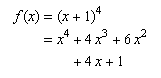
MathML DTD 使用 [Modularization] 中概述的策略,允许在 MathML 元素上使用命名空间前缀。然而建议在 MathML 的 XML 序列化中不要使用命名空间前缀,以与 HTML 序列化保持兼容性。
注意,与 HTML 序列化不同,在使用 XML 序列化时,除非指定了 DTD(要么是此处所述的完整 MathML DTD,或 [Entities] 指定的一组
HTML/MathML 实体声明),否则不能使用诸如 ∫ 之类的字符实体引用。字符始终可以通过直接使用字符数据或数值字符引用来指定,例如使用
∫ 或 ∫,而不是 ∫。
可以使用位于 http://www.w3.org/Math/XMLSchema/mathml4/mathml4.xsd 的 MathML XML 模式来验证 MathML 片段。所提供的模式是从 Relax NG 模式机械生成的,它省略了一些 XSD 语法无法强制执行的约束。
下表给出了在 MathML 中对运算符、定界符、分隔符和重音(均由 mo
元素表示)建议使用的呈现属性词典。为简洁起见,在本附录中所有此类元素均将简单称为“运算符”。请注意,[MathML-Core] 的实现将使用这些值作为默认运算符间距的规范性定义。
该词典不仅按元素内容索引,而且按元素内容与 form 属性值的组合进行索引。具有多种可能形式的运算符会有多条条目。MathML 规范指明在未给出
form 属性时应使用哪种形式;参见 3.2.5.6.2
属性 form 的默认值。
这些数据均以机器可读形式保存在 unicode.xml 中,该文件也是 HTML/MathML 实体定义的来源,并随 [Entities]
一起分发。不过下面以两种更便于人读的格式呈现。另见 [MathML-Core],该规范中对数据有另一种展示方式。
在第一种展示中,运算符首先按 form 和间距属性排序,然后按 priority 排序。随后列出字符,对于该字符剩余的运算符词典条目的附加数据通过
title 属性给出,在支持的浏览器中会显示为工具提示。
在第二种数据展示中,表格的行可以在合适的浏览器中通过点击表头进行重新排序,从而按该列对表格排序。
此处给出的 lspace 和 rspace 的值范围为 0 到 7,表示与 namedspace 所使用值相匹配的 1/18 em 的倍数。
对于内容为 InvisibleTimes 或 ApplyFunction 的不可见运算符,建议
MathML 渲染器以上下文敏感的方式选择间距(这是对下表中静态值的例外)。对于 <mo>⁡</mo>,在诸如 这样的表达式中(右操作数不是以定界符开始时),总间距(lspace+rspace)应大于零;对于
<mo>⁢</mo>,当两个操作数(或在基线上的最近标记)均为以非倾斜字体显示的标识符时,总间距应大于零(即在建议规则下,当两个操作数都是多字符标识符时)。
某些渲染器可能希望在脚本中(即当 scriptlevel 大于 0 时;参见 3.3.4 样式更改
<mstyle>)对大多数运算符使用无间距,就像 TeX 的做法一样。
| 字符 | 字形 | 名称 | 形式 | 优先级 | 左间距 | 右间距 | 属性 |
|---|---|---|---|---|---|---|---|
| ‘ | ‘ | left single quotation mark | prefix | 100 | 0 | 0 | |
| ’ | ’ | right single quotation mark | postfix | 100 | 0 | 0 | |
| “ | “ | left double quotation mark | prefix | 100 | 0 | 0 | |
| ” | ” | right double quotation mark | postfix | 100 | 0 | 0 | |
| ( | ( | left parenthesis | prefix | 120 | 0 | 0 | stretchy, symmetric |
| ) | ) | right parenthesis | postfix | 120 | 0 | 0 | stretchy, symmetric |
| [ | [ | left square bracket | prefix | 120 | 0 | 0 | stretchy, symmetric |
| ] | ] | right square bracket | postfix | 120 | 0 | 0 | stretchy, symmetric |
| { | { | left curly bracket | prefix | 120 | 0 | 0 | stretchy, symmetric |
| | | | | vertical line | prefix | 120 | 0 | 0 | stretchy, symmetric |
| | | | | vertical line | postfix | 120 | 0 | 0 | stretchy, symmetric |
| || | || | multiple character operator: || | prefix | 120 | 0 | 0 | |
| || | || | multiple character operator: || | postfix | 120 | 0 | 0 | |
| } | } | right curly bracket | postfix | 120 | 0 | 0 | stretchy, symmetric |
| ‖ | ‖ | double vertical line | prefix | 120 | 0 | 0 | stretchy, symmetric |
| ‖ | ‖ | double vertical line | postfix | 120 | 0 | 0 | stretchy, symmetric |
| ⌈ | ⌈ | left ceiling | prefix | 120 | 0 | 0 | stretchy, symmetric |
| ⌉ | ⌉ | right ceiling | postfix | 120 | 0 | 0 | stretchy, symmetric |
| ⌊ | ⌊ | left floor | prefix | 120 | 0 | 0 | stretchy, symmetric |
| ⌋ | ⌋ | right floor | postfix | 120 | 0 | 0 | stretchy, symmetric |
| 〈 | 〈 | left-pointing angle bracket | prefix | 120 | 0 | 0 | stretchy, symmetric |
| 〉 | 〉 | right-pointing angle bracket | postfix | 120 | 0 | 0 | stretchy, symmetric |
| ❲ | ❲ | light left tortoise shell bracket ornament | prefix | 120 | 0 | 0 | stretchy, symmetric |
| ❳ | ❳ | light right tortoise shell bracket ornament | postfix | 120 | 0 | 0 | stretchy, symmetric |
| ⟦ | ⟦ | mathematical left white square bracket | prefix | 120 | 0 | 0 | stretchy, symmetric |
| ⟧ | ⟧ | mathematical right white square bracket | postfix | 120 | 0 | 0 | stretchy, symmetric |
| ⟨ | ⟨ | mathematical left angle bracket | prefix | 120 | 0 | 0 | stretchy, symmetric |
| ⟩ | ⟩ | mathematical right angle bracket | postfix | 120 | 0 | 0 | stretchy, symmetric |
| ⟪ | ⟪ | mathematical left double angle bracket | prefix | 120 | 0 | 0 | stretchy, symmetric |
| ⟫ | ⟫ | mathematical right double angle bracket | postfix | 120 | 0 | 0 | stretchy, symmetric |
| ⟬ | ⟬ | mathematical left white tortoise shell bracket | prefix | 120 | 0 | 0 | stretchy, symmetric |
| ⟭ | ⟭ | mathematical right white tortoise shell bracket | postfix | 120 | 0 | 0 | stretchy, symmetric |
| ⟮ | ⟮ | mathematical left flattened parenthesis | prefix | 120 | 0 | 0 | stretchy, symmetric |
| ⟯ | ⟯ | mathematical right flattened parenthesis | postfix | 120 | 0 | 0 | stretchy, symmetric |
| ⦀ | ⦀ | triple vertical bar delimiter | prefix | 120 | 0 | 0 | stretchy, symmetric |
| ⦀ | ⦀ | triple vertical bar delimiter | postfix | 120 | 0 | 0 | stretchy, symmetric |
| ⦃ | ⦃ | left white curly bracket | prefix | 120 | 0 | 0 | stretchy, symmetric |
| ⦄ | ⦄ | right white curly bracket | postfix | 120 | 0 | 0 | stretchy, symmetric |
| ⦅ | ⦅ | left white parenthesis | prefix | 120 | 0 | 0 | stretchy, symmetric |
| ⦆ | ⦆ | right white parenthesis | postfix | 120 | 0 | 0 | stretchy, symmetric |
| ⦇ | ⦇ | z notation left image bracket | prefix | 120 | 0 | 0 | stretchy, symmetric |
| ⦈ | ⦈ | z notation right image bracket | postfix | 120 | 0 | 0 | stretchy, symmetric |
| ⦉ | ⦉ | z notation left binding bracket | prefix | 120 | 0 | 0 | stretchy, symmetric |
| ⦊ | ⦊ | z notation right binding bracket | postfix | 120 | 0 | 0 | stretchy, symmetric |
| ⦋ | ⦋ | left square bracket with underbar | prefix | 120 | 0 | 0 | stretchy, symmetric |
| ⦌ | ⦌ | right square bracket with underbar | postfix | 120 | 0 | 0 | stretchy, symmetric |
| ⦍ | ⦍ | left square bracket with tick in top corner | prefix | 120 | 0 | 0 | stretchy, symmetric |
| ⦎ | ⦎ | right square bracket with tick in bottom corner | postfix | 120 | 0 | 0 | stretchy, symmetric |
| ⦏ | ⦏ | left square bracket with tick in bottom corner | prefix | 120 | 0 | 0 | stretchy, symmetric |
| ⦐ | ⦐ | right square bracket with tick in top corner | postfix | 120 | 0 | 0 | stretchy, symmetric |
| ⦑ | ⦑ | left angle bracket with dot | prefix | 120 | 0 | 0 | stretchy, symmetric |
| ⦒ | ⦒ | right angle bracket with dot | postfix | 120 | 0 | 0 | stretchy, symmetric |
| ⦓ | ⦓ | left arc less-than bracket | prefix | 120 | 0 | 0 | stretchy, symmetric |
| ⦔ | ⦔ | right arc greater-than bracket | postfix | 120 | 0 | 0 | stretchy, symmetric |
| ⦕ | ⦕ | double left arc greater-than bracket | prefix | 120 | 0 | 0 | stretchy, symmetric |
| ⦖ | ⦖ | double right arc less-than bracket | postfix | 120 | 0 | 0 | stretchy, symmetric |
| ⦗ | ⦗ | left black tortoise shell bracket | prefix | 120 | 0 | 0 | stretchy, symmetric |
| ⦘ | ⦘ | right black tortoise shell bracket | postfix | 120 | 0 | 0 | stretchy, symmetric |
| ⦙ | ⦙ | dotted fence | prefix | 120 | 0 | 0 | stretchy, symmetric |
| ⦙ | ⦙ | dotted fence | postfix | 120 | 0 | 0 | stretchy, symmetric |
| ⧘ | ⧘ | left wiggly fence | prefix | 120 | 0 | 0 | stretchy, symmetric |
| ⧙ | ⧙ | right wiggly fence | postfix | 120 | 0 | 0 | stretchy, symmetric |
| ⧚ | ⧚ | left double wiggly fence | prefix | 120 | 0 | 0 | stretchy, symmetric |
| ⧛ | ⧛ | right double wiggly fence | postfix | 120 | 0 | 0 | stretchy, symmetric |
| ⧼ | ⧼ | left-pointing curved angle bracket | prefix | 120 | 0 | 0 | stretchy, symmetric |
| ⧽ | ⧽ | right-pointing curved angle bracket | postfix | 120 | 0 | 0 | stretchy, symmetric |
| ; | ; | semicolon | infix | 140 | 0 | 3 | linebreakstyle=after |
| ⦁ | ⦁ | z notation spot | infix | 140 | 5 | 5 | |
| , | , | comma | infix | 160 | 0 | 3 | linebreakstyle=after |
| ⁣ | | invisible separator | infix | 160 | 0 | 0 | linebreakstyle=after |
| : | : | colon | infix | 180 | 0 | 3 | |
| ⦂ | ⦂ | z notation type colon | infix | 180 | 5 | 5 | |
| ∴ | ∴ | therefore | prefix | 200 | 0 | 0 | |
| ∵ | ∵ | because | prefix | 200 | 0 | 0 | |
| -> | -> | multiple character operator: -> | infix | 220 | 5 | 5 | |
| ⊶ | ⊶ | original of | infix | 220 | 5 | 5 | |
| ⊷ | ⊷ | image of | infix | 220 | 5 | 5 | |
| ⊸ | ⊸ | multimap | infix | 220 | 5 | 5 | |
| ⧴ | ⧴ | rule-delayed | infix | 220 | 5 | 5 | |
| // | // | multiple character operator: // | infix | 240 | 5 | 5 | |
| ⊢ | ⊢ | right tack | infix | 260 | 5 | 5 | |
| ⊣ | ⊣ | left tack | infix | 260 | 5 | 5 | |
| ⊧ | ⊧ | models | infix | 260 | 5 | 5 | |
| ⊨ | ⊨ | true | infix | 260 | 5 | 5 | |
| ⊩ | ⊩ | forces | infix | 260 | 5 | 5 | |
| ⊪ | ⊪ | triple vertical bar right turnstile | infix | 260 | 5 | 5 | |
| ⊫ | ⊫ | double vertical bar double right turnstile | infix | 260 | 5 | 5 | |
| ⊬ | ⊬ | does not prove | infix | 260 | 5 | 5 | |
| ⊭ | ⊭ | not true | infix | 260 | 5 | 5 | |
| ⊮ | ⊮ | does not force | infix | 260 | 5 | 5 | |
| ⊯ | ⊯ | negated double vertical bar double right turnstile | infix | 260 | 5 | 5 | |
| ⫞ | ⫞ | short left tack | infix | 260 | 5 | 5 | |
| ⫟ | ⫟ | short down tack | infix | 260 | 5 | 5 | |
| ⫠ | ⫠ | short up tack | infix | 260 | 5 | 5 | |
| ⫡ | ⫡ | perpendicular with s | infix | 260 | 5 | 5 | |
| ⫢ | ⫢ | vertical bar triple right turnstile | infix | 260 | 5 | 5 | |
| ⫣ | ⫣ | double vertical bar left turnstile | infix | 260 | 5 | 5 | |
| ⫤ | ⫤ | vertical bar double left turnstile | infix | 260 | 5 | 5 | |
| ⫥ | ⫥ | double vertical bar double left turnstile | infix | 260 | 5 | 5 | |
| ⫦ | ⫦ | long dash from left member of double vertical | infix | 260 | 5 | 5 | |
| ⫧ | ⫧ | short down tack with overbar | infix | 260 | 5 | 5 | |
| ⫨ | ⫨ | short up tack with underbar | infix | 260 | 5 | 5 | |
| ⫩ | ⫩ | short up tack above short down tack | infix | 260 | 5 | 5 | |
| ⫪ | ⫪ | double down tack | infix | 260 | 5 | 5 | |
| ⫫ | ⫫ | double up tack | infix | 260 | 5 | 5 | |
| ! | ! | exclamation mark | prefix | 280 | 0 | 0 | |
| ¬ | ¬ | not sign | prefix | 280 | 0 | 0 | |
| ∀ | ∀ | for all | prefix | 280 | 0 | 0 | |
| ∃ | ∃ | there exists | prefix | 280 | 0 | 0 | |
| ∄ | ∄ | there does not exist | prefix | 280 | 0 | 0 | |
| ∼ | ∼ | tilde operator | prefix | 280 | 0 | 0 | |
| ⌐ | ⌐ | reversed not sign | prefix | 280 | 0 | 0 | |
| ⌙ | ⌙ | turned not sign | prefix | 280 | 0 | 0 | |
| ⫬ | ⫬ | double stroke not sign | prefix | 280 | 0 | 0 | |
| ⫭ | ⫭ | reversed double stroke not sign | prefix | 280 | 0 | 0 | |
| ∈ | ∈ | element of | infix | 300 | 5 | 5 | |
| ∉ | ∉ | not an element of | infix | 300 | 5 | 5 | |
| ∊ | ∊ | small element of | infix | 300 | 5 | 5 | |
| ∋ | ∋ | contains as member | infix | 300 | 5 | 5 | |
| ∌ | ∌ | does not contain as member | infix | 300 | 5 | 5 | |
| ∍ | ∍ | small contains as member | infix | 300 | 5 | 5 | |
| ⊂ | ⊂ | subset of | infix | 300 | 5 | 5 | |
| ⊃ | ⊃ | superset of | infix | 300 | 5 | 5 | |
| ⊄ | ⊄ | not a subset of | infix | 300 | 5 | 5 | |
| ⊅ | ⊅ | not a superset of | infix | 300 | 5 | 5 | |
| ⊆ | ⊆ | subset of or equal to | infix | 300 | 5 | 5 | |
| ⊇ | ⊇ | superset of or equal to | infix | 300 | 5 | 5 | |
| ⊈ | ⊈ | neither a subset of nor equal to | infix | 300 | 5 | 5 | |
| ⊉ | ⊉ | neither a superset of nor equal to | infix | 300 | 5 | 5 | |
| ⊊ | ⊊ | subset of with not equal to | infix | 300 | 5 | 5 | |
| ⊋ | ⊋ | superset of with not equal to | infix | 300 | 5 | 5 | |
| ⊏ | ⊏ | square image of | infix | 300 | 5 | 5 | |
| ⊐ | ⊐ | square original of | infix | 300 | 5 | 5 | |
| ⊑ | ⊑ | square image of or equal to | infix | 300 | 5 | 5 | |
| ⊒ | ⊒ | square original of or equal to | infix | 300 | 5 | 5 | |
| ⊰ | ⊰ | precedes under relation | infix | 300 | 5 | 5 | |
| ⊱ | ⊱ | succeeds under relation | infix | 300 | 5 | 5 | |
| ⊲ | ⊲ | normal subgroup of | infix | 300 | 5 | 5 | |
| ⊳ | ⊳ | contains as normal subgroup | infix | 300 | 5 | 5 | |
| ⋐ | ⋐ | double subset | infix | 300 | 5 | 5 | |
| ⋑ | ⋑ | double superset | infix | 300 | 5 | 5 | |
| ⋢ | ⋢ | not square image of or equal to | infix | 300 | 5 | 5 | |
| ⋣ | ⋣ | not square original of or equal to | infix | 300 | 5 | 5 | |
| ⋤ | ⋤ | square image of or not equal to | infix | 300 | 5 | 5 | |
| ⋥ | ⋥ | square original of or not equal to | infix | 300 | 5 | 5 | |
| ⋪ | ⋪ | not normal subgroup of | infix | 300 | 5 | 5 | |
| ⋫ | ⋫ | does not contain as normal subgroup | infix | 300 | 5 | 5 | |
| ⋬ | ⋬ | not normal subgroup of or equal to | infix | 300 | 5 | 5 | |
| ⋭ | ⋭ | does not contain as normal subgroup or equal | infix | 300 | 5 | 5 | |
| ⋲ | ⋲ | element of with long horizontal stroke | infix | 300 | 5 | 5 | |
| ⋳ | ⋳ | element of with vertical bar at end of horizontal stroke | infix | 300 | 5 | 5 | |
| ⋴ | ⋴ | small element of with vertical bar at end of horizontal stroke | infix | 300 | 5 | 5 | |
| ⋵ | ⋵ | element of with dot above | infix | 300 | 5 | 5 | |
| ⋶ | ⋶ | element of with overbar | infix | 300 | 5 | 5 | |
| ⋷ | ⋷ | small element of with overbar | infix | 300 | 5 | 5 | |
| ⋸ | ⋸ | element of with underbar | infix | 300 | 5 | 5 | |
| ⋹ | ⋹ | element of with two horizontal strokes | infix | 300 | 5 | 5 | |
| ⋺ | ⋺ | contains with long horizontal stroke | infix | 300 | 5 | 5 | |
| ⋻ | ⋻ | contains with vertical bar at end of horizontal stroke | infix | 300 | 5 | 5 | |
| ⋼ | ⋼ | small contains with vertical bar at end of horizontal stroke | infix | 300 | 5 | 5 | |
| ⋽ | ⋽ | contains with overbar | infix | 300 | 5 | 5 | |
| ⋾ | ⋾ | small contains with overbar | infix | 300 | 5 | 5 | |
| ⋿ | ⋿ | z notation bag membership | infix | 300 | 5 | 5 | |
| ⥹ | ⥹ | subset above rightwards arrow | infix | 300 | 5 | 5 | |
| ⥺ | ⥺ | leftwards arrow through subset | infix | 300 | 5 | 5 | |
| ⥻ | ⥻ | superset above leftwards arrow | infix | 300 | 5 | 5 | |
| ⪽ | ⪽ | subset with dot | infix | 300 | 5 | 5 | |
| ⪾ | ⪾ | superset with dot | infix | 300 | 5 | 5 | |
| ⪿ | ⪿ | subset with plus sign below | infix | 300 | 5 | 5 | |
| ⫀ | ⫀ | superset with plus sign below | infix | 300 | 5 | 5 | |
| ⫁ | ⫁ | subset with multiplication sign below | infix | 300 | 5 | 5 | |
| ⫂ | ⫂ | superset with multiplication sign below | infix | 300 | 5 | 5 | |
| ⫃ | ⫃ | subset of or equal to with dot above | infix | 300 | 5 | 5 | |
| ⫄ | ⫄ | superset of or equal to with dot above | infix | 300 | 5 | 5 | |
| ⫅ | ⫅ | subset of above equals sign | infix | 300 | 5 | 5 | |
| ⫆ | ⫆ | superset of above equals sign | infix | 300 | 5 | 5 | |
| ⫇ | ⫇ | subset of above tilde operator | infix | 300 | 5 | 5 | |
| ⫈ | ⫈ | superset of above tilde operator | infix | 300 | 5 | 5 | |
| ⫉ | ⫉ | subset of above almost equal to | infix | 300 | 5 | 5 | |
| ⫊ | ⫊ | superset of above almost equal to | infix | 300 | 5 | 5 | |
| ⫋ | ⫋ | subset of above not equal to | infix | 300 | 5 | 5 | |
| ⫌ | ⫌ | superset of above not equal to | infix | 300 | 5 | 5 | |
| ⫍ | ⫍ | square left open box operator | infix | 300 | 5 | 5 | |
| ⫎ | ⫎ | square right open box operator | infix | 300 | 5 | 5 | |
| ⫏ | ⫏ | closed subset | infix | 300 | 5 | 5 | |
| ⫐ | ⫐ | closed superset | infix | 300 | 5 | 5 | |
| ⫑ | ⫑ | closed subset or equal to | infix | 300 | 5 | 5 | |
| ⫒ | ⫒ | closed superset or equal to | infix | 300 | 5 | 5 | |
| ⫓ | ⫓ | subset above superset | infix | 300 | 5 | 5 | |
| ⫔ | ⫔ | superset above subset | infix | 300 | 5 | 5 | |
| ⫕ | ⫕ | subset above subset | infix | 300 | 5 | 5 | |
| ⫖ | ⫖ | superset above superset | infix | 300 | 5 | 5 | |
| ⫗ | ⫗ | superset beside subset | infix | 300 | 5 | 5 | |
| ⫘ | ⫘ | superset beside and joined by dash with subset | infix | 300 | 5 | 5 | |
| ⫙ | ⫙ | element of opening downwards | infix | 300 | 5 | 5 | |
| != | != | multiple character operator: != | infix | 320 | 5 | 5 | |
| *= | *= | multiple character operator: *= | infix | 320 | 5 | 5 | |
| += | += | multiple character operator: += | infix | 320 | 5 | 5 | |
| -= | -= | multiple character operator: -= | infix | 320 | 5 | 5 | |
| /= | /= | multiple character operator: /= | infix | 320 | 5 | 5 | |
| := | := | multiple character operator: := | infix | 320 | 5 | 5 | |
| < | < | less-than sign | infix | 320 | 5 | 5 | |
| <= | <= | multiple character operator: <= | infix | 320 | 5 | 5 | |
| = | = | equals sign | infix | 320 | 5 | 5 | |
| == | == | multiple character operator: == | infix | 320 | 5 | 5 | |
| > | > | greater-than sign | infix | 320 | 5 | 5 | |
| >= | >= | multiple character operator: >= | infix | 320 | 5 | 5 | |
| | | | | vertical line | infix | 320 | 5 | 5 | |
| || | || | multiple character operator: || | infix | 320 | 5 | 5 | |
| ∝ | ∝ | proportional to | infix | 320 | 5 | 5 | |
| ∣ | ∣ | divides | infix | 320 | 5 | 5 | |
| ∤ | ∤ | does not divide | infix | 320 | 5 | 5 | |
| ∥ | ∥ | parallel to | infix | 320 | 5 | 5 | |
| ∦ | ∦ | not parallel to | infix | 320 | 5 | 5 | |
| ∷ | ∷ | proportion | infix | 320 | 5 | 5 | |
| ∹ | ∹ | excess | infix | 320 | 5 | 5 | |
| ∺ | ∺ | geometric proportion | infix | 320 | 5 | 5 | |
| ∻ | ∻ | homothetic | infix | 320 | 5 | 5 | |
| ∼ | ∼ | tilde operator | infix | 320 | 5 | 5 | |
| ∽ | ∽ | reversed tilde | infix | 320 | 5 | 5 | |
| ∾ | ∾ | inverted lazy s | infix | 320 | 5 | 5 | |
| ≁ | ≁ | not tilde | infix | 320 | 5 | 5 | |
| ≂ | ≂ | minus tilde | infix | 320 | 5 | 5 | |
| ≃ | ≃ | asymptotically equal to | infix | 320 | 5 | 5 | |
| ≄ | ≄ | not asymptotically equal to | infix | 320 | 5 | 5 | |
| ≅ | ≅ | approximately equal to | infix | 320 | 5 | 5 | |
| ≆ | ≆ | approximately but not actually equal to | infix | 320 | 5 | 5 | |
| ≇ | ≇ | neither approximately nor actually equal to | infix | 320 | 5 | 5 | |
| ≈ | ≈ | almost equal to | infix | 320 | 5 | 5 | |
| ≉ | ≉ | not almost equal to | infix | 320 | 5 | 5 | |
| ≊ | ≊ | almost equal or equal to | infix | 320 | 5 | 5 | |
| ≋ | ≋ | triple tilde | infix | 320 | 5 | 5 | |
| ≌ | ≌ | all equal to | infix | 320 | 5 | 5 | |
| ≍ | ≍ | equivalent to | infix | 320 | 5 | 5 | |
| ≎ | ≎ | geometrically equivalent to | infix | 320 | 5 | 5 | |
| ≏ | ≏ | difference between | infix | 320 | 5 | 5 | |
| ≐ | ≐ | approaches the limit | infix | 320 | 5 | 5 | |
| ≑ | ≑ | geometrically equal to | infix | 320 | 5 | 5 | |
| ≒ | ≒ | approximately equal to or the image of | infix | 320 | 5 | 5 | |
| ≓ | ≓ | image of or approximately equal to | infix | 320 | 5 | 5 | |
| ≔ | ≔ | colon equals | infix | 320 | 5 | 5 | |
| ≕ | ≕ | equals colon | infix | 320 | 5 | 5 | |
| ≖ | ≖ | ring in equal to | infix | 320 | 5 | 5 | |
| ≗ | ≗ | ring equal to | infix | 320 | 5 | 5 | |
| ≘ | ≘ | corresponds to | infix | 320 | 5 | 5 | |
| ≙ | ≙ | estimates | infix | 320 | 5 | 5 | |
| ≚ | ≚ | equiangular to | infix | 320 | 5 | 5 | |
| ≛ | ≛ | star equals | infix | 320 | 5 | 5 | |
| ≜ | ≜ | delta equal to | infix | 320 | 5 | 5 | |
| ≝ | ≝ | equal to by definition | infix | 320 | 5 | 5 | |
| ≞ | ≞ | measured by | infix | 320 | 5 | 5 | |
| ≟ | ≟ | questioned equal to | infix | 320 | 5 | 5 | |
| ≠ | ≠ | not equal to | infix | 320 | 5 | 5 | |
| ≡ | ≡ | identical to | infix | 320 | 5 | 5 | |
| ≢ | ≢ | not identical to | infix | 320 | 5 | 5 | |
| ≣ | ≣ | strictly equivalent to | infix | 320 | 5 | 5 | |
| ≤ | ≤ | less-than or equal to | infix | 320 | 5 | 5 | |
| ≥ | ≥ | greater-than or equal to | infix | 320 | 5 | 5 | |
| ≦ | ≦ | less-than over equal to | infix | 320 | 5 | 5 | |
| ≧ | ≧ | greater-than over equal to | infix | 320 | 5 | 5 | |
| ≨ | ≨ | less-than but not equal to | infix | 320 | 5 | 5 | |
| ≩ | ≩ | greater-than but not equal to | infix | 320 | 5 | 5 | |
| ≪ | ≪ | much less-than | infix | 320 | 5 | 5 | |
| ≫ | ≫ | much greater-than | infix | 320 | 5 | 5 | |
| ≬ | ≬ | between | infix | 320 | 5 | 5 | |
| ≭ | ≭ | not equivalent to | infix | 320 | 5 | 5 | |
| ≮ | ≮ | not less-than | infix | 320 | 5 | 5 | |
| ≯ | ≯ | not greater-than | infix | 320 | 5 | 5 | |
| ≰ | ≰ | neither less-than nor equal to | infix | 320 | 5 | 5 | |
| ≱ | ≱ | neither greater-than nor equal to | infix | 320 | 5 | 5 | |
| ≲ | ≲ | less-than or equivalent to | infix | 320 | 5 | 5 | |
| ≳ | ≳ | greater-than or equivalent to | infix | 320 | 5 | 5 | |
| ≴ | ≴ | neither less-than nor equivalent to | infix | 320 | 5 | 5 | |
| ≵ | ≵ | neither greater-than nor equivalent to | infix | 320 | 5 | 5 | |
| ≶ | ≶ | less-than or greater-than | infix | 320 | 5 | 5 | |
| ≷ | ≷ | greater-than or less-than | infix | 320 | 5 | 5 | |
| ≸ | ≸ | neither less-than nor greater-than | infix | 320 | 5 | 5 | |
| ≹ | ≹ | neither greater-than nor less-than | infix | 320 | 5 | 5 | |
| ≺ | ≺ | precedes | infix | 320 | 5 | 5 | |
| ≻ | ≻ | succeeds | infix | 320 | 5 | 5 | |
| ≼ | ≼ | precedes or equal to | infix | 320 | 5 | 5 | |
| ≽ | ≽ | succeeds or equal to | infix | 320 | 5 | 5 | |
| ≾ | ≾ | precedes or equivalent to | infix | 320 | 5 | 5 | |
| ≿ | ≿ | succeeds or equivalent to | infix | 320 | 5 | 5 | |
| ⊀ | ⊀ | does not precede | infix | 320 | 5 | 5 | |
| ⊁ | ⊁ | does not succeed | infix | 320 | 5 | 5 | |
| ⊜ | ⊜ | circled equals | infix | 320 | 5 | 5 | |
| ⊦ | ⊦ | assertion | infix | 320 | 5 | 5 | |
| ⊴ | ⊴ | normal subgroup of or equal to | infix | 320 | 5 | 5 | |
| ⊵ | ⊵ | contains as normal subgroup or equal to | infix | 320 | 5 | 5 | |
| ⋈ | ⋈ | bowtie | infix | 320 | 5 | 5 | |
| ⋍ | ⋍ | reversed tilde equals | infix | 320 | 5 | 5 | |
| ⋔ | ⋔ | pitchfork | infix | 320 | 5 | 5 | |
| ⋕ | ⋕ | equal and parallel to | infix | 320 | 5 | 5 | |
| ⋖ | ⋖ | less-than with dot | infix | 320 | 5 | 5 | |
| ⋗ | ⋗ | greater-than with dot | infix | 320 | 5 | 5 | |
| ⋘ | ⋘ | very much less-than | infix | 320 | 5 | 5 | |
| ⋙ | ⋙ | very much greater-than | infix | 320 | 5 | 5 | |
| ⋚ | ⋚ | less-than equal to or greater-than | infix | 320 | 5 | 5 | |
| ⋛ | ⋛ | greater-than equal to or less-than | infix | 320 | 5 | 5 | |
| ⋜ | ⋜ | equal to or less-than | infix | 320 | 5 | 5 | |
| ⋝ | ⋝ | equal to or greater-than | infix | 320 | 5 | 5 | |
| ⋞ | ⋞ | equal to or precedes | infix | 320 | 5 | 5 | |
| ⋟ | ⋟ | equal to or succeeds | infix | 320 | 5 | 5 | |
| ⋠ | ⋠ | does not precede or equal | infix | 320 | 5 | 5 | |
| ⋡ | ⋡ | does not succeed or equal | infix | 320 | 5 | 5 | |
| ⋦ | ⋦ | less-than but not equivalent to | infix | 320 | 5 | 5 | |
| ⋧ | ⋧ | greater-than but not equivalent to | infix | 320 | 5 | 5 | |
| ⋨ | ⋨ | precedes but not equivalent to | infix | 320 | 5 | 5 | |
| ⋩ | ⋩ | succeeds but not equivalent to | infix | 320 | 5 | 5 | |
| ⟂ | ⟂ | perpendicular | infix | 320 | 5 | 5 | |
| ⥶ | ⥶ | less-than above leftwards arrow | infix | 320 | 5 | 5 | |
| ⥷ | ⥷ | leftwards arrow through less-than | infix | 320 | 5 | 5 | |
| ⥸ | ⥸ | greater-than above rightwards arrow | infix | 320 | 5 | 5 | |
| ⦶ | ⦶ | circled vertical bar | infix | 320 | 5 | 5 | |
| ⦷ | ⦷ | circled parallel | infix | 320 | 5 | 5 | |
| ⦹ | ⦹ | circled perpendicular | infix | 320 | 5 | 5 | |
| ⧀ | ⧀ | circled less-than | infix | 320 | 5 | 5 | |
| ⧁ | ⧁ | circled greater-than | infix | 320 | 5 | 5 | |
| ⧎ | ⧎ | right triangle above left triangle | infix | 320 | 5 | 5 | |
| ⧏ | ⧏ | left triangle beside vertical bar | infix | 320 | 5 | 5 | |
| ⧐ | ⧐ | vertical bar beside right triangle | infix | 320 | 5 | 5 | |
| ⧑ | ⧑ | bowtie with left half black | infix | 320 | 5 | 5 | |
| ⧒ | ⧒ | bowtie with right half black | infix | 320 | 5 | 5 | |
| ⧓ | ⧓ | black bowtie | infix | 320 | 5 | 5 | |
| ⧡ | ⧡ | increases as | infix | 320 | 5 | 5 | |
| ⧣ | ⧣ | equals sign and slanted parallel | infix | 320 | 5 | 5 | |
| ⧤ | ⧤ | equals sign and slanted parallel with tilde above | infix | 320 | 5 | 5 | |
| ⧥ | ⧥ | identical to and slanted parallel | infix | 320 | 5 | 5 | |
| ⧦ | ⧦ | gleich stark | infix | 320 | 5 | 5 | |
| ⩦ | ⩦ | equals sign with dot below | infix | 320 | 5 | 5 | |
| ⩧ | ⩧ | identical with dot above | infix | 320 | 5 | 5 | |
| ⩨ | ⩨ | triple horizontal bar with double vertical stroke | infix | 320 | 5 | 5 | |
| ⩩ | ⩩ | triple horizontal bar with triple vertical stroke | infix | 320 | 5 | 5 | |
| ⩪ | ⩪ | tilde operator with dot above | infix | 320 | 5 | 5 | |
| ⩫ | ⩫ | tilde operator with rising dots | infix | 320 | 5 | 5 | |
| ⩬ | ⩬ | similar minus similar | infix | 320 | 5 | 5 | |
| ⩭ | ⩭ | congruent with dot above | infix | 320 | 5 | 5 | |
| ⩮ | ⩮ | equals with asterisk | infix | 320 | 5 | 5 | |
| ⩯ | ⩯ | almost equal to with circumflex accent | infix | 320 | 5 | 5 | |
| ⩰ | ⩰ | approximately equal or equal to | infix | 320 | 5 | 5 | |
| ⩱ | ⩱ | equals sign above plus sign | infix | 320 | 5 | 5 | |
| ⩲ | ⩲ | plus sign above equals sign | infix | 320 | 5 | 5 | |
| ⩳ | ⩳ | equals sign above tilde operator | infix | 320 | 5 | 5 | |
| ⩴ | ⩴ | double colon equal | infix | 320 | 5 | 5 | |
| ⩵ | ⩵ | two consecutive equals signs | infix | 320 | 5 | 5 | |
| ⩶ | ⩶ | three consecutive equals signs | infix | 320 | 5 | 5 | |
| ⩷ | ⩷ | equals sign with two dots above and two dots below | infix | 320 | 5 | 5 | |
| ⩸ | ⩸ | equivalent with four dots above | infix | 320 | 5 | 5 | |
| ⩹ | ⩹ | less-than with circle inside | infix | 320 | 5 | 5 | |
| ⩺ | ⩺ | greater-than with circle inside | infix | 320 | 5 | 5 | |
| ⩻ | ⩻ | less-than with question mark above | infix | 320 | 5 | 5 | |
| ⩼ | ⩼ | greater-than with question mark above | infix | 320 | 5 | 5 | |
| ⩽ | ⩽ | less-than or slanted equal to | infix | 320 | 5 | 5 | |
| ⩾ | ⩾ | greater-than or slanted equal to | infix | 320 | 5 | 5 | |
| ⩿ | ⩿ | less-than or slanted equal to with dot inside | infix | 320 | 5 | 5 | |
| ⪀ | ⪀ | greater-than or slanted equal to with dot inside | infix | 320 | 5 | 5 | |
| ⪁ | ⪁ | less-than or slanted equal to with dot above | infix | 320 | 5 | 5 | |
| ⪂ | ⪂ | greater-than or slanted equal to with dot above | infix | 320 | 5 | 5 | |
| ⪃ | ⪃ | less-than or slanted equal to with dot above right | infix | 320 | 5 | 5 | |
| ⪄ | ⪄ | greater-than or slanted equal to with dot above left | infix | 320 | 5 | 5 | |
| ⪅ | ⪅ | less-than or approximate | infix | 320 | 5 | 5 | |
| ⪆ | ⪆ | greater-than or approximate | infix | 320 | 5 | 5 | |
| ⪇ | ⪇ | less-than and single-line not equal to | infix | 320 | 5 | 5 | |
| ⪈ | ⪈ | greater-than and single-line not equal to | infix | 320 | 5 | 5 | |
| ⪉ | ⪉ | less-than and not approximate | infix | 320 | 5 | 5 | |
| ⪊ | ⪊ | greater-than and not approximate | infix | 320 | 5 | 5 | |
| ⪋ | ⪋ | less-than above double-line equal above greater-than | infix | 320 | 5 | 5 | |
| ⪌ | ⪌ | greater-than above double-line equal above less-than | infix | 320 | 5 | 5 | |
| ⪍ | ⪍ | less-than above similar or equal | infix | 320 | 5 | 5 | |
| ⪎ | ⪎ | greater-than above similar or equal | infix | 320 | 5 | 5 | |
| ⪏ | ⪏ | less-than above similar above greater-than | infix | 320 | 5 | 5 | |
| ⪐ | ⪐ | greater-than above similar above less-than | infix | 320 | 5 | 5 | |
| ⪑ | ⪑ | less-than above greater-than above double-line equal | infix | 320 | 5 | 5 | |
| ⪒ | ⪒ | greater-than above less-than above double-line equal | infix | 320 | 5 | 5 | |
| ⪓ | ⪓ | less-than above slanted equal above greater-than above slanted equal | infix | 320 | 5 | 5 | |
| ⪔ | ⪔ | greater-than above slanted equal above less-than above slanted equal | infix | 320 | 5 | 5 | |
| ⪕ | ⪕ | slanted equal to or less-than | infix | 320 | 5 | 5 | |
| ⪖ | ⪖ | slanted equal to or greater-than | infix | 320 | 5 | 5 | |
| ⪗ | ⪗ | slanted equal to or less-than with dot inside | infix | 320 | 5 | 5 | |
| ⪘ | ⪘ | slanted equal to or greater-than with dot inside | infix | 320 | 5 | 5 | |
| ⪙ | ⪙ | double-line equal to or less-than | infix | 320 | 5 | 5 | |
| ⪚ | ⪚ | double-line equal to or greater-than | infix | 320 | 5 | 5 | |
| ⪛ | ⪛ | double-line slanted equal to or less-than | infix | 320 | 5 | 5 | |
| ⪜ | ⪜ | double-line slanted equal to or greater-than | infix | 320 | 5 | 5 | |
| ⪝ | ⪝ | similar or less-than | infix | 320 | 5 | 5 | |
| ⪞ | ⪞ | similar or greater-than | infix | 320 | 5 | 5 | |
| ⪟ | ⪟ | similar above less-than above equals sign | infix | 320 | 5 | 5 | |
| ⪠ | ⪠ | similar above greater-than above equals sign | infix | 320 | 5 | 5 | |
| ⪡ | ⪡ | double nested less-than | infix | 320 | 5 | 5 | |
| ⪢ | ⪢ | double nested greater-than | infix | 320 | 5 | 5 | |
| ⪣ | ⪣ | double nested less-than with underbar | infix | 320 | 5 | 5 | |
| ⪤ | ⪤ | greater-than overlapping less-than | infix | 320 | 5 | 5 | |
| ⪥ | ⪥ | greater-than beside less-than | infix | 320 | 5 | 5 | |
| ⪦ | ⪦ | less-than closed by curve | infix | 320 | 5 | 5 | |
| ⪧ | ⪧ | greater-than closed by curve | infix | 320 | 5 | 5 | |
| ⪨ | ⪨ | less-than closed by curve above slanted equal | infix | 320 | 5 | 5 | |
| ⪩ | ⪩ | greater-than closed by curve above slanted equal | infix | 320 | 5 | 5 | |
| ⪪ | ⪪ | smaller than | infix | 320 | 5 | 5 | |
| ⪫ | ⪫ | larger than | infix | 320 | 5 | 5 | |
| ⪬ | ⪬ | smaller than or equal to | infix | 320 | 5 | 5 | |
| ⪭ | ⪭ | larger than or equal to | infix | 320 | 5 | 5 | |
| ⪮ | ⪮ | equals sign with bumpy above | infix | 320 | 5 | 5 | |
| ⪯ | ⪯ | precedes above single-line equals sign | infix | 320 | 5 | 5 | |
| ⪰ | ⪰ | succeeds above single-line equals sign | infix | 320 | 5 | 5 | |
| ⪱ | ⪱ | precedes above single-line not equal to | infix | 320 | 5 | 5 | |
| ⪲ | ⪲ | succeeds above single-line not equal to | infix | 320 | 5 | 5 | |
| ⪳ | ⪳ | precedes above equals sign | infix | 320 | 5 | 5 | |
| ⪴ | ⪴ | succeeds above equals sign | infix | 320 | 5 | 5 | |
| ⪵ | ⪵ | precedes above not equal to | infix | 320 | 5 | 5 | |
| ⪶ | ⪶ | succeeds above not equal to | infix | 320 | 5 | 5 | |
| ⪷ | ⪷ | precedes above almost equal to | infix | 320 | 5 | 5 | |
| ⪸ | ⪸ | succeeds above almost equal to | infix | 320 | 5 | 5 | |
| ⪹ | ⪹ | precedes above not almost equal to | infix | 320 | 5 | 5 | |
| ⪺ | ⪺ | succeeds above not almost equal to | infix | 320 | 5 | 5 | |
| ⪻ | ⪻ | double precedes | infix | 320 | 5 | 5 | |
| ⪼ | ⪼ | double succeeds | infix | 320 | 5 | 5 | |
| ⫚ | ⫚ | pitchfork with tee top | infix | 320 | 5 | 5 | |
| ⫮ | ⫮ | does not divide with reversed negation slash | infix | 320 | 5 | 5 | |
| ⫲ | ⫲ | parallel with horizontal stroke | infix | 320 | 5 | 5 | |
| ⫳ | ⫳ | parallel with tilde operator | infix | 320 | 5 | 5 | |
| ⫴ | ⫴ | triple vertical bar binary relation | infix | 320 | 5 | 5 | |
| ⫵ | ⫵ | triple vertical bar with horizontal stroke | infix | 320 | 5 | 5 | |
| ⫷ | ⫷ | triple nested less-than | infix | 320 | 5 | 5 | |
| ⫸ | ⫸ | triple nested greater-than | infix | 320 | 5 | 5 | |
| ⫹ | ⫹ | double-line slanted less-than or equal to | infix | 320 | 5 | 5 | |
| ⫺ | ⫺ | double-line slanted greater-than or equal to | infix | 320 | 5 | 5 | |
| ⯑ | ⯑ | uncertainty sign | infix | 320 | 5 | 5 | |
| ← | ← | leftwards arrow | infix | 340 | 5 | 5 | stretchy |
| ↑ | ↑ | upwards arrow | infix | 340 | 5 | 5 | stretchy |
| → | → | rightwards arrow | infix | 340 | 5 | 5 | stretchy |
| ↓ | ↓ | downwards arrow | infix | 340 | 5 | 5 | stretchy |
| ↔ | ↔ | left right arrow | infix | 340 | 5 | 5 | stretchy |
| ↕ | ↕ | up down arrow | infix | 340 | 5 | 5 | stretchy |
| ↖ | ↖ | north west arrow | infix | 340 | 5 | 5 | |
| ↗ | ↗ | north east arrow | infix | 340 | 5 | 5 | |
| ↘ | ↘ | south east arrow | infix | 340 | 5 | 5 | |
| ↙ | ↙ | south west arrow | infix | 340 | 5 | 5 | |
| ↚ | ↚ | leftwards arrow with stroke | infix | 340 | 5 | 5 | stretchy |
| ↛ | ↛ | rightwards arrow with stroke | infix | 340 | 5 | 5 | stretchy |
| ↜ | ↜ | leftwards wave arrow | infix | 340 | 5 | 5 | stretchy |
| ↝ | ↝ | rightwards wave arrow | infix | 340 | 5 | 5 | stretchy |
| ↞ | ↞ | leftwards two headed arrow | infix | 340 | 5 | 5 | stretchy |
| ↟ | ↟ | upwards two headed arrow | infix | 340 | 5 | 5 | stretchy |
| ↠ | ↠ | rightwards two headed arrow | infix | 340 | 5 | 5 | stretchy |
| ↡ | ↡ | downwards two headed arrow | infix | 340 | 5 | 5 | stretchy |
| ↢ | ↢ | leftwards arrow with tail | infix | 340 | 5 | 5 | stretchy |
| ↣ | ↣ | rightwards arrow with tail | infix | 340 | 5 | 5 | stretchy |
| ↤ | ↤ | leftwards arrow from bar | infix | 340 | 5 | 5 | stretchy |
| ↥ | ↥ | upwards arrow from bar | infix | 340 | 5 | 5 | stretchy |
| ↦ | ↦ | rightwards arrow from bar | infix | 340 | 5 | 5 | stretchy |
| ↧ | ↧ | downwards arrow from bar | infix | 340 | 5 | 5 | stretchy |
| ↨ | ↨ | up down arrow with base | infix | 340 | 5 | 5 | stretchy |
| ↩ | ↩ | leftwards arrow with hook | infix | 340 | 5 | 5 | stretchy |
| ↪ | ↪ | rightwards arrow with hook | infix | 340 | 5 | 5 | stretchy |
| ↫ | ↫ | leftwards arrow with loop | infix | 340 | 5 | 5 | stretchy |
| ↬ | ↬ | rightwards arrow with loop | infix | 340 | 5 | 5 | stretchy |
| ↭ | ↭ | left right wave arrow | infix | 340 | 5 | 5 | stretchy |
| ↮ | ↮ | left right arrow with stroke | infix | 340 | 5 | 5 | stretchy |
| ↯ | ↯ | downwards zigzag arrow | infix | 340 | 5 | 5 | |
| ↰ | ↰ | upwards arrow with tip leftwards | infix | 340 | 5 | 5 | stretchy |
| ↱ | ↱ | upwards arrow with tip rightwards | infix | 340 | 5 | 5 | stretchy |
| ↲ | ↲ | downwards arrow with tip leftwards | infix | 340 | 5 | 5 | stretchy |
| ↳ | ↳ | downwards arrow with tip rightwards | infix | 340 | 5 | 5 | stretchy |
| ↴ | ↴ | rightwards arrow with corner downwards | infix | 340 | 5 | 5 | stretchy |
| ↵ | ↵ | downwards arrow with corner leftwards | infix | 340 | 5 | 5 | stretchy |
| ↶ | ↶ | anticlockwise top semicircle arrow | infix | 340 | 5 | 5 | |
| ↷ | ↷ | clockwise top semicircle arrow | infix | 340 | 5 | 5 | |
| ↸ | ↸ | north west arrow to long bar | infix | 340 | 5 | 5 | |
| ↹ | ↹ | leftwards arrow to bar over rightwards arrow to bar | infix | 340 | 5 | 5 | stretchy |
| ↺ | ↺ | anticlockwise open circle arrow | infix | 340 | 5 | 5 | |
| ↻ | ↻ | clockwise open circle arrow | infix | 340 | 5 | 5 | |
| ↼ | ↼ | leftwards harpoon with barb upwards | infix | 340 | 5 | 5 | stretchy |
| ↽ | ↽ | leftwards harpoon with barb downwards | infix | 340 | 5 | 5 | stretchy |
| ↾ | ↾ | upwards harpoon with barb rightwards | infix | 340 | 5 | 5 | stretchy |
| ↿ | ↿ | upwards harpoon with barb leftwards | infix | 340 | 5 | 5 | stretchy |
| ⇀ | ⇀ | rightwards harpoon with barb upwards | infix | 340 | 5 | 5 | stretchy |
| ⇁ | ⇁ | rightwards harpoon with barb downwards | infix | 340 | 5 | 5 | stretchy |
| ⇂ | ⇂ | downwards harpoon with barb rightwards | infix | 340 | 5 | 5 | stretchy |
| ⇃ | ⇃ | downwards harpoon with barb leftwards | infix | 340 | 5 | 5 | stretchy |
| ⇄ | ⇄ | rightwards arrow over leftwards arrow | infix | 340 | 5 | 5 | stretchy |
| ⇅ | ⇅ | upwards arrow leftwards of downwards arrow | infix | 340 | 5 | 5 | stretchy |
| ⇆ | ⇆ | leftwards arrow over rightwards arrow | infix | 340 | 5 | 5 | stretchy |
| ⇇ | ⇇ | leftwards paired arrows | infix | 340 | 5 | 5 | stretchy |
| ⇈ | ⇈ | upwards paired arrows | infix | 340 | 5 | 5 | stretchy |
| ⇉ | ⇉ | rightwards paired arrows | infix | 340 | 5 | 5 | stretchy |
| ⇊ | ⇊ | downwards paired arrows | infix | 340 | 5 | 5 | stretchy |
| ⇋ | ⇋ | leftwards harpoon over rightwards harpoon | infix | 340 | 5 | 5 | stretchy |
| ⇌ | ⇌ | rightwards harpoon over leftwards harpoon | infix | 340 | 5 | 5 | stretchy |
| ⇍ | ⇍ | leftwards double arrow with stroke | infix | 340 | 5 | 5 | stretchy |
| ⇎ | ⇎ | left right double arrow with stroke | infix | 340 | 5 | 5 | stretchy |
| ⇏ | ⇏ | rightwards double arrow with stroke | infix | 340 | 5 | 5 | stretchy |
| ⇐ | ⇐ | leftwards double arrow | infix | 340 | 5 | 5 | stretchy |
| ⇑ | ⇑ | upwards double arrow | infix | 340 | 5 | 5 | stretchy |
| ⇒ | ⇒ | rightwards double arrow | infix | 340 | 5 | 5 | stretchy |
| ⇓ | ⇓ | downwards double arrow | infix | 340 | 5 | 5 | stretchy |
| ⇔ | ⇔ | left right double arrow | infix | 340 | 5 | 5 | stretchy |
| ⇕ | ⇕ | up down double arrow | infix | 340 | 5 | 5 | stretchy |
| ⇖ | ⇖ | north west double arrow | infix | 340 | 5 | 5 | |
| ⇗ | ⇗ | north east double arrow | infix | 340 | 5 | 5 | |
| ⇘ | ⇘ | south east double arrow | infix | 340 | 5 | 5 | |
| ⇙ | ⇙ | south west double arrow | infix | 340 | 5 | 5 | |
| ⇚ | ⇚ | leftwards triple arrow | infix | 340 | 5 | 5 | stretchy |
| ⇛ | ⇛ | rightwards triple arrow | infix | 340 | 5 | 5 | stretchy |
| ⇜ | ⇜ | leftwards squiggle arrow | infix | 340 | 5 | 5 | stretchy |
| ⇝ | ⇝ | rightwards squiggle arrow | infix | 340 | 5 | 5 | stretchy |
| ⇞ | ⇞ | upwards arrow with double stroke | infix | 340 | 5 | 5 | stretchy |
| ⇟ | ⇟ | downwards arrow with double stroke | infix | 340 | 5 | 5 | stretchy |
| ⇠ | ⇠ | leftwards dashed arrow | infix | 340 | 5 | 5 | stretchy |
| ⇡ | ⇡ | upwards dashed arrow | infix | 340 | 5 | 5 | stretchy |
| ⇢ | ⇢ | rightwards dashed arrow | infix | 340 | 5 | 5 | stretchy |
| ⇣ | ⇣ | downwards dashed arrow | infix | 340 | 5 | 5 | stretchy |
| ⇤ | ⇤ | leftwards arrow to bar | infix | 340 | 5 | 5 | stretchy |
| ⇥ | ⇥ | rightwards arrow to bar | infix | 340 | 5 | 5 | stretchy |
| ⇦ | ⇦ | leftwards white arrow | infix | 340 | 5 | 5 | stretchy |
| ⇧ | ⇧ | upwards white arrow | infix | 340 | 5 | 5 | stretchy |
| ⇨ | ⇨ | rightwards white arrow | infix | 340 | 5 | 5 | stretchy |
| ⇩ | ⇩ | downwards white arrow | infix | 340 | 5 | 5 | stretchy |
| ⇪ | ⇪ | upwards white arrow from bar | infix | 340 | 5 | 5 | stretchy |
| ⇫ | ⇫ | upwards white arrow on pedestal | infix | 340 | 5 | 5 | stretchy |
| ⇬ | ⇬ | upwards white arrow on pedestal with horizontal bar | infix | 340 | 5 | 5 | stretchy |
| ⇭ | ⇭ | upwards white arrow on pedestal with vertical bar | infix | 340 | 5 | 5 | stretchy |
| ⇮ | ⇮ | upwards white double arrow | infix | 340 | 5 | 5 | stretchy |
| ⇯ | ⇯ | upwards white double arrow on pedestal | infix | 340 | 5 | 5 | stretchy |
| ⇰ | ⇰ | rightwards white arrow from wall | infix | 340 | 5 | 5 | stretchy |
| ⇱ | ⇱ | north west arrow to corner | infix | 340 | 5 | 5 | |
| ⇲ | ⇲ | south east arrow to corner | infix | 340 | 5 | 5 | |
| ⇳ | ⇳ | up down white arrow | infix | 340 | 5 | 5 | stretchy |
| ⇴ | ⇴ | right arrow with small circle | infix | 340 | 5 | 5 | stretchy |
| ⇵ | ⇵ | downwards arrow leftwards of upwards arrow | infix | 340 | 5 | 5 | stretchy |
| ⇶ | ⇶ | three rightwards arrows | infix | 340 | 5 | 5 | stretchy |
| ⇷ | ⇷ | leftwards arrow with vertical stroke | infix | 340 | 5 | 5 | stretchy |
| ⇸ | ⇸ | rightwards arrow with vertical stroke | infix | 340 | 5 | 5 | stretchy |
| ⇹ | ⇹ | left right arrow with vertical stroke | infix | 340 | 5 | 5 | stretchy |
| ⇺ | ⇺ | leftwards arrow with double vertical stroke | infix | 340 | 5 | 5 | stretchy |
| ⇻ | ⇻ | rightwards arrow with double vertical stroke | infix | 340 | 5 | 5 | stretchy |
| ⇼ | ⇼ | left right arrow with double vertical stroke | infix | 340 | 5 | 5 | stretchy |
| ⇽ | ⇽ | leftwards open-headed arrow | infix | 340 | 5 | 5 | stretchy |
| ⇾ | ⇾ | rightwards open-headed arrow | infix | 340 | 5 | 5 | stretchy |
| ⇿ | ⇿ | left right open-headed arrow | infix | 340 | 5 | 5 | stretchy |
| ⌁ | ⌁ | electric arrow | infix | 340 | 5 | 5 | |
| ⍼ | ⍼ | right angle with downwards zigzag arrow | infix | 340 | 5 | 5 | |
| ⎋ | ⎋ | broken circle with northwest arrow | infix | 340 | 5 | 5 | |
| ➔ | ➔ | heavy wide-headed rightwards arrow | infix | 340 | 5 | 5 | stretchy |
| ➘ | ➘ | heavy south east arrow | infix | 340 | 5 | 5 | |
| ➙ | ➙ | heavy rightwards arrow | infix | 340 | 5 | 5 | stretchy |
| ➚ | ➚ | heavy north east arrow | infix | 340 | 5 | 5 | |
| ➛ | ➛ | drafting point rightwards arrow | infix | 340 | 5 | 5 | stretchy |
| ➜ | ➜ | heavy round-tipped rightwards arrow | infix | 340 | 5 | 5 | stretchy |
| ➝ | ➝ | triangle-headed rightwards arrow | infix | 340 | 5 | 5 | stretchy |
| ➞ | ➞ | heavy triangle-headed rightwards arrow | infix | 340 | 5 | 5 | stretchy |
| ➟ | ➟ | dashed triangle-headed rightwards arrow | infix | 340 | 5 | 5 | stretchy |
| ➠ | ➠ | heavy dashed triangle-headed rightwards arrow | infix | 340 | 5 | 5 | stretchy |
| ➡ | ➡ | black rightwards arrow | infix | 340 | 5 | 5 | stretchy |
| ➥ | ➥ | heavy black curved downwards and rightwards arrow | infix | 340 | 5 | 5 | stretchy |
| ➦ | ➦ | heavy black curved upwards and rightwards arrow | infix | 340 | 5 | 5 | stretchy |
| ➧ | ➧ | squat black rightwards arrow | infix | 340 | 5 | 5 | |
| ➨ | ➨ | heavy concave-pointed black rightwards arrow | infix | 340 | 5 | 5 | stretchy |
| ➩ | ➩ | right-shaded white rightwards arrow | infix | 340 | 5 | 5 | stretchy |
| ➪ | ➪ | left-shaded white rightwards arrow | infix | 340 | 5 | 5 | stretchy |
| ➫ | ➫ | back-tilted shadowed white rightwards arrow | infix | 340 | 5 | 5 | stretchy |
| ➬ | ➬ | front-tilted shadowed white rightwards arrow | infix | 340 | 5 | 5 | stretchy |
| ➭ | ➭ | heavy lower right-shadowed white rightwards arrow | infix | 340 | 5 | 5 | stretchy |
| ➮ | ➮ | heavy upper right-shadowed white rightwards arrow | infix | 340 | 5 | 5 | stretchy |
| ➯ | ➯ | notched lower right-shadowed white rightwards arrow | infix | 340 | 5 | 5 | stretchy |
| ➱ | ➱ | notched upper right-shadowed white rightwards arrow | infix | 340 | 5 | 5 | stretchy |
| ➲ | ➲ | circled heavy white rightwards arrow | infix | 340 | 5 | 5 | |
| ➳ | ➳ | white-feathered rightwards arrow | infix | 340 | 5 | 5 | stretchy |
| ➴ | ➴ | black-feathered south east arrow | infix | 340 | 5 | 5 | |
| ➵ | ➵ | black-feathered rightwards arrow | infix | 340 | 5 | 5 | stretchy |
| ➶ | ➶ | black-feathered north east arrow | infix | 340 | 5 | 5 | |
| ➷ | ➷ | heavy black-feathered south east arrow | infix | 340 | 5 | 5 | |
| ➸ | ➸ | heavy black-feathered rightwards arrow | infix | 340 | 5 | 5 | stretchy |
| ➹ | ➹ | heavy black-feathered north east arrow | infix | 340 | 5 | 5 | |
| ➺ | ➺ | teardrop-barbed rightwards arrow | infix | 340 | 5 | 5 | stretchy |
| ➻ | ➻ | heavy teardrop-shanked rightwards arrow | infix | 340 | 5 | 5 | stretchy |
| ➼ | ➼ | wedge-tailed rightwards arrow | infix | 340 | 5 | 5 | stretchy |
| ➽ | ➽ | heavy wedge-tailed rightwards arrow | infix | 340 | 5 | 5 | stretchy |
| ➾ | ➾ | open-outlined rightwards arrow | infix | 340 | 5 | 5 | stretchy |
| ⟰ | ⟰ | upwards quadruple arrow | infix | 340 | 5 | 5 | stretchy |
| ⟱ | ⟱ | downwards quadruple arrow | infix | 340 | 5 | 5 | stretchy |
| ⟲ | ⟲ | anticlockwise gapped circle arrow | infix | 340 | 5 | 5 | |
| ⟳ | ⟳ | clockwise gapped circle arrow | infix | 340 | 5 | 5 | |
| ⟴ | ⟴ | right arrow with circled plus | infix | 340 | 5 | 5 | stretchy |
| ⟵ | ⟵ | long leftwards arrow | infix | 340 | 5 | 5 | stretchy |
| ⟶ | ⟶ | long rightwards arrow | infix | 340 | 5 | 5 | stretchy |
| ⟷ | ⟷ | long left right arrow | infix | 340 | 5 | 5 | stretchy |
| ⟸ | ⟸ | long leftwards double arrow | infix | 340 | 5 | 5 | stretchy |
| ⟹ | ⟹ | long rightwards double arrow | infix | 340 | 5 | 5 | stretchy |
| ⟺ | ⟺ | long left right double arrow | infix | 340 | 5 | 5 | stretchy |
| ⟻ | ⟻ | long leftwards arrow from bar | infix | 340 | 5 | 5 | stretchy |
| ⟼ | ⟼ | long rightwards arrow from bar | infix | 340 | 5 | 5 | stretchy |
| ⟽ | ⟽ | long leftwards double arrow from bar | infix | 340 | 5 | 5 | stretchy |
| ⟾ | ⟾ | long rightwards double arrow from bar | infix | 340 | 5 | 5 | stretchy |
| ⟿ | ⟿ | long rightwards squiggle arrow | infix | 340 | 5 | 5 | stretchy |
| ⤀ | ⤀ | rightwards two-headed arrow with vertical stroke | infix | 340 | 5 | 5 | stretchy |
| ⤁ | ⤁ | rightwards two-headed arrow with double vertical stroke | infix | 340 | 5 | 5 | stretchy |
| ⤂ | ⤂ | leftwards double arrow with vertical stroke | infix | 340 | 5 | 5 | stretchy |
| ⤃ | ⤃ | rightwards double arrow with vertical stroke | infix | 340 | 5 | 5 | stretchy |
| ⤄ | ⤄ | left right double arrow with vertical stroke | infix | 340 | 5 | 5 | stretchy |
| ⤅ | ⤅ | rightwards two-headed arrow from bar | infix | 340 | 5 | 5 | stretchy |
| ⤆ | ⤆ | leftwards double arrow from bar | infix | 340 | 5 | 5 | stretchy |
| ⤇ | ⤇ | rightwards double arrow from bar | infix | 340 | 5 | 5 | stretchy |
| ⤈ | ⤈ | downwards arrow with horizontal stroke | infix | 340 | 5 | 5 | stretchy |
| ⤉ | ⤉ | upwards arrow with horizontal stroke | infix | 340 | 5 | 5 | stretchy |
| ⤊ | ⤊ | upwards triple arrow | infix | 340 | 5 | 5 | stretchy |
| ⤋ | ⤋ | downwards triple arrow | infix | 340 | 5 | 5 | stretchy |
| ⤌ | ⤌ | leftwards double dash arrow | infix | 340 | 5 | 5 | stretchy |
| ⤍ | ⤍ | rightwards double dash arrow | infix | 340 | 5 | 5 | stretchy |
| ⤎ | ⤎ | leftwards triple dash arrow | infix | 340 | 5 | 5 | stretchy |
| ⤏ | ⤏ | rightwards triple dash arrow | infix | 340 | 5 | 5 | stretchy |
| ⤐ | ⤐ | rightwards two-headed triple dash arrow | infix | 340 | 5 | 5 | stretchy |
| ⤑ | ⤑ | rightwards arrow with dotted stem | infix | 340 | 5 | 5 | stretchy |
| ⤒ | ⤒ | upwards arrow to bar | infix | 340 | 5 | 5 | stretchy |
| ⤓ | ⤓ | downwards arrow to bar | infix | 340 | 5 | 5 | stretchy |
| ⤔ | ⤔ | rightwards arrow with tail with vertical stroke | infix | 340 | 5 | 5 | stretchy |
| ⤕ | ⤕ | rightwards arrow with tail with double vertical stroke | infix | 340 | 5 | 5 | stretchy |
| ⤖ | ⤖ | rightwards two-headed arrow with tail | infix | 340 | 5 | 5 | stretchy |
| ⤗ | ⤗ | rightwards two-headed arrow with tail with vertical stroke | infix | 340 | 5 | 5 | stretchy |
| ⤘ | ⤘ | rightwards two-headed arrow with tail with double vertical stroke | infix | 340 | 5 | 5 | stretchy |
| ⤙ | ⤙ | leftwards arrow-tail | infix | 340 | 5 | 5 | stretchy |
| ⤚ | ⤚ | rightwards arrow-tail | infix | 340 | 5 | 5 | stretchy |
| ⤛ | ⤛ | leftwards double arrow-tail | infix | 340 | 5 | 5 | stretchy |
| ⤜ | ⤜ | rightwards double arrow-tail | infix | 340 | 5 | 5 | stretchy |
| ⤝ | ⤝ | leftwards arrow to black diamond | infix | 340 | 5 | 5 | stretchy |
| ⤞ | ⤞ | rightwards arrow to black diamond | infix | 340 | 5 | 5 | stretchy |
| ⤟ | ⤟ | leftwards arrow from bar to black diamond | infix | 340 | 5 | 5 | stretchy |
| ⤠ | ⤠ | rightwards arrow from bar to black diamond | infix | 340 | 5 | 5 | stretchy |
| ⤡ | ⤡ | north west and south east arrow | infix | 340 | 5 | 5 | |
| ⤢ | ⤢ | north east and south west arrow | infix | 340 | 5 | 5 | |
| ⤣ | ⤣ | north west arrow with hook | infix | 340 | 5 | 5 | |
| ⤤ | ⤤ | north east arrow with hook | infix | 340 | 5 | 5 | |
| ⤥ | ⤥ | south east arrow with hook | infix | 340 | 5 | 5 | |
| ⤦ | ⤦ | south west arrow with hook | infix | 340 | 5 | 5 | |
| ⤧ | ⤧ | north west arrow and north east arrow | infix | 340 | 5 | 5 | |
| ⤨ | ⤨ | north east arrow and south east arrow | infix | 340 | 5 | 5 | |
| ⤩ | ⤩ | south east arrow and south west arrow | infix | 340 | 5 | 5 | |
| ⤪ | ⤪ | south west arrow and north west arrow | infix | 340 | 5 | 5 | |
| ⤫ | ⤫ | rising diagonal crossing falling diagonal | infix | 340 | 5 | 5 | |
| ⤬ | ⤬ | falling diagonal crossing rising diagonal | infix | 340 | 5 | 5 | |
| ⤭ | ⤭ | south east arrow crossing north east arrow | infix | 340 | 5 | 5 | |
| ⤮ | ⤮ | north east arrow crossing south east arrow | infix | 340 | 5 | 5 | |
| ⤯ | ⤯ | falling diagonal crossing north east arrow | infix | 340 | 5 | 5 | |
| ⤰ | ⤰ | rising diagonal crossing south east arrow | infix | 340 | 5 | 5 | |
| ⤱ | ⤱ | north east arrow crossing north west arrow | infix | 340 | 5 | 5 | |
| ⤲ | ⤲ | north west arrow crossing north east arrow | infix | 340 | 5 | 5 | |
| ⤳ | ⤳ | wave arrow pointing directly right | infix | 340 | 5 | 5 | |
| ⤴ | ⤴ | arrow pointing rightwards then curving upwards | infix | 340 | 5 | 5 | stretchy |
| ⤵ | ⤵ | arrow pointing rightwards then curving downwards | infix | 340 | 5 | 5 | stretchy |
| ⤶ | ⤶ | arrow pointing downwards then curving leftwards | infix | 340 | 5 | 5 | stretchy |
| ⤷ | ⤷ | arrow pointing downwards then curving rightwards | infix | 340 | 5 | 5 | stretchy |
| ⤸ | ⤸ | right-side arc clockwise arrow | infix | 340 | 5 | 5 | |
| ⤹ | ⤹ | left-side arc anticlockwise arrow | infix | 340 | 5 | 5 | |
| ⤺ | ⤺ | top arc anticlockwise arrow | infix | 340 | 5 | 5 | |
| ⤻ | ⤻ | bottom arc anticlockwise arrow | infix | 340 | 5 | 5 | |
| ⤼ | ⤼ | top arc clockwise arrow with minus | infix | 340 | 5 | 5 | |
| ⤽ | ⤽ | top arc anticlockwise arrow with plus | infix | 340 | 5 | 5 | |
| ⤾ | ⤾ | lower right semicircular clockwise arrow | infix | 340 | 5 | 5 | |
| ⤿ | ⤿ | lower left semicircular anticlockwise arrow | infix | 340 | 5 | 5 | |
| ⥀ | ⥀ | anticlockwise closed circle arrow | infix | 340 | 5 | 5 | |
| ⥁ | ⥁ | clockwise closed circle arrow | infix | 340 | 5 | 5 | |
| ⥂ | ⥂ | rightwards arrow above short leftwards arrow | infix | 340 | 5 | 5 | stretchy |
| ⥃ | ⥃ | leftwards arrow above short rightwards arrow | infix | 340 | 5 | 5 | stretchy |
| ⥄ | ⥄ | short rightwards arrow above leftwards arrow | infix | 340 | 5 | 5 | stretchy |
| ⥅ | ⥅ | rightwards arrow with plus below | infix | 340 | 5 | 5 | stretchy |
| ⥆ | ⥆ | leftwards arrow with plus below | infix | 340 | 5 | 5 | stretchy |
| ⥇ | ⥇ | rightwards arrow through x | infix | 340 | 5 | 5 | stretchy |
| ⥈ | ⥈ | left right arrow through small circle | infix | 340 | 5 | 5 | stretchy |
| ⥉ | ⥉ | upwards two-headed arrow from small circle | infix | 340 | 5 | 5 | stretchy |
| ⥊ | ⥊ | left barb up right barb down harpoon | infix | 340 | 5 | 5 | stretchy |
| ⥋ | ⥋ | left barb down right barb up harpoon | infix | 340 | 5 | 5 | stretchy |
| ⥌ | ⥌ | up barb right down barb left harpoon | infix | 340 | 5 | 5 | stretchy |
| ⥍ | ⥍ | up barb left down barb right harpoon | infix | 340 | 5 | 5 | stretchy |
| ⥎ | ⥎ | left barb up right barb up harpoon | infix | 340 | 5 | 5 | stretchy |
| ⥏ | ⥏ | up barb right down barb right harpoon | infix | 340 | 5 | 5 | stretchy |
| ⥐ | ⥐ | left barb down right barb down harpoon | infix | 340 | 5 | 5 | stretchy |
| ⥑ | ⥑ | up barb left down barb left harpoon | infix | 340 | 5 | 5 | stretchy |
| ⥒ | ⥒ | leftwards harpoon with barb up to bar | infix | 340 | 5 | 5 | stretchy |
| ⥓ | ⥓ | rightwards harpoon with barb up to bar | infix | 340 | 5 | 5 | stretchy |
| ⥔ | ⥔ | upwards harpoon with barb right to bar | infix | 340 | 5 | 5 | stretchy |
| ⥕ | ⥕ | downwards harpoon with barb right to bar | infix | 340 | 5 | 5 | stretchy |
| ⥖ | ⥖ | leftwards harpoon with barb down to bar | infix | 340 | 5 | 5 | stretchy |
| ⥗ | ⥗ | rightwards harpoon with barb down to bar | infix | 340 | 5 | 5 | stretchy |
| ⥘ | ⥘ | upwards harpoon with barb left to bar | infix | 340 | 5 | 5 | stretchy |
| ⥙ | ⥙ | downwards harpoon with barb left to bar | infix | 340 | 5 | 5 | stretchy |
| ⥚ | ⥚ | leftwards harpoon with barb up from bar | infix | 340 | 5 | 5 | stretchy |
| ⥛ | ⥛ | rightwards harpoon with barb up from bar | infix | 340 | 5 | 5 | stretchy |
| ⥜ | ⥜ | upwards harpoon with barb right from bar | infix | 340 | 5 | 5 | stretchy |
| ⥝ | ⥝ | downwards harpoon with barb right from bar | infix | 340 | 5 | 5 | stretchy |
| ⥞ | ⥞ | leftwards harpoon with barb down from bar | infix | 340 | 5 | 5 | stretchy |
| ⥟ | ⥟ | rightwards harpoon with barb down from bar | infix | 340 | 5 | 5 | stretchy |
| ⥠ | ⥠ | upwards harpoon with barb left from bar | infix | 340 | 5 | 5 | stretchy |
| ⥡ | ⥡ | downwards harpoon with barb left from bar | infix | 340 | 5 | 5 | stretchy |
| ⥢ | ⥢ | leftwards harpoon with barb up above leftwards harpoon with barb down | infix | 340 | 5 | 5 | stretchy |
| ⥣ | ⥣ | upwards harpoon with barb left beside upwards harpoon with barb right | infix | 340 | 5 | 5 | stretchy |
| ⥤ | ⥤ | rightwards harpoon with barb up above rightwards harpoon with barb down | infix | 340 | 5 | 5 | stretchy |
| ⥥ | ⥥ | downwards harpoon with barb left beside downwards harpoon with barb right | infix | 340 | 5 | 5 | stretchy |
| ⥦ | ⥦ | leftwards harpoon with barb up above rightwards harpoon with barb up | infix | 340 | 5 | 5 | stretchy |
| ⥧ | ⥧ | leftwards harpoon with barb down above rightwards harpoon with barb down | infix | 340 | 5 | 5 | stretchy |
| ⥨ | ⥨ | rightwards harpoon with barb up above leftwards harpoon with barb up | infix | 340 | 5 | 5 | stretchy |
| ⥩ | ⥩ | rightwards harpoon with barb down above leftwards harpoon with barb down | infix | 340 | 5 | 5 | stretchy |
| ⥪ | ⥪ | leftwards harpoon with barb up above long dash | infix | 340 | 5 | 5 | stretchy |
| ⥫ | ⥫ | leftwards harpoon with barb down below long dash | infix | 340 | 5 | 5 | stretchy |
| ⥬ | ⥬ | rightwards harpoon with barb up above long dash | infix | 340 | 5 | 5 | stretchy |
| ⥭ | ⥭ | rightwards harpoon with barb down below long dash | infix | 340 | 5 | 5 | stretchy |
| ⥮ | ⥮ | upwards harpoon with barb left beside downwards harpoon with barb right | infix | 340 | 5 | 5 | stretchy |
| ⥯ | ⥯ | downwards harpoon with barb left beside upwards harpoon with barb right | infix | 340 | 5 | 5 | stretchy |
| ⥰ | ⥰ | right double arrow with rounded head | infix | 340 | 5 | 5 | stretchy |
| ⥱ | ⥱ | equals sign above rightwards arrow | infix | 340 | 5 | 5 | stretchy |
| ⥲ | ⥲ | tilde operator above rightwards arrow | infix | 340 | 5 | 5 | stretchy |
| ⥳ | ⥳ | leftwards arrow above tilde operator | infix | 340 | 5 | 5 | stretchy |
| ⥴ | ⥴ | rightwards arrow above tilde operator | infix | 340 | 5 | 5 | stretchy |
| ⥵ | ⥵ | rightwards arrow above almost equal to | infix | 340 | 5 | 5 | stretchy |
| ⥼ | ⥼ | left fish tail | infix | 340 | 5 | 5 | stretchy |
| ⥽ | ⥽ | right fish tail | infix | 340 | 5 | 5 | stretchy |
| ⥾ | ⥾ | up fish tail | infix | 340 | 5 | 5 | stretchy |
| ⥿ | ⥿ | down fish tail | infix | 340 | 5 | 5 | stretchy |
| ⧟ | ⧟ | double-ended multimap | infix | 340 | 5 | 5 | |
| ⬀ | ⬀ | north east white arrow | infix | 340 | 5 | 5 | |
| ⬁ | ⬁ | north west white arrow | infix | 340 | 5 | 5 | |
| ⬂ | ⬂ | south east white arrow | infix | 340 | 5 | 5 | |
| ⬃ | ⬃ | south west white arrow | infix | 340 | 5 | 5 | |
| ⬄ | ⬄ | left right white arrow | infix | 340 | 5 | 5 | stretchy |
| ⬅ | ⬅ | leftwards black arrow | infix | 340 | 5 | 5 | stretchy |
| ⬆ | ⬆ | upwards black arrow | infix | 340 | 5 | 5 | stretchy |
| ⬇ | ⬇ | downwards black arrow | infix | 340 | 5 | 5 | stretchy |
| ⬈ | ⬈ | north east black arrow | infix | 340 | 5 | 5 | |
| ⬉ | ⬉ | north west black arrow | infix | 340 | 5 | 5 | |
| ⬊ | ⬊ | south east black arrow | infix | 340 | 5 | 5 | |
| ⬋ | ⬋ | south west black arrow | infix | 340 | 5 | 5 | |
| ⬌ | ⬌ | left right black arrow | infix | 340 | 5 | 5 | stretchy |
| ⬍ | ⬍ | up down black arrow | infix | 340 | 5 | 5 | stretchy |
| ⬎ | ⬎ | rightwards arrow with tip downwards | infix | 340 | 5 | 5 | stretchy |
| ⬏ | ⬏ | rightwards arrow with tip upwards | infix | 340 | 5 | 5 | stretchy |
| ⬐ | ⬐ | leftwards arrow with tip downwards | infix | 340 | 5 | 5 | stretchy |
| ⬑ | ⬑ | leftwards arrow with tip upwards | infix | 340 | 5 | 5 | stretchy |
| ⬰ | ⬰ | left arrow with small circle | infix | 340 | 5 | 5 | stretchy |
| ⬱ | ⬱ | three leftwards arrows | infix | 340 | 5 | 5 | stretchy |
| ⬲ | ⬲ | left arrow with circled plus | infix | 340 | 5 | 5 | stretchy |
| ⬳ | ⬳ | long leftwards squiggle arrow | infix | 340 | 5 | 5 | stretchy |
| ⬴ | ⬴ | leftwards two-headed arrow with vertical stroke | infix | 340 | 5 | 5 | stretchy |
| ⬵ | ⬵ | leftwards two-headed arrow with double vertical stroke | infix | 340 | 5 | 5 | stretchy |
| ⬶ | ⬶ | leftwards two-headed arrow from bar | infix | 340 | 5 | 5 | stretchy |
| ⬷ | ⬷ | leftwards two-headed triple dash arrow | infix | 340 | 5 | 5 | stretchy |
| ⬸ | ⬸ | leftwards arrow with dotted stem | infix | 340 | 5 | 5 | stretchy |
| ⬹ | ⬹ | leftwards arrow with tail with vertical stroke | infix | 340 | 5 | 5 | stretchy |
| ⬺ | ⬺ | leftwards arrow with tail with double vertical stroke | infix | 340 | 5 | 5 | stretchy |
| ⬻ | ⬻ | leftwards two-headed arrow with tail | infix | 340 | 5 | 5 | stretchy |
| ⬼ | ⬼ | leftwards two-headed arrow with tail with vertical stroke | infix | 340 | 5 | 5 | stretchy |
| ⬽ | ⬽ | leftwards two-headed arrow with tail with double vertical stroke | infix | 340 | 5 | 5 | stretchy |
| ⬾ | ⬾ | leftwards arrow through x | infix | 340 | 5 | 5 | stretchy |
| ⬿ | ⬿ | wave arrow pointing directly left | infix | 340 | 5 | 5 | |
| ⭀ | ⭀ | equals sign above leftwards arrow | infix | 340 | 5 | 5 | stretchy |
| ⭁ | ⭁ | reverse tilde operator above leftwards arrow | infix | 340 | 5 | 5 | stretchy |
| ⭂ | ⭂ | leftwards arrow above reverse almost equal to | infix | 340 | 5 | 5 | stretchy |
| ⭃ | ⭃ | rightwards arrow through greater-than | infix | 340 | 5 | 5 | stretchy |
| ⭄ | ⭄ | rightwards arrow through superset | infix | 340 | 5 | 5 | stretchy |
| ⭅ | ⭅ | leftwards quadruple arrow | infix | 340 | 5 | 5 | stretchy |
| ⭆ | ⭆ | rightwards quadruple arrow | infix | 340 | 5 | 5 | stretchy |
| ⭇ | ⭇ | reverse tilde operator above rightwards arrow | infix | 340 | 5 | 5 | stretchy |
| ⭈ | ⭈ | rightwards arrow above reverse almost equal to | infix | 340 | 5 | 5 | stretchy |
| ⭉ | ⭉ | tilde operator above leftwards arrow | infix | 340 | 5 | 5 | stretchy |
| ⭊ | ⭊ | leftwards arrow above almost equal to | infix | 340 | 5 | 5 | stretchy |
| ⭋ | ⭋ | leftwards arrow above reverse tilde operator | infix | 340 | 5 | 5 | stretchy |
| ⭌ | ⭌ | rightwards arrow above reverse tilde operator | infix | 340 | 5 | 5 | stretchy |
| ⭍ | ⭍ | downwards triangle-headed zigzag arrow | infix | 340 | 5 | 5 | |
| ⭎ | ⭎ | short slanted north arrow | infix | 340 | 5 | 5 | |
| ⭏ | ⭏ | short backslanted south arrow | infix | 340 | 5 | 5 | |
| ⭚ | ⭚ | slanted north arrow with hooked head | infix | 340 | 5 | 5 | |
| ⭛ | ⭛ | backslanted south arrow with hooked tail | infix | 340 | 5 | 5 | |
| ⭜ | ⭜ | slanted north arrow with horizontal tail | infix | 340 | 5 | 5 | |
| ⭝ | ⭝ | backslanted south arrow with horizontal tail | infix | 340 | 5 | 5 | |
| ⭞ | ⭞ | bent arrow pointing downwards then north east | infix | 340 | 5 | 5 | |
| ⭟ | ⭟ | short bent arrow pointing downwards then north east | infix | 340 | 5 | 5 | |
| ⭠ | ⭠ | leftwards triangle-headed arrow | infix | 340 | 5 | 5 | stretchy |
| ⭡ | ⭡ | upwards triangle-headed arrow | infix | 340 | 5 | 5 | stretchy |
| ⭢ | ⭢ | rightwards triangle-headed arrow | infix | 340 | 5 | 5 | stretchy |
| ⭣ | ⭣ | downwards triangle-headed arrow | infix | 340 | 5 | 5 | stretchy |
| ⭤ | ⭤ | left right triangle-headed arrow | infix | 340 | 5 | 5 | stretchy |
| ⭥ | ⭥ | up down triangle-headed arrow | infix | 340 | 5 | 5 | stretchy |
| ⭦ | ⭦ | north west triangle-headed arrow | infix | 340 | 5 | 5 | |
| ⭧ | ⭧ | north east triangle-headed arrow | infix | 340 | 5 | 5 | |
| ⭨ | ⭨ | south east triangle-headed arrow | infix | 340 | 5 | 5 | |
| ⭩ | ⭩ | south west triangle-headed arrow | infix | 340 | 5 | 5 | |
| ⭪ | ⭪ | leftwards triangle-headed dashed arrow | infix | 340 | 5 | 5 | stretchy |
| ⭫ | ⭫ | upwards triangle-headed dashed arrow | infix | 340 | 5 | 5 | stretchy |
| ⭬ | ⭬ | rightwards triangle-headed dashed arrow | infix | 340 | 5 | 5 | stretchy |
| ⭭ | ⭭ | downwards triangle-headed dashed arrow | infix | 340 | 5 | 5 | stretchy |
| ⭮ | ⭮ | clockwise triangle-headed open circle arrow | infix | 340 | 5 | 5 | |
| ⭯ | ⭯ | anticlockwise triangle-headed open circle arrow | infix | 340 | 5 | 5 | |
| ⭰ | ⭰ | leftwards triangle-headed arrow to bar | infix | 340 | 5 | 5 | stretchy |
| ⭱ | ⭱ | upwards triangle-headed arrow to bar | infix | 340 | 5 | 5 | stretchy |
| ⭲ | ⭲ | rightwards triangle-headed arrow to bar | infix | 340 | 5 | 5 | stretchy |
| ⭳ | ⭳ | downwards triangle-headed arrow to bar | infix | 340 | 5 | 5 | stretchy |
| ⭶ | ⭶ | north west triangle-headed arrow to bar | infix | 340 | 5 | 5 | |
| ⭷ | ⭷ | north east triangle-headed arrow to bar | infix | 340 | 5 | 5 | |
| ⭸ | ⭸ | south east triangle-headed arrow to bar | infix | 340 | 5 | 5 | |
| ⭹ | ⭹ | south west triangle-headed arrow to bar | infix | 340 | 5 | 5 | |
| ⭺ | ⭺ | leftwards triangle-headed arrow with double horizontal stroke | infix | 340 | 5 | 5 | stretchy |
| ⭻ | ⭻ | upwards triangle-headed arrow with double horizontal stroke | infix | 340 | 5 | 5 | stretchy |
| ⭼ | ⭼ | rightwards triangle-headed arrow with double horizontal stroke | infix | 340 | 5 | 5 | stretchy |
| ⭽ | ⭽ | downwards triangle-headed arrow with double horizontal stroke | infix | 340 | 5 | 5 | stretchy |
| ⮀ | ⮀ | leftwards triangle-headed arrow over rightwards triangle-headed arrow | infix | 340 | 5 | 5 | stretchy |
| ⮁ | ⮁ | upwards triangle-headed arrow leftwards of downwards triangle-headed arrow | infix | 340 | 5 | 5 | stretchy |
| ⮂ | ⮂ | rightwards triangle-headed arrow over leftwards triangle-headed arrow | infix | 340 | 5 | 5 | stretchy |
| ⮃ | ⮃ | downwards triangle-headed arrow leftwards of upwards triangle-headed arrow | infix | 340 | 5 | 5 | stretchy |
| ⮄ | ⮄ | leftwards triangle-headed paired arrows | infix | 340 | 5 | 5 | stretchy |
| ⮅ | ⮅ | upwards triangle-headed paired arrows | infix | 340 | 5 | 5 | stretchy |
| ⮆ | ⮆ | rightwards triangle-headed paired arrows | infix | 340 | 5 | 5 | stretchy |
| ⮇ | ⮇ | downwards triangle-headed paired arrows | infix | 340 | 5 | 5 | stretchy |
| ⮈ | ⮈ | leftwards black circled white arrow | infix | 340 | 5 | 5 | |
| ⮉ | ⮉ | upwards black circled white arrow | infix | 340 | 5 | 5 | |
| ⮊ | ⮊ | rightwards black circled white arrow | infix | 340 | 5 | 5 | |
| ⮋ | ⮋ | downwards black circled white arrow | infix | 340 | 5 | 5 | |
| ⮌ | ⮌ | anticlockwise triangle-headed right u-shaped arrow | infix | 340 | 5 | 5 | |
| ⮍ | ⮍ | anticlockwise triangle-headed bottom u-shaped arrow | infix | 340 | 5 | 5 | |
| ⮎ | ⮎ | anticlockwise triangle-headed left u-shaped arrow | infix | 340 | 5 | 5 | |
| ⮏ | ⮏ | anticlockwise triangle-headed top u-shaped arrow | infix | 340 | 5 | 5 | |
| ⮔ | ⮔ | four corner arrows circling anticlockwise | infix | 340 | 5 | 5 | |
| ⮕ | ⮕ | rightwards black arrow | infix | 340 | 5 | 5 | stretchy |
| ⮠ | ⮠ | downwards triangle-headed arrow with long tip leftwards | infix | 340 | 5 | 5 | stretchy |
| ⮡ | ⮡ | downwards triangle-headed arrow with long tip rightwards | infix | 340 | 5 | 5 | stretchy |
| ⮢ | ⮢ | upwards triangle-headed arrow with long tip leftwards | infix | 340 | 5 | 5 | stretchy |
| ⮣ | ⮣ | upwards triangle-headed arrow with long tip rightwards | infix | 340 | 5 | 5 | stretchy |
| ⮤ | ⮤ | leftwards triangle-headed arrow with long tip upwards | infix | 340 | 5 | 5 | stretchy |
| ⮥ | ⮥ | rightwards triangle-headed arrow with long tip upwards | infix | 340 | 5 | 5 | stretchy |
| ⮦ | ⮦ | leftwards triangle-headed arrow with long tip downwards | infix | 340 | 5 | 5 | stretchy |
| ⮧ | ⮧ | rightwards triangle-headed arrow with long tip downwards | infix | 340 | 5 | 5 | stretchy |
| ⮨ | ⮨ | black curved downwards and leftwards arrow | infix | 340 | 5 | 5 | stretchy |
| ⮩ | ⮩ | black curved downwards and rightwards arrow | infix | 340 | 5 | 5 | stretchy |
| ⮪ | ⮪ | black curved upwards and leftwards arrow | infix | 340 | 5 | 5 | stretchy |
| ⮫ | ⮫ | black curved upwards and rightwards arrow | infix | 340 | 5 | 5 | stretchy |
| ⮬ | ⮬ | black curved leftwards and upwards arrow | infix | 340 | 5 | 5 | stretchy |
| ⮭ | ⮭ | black curved rightwards and upwards arrow | infix | 340 | 5 | 5 | stretchy |
| ⮮ | ⮮ | black curved leftwards and downwards arrow | infix | 340 | 5 | 5 | stretchy |
| ⮯ | ⮯ | black curved rightwards and downwards arrow | infix | 340 | 5 | 5 | stretchy |
| ⮰ | ⮰ | ribbon arrow down left | infix | 340 | 5 | 5 | |
| ⮱ | ⮱ | ribbon arrow down right | infix | 340 | 5 | 5 | |
| ⮲ | ⮲ | ribbon arrow up left | infix | 340 | 5 | 5 | |
| ⮳ | ⮳ | ribbon arrow up right | infix | 340 | 5 | 5 | |
| ⮴ | ⮴ | ribbon arrow left up | infix | 340 | 5 | 5 | |
| ⮵ | ⮵ | ribbon arrow right up | infix | 340 | 5 | 5 | |
| ⮶ | ⮶ | ribbon arrow left down | infix | 340 | 5 | 5 | |
| ⮷ | ⮷ | ribbon arrow right down | infix | 340 | 5 | 5 | |
| ⮸ | ⮸ | upwards white arrow from bar with horizontal bar | infix | 340 | 5 | 5 | stretchy |
| ∪ | ∪ | union | infix | 360 | 4 | 4 | |
| ⊌ | ⊌ | multiset | infix | 360 | 4 | 4 | |
| ⊍ | ⊍ | multiset multiplication | infix | 360 | 4 | 4 | |
| ⊎ | ⊎ | multiset union | infix | 360 | 4 | 4 | |
| ⊔ | ⊔ | square cup | infix | 360 | 4 | 4 | |
| ⋓ | ⋓ | double union | infix | 360 | 4 | 4 | |
| ⩁ | ⩁ | union with minus sign | infix | 360 | 4 | 4 | |
| ⩂ | ⩂ | union with overbar | infix | 360 | 4 | 4 | |
| ⩅ | ⩅ | union with logical or | infix | 360 | 4 | 4 | |
| ⩊ | ⩊ | union beside and joined with union | infix | 360 | 4 | 4 | |
| ⩌ | ⩌ | closed union with serifs | infix | 360 | 4 | 4 | |
| ⩏ | ⩏ | double square union | infix | 360 | 4 | 4 | |
| ∩ | ∩ | intersection | infix | 380 | 4 | 4 | |
| ⊓ | ⊓ | square cap | infix | 380 | 4 | 4 | |
| ⋒ | ⋒ | double intersection | infix | 380 | 4 | 4 | |
| ⨟ | ⨟ | z notation schema composition | infix | 380 | 4 | 4 | |
| ⨠ | ⨠ | z notation schema piping | infix | 380 | 4 | 4 | |
| ⨡ | ⨡ | z notation schema projection | infix | 380 | 4 | 4 | |
| ⨾ | ⨾ | z notation relational composition | infix | 380 | 4 | 4 | |
| ⩀ | ⩀ | intersection with dot | infix | 380 | 4 | 4 | |
| ⩃ | ⩃ | intersection with overbar | infix | 380 | 4 | 4 | |
| ⩄ | ⩄ | intersection with logical and | infix | 380 | 4 | 4 | |
| ⩆ | ⩆ | union above intersection | infix | 380 | 4 | 4 | |
| ⩇ | ⩇ | intersection above union | infix | 380 | 4 | 4 | |
| ⩈ | ⩈ | union above bar above intersection | infix | 380 | 4 | 4 | |
| ⩉ | ⩉ | intersection above bar above union | infix | 380 | 4 | 4 | |
| ⩋ | ⩋ | intersection beside and joined with intersection | infix | 380 | 4 | 4 | |
| ⩍ | ⩍ | closed intersection with serifs | infix | 380 | 4 | 4 | |
| ⩎ | ⩎ | double square intersection | infix | 380 | 4 | 4 | |
| ⫛ | ⫛ | transversal intersection | infix | 380 | 4 | 4 | |
| + | + | plus sign | infix | 400 | 4 | 4 | |
| - | - | hyphen-minus | infix | 400 | 4 | 4 | |
| ± | ± | plus-minus sign | infix | 400 | 4 | 4 | |
| − | − | minus sign | infix | 400 | 4 | 4 | |
| ∓ | ∓ | minus-or-plus sign | infix | 400 | 4 | 4 | |
| ∔ | ∔ | dot plus | infix | 400 | 4 | 4 | |
| ∖ | ∖ | set minus | infix | 400 | 4 | 4 | |
| ∨ | ∨ | logical or | infix | 400 | 4 | 4 | |
| ∸ | ∸ | dot minus | infix | 400 | 4 | 4 | |
| ⊕ | ⊕ | circled plus | infix | 400 | 4 | 4 | |
| ⊖ | ⊖ | circled minus | infix | 400 | 4 | 4 | |
| ⊝ | ⊝ | circled dash | infix | 400 | 4 | 4 | |
| ⊞ | ⊞ | squared plus | infix | 400 | 4 | 4 | |
| ⊟ | ⊟ | squared minus | infix | 400 | 4 | 4 | |
| ⊽ | ⊽ | nor | infix | 400 | 4 | 4 | |
| ⋎ | ⋎ | curly logical or | infix | 400 | 4 | 4 | |
| ➕ | ➕ | heavy plus sign | infix | 400 | 4 | 4 | |
| ➖ | ➖ | heavy minus sign | infix | 400 | 4 | 4 | |
| ⦸ | ⦸ | circled reverse solidus | infix | 400 | 4 | 4 | |
| ⧅ | ⧅ | squared falling diagonal slash | infix | 400 | 4 | 4 | |
| ⧵ | ⧵ | reverse solidus operator | infix | 400 | 4 | 4 | |
| ⧷ | ⧷ | reverse solidus with horizontal stroke | infix | 400 | 4 | 4 | |
| ⧹ | ⧹ | big reverse solidus | infix | 400 | 4 | 4 | |
| ⧺ | ⧺ | double plus | infix | 400 | 4 | 4 | |
| ⧻ | ⧻ | triple plus | infix | 400 | 4 | 4 | |
| ⨢ | ⨢ | plus sign with small circle above | infix | 400 | 4 | 4 | |
| ⨣ | ⨣ | plus sign with circumflex accent above | infix | 400 | 4 | 4 | |
| ⨤ | ⨤ | plus sign with tilde above | infix | 400 | 4 | 4 | |
| ⨥ | ⨥ | plus sign with dot below | infix | 400 | 4 | 4 | |
| ⨦ | ⨦ | plus sign with tilde below | infix | 400 | 4 | 4 | |
| ⨧ | ⨧ | plus sign with subscript two | infix | 400 | 4 | 4 | |
| ⨨ | ⨨ | plus sign with black triangle | infix | 400 | 4 | 4 | |
| ⨩ | ⨩ | minus sign with comma above | infix | 400 | 4 | 4 | |
| ⨪ | ⨪ | minus sign with dot below | infix | 400 | 4 | 4 | |
| ⨫ | ⨫ | minus sign with falling dots | infix | 400 | 4 | 4 | |
| ⨬ | ⨬ | minus sign with rising dots | infix | 400 | 4 | 4 | |
| ⨭ | ⨭ | plus sign in left half circle | infix | 400 | 4 | 4 | |
| ⨮ | ⨮ | plus sign in right half circle | infix | 400 | 4 | 4 | |
| ⨹ | ⨹ | plus sign in triangle | infix | 400 | 4 | 4 | |
| ⨺ | ⨺ | minus sign in triangle | infix | 400 | 4 | 4 | |
| ⩒ | ⩒ | logical or with dot above | infix | 400 | 4 | 4 | |
| ⩔ | ⩔ | double logical or | infix | 400 | 4 | 4 | |
| ⩖ | ⩖ | two intersecting logical or | infix | 400 | 4 | 4 | |
| ⩗ | ⩗ | sloping large or | infix | 400 | 4 | 4 | |
| ⩛ | ⩛ | logical or with middle stem | infix | 400 | 4 | 4 | |
| ⩝ | ⩝ | logical or with horizontal dash | infix | 400 | 4 | 4 | |
| ⩡ | ⩡ | small vee with underbar | infix | 400 | 4 | 4 | |
| ⩢ | ⩢ | logical or with double overbar | infix | 400 | 4 | 4 | |
| ⩣ | ⩣ | logical or with double underbar | infix | 400 | 4 | 4 | |
| ⊻ | ⊻ | xor | infix | 420 | 4 | 4 | |
| ∑ | ∑ | n-ary summation | prefix | 440 | 3 | 3 | largeop, movablelimits, symmetric |
| ⨊ | ⨊ | modulo two sum | prefix | 440 | 3 | 3 | largeop, movablelimits, symmetric |
| ⨋ | ⨋ | summation with integral | prefix | 440 | 3 | 3 | largeop, symmetric |
| ⨝ | ⨝ | join | prefix | 440 | 3 | 3 | largeop, movablelimits, symmetric |
| ⨞ | ⨞ | large left triangle operator | prefix | 440 | 3 | 3 | largeop, movablelimits, symmetric |
| ⨁ | ⨁ | n-ary circled plus operator | prefix | 460 | 3 | 3 | largeop, movablelimits, symmetric |
| ∫ | ∫ | integral | prefix | 480 | 3 | 3 | largeop, symmetric |
| ∬ | ∬ | double integral | prefix | 480 | 3 | 3 | largeop, symmetric |
| ∭ | ∭ | triple integral | prefix | 480 | 3 | 3 | largeop, symmetric |
| ∮ | ∮ | contour integral | prefix | 480 | 3 | 3 | largeop, symmetric |
| ∯ | ∯ | surface integral | prefix | 480 | 3 | 3 | largeop, symmetric |
| ∰ | ∰ | volume integral | prefix | 480 | 3 | 3 | largeop, symmetric |
| ∱ | ∱ | clockwise integral | prefix | 480 | 3 | 3 | largeop, symmetric |
| ∲ | ∲ | clockwise contour integral | prefix | 480 | 3 | 3 | largeop, symmetric |
| ∳ | ∳ | anticlockwise contour integral | prefix | 480 | 3 | 3 | largeop, symmetric |
| ⨌ | ⨌ | quadruple integral operator | prefix | 480 | 3 | 3 | largeop, symmetric |
| ⨍ | ⨍ | finite part integral | prefix | 480 | 3 | 3 | largeop, symmetric |
| ⨎ | ⨎ | integral with double stroke | prefix | 480 | 3 | 3 | largeop, symmetric |
| ⨏ | ⨏ | integral average with slash | prefix | 480 | 3 | 3 | largeop, symmetric |
| ⨐ | ⨐ | circulation function | prefix | 480 | 3 | 3 | largeop, symmetric |
| ⨑ | ⨑ | anticlockwise integration | prefix | 480 | 3 | 3 | largeop, symmetric |
| ⨒ | ⨒ | line integration with rectangular path around pole | prefix | 480 | 3 | 3 | largeop, symmetric |
| ⨓ | ⨓ | line integration with semicircular path around pole | prefix | 480 | 3 | 3 | largeop, symmetric |
| ⨔ | ⨔ | line integration not including the pole | prefix | 480 | 3 | 3 | largeop, symmetric |
| ⨕ | ⨕ | integral around a point operator | prefix | 480 | 3 | 3 | largeop, symmetric |
| ⨖ | ⨖ | quaternion integral operator | prefix | 480 | 3 | 3 | largeop, symmetric |
| ⨗ | ⨗ | integral with leftwards arrow with hook | prefix | 480 | 3 | 3 | largeop, symmetric |
| ⨘ | ⨘ | integral with times sign | prefix | 480 | 3 | 3 | largeop, symmetric |
| ⨙ | ⨙ | integral with intersection | prefix | 480 | 3 | 3 | largeop, symmetric |
| ⨚ | ⨚ | integral with union | prefix | 480 | 3 | 3 | largeop, symmetric |
| ⨛ | ⨛ | integral with overbar | prefix | 480 | 3 | 3 | largeop, symmetric |
| ⨜ | ⨜ | integral with underbar | prefix | 480 | 3 | 3 | largeop, symmetric |
| ⋃ | ⋃ | n-ary union | prefix | 500 | 3 | 3 | largeop, movablelimits, symmetric |
| ⨃ | ⨃ | n-ary union operator with dot | prefix | 500 | 3 | 3 | largeop, movablelimits, symmetric |
| ⨄ | ⨄ | n-ary union operator with plus | prefix | 500 | 3 | 3 | largeop, movablelimits, symmetric |
| ⋀ | ⋀ | n-ary logical and | prefix | 520 | 3 | 3 | largeop, movablelimits, symmetric |
| ⋁ | ⋁ | n-ary logical or | prefix | 520 | 3 | 3 | largeop, movablelimits, symmetric |
| ⋂ | ⋂ | n-ary intersection | prefix | 520 | 3 | 3 | largeop, movablelimits, symmetric |
| ⨀ | ⨀ | n-ary circled dot operator | prefix | 520 | 3 | 3 | largeop, movablelimits, symmetric |
| ⨂ | ⨂ | n-ary circled times operator | prefix | 520 | 3 | 3 | largeop, movablelimits, symmetric |
| ⨅ | ⨅ | n-ary square intersection operator | prefix | 520 | 3 | 3 | largeop, movablelimits, symmetric |
| ⨆ | ⨆ | n-ary square union operator | prefix | 520 | 3 | 3 | largeop, movablelimits, symmetric |
| ⨇ | ⨇ | two logical and operator | prefix | 520 | 3 | 3 | largeop, movablelimits, symmetric |
| ⨈ | ⨈ | two logical or operator | prefix | 520 | 3 | 3 | largeop, movablelimits, symmetric |
| ⨉ | ⨉ | n-ary times operator | prefix | 520 | 3 | 3 | largeop, movablelimits, symmetric |
| ⫼ | ⫼ | large triple vertical bar operator | prefix | 520 | 3 | 3 | largeop, movablelimits, symmetric |
| ⫿ | ⫿ | n-ary white vertical bar | prefix | 520 | 3 | 3 | largeop, movablelimits, symmetric |
| ∏ | ∏ | n-ary product | prefix | 540 | 3 | 3 | largeop, movablelimits, symmetric |
| ∐ | ∐ | n-ary coproduct | prefix | 540 | 3 | 3 | largeop, movablelimits, symmetric |
| @ | @ | commercial at | infix | 560 | 3 | 3 | |
| ∟ | ∟ | right angle | prefix | 580 | 0 | 0 | |
| ∠ | ∠ | angle | prefix | 580 | 0 | 0 | |
| ∡ | ∡ | measured angle | prefix | 580 | 0 | 0 | |
| ∢ | ∢ | spherical angle | prefix | 580 | 0 | 0 | |
| ⊾ | ⊾ | right angle with arc | prefix | 580 | 0 | 0 | |
| ⊿ | ⊿ | right triangle | prefix | 580 | 0 | 0 | |
| ⟀ | ⟀ | three dimensional angle | prefix | 580 | 0 | 0 | |
| ⦛ | ⦛ | measured angle opening left | prefix | 580 | 0 | 0 | |
| ⦜ | ⦜ | right angle variant with square | prefix | 580 | 0 | 0 | |
| ⦝ | ⦝ | measured right angle with dot | prefix | 580 | 0 | 0 | |
| ⦞ | ⦞ | angle with s inside | prefix | 580 | 0 | 0 | |
| ⦟ | ⦟ | acute angle | prefix | 580 | 0 | 0 | |
| ⦠ | ⦠ | spherical angle opening left | prefix | 580 | 0 | 0 | |
| ⦡ | ⦡ | spherical angle opening up | prefix | 580 | 0 | 0 | |
| ⦢ | ⦢ | turned angle | prefix | 580 | 0 | 0 | |
| ⦣ | ⦣ | reversed angle | prefix | 580 | 0 | 0 | |
| ⦤ | ⦤ | angle with underbar | prefix | 580 | 0 | 0 | |
| ⦥ | ⦥ | reversed angle with underbar | prefix | 580 | 0 | 0 | |
| ⦦ | ⦦ | oblique angle opening up | prefix | 580 | 0 | 0 | |
| ⦧ | ⦧ | oblique angle opening down | prefix | 580 | 0 | 0 | |
| ⦨ | ⦨ | measured angle with open arm ending in arrow pointing up and right | prefix | 580 | 0 | 0 | |
| ⦩ | ⦩ | measured angle with open arm ending in arrow pointing up and left | prefix | 580 | 0 | 0 | |
| ⦪ | ⦪ | measured angle with open arm ending in arrow pointing down and right | prefix | 580 | 0 | 0 | |
| ⦫ | ⦫ | measured angle with open arm ending in arrow pointing down and left | prefix | 580 | 0 | 0 | |
| ⦬ | ⦬ | measured angle with open arm ending in arrow pointing right and up | prefix | 580 | 0 | 0 | |
| ⦭ | ⦭ | measured angle with open arm ending in arrow pointing left and up | prefix | 580 | 0 | 0 | |
| ⦮ | ⦮ | measured angle with open arm ending in arrow pointing right and down | prefix | 580 | 0 | 0 | |
| ⦯ | ⦯ | measured angle with open arm ending in arrow pointing left and down | prefix | 580 | 0 | 0 | |
| && | && | multiple character operator: && | infix | 600 | 4 | 4 | |
| ∧ | ∧ | logical and | infix | 600 | 4 | 4 | |
| ⊼ | ⊼ | nand | infix | 600 | 4 | 4 | |
| ⋏ | ⋏ | curly logical and | infix | 600 | 4 | 4 | |
| ⩑ | ⩑ | logical and with dot above | infix | 600 | 4 | 4 | |
| ⩓ | ⩓ | double logical and | infix | 600 | 4 | 4 | |
| ⩕ | ⩕ | two intersecting logical and | infix | 600 | 4 | 4 | |
| ⩘ | ⩘ | sloping large and | infix | 600 | 4 | 4 | |
| ⩙ | ⩙ | logical or overlapping logical and | infix | 600 | 4 | 4 | |
| ⩚ | ⩚ | logical and with middle stem | infix | 600 | 4 | 4 | |
| ⩜ | ⩜ | logical and with horizontal dash | infix | 600 | 4 | 4 | |
| ⩞ | ⩞ | logical and with double overbar | infix | 600 | 4 | 4 | |
| ⩟ | ⩟ | logical and with underbar | infix | 600 | 4 | 4 | |
| ⩠ | ⩠ | logical and with double underbar | infix | 600 | 4 | 4 | |
| * | * | asterisk | infix | 620 | 3 | 3 | |
| . | . | full stop | infix | 620 | 3 | 3 | |
| · | · | middle dot | infix | 620 | 3 | 3 | |
| × | × | multiplication sign | infix | 620 | 3 | 3 | |
| • | • | bullet | infix | 620 | 3 | 3 | |
| ⁃ | ⁃ | hyphen bullet | infix | 620 | 3 | 3 | |
| ⁢ | | invisible times | infix | 620 | 0 | 0 | |
| ∗ | ∗ | asterisk operator | infix | 620 | 3 | 3 | |
| ∙ | ∙ | bullet operator | infix | 620 | 3 | 3 | |
| ≀ | ≀ | wreath product | infix | 620 | 3 | 3 | |
| ⊗ | ⊗ | circled times | infix | 620 | 3 | 3 | |
| ⊙ | ⊙ | circled dot operator | infix | 620 | 3 | 3 | |
| ⊛ | ⊛ | circled asterisk operator | infix | 620 | 3 | 3 | |
| ⊠ | ⊠ | squared times | infix | 620 | 3 | 3 | |
| ⊡ | ⊡ | squared dot operator | infix | 620 | 3 | 3 | |
| ⊺ | ⊺ | intercalate | infix | 620 | 3 | 3 | |
| ⋅ | ⋅ | dot operator | infix | 620 | 3 | 3 | |
| ⋆ | ⋆ | star operator | infix | 620 | 3 | 3 | |
| ⋇ | ⋇ | division times | infix | 620 | 3 | 3 | |
| ⋉ | ⋉ | left normal factor semidirect product | infix | 620 | 3 | 3 | |
| ⋊ | ⋊ | right normal factor semidirect product | infix | 620 | 3 | 3 | |
| ⋋ | ⋋ | left semidirect product | infix | 620 | 3 | 3 | |
| ⋌ | ⋌ | right semidirect product | infix | 620 | 3 | 3 | |
| ⌅ | ⌅ | projective | infix | 620 | 3 | 3 | |
| ⌆ | ⌆ | perspective | infix | 620 | 3 | 3 | |
| ⧆ | ⧆ | squared asterisk | infix | 620 | 3 | 3 | |
| ⧈ | ⧈ | squared square | infix | 620 | 3 | 3 | |
| ⧔ | ⧔ | times with left half black | infix | 620 | 3 | 3 | |
| ⧕ | ⧕ | times with right half black | infix | 620 | 3 | 3 | |
| ⧖ | ⧖ | white hourglass | infix | 620 | 3 | 3 | |
| ⧗ | ⧗ | black hourglass | infix | 620 | 3 | 3 | |
| ⧢ | ⧢ | shuffle product | infix | 620 | 3 | 3 | |
| ⨝ | ⨝ | join | infix | 620 | 3 | 3 | |
| ⨞ | ⨞ | large left triangle operator | infix | 620 | 3 | 3 | |
| ⨯ | ⨯ | vector or cross product | infix | 620 | 3 | 3 | |
| ⨰ | ⨰ | multiplication sign with dot above | infix | 620 | 3 | 3 | |
| ⨱ | ⨱ | multiplication sign with underbar | infix | 620 | 3 | 3 | |
| ⨲ | ⨲ | semidirect product with bottom closed | infix | 620 | 3 | 3 | |
| ⨳ | ⨳ | smash product | infix | 620 | 3 | 3 | |
| ⨴ | ⨴ | multiplication sign in left half circle | infix | 620 | 3 | 3 | |
| ⨵ | ⨵ | multiplication sign in right half circle | infix | 620 | 3 | 3 | |
| ⨶ | ⨶ | circled multiplication sign with circumflex accent | infix | 620 | 3 | 3 | |
| ⨷ | ⨷ | multiplication sign in double circle | infix | 620 | 3 | 3 | |
| ⨻ | ⨻ | multiplication sign in triangle | infix | 620 | 3 | 3 | |
| ⨼ | ⨼ | interior product | infix | 620 | 3 | 3 | |
| ⨽ | ⨽ | righthand interior product | infix | 620 | 3 | 3 | |
| ⨿ | ⨿ | amalgamation or coproduct | infix | 620 | 3 | 3 | |
| ⩐ | ⩐ | closed union with serifs and smash product | infix | 620 | 3 | 3 | |
| % | % | percent sign | infix | 640 | 3 | 3 | |
| \ | \ | reverse solidus | infix | 660 | 0 | 0 | |
| / | / | solidus | infix | 680 | 4 | 4 | |
| ÷ | ÷ | division sign | infix | 680 | 4 | 4 | |
| ⁄ | ⁄ | fraction slash | infix | 680 | 4 | 4 | |
| ∕ | ∕ | division slash | infix | 680 | 4 | 4 | |
| ∶ | ∶ | ratio | infix | 680 | 4 | 4 | |
| ⊘ | ⊘ | circled division slash | infix | 680 | 4 | 4 | |
| ➗ | ➗ | heavy division sign | infix | 680 | 4 | 4 | |
| ⟋ | ⟋ | mathematical rising diagonal | infix | 680 | 3 | 3 | |
| ⟍ | ⟍ | mathematical falling diagonal | infix | 680 | 3 | 3 | |
| ⦼ | ⦼ | circled anticlockwise-rotated division sign | infix | 680 | 4 | 4 | |
| ⧄ | ⧄ | squared rising diagonal slash | infix | 680 | 4 | 4 | |
| ⧶ | ⧶ | solidus with overbar | infix | 680 | 4 | 4 | |
| ⧸ | ⧸ | big solidus | infix | 680 | 4 | 4 | |
| ⨸ | ⨸ | circled division sign | infix | 680 | 4 | 4 | |
| ⫶ | ⫶ | triple colon operator | infix | 680 | 4 | 4 | |
| ⫻ | ⫻ | triple solidus binary relation | infix | 680 | 4 | 4 | |
| ⫽ | ⫽ | double solidus operator | infix | 680 | 4 | 4 | |
| ⫾ | ⫾ | white vertical bar | infix | 680 | 3 | 3 | |
| ⩤ | ⩤ | z notation domain antirestriction | infix | 700 | 3 | 3 | |
| ⩥ | ⩥ | z notation range antirestriction | infix | 700 | 3 | 3 | |
| + | + | plus sign | prefix | 720 | 0 | 0 | |
| - | - | hyphen-minus | prefix | 720 | 0 | 0 | |
| ± | ± | plus-minus sign | prefix | 720 | 0 | 0 | |
| ∁ | ∁ | complement | prefix | 720 | 0 | 0 | |
| ∆ | ∆ | increment | infix | 720 | 0 | 0 | |
| − | − | minus sign | prefix | 720 | 0 | 0 | |
| ∓ | ∓ | minus-or-plus sign | prefix | 720 | 0 | 0 | |
| ➕ | ➕ | heavy plus sign | prefix | 720 | 0 | 0 | |
| ➖ | ➖ | heavy minus sign | prefix | 720 | 0 | 0 | |
| ⫝̸ | ⫝̸ | forking | infix | 740 | 3 | 3 | |
| ⫝ | ⫝ | nonforking | infix | 740 | 3 | 3 | |
| ** | ** | multiple character operator: ** | infix | 760 | 3 | 3 | |
| ⅅ | ⅅ | double-struck italic capital d | prefix | 780 | 3 | 0 | |
| ⅆ | ⅆ | double-struck italic small d | prefix | 780 | 3 | 0 | |
| ∂ | ∂ | partial differential | prefix | 780 | 3 | 0 | |
| ∇ | ∇ | nabla | prefix | 780 | 0 | 0 | |
| <> | <> | multiple character operator: <> | infix | 800 | 3 | 3 | |
| ^ | ^ | circumflex accent | infix | 800 | 3 | 3 | |
| ! | ! | exclamation mark | postfix | 820 | 0 | 0 | |
| !! | !! | multiple character operator: !! | postfix | 820 | 0 | 0 | |
| % | % | percent sign | postfix | 820 | 0 | 0 | |
| ′ | ′ | prime | postfix | 820 | 0 | 0 | |
| ? | ? | question mark | infix | 840 | 3 | 3 | |
| √ | √ | square root | prefix | 860 | 3 | 0 | |
| ∛ | ∛ | cube root | prefix | 860 | 3 | 0 | |
| ∜ | ∜ | fourth root | prefix | 860 | 3 | 0 | |
| ⁡ | | function application | infix | 880 | 0 | 0 | |
| ∘ | ∘ | ring operator | infix | 900 | 3 | 3 | |
| ⊚ | ⊚ | circled ring operator | infix | 900 | 3 | 3 | |
| ⋄ | ⋄ | diamond operator | infix | 900 | 3 | 3 | |
| ⧇ | ⧇ | squared small circle | infix | 900 | 3 | 3 | |
| " | " | quotation mark | postfix | 920 | 0 | 0 | |
| & | & | ampersand | postfix | 920 | 0 | 0 | |
| ' | ' | apostrophe | postfix | 920 | 0 | 0 | |
| ++ | ++ | multiple character operator: ++ | postfix | 920 | 0 | 0 | |
| -- | -- | multiple character operator: -- | postfix | 920 | 0 | 0 | |
| ^ | ^ | circumflex accent | postfix | 920 | 0 | 0 | stretchy |
| _ | _ | low line | postfix | 920 | 0 | 0 | stretchy |
| ` | ` | grave accent | postfix | 920 | 0 | 0 | |
| ~ | ~ | tilde | postfix | 920 | 0 | 0 | stretchy |
| ¨ | ¨ | diaeresis | postfix | 920 | 0 | 0 | |
| ¯ | ¯ | macron | postfix | 920 | 0 | 0 | stretchy |
| ° | ° | degree sign | postfix | 920 | 0 | 0 | |
| ² | ² | superscript two | postfix | 920 | 0 | 0 | |
| ³ | ³ | superscript three | postfix | 920 | 0 | 0 | |
| ´ | ´ | acute accent | postfix | 920 | 0 | 0 | |
| ¸ | ¸ | cedilla | postfix | 920 | 0 | 0 | |
| ¹ | ¹ | superscript one | postfix | 920 | 0 | 0 | |
| ˆ | ˆ | modifier letter circumflex accent | postfix | 920 | 0 | 0 | stretchy |
| ˇ | ˇ | caron | postfix | 920 | 0 | 0 | stretchy |
| ˉ | ˉ | modifier letter macron | postfix | 920 | 0 | 0 | stretchy |
| ˊ | ˊ | modifier letter acute accent | postfix | 920 | 0 | 0 | |
| ˋ | ˋ | modifier letter grave accent | postfix | 920 | 0 | 0 | |
| ˍ | ˍ | modifier letter low macron | postfix | 920 | 0 | 0 | stretchy |
| ˘ | ˘ | breve | postfix | 920 | 0 | 0 | |
| ˙ | ˙ | dot above | postfix | 920 | 0 | 0 | |
| ˚ | ˚ | ring above | postfix | 920 | 0 | 0 | |
| ˜ | ˜ | small tilde | postfix | 920 | 0 | 0 | stretchy |
| ˝ | ˝ | double acute accent | postfix | 920 | 0 | 0 | |
| ˷ | ˷ | modifier letter low tilde | postfix | 920 | 0 | 0 | stretchy |
| ̂ | ̂ | combining circumflex accent | postfix | 920 | 0 | 0 | stretchy |
| ̑ | ̑ | combining inverted breve | postfix | 920 | 0 | 0 | |
| ‚ | ‚ | single low-9 quotation mark | postfix | 920 | 0 | 0 | |
| ‛ | ‛ | single high-reversed-9 quotation mark | postfix | 920 | 0 | 0 | |
| „ | „ | double low-9 quotation mark | postfix | 920 | 0 | 0 | |
| ‟ | ‟ | double high-reversed-9 quotation mark | postfix | 920 | 0 | 0 | |
| ″ | ″ | double prime | postfix | 920 | 0 | 0 | |
| ‴ | ‴ | triple prime | postfix | 920 | 0 | 0 | |
| ‵ | ‵ | reversed prime | postfix | 920 | 0 | 0 | |
| ‶ | ‶ | reversed double prime | postfix | 920 | 0 | 0 | |
| ‷ | ‷ | reversed triple prime | postfix | 920 | 0 | 0 | |
| ‾ | ‾ | overline | postfix | 920 | 0 | 0 | stretchy |
| ⁗ | ⁗ | quadruple prime | postfix | 920 | 0 | 0 | |
| ⁤ | | invisible plus | infix | 920 | 0 | 0 | |
| ⃛ | ⃛ | combining three dots above | postfix | 920 | 0 | 0 | |
| ⃜ | ⃜ | combining four dots above | postfix | 920 | 0 | 0 | |
| ⌢ | ⌢ | frown | postfix | 920 | 0 | 0 | stretchy |
| ⌣ | ⌣ | smile | postfix | 920 | 0 | 0 | stretchy |
| ⎴ | ⎴ | top square bracket | postfix | 920 | 0 | 0 | stretchy |
| ⎵ | ⎵ | bottom square bracket | postfix | 920 | 0 | 0 | stretchy |
| ⏍ | ⏍ | square foot | postfix | 920 | 0 | 0 | |
| ⏜ | ⏜ | top parenthesis | postfix | 920 | 0 | 0 | stretchy |
| ⏝ | ⏝ | bottom parenthesis | postfix | 920 | 0 | 0 | stretchy |
| ⏞ | ⏞ | top curly bracket | postfix | 920 | 0 | 0 | stretchy |
| ⏟ | ⏟ | bottom curly bracket | postfix | 920 | 0 | 0 | stretchy |
| ⏠ | ⏠ | top tortoise shell bracket | postfix | 920 | 0 | 0 | stretchy |
| ⏡ | ⏡ | bottom tortoise shell bracket | postfix | 920 | 0 | 0 | stretchy |
| 𞻰 | 𞻰 | arabic mathematical operator meem with hah with tatweel | postfix | 920 | 0 | 0 | stretchy |
| 𞻱 | 𞻱 | arabic mathematical operator hah with dal | postfix | 920 | 0 | 0 | stretchy |
| _ | _ | low line | infix | 940 | 0 | 0 |
作为开放 Web 平台的一个重要要素,W3C 的 MathML 规范具有前所未有的潜力,使内容作者和开发者能够在网络上嵌入数学表达式,并将其底层的结构与语义信息暴露给其他技术。使这些信息可被利用既是可访问性的基础,也为使数字数学内容可由机器读取、可搜索和可重用提供了途径。
关于在网络上创建可访问数字内容的国际公认标准和基本原则,可参见 W3C 的《网络内容可访问性指南》[WCAG21]。在将这些原则扩展到包含数学信息的数字内容时,WCAG 提供了一个有用的框架来定义在使用 MathML 时应遵循的可访问性要求。
由于当前的 WCAG 指南并未直接说明如何确保以 MathML 编码的数学内容对残障用户可访问,本规范定义了如何将这些指南应用于包含 MathML 的数字内容。
遵循这些建议的一个好处是它有助于确保数字数学内容满足已在全球范围内广泛用于网页内容的可访问性要求。此外,确保数字数学材料可访问将把此类内容的读者群扩大到有无残障的读者。
关于最佳实践的附加指导将随着时间在 [MathML-Notes] 中制定。将这些内容放在 Notes 中可以使其独立于 MathML 规范进行调整和演进,因为可访问性实践通常需要更频繁地更新。Notes 也旨在用于过去、现在和将来的 MathML 版本,并兼顾 MathML-Core 与完整 MathML 规范的考虑。采用单独文档的做法可确保 MathML 的演进不会将可访问性最佳实践固定在某一时点,并允许内容作者应用最新的可访问性实践。
自近代以来(例如自文艺复兴晚期),数学在许多方面的进展在一定程度上得益于早期符号记法的发展,这些记法在今天仍在不断演进。尽管可以使用普通的书面文本来陈述基础的数学概念,但符号记法提供了一种简洁的方式来以可移植的形式表示抽象数学结构,使其更易于被人类和机器消费、处理及理解。数学符号本身是一种语言,其目的不仅仅是用于视觉呈现、检查和操作,还用于表达作者的底层含义。数学记法的这些特性与数学的可访问性有直接关联。
可访问性从 MathML 规范一开始就是有意考虑的目标,这在 1998 年的 MathML 1.0 规范中已有所体现。这一理解在 Web 内容可访问性指南的第一个版本(WCAG 1.0,W3C Recommendation 1999-05-05)中也有所反映,该文档在讨论 Checkpoint 3.1 “在存在适当标记语言时,应使用标记而不是图像来传达信息” 时建议使用 MathML 来标记数学方程式。值得注意的是,在 WCAG 1.0 的 Guideline 3 “使用标记和样式表并正确使用它们” 的讨论中,编辑们还告诫说 “内容开发者不得因为某些浏览器或辅助技术不能正确处理而放弃使用适当的标记。” 时至今日(距最初的 WCAG 建议已约 20 年),我们仍然面临许多内容开发者由于这些原因而迟迟未采用 MathML 的现实。然而,随着 MathML 4.0 的发布,可访问性社区对网络上数学可访问性的广泛推广抱有希望。
在数字内容中使用 MathML 可以扩展以支持多种可访问性使用情形。以下将讨论这些情形。
听觉输出。为数学表达式提供动态文本转语音的技术早于 MathML 的出现,而且这一使用场景从一开始就影响了 MathML 规范的形成。除了简单地生成朗读文本字符串之外,使用诸如改变语音音高等音频提示来为二维视觉结构提供听觉类比已被证实有用。其他音频应用还包括双耳空间化、耳标(earcons)和短语压缩(spearcons)等,以帮助用合成语音呈现的数学表达式消除歧义。MathML 为表达式的结构和语法提供了健全的信息,从而支持这些技术。同样重要的是,MathML 感知的 TTS 工具能够使用大量自动化语音规则,从而实现数学语音向各种人类口语语言(例如国际化)以及不同风格的口头数学(例如 ClearSpeak、MathSpeak、SimpleSpeak 等)几乎无限的可移植性。未来,这还可能支持更多类型的语音规则,例如在教育测评中需要采用更受限的朗读方式以免影响测试构造,或面向低年级学习者的教学内容需要采用课堂上使用的口头表达风格等场景。
盲文输出。用盲文进行数学表达的触觉呈现是一个非常重要的使用情形。对于盲人来说,仅靠听觉来理解数学在认知上非常吃力,除非是最基础的表达;而对于聋盲用户,听觉呈现则完全不可用。全球范围内存在几种常用的数学盲文编码,例如 Nemeth 盲文编码、UEB 技术编码、德国数学盲文编码、法国数学盲文编码等。像 Liblouis 这样的动态数学盲文转换器支持将网页上的 MathML 内容翻译为可供使用可刷新盲文显示器的个人使用的盲文输出。因此,在数学内容上使用 MathML 对于提供动态数学盲文是必不可少的。
其他形式的视觉转换。同步高亮是面向有视力用户的文字转语音常见补充。由于 MathML 能够解析表达式的底层树结构,可以在朗读时对表达式的各个元素进行视觉高亮。这增强了 TTS 用户在文本朗读过程中保持跟踪的能力,可能提高理解和学习效果。即使对于不使用 TTS 的视力用户,在使用插入点浏览(caret browsing)导航网页时,高亮表达式的可视单元仍然是 MathML 能够潜在支持的有用可访问性功能。
对于聋或重听但无法使用盲文的个体,MathML 呈现的数学方程有可能被转换为可视显示的文本。研究表明,尤其是在有阅读障碍的学龄儿童中,理解数学表达式中的符号记法通常比阅读文学文本更困难,因此启用此功能可能对该群体是一个有用的访问技术。
MathML 还可能为聋或重听的个体提供的另一个潜在可访问性支撑是为自动化手语化身提供输入的能力。已经有用于生成美式手语(ASL)的自动化手语化身技术应用于小学数学内容add citation。手语因国家(有时甚至因地区)而异,且并非简单的“词到手势”的转换,因为手语有其自身的语法,因此能够访问数学表达式的底层树结构(如通过 MathML 所能实现的)将使得能够从数字文档动态地生成手语表达,而无需使用事先录制的人类手语者视频。
绘制方程图是常用来生成视觉输出以帮助理解表达式的效果和含义的手段。这对所有人都有帮助,但对有认知或学习障碍的人群尤其有益。一些动态绘图工具(例如 Desmos 和 MathTrax)已经将这一概念扩展到简单视觉曲线以外的领域,包含听觉跟踪(例如通过音调升降来提供视觉轨迹的音频构建)以及动态生成的视觉图形描述。数字内容中使用 MathML 将为开发者在其网站上应用此类自动化可访问绘图工具提供可能性。
用户代理(例如 Web 浏览器)应利用 MathML 表达式的树结构信息以最大化可访问性。浏览器应将 MathML 处理为 DOM 树的内部表示,该表示包含代表所有标记元素和属性的对象。一般而言,用户代理会通过平台可访问性服务(例如可访问性 API)来暴露可访问性信息,并通过可访问性树将其传递给辅助技术应用。可访问性树应包含大多数 MathML 元素的可访问性相关信息。浏览器应确保从 DOM 树生成的可访问性树保留这些信息,以便可访问性 API 能够提供辅助技术能够理解的表示。然而,为符合 W3C 的《用户代理可访问性指南》成功标准 4.1.4 所述的要求,“如果用户代理的可访问性 API 无法向一个或多个平台可访问性服务提供足够信息,则必须以编程方式使文档对象模型 (DOM) 可供辅助技术使用”[UAAG20]。
通过确保大多数 MathML 元素成为 DOM 树以及由此生成的可访问性树中的节点,用户代理可以将数学节点暴露出来以支持表达式内的键盘导航。这可以支持诸如在用箭头键导航时对表达式元素进行视觉高亮和/或逐个朗读等重要用户需求。这还可以进一步支持其他形式的同步导航,例如结合合成语音使用可刷新盲文显示器的用户。
虽然在可访问性树中忽略主要用于视觉显示的大多数 DOM
节点元素是常见做法,但值得指出的是,数学表达式经常使用看起来像视觉样式的方式来传达信息,而这些信息对某些类型的辅助技术应用非常重要。例如,将 <mspace> 元素从可访问性树中省略会影响在盲文显示器上生成有效数学盲文表示的能力。此外,当在 MathML 中使用
mathcolor 和 mathbackground
属性来表达颜色时,如果这些颜色用于传达含义,则需要将这些元素包含在可访问性树中。
alttext
属性可用于覆盖标准的语音规则处理(例如在标准化评估中常见的做法)。然而,这种方法存在众多限制。例如,表达式的完整朗读文本必须放在该属性中,即使作者只关心其中一小部分。此外,alttext 仅限于纯文本,因此无法包含诸如暂停和音高变化之类的语音提示以传递给语音引擎。而且,alttext 属性与 MathML 树没有直接链接,因此无法处理表达式的同步高亮,也无法让用户在表达式中逐项导航。
可在早期草案中获得 MathML Accessibility API Mappings
1.0。该规范面向负责其产品中 MathML 可访问性的用户代理开发者。该规范的目标是通过确保每种辅助技术接收到其期望的具有角色、状态和属性的
MathML 内容,来最大化 MathML 内容的可访问性。在 MathML 中放置 ARIA 标签和 aria-labeledby 并不合适,因为这将覆盖盲文生成。
除了标记为非规范性的章节之外,本规范中的所有作者指南、图表、示例和注释均为非规范性。规范性内容以外的所有其它内容均为规范性内容。
本文档中的关键词 MAY, MUST, SHOULD, 和 SHOULD NOT 应当按 BCP 14 [RFC2119] [RFC8174] 所述方式解释,当且仅当它们以全部大写字母出现时,如此处所示。
如今信息通常由软件工具生成、处理和呈现。Web 的指数级增长推动了用于自动搜索、分类和互连信息的高级系统的发展。此外,网络服务的数量也在增加,其中一些提供基于技术的材料和活动。因此,尽管 MathML 可以手写并由人类阅读(无论是借助机器还是凭借高度专注),MathML 的未来在很大程度上依赖于用软件工具处理它的能力。
存在许多不同类型的 MathML 处理器:用于创作 MathML 表达式的编辑器、用于在其他编码之间转换的翻译器、用于检查 MathML 表达式的验证器、用于计算、操作或比较 MathML 表达式的计算引擎,以及生成数学符号的视觉、听觉或触觉表示的渲染引擎。支持 MathML 的含义在不同应用之间差别很大。例如,针对验证解析器出现的问题与方程编辑器所面临的问题往往截然不同。
本节给出描述不同类型 MathML 支持的指南,并明确在特定应用中 MathML 支持的范围。鼓励开发者、用户和评审者在对产品进行表征时使用这些指南。这些指南的意图是通过以可量化的术语准确地列出各自能力,促进 MathML 应用的重用和互操作性。
W3C Math Working Group 维护着 MathML 合规性指南。有关一致性活动和资源的后续更新,请查阅该文档。
有效的 MathML 表达式是由 MathML RelaxNG 模式以及本规范中给出的附加要求所决定的 XML 构造。
我们使用短语“MathML 处理器”来指任何能够接受或生成有效 MathML 表达式的应用。既能接受又能生成有效 MathML 表达式的 MathML 处理器可能能够“往返”(round-trip)MathML。也许最简单的可能对 MathML 表达式做往返处理的应用示例是将其写入新文件而不做修改的编辑器。
指定了三种形式的 MathML 符合性:
MathML 输入符合性的处理器必须接受所有有效的 MathML 表达式;它应适当地将所有 MathML 表达式转换为特定于应用的形式,以允许执行本地应用操作。
MathML 输出符合性的处理器必须生成有效的 MathML,适当地表示所有特定于应用的数据。
MathML 往返符合性的处理器必须保持 MathML 等价性。两个 MathML 表达式当且仅当在任何相关情况下、由任何 MathML 处理器具有相同解释(如 MathML 模式和规范所述)时,才被认为是“等价”的。按元素逐一的等价性在本文档其他部分有所讨论。
除了上述定义之外,MathML 规范对单个处理器不提出强制性要求。为指导开发者,MathML 规范包含建议性材料;例如,在3.Presentation Markup 中有许多建议的渲染规则。然而,一般而言,开发者在解释何种 MathML 实现对其特定应用有意义时拥有较大的自由裁量权。
为澄清符合性与对“有意义”解释之间的差异,考虑下面的一些示例:
为了满足 MathML 输入符合性,验证解析器仅需接受表达式,并对有效的 MathML 表达式返回“true”。特别是,它不需要对 MathML 表达式进行渲染或解释。
基于内容标记的 MathML 计算代数接口可能选择忽略所有呈现(presentation)标记。只要该接口接受所有有效的 MathML 表达式(包括包含呈现标记的表达式),从技术上讲,将该应用描述为 MathML 输入符合性是正确的。
方程编辑器可能具有一种内部数据表示,使其容易将某些方程导出为 MathML 而不能导出其他方程。如果该编辑器将简单方程导出为有效 MathML,而对其他方程只是显示“转换失败”的错误信息,那么从技术上讲它仍然是 MathML 输出符合性的。
如前例所示,要使 MathML 符合性的概念具有实际意义,通常需要对哪些语言部分被有意义地实现与哪些部分仅在技术上被正确处理做出判断。这需要某种机制来对给定应用有意义地实现了 MathML 的哪些部分给出定量说明。为此,W3C Math Working Group 提供了一个 测试套件。
该测试套件包含大量按标记类别和被测试的主要 MathML 元素分类的 MathML 表达式。该测试套件的存在使得例如可以通过说某个假设的计算代数接口是一个 MathML 输入符合性的处理器,并且有意义地实现了测试套件中内容标记部分的所有表达式,从而对其进行定量表征。
选择不以有意义方式实现 MathML 规范某些部分的开发者,鼓励通过引用测试套件中的特定类别来列出他们省略的部分。
对于 MathML 输出符合性的处理器,目前可用用于验证 MathML 的工具信息由 W3C MathML Validator 维护。鼓励 MathML 输出符合性处理器的开发者使用该验证器来验证其输出。
希望核实某个应用实现了 MathML 规范哪些部分的 MathML 应用客户,鼓励在决策过程中使用这些测试套件。
MathML 4.0 包含若干早期 MathML 的已弃用特性。下列要点定义了特性被弃用意味着什么,并澄清了已弃用特性与当前 MathML 符合性之间的关系。
为了成为 MathML 输出符合性的工具,创作工具不得生成包含已弃用特性的 MathML 标记。
为了成为 MathML 输入符合性的工具,渲染和阅读工具必须支持已弃用特性,若它们希望与 MathML 1.x 或 MathML 2.x 保持符合性。要被视为与 MathML 4.0 符合,它们不必支持已弃用特性。然而,鼓励所有工具尽可能支持旧形式。
为了成为 MathML 往返符合性的处理器,处理器仅需在不包含已弃用特性的表达式上保持 MathML 等价性。
MathML 4.0 定义了三种基本的扩展机制:mglyph 元素提供了一种为非 Unicode 字符显示字形以及为现有 Unicode
字符提供字形变体的方式;maction 元素使用来自其他命名空间的属性以获取实现特定的参数;内容标记使用 definitionURL 属性、内容词典(Content Dictionaries)和 cd 属性来指向数学语义的外部定义。
这些扩展机制很重要,因为它们提供了一种对目前 MathML 4.0 明确规范范围之外的概念进行编码的方式,这允许 MathML
用于探索尚未适合标准化的新想法。然而,随着新想法的成熟,它们可能成为未来标准的一部分。例如,今天必须由 mglyph
元素表示的新出现字符将来可能被分配一个 Unicode 代码点。到那时,直接用其 Unicode 代码点表示该字符将更可取。这种向 Unicode 的迁移已经发生在数百个用于数学的字符上。
由于使用扩展机制来促进讨论新想法时存在未来废弃的可能性,MathML 在扩展机制的使用方面合理地不对符合性提出要求,即便存在可用的替代标准标记。例如,使用 mglyph 元素来表示 'x' 是被允许的。然而,强烈鼓励作者和实现者在可能的情况下使用标准标记。同样,采用 MathML 4.0
扩展机制的文档维护者应被鼓励关注相关标准活动(例如 Unicode、OpenMath 等),并在更标准化的标记可用时更新文档。
如果一个 MathML
输入符合性的应用接收到包含一个或多个具有非法属性数量或类型或子模式的元素的输入,它仍应尝试以可理解的方式呈现所有输入,即正常呈现那些有效的输入部分,并在无效表达式处呈现错误信息(如同被包含在 merror 元素中一样)。
诸如编辑器和转换器之类的 MathML 输出符合性的应用可以选择生成 merror
表达式以指示其输入中的错误。这通常优于生成有效但可能有误的 MathML。
MathML 规范中描述的 MathML 属性旨在允许良好的呈现和内容标记。然而,不可能覆盖所有用户对标记的需求。理想情况下,MathML 属性应当是一个开放端点的列表,以便用户可以为特定渲染器添加特定属性。但这在单一 XML DTD 或模式的范围内无法完成。尽管可通过扩展标准 DTD 的方式完成,例如有些作者希望在严格符合标准 DTD 的同时使用非标准属性以利用渲染器特定的能力。
为允许这种用途,MathML 1.0 规范 Mathematical Markup Language (MathML) 1.0
Specification
在所有元素上允许使用 other
属性,作为传递渲染器特定信息的挂钩。尤其是,它旨在作为向音频渲染器、计算代数系统以及将来宏/扩展机制中的模式匹配传递信息的挂钩。这种方法的动机具有历史性,例如参考
PostScript,在那里注释被广泛用于传递不属于 PostScript 本身的信息。
在 MathML 的下一个发展阶段,通用 XML 命名空间机制的发展似乎使得 other
属性变得过时。在 MathML 2.0 中,other 属性被弃用,鼓励使用命名空间前缀来标识非 MathML 属性。other 属性在
MathML 4.0 中已被移除,尽管它在 mathml4-legacy 模式中仍然有效(但没有定义行为)。
例如,在 MathML 1.0 中,建议如果在渲染器特定实现中为 maction 元素
(3.7.1 Bind Action to
Sub-Expression) 使用了额外信息,则应通过 other 属性传递该信息:
<maction actiontype="highlight" other="color='#ff0000'"> expression </maction>
从 MathML 4.0 起,可以使用 data-*
属性:
<body>
...
<maction actiontype="highlight" data-color="#ff0000"> expression </maction>
...
</body>
注意,允许使用非标准属性的意图并非鼓励软件开发者将其作为规避 MathML 标记核心约定的漏洞。作者和应用应谨慎使用非标准属性。
Web 平台对 MathML 的实现应实现 [MathML-Core],因此该处指定的 隐私注意事项 也适用。
Web 平台对 MathML 的实现应实现 [MathML-Core],因此该处指定的 安全注意事项 也适用。
在某些情况下,MathML 表达式可以作为 XML 进行解析。此时适用 XML 解析的安全注意事项,如 [RFC7303] 中所述。
下面的表格总结了关于 Content MathML 操作符元素的关键语法信息。
下表给出与构造符号对应的容器元素的子元素语法。详情和示例见 4.3.1 Container Markup。
表格第一列为元素的 Name,并提供指向描述该构造器的章节的链接。
Content 列给出构造器中可包含的子元素。
| Name | Content |
|---|---|
| set | ContExp* |
| list | ContExp* |
| vector | ContExp* |
| matrix | ContExp* |
| matrixrow | ContExp* |
| lambda | ContExp |
| interval | ContExp,ContExp |
| piecewise | piece*,
otherwise?
|
| piece | ContExp,ContExp |
| otherwise | ContExp |
下表列出可以在特定操作符元素上提供的属性。此外,所有操作符元素均允许 CommonAtt 和 DefEncAtt 属性。
表格第一列为元素的 Name,并提供指向描述该操作符的章节的链接。
Attribute 列指定可在该操作符元素上提供的属性名称。
Values 列指定可为该操作符元素的属性提供的取值。
| Name | Attribute | Values |
|---|---|---|
| tendsto | type? |
string |
| interval | closure? |
open | closed |
open-closed | closed-open
|
| set | type? |
set | multiset |
text |
| list | order |
numeric | lexicographic |
表格第一列为元素的 Name,并提供指向描述该操作符的章节的链接。
Symbol(s) 列提供一组可用于对操作符进行编码的 csymbol,并带有指向在 Strict Content MathML Transformation Algorithm 中使用的 OpenMath 符号的链接。
Class 列指定操作符类,该类指示操作符期望的参数数量,并可能决定向 Strict Content MathML 的映射,详见 4.3.4 Operator Classes。
Qualifiers 列列出操作符接受的限定符元素,作为子元素(对容器元素)或作为后续的兄弟元素(对空操作符元素)。
MathML 通过定义到严格内容 MathML 的映射为内容标记分配语义。严格 MathML 又与 OpenMath 一一对应,由内容 MathML 表达式以这种方式获得的 OpenMath 表达式子集通过标准的 OpenMath 内容字典集具有良好定义的语义。因此,将任意内容 MathML 表达式映射为等价的严格内容 MathML 在支持内容 MathML 的含义方面起着关键作用。
将任意内容 MathML 映射为严格内容 MathML 是以算法方式定义的。本算法以下述对特定非严格构造应用的重写规则集合的形式描述。各个重写转换在随后的子节中描述。本节的目标是将完整算法集中概述于一处。
该算法是由连续的 九 步组成的序列。每一步重复应用以重写输入,直到无法继续应用为止。注意在许多编程语言(例如 XSLT)中,自然的实现方式是递归算法,而不是下文所建议的多轮实现。转换为 XSL 并不困难,且能产生相同的最终严格内容 MathML。然而,由于多轮算法的总体结构更为清晰,因此此处给出该表述。
要将任意内容 MathML 表达式转换为严格内容 MathML,请依次对输入表达式应用下列规则,直到消除所有目标构造为止:
重写非严格的 bind 并消除已弃用元素:
若绑定表达式的外层 bind 标签具有限定符或多个子元素,则将其更改为 apply。这通过允许后续规则在不区分情况的情况下应用于非严格绑定表达式而简化了算法。注意,后续规则将把本步引入的 apply 元素改回 bind 元素。
对限定符的习惯用法应用特殊情况规则:
使用规则 Rewrite: diff、Rewrite: nthdiff 和 Rewrite: partialdiffdegree 重写导数,以明确涉及变量的绑定状态。
使用规则 Rewrite: int, Rewrite:
defint
和 Rewrite: defint limits
重写积分,以消除对被绑定和自由变量状态的歧义,以及当积分区间以 lowlimit/uplimit 对给出时对积分区间方向的歧义。
按 Rewrite: tendsto 和 Rewrite: limits condition 的描述重写极限。
按 4.3.5.2 N-ary Sum
<sum/> 和 4.3.5.3 N-ary Product
<product/> 中的描述重写求和与连乘。
按 F.2.5 Roots 中的描述重写根。
按 F.2.6 Logarithms 中的描述重写对数。
按 F.2.7 Moments 中的描述重写矩矩(moments)。
将限定符重写为 domainofapplication:
这些规则将所有使用 bvar 和限定符的 apply 构造重写为仅使用通用
domainofapplication 限定符的构造。
区间:通过 Rewrite: interval
qualifier 将以 interval 和 lowlimit/uplimit 给出的限定符重写为整数区间。
多个 condition:将多个 condition
限定符重写为其合取得到的单一限定符。然后根据规则 Rewrite: condition 将所得复合
condition 重写为 domainofapplication。
多个 domainofapplication:将多个 domainofapplication 限定符通过取所指定域的交集合并为一个单一限定符。
规范化容器标记:
按规则 Rewrite: n-ary setlist domainofapplication 重写集合与列表。
按 F.3.1 Intervals、4.3.5.8
N-ary Matrix Constructors:
<vector/>,
<matrix/>,
<matrixrow/>
中所述重写区间、向量、矩阵和矩阵行。注意任何限定符将已被重写为 domainofapplication,并将在步骤
6 中进一步重写。
按规则 Rewrite: lambda 和 Rewrite: lambda domainofapplication 重写 lambda 表达式。
按 4.3.10.5 Piecewise
declaration <piecewise>,
<piece>, <otherwise> 中的描述重写分段函数。
对使用 domainofapplication 限定符的操作符应用特殊情况规则:
本步处理在 4.3 Content
MathML for
Specific Structures 中引入的操作符的特殊情况。需考虑不同类别的特殊情况:
按规则 Rewrite: n-ary unary set、Rewrite:
n-ary unary domainofapplication
和 Rewrite: n-ary unary single
重写 min、max、mean 及类似的 n 元/一元算子。
按规则 Rewrite: quantifier 将与 domainofapplication 一起使用的量词 forall 和
exists 重写为使用蕴含与合取的表达式。
按规则 Rewrite: int 和
Rewrite: defint 重写在带或不带 bvar 的情况下与 domainofapplication
元素一起使用的积分。
按 4.3.5.2 N-ary Sum
<sum/> 和 4.3.5.3 N-ary Product
<product/> 中的描述重写在带或不带 bvar 的情况下与 domainofapplication
元素一起使用的求和与连乘。
消除 domainofapplication:在此阶段,任何 apply 最多包含一个 domainofapplication
子元素,且特殊情况已被处理。由于 domainofapplication 不是严格内容 MathML,因此将其重写
如果 apply 不包含 bvar 子元素,则按规则 Rewrite: restriction 将其重写为受限函数的应用。
若与关系一同使用,则按规则 Rewrite: n-ary relations 和 Rewrite: n-ary relations bvar 将其重写为对符号 predicate_on_list 的应用。
对一般的 n 元算子,按通用规则 Rewrite: n-ary domainofapplication 将其重写为使用 apply_to_list 符号的构造。
对于带有被绑定变量的 apply,按规则 Rewrite:
apply bvar domainofapplication 将其重写为在 set1 内容字典中使用的 suchthat 符号构造。
重写非严格的标记元素:
将以 cn 元素表示且其 type 属性为 e-notation、rational、complex-cartesian、complex-polar 或 constant 的数字,通过规则 Rewrite: cn
sep、Rewrite: cn based_integer
和 Rewrite: cn constant 重写为严格的 cn。
将任何包含展示 MathML 的 ci、csymbol 或 cn 重写为包含 semantics 的元素,使用规则 Rewrite: cn presentation mathml、Rewrite: ci presentation mathml
以及对 csymbol 的类似规则。
重写操作符:将任何在 4.3
Content MathML for
Specific Structures 中定义的剩余操作符重写为引用语法表中所标识符号的 csymbol,按规则
Rewrite:
element。如在各操作符元素描述中所述,有些需要特殊情况规则以确定正确的符号选择。若干值得注意的情形包括:
重写非严格属性:
重写 type 属性:
此时,除 ci 和 csymbol 外,所有接受
type 的元素应当已被重写为不带 type
属性的严格内容标记等价形式,其中类型信息体现在所选操作符符号上。现在将剩余带有 type 属性的
ci 和 csymbol 元素按规则 Rewrite: ci type annotation 和
Rewrite: csymbol type
annotation 重写为带有 semantics 的严格表达式。
重写 definitionURL 与 encoding
属性:
如果 csymbol 元素上的 definitionURL 与
encoding 属性可被解释为对某个内容字典的引用(详见 4.2.3.2
Non-Strict uses of <csymbol>),则将其重写为用
cd 属性引用该内容字典。
重写属性:按规则 Rewrite:
attributes 将任何带有在严格标记中不允许的属性的元素重写为一个 semantics
构造,其第一个子元素为不带这些属性的元素,属性内容作为 annotation 元素附加。
如 4.2.6 Bindings and
Bound Variables <bind>
and <bvar> 所述,bind 元素的严格形式不允许限定符,并且只允许一个非 bvar 的子元素。
如果绑定表达式具有限定符或多个非 bvar 子元素,则将每个绑定表达式中的 bind
标签替换为 apply。
此步骤允许后续修改使用 apply 的非严格绑定表达式的规则也可用于使用 bind
的非严格绑定表达式,而无需单独区分情况。
后续规则将把这些使用 apply 的非严格绑定表达式改回使用 bind 元素的严格绑定表达式。
对限定符的惯用用法应用特殊情况规则。
使用规则 Rewrite: diff、 Rewrite: nthdiff 和 Rewrite: partialdiffdegree 重写导数,以明确变量的绑定状态。
对于微分算子,关键的一点是要认识到在表达式情形中,变量实际上并不被微分算子绑定。
将下列表达式翻译为
<apply><diff/>
<bvar><ci>x</ci></bvar>
<ci>expression-in-x</ci>
</apply>
其中
<ci>expression-in-x</ci> 是变量 x
的一个表达式
<apply>
<apply><csymbol cd="calculus1">diff</csymbol>
<bind><csymbol cd="fns1">lambda</csymbol>
<bvar><ci>x</ci></bvar>
<ci>E</ci>
</bind>
</apply>
<ci>x</ci>
</apply>
注意被微分的函数被应用到变量 x,使其在严格标记中作为自由变量的状态变得明确。因此以下表达式的严格等价为:
<apply><diff/>
<bvar><ci>x</ci></bvar>
<apply><sin/><ci>x</ci></apply>
</apply>
<apply>
<apply><csymbol cd="calculus1">diff</csymbol>
<bind><csymbol cd="fns1">lambda</csymbol>
<bvar><ci>x</ci></bvar>
<apply><csymbol cd="transc1">sin</csymbol><ci>x</ci></apply>
</bind>
</apply>
<ci>x</ci>
</apply>
如果 bvar 元素包含一个 degree 元素,则使用
nthdiff 符号。
<apply><diff/>
<bvar><ci>x</ci><degree><ci>n</ci></degree></bvar>
<ci>expression-in-x</ci>
</apply>
其中
<ci>expression-in-x</ci> 是变量 x
的一个表达式,
被翻译为:
<apply>
<apply><csymbol cd="calculus1">nthdiff</csymbol>
<ci>n</ci>
<bind><csymbol cd="fns1">lambda</csymbol>
<bvar><ci>x</ci></bvar>
<ci>expression-in-x</ci>
</bind>
</apply>
<ci>x</ci>
</apply>
例如
<apply><diff/>
<bvar><degree><cn>2</cn></degree><ci>x</ci></bvar>
<apply><sin/><ci>x</ci></apply>
</apply>
严格内容 MathML 等价项
<apply>
<apply><csymbol cd="calculus1">nthdiff</csymbol>
<cn>2</cn>
<bind><csymbol cd="fns1">lambda</csymbol>
<bvar><ci>x</ci></bvar>
<apply><csymbol cd="transc1">sin</csymbol><ci>x</ci></apply>
</bind>
</apply>
<ci>x</ci>
</apply>
当将 partialdiff 应用于函数时,该元素对应于 calculus1 内容字典中的 partialdiff 符号。两者的两个参数可以直接对应,因此不需要特殊规则。
如果在将 partialdiff 与表达式一起使用且带有 bvar
限定符时,应使用 partialdiffdegree 符号将其重写为严格内容
MathML。
<apply><partialdiff/>
<bvar><ci>x1</ci><degree><ci>n1</ci></degree></bvar>
<bvar><ci>xk</ci><degree><ci>nk</ci></degree></bvar>
<degree><ci>total-n1-nk</ci></degree>
<ci>expression-in-x1-xk</ci>
</apply>
其中 <ci>expression-in-x1-xk</ci> 是一个包含这些被绑定变量的任意表达式。
<apply>
<apply><csymbol cd="calculus1">partialdiffdegree</csymbol>
<apply><csymbol cd="list1">list</csymbol>
<ci>n1</ci> <ci>nk</ci>
</apply>
<ci>total-n1-nk</ci>
<bind><csymbol cd="fns1">lambda</csymbol>
<bvar><ci>x1</ci></bvar>
<bvar><ci>xk</ci></bvar>
<ci>expression-in-x1-xk</ci>
</bind>
</apply>
<ci>x1</ci>
<ci>xk</ci>
</apply>
如果任一被绑定变量没有使用 degree 限定符,应使用 <cn>1</cn> 代替该
degree。如果原始表达式未使用 total degree 限定符,则 partialdiffdegree 的第二个参数应为各
degree 的和。例如:
<apply><csymbol cd="arith1">plus</csymbol>
<ci>n1</ci> <ci>nk</ci>
</apply>
使用此规则,表达式
<apply><partialdiff/>
<bvar><ci>x</ci><degree><ci>n</ci></degree></bvar>
<bvar><ci>y</ci><degree><ci>m</ci></degree></bvar>
<apply><sin/>
<apply><times/><ci>x</ci><ci>y</ci></apply>
</apply>
</apply>
被翻译为
<apply>
<apply><csymbol cd="calculus1">partialdiffdegree</csymbol>
<apply><csymbol cd="list1">list</csymbol>
<ci>n</ci><ci>m</ci>
</apply>
<apply><csymbol cd="arith1">plus</csymbol>
<ci>n</ci><ci>m</ci>
</apply>
<bind><csymbol cd="fns1">lambda</csymbol>
<bvar><ci>x</ci></bvar>
<bvar><ci>y</ci></bvar>
<apply><csymbol cd="transc1">sin</csymbol>
<apply><csymbol cd="arith1">times</csymbol>
<ci>x</ci><ci>y</ci>
</apply>
</apply>
</bind>
<ci>x</ci>
<ci>y</ci>
</apply>
</apply>
使用规则 Rewrite: int,
Rewrite: defint 和 Rewrite: defint limits
重写积分,以消除当积分区间以 lowlimit/uplimit
对给出时,对被绑定和自由变量状态及积分区间方向的歧义。
作为应用于函数的不定积分,int 元素对应于 calculus1 内容字典中的 int 符号。作为应用于函数的定积分,int 元素对应于该内容字典中的 defint 符号。
当不存在被绑定变量时,将不定积分翻译为严格内容标记是直接的。若存在被绑定变量,应使用下列规则。
翻译一个不定积分,其中
<ci>expression-in-x</ci> 是涉及被绑定变量
<ci>x</ci> 的任意表达式
<apply><int/>
<bvar><ci>x</ci></bvar>
<ci>expression-in-x</ci>
</apply>
译为表达式
<apply>
<apply><csymbol cd="calculus1">int</csymbol>
<bind><csymbol cd="fns1">lambda</csymbol>
<bvar><ci>x</ci></bvar>
<ci>expression-in-x</ci>
</bind>
</apply>
<ci>x</ci>
</apply>
注意由于 x 在原始不定积分中并未作为自由变量绑定,积分函数被应用到变量 x,使其在严格内容标记表达式中成为一个显式的自由变量,尽管它在作为 int 参数的子项中被绑定。
例如,表达式
<apply><int/>
<bvar><ci>x</ci></bvar>
<apply><cos/><ci>x</ci></apply>
</apply>
<apply>
<apply><csymbol cd="calculus1">int</csymbol>
<bind><csymbol cd="fns1">lambda</csymbol>
<bvar><ci>x</ci></bvar>
<apply><cos/><ci>x</ci></apply>
</bind>
</apply>
<ci>x</ci>
</apply>
对于不带被绑定变量的定积分,翻译也同样直接。
例如,将微分形式 f 在任意域 C 上的积分表示为
<apply><int/>
<domainofapplication><ci>C</ci></domainofapplication>
<ci>f</ci>
</apply>
等价于严格内容 MathML:
<apply><csymbol cd="calculus1">defint</csymbol><ci>C</ci><ci>f</ci></apply>
但请注意关于用于指定积分域的其它类型限定符在定积分翻译规则中需作的补充说明。
当存在被绑定变量时,情形通常更为复杂,因此使用下列规则。
翻译一个定积分,其中
<ci>expression-in-x</ci> 是涉及被绑定变量
<ci>x</ci> 的任意表达式
<apply><int/>
<bvar><ci>x</ci></bvar>
<domainofapplication><ci>D</ci></domainofapplication>
<ci>expression-in-x</ci>
</apply>
译为表达式
<apply><csymbol cd="calculus1">defint</csymbol>
<ci>D</ci>
<bind><csymbol cd="fns1">lambda</csymbol>
<bvar><ci>x</ci></bvar>
<ci>expression-in-x</ci>
</bind>
</apply>
但带有 lowlimit/uplimit
对的定积分传达了积分区间具有方向性的直觉,因此交换上、下限将改变结果的符号。为适应这一点,请使用下列特殊转换规则:
<apply><int/>
<bvar><ci>x</ci></bvar>
<lowlimit><ci>a</ci></lowlimit>
<uplimit><ci>b</ci></uplimit>
<ci>expression-in-x</ci>
</apply>
其中
<ci>expression-in-x</ci>
是变量 x 的表达式,被翻译为:
<apply><csymbol cd="calculus1">defint</csymbol>
<apply><csymbol cd="interval1">oriented_interval</csymbol>
<ci>a</ci> <ci>b</ci>
</apply>
<bind><csymbol cd="fns1">lambda</csymbol>
<bvar><ci>x</ci></bvar>
<ci>expression-in-x</ci>
</bind>
</apply>
在翻译 interval 限定符(用于指定积分域)时也使用 oriented_interval
符号。假定积分从左端点到右端点进行。
多重被积项的情形类比处理。
注意 condition 限定符也需要特殊处理。特别是,它通过使用额外的被绑定变量并对应于笛卡尔积的域将其扩展到多元域,如下所示:
<bind><int/>
<bvar><ci>x</ci></bvar>
<bvar><ci>y</ci></bvar>
<condition>
<apply><and/>
<apply><leq/><cn>0</cn><ci>x</ci></apply>
<apply><leq/><ci>x</ci><cn>1</cn></apply>
<apply><leq/><cn>0</cn><ci>y</ci></apply>
<apply><leq/><ci>y</ci><cn>1</cn></apply>
</apply>
</condition>
<apply><times/>
<apply><power/><ci>x</ci><cn>2</cn></apply>
<apply><power/><ci>y</ci><cn>3</cn></apply>
</apply>
</bind>
严格内容 MathML 等价项
<apply><csymbol cd="calculus1">defint</csymbol>
<apply><csymbol cd="set1">suchthat</csymbol>
<apply><csymbol cd="set1">cartesianproduct</csymbol>
<csymbol cd="setname1">R</csymbol>
</apply>
<apply><csymbol cd="logic1">and</csymbol>
<apply><csymbol cd="arith1">leq</csymbol><cn>0</cn><ci>x</ci></apply>
<apply><csymbol cd="arith1">leq</csymbol><ci>x</ci><cn>1</cn></apply>
<apply><csymbol cd="arith1">leq</csymbol><cn>0</cn><ci>y</ci></apply>
<apply><csymbol cd="arith1">leq</csymbol><ci>y</ci><cn>1</cn></apply>
</apply>
<bind><csymbol cd="fns11">lambda</csymbol>
<bvar><ci>x</ci></bvar>
<bvar><ci>y</ci></bvar>
<apply><csymbol cd="arith1">times</csymbol>
<apply><csymbol cd="arith1">power</csymbol><ci>x</ci><cn>2</cn></apply>
<apply><csymbol cd="arith1">power</csymbol><ci>y</ci><cn>3</cn></apply>
</apply>
</bind>
</apply>
</apply>
使用规则 Rewrite: tendsto 和 Rewrite: limits condition 重写极限。
使用 tendsto 来限定极限的用法通过规则 Rewrite:
limits condition 在将表达式写为严格内容 MathML 时得到正式定义。本规范未对 tendsto
的其它更为惯用的用法给出正式定义。在将这些情况重写为严格内容 MathML 时,应将 tendsto 重写为如下所示的带注释的标识符。
<tendsto/>
严格内容 MathML 等价项
<semantics>
<ci>tendsto</ci>
<annotation-xml encoding="MathML-Content">
<tendsto/>
</annotation-xml>
</semantics>
<apply><limit/>
<bvar><ci>x</ci></bvar>
<condition>
<apply><tendsto/><ci>x</ci><cn>0</cn></apply>
</condition>
<ci>expression-in-x</ci>
</apply>
严格内容 MathML 等价项
<apply><csymbol cd="limit1">limit</csymbol>
<cn>0</cn>
<csymbol cd="limit1">null</csymbol>
<bind><csymbol cd="fns1">lambda</csymbol>
<bvar><ci>x</ci></bvar>
<ci>expression-in-x</ci>
</bind>
</apply>
其中
<ci>expression-in-x</ci> 是包含被绑定变量的任意表达式,且所选符号 null 的选择取决于 tendsto 元素的 type 属性,如 4.3.10.4 Limits <limit/> 中所述。
按 4.3.5.2 N-ary Sum <sum/> 与 4.3.5.3 N-ary Product <product/> 中的描述重写求和与连乘。
当未使用显式被绑定变量时,除了对使用限定符的表达式的一般重写规则外,不需要特殊规则来将求和重写为严格内容。然而,当使用被绑定变量时,需要引入一个 lambda 构造,将被绑定变量中的表达式重写为一个函数。
Content MathML
<apply><sum/>
<bvar><ci>i</ci></bvar>
<lowlimit><cn>0</cn></lowlimit>
<uplimit><cn>100</cn></uplimit>
<apply><power/><ci>x</ci><ci>i</ci></apply>
</apply>
严格内容 MathML 等价项
<apply><csymbol cd="arith1">sum</csymbol>
<apply><csymbol cd="interval1">integer_interval</csymbol>
<cn>0</cn>
<cn>100</cn>
</apply>
<bind><csymbol cd="fns1">lambda</csymbol>
<bvar><ci>i</ci></bvar>
<apply><csymbol cd="arith1">power</csymbol><ci>x</ci><ci>i</ci></apply>
</bind>
</apply>
当未使用显式被绑定变量时,除了对使用限定符的表达式的一般重写规则外,不需要特殊规则来将连乘重写为严格内容。然而当使用被绑定变量时,需要引入一个 lambda 构造,将被绑定变量中的表达式重写为一个函数。
Content MathML
<apply><product/>
<bvar><ci>i</ci></bvar>
<lowlimit><cn>0</cn></lowlimit>
<uplimit><cn>100</cn></uplimit>
<apply><power/><ci>x</ci><ci>i</ci></apply>
</apply>
严格内容 MathML 等价项
<apply><csymbol cd="arith1">product</csymbol>
<apply><csymbol cd="interval1">integer_interval</csymbol>
<cn>0</cn>
<cn>100</cn>
</apply>
<bind><csymbol cd="fns1">lambda</csymbol>
<bvar><ci>i</ci></bvar>
<apply><csymbol cd="arith1">power</csymbol><ci>x</ci><ci>i</ci></apply>
</bind>
</apply>
按 F.2.5 Roots 中的描述重写根。
在严格内容标记中,root 符号始终使用两个参数,第二个参数指示被提取根的次数。
Content MathML
<apply><root/><ci>x</ci></apply>
严格内容 MathML 等价项
<apply><csymbol cd="arith1">root</csymbol>
<ci>x</ci>
<cn type="integer">2</cn>
</apply>
Content MathML
<apply><root/>
<degree><ci type="integer">n</ci></degree>
<ci>a</ci>
</apply>
严格内容 MathML 等价项
<apply><csymbol cd="arith1">root</csymbol>
<ci>a</ci>
<cn type="integer">n</cn>
</apply>
按 4.3.7.9 Logarithm <log/>
, <logbase> 中的描述重写对数。
在将 log 映射到严格内容时,使用 log 符号,表示返回第二个参数相对于第一个参数所指定底的对数的函数。当存在 logbase 时,它决定底;否则在严格标记中必须显式提供默认底 10。见下例。
<apply><plus/>
<apply>
<log/>
<logbase><cn>2</cn></logbase>
<ci>x</ci>
</apply>
<apply>
<log/>
<ci>y</ci>
</apply>
</apply>
严格内容 MathML 等价项:
<apply>
<csymbol cd="arith1">plus</csymbol>
<apply>
<csymbol cd="transc1">log</csymbol>
<cn>2</cn>
<ci>x</ci>
</apply>
<apply>
<csymbol cd="transc1">log</csymbol>
<cn>10</cn>
<ci>y</ci>
</apply>
</apply>
按 4.3.7.8 Moment <moment/>, <momentabout> 中的描述重写矩(moments)。
在重写为严格标记时,当 moment 元素应用于显式参数列表时,应使用来自 s_dist1 内容字典的 moment 符号;当它应用于分布时,应使用来自 s_data1 内容字典的 moment 符号。两者都将 degree
作为第一个参数,点作为第二个参数,随后是数据集或随机变量(分别)。
<apply><moment/>
<degree><cn>3</cn></degree>
<momentabout><ci>p</ci></momentabout>
<ci>X</ci>
</apply>
严格内容 MathML 等价项
<apply><csymbol cd="s_dist1">moment</csymbol>
<cn>3</cn>
<ci>p</ci>
<ci>X</ci>
</apply>
将限定符重写为 domainofapplication。这些规则把所有使用 bvar
和限定符的 apply 构造重写为只使用通用 domainofapplication
限定符的构造。
将以 interval 和 lowlimit/uplimit 给出的限定符重写为整数区间,参见 重写:区间限定符。
<apply><ci>H</ci>
<bvar><ci>x</ci></bvar>
<lowlimit><ci>a</ci></lowlimit>
<uplimit><ci>b</ci></uplimit>
<ci>C</ci>
</apply>
<apply><ci>H</ci>
<bvar><ci>x</ci></bvar>
<domainofapplication>
<apply><csymbol cd="interval1">interval</csymbol>
<ci>a</ci>
<ci>b</ci>
</apply>
</domainofapplication>
<ci>C</ci>
</apply>
此转换中使用的符号取决于应用的头部,这里用 <ci>H</ci> 表示。默认应使用 interval,除非能够确定头项的语义并表明应使用更具体的区间符号。特别地,若头部是
int 则使用 oriented_interval。当头项为 sum 或 product 时,应使用 integer_interval。
上面将 lowlimit 与 uplimit 限定符替换为 domainofapplication 的技术也用于替换 interval
限定符。注意只有当 interval 紧跟在 bvar
之后时才将其解释为限定符;在其他上下文中 interval 被解释为构造器,参见 F.4.2 Intervals,
vectors, matrices。
通过取诸限定条件的合取,将多个 condition 限定符重写为单一限定符。所得的复合 condition 然后按照规则 重写:条件 重写为 domainofapplication。
condition 限定符通过在更大的域上指定布尔值表达式(用于判定给定值是否属于被限制的域)来限制被绑定变量。condition 元素包含单个子元素表示真值条件。复合条件可通过在 condition 中应用布尔运算符(例如 and)来形成。
要将使用 condition 限定符的表达式重写为使用 domainofapplication 的表达式,
<bvar><ci>x1</ci></bvar>
<bvar><ci>xn</ci></bvar>
<condition><ci>P</ci></condition>
被重写为
<bvar><ci>x1</ci></bvar>
<bvar><ci>xn</ci></bvar>
<domainofapplication>
<apply><csymbol cd="set1">suchthat</csymbol>
<ci>R</ci>
<bind><csymbol cd="fns1">lambda</csymbol>
<bvar><ci>x1</ci></bvar>
<bvar><ci>xn</ci></bvar>
<ci>P</ci>
</bind>
</apply>
</domainofapplication>
如果 apply 已有一个 domainofapplication(可能最初由
interval 或 uplimit/lowlimit 对表示),则该域用于 <ci>R</ci>。否则 <ci>R</ci> 是由被绑定变量的 type
属性决定的集合(如 4.2.2.2
Non-Strict uses of <ci>
所述),如果未指定类型,则翻译会引入一个未指定域作为内容标识符 <ci>R</ci>。
将多个 domainofapplication 限定符通过取所指定域的交集合并为单一限定符。
按规则 重写:n 元 set/list 的 domainofapplication 重写集合与列表。
set 与 list 的使用与其它 n 元构造器相同,然而在重写为严格内容
MathML 时使用的规则有所变体,因为 map
符号隐式构造所需的集合或列表,因此在此情形下无需使用 apply_to_list。
表示这些 n 元算子的元素在模式 nary-setlist-constructor.class 中进行了指定。
如果参数列表显式给出,则适用 重写:元素 规则。
当使用限定符来指定参数列表时,使用以下规则。
下列形式的表达式,其中 <set/> 是元素 set 或
list,且 <ci>expression-in-x</ci> 是涉及被绑定变量的任意表达式
<set>
<bvar><ci>x</ci></bvar>
<domainofapplication><ci>D</ci></domainofapplication>
<ci>expression-in-x</ci>
</set>
被重写为
<apply><csymbol cd="set1">map</csymbol>
<bind><csymbol cd="fns1">lambda</csymbol>
<bvar><ci>x</ci></bvar>
<ci>expression-in-x</ci>
</bind>
<ci>D</ci>
</apply>
注意,当 <ci>D</ci> 已经是适合容器元素类型的集合或列表,且由 <ci>expression-in-x</ci> 构造的 lambda
函数为恒等函数时,应将整个容器元素直接重写为 <ci>D</ci>。
在 set 的情况下,所选内容字典与符号取决于参数的 type 属性值。默认使用
set 符号,但如果某个参数的 type 属性值为 multiset,则使用 multiset 符号。如果存在非 set 或 multiset 的 type 属性,应仍使用 set 符号,并通过使用规则 重写:attributes 将参数的类型通过注释的方式保留。
按 F.3.1 区间 与 4.3.5.8 N-元矩阵构造器:
<vector/>,
<matrix/>,
<matrixrow/>
中所述重写区间、向量、矩阵与矩阵行。注意任何限定符将已被重写为 domainofapplication 并将在后续步骤中进一步重写。
在严格标记中,interval 元素对应于 interval1 内容字典中的四个符号之一。如果 closure 的值为 open,则 interval 对应 interval_oo。当值为 closed 时对应 interval_cc,值为 open-closed 时对应 interval_oc,值为 closed-open 时对应 interval_co。
按规则 重写:lambda 和 重写:lambda 的 domainofapplication 重写 lambda 表达式。
如果 lambda 元素不包含限定符,则 lambda 表达式直接翻译为 bind 表达式。
<lambda>
<bvar><ci>x1</ci></bvar><bvar><ci>xn</ci></bvar>
<ci>expression-in-x1-xn</ci>
</lambda>
重写为严格内容 MathML
<bind><csymbol cd="fns1">lambda</csymbol>
<bvar><ci>x1</ci></bvar><bvar><ci>xn</ci></bvar>
<ci>expression-in-x1-xn</ci>
</bind>
如果 lambda 元素包含限定符,则该限定符可能被重写为 domainofapplication,随后 lambda 表达式被翻译为使用 lambda 构造的函数项,并使用 restriction 将其限制在指定域上。
<lambda>
<bvar><ci>x1</ci></bvar><bvar><ci>xn</ci></bvar>
<domainofapplication><ci>D</ci></domainofapplication>
<ci>expression-in-x1-xn</ci>
</lambda>
重写为严格内容 MathML
<apply><csymbol cd="fns1">restriction</csymbol>
<bind><csymbol cd="fns1">lambda</csymbol>
<bvar><ci>x1</ci></bvar><bvar><ci>xn</ci></bvar>
<ci>expression-in-x1-xn</ci>
</bind>
<ci>D</ci>
</apply>
按 4.3.10.5 Piecewise
declaration <piecewise>, <piece>, <otherwise> 中的描述重写分段函数。
在严格内容 MathML 中,容器元素 piecewise、piece 与 otherwise 被映射为在 piece1
内容字典中同名构造器符号的应用。除了这三者(元素与符号)通常一起使用之外,映射到严格标记是直接的:
Content MathML
<piecewise>
<piece>
<cn>0</cn>
<apply><lt/><ci>x</ci><cn>0</cn></apply>
</piece>
<piece>
<cn>1</cn>
<apply><gt/><ci>x</ci><cn>1</cn></apply>
</piece>
<otherwise>
<ci>x</ci>
</otherwise>
</piecewise>
严格内容 MathML 等价项
<apply><csymbol cd="piece1">piecewise</csymbol>
<apply><csymbol cd="piece1">piece</csymbol>
<cn>0</cn>
<apply><csymbol cd="relation1">lt</csymbol><ci>x</ci><cn>0</cn></apply>
</apply>
<apply><csymbol cd="piece1">piece</csymbol>
<cn>1</cn>
<apply><csymbol cd="relation1">gt</csymbol><ci>x</ci><cn>1</cn></apply>
</apply>
<apply><csymbol cd="piece1">otherwise</csymbol>
<ci>x</ci>
</apply>
</apply>
对使用 domainofapplication 限定符的操作符应用特殊情况规则。本步骤处理在 4.3 Content MathML for
Specific Structures 中引入的操作符的特殊情况,需要考虑不同类别的特殊情况。
按规则 重写:n 元/一元的 set 情形、重写:n 元/一元的 domainofapplication 情形
和 重写:n 元/一元的单一参数情形 重写 min、max、mean
及类似的 n 元/一元 操作符。
当一个类为 nary-stats 或 nary-minmax 的元素 <max/> 被应用于一个显式的 0 个或 2
个或更多参数的列表 <ci>a1</ci><ci>a2</ci><ci>an</ci>
<apply><max/><ci>a1</ci><ci>a2</ci><ci>an</ci></apply>
它被翻译为语法表中为该元素指定的符号 <csymbol cd="minmax1" name="max"/>
对构造出的参数集合进行一元应用,其中该集合使用 <csymbol cd="set1" name="set"/> 符号构造。
<apply><csymbol cd="minmax1">max</csymbol>
<apply><csymbol cd="set1">set</csymbol>
<ci>a1</ci><ci>a2</ci><ci>an</ci>
</apply>
</apply>
与所有 MathML 的 n 元算子相同,参数列表也可通过限定符隐式指定。在严格内容 MathML 中使用下列规则表示该情形,这一规则类似于 重写:n 元 domainofapplication,但区别在于符号可直接对构造出的参数集合应用,且不需要使用 apply_to_list。
下列形式的表达式,其中 <max/> 表示相关类的任意元素,且 <ci>expression-in-x</ci> 是涉及被绑定变量的任意表达式
<apply><max/>
<bvar><ci>x</ci></bvar>
<domainofapplication><ci>D</ci></domainofapplication>
<ci>expression-in-x</ci>
</apply>
被重写为
<apply><csymbol cd="minmax1">max</csymbol>
<apply><csymbol cd="set1">map</csymbol>
<bind><csymbol cd="fns1">lambda</csymbol>
<bvar><ci>x</ci></bvar>
<ci>expression-in-x</ci>
</bind>
<ci>D</ci>
</apply>
</apply>
注意,当 <ci>D</ci> 已经是集合且由 <ci>expression-in-x</ci> 构造的 lambda 函数为恒等函数时,应将 domainofapplication 项直接重写为 <ci>D</ci>。
如果该元素被应用于单个参数,则不使用 set 符号,而直接将该符号应用到该参数上。
当一个类为 nary-stats 或 nary-minmax 的元素 <max/> 被应用于单个参数时,
<apply><max/><ci>a</ci></apply>
它被翻译为语法表中为该元素指定的符号的一元应用。
<apply><csymbol cd="minmax1">max</csymbol> <ci>a</ci> </apply>
注意:较早版本的 MathML 对该类元素的正确解释并不明确,未定义例如 max(X) 是对单元素集合的平凡应用,还是应解释为集合 X 的值的最大值。遇到无法应用规则 重写:n 元/一元的单一参数情形(因为提供的参数为标量)的实现,可能会将规则 重写:n 元/一元的 set 情形 用作错误恢复。另一个复杂之处在于,对于统计函数,所用的内容字典取决于该参数是被视为显式数据集合还是表示分布的随机变量。
将与 domainofapplication 一起使用的量词 forall 和
exists 重写为使用蕴含与合取的表达式,按规则 重写:量词。
如果在与 bind 一起使用且无限定符,则其在严格内容 MathML 中的解释很简单。一般而言,若与 apply 或限定符一起使用,则在严格内容 MathML 中的解释见下述规则。
下列形式的表达式,其中 <exists/> 表示类 quantifier 的一个元素,且
<ci>expression-in-x</ci> 是涉及被绑定变量的任意表达式
<apply><exists/>
<bvar><ci>x</ci></bvar>
<domainofapplication><ci>D</ci></domainofapplication>
<ci>expression-in-x</ci>
</apply>
被重写为下列表达式
<bind><csymbol cd="quant1">exists</csymbol>
<bvar><ci>x</ci></bvar>
<apply><csymbol cd="logic1">and</csymbol>
<apply><csymbol cd="set1">in</csymbol><ci>x</ci><ci>D</ci></apply>
<ci>expression-in-x</ci>
</apply>
</bind>
这里所用的符号 <csymbol cd="quant1">exists</csymbol> 与 <csymbol cd="logic1">and</csymbol> 如元素语法表中所指定。(对于 exists 使用的附加符号为 and,对于 forall 则为
implies。)若不存在 domainofapplication,则无需逻辑合取,翻译为直接形式。
当 forall 元素与 condition
限定符一起使用时,其严格等价项通过逻辑蕴含构造,见规则 重写:量词。因此:
<bind><forall/>
<bvar><ci>p</ci></bvar>
<bvar><ci>q</ci></bvar>
<condition>
<apply><and/>
<apply><in/><ci>p</ci><rationals/></apply>
<apply><in/><ci>q</ci><rationals/></apply>
<apply><lt/><ci>p</ci><ci>q</ci></apply>
</apply>
</condition>
<apply><lt/>
<ci>p</ci>
<apply><power/><ci>q</ci><cn>2</cn></apply>
</apply>
</bind>
翻译为
<bind><csymbol cd="quant1">forall</csymbol>
<bvar><ci>p</ci></bvar>
<bvar><ci>q</ci></bvar>
<apply><csymbol cd="logic1">implies</csymbol>
<apply><csymbol cd="logic1">and</csymbol>
<apply><csymbol cd="set1">in</csymbol>
<ci>p</ci>
<csymbol cd="setname1">Q</csymbol>
</apply>
<apply><csymbol cd="set1">in</csymbol>
<ci>q</ci>
<csymbol cd="setname1">Q</csymbol>
</apply>
<apply><csymbol cd="relation1">lt</csymbol><ci>p</ci><ci>q</ci></apply>
</apply>
<apply><csymbol cd="relation1">lt</csymbol>
<ci>p</ci>
<apply><csymbol cd="arith1">power</csymbol>
<ci>q</ci>
<cn>2</cn>
</apply>
</apply>
</apply>
</bind>
按规则 重写:int 与
重写:defint 重写在带或不带 bvar 的情况下与 domainofapplication 元素一起使用的积分。参见
F.2.2 积分。
按 4.3.5.2 N-ary Sum <sum/> 与 4.3.5.3 N-ary Product <product/> 中的描述,重写在带或不带 bvar 的情况下与 domainofapplication
元素一起使用的求和与连乘。参见 F.2.4 求和与连乘。
在此阶段,任何带有最多一个 domainofapplication 子元素的
apply 都已处理特殊情况。由于 domainofapplication 不是严格内容
MathML,因此将其重写为下列情形之一。
通过应用上述规则,使用 interval、condition、
uplimit 和 lowlimit 的表达式可以仅用
domainofapplication 重写。一旦得到 domainofapplication,就使用下列规则将其最终映射为严格标记:
如果该 apply 不包含 bvar 子元素,
则按规则 重写:restriction 将其转为对受限函数的应用。
一个由 domainofapplication 限定的函数应用(以不含被绑定变量的 apply 表示)被转换为使用 restriction 符号构造的函数项的应用。
<apply><ci>F</ci>
<domainofapplication>
<ci>C</ci>
</domainofapplication>
<ci>a1</ci>
<ci>an</ci>
</apply>
可以写作:
<apply>
<apply><csymbol cd="fns1">restriction</csymbol>
<ci>F</ci>
<ci>C</ci>
</apply>
<ci>a1</ci>
<ci>an</ci>
</apply>
若与关系一起使用,则按规则 重写:n 元关系 和 重写:带 bvar 的 n 元关系,将其转为对 predicate_on_list 符号的应用。
下列形式的表达式
<apply><lt/>
<ci>a</ci><ci>b</ci><ci>c</ci><ci>d</ci>
</apply>
重写为严格内容 MathML
<apply><csymbol cd="fns2">predicate_on_list</csymbol>
<csymbol cd="reln1">lt</csymbol>
<apply><csymbol cd="list1">list</csymbol>
<ci>a</ci><ci>b</ci><ci>c</ci><ci>d</ci>
</apply>
</apply>
下列形式的表达式
<apply><lt/>
<bvar><ci>x</ci></bvar>
<domainofapplication><ci>R</ci></domainofapplication>
<ci>expression-in-x</ci>
</apply>
其中 <ci>expression-in-x</ci> 是涉及被绑定变量的任意表达式,重写为严格内容
MathML:
<apply><csymbol cd="fns2">predicate_on_list</csymbol>
<csymbol cd="reln1">lt</csymbol>
<apply><csymbol cd="list1">map</csymbol>
<ci>R</ci>
<bind><csymbol cd="fns1">lambda</csymbol>
<bvar><ci>x</ci></bvar>
<ci>expression-in-x</ci>
</bind>
</apply>
</apply>
上述规则适用于 nary-reln.class 和 nary-set-reln.class 中的所有符号。在后者情形中,所用内容字典取决于符号上的
type 属性,默认为 set1;若 type=multiset,则应使用 multiset1。
对于一般 n 元操作符,按通用规则 重写:n 元 domainofapplication 将其转为使用 apply_to_list 符号的构造。
如果参数列表已显式给出,则适用 重写:元素 规则。
任何限定符元素的使用在严格内容 MathML 中都通过显式将函数应用于参数列表来表示,使用 apply_to_list 符号,如下规则所示。该规则仅考虑 domainofapplication 限定符,因为其它限定符此前可能已被重写为 domainofapplication。
下列形式的表达式,
其中 <union/> 表示相关类的任意元素,且 <ci>expression-in-x</ci> 是涉及被绑定变量的任意表达式
<apply><union/>
<bvar><ci>x</ci></bvar>
<domainofapplication><ci>D</ci></domainofapplication>
<ci>expression-in-x</ci>
</apply>
被重写为
<apply><csymbol cd="fns2">apply_to_list</csymbol>
<csymbol cd="set1">union</csymbol>
<apply><csymbol cd="list1">map</csymbol>
<bind><csymbol cd="fns1">lambda</csymbol>
<bvar><ci>x</ci></bvar>
<ci>expression-in-x</ci>
</bind>
<ci>D</ci>
</apply>
</apply>
上述规则适用于所有列出的类。在 nary-set.class 的情况下,所用内容字典取决于参数上的 type
属性,默认为 set1;若 type=multiset,则应使用 multiset1。
注意 nary-constructor.class 的成员(如 vector)使用构造器语法,其中参数和限定符作为该元素的子元素给出,而不是作为包含它们的 apply 的子元素。在这种情形下,上述规则以类似的语法修改方式适用。
在带有被绑定变量的 apply 中,按规则 重写:apply bvar domainofapplication
将其重写为使用 suchthat 符号(来自 set1 内容字典)的构造。
一般来说,涉及被绑定变量且(可能)含 domainofapplication 的应用按下述规则重写:将域作为应用的第一个位置参数,并使用
lambda 符号对变量绑定进行编码。某些类的操作符有替代规则,如下所述。
一个包含被绑定变量和 domainofapplication 的 Content MathML 表达式
<apply><ci>H</ci>
<bvar><ci>v1</ci></bvar>
...
<bvar><ci>vn</ci></bvar>
<domainofapplication><ci>D</ci></domainofapplication>
<ci>A1</ci>
...
<ci>Am</ci>
</apply>
被重写为
<apply><ci>H</ci>
<ci>D</ci>
<bind><csymbol cd="fns1">lambda</csymbol>
<bvar><ci>v1</ci></bvar>
...
<bvar><ci>vn</ci></bvar>
<ci>A1</ci>
</bind>
...
<bind><csymbol cd="fns1">lambda</csymbol>
<bvar><ci>v1</ci></bvar>
...
<bvar><ci>vn</ci></bvar>
<ci>Am</ci>
</bind>
</apply>
如果没有 domainofapplication 限定符,则省略 <ci>D</ci> 子元素。
重写非严格的标记元素
将以 cn 元素表示且其 type 属性值为 e-notation、rational、complex-cartesian、complex-polar 或 constant
的数字,通过规则 重写:cn sep、重写:cn
based_integer
和 重写:cn constant 重写为严格的 cn。
如果 cn 有 sep 子元素,则中间的文本可被重写为多个 cn 元素。如果包含 sep 的 cn 元素同时具有 base 属性,则该属性复制到结果符号的每个 cn 参数,如下所示。
<cn type="rational" base="b">n<sep/>d</cn>
被重写为
<apply><csymbol cd="nums1">rational</csymbol>
<cn type="integer" base="b">n</cn>
<cn type="integer" base="b">d</cn>
</apply>
结果中使用的符号取决于 type 属性,如下表所示:
| type attribute | OpenMath Symbol |
| e-notation | bigfloat |
| rational | rational |
| complex-cartesian | complex_cartesian |
| complex-polar | complex_polar |
注意:在 bigfloat
的情形下,该符号接受三个参数,应当插入 <cn type="integer">10</cn> 作为第二个参数以标示所用指数的底。
如果 type 属性具有不同值,或存在多于一个 <sep/>
元素,则按上文方式转换中间表达式,但必须使用系统依赖的头符号选择。
如果使用了 base 属性,则所得表达式不是严格内容 MathML,需要对每个参数递归处理。
具有非 10 值 base 属性的 cn 元素按下述方式重写。(base 属性为 10 时仅移除此属性。)
<cn type="integer" base="16">FF60</cn>
<apply><csymbol cd="nums1">based_integer</csymbol>
<cn type="integer">16</cn>
<cs>FF60</cs>
</apply>
如果原始元素指定了类型为 integer,或未指定类型但元素内容仅由字符集 [a-zA-Z0-9]
和空白组成,则结果应用的头符号应为 based_integer。否则应使用 based_float。
在严格内容 MathML 中,常量应使用 csymbol 元素表示。若干重要常量定义在 nums1 内容字典中。下面形式的表达式
<cn type="constant">c</cn>
具有严格内容 MathML 等价项
<csymbol cd="nums1">c2</csymbol>
其中 c2 对应于下表中所列的 c。
| Content | Description | OpenMath Symbol |
U+03C0 (π) |
三角学中常用的 π:约等于 3.141592653... | pi |
U+2147 (ⅇ or ⅇ) |
自然对数的底:约等于 2.718281828... | e |
U+2148 (ⅈ or ⅈ) |
−1 的平方根 | i |
U+03B3 (γ) |
欧拉常数:约等于 0.5772156649... | gamma |
U+221E (∞ or &infty;) |
无穷。具体解释随上下文而异 | infinity |
将任何包含展示 MathML 的 ci、csymbol 或 cn 重写为包含 semantics 的元素,使用规则
重写:cn 的展示 MathML 和 重写:ci 的展示 MathML 以及对应的 csymbol 的规则。
如果 cn 包含展示 MathML 标记,则可使用上面规则的变体将其重写为严格 MathML,其中构造器的参数为被附带相应展示
MathML 的 ci 元素。
具有下列非文本内容的 cn 表达式
<cn type="rational"><mi>P</mi><sep/><mi>Q</mi></cn>
通过重写为下列形式转为严格内容 MathML:
<apply><csymbol cd="nums1">rational</csymbol>
<semantics>
<ci>p</ci>
<annotation-xml encoding="MathML-Presentation">
<mi>P</mi>
</annotation-xml>
</semantics>
<semantics>
<ci>q</ci>
<annotation-xml encoding="MathML-Presentation">
<mi>Q</mi>
</annotation-xml>
</semantics>
</apply>
其中标识符名称 p 和 q(必须是文本字符串)应以系统定义的方式从展示 MathML 内容确定,例如上例中可通过取元素的字符数据并忽略任何元素标记来决定。执行此类重写的系统应确保使用相同展示
MathML 内容的构造被重写为使用相同 ci 的 semantics
元素,反之亦然:使用不同 MathML 的构造应被重写为不同的标识符名称(即使展示 MathML 的字符数据相同)。
相关的特殊情况发生在 cn 元素包含严格内容 MathML 中不允许的字符数据时,例如非数字的字母字符。概念上,这类似于 cn 元素包含展示标记 mtext
的情形,可以相应地重写。然而,由于所得注释不会包含额外的渲染信息,此类实例应直接重写为 ci 元素,而不是 semantics 构造。
ci 元素可以包含 mglyph 元素以引用当前 Unicode
中不可用的字符,或包含通用的展示构造(见 3.1.8
展示元素汇总),用于渲染(参见 4.1.2
内容表达式)。
具有下列非文本内容的 ci 表达式
<ci><mi>P</mi></ci>
被重写为严格内容 MathML:
<semantics>
<ci>p</ci>
<annotation-xml encoding="MathML-Presentation">
<mi>P</mi>
</annotation-xml>
</semantics>
其中标识符名称 p(必须是文本字符串)应以系统定义的方式从展示 MathML 内容确定,例如上例中可通过取元素的字符数据并忽略任何元素标记来决定。执行此类重写的系统应确保使用相同展示
MathML 内容的构造被重写为使用相同 ci 的 semantics
元素,反之亦然:使用不同 MathML 的构造应被重写为不同的标识符名称(即使展示 MathML 的字符数据相同)。
下例编码了一个在视觉上显示为 的原子符号,并且在内容意义上被视为单个符号
<ci>
<msup><mi>C</mi><mn>2</mn></msup>
</ci>
其严格内容 MathML 等价项为
<semantics>
<ci>C2</ci>
<annotation-xml encoding="MathML-Presentation">
<msup><mi>C</mi><mn>2</mn></msup>
</annotation-xml>
</semantics>
将任何剩余的在 4.3 特定结构的 Content
MathML 中定义的运算符重写为引用语法表中标识符号的 csymbol,使用规则
重写:element。
例如,
<plus/>
等价于严格形式
<csymbol cd="arith1">plus</csymbol>
如各运算符元素的描述中所述,有些运算符需要特殊情形规则以确定正确的符号选择。若干值得注意的情形包括:
selector 运算符的参数顺序必须被重写,且所用符号取决于参数的类型。
某些集合运算符所选用的符号取决于参数的 type 值。
某些统计运算符所选用的符号取决于参数的类型。
emptyset 元素所选用的符号依赖于上下文。
minus 元素可用作一元算术运算符(例如表示 − x),也可用作二元算术运算符(例如表示 x − y)。
如果它用于一个参数,则 minus 对应 unary_minus 符号。
如果它用于两个参数,则 minus 对应 minus 符号
在这两种情形中,向严格内容标记的翻译是直接的,如 重写:element 所述。仅需根据实际用法选择反映用途的符号即可。
在翻译为严格内容标记时,若 type 的值为 multiset,则应使用来自 multiset1 的 in 符号替代。
在翻译为严格内容标记时,若 type 的值为 multiset,则应使用来自 multiset1 的 notin 符号替代。
在翻译为严格内容标记时,若 type 的值为 multiset,则应使用来自 multiset1 的 subset 符号替代。
在翻译为严格内容标记时,若 type 的值为 multiset,则应使用来自 multiset1 的 prsubset 符号替代。
在翻译为严格内容标记时,若 type 的值为 multiset,则应使用来自 multiset1 的 notsubset 符号替代。
在翻译为严格内容标记时,若 type 的值为 multiset,则应使用来自 multiset1 的 notprsubset 符号替代。
在翻译为严格内容标记时,若 type 的值为 multiset,则应使用来自 multiset1 的 setdiff 符号替代。
在翻译为严格内容标记时,若 type 的值为 multiset,则应使用来自 multiset1 的 size 符号替代。
当 mean 元素应用于显式参数列表时,向严格内容标记的翻译是直接的,使用来自 s_data1 内容字典的 mean 符号,如 重写:element
所述。当它应用于一个分布时,则应使用来自 s_dist1 内容字典的 mean 符号。在带限定符的情形下使用 重写:n 元 domainofapplication,并保留同样的注意事项。
当 sdev 元素应用于显式参数列表时,向严格内容标记的翻译是直接的,使用来自 s_data1 的 sdev 符号,如 重写:element
所述。当它应用于分布时,则应使用来自 s_dist1 的 sdev 符号。在带限定符的情形下使用 重写:n 元 domainofapplication,并保留同样的注意事项。
当 variance 元素应用于显式参数列表时,向严格内容标记的翻译是直接的,使用来自 s_data1 的 variance 符号,如 重写:element
所述。当它应用于分布时,则应使用来自 s_dist1 的 variance 符号。在带限定符的情形下使用 重写:n 元 domainofapplication,并保留同样的注意事项。
当 median 元素应用于显式参数列表时,向严格内容标记的翻译是直接的,使用来自 s_data1 的 median 符号,如 重写:element 所述。
当 mode 元素应用于显式参数列表时,向严格内容标记的翻译是直接的,使用来自 s_data1 的 mode 符号,如 重写:element 所述。
在某些情形下,上下文可能清楚地表明 emptyset 对应于来自 multiset1 内容字典的 emptyset
符号。然而,由于作者没有其它方法(除注释外)明确指出此点,因此总是可以将其翻译为来自 set1 内容字典的 emptyset 符号。
此时,除 ci 和 csymbol 外,所有接受 type 的元素应已被重写为不带 type
属性的严格内容标记等价项,其中类型信息已反映在所选运算符符号中。现在将剩余带有 type 属性的 ci 与 csymbol 元素重写为带有 semantics 的严格表达式,按规则 重写:ci
类型注释 与 重写:csymbol
类型注释。
在严格内容中,类型属性通过语义归属表示。形式如下的表达式
<ci type="T">n</ci>
被重写为
<semantics>
<ci>n</ci>
<annotation-xml cd="mathmltypes" name="type" encoding="MathML-Content">
<ci>T</ci>
</annotation-xml>
</semantics>
在非严格用法中,csymbol 允许使用 type 属性。
在严格内容中,类型属性通过语义归属表示。形式如下的表达式
<csymbol type="T">symbolname</csymbol>
被重写为
<semantics>
<csymbol>symbolname</csymbol>
<annotation-xml cd="mathmltypes" name="type" encoding="MathML-Content">
<ci>T</ci>
</annotation-xml>
</semantics>
如果 csymbol 元素上的 definitionURL 与 encoding 属性可以被解释为对某个内容字典的引用(详见 4.2.3.2 非严格用法的 <csymbol>),则将其重写为通过 cd
属性引用该内容字典。
将任何在严格标记中不允许其属性的元素重写为一个 semantics 构造:该元素在不带这些属性的情况下作为第一个子元素,属性则作为 annotation 元素,按规则 重写:attributes 进行重写。
许多内容 MathML 元素(如 cn 与 interval)允许使用属性来细化所表示对象的语义。对于这些情况,在 4.3 特定结构的 Content MathML 中给出了逐案的特殊重写规则。然而,内容 MathML
元素也接受所有 MathML 元素共享的属性,并且根据上下文也可能包含其它 XML
命名空间的属性。此类属性必须在严格内容标记中以替代形式重写。
例如,
<ci class="foo" xmlns:other="http://example.com" other:att="bla">x</ci>
被重写为
<semantics>
<ci>x</ci>
<annotation cd="mathmlattr"
name="class" encoding="text/plain">foo</annotation>
<annotation-xml cd="mathmlattr" name="foreign" encoding="MathML-Content">
<apply><csymbol cd="mathmlattr">foreign_attribute</csymbol>
<cs>http://example.com</cs>
<cs>other</cs>
<cs>att</cs>
<cs>bla</cs>
</apply>
</annotation-xml>
</semantics>
对于在严格内容 MathML 中不被允许的 MathML 属性,引用了内容字典 mathmlattr,该字典为内容 MathML 元素上允许的所有属性提供了符号。
本节为非规范性内容。
当前的数学工作组的任期自 2021 年 4 月起至 2023 年 5 月,联合主席为 Neil Soiffer 与 Brian Kardell(Igalia)。
在 2019 年到 2021 年期间,W3C MathML-Refresh 社区组由 Neil Soiffer 主持,并制定了 MathML Core 的初始提案以及 MathML 4 的需求。
负责 MathML 3(2012–2013)的 W3C 数学工作组由 NAG 的 David Carlisle 和 AMS 的 Patrick Ion 联合主持;2006–2011 年间 Patrick Ion 与 Design Science 的 Robert Miner 为联合主席。有关加入工作组的信息请联系联合主席。当前成员见 W3C Math 主页。
Robert Miner 的领导与贡献自工作组和 MathML 成立初期即至关重要,他于 2011 年 12 月不幸英年早逝。
参与负责 MathML 3.0 的工作组人员包括:
Ron Ausbrooks, Laurent Bernardin, Pierre-Yves Bertholet, Bert Bos, Mike Brenner, Olga Caprotti, David Carlisle, Giorgi Chavchanidze, Ananth Coorg, Stéphane Dalmas, Stan Devitt, Sam Dooley, Margaret Hinchcliffe, Patrick Ion, Michael Kohlhase, Azzeddine Lazrek, Dennis Leas, Paul Libbrecht, Manolis Mavrikis, Bruce Miller, Robert Miner, Chris Rowley, Murray Sargent III, Kyle Siegrist, Andrew Smith, Neil Soiffer, Stephen Watt, Mohamed Zergaoui
以上所有人员都曾为数学工作组成员,但并非所有人都在工作组整个生命周期内持续在籍。MathML3 规范开头列出的 22 位作者为那些对规范文本的重写与改写做出贡献的人。该名单因此包含了 MathML2 的主要作者,他们的许多文本被在此处重新利用。当然,他们也得到了整个数学工作组活动与讨论的支持与鼓励,并且在 W3C 内外都有来自其他方面的有益评论。
在 2003 年到 2006 年间,W3C 的数学活动由 Math Interest Group 组成,主席为 NAG 的 David Carlisle 和 Design Science 的 Robert Miner。
W3C 数学工作组(2001–2003)的联合主席为 AMS 的 Patrick Ion,以及 2001 年 6 月至 2002 年 5 月的 IBM 的 Angel Diaz;之后 Patrick Ion 继续担任主席,直至工作组延长任期结束。
参与负责 MathML 2.0 第二版的工作组人员包括:
Ron Ausbrooks, Laurent Bernardin, Stephen Buswell, David Carlisle, Stéphane Dalmas, Stan Devitt, Max Froumentin, Patrick Ion, Michael Kohlhase, Robert Miner, Luca Padovani, Ivor Philips, Murray Sargent III, Neil Soiffer, Paul Topping, Stephen Watt
早期积极参与 W3C 数学工作组(2001 – 2003)的人士包括:
Angel Diaz, Sam Dooley, Barry MacKichan
W3C 数学工作组由 AMS 的 Patrick Ion 与 IBM 的 Angel Diaz 于 1998 年 7 月至 2000 年 12 月联合主持。
负责 MathML 2.0 的工作组参与者包括:
Ron Ausbrooks, Laurent Bernardin, Stephen Buswell, David Carlisle, Stéphane Dalmas, Stan Devitt, Angel Diaz, Ben Hinkle, Stephen Hunt, Douglas Lovell, Patrick Ion, Robert Miner, Ivor Philips, Nico Poppelier, Dave Raggett, T.V. Raman, Murray Sargent III, Neil Soiffer, Irene Schena, Paul Topping, Stephen Watt
此前在该第二届 W3C 数学工作组中曾活跃的人员还包括:
Sam Dooley, Robert Sutor, Barry MacKichan
在 MathML 1.0 [MathML1] 发布时,数学工作组由 Patrick Ion 与当时在 Geometry Center 的 Robert Miner 联合主持。自那时起成员发生了若干变动。在更新到 MathML 1.01 的过程中,除下文原始成员名单外,David Carlisle、Don Gignac、Kostya Serebriany、Ben Hinkle、Sebastian Rahtz、Sam Dooley 等人提供了更正与补充。
参与完成 MathML 1.0 规范的数学工作组人员包括:
Stephen Buswell, Stéphane Dalmas, Stan Devitt, Angel Diaz, Brenda Hunt, Stephen Hunt, Patrick Ion, Robert Miner, Nico Poppelier, Dave Raggett, T.V. Raman, Bruce Smith, Neil Soiffer, Robert Sutor, Paul Topping, Stephen Watt, Ralph Youngen
其他曾在早期阶段成为 W3C 数学工作组成员的人还有:
Stephen Glim, Arnaud Le Hors, Ron Whitney, Lauren Wood, Ka-Ping Yee
工作组在制定 MathML 1.0 规范过程中得到了许多其他人员的帮助。我们特别感谢 Barbara Beeton、Chris Hamlin、John Jenkins、Ira Polans、Arthur Smith、Robby Villegas 和 Joe Yurvati 在汇编 8. 字符、实体与字体 的字符表时提供的帮助与信息,以及 Peter Flynn、Russell S.S. O'Connor、Andreas Strotmann 和 www-math 邮件列表的其他贡献者,感谢他们的仔细校对与建设性批评。
随着数学工作组进入 MathML 2.0 的工作,我们再次得到了来自 W3C 体系内多个工作组成员的大量帮助与互动。在 W3C 之外,一个特别活跃且相关的前线是与 Unicode 技术委员会(UTC)以及处理 ISO 10646 的 NTSC WG2 的接口。在那里,STIX 项目为在 Unicode 中添加数学符号字符提交了提案,这项工作再次由 AMS 的 Barbara Beeton 牵头。整个问题最终被分成三项提案,其中两项由 Microsoft 的 Murray Sargent(数学工作组成员且为 UTC 成员)推进。但数学界应当感谢 Kenneth Whistler(Sybase 的成员,同时是 UTC 与 WG2 成员)在若干年里对提案细化所提供的关键帮助与指导,以及 Asmus Freytag(同样参与 UTC 与 WG2 的审议)长期以来作为科学记号需求的坚定且有见识的支持者所付出的努力。
https 并按当前 W3C 出版物的要求引用 GitHub Issues 页面。
<math> 中移除了 mode 与 macros 属性。这些自 MathML 2 起即被弃用。macros 无定义行为,mode 可通过适当使用 display 来替代。若需支持遗留应用,可使用 mathml4-legacy 模式使其有效。other 属性。该属性自 MathML 2 起即被弃用。若需支持遗留应用,可使用
mathml4-legacy 模式使其有效。
<mn> 的数字 中,应以显式的 mo
运算符标记负数。
<mmultiscripts>,
<mprescripts/>
中脚标的水平对齐是朝向基线的,并添加了新示例。
fontfamily、fontweight、fontstyle、 fontsize、color
与 background 已被移除,改用 mathvariant、mathsize、mathcolor 与 mathbackground。这些属性也不再在 mstyle
上有效。若需支持遗留应用,可使用 mathml4-legacy 模式使其有效。
mglyph 中删除。
mspace,值 indentingnewline 不再有效(它等价于
newline)。
mtr 与 mtd 标记。
[MathML1]
要求实现推断省略时的行标记。
malignmark 的用法已被限制和简化,以匹配现有实现中已实现的功能。表格元素上的 groupalign 属性不再受支持。mo 属性 fence 和 separator 已被移除(且不再列为 B. 运算符词典 中的属性)。这些在 A.2.6 Legacy MathML 模式中仍然有效,但在默认模式中无效。none 元素在整个规范中被空的 mrow 取代,以匹配
[MathML-Core]。mlabeledtr 元素及其相关属性 side 与 minlabelspacing 不再被规范化。它们在默认模式中被移除,但在 Legacy Schema 中仍然有效。
mpadded 长度属性的特殊扩展语法
( "+" | "-" )?
unsigned-number
( ("%" pseudo-unit?)
| pseudo-unit
| unit
| namedspace
)? 不再受支持。大部分功能仍可通过标准 CSS 长度语法实现。参见 注:mpadded 长度。
share 元素、4.2.7.2 无环性约束、4.2.7.3 结构共享与绑定、4.2.7.4
使用结构共享呈现表达式 中的示例,使其使用 src(以匹配规范性模式)而非 href。之前的示例同样有效,因为 href
是所有元素上常见的呈现属性。
reln、declare 与 fn。若需支持遗留应用,可使用 mathml4-legacy 模式使其有效。
intent 属性。
混合标记语言以表示数学表达式
<semantics> 元素混合展示与内容 MathML
的现有文本保留在第二节中,但有删减,一些非规范性文本与示例已移至 [MathML-Notes]。<semantics> 上使用 encoding 与 definitionURL。这些在本规范中无效。若需为遗留应用验证这些属性,可使用
mathml4-legacy 模式。
mathml4-core 模式,作为
mathml4-presentation 的基础,并新增了一个 mathml4-legacy 模式,可用于验证符合 [MathML3]
的现有文档语料库。
compact展示形式,补充此前使用的表格展示。
Referenced in:
Referenced in:
Referenced in:
Referenced in:
Referenced in:
Referenced in:
Referenced in:
Referenced in:
Referenced in:
Referenced in:
Referenced in:
Referenced in:
Referenced in:
Referenced in:
Referenced in:
Referenced in:
Referenced in:
Referenced in:
Referenced in:
Referenced in:
Referenced in:
Referenced in:
Referenced in:
Referenced in:
Referenced in:
Referenced in:
Referenced in:
Referenced in:
Referenced in:
Referenced in:
Referenced in:
Referenced in:
Referenced in:
Referenced in:
Referenced in:
Referenced in:
Referenced in:
Referenced in:
Referenced in:
Referenced in:
Referenced in:
Referenced in:
Referenced in: