display_override
对于高级用法,可以使用 [=manifest/display_override=] 成员来指定
自定义的 显示模式列表值 回退顺序,
供开发者为 Web 应用程序选择其首选的
显示模式 。
[=application manifest=] 的 [=manifest/display_override=] 成员是一个
[=display override entries=] 的 [=list=]。
display override entry 要么是一个
显示模式列表值
(包括 [=display mode extensions|extensions=],例如
[=display mode/window-controls-overlay=]、[=display mode/tabbed=] 和
[=display mode/unframed=]),要么是一个 [=DisplayOverrideEntryObject=]。
此成员表示开发者针对 [=display modes=] 的首选回退链。
此字段会覆盖 [=manifest/display=] 成员。如果用户代理不支持这里指定的任何
[=display modes=],则会回退到考虑 [=manifest/display=] 成员。
有关算法步骤,请参见处理
display
成员 。
DisplayOverrideEntryObject 是一个具有以下成员的 [=ordered map=]:
display :一个
显示模式列表值 ,
包括 [=display mode extensions|extensions=]。
url_patterns
(可选):[=URL patterns=] 的 [=list=]。如果省略,则默认为一个
[=list/is empty|空列表=]。
此成员旨在仅用于高级场景,在这些场景中,开发者希望对其显示模式的
回退顺序进行显式控制,或者用于基本
显示模式列表 中
不可用的模式。否则,[=manifest/display=] 成员对于大多数用例已经足够。
确定所选显示模式
以下步骤被添加到
确定 Web 应用程序的所选显示模式 中的
[=application manifest/processing extension-point=],该过程现在还会
接受一个可选的 [=URL=] |document URL|:
对于 |manifest:ordered map| 的 [=manifest/display_override=] 成员中的
每个 |entry:display override entry| 执行 [=list/For each=]:
令 |candidate display mode| 为 null。
如果 |entry| 是一个 [=display mode=]:
将 |candidate display mode| 设置为 |entry|。
否则,如果 |entry| 是一个 [=DisplayOverrideEntryObject=]:
如果 |entry| 的 [=DisplayOverrideEntryObject/url_patterns=] [=list/is empty=]:
将 |candidate display mode| 设置为 |entry| 的
[=DisplayOverrideEntryObject/display=]。
否则,如果 |document URL| 不为 null:
对于 |entry| 的 [=DisplayOverrideEntryObject/url_patterns=] 中的
每个 |pattern| 执行 [=list/For each=]:
如果 |pattern| [=URL pattern/matches=] |document URL|,则将
|candidate display mode| 设置为 |entry| 的
[=DisplayOverrideEntryObject/display=]
并 [=iteration/break=]。
如果 |candidate display mode| 为 null,则 [=iteration/continue=]。
如果 显示模式列表 包含
|candidate display mode|,则返回该 |candidate display mode|。
如果 |candidate display mode| 是 [=display mode/window-controls-overlay=],且
[=user agent=] 支持此模式,则返回该 |candidate display mode|。
如果 |candidate display mode| 是 [=display mode/tabbed=],且 [=user agent=] 支持此模式,
则返回该 |candidate display mode|。
如果 |candidate display mode| 是 [=display mode/unframed=],[=user agent=] 支持此模式,
且应用程序是一个 Isolated Web Application [[isolated-web-apps]],则返回该
|candidate display mode|。
处理 `display_override` 成员
要处理 `display_override` 成员 ,给定 [=ordered map=]
|json:ordered map|、[=ordered map=] |manifest:ordered map| 和 [=URL=]
|manifest URL:URL|,运行以下步骤:
将 |manifest|["display_override"] 设置为一个新的 [=list=]。
如果 |json|["display_override"] 不 [=map/exist=],则返回。
如果 |json|["display_override"] 不是一个 [=list=],则返回。
令 |processed display override:list| 为一个新的 [=list=]。
对于 |json|["display_override"] 的每个 |entry| 执行 [=list/For each=]:
如果 |entry| 是一个 [=string=]:
如果 显示模式列表
(包括 [=display mode extensions|extensions=])包含 |entry|,则将
|entry| [=list/append=] 到 |processed display override|。
否则,如果 |entry| 是一个 [=ordered map=]:
如果 |entry|["display"] 不 [=map/exist=] 或不是一个 [=string=],
则 [=iteration/continue=]。
如果 显示模式列表
(包括 [=display mode extensions|extensions=])不包含
|entry|["display"],则 [=iteration/continue=]。
如果 [=user agent=] 不支持 |entry|["display"] 的 URL patterns,
则 [=iteration/continue=]。
令 |override object| 为一个新的 [=DisplayOverrideEntryObject=],其
[=DisplayOverrideEntryObject/display=] 被设置为 |entry|["display"]。
如果 |entry|["url_patterns"] [=map/exists=]:
如果 |entry|["url_patterns"] 不是一个 [=list=],则 [=iteration/continue=]。
对于 |entry|["url_patterns"] 的每个 |pattern entry| 执行 [=list/For each=]:
令 |pattern:URL pattern| 为给定 |pattern entry| 和 |manifest URL| 后
[=build a URL pattern from an infra value=] 的结果。
如果此过程抛出异常或返回 null,则 [=iteration/continue=]。
将 |pattern| [=list/append=] 到 |override object| 的
[=DisplayOverrideEntryObject/url_patterns=]。
将 |override object| [=list/append=] 到 |processed display override|。
将 |manifest|["display_override"] 设置为 |processed display override|。
处理后,清单的 `display_override` 中唯一能够存在的字典条目,
是那些 [=user agent=] 支持 URL patterns 的显示模式对应的条目。
概念
窗口控件 :
操作系统在各个应用程序中一致使用的界面元素,用于让用户执行某些
操作来控制应用程序。[=window controls=] 中的常见操作包括最小化、
最大化/还原和关闭按钮。
窗口框架 :
围绕应用程序窗口中 Web 内容的宿主原生装饰,包括边框、标题栏和窗口控件。
显示模式扩展
除了普通的 显示模式 之外,
[=manifest/display_override=] 还支持某些 显示模式扩展 。
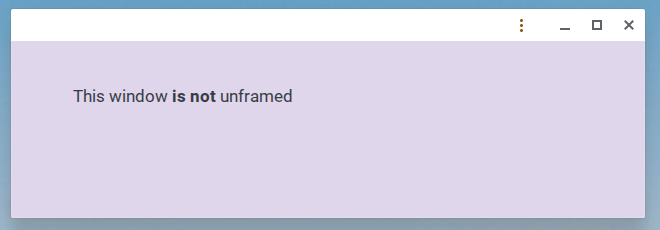
[=display mode/unframed=]
应用窗口处于 [=display mode/unframed=],这意味着它没有 [=Window frame=]。
它没有任何宿主原生标题栏,并且 [=window controls=] 不可见。
Web 内容会扩展到整个窗口区域。[=display mode/Unframed=] 被限制为
仅用于 [[[isolated-web-apps]]]。
[=display mode/window-controls-overlay=]
应用窗口具有 [=display mode/window-controls-overlay=],而不是常规的
[=window controls=]。
tabbed
Web 应用程序可以拥有多个 [=application contexts=],并将它们组合在一个
操作系统级别的窗口中。例如,这可能意味着用户代理显示一个标签栏 UI,
以允许用户在应用程序上下文之间切换。
unframed
[=display mode/unframed=] 显示模式使 [[[isolated-web-apps]]] 能够完全
控制应用窗口的外观,包括标题栏区域。
处于 [=display mode/unframed=] 的窗口没有任何宿主原生标题栏或
[=window controls=] 可见,并且 Web 内容会扩展到整个窗口区域。
应用可以在 Web 内容中指定 [=draggable regions=] 来创建自定义标题栏。
[=User agents=] MUST 将 [=display mode/unframed=] 的使用限制为
仅用于 [[[isolated-web-apps]]]。
一旦创建了 [=display mode/unframed=] 窗口,其显示模式在该窗口的
生命周期内就是固定的。[=user agent=] MUST NOT 允许在无框架窗口内
导航到范围外 URL。
CSS 媒体查询
可以使用
`display-mode` 媒体
特性 来查询 [=display mode/unframed=] 显示模式。
            @media (display-mode: unframed) {
              /* styles for unframed mode */
            }
安全和隐私考虑事项
允许开发者控制标题栏会使他们能够在以前由用户代理控制的可信区域中
伪装内容。为了缓解此威胁,该特性必须仅可用于 [[[isolated-web-apps]]],
并且受窗口管理权限保护。
由于 [=display mode/unframed=] 窗口中没有标题栏,像应用来源或隐私指示器
(例如摄像头和麦克风访问的指示器)这类 [=user agent=] 通常在标题栏中显示的
重要指示器,将需要在其他位置显示。显示这些指示器的具体位置取决于平台,
并由用户代理决定。
定义可拖拽
区域
`app-region`
属性可用于通过 CSS 定义哪些区域或元素(例如标题栏中的区域或元素)
是可拖拽的。
要启用某个元素的拖拽,应设置为 `drag`。
要禁用某个元素的拖拽,应设置为 `no-drag`。
`app-region` 属性 MUST 仅在窗口的已应用 [=display mode=] 为
[=display mode/unframed=] 或 [=display mode/window-controls-overlay=] 时生效。
一些 [=user agents=] 出于相同目的使用非标准 CSS 属性 `-webkit-app-region` 。
对清单处理的扩展
为了便于本规范添加的所有新扩展和孵化特性,用户代理 SHOULD 在
[=processing a manifest=] 中的
扩展
点 期间运行以下内容(可访问 [=URL=]
|document URL:URL|、[=URL=] |manifest URL:URL|、[=ordered map=]
|json:ordered map| 和 [=ordered map=] |manifest:ordered map|):
[=Process the `display_override` member=],传入 |json|、|manifest| 和
|manifest URL|。
[=Process the `tab_strip` member=],传入 |json|、|manifest| 和
|manifest URL|。
[=Process the `note_taking` member=],传入 |json|、|manifest|
和 |manifest URL|。
[=Process the `protocol_handlers` member=],传入 |json| 和
|manifest|。
[=Process the `file_handlers` member=],传入 |json|、|manifest|
和 |manifest URL|。
[=Process the `related_applications` member=],传入 |json| 和
|manifest|。
[=Process the `scope_extensions` member=],传入 |json| 和
|manifest|。
[=Process the `migrate_from` member=],传入 |json|、|manifest|
和 |manifest URL|。
[=Process the `migrate_to` member=],传入 |json|、|manifest|
和 |manifest URL|。
tab_strip
Web 应用程序清单 的
`tab_strip` 成员是一个
对象 ,它包含有关应用程序预期如何在
[=display mode/tabbed=] 显示模式中行为的信息。它具有以下成员:
[=tab_strip/home_tab=]
[=tab_strip/new_tab_button=]
home_tab
[=tab_strip=] 对象的 `home_tab` 成员是一个 ordered map,
其中包含关于一个特殊“home tab”的信息,该标签预期用作应用程序的
顶级菜单。它包含以下成员:
[=home_tab/scope_patterns=]
scope_patterns
每个 scope pattern 要么是一个看起来像 URL 但使用
"*" 作为通配符的字符串,要么是一个包含
带有 "*" 通配符的独立 URL 组件的字典。更多信息见
[[urlpattern]]。
如果应用程序的已应用 [=display mode=] 是 [=display mode/tabbed=],
且 [=Document/processed manifest=] 在 [=tab_strip=] 成员中包含一个非 null 的
[=home_tab=] 成员,则称该应用程序具有 home tab 。
home tab context 是一个可选的 [=application
context=],与其他 application contexts 相比具有特殊属性。
如果应用程序 [=has a home tab=],则每个应用程序窗口 SHOULD 具有一个
[=home tab context=]。如果不是,则应用程序窗口 SHOULD NOT 具有
[=home tab context=]。
[=home tab context=] 的呈现方式由用户代理自行决定,但它 SHOULD
具有不同于普通 application contexts 的外观。
当且仅当满足以下条件时,称一个 [=URL=] |url:URL| 位于 home tab 作用域内 :
应用程序 [=has a home tab=],并且
|url| 是清单的 [=manifest/within scope=],并且
至少满足以下之一:
|url| 与 [=start URL=] [=URL/equals=],其中
[=URL/equals/exclude fragments=] 设置为 true,或者
给定 [=Document/processed manifest=] 的 [=tab_strip=] 成员的
[=home_tab=] 成员的 [=scope_patterns=] 成员中的任意元素以及
|url|,应用 [=URL pattern/match=] 会返回一个 {{URLPatternResult}}。
如果一个 URL 不 [=within home tab scope=],则称它位于 home tab 作用域外 。
“home tab 作用域”(即 [=within home tab scope=] 的 [=URLs=] 集合)
是 [=home tab context=] 能够导航到的 URL 集合。
应用程序中到某个 [=within home tab scope=] URL 的所有导航都会在
[=home tab context=] 中执行,而到某个 [=outside of home tab
scope=] URL 的所有导航都会在另一个 [=application context=] 中执行
(即另一个标签),必要时会创建一个新的标签。应用程序的 [=start URL=]
始终是 home tab 作用域的一部分(如果应用程序 [=has a home tab=])。
为了与 [=start URL=] 进行匹配,[=URL/fragment=] 会被忽略,
但 [=URL/query=] 必须完全匹配。
如果应用程序不 [=has a home tab|have a home tab=],
则 home tab 作用域是空集,并且所有 URL 都
[=outside of home tab scope=]。
每个窗口都有一个 home tab
如果应用程序 [=has a home tab=],则每当创建一个新的应用程序窗口时
(例如启动应用程序时,或将某个标签移动到新窗口时),用户代理 MUST 在该窗口中
创建一个新的 [=home tab context=]。新创建的 [=home tab
context=] SHOULD 导航到 [=start URL=],根据定义,该 URL
[=within home tab scope=]。
关于 home tab 作用域的导航
当将与 [=home tab context=] 关联的 [=top-level traversable=]
[=navigate|导航=] 到一个 [=outside of home tab scope=] 的 [=URL=]
|url:URL| 时,运行以下步骤:
令 [=top-level traversable=] |tab:toplevel traversable| 为
选择一个 target 为
"_blank" 且 noopener 为 true 的 navigable 的结果。
不 [=navigating=] home-tab traversable,而是使用相同参数
[=navigate=] |tab|。
将当前 [=application manifest=] 应用到
|tab| 的 [=top-level browsing context=]。
用户代理 SHOULD 将 |tab| 放置在与 home-tab navigable 相同的窗口中。
聚焦 |tab|。
当将一个 [=display mode=] 为 [=display mode/tabbed=] 且不与
[=home tab context=] 关联(即非 home tab)的 [=top-level traversable=]
[=navigate|导航=] 到一个 [=within home tab scope=] 的 [=URL=]
|url:URL| 时,运行以下步骤:
令 |hometab:toplevel traversable| 为与当前窗口关联的
[=home tab context=] 的 [=top-level traversable=]。
不 [=navigating=] 该 top-level traversable,而是使用相同参数
[=navigate=] |hometab|。
聚焦 |hometab|。
从 home tab 导航到一个 [=outside of home tab scope=] 的 URL
将打开一个新的普通标签,并使现有文档继续在 home tab 中打开。
类似地,从普通标签导航到一个 [=within home tab scope=] 的 URL
将在 home tab 中打开,并使发起该导航的标签中的现有文档保持打开。
开发者应确保在这两种情况下,留下的文档不会进入意外状态。
new_tab_button
[=tab_strip/new_tab_button=] 成员是一个 ordered map,
它描述一个 UI affordance(例如按钮)的行为;当该 UI affordance
被点击/激活时,会在应用程序窗口内打开一个新的 [=application context=]。
它具有以下成员:
url
如果 [=Document/processed manifest=] 的 [=new_tab_button=] 的
[=new_tab_button/url=] 成员 [=outside of home tab scope=],
则称应用程序具有 new tab button 。如果应用程序不
[=has a new tab button|have a new tab button=],则用户代理 SHOULD NOT
向最终用户提供“new tab” affordance。
如果 new tab button 的 URL [=within home tab scope=],则该按钮将不可用。
此规则是必要的,因为否则这将意味着:a) new tab button 会打开一个
[=within home tab scope=] 的非 home tab,违反上面的第三个 home tab
不变量,或者 b) new tab button 只会聚焦 home tab,这会是多余且令人困惑的 UI。
[=new_tab_button/url=] 的默认值是 [=start URL=]。
这意味着如果应用程序 [=has a home tab=],该按钮默认将不可用。
当最终用户激活 new tab button 时,运行以下步骤:
在当前窗口中 [=Create a new application context=] 并聚焦它。
将其导航到 [=new_tab_button=] 的 [=new_tab_button/url=] 成员值。
处理 `tab_strip` 成员
要处理 `tab_strip` 成员 ,给定 [=ordered map=]
|json:ordered map|、[=ordered map=] |manifest:ordered map| 和
[=URL=] |manifest URL:URL|,在 [=processing a manifest=] 的
扩展点 期间运行以下步骤:
将 |manifest|["tab_strip"] 设置为一个新的 [=ordered map=]。
如果 |json|["tab_strip"] 不存在,或 |json|["tab_strip"] 不是一个
[=ordered map=]:
将 |manifest|["tab_strip"]["new_tab_button"]["url"] 设置为
|manifest|["start_url"]。
返回。
[=Process the `home_tab` member=],传入 |json|["tab_strip"]、
|manifest|["tab_strip"] 和 |manifest URL|。
[=Process the `new_tab_button` member=],传入
|json|["tab_strip"]、|manifest|["tab_strip"]、|manifest URL| 和
|manifest|["start_url"]。
处理 `home_tab` 成员
要处理 `home_tab` 成员 ,给定 [=ordered map=]
|json tab strip:ordered map|、[=ordered map=] |manifest tab
strip:ordered map| 和 [=URL=] |manifest URL:URL|,运行以下步骤:
如果 |json tab strip|["home_tab"] 不存在,或 |json tab
strip|["home_tab"] 不是一个 [=ordered map=],则返回。
令 |home tab:ordered map| 为一个新的 [=ordered map=]。
[=Process the `scope_patterns` member=],传入 |json tab
strip|["home_tab"]["scope_patterns"]、|home tab| 和 |manifest
URL|。
将 |manifest tab strip|["home_tab"] 设置为 |home tab|。
处理 `new_tab_button` 成员
要处理 `new_tab_button` 成员 ,给定 [=ordered
map=] |json tab strip:ordered map|、[=ordered map=] |manifest tab
strip:ordered map|、[=URL=] |manifest URL:URL| 和 [=URL=] |start
URL:URL|,运行以下步骤:
将 |manifest tab strip|["new_tab_button"]["url"] 设置为 |start
URL|。
如果 |json tab strip|["new_tab_button"] 不存在,或 |json
tab strip|["new_tab_button"] 不是一个 [=ordered map=],则返回。
令 |url:URL| 为使用 |manifest URL| 作为 base URL 对 |json tab
strip|["new_tab_button"]["url"] 进行 [=URL Parser|parsing=] 的结果。
如果 |url| 是 failure,则返回。
如果 |url| 不是 |manifest URL| 的 [=URL/within scope=],则返回。
将 |manifest tab strip|["new_tab_button"]["url"] 设置为 |url|。
处理 `scope_patterns` 成员
要处理 `scope_patterns` 成员 ,给定 [=ordered
map=] |json home tab:ordered map|、[=ordered map=] |manifest home
tab:ordered map| 和 [=URL=] |manifest URL:URL|,运行以下步骤:
令 |processed scope patterns:list| 为一个新的 [=list=]。
将 |manifest home tab|["scope_patterns"] 设置为 |processed scope
patterns|。
如果 |json home tab|["scope_patterns"] 不存在,或 |json
home tab|["scope_patterns"] 不是一个 [=list=],则返回。
对于 |json home
tab|["scope_patterns"] 的每个 |entry:URLPatternInit|:
令 |pattern:URL pattern| 为给定 |entry| 和 |manifest URL| 后
[=build a URL pattern from an infra value=] 的结果。
如果此过程抛出异常或返回 null,则 continue。
将 |pattern| append 到 |processed scope patterns|。
`share_target` 成员
`share_target` 成员将 Web 应用程序注册为共享操作的“目标”
(例如,用于共享文本、URL 或文件)。
`share_target` 成员是 [[[web-share-target]]]
规范的一部分。
note_taking
Web Application
Manifest 的 `note_taking` 成员是一个
对象 ,其中包含
与记笔记相关的信息。它具有以下成员:
[=note_taking/new_note_url=]
用户代理可以使用这些成员,将 Web 应用程序作为具有记笔记能力的
应用程序进行区别对待(例如,与操作系统记笔记界面集成)。
new_note_url
[=note_taking=] `new_note_url` 成员是一个 [=string=],
表示开发者希望用户代理在用户想使用 Web 应用程序创建新笔记时
加载的 URL
(例如,从操作系统快捷方式图标或键盘快捷键启动时)。
`new_note_url` 成员纯粹是建议性的,用户代理可以
忽略 它,或向
最终用户提供是否使用它的选择。用户代理可以向最终用户提供
修改它的选择。
处理 `note_taking` 成员
要处理 `note_taking` 成员 ,给定 [=ordered map=]
|json:ordered map|、[=ordered map=] |manifest:ordered map|、[=URL=]
|manifest_URL:URL|,在 [=processing a manifest=] 的 扩展
点 期间运行以下步骤:
如果 |json|["note_taking"] 不 [=map/exist=],返回。
如果 |json|["note_taking"] 的类型不是 [=ordered map=],
返回。
将 |manifest|["note_taking"] 设置为一个新的 [=ordered map=]。
[=process the `new_note_url` member=],传入
|json|["note_taking"]、|manifest|["note_taking"] 和 |manifest URL|。
处理 `new_note_url` 成员
要处理 `new_note_url` 成员 ,给定 [=ordered
map=] |json_note_taking:ordered map|、[=ordered map=]
|manifest_note_taking:ordered map|、[=URL=] |manifest_URL:URL|,运行
以下步骤:
如果 |json_note_taking|["new_note_url"] 不 [=map/exist=],
返回。
如果 |json_note_taking|["new_note_url"] 的类型不是
[=string=],返回。
令 |new_note_url:URL| 为以 |manifest URL| 作为基准
URL [=URL Parser|解析=]
|json_note_taking|["new_note_url"] 所得的结果。
如果 |new_note_url| 是失败,返回。
如果 |new_note_url| 不是 |manifest
URL| 的 [=manifest/within scope=],返回。
将 manifest_note_taking["new_note_url"] 设置为 |new_note_url|。
启动 `new_note_url`
要启动 `new_note_url` ,给定
已处理清单
|manifest:processed manifest|,运行以下步骤:
如果 |manifest|["note_taking"] 不 [=map/exist=],返回。
如果 |manifest|["note_taking"]["new_note_url"] 不
[=map/exist=],返回。
如果 |manifest|["note_taking"]["new_note_url"] 的类型不是
[=URL=],返回。
运行 [=launch a web application=] 的步骤,将 |manifest|
设置为 |manifest|,并将 |target URL| 设置为
|manifest|["note_taking"]["new_note_url"]。
用户代理可以随时为给定的 [=installed web application=]
[=launch the `new_note_url`=],通常是响应用户便利项。
`protocol_handlers` 成员
[=manifest=] 的 protocol_handlers 协议处理器描述 数组,它允许 Web 应用程序处理 URL 协议。
在安装时,用户代理应通过符合以下内容的交互,
向操作系统注册协议处理器:
如果某协议有多个已注册处理器,操作系统允许用户选择
应由哪个应用打开它,也允许用户设置默认应用。
点击已注册协议会启动已注册的应用程序。如果该应用是 Web 应用,
则执行 [=HTML=] 中定义的 [=invoke a
protocol handler=] 步骤,其中用户代理应导航到 [=url=],
且相应浏览上下文被设置为新的顶级浏览上下文。
例如,协议处理器可用于 Web 应用通信,其中一个应用通过
自定义协议链接直接调用另一个应用并传递数据。
处理 `protocol_handlers` 成员
要处理 `protocol_handlers` 成员 ,给定
[=object=] |json:JSON|、|manifest:ordered map|:
令 |processedProtocolHandlers| 为一个新的 [=list=],
由 |json:JSON|["|protocol_handlers|"] 组成。
将 manifest["|protocol_handlers|"] 设置为
|processedProtocolHandlers|。
[=list/For each=] |protocol_handler|(协议处理器
描述 ):
如果 |protocol_handler|["protocol"] 或
|protocol_handler|["url"] 为 undefined,则 [=iteration/continue=]。
令 (|normalizedProtocol:string|, |normalizedUrl:URL|) 为使用
|manifest URL| 作为基准 URL,并使用 [=this=] 的相关
[=environment settings object=],以
|protocol_handler|["protocol"]、| protocol_handler|["url"] 运行
[=normalize protocol handler parameters=] 所得的结果。
如果结果为失败,则 [=iteration/continue=]。
如果 |normalizedUrl| 不是 |manifest| 的
[=manifest/within scope=],则 [=iteration/continue=]。
如果 |processedProtocolHandlers| [=list/contains=]
|normalizedUrl|,则 [=iteration/continue=]。
[=List/Append=] |protocol_handler| 到
|processedProtocolHandlers|。
[=list/For each=] |processedProtocolHandlers|,用户代理
应 [=register a protocol handler=]。
用户代理应在将 [=protocol handler description=]
protocol_handler s 注册为宿主操作系统中某协议的
默认处理器之前请求用户许可。用户代理可以截断所呈现的
[=protocol handler description=] protocol_handlers
列表,以保持与宿主操作系统的惯例或限制一致。
在以下示例中,开发者包含了两个 [=protocol
handler description=] protocol_handler s。假设
该清单的 URL 是
https://example.com/manifest.webmanifest :
第一个协议处理器会注册为处理 "web+music"
URL(例如:web+music://#1234)。当被激活时,用户代理
会实例化一个新的 [=top-level browsing context=],并导航到
https://example.com/play?songId=web+music://%231234 。
第二个协议处理器会被忽略,因为所提供的协议
不是以 "web+" 开头,并且不是 [=safelisted schemes=]
的一部分。
            {
              "protocol_handlers": [
                {
                  "protocol": "web+music",
                  "url": "/play?songId=%s"
                },
                {
                  "protocol": "store",
                  "url": "/buy?songId=%s"
                }
              ]
            }
协议处理器项
每个 协议处理器描述 是一个 [=object=],
表示 Web 应用程序想要处理的协议,对应于
[=manifest/protocol_handlers=] 成员。它具有以下成员:
[=protocol handler description/protocol=]
[=protocol handler description/url=]
用户代理应使用这些值将 Web 应用程序注册为操作系统中的处理器。
当用户激活协议处理器 URL 时,用户代理应运行
处理协议启动 。
[[HTML]] 的 {{NavigatorContentUtils/registerProtocolHandler()}} 允许
Web 站点将自身注册为特定协议的可能处理器。
对 协议处理器描述 而言,什么构成有效的
[=protocol handler
description/protocol=] 和 [=protocol handler description/url=]
值由该 API 定义。还请注意,[[HTML]] API 使用
scheme,而这里使用 [=protocol handler description/protocol=],
但适用相同的限制。
`protocol` 成员
协议处理器描述 的 protocol 字符串 ,表示要处理的协议,例如 `mailto` 或
`web+auth`。
协议处理器描述 的
[=protocol handler description/protocol=] 成员等价于
[[HTML]] 中定义的 {{NavigatorContentUtils/registerProtocolHandler()}} 的
scheme 参数。
`url` 成员
协议处理器描述 的 url URL 。
协议处理器描述 的 [=protocol handler description/url=]
成员等价于 [[HTML]] 中定义的
{{NavigatorContentUtils/registerProtocolHandler()}} 的
url 参数。
处理协议启动
当具有 [=manifest=] manifest 的
协议处理器描述
protocol_handler 被调用时,它会经过与
[=invoke a
protocol handler=] 相同的步骤;其中用户代理不是
[=navigating=] 到 resultURL ,而是应
[=launch a web application=],传入 manifest 和
resultURL 。
不应以这种方式调用并修改 [=invoke a protocol handler=]。
resultURL 的计算应被提取为一个单独的算法,
供通用使用。
隐私考虑:默认协议处理器
根据操作系统能力,协议处理器可能会在用户没有明确知情的情况下
成为给定协议的“默认”处理器(例如自动处理给定协议的启动)。
为防止可能的滥用,用户代理可以采用如下保护措施:
在执行 [=invoke a protocol handler=] 的过程之前,
要求用户明确同意。
移除 Web 应用程序作为协议处理实体的 OS 注册,
可以是响应上述对话框,也可以由用户操作触发。
在 [=installation=] 时确认协议处理器注册。
如果用户代理移除协议处理器实体的注册,则应为用户提供 UX,
以便用户可重新向操作系统注册 Web 应用和协议。
`file_handlers` 成员
[=manifest=] 的 file_handlers
已注册文件处理应用程序的管理、呈现和选择由操作系统决定。
要处理 `file_handlers` 成员 ,给定 [=ordered map=]
|json:ordered map|、[=ordered map=] |manifest:ordered map|、[=URL=]
|manifest_url:URL|:
令 |processedFileHandlers:list| 为一个新的 [=list=]。
将 |manifest|["file_handlers"] 设置为 |processedFileHandlers|。
如果 |json|["file_handlers"] 不 [=map/exist=],或
|json|["file_handlers"] 不是 [=list=],返回。
[=list/For each=] |entry:ordered map|,其属于 |json|["file_handlers"]:
令 |file_handler:ordered map| 为以 |entry|、
[=manifest/start_url=]、[=manifest/scope=] 和
|manifest_url| 运行 [=process a file handler
item=] 所得的结果。
如果 |file_handler| 是失败,则 [=iteration/continue=]。
[=list/Append=] |file_handler| 到 |processedFileHandlers|。
在 [=installation=] 时,用户代理应运行 [=register
file handlers=] 的过程。
文件处理器项
每个 文件处理器 表示
应用程序作用域内的一个 URL,该 URL 可处理带有其所接受
[=file types=] 的启动。它具有以下成员:
[=file handler/action=]
[=file handler/name=]
[=file handler/accept=]
[=file handler/icons=]
用户代理可以使用这些成员,在操作系统上将 Web 应用程序与
[=file type=] 关联。
文件类型 可由 [=MIME type=] 和/或
[=file extension=] 定义。如果 OS 判定文件具有某个
[=MIME type=],和/或其名称以某个 [=file extension=] 结尾,
则该文件属于某个文件类型。文件扩展名 是一个
以 "." 开头且只包含
有效
后缀代码
点 的字符串。此外,[=file extensions=] 被限制为
16 个代码点的长度。
`action` 成员
[=file handler=] 的 action 字符串 ,
表示相对于 manifest URL 的 URL,
该 URL 是某个 已处理
清单 的
[=manifest/within scope=]。在 [=execute a file handler
launch=] 的步骤中会导航到此 URL。
`name` 成员
[=file handler=] 的 name 字符串 ,
用于向用户标识文件类型。[=User agents=] 可以在文件处理器
注册期间将此信息传递给操作系统。
[=file handler/name=] 用于以人类可读格式标识和描述
文件类型,通常只有当 Web 应用成为该文件类型的默认处理器时,
才会显示在 OS 界面(例如文件浏览器)中。它对自定义文件类型
最有用。
`icons` 成员
文件处理器 的 icons
[=file handler/icons=] 成员预期是表示与该处理器相关联的
所有文件的图像(或不同尺寸的图像集合)。这通常会显示得像
文档(例如一张纸),而不是应用程序徽标,但可能包含
暗示该文件与哪个应用程序相关联的元素(例如徽标)。与
[=file handler/name=] 一样,这通常只在应用成为某个文件类型的
默认处理器时显示。
`accept` 成员
[=file handler=] 的 accept 字典 ,
将 [=MIME types=] 映射到 [=file extensions=] 列表。
[=User agents=] 必须强制执行 [=file handler/accept=] 条目
仅适用于具有匹配扩展名的文件。
为了 [=register file handlers=],某些操作系统需要
[=MIME types=],某些则需要 [=file extensions=]。因此,
对于每个 [=file
handler/accept=] 条目,清单必须始终同时提供两者。
除了完整的 [=MIME types=] 之外,"*" 可用作
[=MIME type=] 的子类型,以匹配例如
"image/*" 的所有图像格式(这些格式也要适用于
所提供的 [=file extensions=] 列表)。
例如,在 Linux 上,[=MIME type=] 和 [=file extension=]
都会与 xdg-mime 工具一起使用,用于指定
Web 应用程序可打开同时具有指定 [=MIME type=]
和特定文件扩展名的文件。在 Windows 上,只使用
[=file extensions=],因此会忽略 [=MIME types=]。
`launch_type` 成员
[=file handler=] 的 launch_type 字符串 ,用于确定应用如何针对路由到此处理器的文件启动。
可能的值为 `"single-client"` 和
`"multiple-clients"`。如果未提供,则默认为
`"single-client"`。
当某个 [=file handler=] 被确定为匹配一组文件时,
[=user agent=] 应使用 [=file handler/launch_type=] 来控制
应用是为每个文件启动一次
(`"multiple-clients"`),还是为所有文件启动一次
(`"single-client"`)。见 {{LaunchParams/files}}。用户代理
不得将来自不同 [=file handlers=] 的文件合并到
单个启动事件中。
如果应用只打算每个窗口或标签页显示一个文件,
应应用 `"multiple-clients"`。否则,将启动一个实例,
并通过 {{LaunchParams/files}} 数组传递所有打开的文件。
此字段受平台限制。Windows 从不使用多个文件启动一个应用,
而是会使用每个文件各一次的方式多次启动单个应用。
因此,此字段在 Windows 上无效,所有启动实际上都是
`"multiple-clients"`。
处理文件处理器项
要处理文件处理器项 ,给定 [=ordered map=]
|item:ordered map|、[=URL=] |start_url:URL|、[=URL=] |scope:URL| 和
[=URL=] |manifest URL:URL|:
如果以下任一条件为真,则返回 failure:
|item|["action"] 不 [=map/exist=] 或不是
[=string=]。
|item|["accept"] 不 [=map/exist=]。
|item|["accept"] 不是 [=dictionary=]。
|item|["accept"] [=map/is empty=]。
令 |url:URL| 为以 |manifest_url URL| 作为基准 URL
[=URL Parser|解析=]
|item|["action"] 所得的结果。
如果 |url| 是 failure,返回 failure。
如果 |url| 不是 |scope| 的 [=manifest/within scope=],
返回 failure。
令 |launch_type:string| 为一个新的 [=string=],并初始化为
"single-client"。
如果 |item|["launch_type"] [=map/exists=] 且为
"multiple-clients",则将 |launch_type| 设置为 |item|["launch_type"]。
令 |accept:ordered map| 为一个新的 [=ordered map=]。
[=map/for each=] |mime_type_string:string| → |extensions|,其属于
|item|["accept"]
如果 |extensions| 不是 [=list=],则 [=iteration/continue=]。
如果 |extensions| 是 [=list/empty=],则 [=iteration/continue=]。
如果 |extensions| [=list/contains=] 非
[=string=] 项,则 [=iteration/continue=]。
如果 |extensions| [=list/contains=] 不以字符 `.`
开头的字符串,则 [=iteration/continue=]。
如果 |extensions| [=list/contains=] 长度大于
16 个字符的字符串,则 [=iteration/continue=]。
令 |mime_type_parsed:mime type| 为在 |mime_type_string|
上运行 [=parse a mime type=] 的步骤所得的结果。
如果 |mime_type_parsed:mime type| 是 failure,
则 [=iteration/continue=]。
如果 |mime_type_parsed/type| 未被列为 [[IANA-MEDIA-TYPES]]
中的顶级类型,则 [=iteration/continue=]。
将 |accept|[|mime_type_string|] 设置为 |extensions|。
如果 |accept:ordered map| 为空,返回 failure。
令 |file_handler:ordered map| 为 |ordered map| «[ "action" →
|url|, "name" → |item|["name"], "launch_type" → |launch_type|,
"accept" → |accept| ]»。
处理
图像资源 ,传入 |item|["icons"]、|file_handler|、
|manifest URL| 和 "icons"。
返回 |file_handler|。
执行文件处理器启动
执行文件处理器启动 的步骤由以下算法给出。
该算法接受 [=list=] |files:list| 和一个 [=ordered map=]
|manifest:ordered_map|,该有序映射保存 [=processing a manifest=]
的结果。
令 |file_handlers:list| 为 |manifest|["file_handlers"]。
如果 |file_handlers:list| 为 null,返回。
令 |launches:ordered map| 为一个 [=ordered map=]。
[=list/for each=] |filename:string|,其属于 |files|
[=list/for each=] |file_handler:ordered_map|,其属于
|file_handlers:list|:
[=map/for each=] |mime_type_string:string| →
|extensions:list|,其属于 |file_handler|["accept"]
[=list/for each=] |extension:string|,其属于 |extensions|:
如果 |filename| 不以 |extension| 结尾,
则 [=iteration/continue=]。
如果 |launches|[|file_handler|] [=map/exists=],
则 [=list/append=] |filename| 到
|launches|[|file_handler|]。
否则,将 |launches|[|file_handler|] 设置为
一个 [=list=],其中唯一元素为 |filename|。
[=iteration/Continue=] 到 |files| 的下一个元素。
[=map/for each=] |file_handler| → |files:list|,其属于 |launches|
如果 |file_handler|["launch_type"] 等于
"multiple-clients"
[=list/for each=] |file|,其属于 |files|
令 |params:LaunchParams| 为一个新的 {{LaunchParams}},
其中 {{LaunchParams/targetURL}} 设置为
|file_handler|["action"],且 {{LaunchParams/files}} 设置为
一个 {{FrozenArray}},其中唯一元素是与 |file|
对应的 {{FileSystemHandle}}。
[=Launch a web application with handling=],传入
|manifest| 和 |params|。
否则,
令 |params:LaunchParams| 为一个新的 {{LaunchParams}},
其中 {{LaunchParams/targetURL}} 设置为 |file_handler|["action"],
且 {{LaunchParams/files}} 设置为由与 |files| 指定的文件路径
对应的 {{FileSystemHandle}} 组成的 {{FrozenArray}}。
[=Launch a web application with handling=],传入
|manifest| 和 |params|。
注册文件处理器
用户代理应以与以下内容一致的方式,在宿主操作系统中
注册文件处理器 :
应用会暴露在适当的 OS 界面中,例如原生文件浏览器
和显示可处理给定文件或文件类型的应用列表的其他界面。
应用是成为相关文件类型系统默认处理器的候选者。
用户代理可以截断 [=file extensions=] 的总集合,以保留功能并防止滥用。
用户代理可以阻止与某些文件类型建立关联。
隐私考虑:默认文件处理器。
根据操作系统能力,[=file handler=] 可能会在用户没有明确知情的情况下
成为给定 [=file type=] 的默认处理器,自动处理给定文件类型的启动。
为防止可能的误用,[=user
agents=] 可以要求用户明确同意才开始 [=execute a file handler launch=]
的过程。如果请求同意,用户代理应允许用户指定该决定是永久的;
如果如此指定,则应移除 Web 应用程序作为文件处理实体的 OS 注册。
隐私考虑:名称和图标。
每个文件处理器的名称和图标可能涉及隐私和安全,因为没有指定
用户查看并确认这些内容的方式。因此,[=user agents=] 可以选择忽略
这些内容,转而使用替代字符串和图标,或回退到 OS 默认值。
`related_applications` 成员
相关应用程序 是底层应用程序平台可访问的应用程序,
它与 Web 应用程序存在某种关系。
[=manifest=] 的 related_applications 相关
应用程序 ,并作为 Web 应用程序与相关应用程序 之间存在此类关系的指示。
此关系是单向的,除非列出的应用程序声明相同关系,否则
用户代理 MUST NOT 假定存在双向认可。
`related_applications` 的使用示例可以是爬虫利用该信息收集
关于 Web 应用程序的更多信息,或浏览器在用户想要安装 Web 应用程序时
建议所列应用程序作为替代。
要处理 `related_applications` 成员 ,给定
[=ordered map=] |json:ordered map| 和 [=ordered map=]
|manifest:ordered map|:
令 |relatedApplications:list| 为一个新的 [=list=]。
将 |manifest|["related_applications"] 设置为 |relatedApplications|。
如果 |json|["related_applications"] 不 [=map/exist=] 或
|json|["related_applications"] 不是 [=list=],返回。
[=list/For each=] app ,其属于 |json|["related_applications"]:
如果 app ["id"] 和 app ["url"] 都不缺失:
将 app ["url"] 设置为给定
app ["url"] 运行
处理应用程序的 `url` 成员 所得的结果。
[=list/append=] app 到
relatedApplications 。
设置 relatedApplications 。
`prefer_related_applications` 成员
[=manifest=] 的 `prefer_related_applications` 相关应用程序 。如果
`prefer_related_applications` 成员被设置为
`true`,并且用户代理想要建议安装 Web
应用程序,则用户代理可能会改为建议安装其中一个
相关应用程序 。
`scope_extensions` 成员
[=manifest=] 的 scope_extensions
作用域扩展 通过描述应被视为
[=within extended scope=] 的额外 [=URLs=],扩展
[=manifest/navigation scope of
a manifest=]。
用户代理必须先 [=process the scope_extensions member=] 并
[=validate scope extensions=],之后才能 [=apply extended scope=],
以允许额外的 [=URLs=] 被视为 [=within extended scope=]。
如果 |target| 是清单的 [=manifest/within
scope=],或 [=matches a validated scope extension=],
则 [=URL=] |target:URL| 在扩展作用域内 于
|manifest:processed manifest|。
如果给定 [=URL=] |target:URL| 和 [=list=]
|validated_scope_extensions:list| 时,以下算法返回 `true`,
则 [=URL=] |target:URL| 匹配已验证的作用域扩展 :
[=list/For each=] |entry:ordered map|,其属于
|validated_scope_extensions:list|:
如果 |entry| 不是 [=ordered map=],或 |entry|["scope"] 不
[=map/exist=],或不是 [=URL=],继续。
令 [=URL=] |resolved_scope:URL| 为 |entry:ordered
map|["scope"]。
如果 |target| 是 |resolved_scope| 的 [=URL/within scope=],
返回 `true`。
返回 `false`。
[=manifest=] 的 `scope` 成员只允许将来自单个 [=origin=] 的 URL
视为处于作用域内。`scope_extensions` 成员允许将来自多个
[=origins=] 的 URL 视为处于作用域内。
处理 `scope_extensions` 成员
要处理 `scope_extensions` 成员 ,给定 [=ordered
map=] |json:ordered map|、[=ordered map=] |manifest:ordered map| 和
[=URL=] |manifest_id:URL|:
令 |processedScopeExtensions:list| 为一个新的 [=list=]。
将 |manifest|["scope_extensions"] 设置为 |processedScopeExtensions|。
如果 |json|["scope_extensions"] 不 [=map/exist=] 或不是
[=list=],返回。
[=list/For each=] |entry:ordered map|,其属于
|json|["scope_extensions"]:
如果 |entry|["type"] 或 |entry|["origin"] 不 [=map/exist=],
则 [=iteration/continue=]。
如果 |entry|["type"] 不是 "origin",则 [=iteration/continue=]。
如果 |entry|["origin"] 不是 [=string=],
则 [=iteration/continue=]。
令 [=URL=] |origin_url:URL| 为 [=URL
Parser|解析=] |entry|["origin"] 所得的结果。
如果 |origin_url| 是具有 [=URL/scheme=] "https" 的有效
|URL|,则将 |entry|["origin"] 设置为 |origin_url| 的 [=URL/origin=]。
否则 [=iteration/continue=]。
使用 [=validate scope
extensions=] 中的算法验证 |entry|,给定 [=ordered map=]
|entry:ordered map| 和 [=URL=] |manifest_id:URL|。
如果上一步返回错误,
则 [=iteration/continue=]。
否则,将 |entry|["scope"] 设置为返回的 [=URL=]。
[=list/Append=] |entry| 到 |processedScopeExtensions|。
`origin` 是当前指定的唯一作用域扩展条目类型。
未来可能会添加其他类型以支持不同用例。
验证作用域扩展
要验证作用域扩展 ,给定 [=ordered map=]
|extension:ordered map| 和 [=URL=] |manifest_id:URL|:
令 [=URL=] |origin_url:URL| 为 |extension|["origin"] 的
[=URL/origin=] 的 [=URL=]。
令 [=URL=] |download_url:URL| 为使用
|origin_url| 作为基准 [=URL=] [=URL
Parser|解析=] "/.well-known/web-app-origin-association" 所得的结果。
令 [=ordered map=] |json:ordered map| 为给定 |download_url|
进行 [=fetch=] 所得的结果。
如果 [=fetch=] 失败,返回错误。
如果 |json|[|manifest_id|] 不 [=map/exist=] 或不是
[=ordered map=],返回错误。
令 [=string=] |scope:string| 为 "/"。
如果 |json|[|manifest_id|]["scope"] [=map/exists=] 且是
[=string=],则将 |scope| 设置为 |json|[|manifest_id|]["scope"]。
令 [=URL=] |resolved_scope:URL| 为以 |extension|["origin"]
作为基准 [=URL=] [=URL
Parser|解析=] |scope| 所得的结果。
返回 |resolved_scope|。
应用作用域扩展
用户代理可以选择在某些场景中应用
应用扩展作用域 ,而在其他场景中应用 [=manifest/scope=]。
如果 [=application context=] 的 [=navigable/active document=] 的
[=URL=] 不是 [=manifest/within scope=],但
[=within extended
scope=],则用户代理应提供 UI,允许用户确定该 [=URL=]
或至少其 [=origin=],包括它是否通过安全连接提供。该 UI 应区别于
当 [=URL=] 不是 [=application context=] 的
[=Document/processed manifest=] 的 [=manifest/within scope=] 时
使用的任何 UI,以便明显表明用户仍在导航该应用程序的预期内容,
但也让用户了解导航到不同 [=origin=] 的隐私和安全影响。
Web 应用程序源迁移
Web 应用程序源迁移允许 Web 应用程序向用户代理指示
它已从一个源移动到另一个源(在同一站点内)。这使用户代理能够
迁移已安装的 Web 应用程序,同时保留用户的安装状态以及可能的设置。
migrate_from
[=manifest/migrate_from=] 成员是一个由 [=strings=] 或
[=ordered maps=] 组成的 [=list=],用于标识正在从中迁移的
旧 Web 应用程序。
如果条目是 [=string=],则将其视为旧应用程序的 [=manifest/id=]。
如果条目是 [=ordered map=],它可以具有以下成员:
id
install_url
behavior
为了让用户代理处理 [=manifest/migrate_from=] 成员,
清单还需要在其 JSON 中包含有效的显式
id 成员。
migrate_to
[=manifest/migrate_to=] 成员是一个可选的 [=ordered map=],
用于主动发出向新应用程序迁移的信号。它具有以下成员:
id
install_url
验证源迁移
要验证源迁移 ,给定 [=URL=]
|old_manifest_id:URL| 和 [=URL=] |new_manifest_id:URL|:
如果 |old_manifest_id| 的 [=URL/origin=] 和 |new_manifest_id| 的
[=URL/origin=] 不是 [=same site=],返回错误。
如果 |old_manifest_id| 的 [=URL/origin=] 与
|new_manifest_id| 的 [=URL/origin=] 是 [=same origin=],
返回 success。
令 [=URL=] |origin_url:URL| 为
|old_manifest_id| 的 [=URL/origin=]。
令 [=URL=] |download_url:URL| 为使用
|origin_url| 作为基准 [=URL=] [=URL
Parser|解析=] "/.well-known/web-app-origin-association" 所得的结果。
令 [=ordered map=] |json:ordered map| 为给定 |download_url|
进行 [=fetch=] 所得的结果。
如果 [=fetch=] 失败,返回错误。
如果 |json|[|new_manifest_id|] 不 [=map/exist=] 或不是
[=ordered map=],返回错误。
如果 |json|[|new_manifest_id|]["allow_migration"] 不是 `true`,
返回错误。
返回 success。
处理 `migrate_from` 成员
要处理 `migrate_from` 成员 ,给定 [=ordered
map=] |json:ordered map|、[=ordered map=] |manifest:ordered map| 和
[=URL=] |manifest URL:URL|:
如果 |json|["id"] 不 [=map/exist=],或者不是一个 [=string=],
则返回。
如果 |json|["id"] 是空字符串,则返回。
令 |base_origin:origin| 为 |manifest|["start_url"] 的
[=URL/origin=]。
令 |id_url:URL| 为使用 |base_origin| 作为 base URL 对
|json|["id"] 进行 [=URL Parser|parsing=] 的结果。
如果 |id_url| 是 failure,则返回。
如果 |id_url| 与 |manifest|["start_url"] 不是 [=same origin=],
则返回。
令 |processed_migrate_from:list| 为一个新的 [=list=]。
将 |manifest|["migrate_from"] 设置为 |processed_migrate_from|。
如果 |json|["migrate_from"] 不 [=map/exist=],或者不是一个
[=list=],则返回。
对 |json|["migrate_from"] 的每个 |entry| 执行 [=list/For each=]:
令 |processed_entry:ordered map| 为一个新的 [=ordered map=]。
如果 |entry| 是一个 [=string=]:
令 |id:URL| 为使用 |manifest URL| 作为 base URL 对
|entry| 进行 [=URL Parser|parsing=] 的结果。
如果 |id| 是 failure,则 [=iteration/continue=]。
将 |processed_entry| 的 [=migrate_from_item/id=] 设置为 |id|。
否则,如果 |entry| 是一个 [=ordered map=]:
如果 |entry| 的 [=migrate_from_item/id=] 不 [=map/exist=],或者不是一个
[=string=],则 [=iteration/continue=]。
令 |id:URL| 为使用 |manifest URL| 作为 base URL 对
|entry| 的 [=migrate_from_item/id=] 进行 [=URL Parser|parsing=] 的结果。
如果 |id| 是 failure,则 [=iteration/continue=]。
将 |processed_entry| 的 [=migrate_from_item/id=] 设置为 |id|。
如果 |entry| 的 [=migrate_from_item/install_url=] [=map/exists=],并且是一个
[=string=]:
令 |install_url:URL| 为使用 |manifest
URL| 作为 base URL 对 |entry| 的 [=migrate_from_item/install_url=] 进行 [=URL
Parser|parsing=] 的结果。
如果 |install_url| 不是 failure,则将
|processed_entry| 的 [=migrate_from_item/install_url=] 设置为 |install_url|。
如果 |entry| 的 [=migrate_from_item/behavior=] [=map/exists=],并且是一个
[=string=]:
如果 |entry| 的 [=migrate_from_item/behavior=] 是 "suggest" 或 "force",则将
|processed_entry| 的 [=migrate_from_item/behavior=] 设置为 |entry| 的
[=migrate_from_item/behavior=]。
否则,[=iteration/continue=]。
使用 [=validate origin migration=] 的算法,给定 [=URL=]
|processed_entry| 的 [=migrate_from_item/id=] 和 [=URL=] |id_url|,
验证 |processed_entry| 的 [=migrate_from_item/id=]。
如果上一步返回了 error,
则 [=iteration/continue=]。
将 |processed_entry| [=list/Append=] 到
|processed_migrate_from|。
处理 `migrate_to` 成员
要处理 `migrate_to` 成员 ,给定 [=ordered
map=] |json:ordered map|、[=ordered map=] |manifest:ordered map| 和
[=URL=] |manifest URL:URL|:
如果 |json|["migrate_to"] 不 [=map/exist=],或者不是一个
[=ordered map=],则返回。
令 |entry:ordered map| 为 |json|["migrate_to"]。
如果 |entry| 的 [=migrate_to_item/id=] 不 [=map/exist=],或者不是一个 [=string=],
则返回。
令 |id:URL| 为使用 |manifest URL| 作为 base URL 对
|entry| 的 [=migrate_to_item/id=] 进行 [=URL Parser|parsing=] 的结果。
如果 |id| 是 failure,则返回。
令 |processed_migrate_to:ordered map| 为一个新的 [=ordered map=]。
将 |processed_migrate_to| 的 [=migrate_to_item/id=] 设置为 |id|。
如果 |entry| 的 [=migrate_to_item/install_url=] [=map/exists=],并且是一个 [=string=]:
令 |install_url:URL| 为使用 |manifest URL| 作为
base URL 对 |entry| 的 [=migrate_to_item/install_url=] 进行 [=URL
Parser|parsing=] 的结果。
如果 |install_url| 不是 failure,则将
|processed_migrate_to| 的 [=migrate_to_item/install_url=] 设置为 |install_url|。
将 |manifest|["migrate_to"] 设置为 |processed_migrate_to|。
隐私与安全考虑
为防止恶意行为者静默接管应用程序(例如,一个简单计算器将自身更新为模仿银行应用),
[=validate origin migration=] 算法强制执行双向握手。
新旧应用程序源都必须通过 [=web-app-origin-association=] 文件
明确同意迁移。
此外,迁移被限制为 [=same site=],以确保它们用于组织控制范围内
的合法品牌重塑和架构变更,而不是将所有权转移给未经验证的第三方。
用户代理应考虑将显式用户确认对话框作为迁移流程的一部分,
尤其是在包含对安全敏感字段(例如应用名称和图标)的更新时。
外部应用程序资源
每个 外部
应用程序资源 表示一个与 Web 应用程序相关的应用程序。
[=external application resource=] 可以具有以下成员,
其中某些成员是成为 [=valid external application
resource=] 所必需的:
[=external application resource/fingerprints=] 成员
[=external application resource/id=] 成员
[=external application resource/min_version=] 成员
[=external application resource/platform=] 成员
[=external application resource/url=] 成员
有效外部应用程序资源 必须具有
[=external
application resource/platform=] 成员,以及
[=external application resource/url=] 或 [=external application resource/id=]
成员(或两者)。
在以下示例中,Web 应用程序列出了两个不同的相关应用程序,
一个在 Google Play Store 上,另一个在 iTunes Store 上。
Google Play Store 上的那个具有 Android 包名、最低版本说明符,
以及以 Play-Store 特定方式用于验证的加密指纹。
          {
            "related_applications": [
              {
                "platform": "play",
                "url": "https://play.google.com/store/apps/details?id=com.example.app1",
                "id": "com.example.app1",
                "min_version": "2",
                "fingerprints": [
                  {
                    "type": "sha256_cert",
                    "value": "92:5A:39:05:C5:B9:EA:BC:71:48:5F:F2"
                  }
                ]
              },
              {
                "platform": "itunes",
                "url": "https://itunes.apple.com/app/example-app1/id123456789"
              }
            ]
          }
`platform` 成员
platform 平台 表示软件分发生态系统,
或可能表示操作系统。本规范不定义
platform 成员的具体值。
`url` 成员
[=external application resource's=] url URL 。
要处理应用程序的 `url` 成员 :
如果 application URL 缺失,返回 null。
否则,[=URL Parser|解析=] application URL ;如果
结果不是 failure,返回该结果。否则返回 null。
`id` 成员
[=external application resource's=] id
`min_version` 成员
[=external application resource's=] min_version 字符串 ,具有平台特定的语法和语义。
`fingerprints` 成员
[=external application resource's=] 的 fingerprints
fingerprint 表示一组用于
验证应用程序的密码学指纹。fingerprint 具有以下两个成员:type 和 value 。它们各自都是 string ,
但其语法和语义由平台定义。
安装提示
安装过程可以通过多种方式触发:
最终用户可以通过用户代理的
UI
手动
触发安装过程,直接调用
呈现安装提示 的步骤。
安装过程可以通过自动安装提示 发生:
也就是说,当例如存在足够的可安装性
信号 来支持安装 Web 应用程序时,用户代理向
用户呈现的 UI。
安装过程可以通过站点触发的
安装提示 发生:站点可以以编程方式请求
用户代理向用户呈现安装提示。用户代理可以将此特性的可用性
限制在例如存在足够信号来支持 Web 应用程序
[=installed web
application|安装=]的情况下。
无论哪种情况,如果文档不可安装,用户代理都不得
呈现安装提示 。
用户代理可以在任何时候(仅当文档可安装时)
运行通知安装提示可用的步骤 ,
从而让站点有机会显示站点触发的
安装提示 ,而无需用户与用户代理 UI 交互。
要呈现
安装提示 :
显示某种用户代理特定的 UI,询问用户是否
继续安装应用。该选择的 result
要么是 {{AppBannerPromptOutcome/"accepted"}},要么是
{{AppBannerPromptOutcome/"dismissed"}}。
返回 result ,并且并行地 :
如果 result 是 {{AppBannerPromptOutcome/"accepted"}},
则运行安装 Web 应用程序的步骤 。
通知安装提示可用的步骤 由以下算法给出:
等待 top-level browsing
context 的 {{Document}} 完全
加载 。
如果已经有一个 正在呈现的安装提示 ,或者
安装 Web 应用程序的步骤 当前正在
执行,则中止此步骤。
在 application life-cycle task source 上
排入一个任务 以执行以下操作:
令 |mayShowPrompt| 为在 [=top-level browsing context=] 的
[=relevant global object=] 上 [=fire an event=] 名为
`"beforeinstallprompt"`、使用 {{BeforeInstallPromptEvent}}
接口并将 {{Event/cancelable}} 属性初始化为 `true`
所得的结果。
如果 |mayShowPrompt| 为 true,则用户代理可以并行地
使用 |event| 请求呈现安装提示 。
可安装 Web 应用程序
安装 过程
安装 Web 应用程序的步骤 由以下算法给出:
令 manifest 为可安装文档的清单。
执行一系列未指定的操作,以尝试在用户的操作系统中注册
Web 应用程序(例如,创建启动 Web 应用程序的快捷方式、
在系统卸载菜单中注册应用程序等)。如果安装失败
(可能出于任何原因,例如 OS 拒绝授予用户代理将图标添加到
设备主屏幕的权限),则中止这些步骤。
在 application life-cycle task
source 上 排入一个任务 ,以在发生安装的
[=top-level browsing context=] 的 [=relevant global object=] 上
触发事件 ,事件名为 `"appinstalled"`。
安装事件
本规范的 [=event|事件=] 依赖于
application
life-cycle task source 。
BeforeInstallPromptEvent 接口
          [Exposed=Window]
          interface BeforeInstallPromptEvent : Event {
            constructor(DOMString type, optional EventInit eventInitDict = {});
            Promise<PromptResponseObject> prompt();
          };

          dictionary PromptResponseObject {
            AppBannerPromptOutcome userChoice;
          };

          enum AppBannerPromptOutcome {
            "accepted",
            "dismissed"
          };
当允许站点呈现站点触发的安装提示 时,
或者在用户代理呈现自动安装提示 之前,
会分派 {{BeforeInstallPromptEvent}}。它允许站点取消
自动安装提示 ,并手动呈现
站点触发的安装提示 。
如果 {{BeforeInstallPromptEvent}} 未 被取消,
用户代理则被允许向最终用户呈现安装提示
(具体而言,是自动安装提示 )。取消默认动作
(通过 {{Event/preventDefault()}})会阻止用户代理
呈现安装提示 。用户代理可在稍后时间再次运行
通知安装提示可用的步骤 。
PromptResponseObject 包含调用
{{BeforeInstallPromptEvent/prompt()}} 的结果。它包含一个成员,
userChoice ,
该成员表示用户选择的结果。
{{BeforeInstallPromptEvent}} 实例具有以下内部槽:
[[\didPrompt]]
一个布尔值,初始为 `false`。表示此事件是否已用于向最终用户
呈现安装提示 。
[[\userResponsePromise]]
一个 promise,表示呈现安装
提示 的结果。
prompt() 方法
当调用 prompt 方法时,运行以下步骤:
令 |userResponsePromise| 为
{{BeforeInstallPromptEvent/[[userResponsePromise]]}}。
如果 |userResponsePromise| 是 pending:
如果 [=this=].{{BeforeInstallPromptEvent/[[didPrompt]]}} 是
`true`,终止此算法。
如果此事件的 {{Event/isTrusted}} 属性是 `false`,
则以 {{"NotAllowedError"}} 拒绝 |userResponsePromise|,
并终止此算法。
将 [=this=].{{BeforeInstallPromptEvent/[[didPrompt]]}} 设置为
`true`。
并行地 ,使用 [=this=] 请求呈现安装
提示 。等待最终用户做出选择,可能会无限期等待。
返回 |userResponsePromise|。
要使用 {{BeforeInstallPromptEvent}} event
请求呈现安装提示 :
呈现安装提示 ,并令 |outcome| 为结果。
令 |response| 为新创建的 {{PromptResponseObject}},
将其 {{PromptResponseObject/userChoice}} 初始化为 |outcome|。
[=Resolve=]
|event|.{{BeforeInstallPromptEvent/[[userResponsePromise]]}},值为
|response|。
AppBannerPromptOutcome 枚举
AppBannerPromptOutcome 枚举的值表示
呈现安装提示 后的结果。
"accepted ":
最终用户表示希望用户代理安装该 Web 应用程序。
"dismissed ":
最终用户关闭了安装提示。
对 `Window` 对象的扩展
          partial interface Window {
            attribute EventHandler onappinstalled;
            attribute EventHandler onbeforeinstallprompt;
          };
onappinstalled 属性
onappinstalled 事件处理器 IDL 属性
处理 "appinstalled " 事件。
onbeforeinstallprompt 属性
onbeforeinstallprompt 事件处理器 IDL
属性 处理 "beforeinstallprompt " 事件。