Copyright © 2025 World Wide Web Consortium. W3C® liability, trademark and permissive document license rules apply.
EditContext 是一个 API,允许作者更直接参与文本输入流程。
本节描述了该文档在发布时的状态。当前 W3C 的出版物列表以及本技术报告的最新修订可在 W3C 标准和草案索引中查阅。
本文档由 Web 编辑工作组 作为工作草案发布,采用 推荐路线。
作为工作草案发布不代表 W3C 及其成员的认可。
本文档为草稿,有可能随时被更新、替换或废弃。引用此文档时只适合作为正在进行中的工作。
本文档由在 W3C 专利政策 下运作的组织编写。 W3C 维持着 与工作成果相关的专利公开名单 该页面还包含披露专利的说明。知晓专利并认为其包含 必要权利要求 的个人必须根据 W3C 专利政策第6条 披露相关信息。
本文档受 2025年8月18日 W3C 流程文档 管理。
本节为非规范性内容。
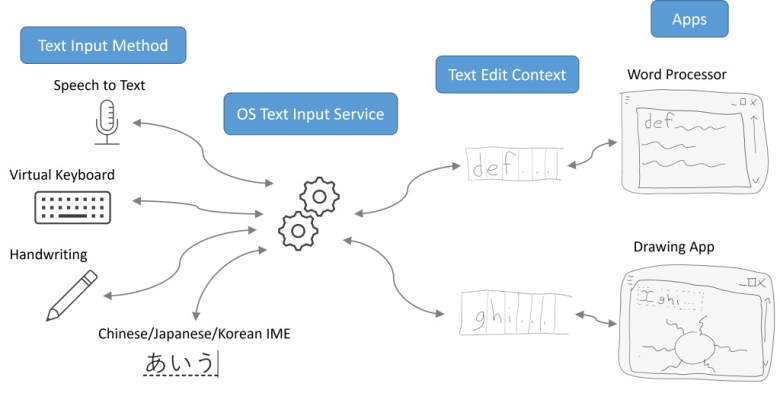
现代操作系统提供了多种生成文本的机制:语音转文本、虚拟键盘、手写识别等。应用想要从这些不同来源接收文本输入,首先必须向操作系统提供其当前可编辑文本的视图。可编辑文本的视图提供了一种通用语言,使得具有各种不同文档模型的应用和具有各种不同输入方式的文本来源都能理解。应用和输入来源双方都通过将其对公共视图状态的期望更改表达为事件,并由对方处理,从而完成文本输入过程。
在本文档中,文本的生产者称为 Text Input Method(文本输入法)。希望消费文本的应用所提供的视图称为 Text Edit Context(文本编辑上下文)。操作系统为 Text Edit Context 被 Text Input Methods 编辑所提供的服务称为 Text Input Service(文本输入服务)。
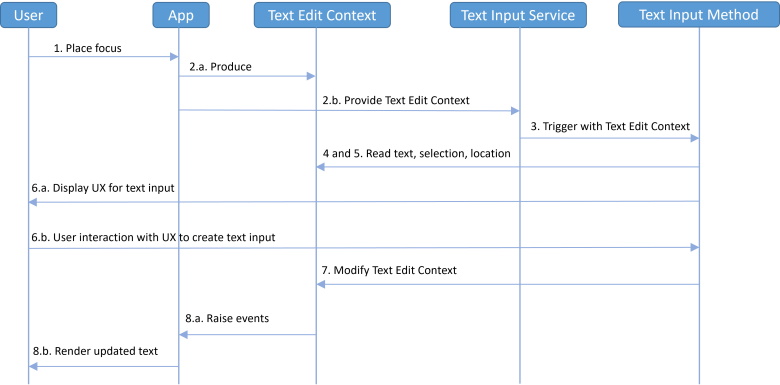
下面是一个更详细的典型文本输入流程:
现有用户代理会处理上述文本输入流程中的细节,因此作者的职责仅限于声明文档中哪些元素代表可编辑区域。作者通过使用 input 元素、textarea 元素、contenteditable 元素,或将 designMode
属性设置为 "on" 来标记整个文档为可编辑,从而表达哪些区域是可编辑的。
当文档中的某个可编辑区域被 focused 时,用户代理会自动根据该可编辑区域的内容及其中的选区位置生成 Text Edit Context。当某个 Text Input Method 生成文本时,用户代理会将针对其 Text Edit Context 的事件转换为一系列 DOM 和样式修改——目前只有一部分通过现有事件暴露给作者可以处理。
希望提供复杂编辑体验的作者可能会受到现有方式的限制。例如,如果文本和选区被渲染到 canvas 中,用户代理就无法生成驱动文本输入过程的 Text Edit Context。作者通常会借助离屏可编辑元素来弥补,但这种方式会对可访问性产生负面影响、降低输入体验,并且需要复杂的代码来同步离屏可编辑元素中的文本位置与 canvas 中相应文本的位置。
通过引入 EditContext API,作者可以更直接地参与文本输入协议,从而避免上述问题。
Text Input Service 和 Text Edit
Context 是在许多操作系统上抽象出文本输入共性的一组概念。
EditContext 是 Text Edit
Context 的 JavaScript 映射。
当 Text Edit Context 被 Text Input
Service 修改时,这些更改会以事件的形式异步反映给作者,这些事件会派发到 active
EditContext 上。
当作者对 active EditContext 进行更改时,这些更改会在下一次生命周期更新时反映到 Text Edit Context 中。
Text Edit Context 和 EditContext 都具有一个 text state,保存前述更新中交换的信息。text state 由以下内容组成:
DOMString,表示可编辑内容。初始值为空字符串。
DOMRect,描述视口中显示 text 的区域。它使用 client coordinate system,其初始 x、y、width 和
height 均为 0。DOMRect,描述选区的位置。它使用 client coordinate system,其初始 x、y、width 和
height 均为 0。DOMRect
组成的数组,用于定义每个码点的边界框。该数组初始为空。text format 是一个结构体,用于指示应应用于某些 text 范围的装饰属性。该结构体包含:
UnderlineStyle,表示被装饰
text 范围的首选下划线样式。
UnderlineThickness,表示被装饰 text 范围的首选下划线粗细。
Codepoint rects 为用户代理提供了一种手段,可以针对一定范围的
text 进行位置查询。Text Input Service 会结合 control bounds 和 selection bounds 使用这些信息,
以支持 Text Input Method 正确显示其用户界面。例如,这些信息可用于将 IME 窗口定位到正在合成的文本附近。
不同平台为了响应来自 Text Input Service
的查询,可能需要缓存不同的位置信息。
用户代理会通过触发 CharacterBoundsUpdateEvent
来指示需要哪些位置。
Control bounds、selection bounds 和 codepoint rects 使用 client coordinate system 表示。该坐标系被定义为一个二维笛卡尔坐标系 (x, y),其原点位于 layout viewport 的左上角, x 轴指向 layout viewport 的右上方, y 轴指向 layout viewport 的左下方。 client 坐标系的单位为 CSS 像素。
由于 EditContext 的各类 bounds 是使用 client coordinates 定义的, 页面上某段内容对应的坐标会随着用户滚动文档而变化,即便该内容在文档中的位置并未改变。 一个需要作者考虑此问题的场景是:用户在存在激活合成的情况下滚动页面。 如果作者没有更新 EditContext 的 bounds 信息(例如在滚动事件监听函数中更新), IME 窗口在整个合成过程中就可能不再与正在合成的文本对齐。
然而,某些平台在激活合成期间不会调整 IME 窗口的位置, 因此在合成中途更新 bounds 信息并不能保证 IME 窗口会立即重新定位, 而可能要等到关闭并重新打开之后才会重新定位。
一个 EditContext 具有一个 associated element,即一个 HTMLElement。
当把某个 EditContext 赋值给元素的 editContext 属性时,该元素就成为该 associated element 。
一个 HTMLElement
至多可以与一个 EditContext associated。
一个 EditContext 会保持其 associated element 存活,
因此开发者需要注意,将某个 EditContext 赋值给元素的
editContext 属性,
会阻止该元素被垃圾回收,直到该属性被清除,或该 EditContext 本身被垃圾回收。
如果某个 EditContext 的 associated
element 的
父节点 既不是
editable,也不是其
designMode
属性为 "on" 的 Document,
则该 associated element 会成为一个 EditContext editing host。
EditContext editing host 是一种 editing host,
其行为在 1.2.3
Differences for an EditContext editing host 中有详细描述。
这其中有几点影响。首先,如果某个元素已经因为
contenteditable
而成为一个 editing
host,
然后又成为某个 EditContext 的 associated element,
那么该元素会成为 EditContext editing host。
换言之,如果在一个元素上同时设置了 EditContext
和
contenteditable,
则以 EditContext 的行为为准。
其次,如果某个元素是
editable,
但本身不是 editing
host(即它是某个 editing
host 子树中的子节点),
那么将其设为某个 EditContext 的 associated element
对该元素不会产生任何影响。这与
contenteditable
的行为类似:为一个
editable 且不是 editing
host 的元素设置
contenteditable
为 "true" 并不会产生效果。综合来看,这些规则意味着,一个可编辑的节点树将要么遵循
EditContext 行为,要么遵循非 EditContext 行为,两者不能混用。
一个 Document 具有一个 active
EditContext,其值可以为 null。
一旦行为更改在 [input-events] 中落地,下面这一段即可移除。
当某个 EditContext editing host 从 Text Input Service 接收到文本输入时, 作为由该输入触发的 beforeinput 事件的 默认动作, 用户代理必须对该 EditContext editing host 运行 Handle Input for EditContext。
在许多方面,一个 EditContext editing
host 的行为与其他类型的 editing
host(例如设置了
contenteditable
的元素)相同。显著的相似点包括:
contenteditable
属性被设置为 "false"。
同时,一个 EditContext editing host 也有一些与其他 editing hosts 不同的地方:
Document 存在 active EditContext 时,
用户代理不得因为在 EditContext editing host 中的某个用户操作
(例如在可编辑区域中的键盘输入、删除或格式化文本等)
而直接更新 DOM。
Document 存在 active EditContext 时,
用户代理不得按照 [uievents] 的规定,
因用户操作而在 EditContext editing host 上触发
input 事件。
Document 存在 active EditContext 时,
用户代理不得因用户操作在 EditContext editing
host 上触发
composition events。
相反,这些事件会在 EditContext 上触发,
作为 updating the EditContext 或 deactivating the EditContext 的一部分。
当 active EditContext 的 associated element 是一个 canvas 时,还存在以下差异:
用户代理会在 EditContext 上触发多种事件,
以告知作者何时必须在 DOM 中更新状态来响应来自 Text Input Service 的更改,
或响应来自 Text Input Service 的查询。
由于 Text Input Service 的时序是平台相关的,
作者应避免依赖这些事件触发时机的具体细节。
TextUpdateEvent。
当作者收到该事件时,必须将这些更改渲染回页面视图,让用户看到自己正在输入的内容。
当 Text Input Service
表明应对正在合成的文本应用某些格式时,
用户代理必须触发 TextFormatUpdateEvent。
当作者收到该事件时,必须将格式更改渲染回页面视图,以帮助用户进行 IME 合成。
为降低指纹识别风险,用户代理可以在分发 TextFormatUpdateEvent 之前,
调整 UnderlineStyle 或 UnderlineThickness。
当使用具有显著样式特征的输入法时,这一点尤其重要。
当 Text Input Service 表明其需要字符边界信息,
以便支持 Text Input Method 正确显示其用户界面时,
用户代理必须触发 CharacterBoundsUpdateEvent。
收到 CharacterBoundsUpdateEvent
后,
作者必须计算所请求的字符边界,并调用 updateCharacterBounds,
以更新 EditContext 的 text state 中的字符边界信息。
如果可能,作者应在 CharacterBoundsUpdateEvent
事件处理函数中同步调用
updateCharacterBounds;
若无法同步调用,异步调用也是允许的。
用户代理在收到 updateCharacterBounds
调用后,
必须将字符边界信息传递给 Text Input Service。
作者延迟调用 updateCharacterBounds
的时间越长,
用户在合成过程中观察到 IME 窗口中途重新定位并产生视觉卡顿的概率就越高。
在 HTML 事件循环处理模型中,会在 Update the
rendering 步骤中新增一个子步骤,紧跟在第 15 步(为其
focused area 变为不可聚焦的
Document 运行 focusing steps)之后。
该步骤为:对每个
fully
active 的
Document doc,
使用 doc 的 relevant
global object,
在 DOM
manipulation task source 上
queue a global
task,
来运行给定 doc 的 Update the Text Edit
Context 步骤。
本节为非规范性内容。
借助 EditContext,作者可以通过将一个 associating
的 EditContext 对象附加到某个元素上来标记文档的某个区域为可编辑,如下例所示:
在下面的示例中,作者使用 canvas 来绘制一个可编辑区域,使用户可以输入使用等宽字体渲染的单行文本。该可编辑区域的文本由作者以 String 的形式维护;选区在可编辑区域中的文本偏移由作者以一对 Number(selectionStart 和 selectionEnd)维护,这两个 Number 表示从文本起始处到选区起点和终点分别包含多少个 UTF-16 码点。为了便于将当前选区和可编辑区域的边界矩形(使用 CSS 像素)告知文本输入服务,作者还会计算选区及可编辑区域在文档中的边界矩形。这些矩形的偏移相对于 canvas 元素的原点给出,因为作者正是将 EditContext associated 到该 canvas 元素上的。由于作者对文本和选区位置的表示方式与 EditContext API 期望的形式一致,作者只需在这些值变化时,将它们赋值给与 canvas associated 的 EditContext 即可。
在前一个示例的基础上,作者在响应用户输入时,应同时处理可编辑元素(本例中为 canvas)和 EditContext 上的事件。
针对 DOM 的输入事件继续描述用户的意图。
下面的示例展示了如何处理 TextUpdateEvent、TextFormatUpdateEvent 和 CharacterBoundsUpdateEvent,
以更新模型并将结果渲染到 canvas。
本节为非规范性内容。
作者并不一定要将 EditContext 与 canvas 元素配合使用。在下面的示例中,作者使用 div 来建立文档中的可编辑区域,并通过各种样式化元素、图片和文本将内容渲染到该可编辑区域中。这使得作者可以利用用户代理提供的其他内置编辑原语,如选区与拼写检查。
除标记为非规范性的章节外,本规范中的所有编写指南、图表、示例和注释均为非规范性内容。本规范中的其他所有内容均为规范性内容。
本规范定义的符合性标准适用于单一产品:实现本规范所包含接口的用户代理。
以算法或具体步骤表述的符合性要求可以以任何方式实现,只要最终结果等效即可。(尤其是,本规范中定义的算法旨在易于理解,而非追求性能。)
WebIDLpartial interface HTMLElement {
attribute EditContext? editContext;
};
HTMLElement
具有一个内部槽 [[EditContext]],它是对一个 EditContext 的引用,初始值为 null。
editContext getter 的步骤是返回 this 的内部 [[EditContext]]
槽的值。editContext setter 必须遵循以下步骤:
canvas",则 抛出 一个 "NotSupportedError"
DOMException。
NotSupportedError"
DOMException。
NotSupportedError"
DOMException。
HTMLElement
针对给定的 editContext,并使用 Text Edit Context 的 text state 中的 text、text formats、 selection start、selection end、is composing、composition start、 以及 composition end, 运行 Update the EditContext 的步骤。
由于 Text Edit Context 是对不同操作系统上文本输入共性方面的抽象, 因此本规范明确不会给出如何确定 Text Edit Context 中这些取值的方式。它们会因不同的操作系统和输入设备而异。
insertTextinsertTransposedeleteWordBackwarddeleteWordForwarddeleteContentdeleteContentBackwarddeleteContentForwardEditContext
处理的 inputType
是那些仅对原始文本进行操作的类型。其他依赖格式、剪贴板/拖放、撤销或浏览器 UI(如拼写检查)的 inputType
无法由
EditContext 处理,因为 EditContext 的状态不包含这些概念。如果作者希望其应用处理这些 inputType,
则需要在 beforeinput
事件处理程序中手动处理它们。
EditContextCompositionEvent。
CompositionEvent。
CompositionEvent。
Document注意:更新 Text Edit Context 的 text state 的步骤取决于对特定平台 Text Input Service 所创建抽象的性质。 这些细节不属于本规范的一部分。
EditContextTextUpdateEvent,其中
text 初始化为
text,
selectionStart
初始化为 editContext 的 selection start,以及
selectionEnd
初始化为 editContext 的 selection
end。
EditContextTextFormat 数组,初始为空。
TextFormat,其包含
rangeStart、rangeEnd、underlineStyle、underlineThickness。
rangeStart 设为
format 的 range start。
rangeEnd 设为
format 的 range end。
underlineStyle 设为
format 的 underline style。
underlineThickness
设为 format 的 underline thickness。TextFormatUpdateEvent,且将该 TextFormatUpdateEvent 的 text format list 初始化为
formats。
EditContextCharacterBoundsUpdateEvent,其中
rangeStart
初始化为 editContext 的 composition start,并将
rangeEnd
初始化为 editContext 的 composition end。
EditContextCompositionEvent。
DocumentEditContext,或 null。如果 focused 为 null,或者 focused 的 shadow-including root 不等于 document,则返回 null。
通过 top-level traversable 获取 focusable 的目的,是希望每个 top-level traversable 在任一时刻只有一个 active EditContext。 因此,如果系统焦点在另一个文档中,则该文档不能拥有 active EditContext。
如果某个 EditContext 的 associated element 的父节点是 editable,那么该 EditContext
不能成为 active EditContext。
无论该父节点是因为另一个 EditContext 还是因为
contenteditable
而变为 editable,都是如此。
WebIDLdictionary EditContextInit {
DOMString text;
unsigned long selectionStart;
unsigned long selectionEnd;
};
[Exposed=Window]
interface EditContext : EventTarget {
constructor(optional EditContextInit options = {});
undefined updateText(unsigned long rangeStart, unsigned long rangeEnd,
DOMString text);
undefined updateSelection(unsigned long start, unsigned long end);
undefined updateControlBounds(DOMRect controlBounds);
undefined updateSelectionBounds(DOMRect selectionBounds);
undefined updateCharacterBounds(unsigned long rangeStart, sequence<DOMRect> characterBounds);
sequence<HTMLElement> attachedElements();
readonly attribute DOMString text;
readonly attribute unsigned long selectionStart;
readonly attribute unsigned long selectionEnd;
readonly attribute unsigned long characterBoundsRangeStart;
sequence<DOMRect> characterBounds();
attribute EventHandler ontextupdate;
attribute EventHandler ontextformatupdate;
attribute EventHandler oncharacterboundsupdate;
attribute EventHandler oncompositionstart;
attribute EventHandler oncompositionend;
};
text getter 的步骤是返回 this 的 text。selectionStart getter 的步骤是返回 this 的 selection start。selectionEnd getter 的步骤是返回 this 的 selection end。characterBounds getter 的步骤是返回 this 的 codepoint rects。characterBoundsRangeStart
getter 的步骤是返回 this 的 codepoint rects start index。该方法必须遵循以下步骤:
该方法必须遵循以下步骤:
该方法必须遵循以下步骤:
DOMRect该方法必须遵循以下步骤:
DOMRect该方法必须遵循以下步骤:
DOMRect 组成的数组该方法返回一个只有一项的列表,该项为该 EditContext 的 associated element;如果该 EditContext 的 associated element 为 null,则返回空列表。
该方法返回列表而非单个元素,是为了前向兼容:如果将来 EditContext 被赋予拥有多个 associated elements 的能力。
TextUpdateEvent 的事件处理程序。
CharacterBoundsUpdateEvent
的事件处理程序。
TextFormatUpdateEvent 的事件处理程序。
compositionstart 事件的事件处理程序。
compositionend 事件的事件处理程序。
WebIDLdictionary TextUpdateEventInit : EventInit {
unsigned long updateRangeStart;
unsigned long updateRangeEnd;
DOMString text;
unsigned long selectionStart;
unsigned long selectionEnd;
unsigned long compositionStart;
unsigned long compositionEnd;
};
[Exposed=Window]
interface TextUpdateEvent : Event {
constructor(DOMString type, optional TextUpdateEventInit options = {});
readonly attribute unsigned long updateRangeStart;
readonly attribute unsigned long updateRangeEnd;
readonly attribute DOMString text;
readonly attribute unsigned long selectionStart;
readonly attribute unsigned long selectionEnd;
};
updateRangeStart, of type
unsigned long, readonlyupdateRangeEnd, of type
unsigned long, readonlytext, of type DOMString, readonlyselectionStart, of type
unsigned long, readonlyselectionEnd, of type unsigned
long, readonlyWebIDLenum UnderlineStyle { "none", "solid", "dotted", "dashed", "wavy" };
enum UnderlineThickness { "none", "thin", "thick" };
dictionary TextFormatInit {
unsigned long rangeStart;
unsigned long rangeEnd;
UnderlineStyle underlineStyle;
UnderlineThickness underlineThickness;
};
[Exposed=Window]
interface TextFormat {
constructor(optional TextFormatInit options = {});
readonly attribute unsigned long rangeStart;
readonly attribute unsigned long rangeEnd;
readonly attribute UnderlineStyle underlineStyle;
readonly attribute UnderlineThickness underlineThickness;
};
dictionary TextFormatUpdateEventInit : EventInit {
sequence<TextFormat> textFormats;
};
[Exposed=Window]
interface TextFormatUpdateEvent : Event {
constructor(DOMString type, optional TextFormatUpdateEventInit options = {});
sequence<TextFormat> getTextFormats();
};
rangeStart, of type unsigned long,
readonlyrangeEnd, of type unsigned long,
readonlyunderlineStyle, of type UnderlineStyle, readonlyunderlineThickness, of type UnderlineThickness,
readonlygetTextFormats method
TextFormatUpdateEvent
具有一个关联的 text
format list,它是一个包含零个或多个 text format 的列表。
WebIDLdictionary CharacterBoundsUpdateEventInit : EventInit {
unsigned long rangeStart;
unsigned long rangeEnd;
};
[Exposed=Window]
interface CharacterBoundsUpdateEvent : Event {
constructor(DOMString type, optional CharacterBoundsUpdateEventInit options = {});
readonly attribute unsigned long rangeStart;
readonly attribute unsigned long rangeEnd;
};
rangeStart, of type
unsigned long, readonly
rangeEnd, of type
unsigned long, readonly
WebIDLpartial interface HTMLElement {
attribute EditContext? editContext;
};
dictionary EditContextInit {
DOMString text;
unsigned long selectionStart;
unsigned long selectionEnd;
};
[Exposed=Window]
interface EditContext : EventTarget {
constructor(optional EditContextInit options = {});
undefined updateText(unsigned long rangeStart, unsigned long rangeEnd,
DOMString text);
undefined updateSelection(unsigned long start, unsigned long end);
undefined updateControlBounds(DOMRect controlBounds);
undefined updateSelectionBounds(DOMRect selectionBounds);
undefined updateCharacterBounds(unsigned long rangeStart, sequence<DOMRect> characterBounds);
sequence<HTMLElement> attachedElements();
readonly attribute DOMString text;
readonly attribute unsigned long selectionStart;
readonly attribute unsigned long selectionEnd;
readonly attribute unsigned long characterBoundsRangeStart;
sequence<DOMRect> characterBounds();
attribute EventHandler ontextupdate;
attribute EventHandler ontextformatupdate;
attribute EventHandler oncharacterboundsupdate;
attribute EventHandler oncompositionstart;
attribute EventHandler oncompositionend;
};
dictionary TextUpdateEventInit : EventInit {
unsigned long updateRangeStart;
unsigned long updateRangeEnd;
DOMString text;
unsigned long selectionStart;
unsigned long selectionEnd;
unsigned long compositionStart;
unsigned long compositionEnd;
};
[Exposed=Window]
interface TextUpdateEvent : Event {
constructor(DOMString type, optional TextUpdateEventInit options = {});
readonly attribute unsigned long updateRangeStart;
readonly attribute unsigned long updateRangeEnd;
readonly attribute DOMString text;
readonly attribute unsigned long selectionStart;
readonly attribute unsigned long selectionEnd;
};
enum UnderlineStyle { "none", "solid", "dotted", "dashed", "wavy" };
enum UnderlineThickness { "none", "thin", "thick" };
dictionary TextFormatInit {
unsigned long rangeStart;
unsigned long rangeEnd;
UnderlineStyle underlineStyle;
UnderlineThickness underlineThickness;
};
[Exposed=Window]
interface TextFormat {
constructor(optional TextFormatInit options = {});
readonly attribute unsigned long rangeStart;
readonly attribute unsigned long rangeEnd;
readonly attribute UnderlineStyle underlineStyle;
readonly attribute UnderlineThickness underlineThickness;
};
dictionary TextFormatUpdateEventInit : EventInit {
sequence<TextFormat> textFormats;
};
[Exposed=Window]
interface TextFormatUpdateEvent : Event {
constructor(DOMString type, optional TextFormatUpdateEventInit options = {});
sequence<TextFormat> getTextFormats();
};
dictionary CharacterBoundsUpdateEventInit : EventInit {
unsigned long rangeStart;
unsigned long rangeEnd;
};
[Exposed=Window]
interface CharacterBoundsUpdateEvent : Event {
constructor(DOMString type, optional CharacterBoundsUpdateEventInit options = {});
readonly attribute unsigned long rangeStart;
readonly attribute unsigned long rangeEnd;
};
添加贡献者
Referenced in:
Referenced in:
Referenced in:
Referenced in:
Referenced in:
Referenced in:
Referenced in:
Referenced in:
Referenced in:
Referenced in:
Referenced in:
Referenced in:
Referenced in:
Referenced in:
Referenced in:
Referenced in:
Referenced in:
Referenced in:
Referenced in:
Referenced in:
Referenced in:
Referenced in:
Referenced in:
Referenced in:
Referenced in:
Referenced in:
Referenced in:
Referenced in:
Referenced in:
Referenced in: