1. 引言
本节不是规范性的。
CSS 多列 1 § 4 列 间隙和分隔线 定义了一些属性,允许 作者控制多列容器中列之间的间距, 并在这些空间中绘制可见的分隔符,例如线条。 我们将这些可见分隔符称为间隙装饰。
本规范扩展了先前定义的属性。 它为行方向添加等效属性, 将整套属性应用于其他容器类型, 并对间隙装饰的绘制位置和方式提供额外控制。
1.1. 值定义
本规范遵循 CSS 属性 定义约定,该约定来自 [CSS2], 并使用来自 值定义语法,该语法来自 [CSS-VALUES-3]。 本规范中未定义的值类型在 CSS Values & Units [CSS-VALUES-3] 中定义。 与其他 CSS 模块组合时,可能会扩展这些值类型的定义。
除了各属性定义中列出的特定于属性的值之外, 本规范定义的所有属性 还接受 CSS 全局关键字作为其属性值。 为了可读性,它们没有被显式重复列出。
2. 盒之间的间隙
虽然 margin 和 padding 可用于指定单个盒周围的视觉间距, 但有时在给定布局上下文中全局指定相邻盒 之间的间距会更方便, 尤其是当兄弟盒之间的间距 不同于第一个/最后一个盒与容器边缘之间的间距时。
gap 属性, 及其row-gap 和 column-gap 子属性, 为 多列、 弹性 和 网格布局提供此功能。
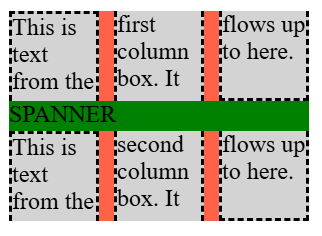
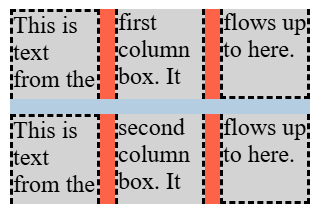
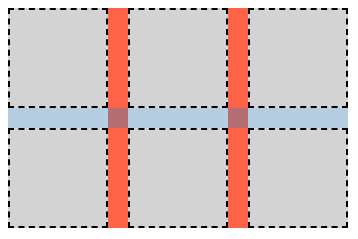
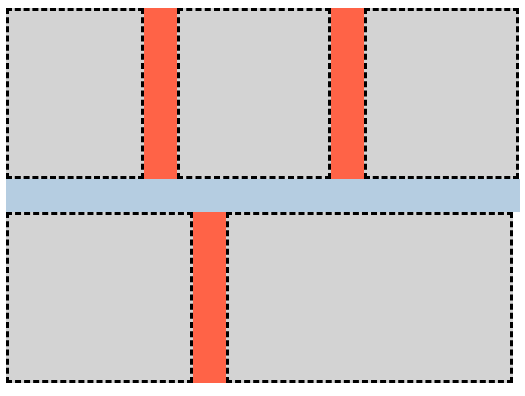
间隙是列间隙或行间隙, 其定义因容器类型而异:
- 多列容器
-
列间隙是相邻列盒之间的槽,
参见 [CSS-MULTICOL-1]。
行间隙是由 column-height 建立的列盒行之间的槽, 参见 [CSS-MULTICOL-2]。
- 弹性 容器
- 当应用于主轴时 (例如在 row 弹性 容器中的列间隙), 指的是项目之间的槽 (仿佛在单行中相邻弹性项目之间 插入了一个额外的固定尺寸外边距)。
- 网格 容器
- 在网格容器的上下文中, 行间隙和列间隙 分别指网格 行与网格列之间的槽。 精确细节参见 CSS 网格布局 1 § 10.1 槽: row-gap、column-gap 和 gap 属性。
槽会产生项目之间的最小间距: justify-content/align-content 可能会添加额外间距。 这种额外空间会增加相应间隙的大小。
在所有情况下,当间隙与 分片断点重合时,它会消失。[CSS-BREAK-3]
注:表格盒不使用 gap 属性 来指定其单元格之间的分隔。 相反,它们使用 border-spacing 属性, 该属性具有略有不同的功能: 它会继承, 并且还指定最外层单元格 与表格边框之间的额外间距 (类似于 space-evenly,而不是 space-between)。
2.1. 行和列槽:row-gap 和 column-gap 属性
| 名称: | row-gap, column-gap |
|---|---|
| 值: | normal | <length-percentage [0,∞]> | <line-width> |
| 初始值: | normal |
| 适用于: | 多列容器、弹性 容器、网格 容器 |
| 继承: | 否 |
| 百分比: | 参见 § 2.3 gap 属性中的百分比 |
| 计算值: | 指定的关键字,否则为计算后的 <length-percentage> 值 |
| 规范顺序: | 按语法 |
| 动画类型: | 按计算值类型 |
这些属性在容器中的项目之间指定固定长度的槽, 以类似于space-between 关键字 (属于内容分布属性) 的方式在它们之间添加空间, 但其大小是固定的,而不是剩余空间的一部分。 column-gap 属性指定“列”之间的间距, 在容器的行内轴中 分隔盒,类似于 inline-axis margin; 而 row-gap 表示“行”之间的间距, 在容器的块轴中分隔盒。
值具有以下含义:
- <length-percentage [0,∞]>
- <line-width>
-
负值无效。 对于百分比, 参见 § 2.3 gap 属性中的百分比。
- normal
2.2. 间隙简写:gap 属性
| 名称: | gap |
|---|---|
| 值: | <'row-gap'> <'column-gap'>? |
| 初始值: | 参见各单独属性 |
| 适用于: | 多列容器、弹性 容器、网格 容器 |
| 继承: | 否 |
| 百分比: | 参考内容区域的相应尺寸 |
| 计算值: | 参见各单独属性 |
| 规范顺序: | 按语法 |
| 动画类型: | 按计算值类型 |
此属性是一个简写,可在一个声明中设置 row-gap 和 column-gap。 如果省略 <'column-gap'>, 它会被设置为与 <'row-gap'> 相同的值。
2.3. gap 属性中的百分比
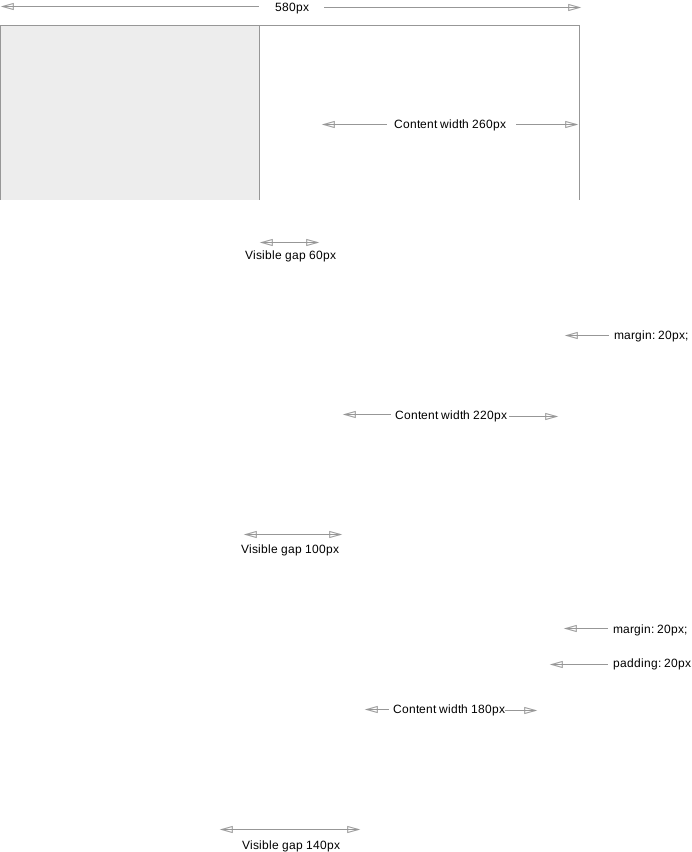
通常, 由 gap 属性引入的间隙 旨在表现得像一个具有该间隙大小的空项目/轨道等; 换句话说, 作者应该能够通过只向容器中插入额外的空项目/轨道等 来复现 gap 的效果。
gap 总是相对于元素内容盒的相应大小 解析百分比。 当该大小是确定的时, 行为是明确定义的, 并且在各布局模式之间保持一致。 但是,由于不同布局模式对项目/轨道等的循环百分比大小处理不同, gap 也同样如此:
- 在网格布局中
-
如同最小尺寸属性和 外边距/内边距 [CSS-SIZING-3] 一样, 循环百分比大小在确定内在大小贡献时相对于零解析, 但在布局盒的内容时 相对于盒的内容盒解析。
- 在弹性布局中
-
循环百分比大小在所有情况下都相对于零解析。
2.4. 旧式间隙属性:grid-row-gap、grid-column-gap 和 grid-gap 属性
Grid Layout 模块最初使用其自己的一组槽属性编写, 后来所有此类属性统一为现有的 row-gap/column-gap 命名。 为了与旧内容兼容, 必须按如下方式支持这些带 grid 前缀的名称:
-
grid-column-gap 作为 旧式名称别名,对应 column-gap 属性
3. 间隙装饰
间隙可以包含间隙装饰, 即绘制在相邻盒之间的可见分隔符(例如线条)。
间隙装饰不占用空间。 也就是说,间隙装饰的存在或宽度不会改变 任何其他内容的位置。 如果间隙装饰比其间隙更宽, 任何相邻盒都会与该装饰重叠, 并且在某些情况下,该装饰可能延伸到容器盒之外。
间隙装饰绘制在 容器边框的正上方。 对于可滚动容器, 注意,虽然容器的边框和背景不会滚动, 但装饰需要随容器中的项目一起滚动。
间隙装饰遵循 应用这些属性的容器所布置的“column”和“row”的定义。 它们依赖容器类型在确定这些术语的含义时考虑书写 模式。 示例参见: CSS 多列 2 § 3 多列模型、 CSS 弹性盒 1 § 5.1 弹性 流方向:flex-direction 属性、 以及 CSS 网格布局 1 § 3 网格布局 概念和术语。
本规范中名称以 "column" 开头的属性适用于列间隙, 名称以 "row" 开头的属性适用于行间隙。
3.1. 几何
3.1.1. 线段端点
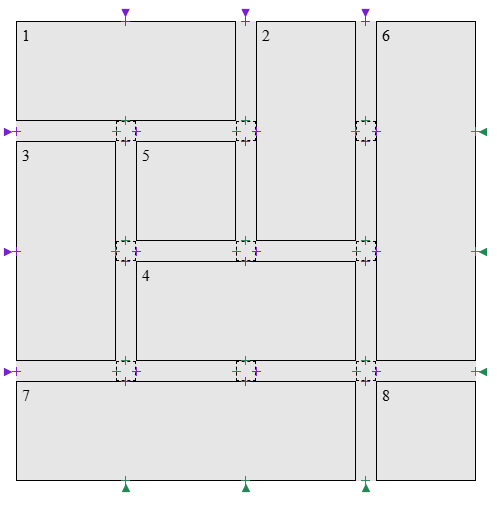
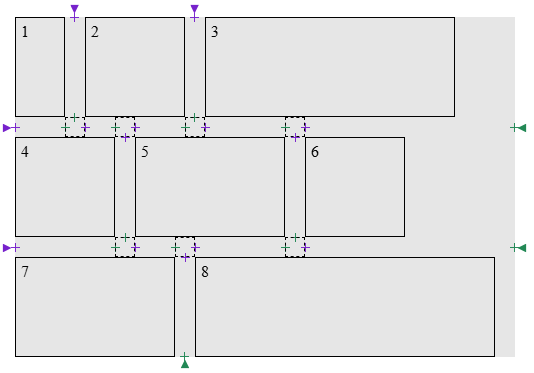
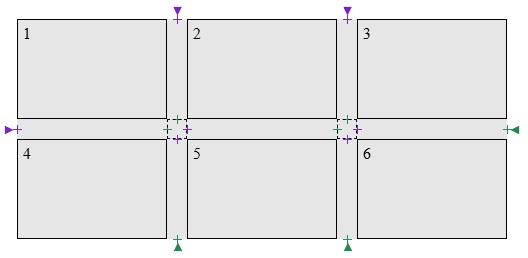
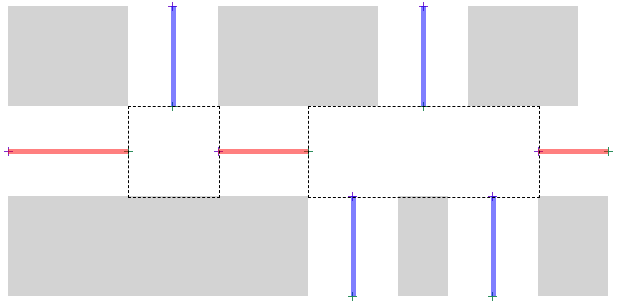
线段端点是 间隙中心线上的一个点,间隙装饰 线段 可在此开始或结束。 有两种端点类型:
.grid-with-spans {
  display: grid;
  grid-template: repeat(4, 100px) / repeat(4, 100px);
  gap: 20px;
  background: rgb(255 255 128);
}
.grid > * {
  border: 1px dashed black;
}
.flex {
  display: flex;
  flex-wrap: wrap;
  gap: 20px;
  width: 500px;
  background: rgb(255 255 128);
}
.flex > * {
  border: 1px dashed black;
}
.multi-column {
  column-count: 3;
  column-width: 100px;
  column-height: 50px;
  column-wrap: wrap;
  gap: 20px;
  background: rgb(255 255 128);
}

.multi-column > * {
  height: 100px;
  border: 1px dashed black;
}
3.1.2. 间隙装饰线段
定义
间隙装饰 线段由一个起始线段端点与一个结束线段端点配对形成。 每个间隙形成一组间隙装饰 线段。
在本节中,我们将间隙装饰线段 s 表示为
s = [s.start, s.end],
其中 s.start 是该线段的起始线段端点,
s.end 是该线段的结束线段端点。
令 UNION(s1, s2) 等于 [s1.start, s2.end]。
如果对于其端点之间的每个间隙交汇处, 在间隙相对两侧存在项目, 且这些项目跨越所有对应该交汇处有贡献的垂直间隙, 则称一个间隙装饰 线段被跨越项目夹住。
在给定间隙的上下文中, 如果从 a 到 b 的线段(宽度与该间隙相同)与容器中的子项目相交, 则一对线段端点 a 和 b 被视为不连续。
算法
- 令 S 为空列表。
- 令 endpoints 为对 G 创建线段端点的结果, 并按其沿 G 中心线从起始到结束的位置排序。
- 如果 endpoints 为空,返回 S。
- 令 break 为 column-rule-break 或 row-rule-break 的使用值,取适用于该间隙的那个。
- 如果 break 是 none:
- 空检查:如果 endpoints 为空,返回 S。
- 从 endpoints 中前两项创建一个间隙装饰线段 s。 从列表中移除这两项。
- 如果 s 的端点是不连续的,返回到空检查。
- 当 endpoints 非空时:
- 对 s 应用偏移,然后将其追加到 S。
- 返回到空检查。
- 按适用的 rule-inset 属性的使用值偏移 start。
- 按适用的 rule-inset 属性的使用值偏移 end。
- 用调整后的 [start, end] 更新 s。
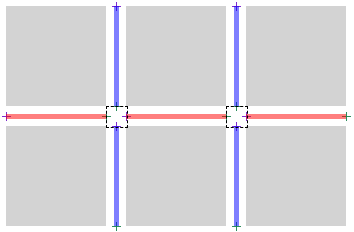
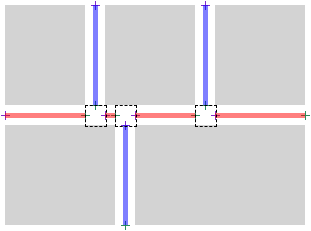
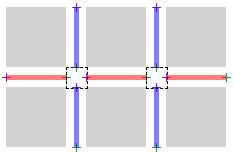
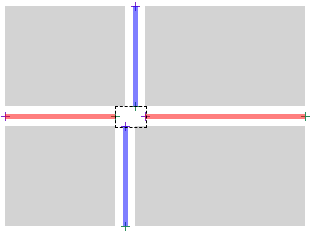
测试
- flex-gap-decorations-001.html (实时 测试) (源代码)
- flex-gap-decorations-006.html (实时 测试) (源代码)
- flex-gap-decorations-007.html (实时 测试) (源代码)
- flex-gap-decorations-008.html (实时 测试) (源代码)
- flex-gap-decorations-015.html (实时 测试) (源代码)
- flex-gap-decorations-016.html (实时 测试) (源代码)
- flex-gap-decorations-020.html (实时 测试) (源代码)
- flex-gap-decorations-021.html (实时 测试) (源代码)
- flex-gap-decorations-022.html (实时 测试) (源代码)
- flex-gap-decorations-023.html (实时 测试) (源代码)
- flex-gap-decorations-024.html (实时 测试) (源代码)
- flex-gap-decorations-025.html (实时 测试) (源代码)
- flex-gap-decorations-026-crash.html (实时 测试) (源代码)
- flex-gap-decorations-027.html (实时 测试) (源代码)
- flex-gap-decorations-032.html (实时 测试) (源代码)
- flex-gap-decorations-033.html (实时 测试) (源代码)
- flex-gap-decorations-039.html (实时 测试) (源代码)
- flex-gap-decorations-040.html (实时 测试) (源代码)
- flex-gap-decorations-041.html (实时 测试) (源代码)
- flex-gap-decorations-042.html (实时 测试) (源代码)
- flex-gap-decorations-043.html (实时 测试) (源代码)
- flex-gap-decorations-044.html (实时 测试) (源代码)
- flex-gap-decorations-045.html (实时 测试) (源代码)
- flex-gap-decorations-046.html (实时 测试) (源代码)
- flex-gap-decorations-047.html (实时 测试) (源代码)
- flex-gap-decorations-048.html (实时 测试) (源代码)
- flex-gap-decorations-049.html (实时 测试) (源代码)
- flex-gap-decorations-056.html (实时 测试) (源代码)
- flex-gap-decorations-057.html (实时 测试) (源代码)
- flex-gap-decorations-058.html (实时 测试) (源代码)
- flex-gap-decorations-059.html (实时 测试) (源代码)
- flex-gap-decorations-060.html (实时 测试) (源代码)
- flex-gap-decorations-061.html (实时 测试) (源代码)
- flex-gap-decorations-repaint-on-child-resize.html (实时 测试) (源代码)
- flex-gap-decorations-repaint-on-container-shift.html (实时 测试) (源代码)
- flex-gap-decorations-writing-mode.html (实时 测试) (源代码)
- grid-gap-decorations-001.html (实时 测试) (源代码)
- grid-gap-decorations-029.html (实时 测试) (源代码)
- grid-gap-decorations-030.html (实时 测试) (源代码)
- grid-gap-decorations-031.html (实时 测试) (源代码)
- grid-gap-decorations-032.html (实时 测试) (源代码)
- grid-gap-decorations-033.html (实时 测试) (源代码)
- grid-gap-decorations-034.html (实时 测试) (源代码)
- grid-gap-decorations-035.html (实时 测试) (源代码)
- grid-gap-decorations-036.html (实时 测试) (源代码)
- grid-gap-decorations-037.html (实时 测试) (源代码)
- grid-gap-decorations-041-crash.html (实时 测试) (源代码)
- grid-gap-decorations-042.html (实时 测试) (源代码)
- grid-gap-decorations-043-crash.html (实时 测试) (源代码)
- grid-gap-decorations-044-crash.html (实时 测试) (源代码)
- grid-gap-decorations-045.html (实时 测试) (源代码)
- grid-gap-decorations-046.html (实时 测试) (源代码)
- grid-gap-decorations-047.html (实时 测试) (源代码)
- grid-gap-decorations-066.html (实时 测试) (源代码)
- grid-gap-decorations-repaint-on-child-resize.html (实时 测试) (源代码)
- grid-gap-decorations-repaint-on-item-position-change.html (实时 测试) (源代码)
- grid-gap-decorations-repaint-on-item-span-change.html (实时 测试) (源代码)
- grid-gap-decorations-writing-mode.html (实时 测试) (源代码)
- subgrid-gap-decorations-001.html (实时 测试) (源代码)
- subgrid-gap-decorations-002.html (实时 测试) (源代码)
- subgrid-gap-decorations-003.html (实时 测试) (源代码)
- subgrid-gap-decorations-009.html (实时 测试) (源代码)
- subgrid-gap-decorations-010.html (实时 测试) (源代码)
- subgrid-gap-decorations-011.html (实时 测试) (源代码)
- subgrid-gap-decorations-012.html (实时 测试) (源代码)
- subgrid-gap-decorations-013.html (实时 测试) (源代码)
- subgrid-gap-decorations-014.html (实时 测试) (源代码)
- subgrid-gap-decorations-015.html (实时 测试) (源代码)
- subgrid-gap-decorations-016.html (实时 测试) (源代码)
- subgrid-gap-decorations-018.html (实时 测试) (源代码)
- multicol-gap-decorations-001.html (实时 测试) (源代码)
- multicol-gap-decorations-002.html (实时 测试) (源代码)
- multicol-gap-decorations-003.html (实时 测试) (源代码)
- multicol-gap-decorations-005.html (实时 测试) (源代码)
- multicol-gap-decorations-006.html (实时 测试) (源代码)
- multicol-gap-decorations-007.html (实时 测试) (源代码)
- multicol-gap-decorations-013.html (实时 测试) (源代码)
- multicol-gap-decorations-015.html (实时 测试) (源代码)
- multicol-gap-decorations-016.html (实时 测试) (源代码)
- multicol-gap-decorations-018.html (实时 测试) (源代码)
- multicol-gap-decorations-024.html (实时 测试) (源代码)
- multicol-gap-decorations-040.html (实时 测试) (源代码)
- multicol-gap-decorations-repaint-on-content-resize.html (实时 测试) (源代码)
- multicol-gap-decorations-writing-mode.html (实时 测试) (源代码)
3.2. 交点处的断开行为:column-rule-break、row-rule-break 和 rule-break 属性
| 名称: | column-rule-break, row-rule-break |
|---|---|
| 值: | none | normal | intersection |
| 初始值: | normal |
| 适用于: | 网格容器、弹性 容器、多列容器,以及 网格分道容器 |
| 继承: | 否 |
| 百分比: | 不适用 |
| 计算值: | 按指定值 |
| 规范顺序: | 按语法 |
| 动画类型: | 离散 |
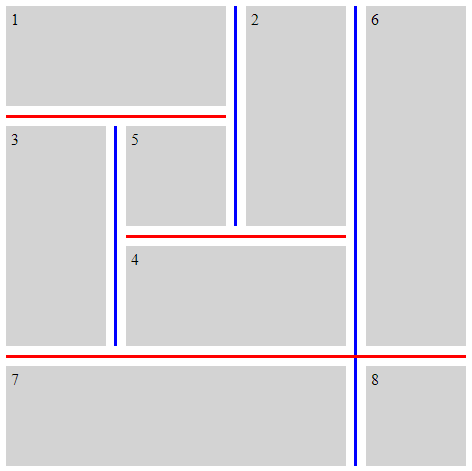
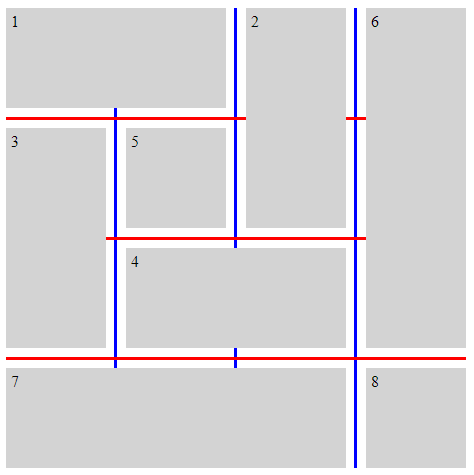
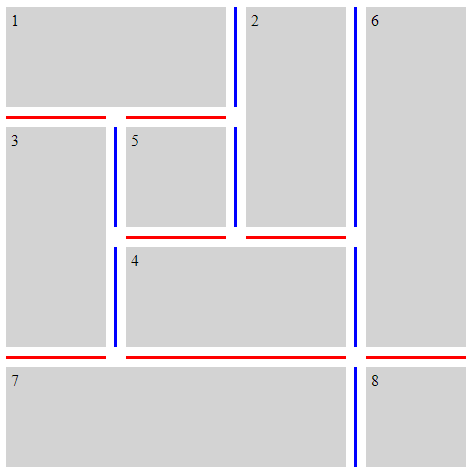
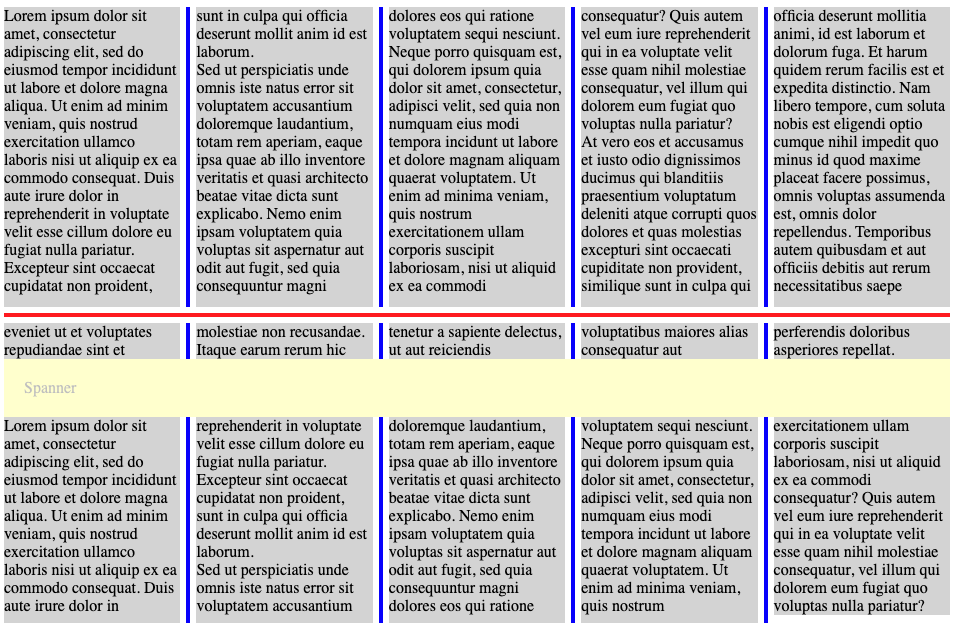
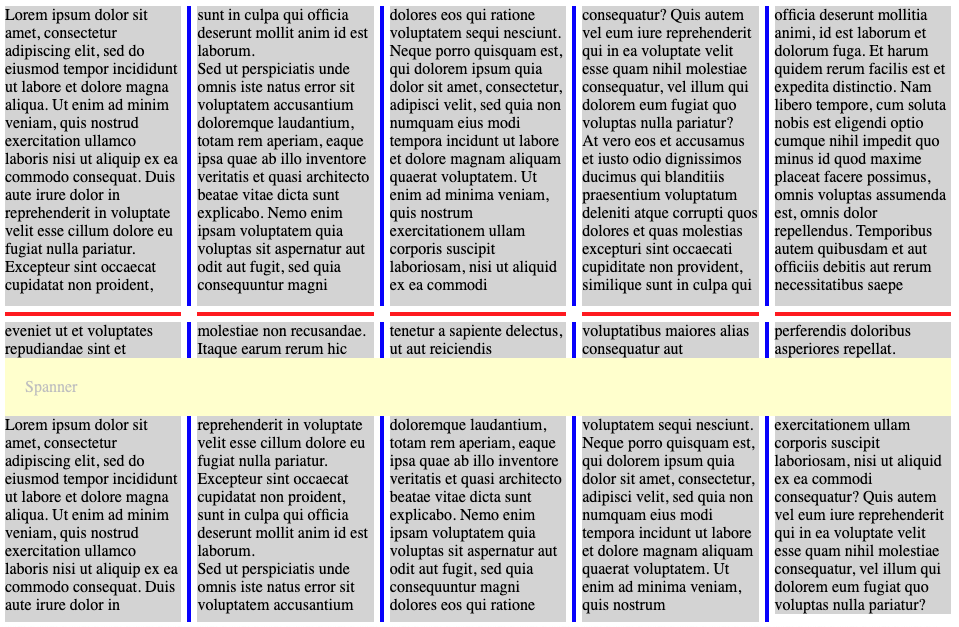
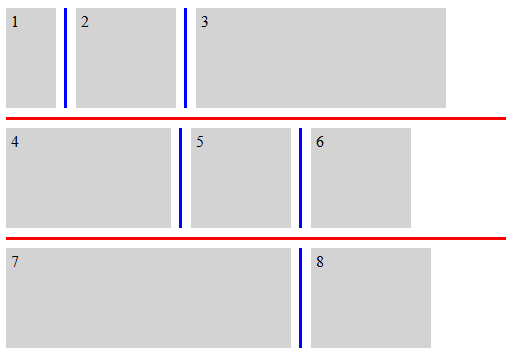
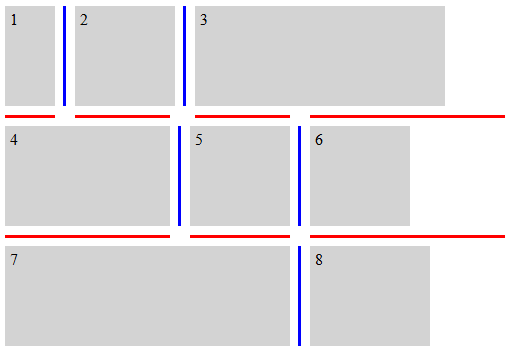
这些属性设置在容器中项目形成的可见 “T” 形或 “十字” 交点处, 将给定间隙内的装饰断开为线段的行为。 关于如何应用这些值的精确细节,在确定间隙 装饰线段的步骤中给出。
- none
- 间隙装饰不会在可见的 “T” 形或 “十字” 交点处开始或结束。 相反,会从间隙的一端到另一端绘制单个连续装饰。
- normal
-
行为取决于容器类型。
- 网格容器
- 间隙装饰在可见的 “T” 形交点处开始和结束, 但会穿过可见的 “十字” 交点。
- 弹性容器
- 行为与 none 相同。
- 多列容器
- 对于 column-rule-break,行为与 intersection 相同。 对于 row-rule-break,行为与 none 相同。
- intersection
- 间隙装饰在可见的 “T” 形和 “十字” 交点处开始和结束。
测试
- flex-gap-decorations-009.html (实时 测试) (源代码)
- flex-gap-decorations-010.html (实时 测试) (源代码)
- flex-gap-decorations-028.html (实时 测试) (源代码)
- flex-gap-decorations-031.html (实时 测试) (源代码)
- flex-gap-decorations-034.html (实时 测试) (源代码)
- flex-gap-decorations-035.html (实时 测试) (源代码)
- flex-gap-decorations-036.html (实时 测试) (源代码)
- flex-gap-decorations-037.html (实时 测试) (源代码)
- flex-gap-decorations-050.html (实时 测试) (源代码)
- flex-gap-decorations-051.html (实时 测试) (源代码)
- flex-gap-decorations-052.html (实时 测试) (源代码)
- grid-gap-decorations-006.html (实时 测试) (源代码)
- grid-gap-decorations-007.html (实时 测试) (源代码)
- grid-gap-decorations-008.html (实时 测试) (源代码)
- grid-gap-decorations-009.html (实时 测试) (源代码)
- grid-gap-decorations-040.html (实时 测试) (源代码)
- subgrid-gap-decorations-004.html (实时 测试) (源代码)
- subgrid-gap-decorations-005.html (实时 测试) (源代码)
- subgrid-gap-decorations-006.html (实时 测试) (源代码)
- multicol-gap-decorations-014.html (实时 测试) (源代码)
- multicol-gap-decorations-020.html (实时 测试) (源代码)
- multicol-gap-decorations-025.html (实时 测试) (源代码)
- multicol-gap-decorations-026.html (实时 测试) (源代码)
- multicol-gap-decorations-034.html (实时 测试) (源代码)
| 名称: | rule-break |
|---|---|
| 值: | <'column-rule-break'> |
| 初始值: | 参见各单独属性 |
| 适用于: | 与 column-rule-break 和 row-rule-break 相同 |
| 继承: | 参见各单独属性 |
| 百分比: | 参见各单独属性 |
| 计算值: | 参见各单独属性 |
| 动画类型: | 参见各单独属性 |
| 规范顺序: | 按语法 |
此简写属性将 column-rule-break 和 row-rule-break 设置为相同的值。
测试
以下示例说明 *-rule-break 属性的各种设置。
.break-normal-grid {
  display: grid;
  grid-template: repeat(4, 100px) / repeat(4, 100px);
  gap: 20px;
  row-rule: 6px solid red;
  column-rule: 6px solid blue;
  rule-break: normal;
}
.break-none-grid {
  display: grid;
  grid-template: repeat(4, 100px) / repeat(4, 100px);
  gap: 20px;
  row-rule: 6px solid red;
  column-rule: 6px solid blue;
  rule-break: none;
}
.break-intersection-grid {
  display: grid;
  grid-template: repeat(4, 100px) / repeat(4, 100px);
  gap: 20px;
  row-rule: 6px solid red;
  column-rule: 6px solid blue;
  rule-break: intersection;
}
.break-normal-multicol {
  column-width: 150px;
  column-height: 300px;
  gap: 1em;
  row-rule: 4px solid red;
  column-rule: 4px solid blue;
  rule-break: normal;
}
.break-intersection-multicol {
  column-width: 150px;
  column-height: 300px;
  gap: 1em;
  row-rule: 4px solid red;
  column-rule: 4px solid blue;
  rule-break: intersection;
}
.break-normal-flex {
  display: flex;
  flex-wrap: wrap;
  gap: 20px;
  row-rule: 6px solid red;
  column-rule: 6px solid blue;
  rule-break: normal;
}
.break-intersection-flex {
  display: flex;
  flex-wrap: wrap;
  width: 500px;
  gap: 20px;
  row-rule: 6px solid red;
  column-rule: 6px solid blue;
  rule-break: intersection;
}
3.3. 调整间隙装饰端点:rule-inset 属性
| 名称: | column-rule-inset-cap-start, column-rule-inset-cap-end, column-rule-inset-junction-start, column-rule-inset-junction-end, row-rule-inset-cap-start, row-rule-inset-cap-end, row-rule-inset-junction-start, row-rule-inset-junction-end |
|---|---|
| 值: | <inset-value> |
| 初始值: | 0 |
| 适用于: | 网格容器、弹性 容器、多列容器,以及 网格分道容器 |
| 继承: | 否 |
| 百分比: | 参考交叉间隙宽度 |
| 计算值: | 按指定值 |
| 规范顺序: | 按语法 |
| 动画类型: | 按计算值类型 |
<inset-value> = <length-percentage> | overlap-join
这些属性可用于相对于通常决定装饰开始和结束位置的线段端点, 偏移间隙装饰的起点和终点。
交汇线段 端点是在间隙交汇处的线段端点, 在此处还存在一个或多个其他间隙装饰线段。
端帽线段 端点是任何不是交汇线段端点的线段端点。 这包括位于容器内容边缘的端点, 以及位于间隙 交汇处、且没有其他间隙装饰线段存在的端点。
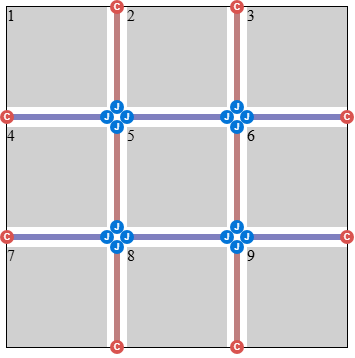
.simple-grid {
  rule-break: intersection;
  rule-visibility-items: between;
}
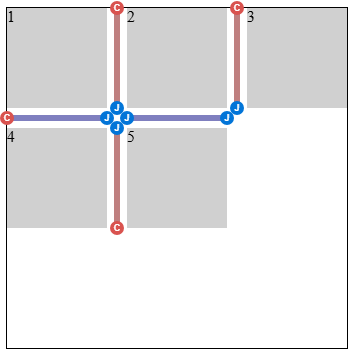
.simple-grid-with-empty-cells {
  rule-break: intersection;
  rule-visibility-items: between;
}
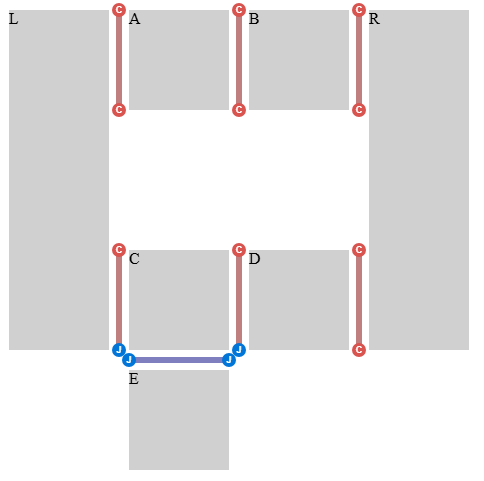
.donut-grid-layout {
  rule-break: intersection;
  rule-visibility-items: between;
}
百分比相对于交叉间隙宽度解析,其定义如下:
- 位于间隙 交汇处的线段端点
-
交叉间隙
宽度是间隙交汇处的大小,
其维度与该间隙中
线段端点
所在的维度相同
(对于行间隙为行维度,
对于列
间隙为列维度)。
注:通常,这将是 适用于相交或相接间隙的 column-gap 或 row-gap 属性的使用值, 再加上由于 justify-content 或 align-content 而添加的任何额外间距。 但是,在间隙以重叠区间相交或 相接的情况下, 交叉间隙 宽度将由这些区间的并集确定。 参见此示例中的这种情况。
- 其他线段端点
- 交叉间隙 宽度为 0。
注:这种按位置进行的分类不同于 端帽线段 端点/交汇线段端点分类。 端帽线段端点可以位于容器边缘,也可以位于 间隙交汇处 (参见此示例)。因此, column-rule-inset-cap-start: 50% 在内部端帽处 解析为该间隙交汇处 大小的一半,而在其他端帽(例如容器边缘)处解析为 0。
column-rule-inset-cap-start 和 row-rule-inset-cap-start 属性适用于属于端帽线段端点的起始线段 端点。 column-rule-inset-junction-start 和 row-rule-inset-junction-start 属性适用于 属于交汇线段 端点的起始线段端点。 对于这些属性,正值沿间隙轴向结束方向偏移, 负值沿起始方向偏移。
column-rule-inset-cap-end 和 row-rule-inset-cap-end 属性适用于属于端帽线段端点的结束线段 端点。 column-rule-inset-junction-end 和 row-rule-inset-junction-end 属性适用于 属于交汇线段 端点的结束线段端点。 对于这些属性,正值沿间隙轴向起始方向偏移, 负值沿结束方向偏移。
overlap-join 关键字 会在同一间隙交汇处相遇的间隙 装饰之间产生整洁的连接:
- 在交汇线段端点处,间隙装饰延伸进入间隙交汇处, 其距离为交叉 间隙宽度的一半,加上交叉间隙的 column-rule-width 或 row-rule-width(取适用者)的使用值的一半。
- 在端帽线段 端点处,overlap-join 被视为 0。
.inset-overlap-join {
  rule-inset: overlap-join;
  rule-break: intersection;
  rule-visibility-items: between;
}
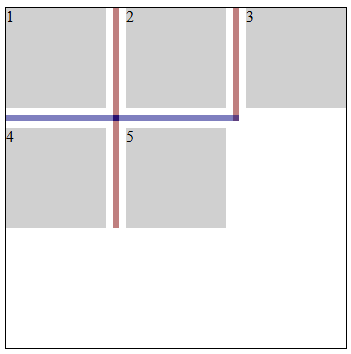
.inset-overlap-join {
  rule-inset: overlap-join;
  rule-break: intersection;
  rule-visibility-items: between;
}
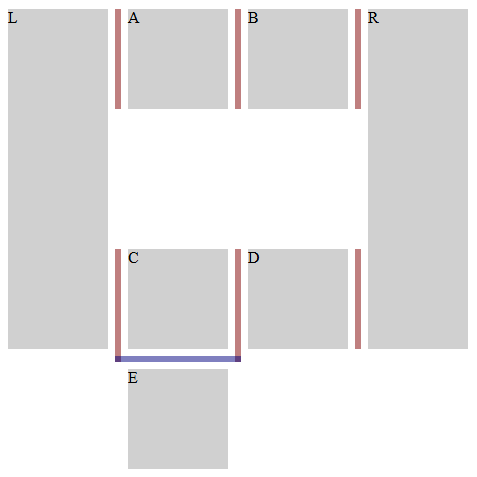
.inset-end {
  row-rule: 3px solid red;
  row-rule-break: intersection;
  row-rule-inset-end: 10px;
}
测试
- flex-gap-decorations-011.html (实时 测试) (源代码)
- flex-gap-decorations-013.html (实时 测试) (源代码)
- flex-gap-decorations-014.html (实时 测试) (源代码)
- flex-gap-decorations-029.html (实时 测试) (源代码)
- flex-gap-decorations-030.html (实时 测试) (源代码)
- flex-gap-decorations-053.html (实时 测试) (源代码)
- flex-gap-decorations-054.html (实时 测试) (源代码)
- flex-gap-decorations-055.html (实时 测试) (源代码)
- flex-gap-decorations-063.html (实时 测试) (源代码)
- flex-gap-decorations-064.html (实时 测试) (源代码)
- flex-gap-decorations-065.html (实时 测试) (源代码)
- flex-gap-decorations-066.html (实时 测试) (源代码)
- flex-gap-decorations-067.html (实时 测试) (源代码)
- flex-gap-decorations-direction-inset.html (实时 测试) (源代码)
- grid-gap-decorations-010.html (实时 测试) (源代码)
- grid-gap-decorations-011.html (实时 测试) (源代码)
- grid-gap-decorations-012.html (实时 测试) (源代码)
- grid-gap-decorations-013.html (实时 测试) (源代码)
- grid-gap-decorations-014.html (实时 测试) (源代码)
- grid-gap-decorations-015.html (实时 测试) (源代码)
- grid-gap-decorations-038.html (实时 测试) (源代码)
- grid-gap-decorations-052.html (实时 测试) (源代码)
- grid-gap-decorations-053.html (实时 测试) (源代码)
- grid-gap-decorations-067.html (实时 测试) (源代码)
- grid-gap-decorations-068.html (实时 测试) (源代码)
- grid-gap-decorations-069.html (实时 测试) (源代码)
- grid-gap-decorations-070.html (实时 测试) (源代码)
- grid-gap-decorations-071.html (实时 测试) (源代码)
- grid-gap-decorations-072.html (实时 测试) (源代码)
- grid-gap-decorations-073.html (实时 测试) (源代码)
- grid-gap-decorations-074.html (实时 测试) (源代码)
- grid-gap-decorations-075.html (实时 测试) (源代码)
- grid-gap-decorations-076.html (实时 测试) (源代码)
- grid-gap-decorations-077.html (实时 测试) (源代码)
- grid-gap-decorations-078.html (实时 测试) (源代码)
- grid-gap-decorations-079.html (实时 测试) (源代码)
- grid-gap-decorations-080.html (实时 测试) (源代码)
- grid-gap-decorations-081.html (实时 测试) (源代码)
- grid-gap-decorations-082.html (实时 测试) (源代码)
- grid-gap-decorations-090.html (实时 测试) (源代码)
- grid-gap-decorations-091.html (实时 测试) (源代码)
- grid-gap-decorations-092.html (实时 测试) (源代码)
- grid-gap-decorations-direction-inset.html (实时 测试) (源代码)
- subgrid-gap-decorations-007.html (实时 测试) (源代码)
- subgrid-gap-decorations-008.html (实时 测试) (源代码)
- multicol-gap-decorations-008.html (实时 测试) (源代码)
- multicol-gap-decorations-009.html (实时 测试) (源代码)
- multicol-gap-decorations-010.html (实时 测试) (源代码)
- multicol-gap-decorations-011.html (实时 测试) (源代码)
- multicol-gap-decorations-012.html (实时 测试) (源代码)
- multicol-gap-decorations-017.html (实时 测试) (源代码)
- multicol-gap-decorations-022.html (实时 测试) (源代码)
- multicol-gap-decorations-023.html (实时 测试) (源代码)
- multicol-gap-decorations-033.html (实时 测试) (源代码)
- multicol-gap-decorations-036.html (实时 测试) (源代码)
- multicol-gap-decorations-037.html (实时 测试) (源代码)
- multicol-gap-decorations-038.html (实时 测试) (源代码)
- multicol-gap-decorations-039.html (实时 测试) (源代码)
- multicol-gap-decorations-direction-inset.html (实时 测试) (源代码)
- rule-inset-cap-start-end-computed.html (实时 测试) (源代码)
- rule-inset-cap-start-end-invalid.html (实时 测试) (源代码)
- rule-inset-junction-start-end-computed.html (实时 测试) (源代码)
- rule-inset-junction-start-end-invalid.html (实时 测试) (源代码)
3.3.1. -start 和 -end 简写
这些简写允许作者实现统一的非对称装饰。
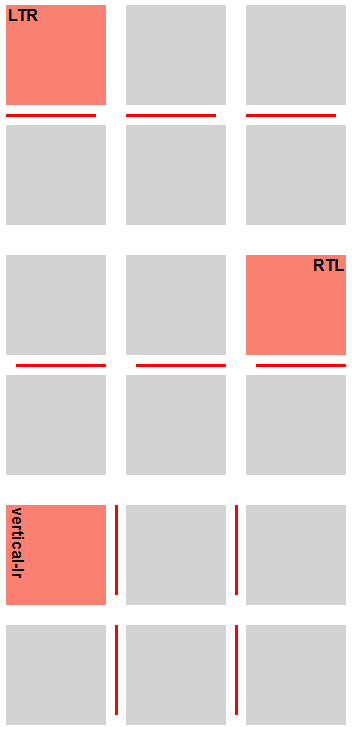
.inset-start-8px-end-0px {
  column-rule-inset-start: 8px;
  column-rule-inset-end: 0px;
}
| 名称: | column-rule-inset-start, column-rule-inset-end, row-rule-inset-start, row-rule-inset-end |
|---|---|
| 值: | <inset-value> |
| 初始值: | 参见各单独属性 |
| 适用于: | 与 column-rule-inset-cap-start、column-rule-inset-junction-start、 column-rule-inset-cap-end、column-rule-inset-junction-end、row-rule-inset-cap-start、row-rule-inset-junction-start、row-rule-inset-cap-end 和 row-rule-inset-junction-end 相同 |
| 继承: | 参见各单独属性 |
| 百分比: | 参见各单独属性 |
| 计算值: | 参见各单独属性 |
| 动画类型: | 参见各单独属性 |
| 规范顺序: | 按语法 |
这些简写属性将对应的 -cap- 和 -junction- 属性设置为相同的值。 例如,column-rule-inset-start 会将 column-rule-inset-cap-start 和 column-rule-inset-junction-start 都设置为相同的 值。
| 名称: | rule-inset-start |
|---|---|
| 值: | <'column-rule-inset-start'> |
| 初始值: | 参见各单独属性 |
| 适用于: | 与 column-rule-inset-start 和 row-rule-inset-start 相同 |
| 继承: | 参见各单独属性 |
| 百分比: | 参见各单独属性 |
| 计算值: | 参见各单独属性 |
| 动画类型: | 参见各单独属性 |
| 规范顺序: | 按语法 |
此简写属性将 column-rule-inset-start 和 row-rule-inset-start 设置为相同的值。
| 名称: | rule-inset-end |
|---|---|
| 值: | <'column-rule-inset-end'> |
| 初始值: | 参见各单独属性 |
| 适用于: | 与 column-rule-inset-end 和 row-rule-inset-end 相同 |
| 继承: | 参见各单独属性 |
| 百分比: | 参见各单独属性 |
| 计算值: | 参见各单独属性 |
| 动画类型: | 参见各单独属性 |
| 规范顺序: | 按语法 |
此简写属性将 column-rule-inset-end 和 row-rule-inset-end 设置为相同的值。
测试
3.3.2. -cap- 和 -junction- 简写
这些简写允许作者在端帽线段端点与交汇 线段端点处实现不同处理。
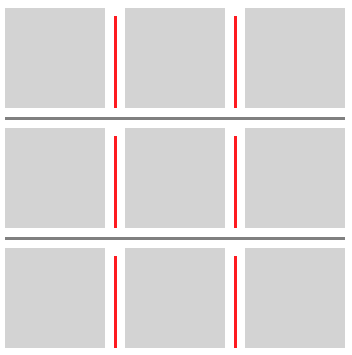
.inset-cap-0px-inset-junction-negative-5px {
  column-rule-inset-cap: 0px;
  column-rule-inset-junction: -5px;
  column-rule-break: intersection;
}
| 名称: | column-rule-inset-cap, column-rule-inset-junction, row-rule-inset-cap, row-rule-inset-junction |
|---|---|
| 值: | <inset-value> <inset-value>? |
| 初始值: | 参见各单独属性 |
| 适用于: | 与 column-rule-inset-cap-start、column-rule-inset-cap-end、column-rule-inset-junction-start、 column-rule-inset-junction-end、row-rule-inset-cap-start、row-rule-inset-cap-end、row-rule-inset-junction-start 和 row-rule-inset-junction-end 相同 |
| 继承: | 参见各单独属性 |
| 百分比: | 参见各单独属性 |
| 计算值: | 参见各单独属性 |
| 动画类型: | 参见各单独属性 |
| 规范顺序: | 按语法 |
这些简写会设置对应的 -start 和 -end 属性。 例如,column-rule-inset-cap 会同时设置 column-rule-inset-cap-start 和 column-rule-inset-cap-end。 如果指定一个值,则两个属性都设置为该值。 如果指定两个值,则 -start 设置为第一个,-end 设置为第二个。
| 名称: | rule-inset-cap |
|---|---|
| 值: | <'column-rule-inset-cap'> |
| 初始值: | 参见各单独属性 |
| 适用于: | 与 column-rule-inset-cap 和 row-rule-inset-cap 相同 |
| 继承: | 参见各单独属性 |
| 百分比: | 参见各单独属性 |
| 计算值: | 参见各单独属性 |
| 动画类型: | 参见各单独属性 |
| 规范顺序: | 按语法 |
此简写属性将 column-rule-inset-cap 和 row-rule-inset-cap 设置为相同的值。
| 名称: | rule-inset-junction |
|---|---|
| 值: | <'column-rule-inset-junction'> |
| 初始值: | 参见各单独属性 |
| 适用于: | 与 column-rule-inset-junction 和 row-rule-inset-junction 相同 |
| 继承: | 参见各单独属性 |
| 百分比: | 参见各单独属性 |
| 计算值: | 参见各单独属性 |
| 动画类型: | 参见各单独属性 |
| 规范顺序: | 按语法 |
此简写属性将 column-rule-inset-junction 和 row-rule-inset-junction 设置为相同的值。
测试
- rule-inset-cap-bidirectional-shorthand.html (实时 测试) (源代码)
- rule-inset-cap-junction-computed.html (实时 测试) (源代码)
- rule-inset-cap-junction-invalid.html (实时 测试) (源代码)
- rule-inset-cap-junction-shorthand.html (实时 测试) (源代码)
- rule-inset-cap-junction-valid.html (实时 测试) (源代码)
- rule-inset-junction-bidirectional-shorthand.html (实时 测试) (源代码)
3.3.3. 通用简写
这些简写允许作者在整个容器中实现统一处理。
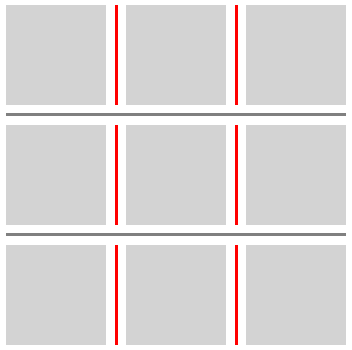
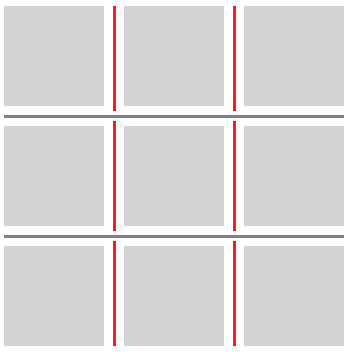
.inset-positive-5px {
  column-rule-inset: 5px;
  column-rule-break: intersection;
}
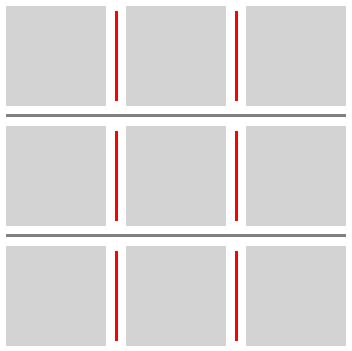
.inset-negative-5px {
  column-rule-inset: -5px;
  column-rule-break: intersection;
}
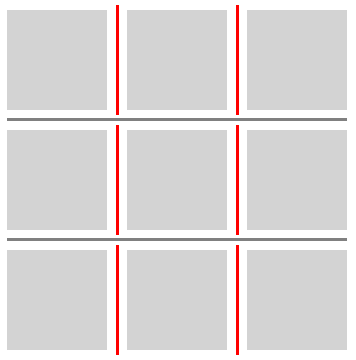
.inset-negative-50percent {
  column-rule-inset: -50%;
  column-rule-break: intersection;
}
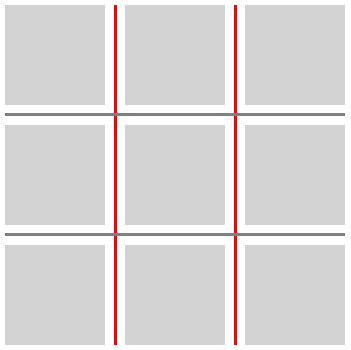
| 名称: | column-rule-inset, row-rule-inset |
|---|---|
| 值: | <'column-rule-inset-cap'> [ / <'column-rule-inset-junction'> ]? |
| 初始值: | 参见各单独属性 |
| 适用于: | 与 column-rule-inset-cap、column-rule-inset-junction、row-rule-inset-cap 和 row-rule-inset-junction 相同 |
| 继承: | 参见各单独属性 |
| 百分比: | 参见各单独属性 |
| 计算值: | 参见各单独属性 |
| 动画类型: | 参见各单独属性 |
| 规范顺序: | 按语法 |
这些简写会设置对应的端帽和交汇起始值与结束值。 值的顺序为:
cap-start cap-end? [/ junction-start junction-end?]?
省略的值按如下方式填充:
- 如果省略交汇值,则从端帽值复制。
- 任何省略的结束值都会从对应的起始值复制。
| 名称: | rule-inset |
|---|---|
| 值: | <'column-rule-inset'> |
| 初始值: | 参见各单独属性 |
| 适用于: | 与 column-rule-inset 和 row-rule-inset 相同 |
| 继承: | 参见各单独属性 |
| 百分比: | 参见各单独属性 |
| 计算值: | 参见各单独属性 |
| 动画类型: | 参见各单独属性 |
| 规范顺序: | 按语法 |
此简写属性将 column-rule-inset 和 row-rule-inset 设置为相同的值。
测试
3.4. 间隙装饰可见性:rule-visibility-items 属性
| 名称: | column-rule-visibility-items, row-rule-visibility-items |
|---|---|
| 值: | all | around | between | normal |
| 初始值: | normal |
| 适用于: | 网格容器和多列容器 |
| 继承: | 否 |
| 百分比: | 不适用 |
| 计算值: | 按指定值 |
| 规范顺序: | 按语法 |
| 动画类型: | 离散 |
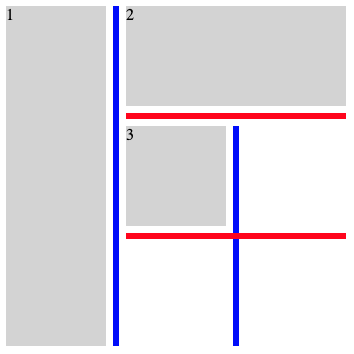
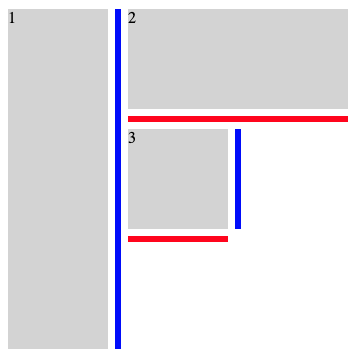
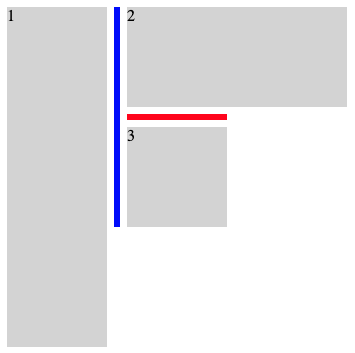
这些属性控制间隙装饰线段是否绘制在与空白区域相邻的间隙部分中。
- all
- 在所有间隙线段中绘制装饰,无论是否存在相邻项目。
- around
- 如果两个相邻区域中至少有一个被项目占据,则在间隙线段中绘制装饰。
- between
- 如果两个相邻区域都被项目占据,则在间隙线段中绘制装饰。
- normal
-
行为取决于容器类型。
- 网格容器
- 行为与 all 相同。
- 多列容器
- 对于 column-rule-visibility-items,行为 与 between 相同。 对于 row-rule-visibility-items,行为 与 all 相同。
| 名称: | rule-visibility-items |
|---|---|
| 值: | <'column-rule-visibility-items'> |
| 初始值: | 参见各单独属性 |
| 适用于: | 与 column-rule-visibility-items 和 row-rule-visibility-items 相同 |
| 继承: | 参见各单独属性 |
| 百分比: | 参见各单独属性 |
| 计算值: | 参见各单独属性 |
| 动画类型: | 参见各单独属性 |
| 规范顺序: | 按语法 |
此简写属性将 column-rule-visibility-items 和 row-rule-visibility-items 设置为相同的值。
.break-normal-with-all-grid {
  display: grid;
  grid-template: repeat(3, 100px) / repeat(3, 100px);
  gap: 20px;
  row-rule: 6px solid red;
  column-rule: 6px solid blue;
  rule-visibility-items: all;
}
.break-normal-with-around-grid {
  display: grid;
  grid-template: repeat(3, 100px) / repeat(3, 100px);
  gap: 20px;
  row-rule: 6px solid red;
  column-rule: 6px solid blue;
  rule-visibility-items: around;
}
.break-normal-with-between-grid {
  display: grid;
  grid-template: repeat(3, 100px) / repeat(3, 100px);
  gap: 20px;
  row-rule: 6px solid red;
  column-rule: 6px solid blue;
  rule-visibility-items: between;
}
测试
- grid-gap-decorations-fragmentation-025.html (实时 测试) (源代码)
- grid-gap-decorations-fragmentation-026.html (实时 测试) (源代码)
- grid-gap-decorations-fragmentation-027.html (实时 测试) (源代码)
- grid-gap-decorations-054.html (实时 测试) (源代码)
- grid-gap-decorations-055.html (实时 测试) (源代码)
- grid-gap-decorations-056.html (实时 测试) (源代码)
- grid-gap-decorations-057.html (实时 测试) (源代码)
- grid-gap-decorations-064.html (实时 测试) (源代码)
- grid-gap-decorations-065.html (实时 测试) (源代码)
- subgrid-gap-decorations-019.html (实时 测试) (源代码)
- subgrid-gap-decorations-020.html (实时 测试) (源代码)
- subgrid-gap-decorations-021.html (实时 测试) (源代码)
- subgrid-gap-decorations-022.html (实时 测试) (源代码)
- subgrid-gap-decorations-023.html (实时 测试) (源代码)
- subgrid-gap-decorations-024.html (实时 测试) (源代码)
- subgrid-gap-decorations-025.html (实时 测试) (源代码)
- multicol-gap-decorations-027.html (实时 测试) (源代码)
- multicol-gap-decorations-028.html (实时 测试) (源代码)
- multicol-gap-decorations-029.html (实时 测试) (源代码)
- multicol-gap-decorations-030.html (实时 测试) (源代码)
- multicol-gap-decorations-031.html (实时 测试) (源代码)
- multicol-gap-decorations-032.html (实时 测试) (源代码)
- multicol-gap-decorations-035.html (实时 测试) (源代码)
- rule-visibility-items-computed.html (实时 测试) (源代码)
- rule-visibility-items-invalid.html (实时 测试) (源代码)
- rule-visibility-items-shorthand.html (实时 测试) (源代码)
- rule-visibility-items-valid.html (实时 测试) (源代码)
3.5. 间隙装饰重叠:rule-overlap 属性
| 名称: | rule-overlap |
|---|---|
| 值: | row-over-column | column-over-row |
| 初始值: | row-over-column |
| 适用于: | 网格容器、弹性 容器,以及 网格分道容器 |
| 继承: | 否 |
| 百分比: | 不适用 |
| 计算值: | 按指定值 |
| 规范顺序: | 按语法 |
| 动画类型: | 离散 |
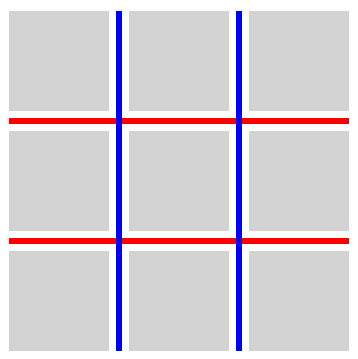
此属性设置重叠间隙装饰的绘制顺序。
- row-over-column
- 行方向装饰绘制在列方向装饰之上。
- column-over-row
- 列方向装饰绘制在行方向装饰之上。
.row-over-column {
  rule-overlap: row-over-column;
  row-rule: 6px solid red;
  column-rule: 6px solid blue;
}
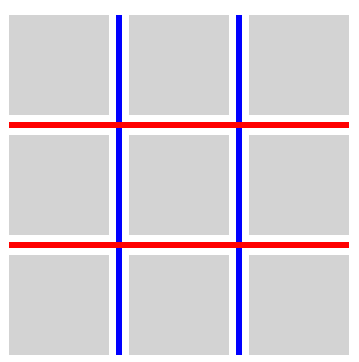
.column-over-row {
  rule-overlap: column-over-row;
  row-rule: 6px solid red;
  column-rule: 6px solid blue;
}
测试
3.6. 分片
CSS 盒对齐 3 § 8.1 行和 列槽:row-gap 和 column-gap 属性规定,在与分片断点重合的位置,间隙会消失。 由于这些位置没有间隙, 因此也不会在其中绘制间隙装饰。
测试
- flex-gap-decorations-fragmentation-001.html (实时 测试) (源代码)
- flex-gap-decorations-fragmentation-002.html (实时 测试) (源代码)
- flex-gap-decorations-fragmentation-003.html (实时 测试) (源代码)
- flex-gap-decorations-fragmentation-004.html (实时 测试) (源代码)
- flex-gap-decorations-fragmentation-005.html (实时 测试) (源代码)
- flex-gap-decorations-fragmentation-006.html (实时 测试) (源代码)
- flex-gap-decorations-fragmentation-007.html (实时 测试) (源代码)
- flex-gap-decorations-fragmentation-008.html (实时 测试) (源代码)
- flex-gap-decorations-fragmentation-009.html (实时 测试) (源代码)
- flex-gap-decorations-fragmentation-010.html (实时 测试) (源代码)
- flex-gap-decorations-fragmentation-011.html (实时 测试) (源代码)
- flex-gap-decorations-fragmentation-012.html (实时 测试) (源代码)
- flex-gap-decorations-fragmentation-013.html (实时 测试) (源代码)
- flex-gap-decorations-fragmentation-014.html (实时 测试) (源代码)
- flex-gap-decorations-fragmentation-015.html (实时 测试) (源代码)
- flex-gap-decorations-fragmentation-016.html (实时 测试) (源代码)
- flex-gap-decorations-fragmentation-017.html (实时 测试) (源代码)
- flex-gap-decorations-fragmentation-018.html (实时 测试) (源代码)
- flex-gap-decorations-fragmentation-019.html (实时 测试) (源代码)
- flex-gap-decorations-fragmentation-020.html (实时 测试) (源代码)
- flex-gap-decorations-fragmentation-021.html (实时 测试) (源代码)
- flex-gap-decorations-fragmentation-022-crash.html (实时 测试) (源代码)
- flex-gap-decorations-fragmentation-026.html (实时 测试) (源代码)
- grid-gap-decorations-fragmentation-001.html (实时 测试) (源代码)
- grid-gap-decorations-fragmentation-002.html (实时 测试) (源代码)
- grid-gap-decorations-fragmentation-003.html (实时 测试) (源代码)
- grid-gap-decorations-fragmentation-004.html (实时 测试) (源代码)
- grid-gap-decorations-fragmentation-005.html (实时 测试) (源代码)
- grid-gap-decorations-fragmentation-006.html (实时 测试) (源代码)
- grid-gap-decorations-fragmentation-007.html (实时 测试) (源代码)
- grid-gap-decorations-fragmentation-008.html (实时 测试) (源代码)
- grid-gap-decorations-fragmentation-009.html (实时 测试) (源代码)
- grid-gap-decorations-fragmentation-010.html (实时 测试) (源代码)
- grid-gap-decorations-fragmentation-011.html (实时 测试) (源代码)
- grid-gap-decorations-fragmentation-012.html (实时 测试) (源代码)
- grid-gap-decorations-fragmentation-013.html (实时 测试) (源代码)
- grid-gap-decorations-fragmentation-014.html (实时 测试) (源代码)
- grid-gap-decorations-fragmentation-015.html (实时 测试) (源代码)
- grid-gap-decorations-fragmentation-016.html (实时 测试) (源代码)
- grid-gap-decorations-fragmentation-017.html (实时 测试) (源代码)
- grid-gap-decorations-fragmentation-018-crash.html (实时 测试) (源代码)
- grid-gap-decorations-fragmentation-019-crash.html (实时 测试) (源代码)
- grid-gap-decorations-fragmentation-020.html (实时 测试) (源代码)
- grid-gap-decorations-fragmentation-021.html (实时 测试) (源代码)
- grid-gap-decorations-fragmentation-022.html (实时 测试) (源代码)
- grid-gap-decorations-fragmentation-023.html (实时 测试) (源代码)
- grid-gap-decorations-fragmentation-024.html (实时 测试) (源代码)
- grid-gap-decorations-fragmentation-025.html (实时 测试) (源代码)
- grid-gap-decorations-fragmentation-026.html (实时 测试) (源代码)
- grid-gap-decorations-fragmentation-027.html (实时 测试) (源代码)
- grid-gap-decorations-fragmentation-028.html (实时 测试) (源代码)
- grid-gap-decorations-fragmentation-029.html (实时 测试) (源代码)
- grid-gap-decorations-fragmentation-030.html (实时 测试) (源代码)
- grid-gap-decorations-fragmentation-031.html (实时 测试) (源代码)
- grid-gap-decorations-fragmentation-032.html (实时 测试) (源代码)
- grid-gap-decorations-fragmentation-033.html (实时 测试) (源代码)
- grid-gap-decorations-fragmentation-036.html (实时 测试) (源代码)
- grid-gap-decorations-fragmentation-037.html (实时 测试) (源代码)
- subgrid-gap-decorations-fragmentation-001.html (实时 测试) (源代码)
- subgrid-gap-decorations-fragmentation-002.html (实时 测试) (源代码)
- subgrid-gap-decorations-fragmentation-003.html (实时 测试) (源代码)
- subgrid-gap-decorations-fragmentation-004.html (实时 测试) (源代码)
- subgrid-gap-decorations-fragmentation-005.html (实时 测试) (源代码)
- subgrid-gap-decorations-fragmentation-006.html (实时 测试) (源代码)
- subgrid-gap-decorations-fragmentation-007.html (实时 测试) (源代码)
- subgrid-gap-decorations-fragmentation-008.html (实时 测试) (源代码)
- subgrid-gap-decorations-fragmentation-009.html (实时 测试) (源代码)
- subgrid-gap-decorations-fragmentation-010.html (实时 测试) (源代码)
- subgrid-gap-decorations-fragmentation-011.html (实时 测试) (源代码)
- subgrid-gap-decorations-fragmentation-012.html (实时 测试) (源代码)
- subgrid-gap-decorations-fragmentation-013.html (实时 测试) (源代码)
- subgrid-gap-decorations-fragmentation-014.html (实时 测试) (源代码)
- subgrid-gap-decorations-fragmentation-015.html (实时 测试) (源代码)
- subgrid-gap-decorations-fragmentation-016.html (实时 测试) (源代码)
- subgrid-gap-decorations-fragmentation-017.html (实时 测试) (源代码)
- subgrid-gap-decorations-fragmentation-018.html (实时 测试) (源代码)
- subgrid-gap-decorations-fragmentation-019.html (实时 测试) (源代码)
- subgrid-gap-decorations-fragmentation-020.html (实时 测试) (源代码)
- subgrid-gap-decorations-fragmentation-021.html (实时 测试) (源代码)
- subgrid-gap-decorations-fragmentation-022.html (实时 测试) (源代码)
4. 颜色、样式和宽度
本节中的属性定义取代 [CSS-MULTICOL-1] 中同名属性的定义。
4.1. 间隙装饰颜色:column-rule-color、row-rule-color 和 rule-color 属性
| 名称: | column-rule-color, row-rule-color |
|---|---|
| 值: | <line-color-list> | <auto-line-color-list> |
| 初始值: | currentcolor |
| 适用于: | 网格容器、弹性 容器、多列容器,以及 网格分道容器 |
| 继承: | 否 |
| 百分比: | 不适用 |
| 计算值: | 按指定值 |
| 规范顺序: | 按语法 |
| 动画类型: | 可重复列表,参见 § 4.7 列表值的插值。 |
<line-color-list>          = <line-color-or-repeat>#

<auto-line-color-list>     = <line-color-or-repeat>#? ,
                             <auto-repeat-line-color> ,
                             <line-color-or-repeat>#?

<line-color-or-repeat>     = [ <color> | <repeat-line-color> ]

<repeat-line-color>        = repeat( [ <integer [1,∞]> ] , [ <color> ]# )

<auto-repeat-line-color>   = repeat( auto , [ <color> ]# )
这些属性设置间隙装饰的颜色。
| 名称: | rule-color |
|---|---|
| 值: | <'column-rule-color'> |
| 初始值: | 参见各单独属性 |
| 适用于: | 与 column-rule-color 和 row-rule-color 相同 |
| 继承: | 否 |
| 百分比: | 参见各单独属性 |
| 计算值: | 参见各单独属性 |
| 动画类型: | 参见各单独属性 |
| 规范顺序: | 按语法 |
此简写属性将 column-rule-color 和 row-rule-color 设置为相同的值。
测试
- gap-decorations-003.html (实时 测试) (源代码)
- gap-decorations-004.html (实时 测试) (源代码)
- gap-decorations-010-crash.html (实时 测试) (源代码)
- flex-gap-decorations-multi-value-direction.html (实时 测试) (源代码)
- flex-gap-decorations-multi-value-writing-mode.html (实时 测试) (源代码)
- grid-gap-decorations-022.html (实时 测试) (源代码)
- grid-gap-decorations-024.html (实时 测试) (源代码)
- grid-gap-decorations-025.html (实时 测试) (源代码)
- grid-gap-decorations-026.html (实时 测试) (源代码)
- grid-gap-decorations-027.html (实时 测试) (源代码)
- grid-gap-decorations-028.html (实时 测试) (源代码)
- grid-gap-decorations-048.html (实时 测试) (源代码)
- grid-gap-decorations-049.html (实时 测试) (源代码)
- grid-gap-decorations-050.html (实时 测试) (源代码)
- grid-gap-decorations-051.html (实时 测试) (源代码)
- grid-gap-decorations-multi-value-direction.html (实时 测试) (源代码)
- grid-gap-decorations-multi-value-writing-mode.html (实时 测试) (源代码)
- grid-gap-decorations-visited-alpha-clamp.html (实时 测试) (源代码)
- multicol-gap-decorations-019.html (实时 测试) (源代码)
- multicol-gap-decorations-multi-value-direction.html (实时 测试) (源代码)
- multicol-gap-decorations-multi-value-writing-mode.html (实时 测试) (源代码)
- gap-decorations-color-computed.html (实时 测试) (源代码)
- gap-decorations-color-invalid.html (实时 测试) (源代码)
- gap-decorations-color-valid.html (实时 测试) (源代码)
4.2. 间隙装饰样式:column-rule-style、row-rule-style 和 rule-style 属性
| 名称: | column-rule-style, row-rule-style |
|---|---|
| 值: | <line-style-list> | <auto-line-style-list> |
| 初始值: | none |
| 适用于: | 网格容器、弹性容器、多列容器,以及 网格分道容器 |
| 继承: | 否 |
| 百分比: | 不适用 |
| 计算值: | 按指定值 |
| 规范顺序: | 按语法 |
| 动画类型: | 离散 |
<line-style-list>          = <line-style-or-repeat>#

<auto-line-style-list>     = <line-style-or-repeat>#? ,
                             <auto-repeat-line-style> ,
                             <line-style-or-repeat>#?

<line-style-or-repeat>     = [ <line-style> | <repeat-line-style> ]

<repeat-line-style>        = repeat( [ <integer [1,∞]> ] , [ <line-style> ]# )

<auto-repeat-line-style>   = repeat( auto , [ <line-style> ]# )
这些属性设置间隙装饰的样式。 <line-style> 值的应用方式与 border-style 相同。
| 名称: | rule-style |
|---|---|
| 值: | <'column-rule-style'> |
| 初始值: | 参见各单独属性 |
| 适用于: | 与 column-rule-style 和 row-rule-style 相同 |
| 继承: | 否 |
| 百分比: | 参见各单独属性 |
| 计算值: | 参见各单独属性 |
| 动画类型: | 参见各单独属性 |
| 规范顺序: | 按语法 |
此简写属性将 column-rule-style 和 row-rule-style 设置为相同的值。
测试
- flex-gap-decorations-002.html (实时 测试) (源代码)
- flex-gap-decorations-003.html (实时 测试) (源代码)
- flex-gap-decorations-004.html (实时 测试) (源代码)
- flex-gap-decorations-005.html (实时 测试) (源代码)
- flex-gap-decorations-017.html (实时 测试) (源代码)
- flex-gap-decorations-018.html (实时 测试) (源代码)
- grid-gap-decorations-002.html (实时 测试) (源代码)
- grid-gap-decorations-003.html (实时 测试) (源代码)
- grid-gap-decorations-004.html (实时 测试) (源代码)
- grid-gap-decorations-005.html (实时 测试) (源代码)
- grid-gap-decorations-016.html (实时 测试) (源代码)
- grid-gap-decorations-017.html (实时 测试) (源代码)
- grid-gap-decorations-020.html (实时 测试) (源代码)
- grid-gap-decorations-021.html (实时 测试) (源代码)
- grid-gap-decorations-039.html (实时 测试) (源代码)
- gap-decorations-style-computed.html (实时 测试) (源代码)
- gap-decorations-style-invalid.html (实时 测试) (源代码)
- gap-decorations-style-valid.html (实时 测试) (源代码)
4.3. 间隙装饰宽度:column-rule-width、row-rule-width 和 rule-width 属性
| 名称: | column-rule-width, row-rule-width |
|---|---|
| 值: | <line-width-list> | <auto-line-width-list> |
| 初始值: | medium |
| 适用于: | 网格容器、弹性容器、多列容器,以及 网格分道容器 |
| 继承: | 否 |
| 百分比: | 不适用 |
| 计算值: | 绝对长度列表,按边框宽度吸附 |
| 规范顺序: | 按语法 |
| 动画类型: | 可重复列表,参见 § 4.7 列表值的插值。 |
<line-width-list>          = <line-width-or-repeat>#

<auto-line-width-list>     = <line-width-or-repeat>#? ,
                             <auto-repeat-line-width> ,
                             <line-width-or-repeat>#?

<line-width-or-repeat>     = [ <line-width> | <repeat-line-width> ]

<repeat-line-width>        = repeat( [ <integer [1,∞]> ] , [ <line-width> ]# )

<auto-repeat-line-width>   = repeat( auto , [ <line-width> ]# )
这些属性设置间隙装饰的宽度。不允许负值。
| 名称: | rule-width |
|---|---|
| 值: | <'column-rule-width'> |
| 初始值: | 参见各单独属性 |
| 适用于: | 与 column-rule-width 和 row-rule-width 相同 |
| 继承: | 否 |
| 百分比: | 参见各单独属性 |
| 计算值: | 参见各单独属性 |
| 动画类型: | 参见各单独属性 |
| 规范顺序: | 按语法 |
此简写属性将 column-rule-width 和 row-rule-width 设置为相同的值。
测试
- gap-decorations-009-crash.html (实时 测试) (源代码)
- grid-gap-decorations-018.html (实时 测试) (源代码)
- grid-gap-decorations-019.html (实时 测试) (源代码)
- multicol-gap-decorations-004.html (实时 测试) (源代码)
- gap-decorations-col-rule-width.html (实时 测试) (源代码)
- gap-decorations-width-computed.html (实时 测试) (源代码)
- gap-decorations-width-invalid.html (实时 测试) (源代码)
- gap-decorations-width-valid.html (实时 测试) (源代码)
4.4. 间隙装饰简写:column-rule、row-rule 和 rule 属性
| 名称: | column-rule, row-rule |
|---|---|
| 值: | <gap-rule-list> | <gap-auto-rule-list> |
| 初始值: | 参见各单独属性 |
| 适用于: | 参见各单独属性 |
| 继承: | 参见各单独属性 |
| 百分比: | 参见各单独属性 |
| 计算值: | 参见各单独属性 |
| 动画类型: | 参见各单独属性 |
| 规范顺序: | 按语法 |
<gap-rule-list>        = <gap-rule-or-repeat>#

<gap-auto-rule-list>   = <gap-rule-or-repeat>#? ,
                         <gap-auto-repeat-rule> ,
                         <gap-rule-or-repeat>#?

<gap-rule-or-repeat>   = <gap-rule> | <gap-repeat-rule>

<gap-repeat-rule>      = repeat( <integer [1,∞]> , <gap-rule># )

<gap-auto-repeat-rule> = repeat( auto , <gap-rule># )

<gap-rule>             = <line-width> || <line-style> || <color>
这些简写属性分别为 column-rule-width、column-rule-style 和 column-rule-color 属性, 或 row-rule-width、row-rule-style 和 row-rule-color 属性设置值。
| 名称: | rule |
|---|---|
| 值: | <'column-rule'> |
| 初始值: | 参见各单独属性 |
| 适用于: | 与 column-rule 和 row-rule 相同 |
| 继承: | 否 |
| 百分比: | 参见各单独属性 |
| 计算值: | 参见各单独属性 |
| 动画类型: | 参见各单独属性 |
| 规范顺序: | 按语法 |
此简写属性将 column-rule 和 row-rule 设置为相同的值。
测试
- flex-gap-decorations-019.html (实时 测试) (源代码)
- gap-decorations-bidirectional-shorthands.html (实时 测试) (源代码)
- gap-decorations-rule-initial-value-crash.html (实时 测试) (源代码)
- gap-decorations-rule-shorthand-computed.html (实时 测试) (源代码)
- gap-decorations-rule-shorthand-invalid.html (实时 测试) (源代码)
- gap-decorations-rule-shorthand-valid.html (实时 测试) (源代码)
- gap-decorations-rule-shorthand.html (实时 测试) (源代码)
4.5. 值列表和 repeat() 表示法
本节中的每个属性都接受一个逗号分隔的值列表。 以这种方式设置多个值,允许在给定容器内产生不同的间隙装饰。
column-rule-width: 1px;
column-rule-style: solid;
column-rule-color: red, blue;
这样的列表可以包含 repeat() 表示法。 与 CSS 网格布局 1 § 7.2.3 重复行和列:repeat() 表示法类似,这些表示法允许将呈现重复模式的一系列间隙装饰 以更紧凑的形式写出。
repeat() 语法的通用形式大致为:
repeat( [ <integer [1,∞]> | auto ] , <value># )
repeat() 的第一个参数指定重复次数。
- <integer>
- 指定一个整数 重复器。 整数重复器 展开为第二个参数中的值列表, 重复次数由第一个参数指定。
- auto
- 指定一个自动 重复器。 自动重复器将用于为那些 无法从列表其他部分获得值的间隙填充值。 在给定值列表中,至多一个 repeat() 可以是 自动重复器。
repeat() 的第二个参数是一个逗号分隔的值列表, 其中的值会被出现该 repeat() 的属性接受。
4.6. 将间隙装饰值分配给间隙
在分配间隙装饰之前,会先应用槽 折叠。 给定的一组折叠槽恰好消耗一个间隙装饰;下一个 间隙装饰 应用于下一个槽(或下一组折叠槽)。 因此,折叠槽会出于装饰目的被视为一个单独的 间隙。
由于分片而被抑制的间隙, 即使没有绘制装饰,仍会从模式中消耗一个间隙装饰值。 这会在分片和未分片上下文中保持间隙与装饰之间的一致关联。
类似地,当弹性容器换行成多条弹性行时,装饰模式 会按顺序分配给整个 flexbox 中的间隙, 而不会在每条弹性行的开头重新开始。
- 将 values 中的任何整数 重复器替换为其展开后的等价项。
-
如果列表不包含自动重复器,则:
- 从 values 中的第一项和 gaps 中的第一项开始, 将每个值分配给对应的间隙。 如果值少于间隙, 则从 values 的第一项开始重复, 重复所需次数。
- 结束此算法。
- values 包含一个自动重复器。 令 leading count 为 values 中位于该自动重复器之前的项目数量。 令 trailing count 为 values 中位于该自动重复器之后的项目数量。
-
按如下方式划分 gaps:
- 令 leading gaps 包含 gaps 中最前面的 leading count 项。
- 令 trailing gaps 包含 gaps 中最后的 trailing count 项, 排除 leading gaps 中的任何项。
- 令 auto gaps 包含 gaps 中 既不属于 leading gaps 也不属于 trailing gaps 的任何项。
- 如果 leading gaps 非空, 使用 values 中的前 leading count 项 向 leading gaps 分配间隙装饰值。
- 如果 trailing gaps 非空, 使用 values 中的前 trailing count 项 向 trailing gaps 分配间隙装饰值。
- 如果 auto gaps 非空, 使用该自动重复器的第二个参数中的值列表 向 auto gaps 分配间隙装饰值。
测试
- gap-decorations-011-crash.html (实时 测试) (源代码)
- grid-gap-decorations-058-crash.html (实时 测试) (源代码)
- grid-gap-decorations-059-crash.html (实时 测试) (源代码)
- grid-gap-decorations-060-crash.html (实时 测试) (源代码)
- grid-gap-decorations-061.html (实时 测试) (源代码)
- grid-gap-decorations-062.html (实时 测试) (源代码)
- grid-gap-decorations-063.html (实时 测试) (源代码)
- grid-gap-decorations-collapsed-all-auto-fit.html (实时 测试) (源代码)
- grid-gap-decorations-collapsed-leading-auto-fit.html (实时 测试) (源代码)
- grid-gap-decorations-collapsed-leading-spanner.html (实时 测试) (源代码)
- grid-gap-decorations-collapsed-middle-auto-fit.html (实时 测试) (源代码)
- grid-gap-decorations-collapsed-middle-spanner.html (实时 测试) (源代码)
- grid-gap-decorations-collapsed-trailing-auto-fit.html (实时 测试) (源代码)
- grid-gap-decorations-collapsed-trailing-spanner.html (实时 测试) (源代码)
4.7. 列表值的插值
在对 repeat() 值,或 rule-color 或 rule-width 的值列表进行插值时,插值分两步进行:上述值的插值会将“from”和“to”值展开为等长的列表,从而得到:@keyframes example{ from{ column-rule-width : 10 px ; } to{ column-rule-width : 20 px , 40 px ; } }
From:   10px, 10px
At 50%: 15px, 25px
To:     20px, 40px
上述值的插值会将“from”和“to”值展开为等长的列表,从而得到:@keyframes example{ from{ column-rule-width : repeat ( 2 , 5 px , 10 px ); } to{ column-rule-width : repeat ( 2 , 15 px , 20 px ); } }
From:    5px, 10px,  5px, 10px
At 50%: 10px, 15px, 10px, 15px
To:     15px, 20px, 15px, 20px
上述值的插值会将“from”和“to”值展开为等长的列表,从而得到:@keyframes example{ from{ column-rule-width : repeat ( 2 , 10 px , 20 px ); } to{ column-rule-width : 20 px ; } }
From:   10px, 20px, 10px, 20px
At 50%: 15px, 20px, 15px, 20px
To:     20px, 20px, 20px, 20px
上述值的插值会将“from”和“to”值展开为等长的列表,从而得到:@keyframes example{ from{ column-rule-width : repeat ( 2 , 10 px , 20 px ); } to{ column-rule-width : 20 px , 30 px ; } }
From:   10px, 20px, 10px, 20px
At 50%: 15px, 25px, 15px, 25px
To:     20px, 30px, 20px, 30px
当我们要在其间插值的任一列表(from 与 to)包含一个 自动重复器 时:
- 将 from 和 to 各自分割为若干段,方式与我们在 分配间隙装饰值 时的分割类似:
- 如果只有 from 或 to 中的一个包含自动重复器,则退回到 离散 插值。
- 展开每个段中的任何整数重复器。
- 如果 from 中 leading values 的长度与 to 中 leading values 的长度不匹配,则退回到 离散 插值。 如果 from 中 trailing values 的长度与 to 中 trailing values 的长度不匹配,则同样退回到 离散 插值。
- 当 from 与 to 都包含自动重复器,且其段的长度按上述方式匹配时, 对每个 auto values 中的值列表应用 可重复列表 插值算法。
across from 与 to 的 leading values 与 trailing values 长度匹配, 因此我们可以对每个段应用 可重复列表 算法。@keyframes example{ from{ column-rule-width : 10 px , repeat ( auto, 20 px ), 30 px } to{ column-rule-width : 20 px , repeat ( auto, 40 px ), 40 px } }
From:   10px, repeat(auto, 20px), 30px
At 50%: 15px, repeat(auto, 30px), 35px
To:     20px, repeat(auto, 40px), 40px
across from 与 to 的 leading values 与 trailing values 长度匹配, 因此我们可以对每个段应用 可重复列表 算法。@keyframes example{ from{ column-rule-width : 10 px , 20 px , repeat ( auto, 20 px ), 30 px } to{ column-rule-width : 20 px , 30 px , repeat ( auto, 40 px , 50 px ), 40 px } }
From:   10px, 20px, repeat(auto, 20px, 20px), 30px
At 50%: 15px, 25px, repeat(auto, 30px, 35px), 35px
To:     20px, 30px, repeat(auto, 40px, 50px), 40px
from 的 leading values 与 to 的 leading values 长度不匹配, 因此我们退回到 离散 插值。@keyframes example{ from{ column-rule-width : 10 px , repeat ( auto, 20 px ) } to{ column-rule-width : 20 px , 30 px , repeat ( auto, 40 px , 50 px ) } }
from 的 trailing values 与 to 的 trailing values 长度不匹配, 因此我们退回到 离散 插值。@keyframes example{ from{ column-rule-width : 10 px , repeat ( auto, 20 px ), 30 px } to{ column-rule-width : 20 px , repeat ( auto, 40 px ), 40 px , 50 px } }
Tests
- column-rule-inset-interpolation.html (live test) (source)
- gap-decorations-color-neutral-keyframe-001.html (live test) (source)
- gap-decorations-color-neutral-keyframe-002.html (live test) (source)
- gap-decorations-color-neutral-keyframe-003.html (live test) (source)
- gap-decorations-color-neutral-keyframe-004.html (live test) (source)
- gap-decorations-color-neutral-keyframe-005.html (live test) (source)
- gap-decorations-inset-neutral-keyframe-001.html (live test) (source)
- gap-decorations-inset-neutral-keyframe-002.html (live test) (source)
- gap-decorations-width-neutral-keyframe-001.html (live test) (source)
- gap-decorations-width-neutral-keyframe-002.html (live test) (source)
- gap-decorations-width-neutral-keyframe-003.html (live test) (source)
- gap-decorations-width-neutral-keyframe-004.html (live test) (source)
- gap-decorations-width-neutral-keyframe-005.html (live test) (source)
- row-rule-color-interpolation.html (live test) (source)
- row-rule-inset-interpolation.html (live test) (source)
- row-rule-width-interpolation.html (live test) (source)
- rule-color-interpolation-conversion-001.html (live test) (source)
- rule-color-interpolation-conversion-002.html (live test) (source)
- rule-color-interpolation-conversion-crash.html (live test) (source)
- rule-color-interpolation-multiple-values-001.html (live test) (source)
- rule-color-interpolation-repeaters-001.html (live test) (source)
- rule-width-interpolation-conversion-001.html (live test) (source)
- rule-width-interpolation-conversion-002.html (live test) (source)
- rule-width-interpolation-multiple-values-001.html (live test) (source)
- rule-width-interpolation-multiple-values-002.html (live test) (source)
- rule-width-interpolation-repeaters.html (live test) (source)
4.8. 序列化
仅当组件长属性是 重复器对齐 时,column-rule、row-rule 和 rule 简写才会从对应的长属性序列化出来。 如果长属性不是 重复器对齐,则该简写的序列化结果为空字符串。
column-rule: 1px solid red, 2px dashed green, 3px dotted blue;
拆分得到如下长属性值:
column-rule-width: 1px, 2px, 3px;
column-rule-style: solid, dashed, dotted;
column-rule-color: red, green, blue;
由于长属性是 重复器对齐(三者均有相同的项数(3),且每项都是单个值), 它们会被序列化回相同的原始简写值。
如果直接指定这三个长属性(而不是来自简写),也会产生相同的行为。
column-rule: 1px solid red, repeat(2, 2px dashed green);
拆分得到如下长属性值:
column-rule-width: 1px, repeat(2, 2px);
column-rule-style: solid, repeat(2, dashed);
column-rule-color: red, repeat(2, green);
由于长属性是 重复器对齐(三者均有相同的项数(2),且在每个索引处项类型匹配——索引 0 为单值,索引 1 为整数重复器;整数重复器的重复计数相同且包含相同数量的值), 它们会被序列化回相同的原始简写值。
如果直接指定这三个长属性(而不是来自简写),也会产生相同的行为。
column-rule: repeat(auto, 1px solid red, 2px dashed green);
拆分得到如下长属性值:
column-rule-width: repeat(auto, 1px, 2px);
column-rule-style: repeat(auto, solid, dashed);
column-rule-color: repeat(auto, red, green);
由于长属性是 重复器对齐(三者均有相同的项数(1),每项是自动重复器,且自动重复器包含相同数量的值(2)), 它们会被序列化回相同的原始简写值。
如果直接指定这三个长属性(而不是来自简写),也会产生相同的行为。
column-rule: repeat(auto, 1px solid red, 2px dashed green);
column-rule-width: repeat(auto, 3px, 4px, 5px);
拆分得到如下长属性值:
column-rule-width: repeat(auto, 3px, 4px, 5px);
column-rule-style: repeat(auto, solid, dashed);
column-rule-color: repeat(auto, red, green);
由于长属性不是 重复器对齐(自动重复器包含不同数量的值),column-rule 简写将在序列化时输出为空字符串。
如果直接指定这三个长属性(而不是来自简写),也会产生相同的行为。
column-rule: repeat(2, 1px solid red, 2px dashed green);
column-rule-style: dashed, dotted, solid;
拆分得到如下长属性值:
column-rule-width: repeat(2, 1px, 2px);
column-rule-style: dashed, dotted, solid;
column-rule-color: repeat(2, red, green);
由于长属性不是 重复器对齐(在索引 0 处项的类型不匹配——宽度与颜色为整数重复器,而样式为单值),column-rule 简写将在序列化时输出为空字符串。
如果直接指定这三个长属性(而不是来自简写),也会产生相同的行为。
column-rule: repeat(2, 1px solid red, 2px dashed green);
column-rule-color: repeat(4, red, cyan);
拆分得到如下长属性值:
column-rule-width: repeat(2, 1px, 2px);
column-rule-style: repeat(2, solid, dashed);
column-rule-color: repeat(4, red, cyan);
由于长属性不是 重复器对齐(整数重复器的重复计数不同),column-rule 简写将在序列化时输出为空字符串。
如果直接指定这三个长属性(而不是来自简写),也会产生相同的行为。
Tests
5. 致谢
非常感谢 Sam Davis Omekara Jr. 和 Javier Contreras Tenorio, 他们为本规范贡献了大量规范性文本、示例和 WPT 覆盖。
Mats Palmgren 早期关于间隙装饰的 提案 帮助确立了本规范的方向。
还有许多人提供了有助于塑造本规范的额外反馈,包括: Ahmad Shadeed、 Alison Maher、 Benoît Rouleau、 Elika Etemad、 Ian Kilpatrick、 Josh Tumath、 Kurt Catti-Schmidt、 Lea Verou、 Oliver Williams、 Rachel Andrew、 Sebastian Zartner、 Tab Atkins-Bittner、 以及 CSS 工作组成员。
6. 隐私考虑
尚未报告本规范有新的隐私考虑。
7. 安全考虑
尚未报告本规范有新的安全考虑。
8. 变更
8.1. 自 2026 年 2 月 27 日工作 草案以来的变更
- 向 *-rule-visibility-items 添加了 normal 值,并将其设为新的初始值。 (问题 13477)
- 阐明了书写模式和文本装饰对间隙装饰的适用性。 (问题 13648, 问题 13649)
- 将 gap 属性从 [CSS-ALIGN-3] 移至本规范。 (问题 13089)
- 将边缘和内部内移更新为端帽和交汇内移。 (问题 13697)
- 阐明了由于分片而被抑制的间隙仍会消耗间隙装饰值。 (问题 13754)
- 向 rule-inset 属性添加了 overlap-join 值。 (问题 13137)
- 阐明了装饰模式不会在每条弹性行的开头重新开始。 (问题 13663)
- 更新了摘要和引言以反映变更。
- 更新了指向更多 WPT 的链接。
- 更新了致谢部分。
8.2. 自 2025 年 4 月 17 日工作 草案以来的变更
- 规定了由于轨道折叠而导致间隙重合时的行为。 (问题 11814)
- 将 rule-paint-order 重命名为 rule-overlap。 (问题 12540)
- 更新了交点的定义,以使用 槽。 (问题 12084)
- 更新了尾部间隙装饰的分配,使其按正向顺序使用值。 (问题 12527)
- 规定了可能包含重复器的值的插值行为。 (问题 12431)
- 移除了 column-rule-width 在 column-rule-style 为 none 或 时计算值为 0 的特殊情况。 (问题 11494)
- 将 rule-outset 属性改为 rule-inset,并引入相关属性。 (问题 12603, 问题 12848, 问题 8402)
- 将 inset 属性的初始值更新为 0,并 移除了 auto 关键字。 (问题 13137)
- 添加了一段说明,阐明间隙装饰不会绘制在由于 分片断点而被抑制的间隙处。 (问题 11520)
- 更新了由于轨道折叠而导致间隙重合时的行为。 (问题 11814)
- 添加了从单独长属性序列化简写的章节。 (问题 12201)
- 更新了颜色、宽度和样式长属性,使其使用逗号分隔列表,而不是 空格分隔列表。 (问题 12201)
- 添加了关于空网格区域旁边的间隙装饰的章节。 (问题 12602)
- 阐明了对齐空间会计入间隙大小。 (问题 12922)
- 将 break 值 spanning-item 重命名为 normal。 (问题 13127)
- 刷新了示例以反映规范的变更。
- 添加了指向 WPT 套件的链接。
- 添加了致谢部分。