加速度计

W3C 候选推荐草案,

关于本文档的更多详细信息
本版本:
https://www.w3.org/TR/2026/CRD-accelerometer-20260514/
最新发布版本:
https://www.w3.org/TR/accelerometer/
编辑草案:
https://w3c.github.io/accelerometer/
先前版本:
历史:
https://www.w3.org/standards/history/accelerometer/
反馈:
public-device-apis@w3.org 主题行使用“[accelerometer] … 消息主题 …”(存档
GitHub
实现报告:
https://www.w3.org/wiki/DAS/Implementations
测试套件:
https://github.com/web-platform-tests/wpt/tree/main/accelerometer
编辑:
Anssi KostiainenIntel Corporation
前任编辑:
Alexander ShalamovIntel Corporation

摘要

本规范定义了 AccelerometerLinearAccelerationSensorGravitySensor 接口,用于 获取有关施加到托管该传感器的设备的 X、Y 和 Z 轴上的加速度信息。

本文档状态

本节描述本文档在其发布时的状态。当前 W3C 出版物列表以及本技术报告的最新修订版 可在 W3C 技术报告 索引中找到。

本文档由 Devices and Sensors Working Group 作为候选推荐草案使用 推荐 轨道发布。本文档旨在成为 W3C 推荐标准。

如果你希望就本文档发表评论,请发送至 public-device-apis@w3.org订阅存档)。 发送电子邮件时, 请将文本“accelerometer”放入主题中, 最好采用如下形式: “[accelerometer] …评论摘要…”。 欢迎所有评论。

作为候选推荐发布并不意味着 W3C 及其成员认可该文档。候选推荐草案会集成 工作组打算纳入后续候选推荐快照中的、相对于 前一候选推荐的变更。这是一个草案文档, 可能随时被其他文档更新、替换或废弃。除作为进行中的工作外, 不宜引用本文档。

本文档进入提议推荐阶段的准入标准是,至少有两个独立且可互操作的用户代理 实现本规范的所有特性,这将通过 通过工作组开发的测试套件中定义的用户代理测试来确定。 工作组将准备一份实现报告以跟踪进展。

本文档由一个根据 W3C 专利政策运作的组制作。 W3C 维护了一个与该组交付物相关的任何专利 披露的公开列表; 该页面还包含披露专利的说明。 实际知晓某项专利且认为该专利包含必要权利要求的个人 必须按照 W3C 专利政策第 6 节披露该信息。

本文档受 2025 年 8 月 18 日 W3C 流程文档管辖。

本规范是为现有部署而维护的。多个浏览器引擎已 对本规范表达了担忧。对于新项目,开发者应使用具有跨引擎支持的 Device Orientation and Motion。 工作组打算在 Device Orientation and Motion 中开发新的运动感测功能。

本文档会随时维护和更新。本文档的某些部分仍在进行中。

1. 引言

AccelerometerLinearAccelerationSensorGravitySensor API 扩展了 Generic Sensor API [GENERIC-SENSOR] 接口,以提供有关在设备定义的局部坐标系中施加到设备 X、Y 和 Z 轴上的加速度信息。

2. 示例

let sensor = new Accelerometer();
sensor.start();

sensor.onreading = () => {
    console.log("Acceleration along X-axis: " + sensor.x);
    console.log("Acceleration along Y-axis: " + sensor.y);
    console.log("Acceleration along Z-axis: " + sensor.z);
}

sensor.onerror = event => console.log(event.error.name, event.error.message);
以下示例展示了如何使用提供 屏幕坐标系中读数的重力传感器。当 DOM 屏幕垂直于地面,并且 渲染的网页底部朝下时,该代码片段会向 控制台打印消息。
let sensor = new GravitySensor({frequency: 5, referenceFrame: "screen"});

sensor.onreading = () => {
  if (sensor.y >= 9.8) {
    console.log("Web page is perpendicular to the ground.");
  }
}

sensor.start();
以下示例检测设备 x 轴方向上的摇动手势,而不考虑 DOM 屏幕的方向。
const shakeThreshold = 25;

let sensor = new LinearAccelerationSensor({frequency: 60});

sensor.addEventListener('reading', () => {
  if (sensor.x > shakeThreshold) {
    console.log("Shake detected.");
  }
});

sensor.start();

3. 用例和需求

用例和需求列在 Motion Sensors Explainer Sensor use cases 文档中。

4. 安全与隐私考量

由加速度计等惯性传感器提供的传感器读数 可能被攻击者用于利用各种安全威胁,例如 按键记录位置 跟踪指纹识别用户 识别

安全社区发表的研究论文,例如 [KEYSTROKEDEFENSE], 表明 通过限制频率并不能完全消除成功攻击的风险,而限流 可能会极大影响有正当理由使用传感器的 Web 应用的实用性。

[TOUCHSIGNATURES][ACCESSORY] 研究论文 提出,实现可以 在惯性传感器使用中提供视觉指示和/或要求用户明确同意 访问传感器读数。这些缓解策略补充了 Generic Sensor API 通用缓解措施 中定义的缓解措施 [GENERIC-SENSOR]

本规范定义了一个加速度计读数量化 算法(由 从最新读数获取值操作调用),以缓解 传感器校准指纹识别 [SENSORID] 以及依赖高精度传感器读数的攻击。量化算法的细节 遵循 W3C Privacy Interest Group 的建议

5. Permissions Policy 集成

本规范利用由字符串 "accelerometer" 标识的策略控制特性,该特性定义于 [DEVICE-ORIENTATION]

6. 模型

6.1. 加速度计

Accelerometer 传感器类型具有 以下关联数据:

扩展传感器接口

Accelerometer

传感器权限名称

"accelerometer"

传感器特性名称

"accelerometer"

权限撤销算法

以 "accelerometer" 调用通用传感器权限撤销 算法

默认传感器

设备的主加速度计传感器。

虚拟传感器类型

"accelerometer"

对于 Accelerometer 传感器类型的一个 Sensor, 其最新读数包含 三个条目, 其为 "x"、"y"、"z",其包含设备在相应轴上的加速度

加速度是设备速度相对于时间的 变化率。其单位为米每二次方秒(m/s2[SI]

加速度测量的参考系必须是惯性的,例如处于自由 落体状态的设备会 在每个轴上提供 0(m/s2)的加速度值。
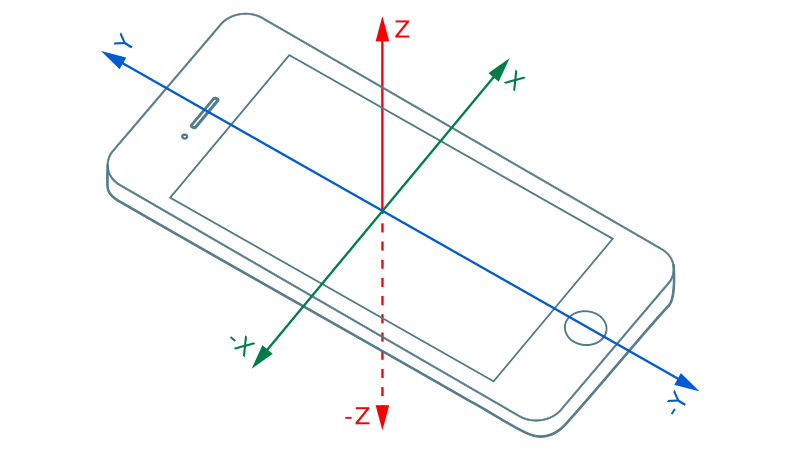
加速度 值的符号必须遵循局部坐标系中的右手约定(见下图)。

加速度计坐标系。

6.2. 线性加速度传感器

Linear Acceleration Sensor 传感器类型具有 以下关联数据:

扩展传感器接口

LinearAccelerationSensor

传感器权限名称

"accelerometer"

传感器特性名称

"accelerometer"

权限撤销算法

以 "accelerometer" 调用通用传感器权限 撤销算法

虚拟传感器类型

"linear-acceleration"

对于 Linear Acceleration Sensor 传感器 类型的一个 Sensor, 其最新读数包含三个条目, 其为 "x"、"y"、"z",其包含设备在相应轴上的线性加速度

线性 加速度是施加到托管传感器的设备上的一种加速度, 不包含重力的贡献。

注:重力线性加速度之间的关系在 Motion Sensors Explainer § gravity-and-linear-acceleration 中讨论。

6.3. 重力传感器

Gravity Sensor 传感器类型具有以下关联数据:

扩展传感器接口

GravitySensor

传感器权限名称

"accelerometer"

传感器特性名称

"accelerometer"

权限撤销算法

以 "accelerometer" 调用通用传感器权限 撤销算法

虚拟传感器类型

"gravity"

对于 Gravity Sensor 传感器类型的一个 Sensor, 其最新读数包含 三个条目, 其为 "x"、"y"、"z",其包含由于重力造成的、关于相应轴的加速度。

重力是设备加速度中 阻止其速度朝附近质量增加的分量。长时间处于自由落体状态的设备可能会计算出错误的重力值。

注:重力线性加速度之间的关系在 Motion Sensors Explainer § gravity-and-linear-acceleration 中讨论。

6.4. 参考坐标系

局部坐标系表示 AccelerometerLinearAccelerationSensorGravitySensor 读数的参考坐标系。它可以是设备坐标系屏幕坐标系

设备坐标 系定义为绑定到物理设备的三维 笛卡尔坐标系(x、y、z)。 对于带显示器的设备,设备坐标系的原点是 设备显示器的中心。如果设备以其默认位置握持, Y 轴指向显示器顶部,X 轴指向 显示器右侧,而 Z 轴是 X 轴和 Y 轴的向量积, 它从显示器向外并朝向观看者。设备坐标系保持静止, 不受DOM 屏幕方向影响(见下图)。
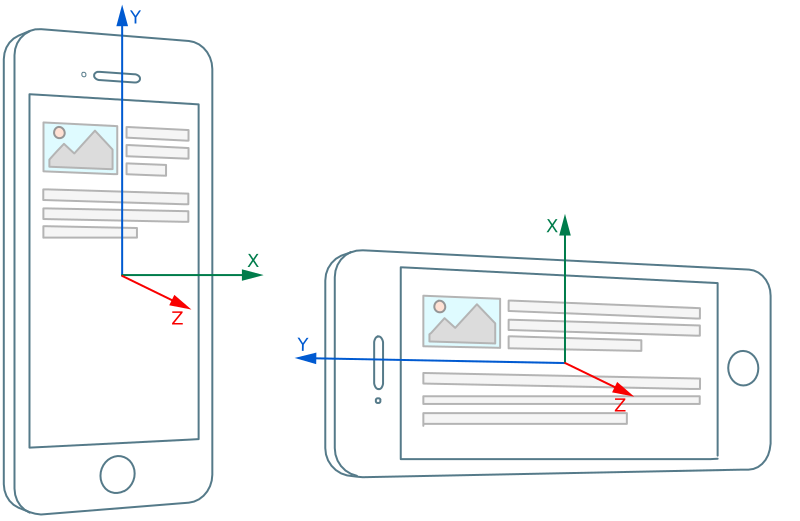
设备坐标系。

屏幕坐标 系定义为绑定到DOM 屏幕的三维 笛卡尔坐标系(x、y、z)。 屏幕坐标系的原点位于 DOM 屏幕的中心。Y 轴始终指向 DOM 屏幕顶部, X 轴指向 DOM 屏幕右侧, Z 轴是 X 轴和 Y 轴的向量积,它从 DOM 屏幕 向外并朝向观看者(见下图)。
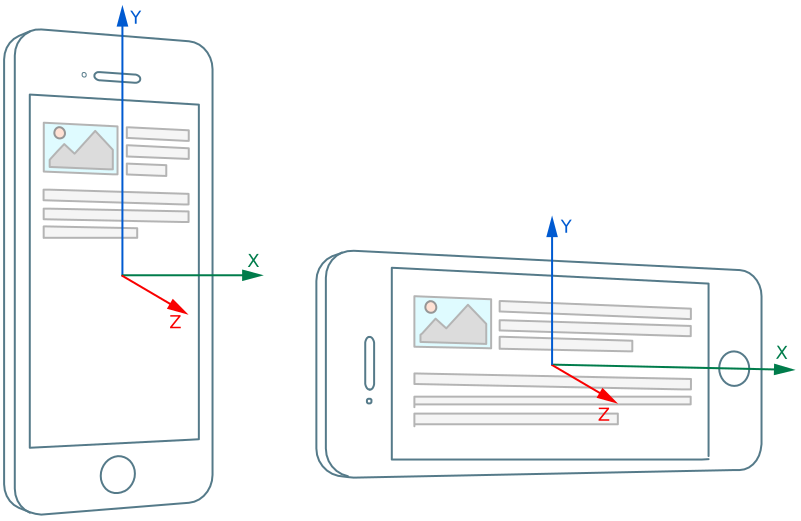
屏幕坐标系。

设备坐标系屏幕坐标系之间的主要区别 在于屏幕坐标系始终跟随DOM 屏幕方向, 即如果当前方向类型 改变,它会相对于设备交换 X 轴和 Y 轴。相比之下,设备坐标系将始终相对于 设备保持静止。

7. API

7.1. Accelerometer 接口

[SecureContext, Exposed=Window]
interface Accelerometer : Sensor {
  constructor(optional AccelerometerSensorOptions options = {});
  readonly attribute double? x;
  readonly attribute double? y;
  readonly attribute double? z;
};

enum AccelerometerLocalCoordinateSystem { "device", "screen" };

dictionary AccelerometerSensorOptions : SensorOptions {
  AccelerometerLocalCoordinateSystem referenceFrame = "device";
};
new Accelerometer(options) 构造器步骤是,以 thisoptions 调用构造加速度计对象抽象操作。

Accelerometer受支持传感器选项为 "frequency" 和 "referenceFrame"。

7.1.1. Accelerometer.x

x 属性属于 Accelerometer 接口,它返回以 this 和 "x" 为参数调用 从最新读数获取值所得的结果。它表示沿 x 轴的加速度

7.1.2. Accelerometer.y

y 属性属于 Accelerometer 接口,它返回以 this 和 "y" 为参数调用 从最新读数获取值所得的结果。它表示沿 y 轴的加速度

7.1.3. Accelerometer.z

z 属性属于 Accelerometer 接口,它返回以 this 和 "z" 为参数调用 从最新读数获取值所得的结果。它表示沿 z 轴的加速度

7.2. LinearAccelerationSensor 接口

[SecureContext, Exposed=Window]
interface LinearAccelerationSensor : Accelerometer {
  constructor(optional AccelerometerSensorOptions options = {});
};
new LinearAccelerationSensor(options) 构造器步骤是,以 thisoptions 调用构造加速度计对象抽象操作。

LinearAccelerationSensor受支持传感器选项为 "frequency" 和 "referenceFrame"。

7.2.1. LinearAccelerationSensor.x

x 属性属于 LinearAccelerationSensor 接口,它返回以 this 和 "x" 为参数调用 从最新读数获取值所得的结果。它表示沿 x 轴的线性加速度

7.2.2. LinearAccelerationSensor.y

y 属性属于 LinearAccelerationSensor 接口,它返回以 this 和 "y" 为参数调用 从最新读数获取值所得的结果。它表示沿 y 轴的线性加速度

7.2.3. LinearAccelerationSensor.z

z 属性属于 LinearAccelerationSensor 接口,它返回以 this 和 "z" 为参数调用 从最新读数获取值所得的结果。它表示沿 z 轴的线性加速度

7.3. GravitySensor 接口

[SecureContext, Exposed=Window]
interface GravitySensor : Accelerometer {
  constructor(optional AccelerometerSensorOptions options = {});
};
new GravitySensor(options) 构造器步骤是,以 thisoptions 调用构造加速度计对象抽象操作。

GravitySensor受支持传感器选项为 "frequency" 和 "referenceFrame"。

7.3.1. GravitySensor.x

x 属性属于 GravitySensor 接口,它返回以 this 和 "x" 为参数调用 从最新读数获取值所得的结果。它表示由于 重力造成的沿 x 轴的加速度作用。

7.3.2. GravitySensor.y

y 属性属于 GravitySensor 接口,它返回以 this 和 "y" 为参数调用 从最新读数获取值所得的结果。它表示由于 重力造成的沿 y 轴的加速度作用。

7.3.3. GravitySensor.z

z 属性属于 GravitySensor 接口,它返回以 this 和 "z" 为参数调用 从最新读数获取值所得的结果。它表示由于 重力造成的沿 z 轴的加速度作用。

8. 抽象操作

8.1. 构造加速度计对象

输入

object,一个 AccelerometerLinearAccelerationSensorGravitySensor 对象。

options,一个 AccelerometerSensorOptions 对象。

  1. allowed 为以 object传感器类型调用 检查传感器策略控制 特性所得的结果。

  2. 如果 allowed 为 false,则:

    1. 抛出一个 SecurityError DOMException

  3. objectoptions 调用 初始化传感器对象

  4. 如果 options.referenceFrame 为 "screen",则:

    1. object局部坐标系设置为屏幕坐标系

  5. 否则,将 object局部坐标系定义为设备坐标系

8.2. 加速度计读数量化算法

Accelerometer 传感器类型定义了以下 读数量化算法

输入

reading,一个传感器 读数

输出

一个传感器读数

  1. quantizedReadingreading

  2. 如果 quantizedReading["x"] 不为 null,则将 quantizedReading["x"] 设置为 最接近的 0.1 m/s2

  3. 如果 quantizedReading["y"] 不为 null,则将 quantizedReading["y"] 设置为 最接近的 0.1 m/s2

  4. 如果 quantizedReading["z"] 不为 null,则将 quantizedReading["z"] 设置为 最接近的 0.1 m/s2

  5. 返回 quantizedReading

9. 自动化

本节通过提供 Accelerometer 特定的虚拟传感器元数据, 扩展了 Generic Sensor API § 9 自动化。本规范使用的一些虚拟传感器类型定义于 [DEVICE-ORIENTATION]

9.1. 加速度计自动化

accelerometer 虚拟传感器类型及其在 按类型虚拟传感器元数据映射 中对应的条目,定义于 Device Orientation and Motion § automation

9.2. 线性加速度计自动化

linear-acceleration 虚拟传感器类型及其在 按类型虚拟传感器元数据映射 中对应的条目,定义于 Device Orientation and Motion § automation

9.3. 重力自动化

按类型虚拟传感器元数据映射 必须具有以下条目

"gravity"

一个虚拟传感器元数据,其读数解析算法解析 xyz 读数

10. 致谢

感谢 Tobie Langel 在 Generic Sensor API 上的工作。

感谢 W3C Privacy Interest Group 和 Paul Jensen 提出并讨论传感器校准指纹识别缓解方案。

一致性

文档 约定

一致性要求通过描述性断言 与 RFC 2119 术语的组合来表达。 本文档规范性部分中的关键词“MUST”、“MUST NOT”、“REQUIRED”、“SHALL”、“SHALL NOT”、“SHOULD”、“SHOULD NOT”、“RECOMMENDED”、 “MAY”和“OPTIONAL” 应按 RFC 2119 中的描述来解释。 但是,为了可读性, 这些词在本规范中并非全部以大写字母出现。

本规范的所有文本都是规范性的, 除非某些章节明确标记为非规范性、示例和注释。[RFC2119]

本规范中的示例由“例如”一词引入, 或使用 class="example" 与规范性文本分开设置, 如下所示:

这是一个资料性示例。

资料性注释以“注”一词开头, 并使用 class="note" 与规范性文本分开设置, 如下所示:

注,这是一个资料性注释。

一致性 算法

作为算法一部分以祈使语气表述的要求 (例如“剥离任何前导空格字符” 或“返回 false 并中止这些步骤”) 应按引入该算法时所使用的关键词 (“must”、“should”、“may”等)的含义来解释。

以算法或特定步骤表述的一致性要求 可以用任何方式实现, 只要最终结果等价即可。 尤其是,本规范中定义的算法 旨在易于理解, 并非旨在具备高性能。 鼓励实现者进行优化。

索引

由本 规范定义的术语

由引用 定义的术语

参考文献

规范性参考文献

[DEVICE-ORIENTATION]
Reilly Grant; Marcos Caceres. Device Orientation and Motion. URL: https://w3c.github.io/deviceorientation/
[GENERIC-SENSOR]
Rick Waldron. Generic Sensor API. URL: https://w3c.github.io/sensors/
[INFRA]
Anne van Kesteren; Domenic Denicola. Infra Standard. Living Standard. URL: https://infra.spec.whatwg.org/
[PERMISSIONS]
Marcos Caceres; Mike Taylor. Permissions. URL: https://w3c.github.io/permissions/
[PERMISSIONS-POLICY-1]
Ian Clelland. Permissions Policy. URL: https://w3c.github.io/webappsec-permissions-policy/
[RFC2119]
S. Bradner. Key words for use in RFCs to Indicate Requirement Levels. March 1997. Best Current Practice. URL: https://datatracker.ietf.org/doc/html/rfc2119
[SCREEN-ORIENTATION]
Marcos Caceres. Screen Orientation. URL: https://w3c.github.io/screen-orientation/
[WEBIDL]
Edgar Chen; Timothy Gu. Web IDL Standard. Living Standard. URL: https://webidl.spec.whatwg.org/

非规范性参考文献

[ACCESSORY]
Owusu, Emmanuel, et al. ACCessory: password inference using accelerometers on smartphones. 2012. Informational. URL: https://dl.acm.org/citation.cfm?id=2162095
[KEYSTROKEDEFENSE]
Song, Yihang, et al. Two novel defenses against motion-based keystroke inference attacks. 2014. Informational. URL: https://arxiv.org/abs/1410.7746
[MOTION-SENSORS]
Kenneth Christiansen; Alexander Shalamov. Motion Sensors Explainer. URL: https://w3c.github.io/motion-sensors/
[SENSORID]
Zhang, Jiexin; Beresford, Alastair R.; Sheret, Ian. SensorID: Sensor Calibration Fingerprinting for Smartphones. 2019. URL: https://doi.org/10.1109/SP.2019.00072
[SI]
SI Brochure: The International System of Units (SI), 8th edition. 2014. 8th Edition. URL: http://www.bipm.org/en/publications/si-brochure/
[TOUCHSIGNATURES]
Mehrnezhad, Maryam, et al. Touchsignatures: identification of user touch actions and pins based on mobile sensor data via javascript. 2016. Informational. URL: https://arxiv.org/abs/1602.04115

IDL 索引

[SecureContext, Exposed=Window]
interface Accelerometer : Sensor {
  constructor(optional AccelerometerSensorOptions options = {});
  readonly attribute double? x;
  readonly attribute double? y;
  readonly attribute double? z;
};

enum AccelerometerLocalCoordinateSystem { "device", "screen" };

dictionary AccelerometerSensorOptions : SensorOptions {
  AccelerometerLocalCoordinateSystem referenceFrame = "device";
};

[SecureContext, Exposed=Window]
interface LinearAccelerationSensor : Accelerometer {
  constructor(optional AccelerometerSensorOptions options = {});
};

[SecureContext, Exposed=Window]
interface GravitySensor : Accelerometer {
  constructor(optional AccelerometerSensorOptions options = {});
};

MDN

Accelerometer/Accelerometer

In only one current engine.

FirefoxNoneSafariNoneChrome67+
Opera?Edge79+
Edge (Legacy)?IENone
Firefox for Android?iOS Safari?Chrome for Android?Android WebView?Samsung Internet?Opera Mobile?
MDN

Accelerometer/x

In only one current engine.

FirefoxNoneSafariNoneChrome67+
Opera?Edge79+
Edge (Legacy)?IENone
Firefox for Android?iOS Safari?Chrome for Android?Android WebView?Samsung Internet?Opera Mobile?
MDN

Accelerometer/y

In only one current engine.

FirefoxNoneSafariNoneChrome67+
Opera?Edge79+
Edge (Legacy)?IENone
Firefox for Android?iOS Safari?Chrome for Android?Android WebView?Samsung Internet?Opera Mobile?
MDN

Accelerometer/z

In only one current engine.

FirefoxNoneSafariNoneChrome67+
Opera?Edge79+
Edge (Legacy)?IENone
Firefox for Android?iOS Safari?Chrome for Android?Android WebView?Samsung Internet?Opera Mobile?
MDN

Accelerometer

In only one current engine.

FirefoxNoneSafariNoneChrome67+
Opera?Edge79+
Edge (Legacy)?IENone
Firefox for Android?iOS Safari?Chrome for Android?Android WebView?Samsung Internet?Opera Mobile?
MDN

GravitySensor/GravitySensor

In only one current engine.

FirefoxNoneSafariNoneChrome91+
Opera?Edge91+
Edge (Legacy)?IENone
Firefox for Android?iOS Safari?Chrome for Android?Android WebView?Samsung Internet?Opera Mobile?
MDN

GravitySensor

In only one current engine.

FirefoxNoneSafariNoneChrome91+
Opera?Edge91+
Edge (Legacy)?IENone
Firefox for Android?iOS Safari?Chrome for Android?Android WebView?Samsung Internet?Opera Mobile?
MDN

LinearAccelerationSensor/LinearAccelerationSensor

In only one current engine.

FirefoxNoneSafariNoneChrome67+
Opera?Edge79+
Edge (Legacy)?IENone
Firefox for Android?iOS Safari?Chrome for Android?Android WebView?Samsung Internet?Opera Mobile?
MDN

LinearAccelerationSensor

In only one current engine.

FirefoxNoneSafariNoneChrome67+
Opera?Edge79+
Edge (Legacy)?IENone
Firefox for Android?iOS Safari?Chrome for Android?Android WebView?Samsung Internet?Opera Mobile?
MDN

Headers/Feature-Policy/accelerometer

In only one current engine.

FirefoxNoneSafariNoneChrome67+
Opera?Edge79+
Edge (Legacy)?IENone
Firefox for Android?iOS Safari?Chrome for Android?Android WebView?Samsung Internet?Opera Mobile?